Marcus Bell
 If you already own a desk you like, you do not need to replace it to start working on your feet. That is exactly why the best standing desk converters have become so popular with home offices and corporate setups alike. These risers sit on top of your existing desk and lift your monitor, laptop, and keyboard up to standing height in seconds, then drop back down when you want to sit. The result is a flexible sit-to-stand workflow without the cost or hassle of buying a full electric standing desk.
This guide is not a product-by-product review. Instead, it walks you through how to choose the right converter for your space, your gear, and your budget, so you can shortlist the models that actually fit your needs. Below you will also find a curated list of popular options to compare side by side.

Pros
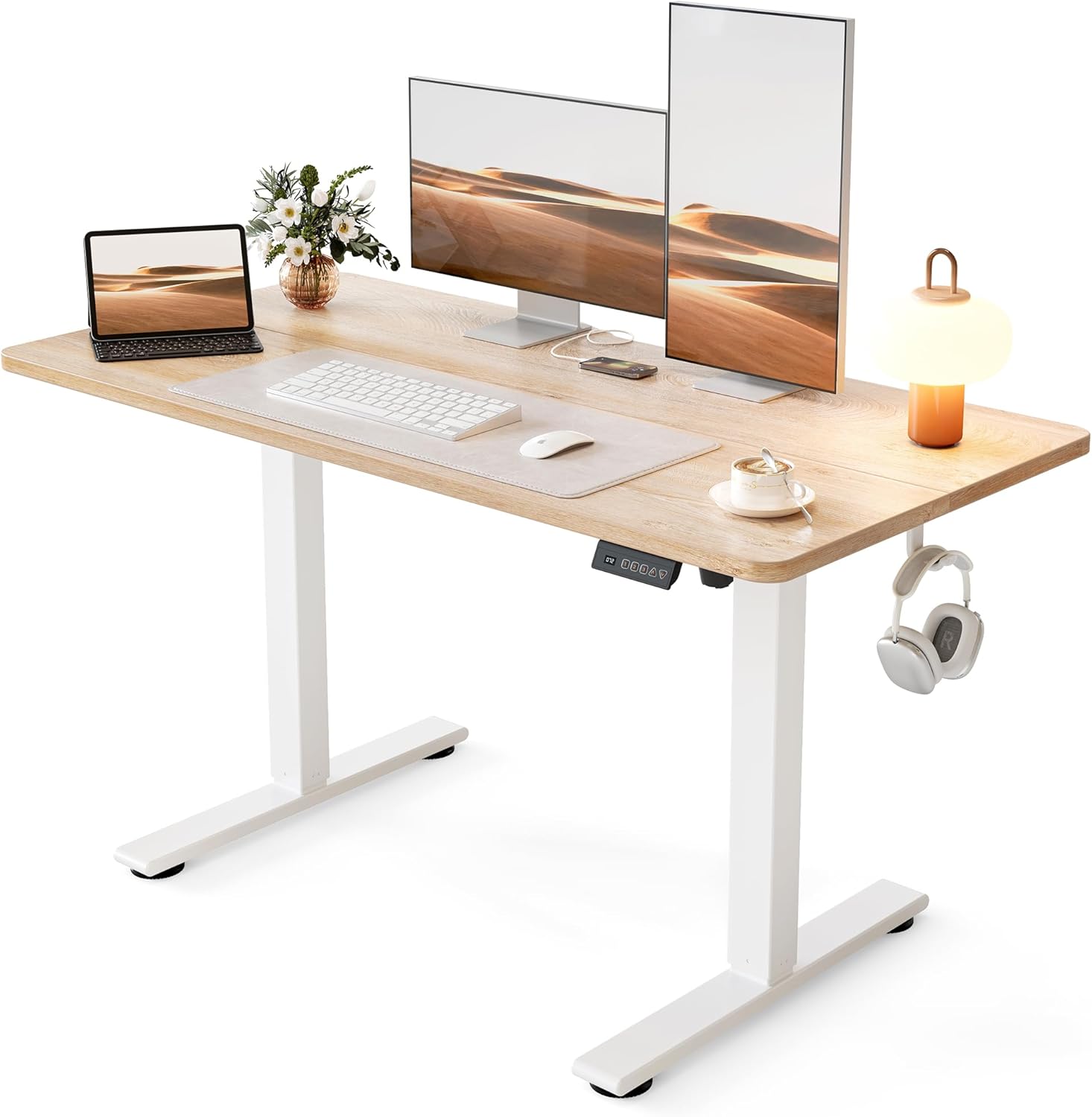
- Designed with Ergonomic Sit-Stand Design Switch between sitting and standing to improve for reliable daily operation
- Designed with Adjustable Height 5.120 Easily adjust to your ideal height for for reliable daily operation
- Designed with Fits Dual Monitors Spacious top surface supports two monitors or for reliable daily operation
- Constructed using quality Engineered Wood, Metal materials
Cons
- Requires verifying available physical space for Panana Standing De prior to setup
- Regular cleaning is recommended to preserve the Engineered Wood, Metal finish
Pros
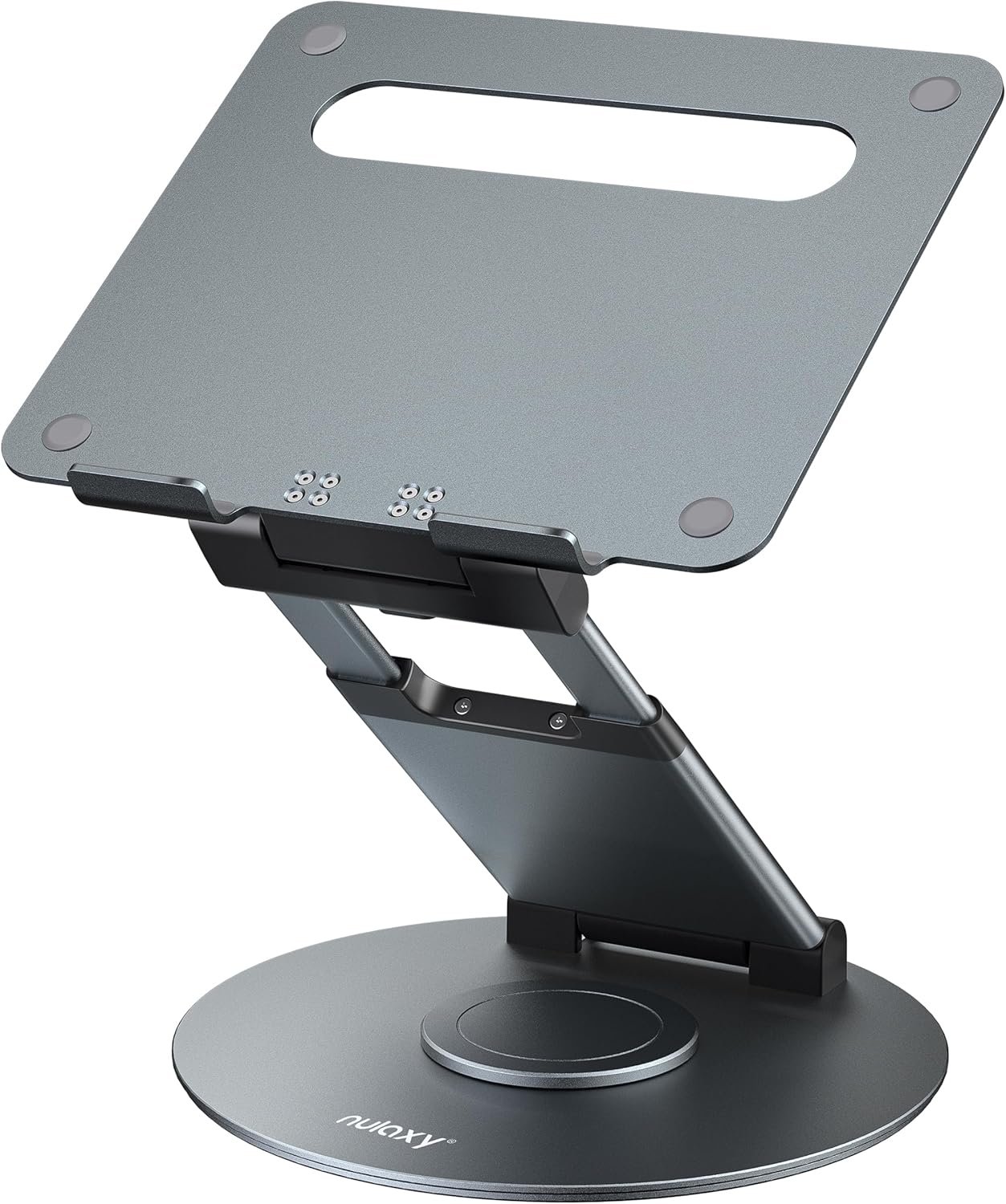
- Folds down to just 2.13 inches thick for flat storage or travel
- Height adjusts up to about 21 inches, letting you switch between sitting and standing work
- Rated to hold up to 22 lbs (10 kg), enough for most 10-17" laptops
- 360° swivel base lets you turn the screen toward a colleague without lifting the laptop
- Tilt angle adjusts independently of height, so you can angle the screen to eye level
Cons
- No lock on the swivel base, so it can rotate under a firm bump even though it resists casual movement
- Typing directly on the stand's raised laptop keyboard causes wobble; an external keyboard and mouse are recommended
- Hinges are tightened at the factory for stability, and lubricating them can introduce wobble instead of fixing it
The stand telescopes up to a maximum height of about 21 inches, giving enough range to move between a seated desk setup and a standing position without swapping furniture. A separate tilt adjustment raises or lowers the screen angle independently of height, so the display can be leveled to eye height once the base height is set.
A 360-degree swivel base rotates in both directions, useful for turning a screen toward someone else in the room during a shared review or a video call. There's no lock on the swivel, though the base is built tight enough that it won't drift on its own.
- Height adjusts up to ~21 inches
- Independent tilt angle adjustment
- 360° swivel, both directions
When not needed, the stand folds down to just 2.13 inches thick, flat enough to slide into a bag or stand in a closet corner. The base is rated to bear up to 22 lbs (10 kg), which keeps most 10-17 inch laptops steady even while typing directly on the built-in keyboard or drawing on the screen.
The hinges are set tight at the factory for a reason: that resistance is what keeps the laptop from slipping once positioned. Loosening or lubricating the joints to make adjustment easier can introduce wobble instead of fixing stiffness, so the tension is best left as shipped.
- Folds to 2.13 in flat
- 22 lb (10 kg) bearing capacity
- Factory-tight hinges resist wobble
Pros
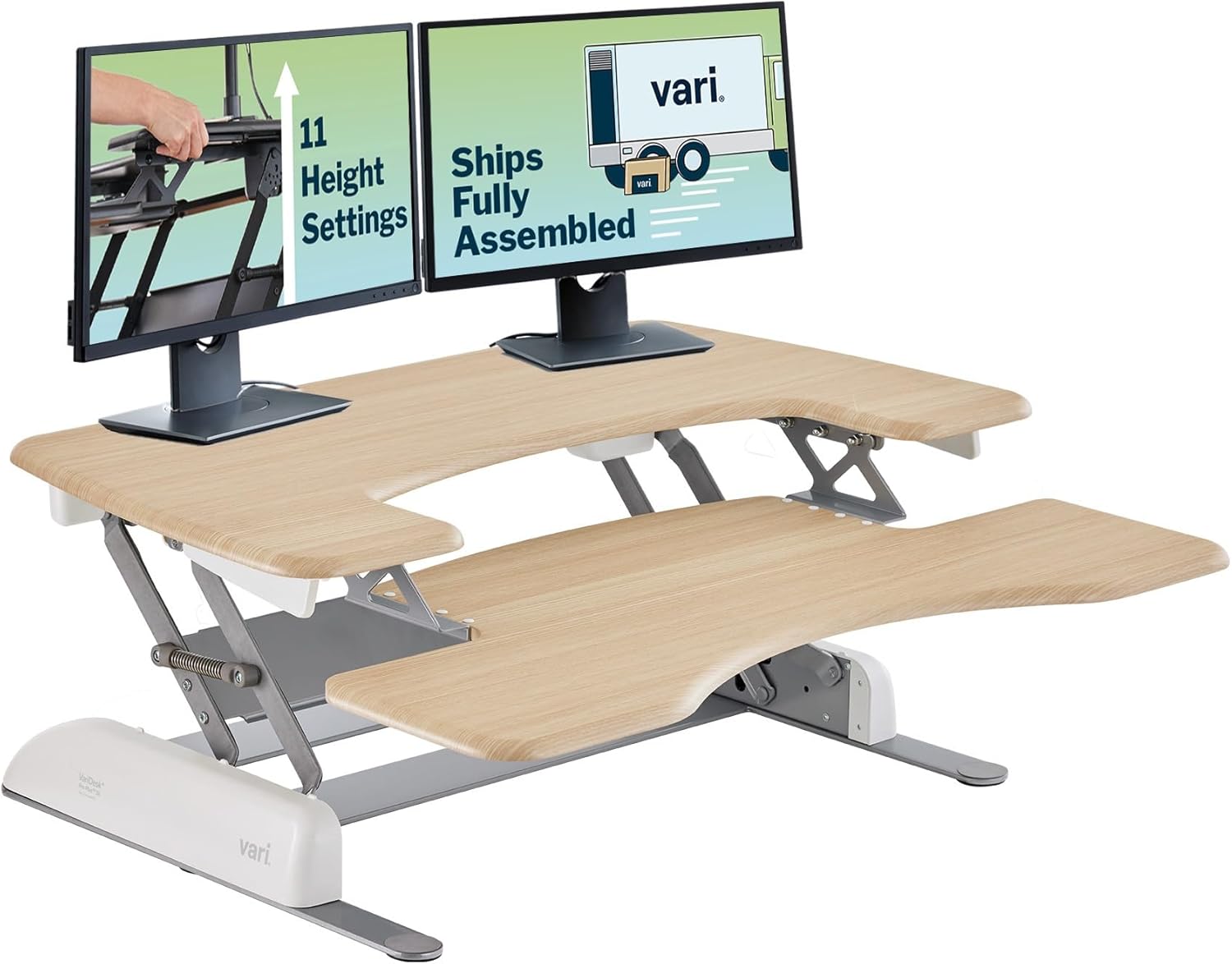
- Arrives fully assembled, so there is no tool-based setup before placing it on an existing desk
- 11 height settings with a spring-assisted lift cover a range of sitting and standing positions without a motorized mechanism to maintain
- 36-inch top tier fits dual monitors, with a dedicated lower tray sized for a keyboard and mouse
- Thick steel construction with dual stability bars is built to keep a solid feel at every height rather than wobbling at full extension
Cons
- At 36 inches wide by 29.75 inches deep, it needs a desktop at least that large to sit on securely
- Manual spring-lift height adjustment relies on physical effort at each change, unlike a motorized standing desk that moves at the press of a button
- 2-tier fixed layout dedicates the lower tray to keyboard and mouse only, leaving less flexible space than a single flat desktop surface
The converter measures 36 inches wide by 29.75 inches deep with a 4.5-inch base height, sized to fit desktops at least 36 inches wide by 26.5 inches deep. The top tier is spacious enough for a dual-monitor setup, while a separate lower tray holds a keyboard, mouse, and other everyday desk items.
- Footprint: 36 x 29.75 inches
- Base height: 4.5 inches
- Minimum desktop size: 36 inches wide x 26.5 inches deep
- Height settings: 11
Because the unit sits on top of an existing desk rather than replacing it, the desk underneath needs to be at least as large as the converter's footprint for stable support.

Pros
- Two-tier design gives a 30"x12.5" upper surface for a monitor plus a separate lower tier for keyboard and mouse
- 11 height settings raise the work surface up to 17.5" above the desk surface for a full standing position
- Supports up to 35 lbs of monitor and equipment weight on the weighted, spring-assisted base
- Ships fully assembled, so it goes straight onto an existing desk without tool assembly
- Backed by a 5-year warranty against structural defects
Cons
- 35-lb capacity limits it to a single monitor setup or a light dual-monitor arm, not a heavy 3-monitor array
- Footprint of 29.75"D x 30"W takes up most of a standard desk, leaving little extra desk space beside it
- Sold in black only in this listing, with no alternate finish
The VariDesk Pro Plus 30 measures 29.75" deep by 30" wide with a 4.5" collapsed height, and it splits into two tiers, a 30"-wide by 12.5"-deep upper surface for a monitor or laptop, and a lower tier for a keyboard and mouse. Weight capacity is set at 35 lbs, enough for one monitor and a laptop dock but a ceiling for anyone running a heavier dual-monitor arm setup. The weighted base and thicker-gauge steel frame keep the unit stable at full extension rather than wobbling at the highest height settings.
- Footprint: 29.75"D x 30"W
- Weight capacity: 35 lbs
- Tiers: 2, upper 30"x12.5" and a lower keyboard tier
The two-tier layout keeps the keyboard closer to sitting-desk height even when the monitor tier is raised, which helps wrist position stay more neutral at standing height.
This converter ships fully assembled, so it sits directly on an existing desk without additional hardware assembly. Height changes use a dual-handle, spring-assisted lift with an up-and-back motion across 11 discrete settings, raising the work surface up to 17.5" above the desk. The spring assist is designed to offset the weight of a loaded monitor tier, so lifting does not require pulling against the full weight of the equipment on top. A foam-wrapped steel mechanism is built into the lift to keep fingers clear of pinch points during height changes.
- Ships fully assembled, no tool setup required
- 11 height settings, up to 17.5" of rise
- Spring-assisted dual-handle lift mechanism
Because the unit sits on top of an existing desk rather than replacing it, desk surface depth needs to comfortably fit the 29.75" footprint before ordering.

Pros
- Holds up to 17.6 pounds on the desktop, enough for a monitor and full-size keyboard together
- Five lockable height settings range from 8.5 to 15.9 inches, adjustable in seconds with a squeeze-handle release
- Sits just 1.8 inches off the table surface at resting height, keeping a low profile when lowered
- Ships fully assembled, so it's ready to use straight out of the box without tools
- Steel frame construction supports repeated daily height changes without the wobble of lighter riser materials
Cons
- Surface measures 26.4" x 18.5", sized for a single monitor and keyboard rather than a dual-monitor or wide desktop setup
- Weight capacity tops out at 17.6 pounds, which rules out heavier dual-monitor arms or large all-in-one displays
- Five fixed height settings only, without continuous adjustment between the preset positions
The desktop surface measures 26.4 inches by 18.5 inches, sized for a single monitor and laptop or a monitor paired with a full-size keyboard. The steel frame holds up to 17.6 pounds, and at its lowest resting position the riser sits just 1.8 inches above the table surface.
- 26.4"W x 18.5"D desktop surface
- 17.6 lb weight capacity
- 1.8" low-profile resting height
Because the surface is sized for single-monitor setups, anyone running dual monitors side by side will find the platform narrower than needed, making this riser better matched to compact desks than wide multi-screen workstations.
Five lockable height settings are available at 8.5", 10.4", 12", 14.4", and 15.9" above the resting position, adjusted with a squeeze-handle mechanism that changes height in seconds rather than requiring a crank or separate tool. No assembly is needed out of the box, since the riser ships pre-built and ready to place on an existing desk.
- 5 lockable height settings: 8.5" to 15.9"
- Squeeze-handle quick height adjustment
- Zero assembly required
Because the settings are fixed rather than continuously adjustable, users pick from five preset heights rather than fine-tuning to an exact custom position, which covers most sitting-to-standing transitions without extra calibration.
Pros
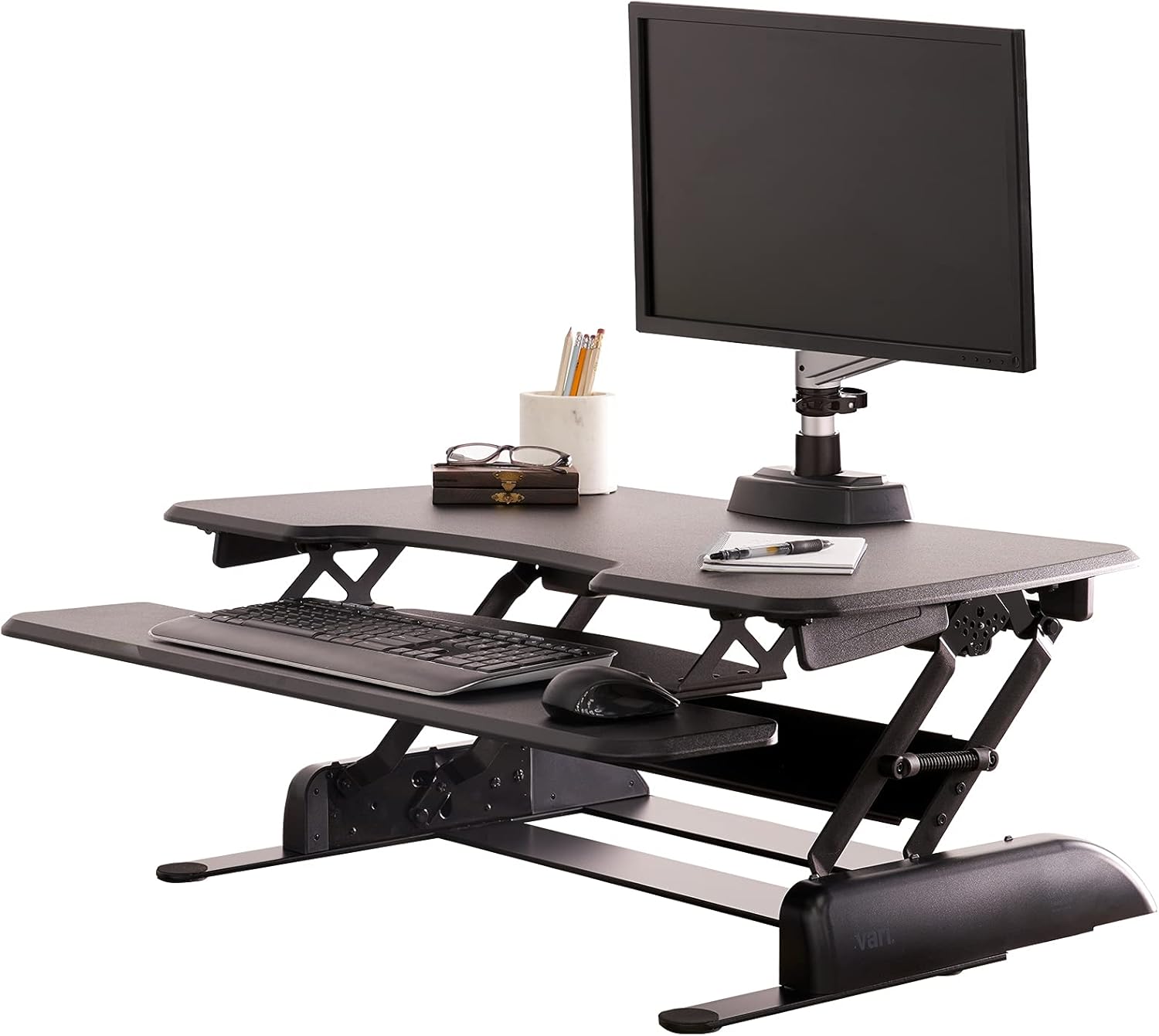
- Compact dimensions of 24 x 36 x 4.5 inches
- Premium Laminate construction

Pros
- Lifts from 4.5 in to 20 in of height adjustment, covering a wide sitting-to-standing range in one smooth pneumatic motion
- Top surface measures 31.5 in by 15.7 in, wide enough for dual monitors side by side
- Keyboard tray rises in sync with the desktop and measures 31.3 in by 11.8 in (10.5 in at center)
- Supports up to 33 lbs, enough for two monitors or a monitor-and-laptop combination
- Backed by a 3-year manufacturer warranty on the steel frame and lift mechanism
Cons
- 33 lb weight limit rules out heavier ultrawide monitor arms or a triple-monitor setup
- Sits on top of an existing desk rather than replacing it, so it needs enough desk depth to hold its 31.5 in footprint
- Pneumatic lift assist relies on a locking mechanism rather than an electric motor, so height changes take a manual push rather than a button press
The main work surface measures 31.5 in wide by 15.7 in deep, sized to hold dual monitors, while the keyboard tray below measures 31.3 in by 11.8 in (10.5 in at the center) and rises in sync with the desktop. Overall height adjusts across a 4.5 in to 20 in range.
- Rated to support up to 33 lbs of monitors, laptop, and accessories combined
- Pneumatic lift assist moves the desktop up and down without side-to-side or back-and-forth sway
- A locking mechanism holds the chosen height with a simple touch-release action
This makes it a fit for dual-monitor or monitor-plus-laptop setups, though it is not rated for heavier configurations like a triple-monitor arm.
This converter suits anyone who wants to alternate between sitting and standing during the day without replacing an existing desk. Its 33 lb capacity fits dual-monitor or laptop-plus-monitor setups typical of office and home-office desk work.
- Good option for renters or anyone who cannot install a full electric standing desk
- Wide 31.5 in surface accommodates two monitors or a monitor and laptop side by side
- 3-year warranty covers the steel frame and lift mechanism for extended daily use
Anyone needing to support a triple-monitor arm, a large tower, or more than 33 lbs of equipment will need a different riser or a dedicated standing desk instead.

Pros
- Dual pneumatic spring assist lifts up to 15kg of monitor and keyboard weight in one smooth motion
- Height adjusts across a 17cm to 43cm range, covering both seated and standing positions
- 91cm x 56cm desktop surface fits single or dual monitor and laptop setups
- Keyboard tray raises in sync with the top surface, so hand position stays consistent at any height
- Backed by a 3-year manufacturer warranty
Cons
- Minimal assembly still requires attaching the keyboard tray and feet before first use, unlike a fully pre-assembled riser
- At 22"D x 36"W x 17"H, it takes up a large portion of an existing desk's surface once placed
This desk converter measures 22"D x 36"W x 17"H, with a desktop surface of 91cm x 56cm for single or dual monitor and laptop setups.
- The keyboard tray measures 64cm x 27cm and raises in sync with the top surface
- Height adjusts across a 17cm to 43cm range using a touch-locking mechanism
- Dual pneumatic springs provide 15kg of lift assist, supporting the combined weight of monitors and a laptop through the transition
The 91cm-wide surface gives enough room for dual-monitor arrangements, though very wide ultrawide displays may still extend past the desktop edges.
Built for anyone alternating between sitting and standing through the workday, this converter sits on top of an existing desk rather than requiring a full desk replacement.
- The 15kg lift assist comfortably handles a monitor, keyboard, and laptop combination for most home office setups
- Dual monitor and laptop users benefit from the 91cm-wide surface and synced keyboard tray movement
- The 17cm to 43cm adjustment range covers a wide span of desk heights and user preferences
It suits home and office workers wanting to add standing capability without buying a new desk, though anyone needing a permanently fixed, single-height desk may not need the added mechanism.

Pros
- 36 inch wide MDF work surface gives room for a monitor, keyboard and notes
- Height adjusts to switch between sitting and standing positions on the same desk
- Doubles as a stationary workstation surface when left in a fixed position
- Compact 24.4 x 36 x 19.7 inch footprint sits on top of an existing desk without replacing it
Cons
- MDF wood construction adds more weight than a steel or aluminum riser of similar size
- No cable management channels are mentioned, so cords may need separate routing
- Height adjustment relies on manual mechanism rather than an electric motor for smooth, hands-free transitions
The Rise-X Pro is a 36 inch wide desk converter built from MDF wood, with overall dimensions of 24.4 x 36 x 19.7 inches. It sits on top of an existing desk and adjusts between sitting and standing heights.
- 36 inch width provides space for a monitor and keyboard together
- Height-adjustable platform switches between sit and stand positions
- MDF construction gives a stable, flat work surface
Because it sits on an existing desk rather than replacing it, the converter adds height and depth on top of whatever surface it is placed on.

Pros
- Top surface measures 36"W x 24.2"D, sized for a dual-monitor or laptop-plus-monitor setup
- Height range spans from 4.3" to 19.8", covering both seated and standing positions
- Dual gas spring mechanism lets you switch from sitting to standing in one smooth motion
- Steel frame supports up to 33 lbs, enough for two monitors or an iMac plus accessories
- Built-in tablet slot and anti-slip pads keep smaller devices from sliding during height changes
Cons
- Weight capacity tops out at 33 lbs, so heavier dual-monitor arms or larger displays may exceed the limit
- Straight up-and-down movement means the converter sits on top of an existing desk rather than replacing it
- Touch height-locking mechanism is a single-button system, with no memory presets for multiple saved heights
The converter's top surface measures 36"W x 24.2"D, with enough space for a single monitor, dual-monitor setup, or a laptop alongside a separate display. It raises to 19.8" and lowers to 4.3", covering a working range between seated and standing heights, and the steel frame supports up to 33 lbs.
- Top surface: 36"W x 24.2"D
- Height range: 4.3" to 19.8"
- Weight capacity: 33 lbs
The dual-tier top also includes a built-in tablet slot, giving a dedicated spot for a phone or tablet separate from the main monitor surface.
What Is a Standing Desk Converter?
A standing desk converter, sometimes called a desktop riser or sit-stand workstation, is a platform that rests on your current desk and raises your work surface. When you want to stand, you lift the platform; when you want to sit, you lower it back down. Because it is a topper rather than a full desk, you keep your existing furniture and simply add height on demand.
Most converters carry two things: your monitor (or laptop) on the upper deck and your keyboard and mouse on a lower tray. This two-tier design keeps your screen at eye level while your hands stay at elbow height, which is the foundation of good standing ergonomics. Compact single-surface models like the VIVO Ultra-Slim Riser skip the separate tray to save space, while roomier picks such as the VIVO V Series 36″ give you a wide keyboard tray and space for a mouse.
Why Choose a Converter Over a Full Standing Desk?
Standing desk converters win on three fronts. First, cost: a good converter is often a fraction of the price of a motorized desk, and budget-friendly picks like the Panana Standing Desk Converter make it easy to try standing without a big commitment. Second, convenience: there is no need to disassemble your current desk or run power cables, since most converters are manual and arrive ready to use. Third, flexibility: if you rent, move often, or share a workspace, a converter can travel with you and adapt to almost any desktop.
The trade-off is that a converter adds height and bulk on top of your desk, and it typically supports a bit less weight than a dedicated frame. For most laptop and single or dual-monitor setups, though, that ceiling is more than enough.
Key Features to Compare Before You Buy
When you are comparing the best standing desk converters, a handful of specifications matter far more than marketing claims. Focus on these and you will avoid the most common buyer regrets.
Lift Mechanism
The way a converter moves is the single biggest factor in daily comfort. There are three common styles:
- Spring-assisted (gas or pneumatic): Squeeze the handles and the platform glides up or down almost effortlessly. This is the most convenient system and is found on premium models such as the Vari VariDesk Pro Plus 30 and the larger Vari VariDesk Pro Plus 36.
- Z-lift or X-lift with levers: A common design that raises the surface in a smooth arc. It is reliable and usually affordable, as seen on the TechOrbits Rise-X Pro.
- Post or telescopic column: Best for lightweight laptop-only setups, like the Nulaxy Telescopic Laptop Stand, which rotates and adjusts height for a single device.
Height Range and Settings
A converter is only ergonomic if it fits your body. Look at both the lowest and highest positions. Taller users need a higher maximum so the monitor reaches eye level, while shorter users benefit from a low keyboard height. Models with multiple locking stops, such as the eleven settings on Vari’s spring-lift units, let you fine-tune the position instead of forcing you into a single standing height.
Surface Size and Desktop Footprint
Measure your desk before buying. A 36-inch wide converter like the Vari VariDesk Essential 36 gives you room for dual monitors and paperwork, but it needs a deep, sturdy desk beneath it. If space is tight, a narrower 32-inch unit such as the VIVO K Series 32″ or an ultra-slim riser will feel much less crowded.
Weight Capacity
Add up the weight of everything you plan to place on top: monitors, arms, a laptop, speakers, and any accessories. Then choose a converter rated comfortably above that figure. Overloading a riser makes the lift stiff and can cause it to drift down over time, so leave yourself some headroom.
Assembly and Stability
Many premium converters, including the Vari lineup, ship fully assembled so you can use them straight out of the box. Others need a few minutes of setup. Either way, check that the base is weighted or wide enough to stay steady when you type at standing height. Wobble is the fastest way to abandon a standing routine.
Matching a Converter to Your Setup
The best pick depends heavily on what you put on your desk. Here is a quick way to think about it.
Laptop-Only Users
If you work from a single laptop, you do not need a large two-tier platform. A compact riser or a telescopic laptop stand gives you height and airflow while taking up almost no space. The Nulaxy Telescopic Laptop Stand and the VIVO Ultra-Slim Riser are natural fits for this minimalist style.
Single-Monitor Workstations
For one monitor plus a keyboard, a mid-size two-tier converter offers the best balance. You get a proper keyboard tray for wrist comfort and enough top-deck space for the screen. A model like the FITUEYES Standing Desk Converter or a 32-inch VIVO unit handles this comfortably.
Dual-Monitor and Power Users
Running two monitors, or a monitor plus a laptop, calls for a wider, higher-capacity platform. Look at 36-inch options such as the VIVO V Series 36″ or the Vari VariDesk Pro Plus 36, which are built to carry more gear and still lift smoothly.
How to Use a Standing Desk Converter the Right Way
Buying the hardware is only half the battle. To actually feel the benefits, set it up and use it correctly.
- Set the screen at eye level. The top of your monitor should sit roughly at or just below your line of sight when standing tall.
- Keep elbows at about 90 degrees. Adjust the keyboard tray so your forearms stay level and your wrists stay neutral.
- Alternate often. Do not stand all day. A common rhythm is to switch between sitting and standing every 30 to 60 minutes.
- Use an anti-fatigue mat. Standing on a cushioned mat reduces pressure on your feet and lower back.
- Wear supportive shoes. Even at home, footwear with a bit of cushioning makes long standing sessions easier.
Common Mistakes to Avoid
A few missteps can turn a promising purchase into a shelf ornament. Avoid these:
- Ignoring desk depth. A wide converter on a shallow desk can overhang the front edge and feel unstable.
- Buying purely on price. The cheapest option can save money up front, but a jerky lift or low height ceiling may push you back to sitting full time.
- Forgetting the keyboard tray. Placing your keyboard on the top deck raises it too high and strains your shoulders. A two-tier design exists for a reason.
- Overloading the platform. Respect the weight rating so the mechanism stays smooth for years.
Budget Tiers at a Glance
Standing desk converters span a wide price range, and each tier has a clear sweet spot.
- Entry level: Simple risers and laptop stands like the Panana Standing Desk Converter are ideal for trying standing on a tight budget.
- Mid range: Two-tier VIVO, TechOrbits, and FITUEYES models deliver strong value with real keyboard trays and solid capacity, making the VIVO K Series 32″ and TechOrbits Rise-X Pro popular all-rounders.
- Premium: Spring-assisted, fully assembled units such as the Vari VariDesk Essential 36 and Vari VariDesk Pro Plus 30 offer the smoothest daily experience for those who stand often.
Frequently Asked Questions
Do standing desk converters work on any desk?
Most do, as long as your desk is sturdy and deep enough to hold the converter’s base. Always measure your desktop against the converter’s footprint before buying, and make sure the desk can bear the combined weight of the riser and your equipment.
Are converters as good as full electric standing desks?
For flexibility and value, converters are hard to beat, especially if you already have a desk you like. Full electric desks offer more range and a cleaner look, but they cost more and are harder to move. If you want to test a standing routine first, a converter is the smart starting point.
How much standing is healthy?
There is no single rule, but many people find alternating between sitting and standing throughout the day feels best. Start with short standing intervals and build up gradually so your legs and back adjust.
Final Thoughts
Choosing among the best standing desk converters comes down to matching the lift style, height range, surface size, and weight capacity to your own setup. Laptop users can stay compact, single-monitor workers want a comfortable two-tier tray, and dual-monitor power users should size up to a wide, high-capacity platform. Decide how often you plan to stand, set a realistic budget, and pick the model that fits your desk and your workflow. Compare the options in the list above, weigh the features that matter most to you, and you will land on a converter that helps you move more and feel better every workday.