
 Marcus Bell
 Best Stand Up Desks for Home Office: A Complete Buying Guide
Choosing the best stand up desks for home office setups is one of the smartest upgrades you can make for your health, focus, and daily comfort. Sitting for eight or more hours a day takes a toll on your back, posture, and energy levels, and a height adjustable desk lets you switch between sitting and standing whenever your body needs a change. But with dozens of models, frame styles, and price points on the market, finding the right one can feel overwhelming.
This guide breaks down everything that matters when shopping for a standing desk, from motor type and desktop size to memory presets and stability. Instead of reviewing each model line by line, we focus on how to choose the desk that fits your space, budget, and work style, with real product examples to point you in the right direction.
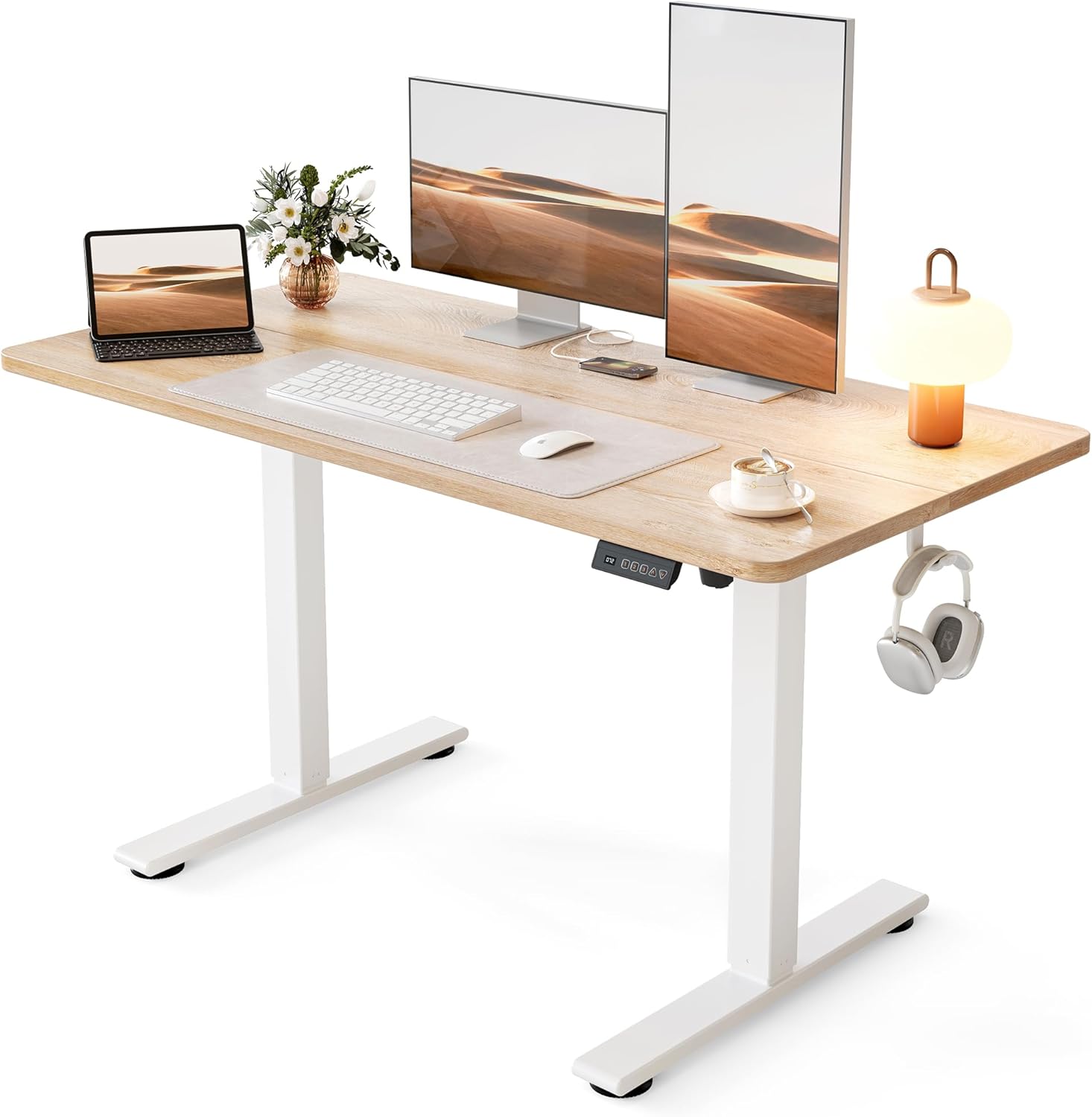
Pros
- Lifts from 28.3 in. to 46.5 in., covering seated typing and standing work for most adults
- Steel frame carries up to 176 lb, enough for dual monitors, a laptop dock and a desk lamp
- Motor runs under 45 dB, quiet enough to raise the top mid video call
- 3 memory presets recall exact seated and standing heights with one touch
- Frame tested through 100,000 lift cycles before shipping
Cons
- Only 24 in. deep, so a wide monitor stand crowds the keyboard area
- Spliced two-piece top leaves a seam running across the work surface
- No cable tray is listed among the included parts, so wire management is a separate job
The top measures 48 in. wide by 24 in. deep, which holds two 24 in. monitors side by side, or one ultrawide with room in front for a keyboard and notebook.
- Height travel runs 28.3 in. to 46.5 in.
- Steel frame rated to 176 lb of gear
- Frame tested through 100,000 lift cycles
- Listed footprint 24 in. D x 48 in. W x 27 in. H
At 24 in. of depth, a deep monitor stand eats into arm room, so a clamp-mounted arm frees the back edge and buys back several inches. Standing users above 6 ft 3 in. should measure elbow height against the 46.5 in. ceiling before committing, since that figure is the hard limit of the columns.
This is a single-user home workstation rather than a shared studio bench. The 48 in. span suits a laptop plus one or two monitors, a lamp and a notebook, and the 24 in. depth keeps it usable in a bedroom corner or against a hallway wall.
- Sit-stand switching several times a day
- Rooms where a quiet motor matters during calls
- Setups comfortably under the 176 lb load ceiling
- Interiors that suit a white frame with a maple top
It is a weaker fit if you run a very deep curved panel with wide feet, need a third monitor across the span, or want a finish that matches dark furniture, since the frame and top combination is fixed.

Pros
- Electric height range of 28.3 to 46.5 inches across 3 memory presets, covering both seated and standing positions without manual cranking
- Built-in 3 outlets and 2 USB ports let you charge devices at the desk instead of running an extension cord
- U-shaped 55.1-inch top plus a full-size monitor stand holds 2 monitors while leaving desktop space clear
- Steel frame rated to 154 lbs, enough for dual monitors, a laptop dock and desk accessories together
- LED strip offers 10 colours and 10 lighting modes built into the frame, no separate light bar needed
Cons
- Footprint of 29.1 x 55.1 inches with a U-shaped corner needs more floor space than a straight desk of the same width
- 154 lb capacity is lower than some steel-frame standing desks rated past 200 lbs, so heavy dual-monitor arm setups should check total load
- Only offered in white in this listing, with no alternate finish
The desktop measures 29.1"D x 55.1"W, finished with a U-shaped corner extension that adds side workspace beyond a standard rectangular top. Height adjusts electrically from 28.3" to 46.5", covering seated and standing positions for most adult heights.
- 3 preset memory buttons recall favourite heights without re-adjusting each time
- Steel frame construction supports up to 154 lbs of desktop load
- Monitor stand section accommodates 2 monitors side by side
- 3 power outlets and 2 USB ports are built into the frame
The U-shape trades a larger footprint for additional side surface, so measuring available floor space before assembly is worthwhile, particularly in home offices where the desk sits in a corner.

Pros
- Electric lift adjusts smoothly from 27.95 to 45.67 inches to cover sitting and standing heights
- 3 programmable memory buttons recall preferred heights instantly
- Frame is tested for 50,000 lift cycles at up to 220 lbs (100 kg) of loaded weight
- 1-inch-thick desktop resists flex under monitors and heavier equipment
- Motor runs below 45dB, quiet enough for shared home office spaces
Cons
- 60 x 28-inch top is fixed in size, so it will not suit a corner or L-shaped office layout
- Requires a nearby power outlet for the electric lift motor to function
- Cable management is built in but still needs manual routing during setup
The desk lifts electrically between 27.95 and 45.67 inches, covering both seated and standing positions on the same frame. Maximum loaded capacity is rated to 220 lbs (100 kg), supported by a 2.5mm steel base and a reinforced double-beam frame.
The desktop itself is 1 inch thick across a 60 x 28-inch surface, sized to hold multiple monitors and other equipment without visible flex. DeskShow states the lifting mechanism has been tested through 50,000 lift cycles, aimed at withstanding years of daily height changes.

Pros
- Height range spans 28.3 to 46.5 inches, covering seated and standing positions across a wide range of user heights
- Steel frame supports up to 154 lbs of desktop load, enough for dual monitors and a full workstation setup
- Motor noise stays under 52 dB, quiet enough for video calls while adjusting height
- Memory presets store favorite heights, so switching between sit and stand modes skips manual re-adjustment
- 55-inch desktop includes built-in cable management channels to keep cords off the floor
Cons
- Two-piece desktop construction means a visible center seam runs across the surface rather than a single continuous slab
- 154 lb capacity is modest versus heavier-duty standing desks built for dual monitor arms plus additional equipment
- Assembly takes 10-30 minutes per the maker's estimate, so basic tool use and setup time are required before first use
The desktop measures 55.12 x 23.64 inches, with electric height adjustment spanning 28.3 up to 46.5 inches to cover both seated and full standing positions. Weight capacity is listed at 154 lbs, which comfortably covers a monitor, laptop, keyboard, and typical desk accessories, though it leaves less headroom for buyers planning to add a monitor arm carrying a second or third display plus other equipment on top.
The frame is built from stainless steel for stability, and the maker notes that performance at full height can vary slightly depending on floor type and total load weight, though the frame is designed to stay solid even when fully extended. The desktop is composed of two boards joined at the center rather than a single continuous panel.
At 55 inches wide, this desktop comfortably fits two 24-inch monitors side by side with room left for a laptop stand or paperwork, making it a fit for home offices, study setups, or gaming stations that need both sitting and standing options. The 28.3-46.5 inch height range covers a broad span of user heights, from shorter seated users up to taller users who prefer a fully standing position.
Buyers running dual larger monitors, a heavy monitor arm, or additional studio equipment on top should check the 154 lb capacity against their full equipment weight before committing, since it is built for typical desk work rather than maximum-load studio setups. The white desktop finish is one of several colorways offered across this desk line.

Pros
- Height adjusts from 27.5" to 46.4" with 4 programmable presets for quick sit-stand switching
- Supports up to 176 lb of desktop load, covering multiple monitors and equipment
- Two built-in drawers plus an open cubicle keep keyboard, mouse and small items organized
- Automotive-grade cold-rolled steel frame is built for repeated daily height changes
- Extended 2.36" rear platform edge is designed to fit a C-clamp monitor mount
Cons
- At 48"W x 24"D, it needs a fairly wide dedicated wall or office space to accommodate
- Two hooks and two drawers are fixed storage, with no modular option to add more compartments later
- Programmable presets speed up recall, but actual height changes still run at the motor's set travel speed
This standing desk offers a 48" x 24" desktop with a height range of 27.5" to 46.4", covering both seated and standing positions.
- Load capacity is 176 lb across the desktop surface
- Two drawers and an open storage cubicle provide dedicated space for a keyboard, mouse and accessories
- An extended 2.36" rear platform edge is built to support a C-clamp monitor mount
That load capacity comfortably covers a dual-monitor setup, a desktop tower and typical desk accessories, though stacking heavier equipment like multiple monitor arms and a printer simultaneously would be worth checking against the 176 lb ceiling first.

Pros
- Height adjusts electrically from 29.9 to 46.1 inches, covering both seated and standing positions
- Weight capacity rated to 70 kg, about 154 lb, supporting a monitor stand, dual drawers, and desktop gear together
- 3 height-memory presets recall favorite sit and stand positions at the press of a button
- Built-in power outlet with 3 outlets and 2 USB ports charges devices directly at the desk
- Includes 2 cloth drawers plus a keyboard tray for storage without needing separate furniture
Cons
- LED lighting adds 20 modes but is a fixed accent feature, not adjustable in brightness levels beyond its presets
- 55-inch width is sized for a single-monitor or dual-monitor setup, not a wide corner or L-shaped configuration
- Iron drawer structures reduce assembly steps but also add weight, making the desk harder to move once assembled
The AODK desk adjusts electrically across a 29.9 to 46.1-inch height range, covering typical seated and standing positions for most adult heights. The tabletop, measuring 55 in W x 21.25 in D, is rated to hold up to 70 kg, about 154 lb, enough for a monitor stand, drawers, and standard desktop equipment used together.
- Height range: 29.9 to 46.1 in (electric adjustment)
- Tabletop: 55 in W x 21.25 in D
- Weight capacity: 70 kg, about 154 lb
- 3 height-memory presets
The memory presets let you switch between a seated and standing height with one button press rather than manually adjusting each time, useful for anyone alternating positions several times a day.

Pros
- 55 x 28 in worktop holds two monitors plus a laptop without crowding the keyboard area
- Motorised lift covers 28 in to 45 in with three memory presets on an LED controller
- Carries up to 110 lb of equipment on an alloy steel frame
- Twist-adjust levelling feet at each corner take the wobble out of an uneven floor
- Drawer with removable dividers, two hooks, desktop grommets and a cable tray are built in rather than bolt-on extras
Cons
- No anti-collision sensor is listed, so the descent has to be watched when a chair arm or drawer unit sits underneath
- A single lifting column per leg means slower travel and more sway at full 45 in extension than a twin-motor frame
The top measures 55 in wide by 28 in deep, with the frame travelling from 28 in to 45 in high.
- 28 in of depth leaves enough distance for two 24 in monitors at arm's length rather than pressed against the nose.
- The 28 in low setting suits shorter seated users, who are often left perched at fixed 29 to 30 in desks.
- 45 in at the top covers standing work for most people up to roughly 6 ft 3 in.
Load capacity is 110 lb, which comfortably covers two monitors, a laptop, speakers and desk clutter. A curved front edge takes pressure off the forearms during long typing stretches, and rounded corners reduce the hazard in a room children pass through.
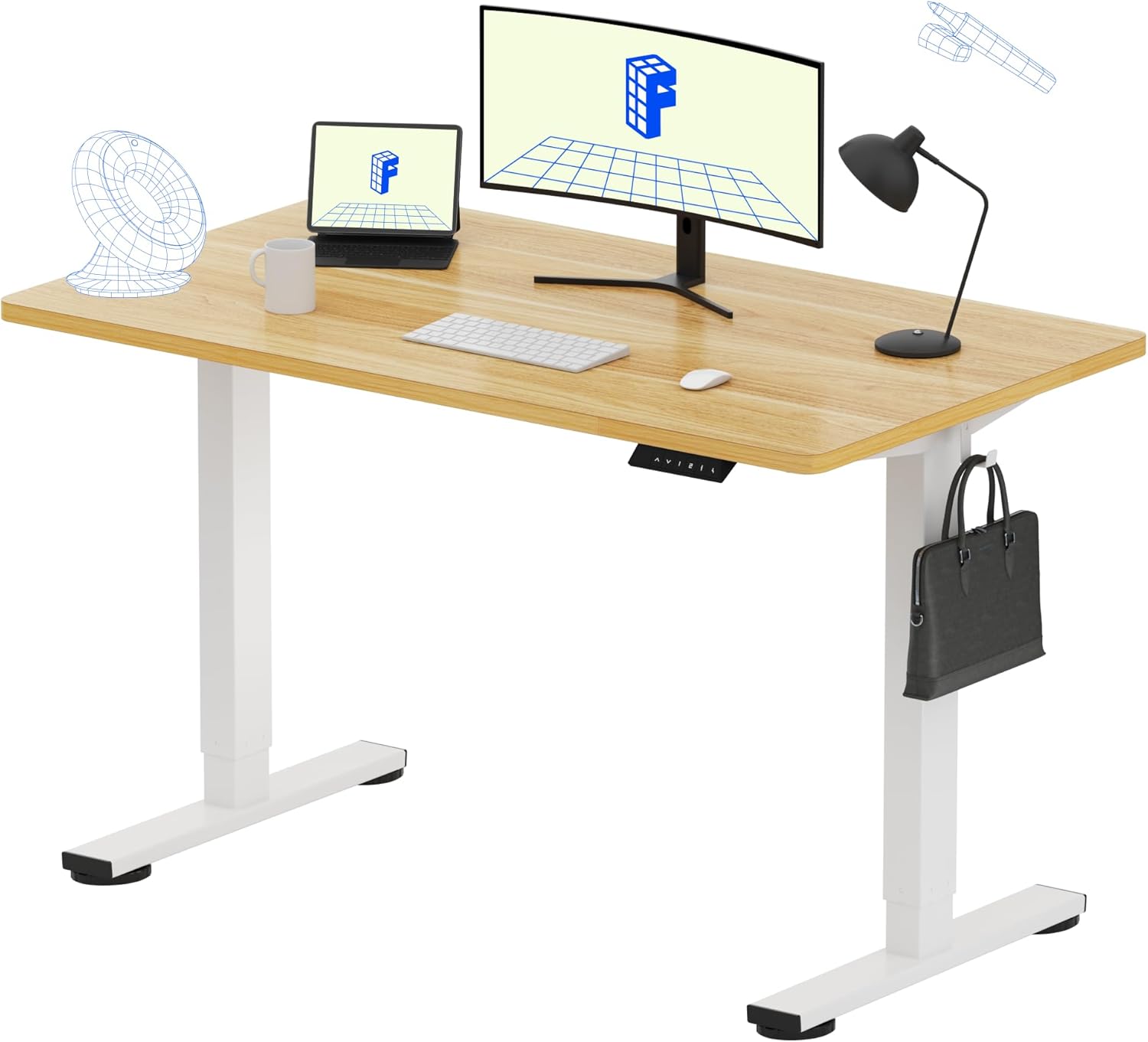
Pros
- Electric height range of 28.9 to 46.5 inches with 4 memory presets
- One-piece 48 by 24 inch top with no seam running under a mousepad
- 176 pound load capacity covers a dual-monitor arm, dock, speakers and a printer
- Alloy steel frame in white under a maple-finish desktop
- Simplified assembly with no desktop halves to align or level
Cons
- The 176 pound limit sits below the 220 to 355 pounds of heavier dual-motor frames
- A 48 by 24 inch top is too narrow for three monitors side by side
- A 28.9-inch minimum height is tall for seated typing if you are short
The top measures 48 by 24 inches and is a one-piece board rather than two planks bolted together, so no seam runs under a mousepad or a writing pad. Listed load capacity is 176 pounds, which covers a dual-monitor arm, a laptop dock, speakers and a small printer without approaching the ceiling.
- Maple-finish desktop on a white alloy steel frame
- Powered travel from 28.9 to 46.5 inches
- 24-inch depth is the common standard for home offices
Measure the 46.5-inch maximum against your own standing elbow height before ordering. Users over roughly 6 foot 3 often want a frame that reaches higher, while the 28.9-inch minimum is on the tall side for seated work if you are short.

Pros
- Powered travel from 28.35 inches to 46.46 inches covers seated and standing work for most heights
- 176 pound load capacity carries dual monitors, a tower on the deck and a monitor arm
- Four memory presets on the keypad recall sitting and standing positions with one press
- Alloy steel frame with lifting columns tested to 100,000 cycles
- Low-VOC materials reduce off-gassing in a closed home office during the first week
Cons
- Lift speed of 0.8 inches per second trails the 1 inch per second frames in the same family
- The 23.6 inch depth is tight for two 27 inch monitors mounted on arms
- No cable tray or grommets are included, so wiring management has to be added separately
The frame travels from 28.35 inches to 46.46 inches, a span covering a seated position for someone around 5 feet tall up to standing keyboard height for a user near 6 feet 3. The top measures 47.2 by 23.6 inches, room for two 24 inch monitors or a single ultrawide with a keyboard and notepad in front. Load capacity is 176 pounds, ample for screens, a tower resting on the deck and a clamped monitor arm, though it rules out a full studio rack or heavy workshop equipment.
- 28.35 to 46.46 inch powered height travel
- 47.2 x 23.6 inch desktop on an alloy steel frame
- 176 pound load capacity, lifting at 0.8 inches per second

Pros
- Travels from 28.3 to 46.5 inches, covering seated work for someone around 5 ft 2 and standing use past 6 ft
- A reinforced steel frame carries 176 lb, enough for two monitors, a tower and a dock
- Three memory presets recall sit and stand heights instead of eyeballing the number each time
- The lift motor is tested to 50,000 cycles and stays under 45 dB while moving, so it will not carry through a call
- An FSC-certified wood top in a 48 by 24 inch footprint that sits flat against a standard wall
Cons
- The 176 lb limit includes the desktop itself, so heavy monitor arms and a full tower eat into the margin
- The top arrives as two spliced boards rather than one panel, leaving a visible seam across the surface
- Assembly still takes about 30 minutes and the top is awkward to flip and align alone
The desktop measures 48 by 24 inches, a footprint that takes two 27 inch monitors side by side with room for a keyboard in front. Height travel runs from 28.3 to 46.5 inches.
- Load limit: 176 lb, including the desktop
- Frame: reinforced steel with two-stage legs
- Colourway here: white frame with a maple splice top
The correct seated height puts elbows at roughly 90 degrees with feet flat, which for most adults lands between 27 and 30 inches. Standing height is usually elbow height less a little, commonly 40 to 45 inches for people between 5 ft 6 and 6 ft 2. The stated range covers both ends of that for the majority of users, though anyone over about 6 ft 4 should measure carefully before committing.
The 48 by 24 inch surface is a single-user workstation rather than a sprawling command centre. It suits a home office corner, a bedroom study nook or a dorm room where floor space is finite.
- Works well for a laptop plus one or two monitors and a small speaker set
- Suits anyone alternating sitting and standing through a working day
- Fits users roughly between 5 ft 2 and 6 ft 3 within the height travel
It is less suited to a heavy multi-monitor rig with a large tower on top, since the 176 lb figure includes the desktop, or to anyone needing a deep surface for drawing or hardware work, where 24 inches of depth becomes tight once a monitor arm clamp takes up the rear edge.
Why a Stand Up Desk Belongs in Your Home Office
The shift to remote work has made the home office a permanent fixture for millions of people. Unlike a traditional office, your home setup is entirely yours to design, which means you can prioritize comfort and long term health instead of settling for whatever furniture is provided. A sit stand desk is the centerpiece of a healthy workstation.
Standing for part of your workday can help reduce back pain, improve circulation, and keep your energy from crashing in the afternoon. Alternating positions also encourages better posture and helps you stay more alert during long tasks. When paired with a walking pad or a supportive chair, an adjustable desk turns a static workspace into a flexible, movement friendly environment.
Electric models make the transition effortless. Instead of manually cranking a handle, you press a button and the desktop glides to your preferred height in seconds. Options like the Veken Electric Standing Desk and the ErGear Height Adjustable Desk show how affordable smooth, motorized adjustment has become for home users.
Key Features to Compare Before You Buy
Not all standing desks are built the same. Before you commit, it helps to understand the handful of specifications that separate a desk you will love from one you will regret. Here are the factors that matter most.
Motor and Adjustment Type
Electric standing desks are the standard for home offices because they raise and lower quietly at the push of a button. Single motor desks are budget friendly and work well for lighter setups, while dual motor frames offer faster, smoother, and more stable movement, especially when supporting heavier monitors and accessories. Nearly every desk in this guide, including the Cubiker Standing Desk and the FEZIBO Standing Desk, uses an electric motor for effortless height changes.
Desktop Size and Shape
Your available space should guide the footprint you choose. A compact 48 by 24 inch surface fits neatly into a corner or small room, while a wider 55 or 60 inch top gives you room for dual monitors, a laptop, and paperwork. If you want maximum surface area and a wraparound layout, a U shaped design like the OffiGo U Shaped Standing Desk provides plenty of elbow room. For a large single plane workspace, the Electric Standing Desk 60×28 delivers a generous 60 inch top.
Height Range and Memory Presets
A good desk should accommodate everyone from shorter users to taller ones, so check that the height range fits your body. Memory presets are a huge convenience: they let you save your favorite sitting and standing heights and return to them with one tap. Desks such as the SHW Electric Adjustable Desk and the FLEXISPOT EN1 Standing Desk include multiple memory settings so you never have to fiddle with the controls each time you switch positions.
Stability and Weight Capacity
Wobble is the most common complaint about cheaper standing desks. A double beam frame and a solid crossbar dramatically reduce shaking at standing height, which keeps your monitors steady while you type. Look at the rated weight capacity too, since a frame like the FLEXISPOT EN1 supports up to 176 pounds, easily handling dual monitors and other gear without strain.
Matching a Desk to Your Work Style
The best desk for you depends on how you actually work. Thinking through your daily routine will narrow the field quickly.
For Small Spaces and Tight Budgets
If you are working from a bedroom, apartment, or shared area, a compact and affordable desk keeps things simple. Models with a 48 inch splice board top, such as the Cubiker Sit Stand Desk and the FEZIBO Adjustable Desk, offer full electric functionality at an entry level price. They prove you do not need to spend a fortune to get a healthy, motorized workstation.
For Dual Monitors and Power Users
Anyone running multiple screens, a docking station, and peripherals needs both surface area and stability. A wide, sturdy frame with strong weight capacity is essential here. The FLEXISPOT EN1 and the SHW 55 inch Desk are built to keep heavier setups rock solid at any height.
For Organization and Extra Storage
Clutter kills productivity. If you like everything within reach, look for desks that build in drawers, hooks, or trays. The HUANUO Standing Desk with Drawers adds two drawers and hooks for cables and bags, while the AODK Standing Desk combines drawers with a keyboard tray and even a monitor stand to keep your surface tidy.
For Gamers and Feature Seekers
Some desks blur the line between work and play. Built in power outlets, LED lights, and monitor stands make for a more immersive and convenient setup. The AODK Gaming Standing Desk and the OffiGo Standing Desk both bundle these extras, so your accessories stay powered and your space stays organized.
Setting Up Your Standing Desk the Right Way
Buying the desk is only half the equation. To get the full benefit, you need to use it correctly. A few simple habits will protect your body and help you build a sustainable standing routine.
Start by setting your standing height so your elbows rest at roughly a 90 degree angle and your wrists stay neutral while typing. Your monitor should sit at or just below eye level so you are not craning your neck. This is where memory presets earn their keep, letting you dial in the perfect ergonomic position every time.
Do not try to stand all day on your first try. Begin with short standing intervals of 20 to 30 minutes, then gradually increase as your body adapts. Alternating every hour is a comfortable rhythm for most people. An anti fatigue mat under your feet makes standing far more pleasant, and a walking pad paired with a desk like the Veken Standing Desk can turn standing time into light exercise.
Finally, take advantage of built in cable management. A tidy setup with cables routed through trays or clips, as offered on the Electric Standing Desk with Cable Management, keeps wires from tangling as the desk moves up and down.
Common Mistakes to Avoid
Even a great desk can disappoint if you overlook a few details. First, do not underestimate the space a desk needs, both its footprint and the clearance it requires to rise fully. Measure your room before ordering.
Second, avoid overloading a frame beyond its rated capacity. Exceeding the weight limit can strain the motor and cause instability. If you run a heavy setup, choose a higher capacity frame from the start.
Third, resist the urge to stand nonstop. Standing for hours without a break can be just as tiring as sitting all day. The goal is movement and variety, not trading one static posture for another. Use the sit stand flexibility your desk provides to keep changing positions throughout the day.
Finally, do not ignore assembly and warranty details. Some desks arrive nearly ready to use, while others require attaching the frame to the desktop, so factor in a bit of setup time. Checking the manufacturer coverage on the motor and frame also gives you peace of mind, since these are the components most likely to need support down the road.
How to Make Your Final Decision
With so many solid options, the choice comes down to matching features with priorities. Start with your budget, since desks in this guide range from around ninety dollars to two hundred dollars, and all deliver reliable electric adjustment. Next, measure your space to decide between a compact 48 inch top and a wider 55 or 60 inch surface.
Then weigh the extras that matter to you. If storage is a priority, lean toward a model with drawers. If you want a plug and play command center, pick one with outlets and LED accents. If stability under heavy gear is your top concern, prioritize a proven, high capacity frame. For a dependable all rounder that balances price and quality, the ErGear Standing Desk is a strong starting point, while the FLEXISPOT EN1 stands out for those who want a seamless, sturdy surface for dual monitors.
Whichever direction you choose, upgrading to one of the best stand up desks for home office use is an investment in your health and productivity that pays off every single workday. Compare the models above, match the features to your routine, and set up a workspace that supports you from morning to evening.








