
 Marcus Bell
 Sitting for eight or more hours a day quietly takes a toll on your posture, energy, and focus. That is why the best standing desks have become a staple of the modern home office. A height-adjustable desk lets you shift between sitting and standing throughout the day, keeping your body moving and your mind sharp. But with dozens of models, motor types, sizes, and price points on the market, choosing the right one can feel overwhelming. This guide breaks down everything you need to know so you can invest with confidence.
Whether you want a premium electric workstation, a compact sit-stand solution for a small apartment, or an affordable entry-level model, understanding the core features will help you match a desk to your space, budget, and workflow.

Pros
- Two synchronised motors lift 264.6 lb, enough for dual 27-inch monitors, a docking station and a drawing tablet together
- Height range spans 28.9 to 47.1 inches, covering users between 5 feet 0 inches and 6 feet 8 inches
- Three memory presets on the touchscreen recall exact sit and stand heights in a single tap
- Integrated USB-A and USB-C charging ports on the frame, so chargers stop eating desk surface
- One-piece 60 by 30 inch top with rounded corners and no centre seam to catch a mouse foot
Cons
- 264.6 lb ceiling sits below the 300 lb limits offered by some heavier four-leg frames
- The one-piece top is bulky and awkward to flip alone, so assembly is far easier with a second pair of hands
- Anti-collision works on contact rather than proximity, so anything parked underneath still takes one bump before the desk reverses
The 28.9 to 47.1 inch travel is the deciding specification. It drops low enough for shorter users who normally need a footrest under a fixed 29 inch desk, and rises high enough for someone at 6 feet 8 inches to type standing without hunching down toward the keys.
- Home workers alternating sitting and standing through the day to take pressure off the lower back
- Multi-monitor setups, since the frame holds a dual or triple arrangement without wobble at full extension
- Anyone who shares a desk, because the three presets let two people swap heights with one tap each
It is less relevant if you already stand all day or only ever sit. The motors, controller and presets exist for people who genuinely change position several times a day.

Pros
- Quick Setup - Effortless assembly with a pre-installed frame and slide-and-lock legs, ensuring your
- Customizable Heights - Programmable convenience with up to 4 height settings and an intuitive LED co
Cons
- Weight capacity of 176 lbs limits dual large monitor setup
Pros
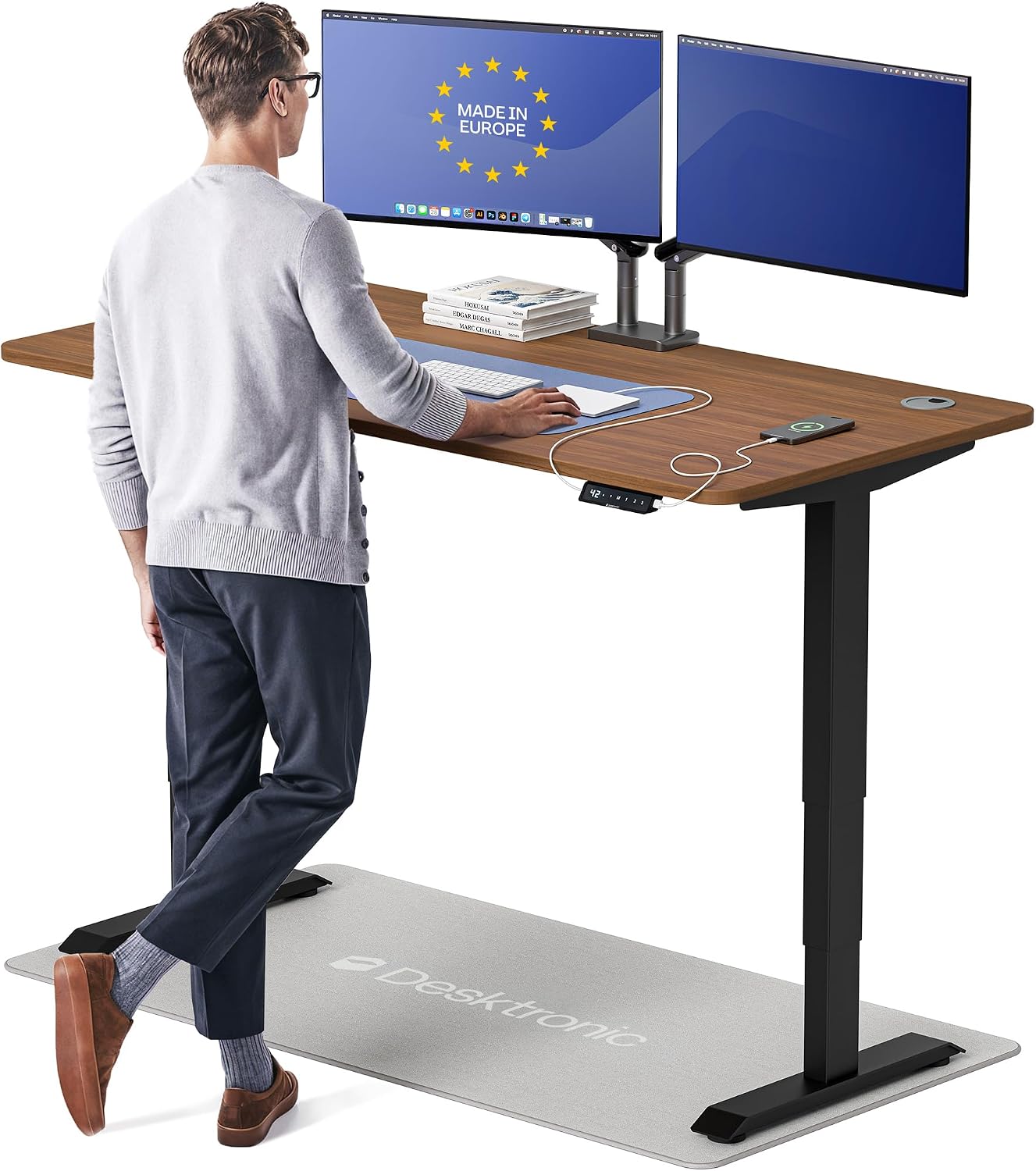
- Dual synchronized motors lift at 2 inches per second and hold up to 352.7 lbs with minimal wobble at any height
- Height adjusts from 25.4 in to 51.2 in, covering users from 5'0" to 6'8" without a separate riser
- Touchscreen controller stores 3 memory presets, so switching between sit and stand heights takes one tap
- Built-in USB-A and USB-C charging ports keep devices powered without a separate charging block on the desktop
- Anti-collision sensor auto-reverses the desk if it contacts an obstacle while adjusting height
Cons
- 60 in x 30 in one-piece top needs a dedicated wall or floor footprint that size, ruling it out for small home offices with limited space
- Height range tops out at 51.2 in, which may fall short for anyone taller than 6'8" wanting a fully upright stand position
- Dual-motor lift system depends on the touchscreen controller and its electronics, so a control fault takes both motors offline rather than allowing a manual crank as backup
The tabletop measures 60 in x 30 in as a one-piece surface, with height adjusting from 25.4 in to 51.2 in, a range built to fit users from 5'0" to 6'8". The dual-motor lift holds up to 353 lbs with what the manufacturer rates as minimal wobble at any height, moving at 2 inches per second.
- Tabletop: 60 in W x 30 in D, one-piece surface
- Height range: 25.4 in - 51.2 in
- Weight capacity: 353 lbs
- Lift speed: 2 in/s
The surface is sized to fit triple monitors, a docking station and a drawing tablet at once, with rounded corners and no sharp edges along the front edge.
This desk is built for home office setups that need a large single-piece surface and a wide height range in one unit. The 25.4 in to 51.2 in range spans users from 5'0" to 6'8", making it workable in a household or shared office where more than one person uses the same desk.
- Good fit for setups running triple monitors, a docking station or a drawing tablet
- Needs a dedicated 60 in x 30 in footprint, so it will not suit a cramped home office corner
- 3 memory presets suit households where multiple people share the same desk at different heights
Anyone taller than 6'8" or working in a tight space under 60 in wide should measure carefully before ordering, since the tabletop size and top height are both fixed.

Pros
- Electric lift covers 27.9 inches to 46.1 inches, spanning seated and standing positions for most heights
- Memory keypad recalls preset heights, so switching positions doesn't need re-measuring each time
- Reversible corner return installs on either the left or right side to match room layout
- Large L-shaped top holds multiple monitors and a laptop alongside paperwork without crowding
- Reinforced frame is built to keep the desk steady at extended standing heights
Cons
- Weight capacity is capped at 154 lbs, which limits stacking multiple monitors, a PC tower and equipment together
- Engineered wood top needs the same moisture care as particleboard furniture, unlike solid wood or metal
- Full corner footprint of 47 x 63 inches needs a genuine room corner, not a narrow wall run
The corner desk spans 47 inches deep by 63 inches wide, with electric height adjustment covering 27.9 inches to 46.1 inches to move between seated and standing positions. A memory keypad stores preset heights so the desk can return to a saved position instead of manual adjustment each time.
- Height range of 27.9" to 46.1" covers most seated and standing needs
- 47" x 63" L-shaped surface for a genuine corner setup
- Memory keypad recalls preset heights
Weight capacity is rated at 154 lbs, worth checking against the combined weight of monitors, a PC tower, and other desk equipment before loading it up.

Pros
- Impact-resistant molded plastic body shields contents from damage
- Integrated rubber gasket lid seal prevents water and dust ingress
- Sturdy side latches lock lid tightly to maintain waterproof barrier
- Grooved lid surface allows safe vertical stacking in storage rooms
- Molded side handles support comfortable carrying when fully loaded
Cons
- Thick plastic construction adds slight weight when empty
- Opaque container sides prevent inspecting contents without unlatching

Pros
- Height adjusts from 28 to 46 inches, covering seated and standing positions for most heights
- Reinforced steel frame with anti-wobble design stays stable even at full extended height
- Motor runs under 50dB, quiet enough for calls without background whirring
- 2 memory presets recall favorite heights with one button press
- Anti-collision sensor auto-stops and reverses within about 1 inch of an obstacle
Cons
- 132-pound weight capacity is lower than some heavy-duty standing desks built for multiple monitors plus equipment
- 48 x 24 inch desktop leaves limited legroom width for a wide keyboard tray or side storage
- Motor-driven height adjustment relies on a wall outlet, so it will not operate during a power outage
The desktop measures 48 inches wide by 24 inches deep, with electric height adjustment spanning 28 to 46 inches to cover both seated and standing positions for most adult heights. The frame is rated to hold up to 132 pounds of monitors, a laptop and accessories without sagging or losing stability during height changes.
- Height adjustment range: 28 to 46 inches
- Desktop size: 48 inches wide by 24 inches deep
- Weight capacity: up to 132 pounds
That capacity comfortably covers a dual-monitor arm setup or a monitor plus laptop dock, though heavier multi-monitor arrays with additional gear should be weighed against the limit first.
Pros
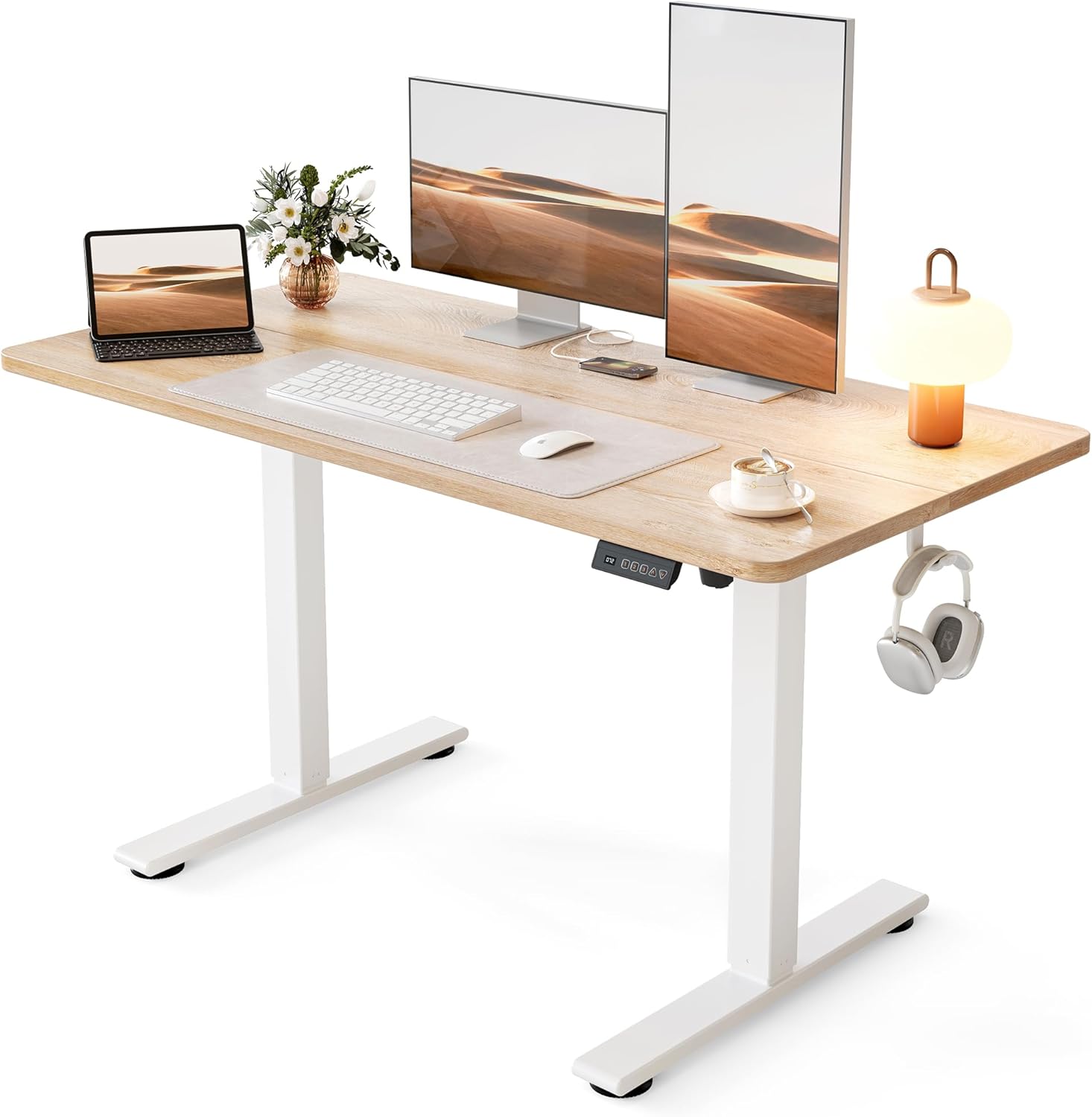
- Lifts from 28.3 in. to 46.5 in., covering seated typing and standing work for most adults
- Steel frame carries up to 176 lb, enough for dual monitors, a laptop dock and a desk lamp
- Motor runs under 45 dB, quiet enough to raise the top mid video call
- 3 memory presets recall exact seated and standing heights with one touch
- Frame tested through 100,000 lift cycles before shipping
Cons
- Only 24 in. deep, so a wide monitor stand crowds the keyboard area
- Spliced two-piece top leaves a seam running across the work surface
- No cable tray is listed among the included parts, so wire management is a separate job
The top measures 48 in. wide by 24 in. deep, which holds two 24 in. monitors side by side, or one ultrawide with room in front for a keyboard and notebook.
- Height travel runs 28.3 in. to 46.5 in.
- Steel frame rated to 176 lb of gear
- Frame tested through 100,000 lift cycles
- Listed footprint 24 in. D x 48 in. W x 27 in. H
At 24 in. of depth, a deep monitor stand eats into arm room, so a clamp-mounted arm frees the back edge and buys back several inches. Standing users above 6 ft 3 in. should measure elbow height against the 46.5 in. ceiling before committing, since that figure is the hard limit of the columns.
This is a single-user home workstation rather than a shared studio bench. The 48 in. span suits a laptop plus one or two monitors, a lamp and a notebook, and the 24 in. depth keeps it usable in a bedroom corner or against a hallway wall.
- Sit-stand switching several times a day
- Rooms where a quiet motor matters during calls
- Setups comfortably under the 176 lb load ceiling
- Interiors that suit a white frame with a maple top
It is a weaker fit if you run a very deep curved panel with wide feet, need a third monitor across the span, or want a finish that matches dark furniture, since the frame and top combination is fixed.

Pros
- Height adjusts from 27.6 inches to 45 inches via gas spring, covering seated and standing positions
- One-piece 32 inch desktop measures 19.7in D x 31.5in W x 28in H for compact rooms
- Rear wheels let the desk roll between rooms without disassembly
- Cordless, non-electric lift means no outlet is needed near the desk
- One-touch gas spring adjustment avoids the crank or motor noise of other sit-stand desks
Cons
- Non-electric lift caps the height adjustment range at 27.6-45 inches, shorter than some electric standing desks
- 32 inch desktop width limits it to a single monitor or compact dual-monitor setup
- No memory height presets, so the level has to be judged by eye each time
The one-piece 32 inch desktop measures 19.7in D x 31.5in W x 28in H at its base, and the gas spring lift adjusts total height from 27.6 inches to 45 inches, covering both seated and standing positions for most adult heights.
- 32in one-piece desktop
- Height range 27.6in to 45in
- Base footprint 19.7in D x 31.5in W
The compact desktop width suits a single monitor or a laptop plus a small secondary screen, but it will feel tight for dual full-size monitor setups compared to wider 48in+ desks.

Pros
- Electric height range of 28.3 to 46.5 inches across 3 memory presets, covering both seated and standing positions without manual cranking
- Built-in 3 outlets and 2 USB ports let you charge devices at the desk instead of running an extension cord
- U-shaped 55.1-inch top plus a full-size monitor stand holds 2 monitors while leaving desktop space clear
- Steel frame rated to 154 lbs, enough for dual monitors, a laptop dock and desk accessories together
- LED strip offers 10 colours and 10 lighting modes built into the frame, no separate light bar needed
Cons
- Footprint of 29.1 x 55.1 inches with a U-shaped corner needs more floor space than a straight desk of the same width
- 154 lb capacity is lower than some steel-frame standing desks rated past 200 lbs, so heavy dual-monitor arm setups should check total load
- Only offered in white in this listing, with no alternate finish
The desktop measures 29.1"D x 55.1"W, finished with a U-shaped corner extension that adds side workspace beyond a standard rectangular top. Height adjusts electrically from 28.3" to 46.5", covering seated and standing positions for most adult heights.
- 3 preset memory buttons recall favourite heights without re-adjusting each time
- Steel frame construction supports up to 154 lbs of desktop load
- Monitor stand section accommodates 2 monitors side by side
- 3 power outlets and 2 USB ports are built into the frame
The U-shape trades a larger footprint for additional side surface, so measuring available floor space before assembly is worthwhile, particularly in home offices where the desk sits in a corner.

Pros
- Electric lift adjusts smoothly from 27.95 to 45.67 inches to cover sitting and standing heights
- 3 programmable memory buttons recall preferred heights instantly
- Frame is tested for 50,000 lift cycles at up to 220 lbs (100 kg) of loaded weight
- 1-inch-thick desktop resists flex under monitors and heavier equipment
- Motor runs below 45dB, quiet enough for shared home office spaces
Cons
- 60 x 28-inch top is fixed in size, so it will not suit a corner or L-shaped office layout
- Requires a nearby power outlet for the electric lift motor to function
- Cable management is built in but still needs manual routing during setup
The desk lifts electrically between 27.95 and 45.67 inches, covering both seated and standing positions on the same frame. Maximum loaded capacity is rated to 220 lbs (100 kg), supported by a 2.5mm steel base and a reinforced double-beam frame.
The desktop itself is 1 inch thick across a 60 x 28-inch surface, sized to hold multiple monitors and other equipment without visible flex. DeskShow states the lifting mechanism has been tested through 50,000 lift cycles, aimed at withstanding years of daily height changes.
Why a Standing Desk Is Worth It
Prolonged sitting has been linked to back pain, poor circulation, and afternoon energy slumps. A standing desk does not force you to stand all day. Instead, it gives you the freedom to alternate positions, which is where the real benefits come from. Many users report reduced lower-back discomfort, better concentration, and a more active feeling by mid-afternoon once they start standing for even 20 to 30 minutes each hour.
Beyond health, a good adjustable desk is simply more flexible. You can raise it for a video call, lower it for detailed keyboard work, or set a comfortable height for a taller or shorter family member. When the whole household shares one workspace, that adaptability quickly pays for itself.
There is a productivity angle too. Standing during creative or repetitive tasks can help you stay engaged, while sitting suits deep-focus work that demands stillness. By giving yourself the option to switch, you build natural breaks into your day that reduce fatigue and keep your posture from settling into one fixed, unhealthy position for hours on end.
Electric vs Manual: Choosing Your Adjustment Type
The first big decision is how the desk changes height. There are three common mechanisms, and each suits a different type of user.
Electric Dual-Motor Desks
Electric desks are the gold standard for daily use. A dual-motor system, like the one found in the Desktronic HomeOne, raises and lowers the surface smoothly and quietly at the touch of a button. Dual motors also handle heavier loads and wide surfaces more evenly than single-motor designs, which reduces wobble and speeds up transitions. If you plan to adjust your desk several times a day, an electric model is the most convenient choice.
Premium electric desks such as the Vari Electric and the Desktronic HomePro pair strong motors with sturdy frames and memory presets, so you can save your favorite sitting and standing heights and recall them instantly.
Gas-Spring Desks
Gas-spring or pneumatic desks use a counterbalanced lever instead of electricity, so they need no outlet and adjust in seconds. The FLEXISPOT H7 Plus is a mobile example with wheels, making it ideal for small spaces or for rolling between rooms. These desks are cordless and quiet, though they typically support smaller surfaces and lighter loads than full electric frames.
Budget Electric Options
You do not have to spend a fortune to get powered height adjustment. Compact electric models like the this 48-inch electric desk and the Cubiker Standing Desk deliver motorized convenience at entry-level prices, making them a smart pick for students or anyone testing the sit-stand lifestyle for the first time.
Desktop Size and Shape
The surface you work on affects both comfort and productivity. Standing desks come in several footprints, and the right one depends on your equipment and your room.
- Compact (48 x 24 inches): Ideal for laptops, single monitors, and tight spaces. Models like the Cubiker Standing Desk fit neatly into bedrooms and small offices.
- Standard (54 to 60 inches wide): The sweet spot for dual monitors, a keyboard, and desk accessories. The Vari Ergo and this 60×28 adjustable desk offer generous room without dominating a room.
- L-shaped and U-shaped: Corner and wraparound designs maximize surface area for multitaskers. The Casaottima L-Shaped and the OffiGo U-Shaped are built for those who need to spread out documents, monitors, and peripherals.
Also consider edge design. A curved waterfall edge, like the one on the Vari Ergo, is gentler on your wrists and forearms during long sessions, while a thicker one-inch tabletop adds a solid, premium feel and better resists sagging.
Stability and Weight Capacity
A desk that shakes at standing height is frustrating and can even knock over a coffee cup. Stability comes down to frame design and construction. Look for double-beam or reinforced frames and wide, well-planted feet. T-style legs, such as those on the Vari Electric, provide a broad base that resists wobble even when fully extended.
Weight capacity matters too. Most quality desks support 150 to 220 pounds, which is plenty for multiple monitors, a desktop tower, and accessories. If you run a heavy multi-screen setup, prioritize a dual-motor frame with a higher rated capacity to keep movements smooth and safe.
A quick way to judge stability before buying is to check the frame material and the number of leg segments. Two-stage legs raise faster but can feel less rigid at full height, while three-stage legs and thick steel tubing add rigidity. Reading how a desk performs at its tallest setting, rather than just its lowest, tells you the most about how steady it will feel when you are actually standing and typing.
Height Range and Memory Presets
Everyone is a different height, so check the desk’s minimum and maximum settings. A typical range of about 28 to 46 inches accommodates most adults from sitting to standing, but taller users should confirm the desk reaches a comfortable standing height without a keyboard riser.
Memory presets are one of the most underrated features. Instead of holding a button and eyeballing the height each time, you simply tap a saved number and the desk glides to your exact position. Desks like the Desktronic HomeOne offer three presets, while the Vari Ergo provides four. If more than one person uses the desk, presets are a genuine daily convenience.
Extra Features Worth Considering
Once you have the essentials covered, a few thoughtful extras can elevate your workspace.
- Built-in charging: Integrated USB and USB-C ports, found on the Desktronic HomePro, keep your phone and devices powered without cluttering the surface with adapters.
- Cable management: Trays and clips route wires cleanly so cords do not snag or dangle when the desk moves up and down.
- Power outlets and lighting: The OffiGo U-Shaped includes power outlets and LED lights, turning the desk into a complete command center.
- Touchscreen controls: A sleek touchscreen panel makes adjustments intuitive and adds a modern look to the workspace.
- Mobility: Casters on the FLEXISPOT H7 Plus let you reposition your workstation whenever you need to.
Assembly and Build Quality
Nobody wants to spend an entire afternoon wrestling with a desk. Many modern models are designed for quick assembly with pre-installed components and clear instructions. Desks that ship in two boxes, like the Vari Ergo, often trade a bit of unboxing effort for a more robust frame. If build quality is a priority, look for European-made or reinforced steel frames, which tend to last longer and stay wobble-free over years of daily use.
Matching a Desk to Your Budget
Standing desks span a wide price range, and more expensive does not always mean better for your needs. Here is a simple way to think about it.
- Under $100: Entry-level electric desks such as the compact 48-inch model, the Cubiker, and the mobile FLEXISPOT H7 Plus are perfect for first-time buyers and tight budgets.
- $150 to $200: Larger and specialty-shaped desks like the Casaottima L-Shaped, the OffiGo U-Shaped, and the 60×28 double-beam desk deliver more surface and features for growing setups.
- $600 and up: Premium workstations such as the Desktronic HomeOne, Desktronic HomePro, and Vari Electric justify their price with dual motors, superior stability, and refined finishes for daily professional use.
How to Choose the Right Standing Desk for You
To narrow your options, start with three questions. First, how much space do you have? Measure your room and match it to a compact, standard, or corner footprint. Second, how often will you adjust the height? Frequent switching favors an electric dual-motor desk with memory presets, while occasional standing works fine with a gas-spring or budget electric model. Third, what is your budget and what equipment will you place on top?
Once you answer those, the shortlist gets much smaller. A remote worker with dual monitors and a professional setup will lean toward a premium 60-inch electric desk. A student in a dorm will be happier with an affordable compact model. Someone building a full battlestation may want the surface of an L-shaped or U-shaped design.
Final Thoughts
The best standing desks are the ones that fit seamlessly into your daily routine and encourage you to move more without getting in the way. Focus on the fundamentals first, a reliable motor, a stable frame, the right size, and a comfortable height range, and treat charging ports, lighting, and presets as valuable bonuses. Whether you choose a flagship electric model or a wallet-friendly starter desk, upgrading to a sit-stand workspace is one of the simplest investments you can make in your comfort and productivity. Compare the options above, weigh them against your space and budget, and you will find a desk that keeps you moving for years to come.









Comments are closed.
No reviews yet. Be the first to share your experience!