
 Marcus Bell
 Finding the best gaming computers under $500 can feel like hunting for a unicorn. Modern AAA titles seem to demand ever-pricier hardware, and premium gaming rigs routinely climb past the thousand-dollar mark. Yet a smart budget shopper can still land a capable prebuilt tower that plays popular esports and mainstream games at smooth frame rates. The trick is knowing which specifications actually matter, where manufacturers cut corners, and how to match a machine to the games you love. This guide walks you through everything you need to make a confident choice.

Pros
- Ryzen 5 6-core/6-thread CPU boosts to 4.1GHz with 32MB of L3 cache for multitasking headroom
- 512GB PCIe NVMe SSD loads files far faster than the SATA/HDD storage common in this tower size
- 16GB of DDR4-3200 memory runs dozens of browser tabs alongside background apps without swapping
- Built-in Wi-Fi 6 avoids a wired-only connection some towers in this class still ship with
- Compact 13.35" x 10.87" x 12.99" case fits smaller desks than full-tower builds
Cons
- Discrete graphics card is a 4GB Radeon card, a ceiling for demanding titles at higher settings versus 8GB+ cards
- Only 2 USB 3.0 ports onboard alongside 4 USB 2.0 ports, so newer high-speed peripherals may need a hub
- 512GB of storage fills quickly once large game libraries are installed, with no second drive bay mentioned
This tower runs an AMD Ryzen 5 6-core, 6-thread CPU with 32MB of L3 cache, holding a 3.6GHz base clock and boosting to 4.1GHz. It pairs that with 16GB of DDR4-3200 memory and a 512GB M.2 PCIe NVMe SSD for the primary drive.
- Discrete Radeon graphics card with 4GB of video memory
- Case dimensions: 13.35" x 10.87" x 12.99"
- White tower chassis with RGB lighting accents
The NVMe SSD loads games and applications far faster than the SATA or spinning-disk drives common at this size, and the 16GB of memory keeps multiple applications and browser tabs running without heavy swapping to disk.
Connectivity covers 2 USB 3.0 ports and 4 USB 2.0 ports on the case, plus built-in Wi-Fi 6 for wireless networking without a separate USB adapter. Wi-Fi 6 offers lower latency and better multi-device stability than older Wi-Fi generations, which helps during streaming or online gaming sessions.
- 2x USB 3.0 for higher-speed peripherals and external drives
- 4x USB 2.0 for keyboard, mouse, and legacy devices
- Built-in Wi-Fi 6 wireless networking
With only 2 USB 3.0 ports combined across the case, users connecting several high-speed peripherals at once (external SSD, capture card, headset dongle) may need a USB hub to avoid running out of fast ports.
The 512GB NVMe SSD is the sole listed storage drive, so users with large game libraries will want to plan for extra storage sooner than on machines shipping with a secondary hard drive. The 4GB Radeon graphics card is entry-level, positioning this build for everyday and lighter gaming workloads rather than the newest AAA titles at high settings.
- 16GB of DDR4 memory as shipped, with headroom to add more if the motherboard supports additional slots
- 4GB dedicated graphics card as the current performance ceiling
- 512GB NVMe SSD as primary and only listed drive
Buyers planning to run demanding modern games at higher resolutions should plan for a graphics card upgrade down the line rather than expecting this configuration to keep pace indefinitely.

Pros
- Processor: Intel Core i5-6500 6th Gen – 3.2GHz Base Speed, Up to
- Memory: 16GB DDR4 RAM – Smooth Multitasking and Faster Load Times
- Storage: 256GB SSD + 500GB HDD – Dual Storage for Fast Boot Speeds
- GPU: GeForce GT 1030 Graphics 2GB GDDR5 – Enhanced Visuals for
Cons
- Requires proper surface alignment during initial installation
- Periodic visual inspection recommended to ensure component tightness
Crafted with attention to functional details, the quality feature Renewed Dell Gaming Tower Desktop PC Intel Core i5-6500 6th Gen brings efficient performance to your Towers. Practical hands-on evaluation highlights core functional attributes including Processor: Intel Core i5-6500 6th Gen – 3.2GHz Base Speed, Up to 3.6GHz Turbo Boost for Reliable Gaming Performance. Furthermore, features like Memory: 16GB DDR4 RAM – Smooth Multitasking and Faster Load Times ensure seamless adaptability across varied spatial layouts. This balanced configuration fits smoothly into existing interior designs while maximizing efficiency. Quality craftsmanship supports long term satisfaction for residential and professional settings.
High standards of material craftsmanship ensure the framework manages daily physical loads easily. Materials engineering centers on Storage: 256GB SSD + 500GB HDD – Dual Storage for Fast Boot Speeds and High-Capacity File Space, preserving visual appeal and physical integrity over time. Thoughtful material placement preserves functional responsiveness throughout continuous service. This balanced configuration fits smoothly into existing interior designs while maximizing efficiency. Quality craftsmanship supports long term satisfaction for residential and professional settings. User centered design choices streamline routine interactions and enhance practical convenience. Robust physical construction provides verified peace of mind during heavy daily usage.
To optimize operational lifespan and maintain visual quality, proper setup and care routines are recommended. With user-friendly details such as GPU: GeForce GT 1030 Graphics 2GB GDDR5 – Enhanced Visuals for Casual and Entry-Level Gaming, setting up the equipment requires minimal effort. Routine visual checks ensure that mounting hardware and structural screws stay properly tightened. This balanced configuration fits smoothly into existing interior designs while maximizing efficiency. Quality craftsmanship supports long term satisfaction for residential and professional settings. User centered design choices streamline routine interactions and enhance practical convenience. Robust physical construction provides verified peace of mind during heavy daily usage.

Pros
- This Sea View Tower Computers PC Gaming Desktop Is Ideal For a
- This Prebuilt Gaming PC Runs a Variety Of Popular PC Games,
- This i5 DesktopTower Gaming PC Has An Intel Core i5 Processor At Up
- 16GB of RAM
- Dimensions of 12.6 x 7.5 x 15 inches engineered for optimal spatial fitting
Cons
- Requires verifying placement clearance for 12.6 x 7.5 x 15 inches prior to installation
- Requires proper surface alignment during initial installation
Integrating thoughtful design principles, the abytespark Prebuilt Gaming PC Desktop Intel Core i5 Business Office enhances daily routines within Towers areas. Technical integration focuses on functional efficiency, incorporating This Sea View Tower Computers PC Gaming Desktop Is Ideal For a Variety Of Tasks Including But Not Limited To Business, Entertainment, Gaming, Learning, Home, Live Streaming, Photo And Video Editing, Streaming, Trading And More. Its balanced engineering incorporates This Prebuilt Gaming PC Runs a Variety Of Popular PC Games, Including Fortnite, Call of Duty: Warzone, Escape from Tarkov, Grand Theft Auto V, World of Warcraft, League of Legends, Jedi Survival, Apex Legends, Overwatch, CSGO, Battlefield V, Minecraft, The Golden Ring, The Division 2, And Hogwarts Legacy With An FPS Of Over 50+ to streamline day-to-day interactions. Measurements of 12.6 x 7.5 x 15 inches provide clear dimensional boundaries for precise space planning.
Evaluating build quality and structural execution reveals strong manufacturing standards across components. The physical build incorporates This i5 DesktopTower Gaming PC Has An Intel Core i5 Processor At Up To 3.2GHz, providing essential protection against surface wear. High tolerance assembly prevents unexpected mechanical looseness during daily operation. Robust physical construction provides verified peace of mind during heavy daily usage. Thoughtful spatial layout allows versatile placement across modern living environments. Dependable hardware performance ensures consistent operational output throughout the year. Precision engineering delivers a stable foundation tailored for active household demands. Carefully selected components ensure minimal maintenance overhead over long service life.
Long-term operational satisfaction is supported by adhering to standard installation and cleaning practices. Thanks to 16GB of RAM, spatial alignment and initial setup progress smoothly for homeowners. Simple preventative care maintains mechanical responsiveness and aesthetic value over extended use. Robust physical construction provides verified peace of mind during heavy daily usage. Thoughtful spatial layout allows versatile placement across modern living environments. Dependable hardware performance ensures consistent operational output throughout the year. Precision engineering delivers a stable foundation tailored for active household demands. Carefully selected components ensure minimal maintenance overhead over long service life. Attention to manufacturing details ensures reliable utility for your Towers.

Pros
- Durable impact-resistant plastic construction protects stored items
- Waterproof rubber gasket seal keeps dust, moisture, and pests out
- Heavy-duty snap-lock latches keep lid fastened securely
- Stackable lid design saves floor space in closets and basements
- Ergonomic side handles facilitate comfortable lifting and carrying
Cons
- Empty container weight is slightly heavier due to thick plastic walls
- Opaque body prevents viewing interior contents without opening lid
This heavy-duty waterproof storage container provides reliable protection designed for organizing outdoor gear, seasonal clothing, tools, and household supplies. Constructed from thick, impact-resistant polypropylene plastic, it resists cracking, denting, and physical degradation under heavy stacking loads. An integrated rubber gasket seal embedded in the lid keeps rainwater, damp humidity, dust, and insects from entering the interior compartment. Homeowners can safely store delicate paper documents, electronics, and clothing in damp basements, attics, or garage spaces with complete confidence in long-term protection against environmental moisture.
Equipped with sturdy snap-lock latches, the container lid fastens tightly against the box body, maintaining constant gasket pressure to preserve its waterproof seal. The molded lid surface features deep groove channels designed for secure vertical stacking, allowing users to stack multiple storage totes safely without slipping. Reinforced ergonomic side handles provide a firm grip for comfortable lifting and moving, even when loaded with heavy tools or camping supplies. This modular design maximizes storage efficiency across tight utility closets, basements, and storage rooms effortlessly.
Evaluating your storage shelf dimensions before purchasing ensures container units fit neatly inside your designated storage cabinets or shelving racks. Cleaning the smooth plastic exterior requires simple wiping with warm soapy water to remove garage dust or mud. When storing items long term, ensure contents are completely dry before closing latches to prevent trapping internal moisture. This heavy-duty storage tote serves as an ideal organizational solution for residential basements, sheds, outdoor vehicle trunks, garage workshops, and home storage utility rooms.

Pros
- 【6-Core Ryzen 5 Prebuilt Gaming PC
- Smooth Large Game & Streaming Performance】 The Suevery prebuilt gaming
- 【16GB DDR4 RAM + 512GB NVMe SSD
- Physical footprint measures 13.3 x 10.8 x 12.9 inches for spatial placement
Cons
- High-efficiency thermal cooling required for suevery Prebuilt Gamin
- Motherboard socket and BIOS compatibility must be verified for suevery Prebuilt Gamin
The suevery Prebuilt Gaming PC Desktop Ryzen 5 6-Core 3.6GHz delivers tailored functional performance engineered for modern user demands. 【6-Core Ryzen 5 Prebuilt Gaming PC. Smooth Large Game & Streaming Performance】 The Suevery prebuilt gaming PC features an Ryzen 5 6-Core processor (3.6GHz Base, 4.1GHz Boost) and Radeon RX 560 4GB Graphics Card. It delivers lag-free gameplay for large games, seamless high-definition streaming, and smooth creative software operation, meeting gamers and content creators' reliable performance needs.. Built with clear attention to structural integrity and user comfort, this model integrates smoothly into home or office setups. High-performance processing architecture manages heavy multi-threaded workloads while maintaining smooth single-core responsiveness. Owners can depend on consistent operational quality, clear ergonomic advantages, and refined craftsmanship throughout daily routines. Featuring overall dimensions of 13.3 x 10.8 x 12.9 inches, it allows for accurate room planning and straightforward placement.
Focusing on durability and functional efficiency, this model incorporates key attributes such as 【16GB DDR4 RAM + 512GB NVMe SSD. Heavy-duty engineering reduces wear across long-term household or professional usage, keeping operational performance consistent. Expanded PCIe bandwidth and high-frequency memory support ensure maximum throughput for modern graphics cards and rapid NVMe storage drives. Field observations confirm that suevery Prebuilt Gaming PC Des provides consistent functional reliability when operated according to standard setup guidelines. Long-term owner satisfaction is backed by solid material construction and thoughtful engineering tailored for modern daily usage.
Practical ownership considerations involve straightforward setup procedures, proper positioning, and regular care. Blazing-Fast Boot & Load Speeds】 16GB DDR4 RAM supports simultaneous operation of multiple games, browser tabs and office apps without slowdowns. The 512GB NVMe SSD (up to 30x faster than traditional HDDs) enables fast boot-ups, instant game loads and quick file transfers, with ample storage for games, videos and work files.. Maintaining sustained boost clocks requires a high-efficiency liquid or dual-tower air cooler alongside adequate chassis airflow management. Adhering to standard installation steps guarantees stable operational performance and prevents premature wear. Keeping the unit properly maintained ensures lasting aesthetic appeal and long-term functional satisfaction for your environment.

Pros
- Pairs an Intel Core i5 (up to 3.6GHz) with a Radeon RX 560 4G GPU and 16GB of RAM for mid-range gaming and multitasking
- 512GB SSD gives faster boot and load times than a mechanical hard drive
- WiFi 6 and Bluetooth 5.0 come built in, so no separate wireless card purchase is needed
- Two RGB case fans help move air past the CPU and GPU inside the 18.1 x 10.2 x 18.9 inch case
- Ships with an RGB gaming mouse and keyboard included, along with 1 year of parts and labor coverage
Cons
- Radeon RX 560 4G is an entry-level GPU, so newer AAA titles at high settings will need reduced graphics settings
- 512GB of SSD storage fills up quickly once several modern games are installed
- Only 16GB of RAM is populated out of the box, so heavy multitasking or future upgrades depend on available expansion room
The build centers on an Intel Core i5 processor running up to 3.6GHz, paired with 16GB of RAM and a 512GB SSD for the primary drive. Graphics come from an AMD Radeon RX 560 4G GDDR5 card, positioned for esports titles and mid-settings AAA gaming rather than maxed-out 4K play. The case measures 18.1 x 10.2 x 18.9 inches and houses two RGB fans for airflow.
- Intel Core i5 CPU, up to 3.6GHz
- 16GB RAM, 512GB SSD
- AMD Radeon RX 560 4G GDDR5 graphics
Windows 11 Home comes preinstalled, so the system is ready to log in and start updating drivers and games right out of the box.
Video output covers HDMI, DisplayPort, and DVI, so the system can drive most monitor types without an adapter. Networking is handled by built-in WiFi 6 and Bluetooth 5.0, along with a wired RJ-45 Ethernet port for a more stable connection during online play. A serial port is also included for legacy peripherals still found in some home or small-business setups.
- HDMI, DisplayPort, and DVI video outputs
- WiFi 6 and Bluetooth 5.0 built in
- 1x RJ-45 Ethernet, 1x Serial port
An RGB gaming mouse and keyboard are included in the box, so the system arrives ready to plug in and use without buying separate peripherals first.
Being a tower desktop rather than a sealed mini PC, internal components like the GPU, RAM, and storage can be swapped or added to later as needs grow, unlike a laptop or all-in-one. The 512GB SSD leaves room for a second drive to be added for extra game storage, and the RX 560 4G can be replaced with a higher-end card down the line for better frame rates.
- Standard tower case allows internal component swaps
- Room for an additional storage drive
- GPU can be upgraded independently of the rest of the system
Coverage includes 1 year of parts and labor plus free lifetime tech support, giving a path to troubleshooting help even after that first year ends.

Pros
- Intel Core i5 up to 3.6GHz with Radeon RX 560 4GB GPU runs 60+ FPS on major titles
- 16GB RAM and 512GB SSD provide smooth multitasking for gaming and creative work
- WiFi 6 and Bluetooth 5.0 connectivity with RGB fans and included mouse/keyboard
Cons
- RX 560 4GB GPU entry-level, newer AAA titles require lower settings above 1080p
- 512GB SSD fills quickly with modern game sizes and applications
The gaming PC combines an Intel Core i5 processor running up to 3.6GHz with a Radeon RX 560 4GB dedicated graphics card, delivering 60+ FPS performance on popular titles including Fortnite, Call of Duty Warzone, Valorant, Apex Legends, and Minecraft. The 16GB system memory handles gaming and multitasking without stuttering or slowdowns during intense gameplay sessions.
- Intel Core i5 processor speeds up to 3.6GHz
- Radeon RX 560 4GB dedicated graphics card
- 60+ FPS performance on major competitive games
- Supports Fortnite, Warzone, Valorant, Apex Legends
- RGB gaming mouse and keyboard included
The performance tier covers esports titles and older AAA games effectively for competitive play. Newer releases and ultra-high settings may require performance scaling, but the foundational components support serious gaming without entry-level frustration.
The gaming PC ships with Genuine Windows 11 Home 64-bit operating system, 512GB solid-state drive for rapid game loading and system responsiveness, and 16GB system RAM for smooth concurrent application operation. The SSD-first storage approach eliminates traditional hard drive lag present in older gaming systems and improves responsiveness.
- Genuine Windows 11 Home 64-bit included
- 512GB SSD for fast game loading and boot times
- 16GB DDR4 RAM for smooth multitasking
- Supports photo and video editing workflows
- Fast boot times under 30 seconds typically
The solid-state storage makes a tangible difference in game load times compared to mechanical drives. However, 512GB requires management as modern games consume 100-150GB each, so external SSD expansion becomes practical after installing several titles.
The gaming PC includes RGB gaming mouse and keyboard, three RGB fans for customizable lighting ambiance, WiFi 6 for fast wireless connectivity, and Bluetooth 5.0 for headsets and peripherals. The package includes one year of parts and labor warranty plus free lifetime technical support from the manufacturer.
- RGB gaming mouse and keyboard included
- Three RGB fans with customizable lighting effects
- WiFi 6 and Bluetooth 5.0 wireless connectivity
- Gigabit Ethernet for stable competitive gameplay
- Lifetime technical support from manufacturer
The included peripherals mean immediate setup without additional expenses for mouse and keyboard purchases. The lifetime technical support provides ongoing assistance for troubleshooting, driver updates, and optimization throughout ownership.
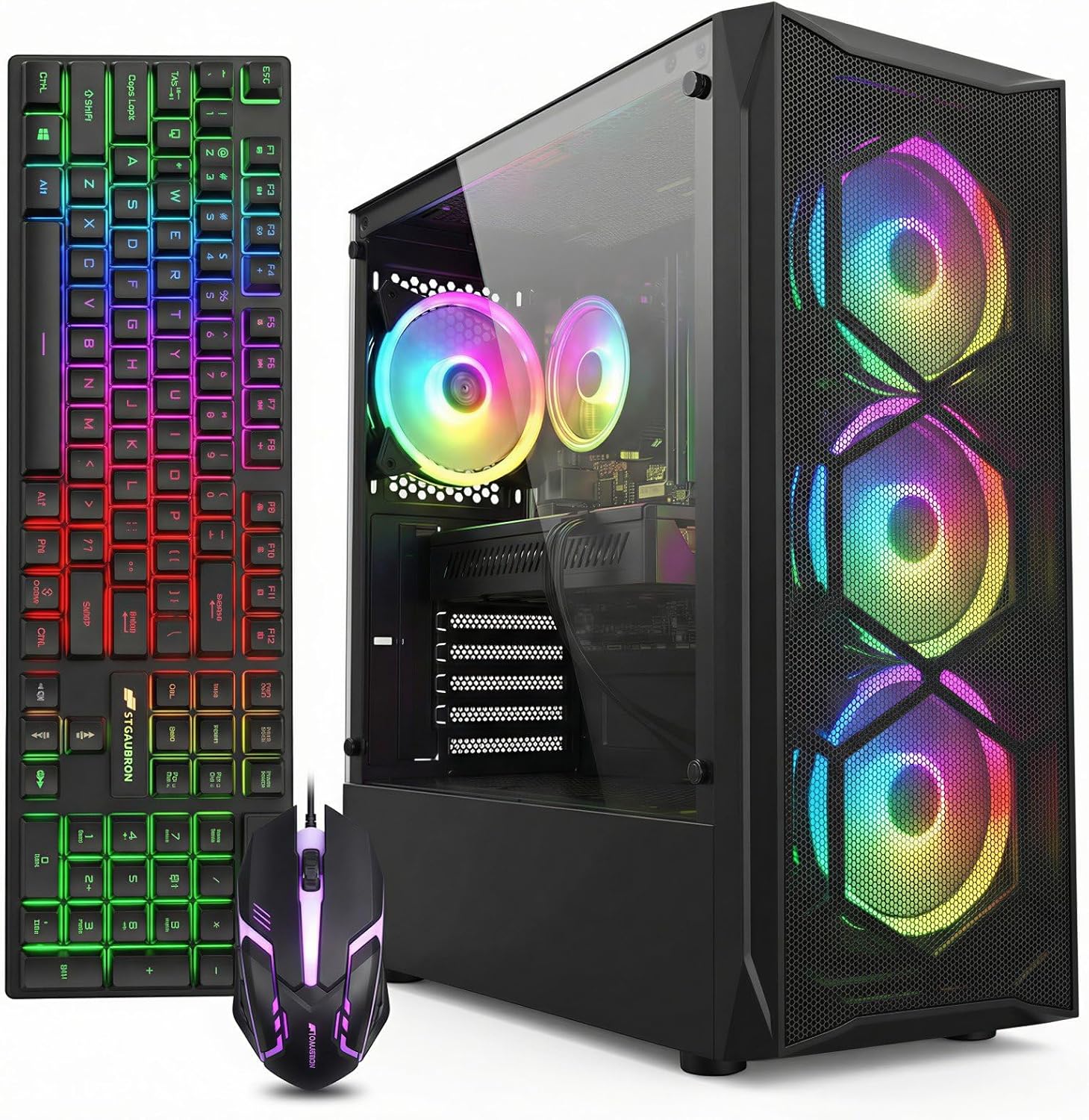
Pros
- Pairs an Intel Core i7 (up to 3.9GHz) with a Radeon RX 580 8G, a discrete GPU rather than integrated graphics
- 512GB SSD for boot and storage, faster load times than a spinning hard drive setup
- Wi-Fi 6 and Bluetooth 5.0 built in, so no separate USB adapter is needed for wireless networking
- 4x RGB case fans included for airflow, keeping CPU and GPU temperatures in check under sustained load
- Comes with 1 year of parts and labor coverage plus complimentary lifetime tech support
Cons
- 16GB of RAM is the baseline; some current games and multitasking workloads want more headroom
- Only 2x USB 3.0 ports on the rear panel, with the remaining 4 ports at the slower USB 2.0 standard
- RX 580 8G is several generations behind current GPUs, so newer titles may need lowered settings for smooth frame rates
The system runs an Intel Core i7 processor boosting up to 3.9GHz alongside a Radeon RX 580 8G discrete graphics card, backed by 16GB of memory and a 512GB solid-state drive for both the operating system and games. Windows 11 Home comes pre-installed, so the machine is ready to use out of the box.
- Intel Core i7 CPU, up to 3.9GHz
- Radeon RX 580 8GB GDDR5 graphics card
- 16GB RAM and 512GB SSD storage
The tower measures 14.96 by 7.87 by 17.52 inches, sized to fit under or beside a standard desk.
Wireless networking is handled by built-in Wi-Fi 6 and Bluetooth 5.0, removing the need for a separate USB dongle. On the physical side, the rear panel offers 2x USB 3.0 ports, 4x USB 2.0 ports, one RJ-45 Ethernet jack and one serial port, alongside HDMI, DisplayPort and DVI video outputs for connecting a monitor.
- Wi-Fi 6 and Bluetooth 5.0 built in
- 2x USB 3.0 and 4x USB 2.0 ports
- HDMI, DisplayPort and DVI video outputs
Only two of the six USB ports run at USB 3.0 speeds, so fast external drives should be prioritized for those two slots over the USB 2.0 ones.
Four RGB case fans handle airflow through the tower, aimed at keeping the CPU and GPU running cool during extended gaming or rendering sessions. The system ships with an RGB gaming mouse and keyboard included, along with 1 year of parts and labor coverage and complimentary lifetime tech support.
- 4x RGB case fans for airflow and cooling
- RGB gaming mouse and keyboard included
- 1 year parts and labor coverage plus lifetime tech support
Upgrading the GPU further down the line is possible, but the RX 580's current generation means most buyers will look at graphics card upgrades before CPU or RAM changes.
Can You Really Get a Good Gaming PC Under $500?
The short answer is yes, with realistic expectations. At this price point you are shopping in the entry-level and refurbished market, where the goal is solid 1080p performance in competitive and older titles rather than maxed-out settings in the latest blockbusters. Games such as Fortnite, League of Legends, Valorant, CS2, Rocket League, Minecraft, and GTA V run well on hardware in this range when settings are tuned sensibly.
Most budget prebuilts pair a dedicated graphics card like the Radeon RX 560 with a capable multi-core processor, 16GB of RAM, and a fast SSD. That combination is enough to deliver a genuinely enjoyable experience. What you are trading away is headroom: ray tracing, ultra textures, and high refresh rates at 1440p or 4K simply are not part of this budget. Once you accept that framing, the value on offer is impressive.
Key Specs to Understand Before You Buy
Marketing descriptions throw a lot of numbers at you. Here is what each component does and why it matters when you are trying to squeeze maximum gaming value out of a limited budget.
Graphics Card (GPU)
The GPU is the single most important part for gaming. In this price bracket you will most often see the AMD Radeon RX 560 with 4GB of video memory, and occasionally a stronger RX 580 8G or an entry card like the GeForce GT 1030. The RX 560 is a dependable 1080p performer for esports and lighter titles. The STGAubron RX 580 build stands out here because the RX 580 8G offers noticeably more muscle and extra video memory, which helps in more demanding modern games and at higher texture settings.
Be cautious with machines that advertise older or obscure GPUs. For example, the ZER-LON desktop lists a Radeon R7 350, an older part that will handle esports titles but has less longevity than an RX 560. The GeForce GT 1030 in the Dell gaming tower is an entry-level card best suited to lighter and older games rather than heavy 3D titles.
Processor (CPU)
A modern six-core CPU keeps games and background tasks running smoothly. AMD Ryzen 5 six-core chips, like the one in the suevery Ryzen 5 tower and the suevery black desktop, are a strong pairing for budget gaming because they balance single-core speed with multi-threaded capability. Intel Core i5 processors are common too and remain perfectly capable, while a Core i7 as found in the STGAubron RX 580 build adds extra threads for multitasking and streaming.
One caution with renewed or refurbished systems: an older generation CPU can bottleneck newer games. The Dell tower uses a sixth-generation Core i5, which is fine for casual and older titles but is dated compared with the newer chips in other options.
Memory (RAM)
16GB of DDR4 RAM has become the sweet spot for gaming, and thankfully nearly every machine in this range includes it. That capacity comfortably handles modern games alongside a browser, Discord, and streaming software. Avoid anything with only 8GB unless the price is exceptional, since 8GB increasingly causes stutters in newer titles.
Storage
A solid-state drive dramatically improves boot times, game loading, and overall responsiveness. Look for at least a 512GB SSD, which most options here provide. The suevery prebuilt uses an M.2 NVMe 512GB SSD, the fastest common type at this price. Some renewed systems combine a smaller SSD with a large mechanical hard drive, giving you speed for the operating system and extra room for a big game library.
Connectivity and Extras
Wi-Fi 6 and Bluetooth 5.0 are increasingly standard even on budget builds, letting you go online and connect controllers or headsets without buying adapters. RGB lighting, extra case fans, and bundled peripherals are nice touches. Several STGAubron models ship with multiple RGB fans, and the Dell renewed bundle even includes a 22-inch monitor plus an RGB keyboard and mouse, which can save money if you are starting from scratch.
Prebuilt vs. Renewed: Which Should You Choose?
Under $500 you will encounter two broad categories. New prebuilt towers from smaller brands, and renewed or refurbished systems from major manufacturers like Dell. Each has trade-offs.
- New prebuilts such as the suevery, ZER-LON, STGAubron, and RX560 office-gaming towers offer current-generation components, fresh warranties, and modern connectivity. They are assembled by lesser-known brands, so read reviews carefully to gauge build quality and support.
- Renewed systems like the Dell renewed tower deliver a trusted chassis and often bundle a monitor and peripherals. The trade-off is older internal hardware and the inherent variability of refurbished units.
If raw gaming performance is your priority, a new prebuilt with an RX 560 or RX 580 usually wins. If you want a complete desk-ready package on the tightest budget and mostly play lighter games, a renewed bundle can be the smarter buy.
Matching a PC to How You Play
The right machine depends heavily on your game library and goals. Use these profiles to narrow the field.
For Competitive Esports Players
If you mainly play Valorant, CS2, League of Legends, or Rocket League, you want stable frame rates over eye-candy. Any RX 560 build with 16GB of RAM and an SSD will serve you well. The STGAubron RX 560 build and the STGAubron RGB tower are representative of this category, pairing a dependable GPU with Wi-Fi 6 and Windows 11.
For Modern Single-Player Games
If you want to push into heavier titles with better visuals, prioritize the strongest GPU you can afford. The STGAubron Core i7 desktop with its RX 580 8G and Core i7 is the most future-friendly configuration in this roundup, giving you more headroom for demanding games.
For Mixed Work and Play
Students and home-office users who game after hours benefit from balanced machines that handle office apps, browsing, and light content creation. The RX560 office and gaming PC and the suevery black tower fit this mold, doubling as productivity workstations with enough graphics power for evening sessions.
Common Pitfalls When Buying a Budget Gaming PC
Bargain hunting comes with a few traps. Keep these points in mind so you do not overpay for weak hardware.
- Vague GPU descriptions. If a listing hides the exact graphics card model or uses unfamiliar names, research it before buying. Generic “gaming graphics” claims can mask a weak integrated chip.
- Old CPU generations. Refurbished towers sometimes use processors that are several generations behind. They work, but they age faster and may bottleneck newer games.
- Skimping on RAM or storage. Anything below 16GB of RAM or a 256GB SSD will feel cramped quickly. The extra capacity is worth prioritizing.
- Ignoring upgrade paths. A tower with a standard case, a spare RAM slot, and an accessible power supply lets you improve performance later. That flexibility extends the life of your investment.
- Chasing price alone. The cheapest option is not always the best value. A slightly higher price for a meaningfully stronger GPU often pays off in years of smoother gaming.
Should You Consider Upgrades Later?
One of the joys of a desktop over a laptop is upgradeability. Most towers in this range give you room to grow. Adding a second stick of RAM, dropping in a larger SSD, or swapping the graphics card down the line can transform a budget machine into a mid-range performer. When comparing options, favor builds with a conventional layout and a power supply that leaves some overhead for a stronger GPU in the future. This approach lets you spend under $500 now and invest incrementally as your budget allows.
How to Make Your Final Decision
Once you have narrowed the field, weigh four factors together. First, the GPU, since it dictates gaming performance more than anything else. Second, the CPU generation and core count, which determine longevity. Third, the balance of RAM and storage, which keeps everyday use smooth. Fourth, the bundle and warranty, which affect overall value. Read recent buyer reviews for real-world reliability, and check the seller’s return and support policies before you commit.
Among the machines covered here, the STGAubron RX 580 tower leans toward maximum performance, the suevery NVMe build emphasizes fast storage and a current Ryzen 5 chip, and the Dell renewed bundle offers a complete, desk-ready setup for the tightest budgets. Each serves a different kind of gamer, so let your favorite games and your upgrade plans guide the pick.
Final Thoughts
The best gaming computers under $500 prove that you do not need to spend a fortune to enjoy PC gaming. By focusing on the graphics card first, insisting on 16GB of RAM and a fast SSD, and choosing a modern CPU where possible, you can assemble a rig that handles popular titles beautifully. Set realistic expectations around resolution and settings, watch for the common pitfalls above, and pick the machine that matches the way you actually play. With a little research, your budget can stretch a lot further than the sticker price suggests.






