
 Marcus Bell
 Best Large Standing Desks: A Complete Buying Guide for 2026
Finding the best large standing desks can transform how you work, whether you run a dual-monitor setup, spread out paperwork, or simply want more room to think. A spacious sit-stand surface gives you the freedom to move throughout the day while keeping every tool within arm’s reach. But with so many sizes, frames, and price points on the market, choosing the right one is not always obvious. This guide walks you through what actually matters so you can pick a large standing desk that fits your space, your body, and your budget.
Below you will find a curated shortlist of popular large standing desks, followed by a practical breakdown of the features that separate a great desk from a frustrating one. Instead of rating each model one by one, we focus on how to choose, so you can apply the same logic no matter which desk catches your eye.

Pros
- 63" W x 23.6" D single-board desktop avoids the seams of multi-panel long tables
- Rated to support nearly 600 lb thanks to the C-shape metal frame and double beam support
- Desktop is 0.61" thick, scratch-resistant, and easy to wipe clean
- Built-in storage shelf sits 14.6" above the floor, leaving legroom while adding book and item storage
- Adjustable foot pads compensate for uneven flooring and protect against scratches
Cons
- At 63" wide, it needs a dedicated wall run and won't fit tight or narrow rooms
- Two-person workstation layout means less individual desk space than two separate desks would offer
- Metal frame with an MDF desktop is heavier to move than a lightweight particleboard desk
The desktop measures 63"W x 23.6"D x 30"H, built from a single board rather than multiple spliced panels, which keeps the writing surface flatter and the overall structure stiffer. The desktop itself is 0.61" thick, scratch-resistant, and easy to wipe down, with rounded corners at all four edges to reduce bumps.
A C-shape metal frame with a double-beam support structure carries a rated capacity of nearly 600 lb, well above what a laptop, monitor, and daily desk items require, giving headroom for shared use by two people at once. Adjustable foot pads at the base level the desk on uneven flooring and protect both the frame and the floor from scratching.

Pros
- Electric lift adjusts smoothly from 27.95 to 45.67 inches to cover sitting and standing heights
- 3 programmable memory buttons recall preferred heights instantly
- Frame is tested for 50,000 lift cycles at up to 220 lbs (100 kg) of loaded weight
- 1-inch-thick desktop resists flex under monitors and heavier equipment
- Motor runs below 45dB, quiet enough for shared home office spaces
Cons
- 60 x 28-inch top is fixed in size, so it will not suit a corner or L-shaped office layout
- Requires a nearby power outlet for the electric lift motor to function
- Cable management is built in but still needs manual routing during setup
The desk lifts electrically between 27.95 and 45.67 inches, covering both seated and standing positions on the same frame. Maximum loaded capacity is rated to 220 lbs (100 kg), supported by a 2.5mm steel base and a reinforced double-beam frame.
The desktop itself is 1 inch thick across a 60 x 28-inch surface, sized to hold multiple monitors and other equipment without visible flex. DeskShow states the lifting mechanism has been tested through 50,000 lift cycles, aimed at withstanding years of daily height changes.


Pros
- Dimensions of 37"D x 71"W x 28.3"H engineered for optimal spatial fitting
Cons
- Requires verifying placement clearance for 37"D x 71"W x 28.3"H prior to installation
- Load weight limits should not exceed 220 Pounds during active operations

Pros
- A 63 by 23.6-inch top takes two 27-inch panels side by side with room left for a keyboard
- Reinforcement struts run beneath the tabletop, cutting the sideways sway thin steel legs usually develop
- Adjustable feet compensate for uneven floorboards or a rug edge under one leg
- Offered in five finishes including grey, black, white, rustic brown and a two-tone brown and black
- Ships in a 46.5 by 26.2 by 3-inch flat carton that fits across a hatchback back seat
Cons
- No load capacity is published, so heavy equipment loading is guesswork rather than a stated figure
- Particleboard core chips at the drilled edges if fixings are overtightened during the build
- Fixed 29.5-inch height with no sit-stand travel, only levelling feet
The top runs 63 inches wide by 23.6 inches deep at a 29.5-inch height. Because the frame uses open steel tube legs with no drawer box or modesty panel, the whole underside is clear, which is why the legroom claim holds up in practice.
- Two 27-inch panels fit across the width with space for a keyboard and mouse in front
- 23.6 inches of depth is enough for a laptop plus an external screen, but tight for a monitor on a bulky stand
- Nothing under the surface blocks a chair, so a wide criss-cross seat can pull right in
Multiple lengths exist in the same family, so if 63 inches overruns your wall, a shorter version of the same design covers the gap.

Pros
- 71 by 31.5 inch top takes two 27-inch monitors on arms plus a laptop dock without crowding
- Height travels from 28.3 to 46.5 inches, bracketing seated work for shorter users and standing work for tall ones
- Heavy-duty steel frame is quoted at a 176 lb (80 kg) load
- Three one-touch memory positions on the LED keypad, enough for sit, stand and a second user
- CARB Phase 2 certified low-VOC top, which matters in a closed home office
Cons
- Anti-collision reacts on contact rather than sensing ahead, so an item under the top can still be nudged before the motion stops
- The one-piece 71-inch top is heavy and awkward, so assembly realistically needs two people
- 176 lb of frame capacity sits below the 200 lb-plus ceiling of some four-leg standing frames
The surface measures 71 inches wide by 31.5 inches deep, which is enough for two 27-inch monitors on arms, a laptop dock and a full keyboard without anything overhanging the front edge.
- Height travel runs from 28.3 to 46.5 inches, covering seated work for shorter users and standing work for taller ones.
- The steel frame is quoted at a 176 lb (80 kg) load, so a monitor arm, a hung tower and a laptop still leave margin.
- The top carries CARB Phase 2 certification for low formaldehyde emission, which is relevant in a small closed room.
- At 71 inches, measure your wall run first — this is wider than a typical alcove or bay.
Cable slack is what people forget. Allow enough monitor and power cable length to cover the full 18 inches of vertical travel.

Pros
- Dimensions of 27"D x 70"W x 45"H engineered for optimal spatial fitting
Cons
- Requires verifying placement clearance for 27"D x 70"W x 45"H prior to installation

Pros
- Spacious 55-inch width accommodates dual monitors plus keyboard and accessories
- Supports up to 149 kg, well above typical desk equipment loads
- Sturdy Z-shaped metal legs provide stable base without wobbling
- Simple assembly requires just 15 minutes with included tools
- Smooth particleboard top resists scratches from daily use
Cons
- Fixed height at 29.5 inches may feel low for users over 6 feet tall
- Desktop is not height-adjustable for sitting or standing work positions
The extra-large 55-inch desktop provides ample workspace for modern multi-monitor setups, office supplies, and decorative elements without requiring constant reorganization. The smooth particleboard surface resists scratches from keyboard and mouse movement while maintaining a professional appearance suitable for both home offices and professional environments.
- Width of 55 inches accommodates dual 27-inch monitors side by side with keyboard between them
- Depth of 23.6 inches allows monitor stands and pull-forward peripherals without excessive reach required
- Height of 29.5 inches aligns with standard office desk heights for most users between five feet four inches and six feet
- Smooth finish top prevents snagging cables or damaging monitor bases during repositioning
- Neutral gray color coordinates with most office furniture and lighting fixtures without clashing
The spacious layout eliminates cramped feeling common with compact desks, enabling comfortable positioning of multiple monitors and peripherals for enhanced productivity and reduced neck strain from excessive head turning.

Pros
- 63 by 37 in top in 1 in thick FSC-certified wood, deep enough to seat a monitor at proper arm's length
- 220 lb load capacity on an alloy steel frame with an integrated dual crossbeam
- Travels from 28.3 in to 46.5 in at under 50 dB, with 3 memory presets
- Built-in 18W USB-C port supporting PD 3.0 fast charging
- Seven-step assembly with unified downward screws, so the desk never has to be flipped mid-build
Cons
- The three-piece desktop leaves two visible seams across the working surface
- Desktop and frame ship in two separate packages that can arrive on different days
- 220 lb capacity sits below the 300 lb-plus that some heavy dual-motor frames handle
The surface measures 63 by 37 in on a 1 in thick FSC-certified wood top, and the depth is the number worth noticing.
- At 37 in deep it seats a monitor at proper arm's length plus a keyboard and notes, where a typical 24 in deep desk forces the screen too close
- Load capacity is 220 lb, covering two or three monitors, a full tower and a printer together
- Height travels from 28.3 in to 46.5 in, spanning seated through to standing for most adults
- The scratch-resistant top accepts monitor arm clamps
An integrated dual crossbeam ties the alloy steel legs together, which is what keeps a top this wide from swaying at full extension. Measure the room first, because 63 in is a lot of wall and the extra depth pushes a chair further into the floor space.
The proportions point at a particular kind of user rather than a general one.
- Multi-screen workers, since the 37 in depth gives ultrawide and triple-monitor arrays room to sit back far enough to be comfortable
- Gamers and builders running a full tower, where 220 lb of capacity and the reinforced frame carry the load at any height
- Shared households, thanks to 3 memory presets that recall a saved height at a touch
The motor covers the full travel at under 50 dB, quiet enough to adjust during a call. An 18W USB-C port with PD 3.0 is built into the control panel for phone charging. Anyone working in a compact room or a corner nook will find this footprint too large; a 48 in top suits those spaces far better.
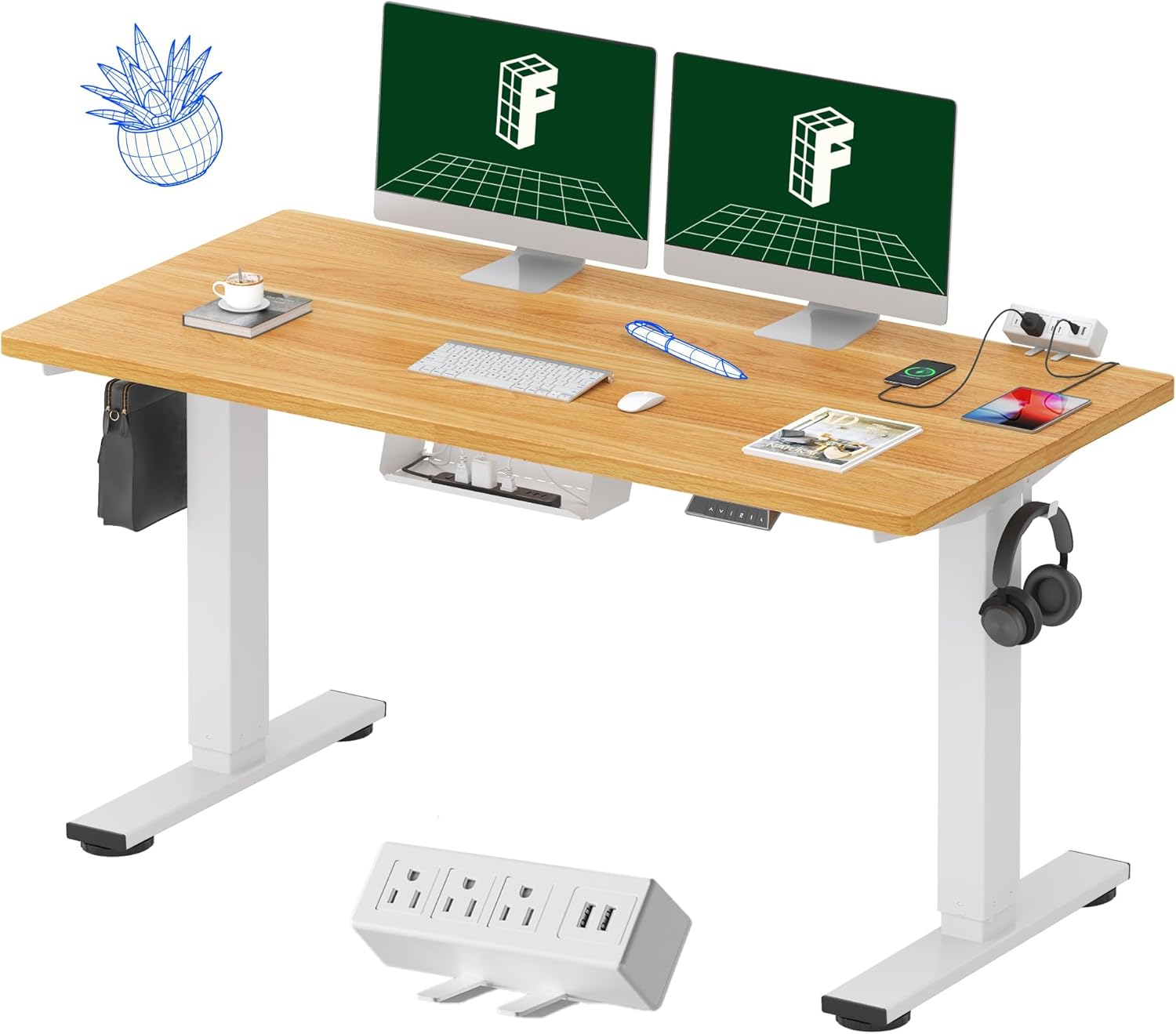
Pros
- Motorized height adjustment runs from 28.1" to 45.7", covering both seated and standing positions
- Capacity is rated to 176 pounds via the industrial-grade steel frame, enough for a dual-monitor workstation
- 4 programmable memory presets on the digital controller recall favorite heights at the touch of a button
- Motor runs at under 50 dB, quiet enough not to disrupt calls while adjusting height
- Desktop includes 3 power outlets and 2 USB charging ports built into a clip-on strip for cable-free charging
Cons
- Ships in two separate packages, and may arrive at different times since they can be shipped separately
- Listed capacity figures vary slightly across the product description, so exact load limits should be confirmed before loading heavy equipment
- Desktop dimensions can vary by up to 1 inch due to the manual measurement process used in production
The whole-piece desktop measures 55 inches wide by 28 inches deep, with the frame adjusting in height from 28.1 inches to 45.7 inches to move between seated and standing positions. The industrial-grade steel frame pairs with a solid maple-finish tabletop for stability at both height extremes.
- Desktop: 55"W x 28"D, height range 28.1"-45.7"
- Steel frame rated to hold up to 176 pounds
- Motor operates at under 50 dB
The listed capacity figures vary slightly between the feature bullets, so heavier multi-monitor or dual-PC setups should stay toward the lower end of the stated range rather than pushing close to the maximum.
Why Choose a Large Standing Desk?
A large standing desk is more than a bigger tabletop. It is a workspace built for productivity, health, and flexibility. When you have room for two monitors, a laptop, a notebook, and a coffee mug all at once, you spend less time shuffling clutter and more time doing focused work. Add height adjustment to that generous surface and you get a station that supports both sitting and standing, which many people find helps with energy, posture, and comfort during long sessions.
Large desks also suit shared or multi-purpose rooms. A wide model like the OSCHF 63-Inch Long Desk can serve as a two-person workstation, while a deep electric option such as the VIVO 83-Inch Standing Desk gives serious multitaskers all the surface area they need. The key is matching the desk footprint to your room and your workflow rather than simply buying the biggest slab you can find.
Key Factors to Consider Before You Buy
The best large standing desks share a handful of core qualities. Keep these in mind as you compare options, and you will avoid the most common regrets.
1. Size and Surface Area
Large desks typically start around 55 inches wide and stretch to 83 inches or more. Width determines how many devices you can line up, while depth (usually 28 to 37 inches) controls how far you can push monitors back for comfortable viewing. If you use a dual-monitor arm, a deeper top like the FEZIBO 71×37 Standing Desk or the FEZIBO 63×37 Desk gives you extra breathing room. Before ordering, measure your space and mark the footprint on the floor with tape so you know exactly how the desk will fit.
2. Electric vs. Fixed Height
Most large standing desks fall into two camps. Electric models use motors to raise and lower the surface at the push of a button, making it effortless to switch between sitting and standing. Fixed desks, like the roomy Huuger 63-Inch Computer Desk, cost far less and are a solid choice if you mainly want space rather than adjustability. If health and posture are priorities, an electric sit-stand desk is worth the investment because it makes movement a habit instead of a chore.
3. Motor and Frame Design
For electric desks, the frame is the heart of the product. Single-motor desks are cheaper but slower and less stable at height, while dual-motor and dual-beam frames offer smoother lifts and better load balance. Options such as the VIVO Dual-Motor Desk and the dual-beam FEZIBO 71×37 are designed to reduce wobble on wide tops, which matters a lot when the surface is long and carrying heavy gear.
4. Weight Capacity
A big desk often means big equipment: multiple monitors, a desktop tower, speakers, and more. Check the rated load before buying. Many quality large desks handle 176 to 220 pounds, like the Monomi 71-Inch Standing Desk at 176 pounds and the VIVO 83-Inch Desk at 220 pounds. A higher capacity also signals a sturdier frame overall, so it is a useful proxy for build quality even if you never max it out.
5. Height Range and Memory Presets
The right height range ensures the desk works for your body whether you are seated or standing tall. Programmable memory presets, found on desks like the 60×28 Electric Standing Desk and the farexon 71×28 Sit-Stand Desk, let you save your favorite positions and recall them instantly. If more than one person shares the desk, multiple presets are a genuine convenience rather than a gimmick.
6. Stability at Full Height
Wobble is the number one complaint with poorly built standing desks, and it gets worse as the surface gets wider. Look for double-beam frames, crossbars, and thicker tabletops. A one-inch top, like those on the FEZIBO 63×37 and the Electric Standing Desk 60×28, resists flex and keeps typing steady when you are standing.
Comparing Materials and Build Quality
The materials in a large standing desk affect both looks and longevity. Tabletops are usually engineered wood with a laminate finish, which balances durability and cost. Thicker tops feel more premium and hold up better under heavy loads. Three-piece tops, common on wide FEZIBO models, ship in smaller boxes and are easier to carry upstairs, though they require a bit more assembly.
Frames are almost always steel. The gauge, welding quality, and leg design determine how solid the desk feels. Premium picks such as the Vari ComfortEdge 72×30 emphasize refined engineering and tool-free assembly, which appeals to buyers who want a polished result without the hassle. Budget and mid-range desks can still be excellent, but you should expect a little more effort during setup.
Cable Management and Everyday Convenience
On a large desk with several devices, cables can quickly become a tangled mess. Built-in cable management trays and channels keep cords tidy and safe, especially on a moving surface where loose wires could snag. Models like the FEZIBO 71×37 and the farexon Sit-Stand Desk include cable management as a standard feature. Small extras such as an integrated mouse pad, hooks for headphones, or a clamp power strip like the one on the FLEXISPOT EN2 add real day-to-day value.
Matching the Desk to Your Workflow
The best large standing desk for you depends on how you work. Use these quick profiles to narrow your search.
- The dual-monitor power user: Prioritize depth and weight capacity. A deep, sturdy electric desk like the Monomi 71-Inch keeps big screens at a comfortable distance.
- The shared home office: Look for a wide surface and multiple memory presets so two people can dial in their own heights, as with the OSCHF 63-Inch Two-Person Desk.
- The budget-conscious buyer: A spacious fixed desk such as the Huuger 63-Inch Desk delivers room to spread out without the electric price tag.
- The premium seeker: If refinement and easy setup matter most, a design-forward option like the Vari ComfortEdge is built to impress.
- The compact-but-wide setup: A slimmer depth model such as the FLEXISPOT EN2 gives you length without eating up too much floor space.
Setting Up Your Large Standing Desk for Health
Buying a great desk is only half the battle. To get the ergonomic benefits, set your standing height so your elbows sit at roughly 90 degrees and your monitor tops are near eye level. Alternate between sitting and standing every 30 to 60 minutes rather than standing all day, which can be just as tiring as sitting too long. An anti-fatigue mat under your feet makes standing sessions far more comfortable, and a good chair keeps the sitting periods healthy too.
Because a large surface encourages you to keep everything spread out, take a minute to arrange your most-used items within easy reach. Center your primary monitor, keep the keyboard and mouse close, and reserve the far edges for reference materials. This simple habit reduces reaching and twisting, which protects your shoulders and back over the long run.
Budget Expectations for Large Standing Desks
Prices for large standing desks span a wide range. Fixed desks and entry-level electric frames can be very affordable, while premium branded models climb toward and beyond the thousand-dollar mark. In general, you are paying for motor quality, frame stability, tabletop thickness, warranty, and finish. A mid-range electric desk usually hits the sweet spot for most home offices, offering dual-motor smoothness and solid capacity without a luxury price. Decide which features you truly need, and avoid overpaying for extras you will rarely use.
Common Mistakes to Avoid
Even experienced buyers slip up. Watch out for these pitfalls when shopping for the best large standing desks:
- Ignoring room dimensions: A desk that looks perfect online can overwhelm a small office. Always measure first.
- Overlooking depth: Width gets the attention, but shallow tops force monitors too close to your eyes.
- Skipping the weight rating: Loading heavy gear onto an under-rated frame invites wobble and premature wear.
- Forgetting assembly effort: Larger desks take longer to build. Factor in time, and grab a helper for the heavy top.
- Chasing size alone: The biggest desk is not automatically the best. Balance surface area with stability and your actual needs.
Final Thoughts
The best large standing desks combine generous surface area with a stable frame, smooth height adjustment, and thoughtful features like cable management and memory presets. Rather than fixating on a single model, decide which factors matter most for your space and workflow, then choose the desk that checks those boxes. Whether you lean toward a budget-friendly fixed desk, a versatile mid-range electric model, or a premium powerhouse, a well-chosen large standing desk will pay you back in comfort and productivity every single day.
Take your time, measure carefully, and match the features to how you actually work. With the guidance above, you are ready to invest in a large standing desk that keeps you moving, organized, and comfortable for years to come.








