 Daniel Okafor
A flat, level surface keeps your keyboard steady, your mouse tracking true, and your monitor at eye height. That matters more than RGB when your reflexes are on the line. The best flat desks under $200 for computer gaming give you a wide, wobble-free tabletop without draining your build budget. In this guide, you get 10 tested picks ranked by build quality, work surface, and value. You will see who each desk fits, where it falls short, and which specs actually change your play. Prices here run to just under $200, so a genuine upgrade is closer than you think.
Quick answer: For most players in 2026, our top pick among the best flat desks under $200 for computer gaming is the BON AUGURE 54″ Computer Desk — our #1 rated choice. See the full ranked comparison, alternatives and buying advice below.
Pros
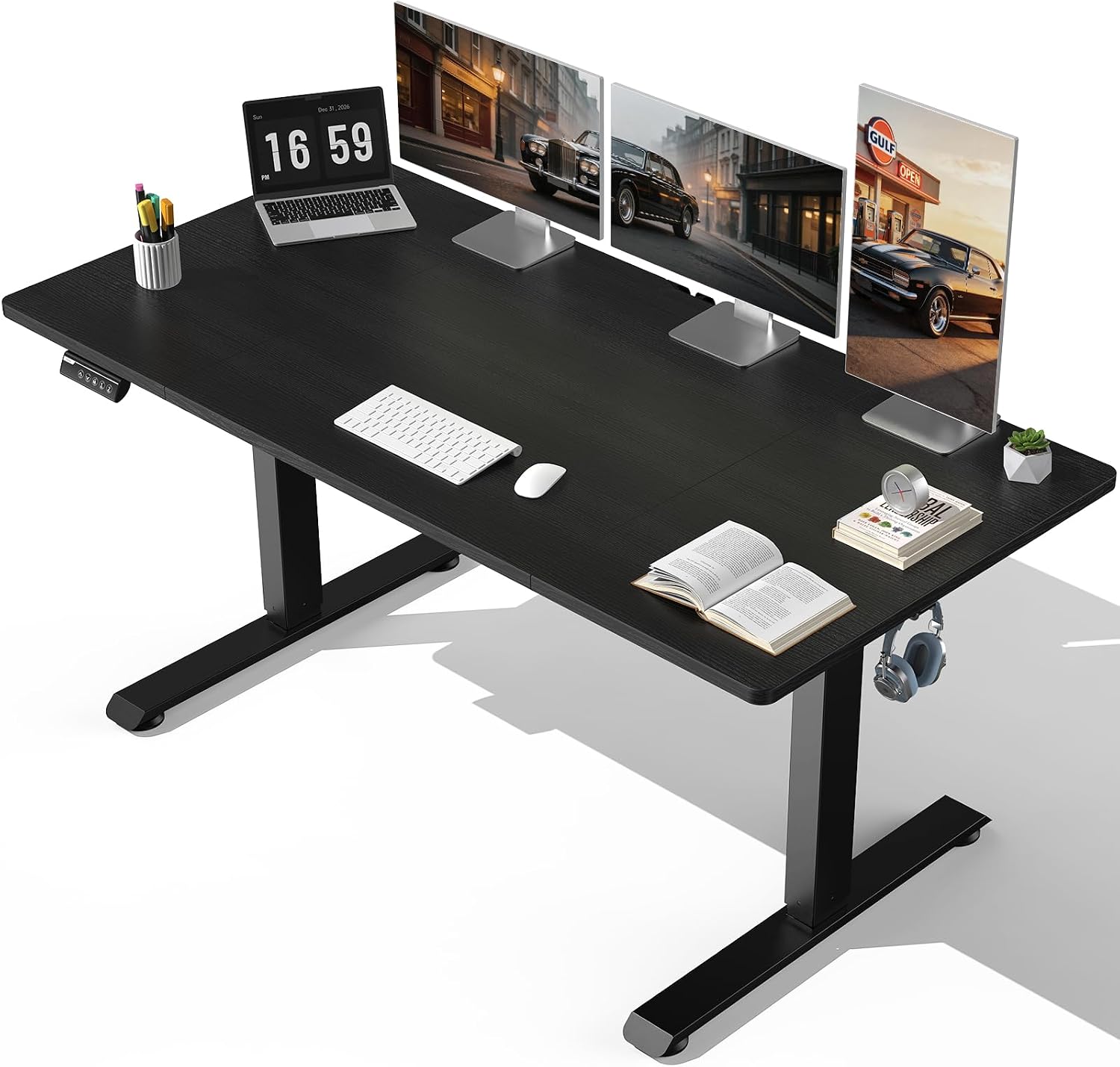
- Generous 63x28 inch desktop surface accommodates multi-monitor setups
- Motorized height adjustment transitions quietly between sit and stand modes
- Programmable memory settings save preferred standing heights for quick recall
- Heavy-duty steel T-legs provide physical stability under full load
- Integrated cable tray keeps power cords organized underneath desk
Cons
- Assembling the large steel frame requires space and two-person effort
- Motorized lift requires an accessible wall power socket nearby for operation

Pros
- 54.21 x 23.62 in top with a 0.98 in thick surface braced by a metal support tube underneath
- X-shaped metal legs, a rear support frame and an under-top reinforcement bar to resist racking
- Stated to hold up to 250 lb of equipment
- Adjustable feet correct uneven floors, and a tip-over restraint device is supplied
- 30.11 in height with an open underside that clears the arms of most task chairs
Cons
- No drawers or shelves, so storage means adding a separate pedestal or cabinet
- A single cable cover hole rather than a full-length cable tray
- At 36.92 lb built, it is awkward for one person to reposition without clearing the top first
Working size is 54.21 in wide, 23.62 in deep and 30.11 in tall, with a 0.98 in thick top and a stated 250 lb capacity.
- Wide enough for two 24-inch monitors, or a single ultrawide with room for notes
- 23.62 in depth places a 27-inch screen at a sensible viewing distance
- 250 lb covers a tower, dual screens, a printer and books together
- Assembled weight is 36.92 lb, made up of MDF and a black powder-coated steel frame
The thickness figure matters if you plan to clamp a monitor arm: at 0.98 in the edge sits inside the clamp range of nearly every desk mount sold, which is not always true of thinner flat-pack tops.

Pros
- 60-inch desktop with a 360 lb capacity handles dual monitors plus a printer or shelf items
- Solid metal frame construction supports daily heavy workloads rather than light home-office use only
- Adjustable screw-in feet level the desk on uneven flooring
- Backed by a 12-month warranty and a 30-day return window
Cons
- MDF desktop surface is less resistant to scratches and moisture than solid wood or laminate
- Rustic brown oak finish is the only color offered in this listing
The desktop measures 60"W x 23.6"D x 29.7"H, giving a long, wide surface suited to dual monitors, a laptop dock, and papers spread out side by side, though the 23.6-inch depth is shallower than some executive desks built for a full monitor-arm setup. Weight capacity is rated to 360 lbs, supported by a solid metal frame beneath the MDF desktop.
That capacity comfortably covers heavier setups like multiple monitors, a desktop tower, and shelving items placed directly on the surface, above the capacity offered by many lighter particleboard desks in the same size range.

Pros
- Designed with Industrial Computer Desk with Modern Style This rustic brown computer for reliable daily operation
- Designed with Heavy Duty Durable Office Desk Built with a 1.57 thick for reliable daily operation
- Designed with 55 Inch Large Computer Desk with Spacious Desktop This 55 for reliable daily operation
- Dimensions measure 55"D x 23.62"W x 29.52"H for spatial allocation
Cons
- Requires measuring doorways and room clearance for HSH Rustic Home Of prior to placement

Pros
- 60"W x 23.6"D surface with a 29.7" height gives ample room for a monitor setup plus documents
- 360-pound weight capacity is backed by a heavy-duty steel frame with additional metal leg supports
- Additional metal leg supports free up legroom, suited to taller users needing more clearance
- Numbered parts and included tools are meant to simplify the assembly process
- Backed by a 12-month quality warranty plus a 30-day return window
Cons
- Metal frame with a wood-look top, not solid hardwood, means the surface is a laminate finish
- 60-inch width needs a dedicated wall run, ruling out tight corner placements
- Single rustic oak finish offered, with no alternate color option

Pros
- 300 lb weight capacity metal frame handles dual towers and monitors
- 55" x 21.6" desktop, large enough for two full computer setups side by side
- Two open storage shelves plus a top hutch keep consoles and speakers off the desktop
- RGB LED strip syncs to music with an adjustable-sensitivity mic, over 60,000 colours via app
- Built-in CPU holder and monitor stand free up desk surface for keyboard and mouse
Cons
- 78.8" width needs a dedicated wall run, not suited to small bedrooms
- LED strip depends on a companion app and Bluetooth pairing, no physical remote mentioned
- Metal frame with hutch and shelves means a longer bolt-together assembly than a basic table
This desk measures 78.8"W x 21.6"D x 60"H, giving it enough footprint for a triple-monitor arrangement or two workstations sharing the surface. The metal frame is rated to hold 300 pounds, which covers a full tower PC, two monitors on stands, and typical desktop accessories without flexing.
- Desktop area: 55"L x 21.6"W for keyboard, mouse and paperwork
- Two lower storage shelves for CPU towers, consoles or speakers
- Top hutch shelf for books, figures or plants
- Built-in monitor stand raises screens above desk clutter
The dimensions suit a dedicated office or gaming room rather than a shared or compact bedroom corner.
This desk fits gamers and remote workers who want a single station that also stores hardware. The 300 lb capacity and dual shelving make it practical for anyone running two PCs, streaming equipment, or console peripherals that would otherwise clutter the floor.
- Suited to dedicated gaming rooms or home offices with wall space for a 78.8" run
- Good for users who want LED ambiance synced to games or music
- Storage shelves help households consolidating a PC and console setup on one desk
It is less practical for small apartments or shared bedrooms where a 78.8" wide footprint will not fit comfortably against available wall space.

Pros
- Spacious and Ergonomic Desk 71.5 inch Large gaming table with monitor
- Gamer Desk with Power Outlet l shaped desk is equipped with 4
- AC power outlet 120V 12A
- USB port 5V 2.2A
- Computer Desk with LED Light This big black desk has an RGB light strip
Cons
- Requires checking room layout clearance for 19.7"D x 71.5"W x 35.8"H dimensions
- Requires periodic vacuuming and fabric care for Stainless Steel

Pros
- 23.6-inch deep desktop across an L-shaped 59"D x 61"H footprint leaves room for dual monitors
- 5-tier open shelving plus a glass display cabinet add vertical storage beyond the desktop surface
- 2 fabric drawers and a multifunctional storage bag keep small items off the work surface
- Built-in power strip with 3 outlets and 2 USB ports charges gear without a floor extension cord
- RGB LED strip with app remote control offers over 60,000 colors and 29 flashing modes
Cons
- 61-inch-tall bookshelf section needs wall clearance, so it will not fit under a sloped ceiling nook
- Fabric drawers, rather than solid wood, mean heavier items are better kept on the open shelves
- Multi-piece assembly across the metal frame, shelving, and cabinet takes longer than a single-slab desk


Cons
- Weight capacity not specified for heavy-duty scenarios
- Assembly or installation time depends on room setup
What a flat gaming desk actually is
A flat desk is a single, level rectangular surface with no built-in monitor riser or tiered shelf. The whole top sits at one height. That simplicity is a feature, not a limitation.
You gain freedom to place your monitor, arm, and peripherals exactly where your setup needs them. Curved or hutch-heavy desks lock you into their layout. A flat top adapts to a single ultrawide or a triple-monitor stack with equal ease.
These desks also tend to cost less per square inch. You pay for a sturdy frame and a clean surface, not molded plastic accessories you may never use.
Flat versus L-shaped and standing options
L-shaped desks add a return for a second monitor or console. Standing desks add height motors. Both raise the price and cut into your under-$200 headroom.
If corner space or sit-to-stand is your priority, one option still qualifies here. The Veken Standing Desk is a 63″ x 28″ electric height-adjustable model, rated 4.9 across 79 reviews. It is the outlier that proves a flat surface and a motorized frame can coexist under budget.
How to choose the best flat desks under $200 for computer gaming
Not every cheap desk holds up to a full tower and a heavy monitor arm. Focus on the specs that decide comfort and stability, then match size to your room.
Surface size and depth
Depth matters as much as width for gaming. Aim for at least 24 inches of depth so your monitor sits an arm’s length away. That distance eases eye strain during long sessions.
For width, 47 to 55 inches suits a single-monitor setup with room for a mousepad sweep. Go 60 inches or wider for dual monitors, a stream mic, and speakers. The IBF 60″ and HSH 55″ industrial models both hit that comfortable middle ground.
Frame stability and weight capacity
Wobble ruins aim. Look for a steel frame with cross-bars or a full A-frame, plus adjustable leveling feet for uneven floors. Metal legs beat all-particleboard construction every time.
Check the stated weight rating against your gear. A mid-tower, a 27-inch monitor, and dual speakers rarely top 60 pounds. Most desks here clear that easily, but a full tower on the desktop demands a rated top, not just rated legs.
Surface material and finish
Laminated MDF or engineered wood resists scratches and cleans up fast. A matte finish hides fingerprints and cuts glare from your monitor and overhead lights. Carbon-fiber-textured tops, like the one on the Bestier, also grip mouse feet well.
Rustic wood-grain finishes look warmer in a bedroom setup. The LVB 60″ Desk pairs a rustic oak top with a metal frame and earns 4.7 stars from 1,114 reviewers. It is a strong pick if you want your rig to blend into a living space.
Best flat gaming desks by use case
Your ideal desk depends on room size, monitor count, and how much storage you want within reach. Here is how the standouts sort themselves.
Best overall value
The BON AUGURE 54″ Desk earns the top spot on trust and balance. With a 4.8 rating across 1,308 reviews, it has the deepest track record here. The industrial wood-and-metal build stays flat and firm under a full peripheral load.
It is not for you if you crave built-in RGB or drawers. This is a clean, honest workstation. That restraint is exactly why it fits so many rigs.
Best budget pick
The AODK L-Shaped Desk is the cheapest way in. It adds a hutch, 4 drawers, LED light, and power outlets in gray oak. The corner layout suits a tight bedroom.
The trade-off is a busier surface and lighter build than the flagship picks. If you want maximum accessories per dollar, though, nothing else here comes close at this price.
Best for two people or wide setups
The OSCHF 71″ Desk stretches to a full 71 inches with a storage shelf. It hits the ceiling of this list, but the space is real. Two players can sit side by side, or one player can run a triple-monitor wall.
Its long span needs a stable center support, which this frame provides. Skip it only if your room can not spare six feet of wall.
Best with lighting and storage
The SEDETA 78.8″ Gaming Desk combines a huge surface, a hutch, storage shelves, and LED lights. The monitor stand lifts your screen while the flat main deck stays open for keyboard and mouse. It carries a 4.7 rating from 1,043 reviews.
This is the showpiece choice for streamers who want gear on display. It is not for minimalists who dislike shelving above the desk.
Best L-shaped flat surface
The Bestier 71.5″ L-Shaped Desk brings a carbon-fiber desktop, power outlets, and 20 static plus 22 dynamic RGB modes. The corner design gives you a flat main zone and a return for a laptop or console. Cup and headset hooks fold away when unused.
It suits gamers who split time between a PC and a console. If you prefer one uninterrupted rectangle, a straight desk serves you better.
A practical buying guide: sizes, specs, and compatibility
Measure your space before you fall for a spec sheet. Leave 30 inches of clearance behind your chair so you can roll back freely. Then confirm the desk depth clears your monitor arm’s C-clamp.
Match the desk to your monitor plan
A single 27-inch monitor lives happily on a 47-inch top. A 34-inch ultrawide wants 55 inches or more for balanced margins. Planning a multi-screen wall changes everything, and a wider frame becomes non-negotiable.
If you run three panels or a monitor-plus-side-display, prioritize width and edge strength. Our roundup of the best computer gaming desks for multiple monitors digs deeper into span and mounting for those builds.
Cable management and clamp edges
Look for a rear edge free of a back panel so a monitor arm can clamp cleanly. Grommets or a wire tray keep power bricks and USB runs tidy. A cluttered floor is a tripping hazard during a heated match.
Desks with built-in outlets, like the Bestier and AODK, cut cord runs to the wall. That is a small feature with a daily payoff.
Where these desks fit your budget
Everything here lands under $200, which is a sweet spot for a lasting upgrade. If you want to weigh more options in this exact range, our guide to the best gaming desks under $200 compares frames and warranties side by side. For a flat-surface deep dive, the companion piece on the best flat desks for computer gaming covers layout and ergonomics in more detail.
Common mistakes to avoid
Buyers often chase looks and regret it within a week. A few habits keep you from that trap.
- Ignoring depth. A shallow desk forces your monitor too close and cramps your keyboard hand.
- Overpaying for RGB. Lights fade behind your screen glow. Spend on the frame first.
- Skipping the weight rating. A desktop tower needs a top rated for the load, not just sturdy legs.
- Forgetting the chair. Desk height near 29 to 30 inches suits most gaming chairs, so confirm your armrests clear the apron.
Also plan your dual-purpose use honestly. If the desk doubles as a homework or work-from-home station, read our take on the best computer desks for gaming and work before you commit. A desk that only games well can feel cramped by day.
Frequently asked questions
Can a desk under $200 hold a full tower PC?
Yes, most flat desks here handle a floor-standing or desktop tower comfortably. Place a heavy full tower on the floor or a rated shelf when possible. The BON AUGURE and IBF frames both stay stable under typical gaming loads.
What size flat desk is best for gaming?
A 47 to 55 inch width with at least 24 inches of depth suits single-monitor play. Move up to 60 inches or wider for dual monitors, a mic, and speakers. The OSCHF 71″ and SEDETA 78.8″ cover the largest setups on this list.
Are flat desks better than L-shaped desks for gaming?
Flat desks give you one clean surface and usually cost less. L-shaped desks add a return for a second monitor or console at a corner. Choose based on your room shape and whether you split time between PC and console gaming.
Do I need built-in LED lights or outlets?
Neither is essential, but outlets genuinely reduce cable clutter. LED lighting is mostly cosmetic since your monitor dominates the glow. Models like the AODK and Bestier include both if you want the convenience.
Is a height-adjustable desk worth it under $200?
It can be, if sitting for hours strains your back. The Veken electric standing desk fits the budget with a strong 4.9 rating. Just accept a slightly higher price for the motor and a smaller accessory count.
The bottom line
You do not need to overspend for a stable, spacious gaming surface. The BON AUGURE 54″ desk wins on proven reliability, while the AODK covers the tightest budgets and the OSCHF 71″ serves wide, two-person setups. Match depth and width to your monitor plan first, then let features like outlets or RGB break the tie. Pick the surface that fits your room in 2026, and your aim, comfort, and wallet all come out ahead.