
 Owen Bradley
 A solid-state drive is the single upgrade that makes a computer feel new again, yet buying one has become surprisingly confusing. The spec sheets throw around interface generations, cache types, endurance ratings and sequential speeds that reach numbers most people will never actually use, and the fastest drive on the shelf is rarely the smartest purchase. What matters is matching the drive to how you use it, so you pay for the speed and capacity that improve your daily experience rather than headline figures that look good in a benchmark. This buying guide untangles the specifications that count, explains what they mean in practice, and offers capacity advice for gaming rigs and creative libraries so you can choose storage with confidence in 2026.
Interface and Form Factor Basics
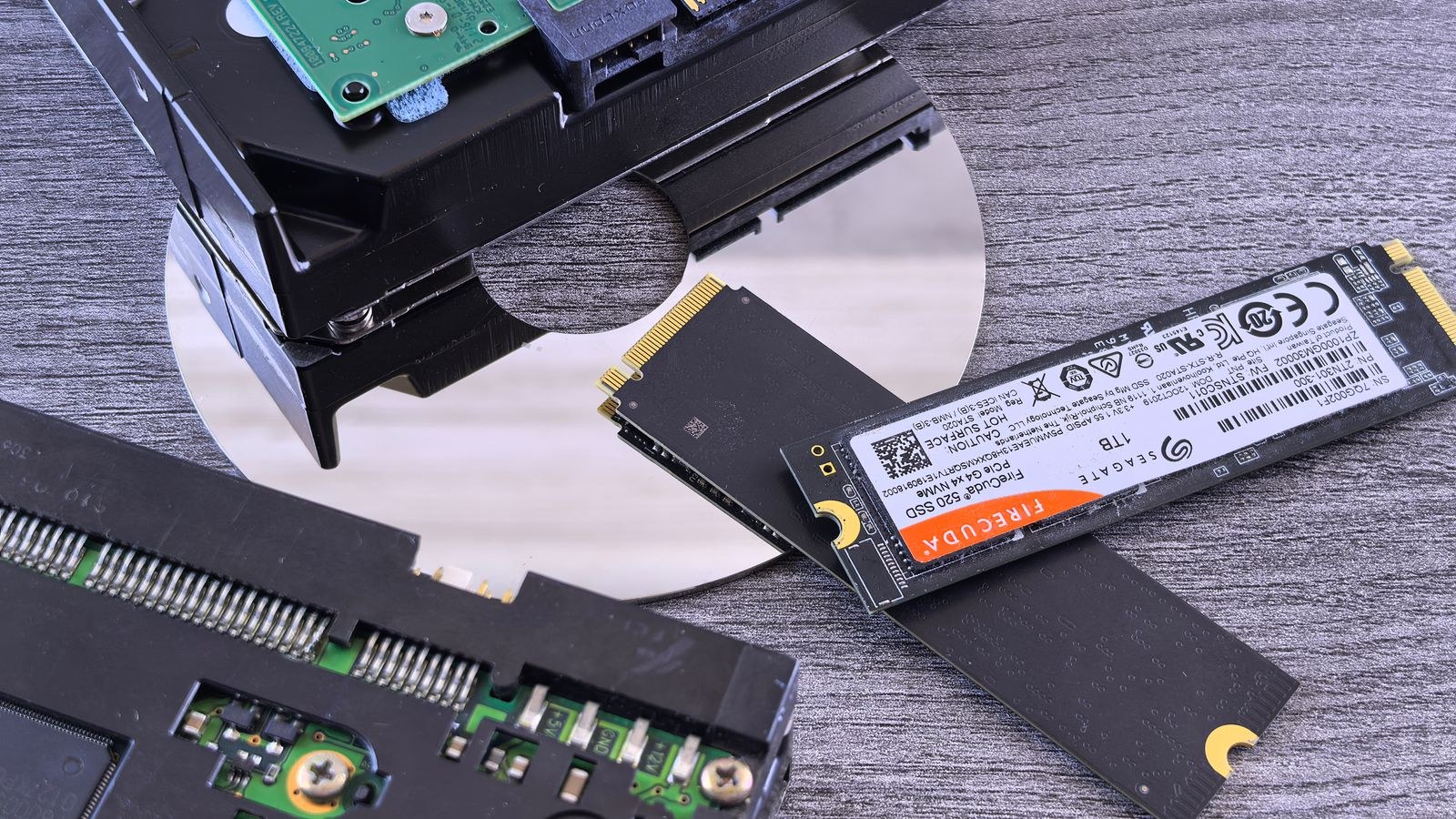
The biggest divide in solid-state storage is the interface, because it sets the ceiling for how fast the drive can go. Older drives connect over the same interface as a hard drive and are limited to a few hundred megabytes per second, while modern drives plug directly into the motherboard and communicate over a much faster connection that unlocks several thousand megabytes per second. That newer type is the one to prioritize for a system drive, and browsing the best NVMe SSDs shows how much the market has standardized around it. The physical form factor also differs: the fast modern drives are usually a small stick that mounts flat on the board, while older drives are a small enclosed rectangle that connects with cables.
Check your motherboard before buying, because it determines both the form factor and the interface generation your slot supports. A drive faster than your slot will still work, but it runs at the slot’s ceiling, so paying for a top-tier generation on an older board wastes money. Matching the drive to the slot is the first step in a sensible purchase.
Understanding NVMe Generations
The fast modern interface comes in generations, each roughly doubling the peak sequential speed of the one before. The newest generations reach enormous numbers that look impressive on a box, but there is an important reality check: most everyday tasks, including loading games and opening applications, depend far more on how the drive handles many small scattered reads than on peak sequential throughput. Those small operations improve much more modestly from one generation to the next. As a result, a mid-generation drive often feels nearly identical to a top-generation drive in normal use while costing considerably less.
The generations that push the highest speeds earn their premium mainly in professional workloads that move enormous files continuously, such as high-resolution video editing. If that is your work, the fastest tier is worth it; if you game and browse and run everyday software, a well-priced mid-tier drive delivers the vast majority of the felt benefit. For gaming specifically, the best SSDs for gaming focus on the balance of quick load times and value rather than raw peak figures.
Why DRAM Cache Matters
One of the most overlooked specifications is whether a drive includes a small dedicated cache. This cache stores the map the drive uses to find data, and drives that include it maintain consistent performance under sustained load, while drives without it can slow down noticeably during long transfers or when they get full. Two drives with identical headline speeds can behave very differently once you push them hard, and the cache is often the reason. For a system drive or any drive that sees heavy, sustained work, favoring one with a dedicated cache is a small detail that pays off in steadier real-world performance.
Budget drives frequently omit this cache to hit a lower price, which is fine for light secondary storage but less ideal for a busy primary drive. When comparing two similarly priced options, the presence of a dedicated cache is a tie-breaker worth weighing. Buyers chasing the steadiest sustained speeds tend to gravitate toward the best high-speed SSDs, which pair strong interfaces with proper caching.
Endurance and How Long a Drive Lasts
Endurance ratings describe how much data you can write to a drive over its lifetime, usually quoted as a total written figure or a daily write allowance over the warranty period. These numbers can look alarming until you put them in context: typical gaming and everyday use writes a tiny fraction of what a modern drive is rated for, so most people will replace the drive for more capacity long before they exhaust its endurance. For the average buyer, endurance is not a specification to lose sleep over.
It becomes relevant for a specific group: professionals who write enormous amounts of data every day, such as video editors constantly ingesting and exporting large files, or anyone using a drive for heavy continuous workloads. If that is you, choosing a drive with a higher endurance rating and a dedicated cache is a sensible precaution. For everyone else, prioritize capacity and consistent speed, and treat endurance as a reassurance rather than a deciding factor.
Choosing the Right Capacity
Capacity is where your buying decision has the clearest daily impact, because a drive that is too small fills up fast and a full drive can lose performance as well as convenience. For a gaming machine, modern titles are large, and a mid capacity fills quickly once you install a handful of them alongside the operating system. A drive around one terabyte is a practical starting point that holds the system and a reasonable game library, and the best 1TB SSDs hit a strong balance of price and space for most builds.
Larger libraries and creative work call for more room. If you keep many games installed at once, work with big media files, or store high-resolution photo and video projects, stepping up to a larger drive saves you constant shuffling and keeps performance healthy by leaving free space. Drives around two terabytes have become the comfortable choice for enthusiasts and creators, and the best 2TB SSDs offer that headroom without the steep premium the very largest drives command. Buy a size that fits your real library with room to spare, since a drive kept near full performs worse and fills up again quickly.
Putting It All Together
A sensible purchase comes from stacking these factors in order. Confirm the form factor and interface generation your motherboard supports. Choose a drive on the fast modern interface for anything that will be a system drive. Favor a drive with a dedicated cache for steady sustained performance, especially as a primary drive. Pick a capacity that fits your real workload with comfortable free space. Only reach for the very fastest generation or highest endurance rating if a data-heavy professional workload genuinely calls for it. Follow that order and you avoid both overpaying for speed you cannot feel and underbuying capacity you will miss.
Heat, Cooling and Real-World Speed
Fast modern drives generate more heat than the older type, and heat can force a drive to slow itself down to stay safe during long transfers. This is why many motherboards include a small heatsink for the drive slot, and why premium drives sometimes ship with their own. For everyday tasks the effect is negligible, because bursts of activity are too short to build up meaningful heat. It becomes relevant only during sustained heavy transfers, the same professional workloads that justify the fastest generations in the first place. If you buy a top-tier drive for continuous large-file work, using the board’s heatsink is a simple way to keep performance steady.
It is also worth keeping expectations realistic about the headline speeds. The enormous sequential numbers on a box are measured in ideal conditions and appear mainly during large continuous transfers. The responsiveness you feel opening applications and loading games comes from the drive handling many small requests quickly, which is far more consistent across drives than the peak figures suggest. Judge a drive by how it will actually behave in your day rather than by the biggest number it can post, and you will consistently choose well.
Frequently Asked Questions
Is the fastest SSD generation worth it?
For most people, no. Everyday tasks and game loading depend more on small scattered reads than peak sequential speed, so a mid-generation drive feels nearly identical while costing less. The top tier mainly benefits professionals moving huge files continuously.
Does an SSD without a cache matter?
It can. Drives with a dedicated cache hold performance steady under sustained load, while cacheless drives may slow during long transfers or when full. For a busy primary drive, a cache is worth prioritizing.
How much capacity do I need for gaming?
Modern games are large, so a one terabyte drive is a practical minimum for the system and a reasonable library. If you keep many games installed at once, a larger drive saves constant uninstalling.
Should I worry about endurance?
Rarely. Typical use writes a small fraction of a modern drive’s rated endurance, so most people replace the drive for more space long before wearing it out. It only matters for heavy daily write workloads.
Final Thoughts
The best solid-state drive for you is the one that matches your motherboard, your workload and your library, not the one with the biggest number on the box. Prioritize the fast modern interface for a system drive, favor a dedicated cache for steady performance, and choose a capacity that fits your real storage needs with room to breathe. Save the top-tier speeds and highest endurance ratings for genuinely data-heavy professional work. Get those priorities in order and your storage will feel fast, stay reliable, and hold everything you need for years to come.










