
 Owen Bradley
 Running a network camera on a garage wall or an access point in a hallway ceiling used to mean two problems: getting data there and getting power there. Power over Ethernet solves both with one cable, and that is why it quietly became the backbone of modern home and small-office networks. The trouble is the naming. PoE, PoE+, PoE++, Type 3, Type 4, Class 6, 802.3af, at, bt — the labels multiply faster than the technology changes. This guide has power over ethernet explained in plain language: what each standard actually delivers, how much wattage your device really needs, when an injector beats a switch, and where cable quality and distance quietly ruin an otherwise sound plan.
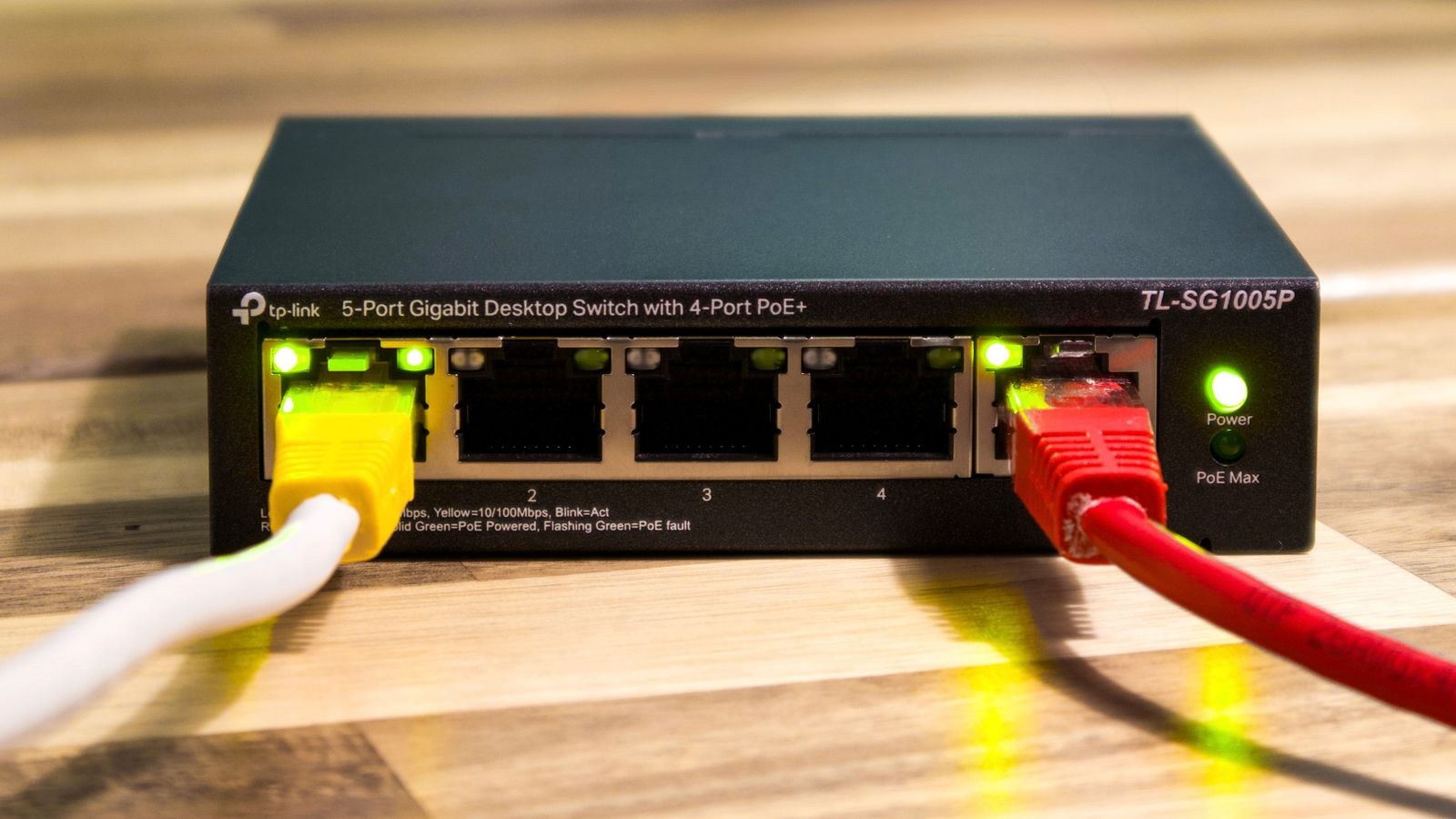
What Power over Ethernet Actually Does
Power over Ethernet sends low-voltage DC power along the same twisted-pair cable that carries your network data. A device at one end — called power sourcing equipment, or PSE — injects roughly 44 to 57 volts onto the cable. The device at the far end, the powered device or PD, taps that voltage and converts it to whatever it needs internally. Because the voltage is low and current-limited, PoE is not mains wiring: you do not need an electrician, a conduit run, or a permit to pull a cable through a ceiling.
The critical detail is that PoE negotiates. Before any meaningful power flows, the source checks for a valid resistance signature on the far end and then agrees on a power class. Plug a laptop or an old printer into a PoE port and nothing happens, because the handshake fails and the port stays dormant. This is why you can safely mix PoE and non-PoE gear on the same switch without frying anything.
The Three Standards You Need to Know
Nearly everything on the market maps onto three IEEE standards, and once you know their real-world budgets the marketing names stop mattering.
- PoE (802.3af) — up to 15.4W at the source, about 12.95W guaranteed at the device after cable loss. Enough for most indoor cameras, VoIP phones, small sensors and basic access points.
- PoE+ (802.3at, Type 2) — up to 30W at the source, roughly 25.5W at the device. This is the practical sweet spot today: pan-tilt-zoom cameras, cameras with heaters or strong IR illuminators, and nearly all Wi-Fi 6 and Wi-Fi 6E access points.
- PoE++ (802.3bt) — split into Type 3 at up to 60W source (51W delivered) and Type 4 at up to 100W source (71W delivered). Aimed at high-power access points, LED lighting, thin clients, and video-conferencing bars.
There is also “passive PoE,” which is not a standard at all. It shoves a fixed voltage down the cable with no negotiation, and plugging the wrong device into it can genuinely destroy hardware. Treat passive PoE injectors as vendor-specific accessories and never mix them into a standards-based network.
Why Delivered Power Is Always Lower
Copper has resistance, so some of the power you inject turns into heat before it reaches the far end. The standards build in that margin deliberately, assuming a worst-case 100-metre run. Over a short 10-metre patch you will lose far less, but you should always size your plan around the delivered figure, not the source figure. A device rated at 25W is a PoE+ device even if the switch label says 30W.
Injector, Splitter or PoE Switch?
There are three ways to get power onto a cable, and the right choice depends on how many devices you are feeding.
A midspan injector is a small brick that sits between your existing switch and the device. It takes a data-only cable in, adds power, and sends the combined signal out. Injectors are cheap and perfect when you have one or two powered devices and an existing non-PoE network you do not want to replace.
A PoE splitter does the reverse: it takes a PoE cable and separates it into a data cable plus a barrel jack at 12V or 5V, letting you power a device that has no PoE support of its own. Splitters are handy for older cameras or small single-board computers in awkward locations.
A PoE switch is the clean answer once you pass roughly three powered devices. Every port can source power, everything lives in one place, and you get a single power budget to manage. If you are building out a wired backbone, our roundup of the best network switches covers both PoE and standard models and explains which port counts suit typical home layouts.
Reading a Switch’s Power Budget
This is the specification buyers most often miss. A switch may advertise eight PoE+ ports, but that does not mean it can deliver 30W to all eight at once. Instead it has a total power budget — say 65W or 120W — shared across every port. Eight ports at 30W would need 240W; a 120W budget realistically supports four heavy devices or eight light ones.
Add up the actual draw of your planned devices, then add at least 25 percent headroom for future additions and for the fact that cameras spike when infrared illuminators switch on at dusk. Better switches let you set per-port priority so that if the budget is exceeded, low-priority ports shut down first instead of the whole bank dropping. If your router is the hub of the whole setup, comparing the best PoE routers is a sensible starting point, since a router with built-in PoE ports can remove the need for a separate switch in a small deployment.
Cabling: Where PoE Installations Go Wrong
PoE is only as reliable as the copper underneath it. Three cabling issues cause the overwhelming majority of intermittent faults.
- Copper-clad aluminium (CCA) cable. Cheap bulk cable that is aluminium with a thin copper skin has far higher resistance and is a genuine fire risk under sustained PoE load. Insist on solid pure-copper cable for any permanent run.
- Distance. The 100-metre limit covers data and power together, including patch leads at both ends. Beyond that you need a PoE extender, which repeats both signals at the cost of a little latency.
- Category. Cat5e handles 802.3af and at perfectly well. For Type 3 and Type 4 at 60W or 100W, step up to Cat6 or Cat6a — the thicker conductors run cooler, which matters when bundles of cables sit together in a warm ceiling void.
One more practical note: bundle size affects heat. Twenty PoE cables strapped tightly together in a riser run hotter than the same cables spaced apart, and heat raises resistance, which lowers delivered power. Keep bundles loose and avoid running them alongside mains cable.
What You Can Realistically Power
Matching devices to classes is easier with typical figures in hand. A fixed indoor dome camera usually draws 4W to 7W. An outdoor bullet camera with IR climbs to 8W to 12W, and a PTZ model with a heater can hit 25W or more. A dual-band Wi-Fi 6 access point typically sits between 12W and 20W, while a tri-band Wi-Fi 6E or Wi-Fi 7 unit with multiple high-power radios frequently demands full PoE+ or Type 3.
The pattern is clear: cameras are mostly an 802.3af or low PoE+ story, and access points are where power requirements have grown fastest. If you are planning ceiling-mounted coverage, our guide to the best home Wi-Fi access points lists power requirements alongside coverage, which makes budgeting far easier. For camera-side planning, the best Wi-Fi camera systems comparison is useful for deciding where wired PoE genuinely beats a battery or wireless unit.
PoE and Network Speed
Power and data are independent, but they share a cable, so port speed still matters. Many budget PoE switches pair PoE+ ports with 100Mbps data, which is fine for a handful of 1080p cameras but a bottleneck for 4K streams or an access point serving fast clients. Check the data rate per port, not just the PoE class.
Equally, the uplink matters. Eight cameras writing to a recorder through a single gigabit uplink can saturate it during simultaneous motion events. If wired throughput is central to your setup, comparing the best ethernet routers helps you avoid pairing a capable PoE switch with a router that cannot keep up.
Budget Tiers and What They Buy
At the entry level, a single-port 802.3af injector costs very little and is the correct answer for one doorbell camera or one access point. Nothing is gained by over-buying here.
In the middle, an unmanaged 4- to 8-port PoE+ switch with a 60W to 120W budget covers the typical home: a few cameras, one or two access points, maybe a VoIP phone. This tier is where most buyers should land.
At the top, managed switches add VLANs, per-port scheduling, PoE watchdog features that reboot a hung camera automatically, and 802.3bt Type 3 or Type 4 output. Pay for this only if you actually want network segmentation or high-draw devices; the management interface is otherwise complexity you will never open twice.
Common Mistakes to Avoid
- Buying on port count alone. The power budget, not the number of ports, sets how many devices you can really run.
- Mixing passive and standards-based PoE. Passive injectors do not negotiate and can damage compliant hardware.
- Using CCA cable. It saves a few dollars and costs you reliability, delivered wattage, and safety margin.
- Ignoring the patch leads. Two thin 3-metre patch cables at each end count toward the 100-metre budget and often use stranded conductors with higher loss.
- Forgetting surge protection. An outdoor camera run entering the house is a lightning path. Inline PoE surge protectors are inexpensive insurance.
- No headroom. Every network grows. Size the budget for the devices you will add next year, not only for today’s list.
Frequently Asked Questions
Can PoE damage a non-PoE device?
Standards-compliant PoE cannot, because it will not energise the line without a valid handshake. Passive PoE absolutely can, so check what you are plugging into.
Does PoE slow down my network?
No. Power and data travel on the same cable without interfering, and throughput is set by the port speed, not by whether power is present.
Do I need a PoE switch if I only have one camera?
No. A single injector is cheaper, smaller, and does the job identically. Move to a switch when you reach three or more powered devices.
Is PoE+ backward compatible with PoE?
Yes. A PoE+ source will negotiate down to supply an 802.3af device safely. The reverse is not true — an af-only source cannot fully power an at device, which may boot into a reduced mode or fail to start.
How much does PoE add to my electricity bill?
Very little. Four cameras and an access point drawing a combined 45W continuously costs roughly the same as leaving a modest light bulb on, and the conversion overhead in the switch adds only a few extra watts.
Final Thoughts
Power over Ethernet rewards a little planning far more than it rewards spending. Work out what each device actually draws, pick the standard that covers it with headroom, buy real copper cable, and check the switch’s total power budget rather than trusting the port count. Do that and PoE becomes the least troublesome part of your network — one cable per device, no wall warts, no outlet hunting, and the freedom to mount hardware where it works best rather than where a socket happens to be. As 2026 hardware pushes access points toward higher draw, buying one class above your current need is the single cheapest form of future-proofing available.









