
 Priya Raghavan
 Typing on a cramped laptop keyboard eight hours a day wears on your wrists and your patience. If you’re building out a real workstation, the best keyboards for home office use trade clicky, mushy laptop keys for something quieter, roomier and built to survive years of emails, spreadsheets and video calls. We compared 10 widely used models to build this guide, walking through what actually matters when you shop before breaking down which one fits which kind of desk setup.
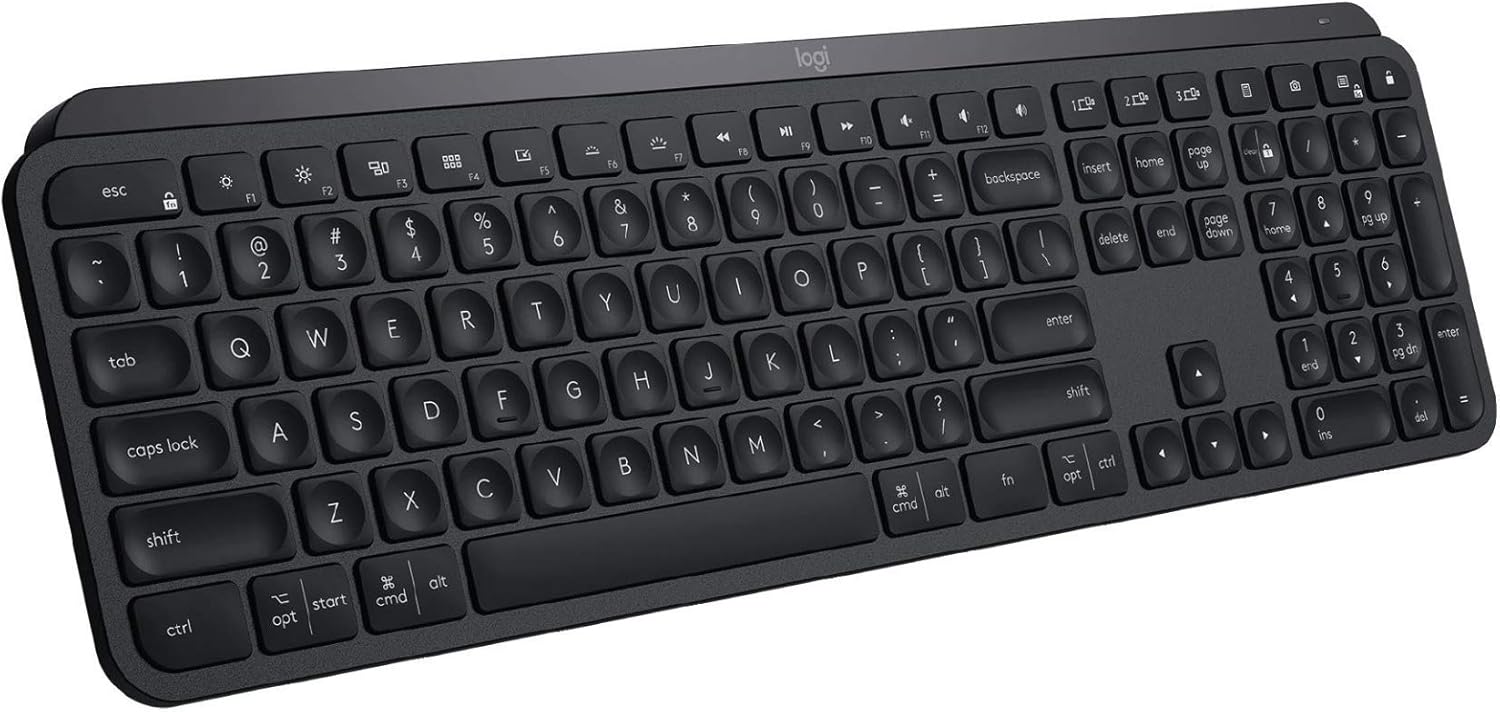
Quick answer: If you want our shortcut pick for 2026, our top pick among the best keyboards for home office is the Logitech MX Keys — our #1 rated choice for quiet, reliable typing across Windows, Mac and Chrome machines. See the full ranked comparison, alternatives and buying advice below.

Pros
- Keys tested to 10 million keystrokes on a spill-resistant deck with a curved space bar
- Full-size layout keeps a dedicated number pad and full-size F-row rather than compressing them
- Plug-and-play over USB, so two ports and no driver install, account or pairing sequence are needed
- Sculpted optical mouse uses an ambidextrous shape that works in a left or right hand
- Post-consumer recycled plastic makes up 72% of the mouse and 54% of the keyboard, with a stated 5.03 kg CO2e footprint
Cons
- Wired only, so two fixed cables cross the desk and two USB-A ports are permanently occupied
- No backlighting, media keys or programmable macros - every key does exactly one job
- Listed for Windows 7, 8, 10 or later, with no macOS support claimed by the maker
The mouse in the box is a full-size sculpted optical unit with an ambidextrous shape, meaning the same body works in a left or a right hand. That is unusual in a bundled mouse and genuinely useful in a shared household or an office where desks get reassigned.
- Suits office desks, reception counters, school labs and any machine that simply needs working input devices
- Good for a second computer, a workshop PC or a media machine where a wireless set would flatten its batteries unnoticed
It is less suited to gaming, where membrane keys and a basic sensor trail a mechanical board, and less suited to anyone chasing a single-cable desk. Recycled content is high: 72% post-consumer plastic in the mouse and 54% in the keyboard, with a stated product carbon footprint of 5.03 kg CO2e.

Pros
- Multi-device wireless keyboard beautiful type-on-everything keyboard
- Type and switch between devices Type on up to three devices and switch
- Comfortable typing full size, fully equipped keyboard with large, quiet
- Integrated phone and tablet stand Holds your devices at the perfect
- Wide compatibility works with Windows, Mac, Chrome OS, iOS and Android
Cons
- Requires verifying desktop clearance for 14.9"L x 6.2"W x 0.9"H dimensions

Pros
- 8K DPI Darkfield sensor tracks accurately on glass surfaces down to 4mm thick, where standard optical mice fail
- MagSpeed scroll wheel shifts between ratchet and free-spin scrolling at up to 1000 lines per second for fast document jumps
- Pairs across up to 3 devices via Bluetooth Low Energy or the included Logi Bolt USB receiver, with one-key switching
- Keyboard battery is a 1500mAh rechargeable Li-Po cell, and the mouse runs a separate 500mAh cell, so charging is decoupled between the two
- Backlit keys use proximity sensors to light only when hands approach, cutting needless battery drain
Cons
- Keyboard weighs 810g, more than twice the 141g mouse, so the combo isn't a light travel set
- Advanced automation and lighting customization both require installing the Logi Options+ app, with no full feature set built in
- FileVault-enabled macOS machines can block Bluetooth password entry at startup, forcing use of the Bolt USB receiver instead
Pros
- Pairs up to 3 devices via Bluetooth Low Energy or the Unifying USB receiver, switching with one button press
- USB-C charging holds up to 10 days with backlighting on, or roughly 5 months with it off
- Flow feature carries copy-paste and cursor control across paired computers running Windows, Mac, or Linux
Cons
- Full-size 17.7 x 6.6 inch footprint takes up more desk space than a compact tenkeyless board
- Flow's cross-computer file transfer only works between Windows and Mac, leaving Linux systems without that feature
- Backlighting draws down the battery faster than keeping it switched off, so heavy typists in low light see shorter runtime than the 5-month spec

Pros
- Thick impact-resistant plastic body shields stored items
- Watertight rubber gasket lid seal blocks moisture and dust
- Dual side latches snap down securely to maintain lid seal
- Stackable lid design saves vertical floor space in closets
- Ergonomic side handles provide comfortable grip for lifting
Cons
- Empty box adds slight weight due to heavy-wall plastic build
- Opaque plastic walls prevent observing items without unlatching

Pros
- Single USB-A nano receiver pairs both keyboard and mouse over a 2.4GHz connection up to 10 meters away
- Keyboard battery is rated up to 3 years and the mouse up to 18 months, with batteries included in the box
- Integrated palm rest and spill-resistant design support long typing sessions
- Works across Windows, macOS and Chrome OS without separate driver installs
- Contoured mouse shape is shaped specifically for right-handed use
Cons
- Mouse is right-handed only, with no left-handed or ambidextrous version in this combo
- Single nano receiver means losing it disables both devices until a replacement is bought
- No backlighting on the keyboard, so keys are not visible in low light

Pros
- Curved split keyframe cuts wrist bending by 25% against a standard board, per the maker's testing
- Memory foam wrist rest adds 54% more wrist support, measured against a keyboard with no palm rest
- Tilt legs set 0, -4 and -7 degrees, so the angle works seated or at a standing desk
- Connects over Bluetooth or the bundled USB receiver and works with both Windows and Mac
- Graphite plastic parts use 71% certified post-consumer recycled content with FSC-certified packaging
Cons
- 17.95 by 9.17 in footprint with a fixed wrist rest, so it dominates a desk shallower than about 24 in
- Split keyframe is fixed, with no tenting angle or separation adjustment like a true split board
- No key backlighting, so legends disappear in a dark room
Three design elements work together here. The split, curved keyframe angles each hand's keys outward so the wrists stay straighter, the sloping form reduces forearm rotation, and the pillowed wrist rest lifts the palms so the hands hover rather than bend upward.
- Wrist bending cut by 25% against a standard board with no palm rest
- 54% more wrist support from the memory foam rest
- Scooped Perfect Stroke keys shaped to the fingertip for orientation without looking
- Certified by United States Ergonomics for improved posture and lower muscle strain
The adjustment to learn is the negative tilt: the legs set 0, -4 and -7 degrees, tipping the board away from you. That is the opposite of the raised-back position most people default to, and it is what keeps the wrists neutral at both a seated and a standing desk.
The keyboard measures 17.95 in long by 9.17 in wide by 1.89 in tall. That depth is the figure to check before buying: the wrist rest is integrated into the body and cannot be removed, so it occupies close to half the total depth.
- Nearly 18 in wide with a full-size layout and integrated numpad
- 9.17 in deep including the fixed wrist rest
- 1.89 in tall at the thickest point, before the tilt legs are used
- Needs clear space in front so the palm rest sits flat
On a desk shallower than about 24 in, the keyboard plus a monitor leaves very little room for anything else and the mouse gets pushed to the edge. Measure first, particularly if the same desk also carries a laptop on a riser.
Pros
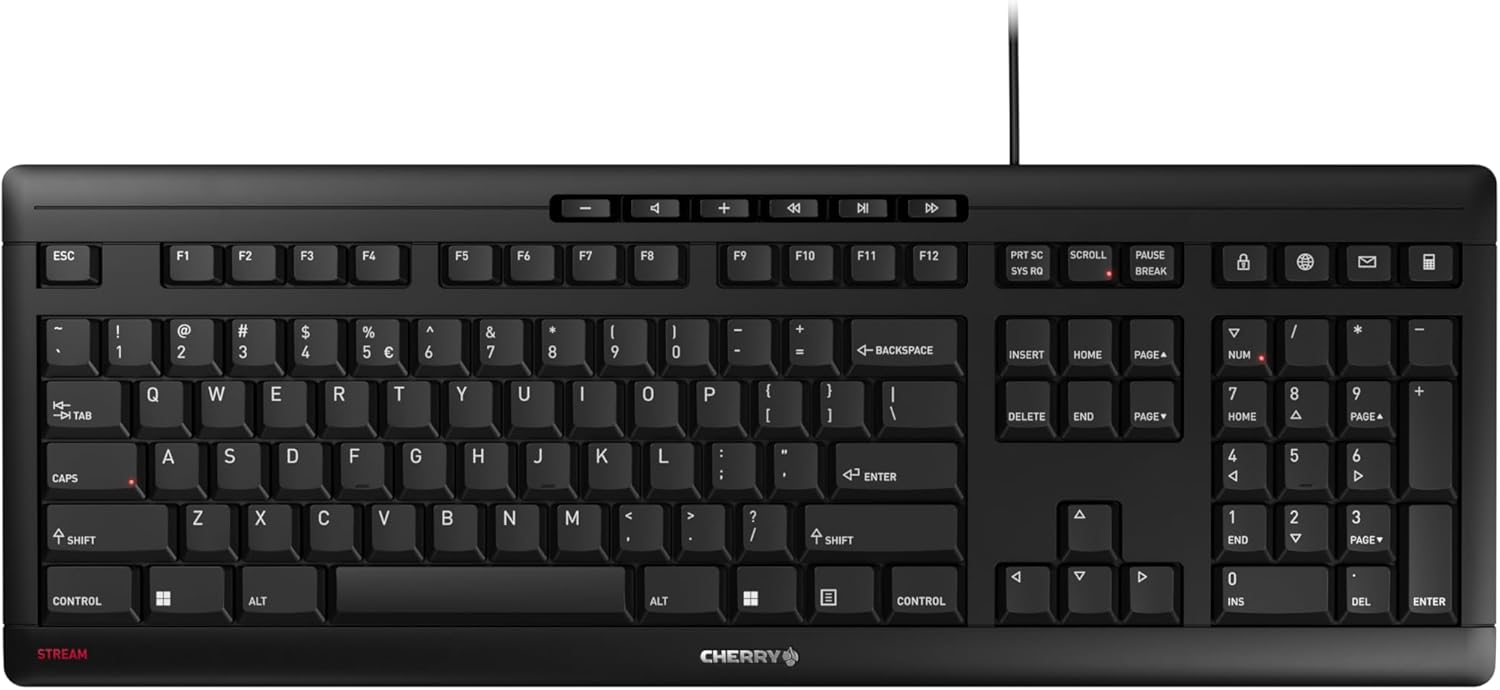
- CHERRY SX scissor switches deliver a defined pressure point while keeping keystrokes whisper-quiet
- Integrated metal plate plus 8 rubber feet keep the slim keyboard from sliding during fast typing
- 10 additional keys cover browser, email, media, and calculator shortcuts without extra software
- Abrasion-resistant key lettering stays legible after extended daily use
- Carries the GS mark (Tested Safety) certification alongside a low-profile flat design
Cons
- Wired-only via USB-A, so it offers no Bluetooth or 2.4GHz wireless connection option
- No backlighting specified in the feature set, which limits visibility for typing in low light
- Only 2 fold-out feet for incline adjustment, offering a single tilt angle rather than multiple height settings
The keyboard measures 18.23 inches long, 6.42 inches wide, and 0.71 inches thick — a flat, low-profile build that includes a full numeric keypad. It connects over a wired USB-A connection in a standard QWERTY layout.
- 18.23"L x 6.42"W x 0.71"H
- Full numeric keypad included
- Wired USB-A connection
- CHERRY SX scissor switch mechanism
The CHERRY SX scissor switches are the core of the typing feel, engineered for a precise pressure point that stays quieter than the switch mechanism used in the previous CHERRY Stream generation.

Pros
- Fluid Typing Experience Laptop-like profile with spherically-dished
- Automate Repetitive Tasks Easily create and share time-saving Smart
- Smarter Illumination Backlit keyboard keys light up as your hands
- Now with more lighting customizations on Logi Options (1)
- More Comfort, Deeper Focus Work for longer with a solid build,
Cons
- Requires verifying desktop clearance for 18"L x 6"W x 1.5"H dimensions

Pros
- Switch Typing Between Your Computer, Tablet or Phone The Logitech
- Save Time Like Magic Do more than you ever dreamed by using
- it s like magic ( available on Windows and macOS) (3) (4)
- Enhance Your Space A sleek and solidly built full-size wireless
- made with recycled plastic (7)
What to Look for in a Keyboard for Home Office Work
Before you compare specific models, it helps to know which specs actually change how a keyboard feels after hour three of a workday. Four factors matter more than brand name: switch feel, connectivity, ergonomics and how many devices you need it to serve.
Switch Feel and Typing Sound
Scissor-switch and low-profile keyboards, like most of the Logitech MX lineup, feel closer to a laptop but with more travel and stability. They’re also quieter, which matters if you’re on calls in a shared space or an open-plan apartment. Membrane keyboards, like the budget Logitech MK120, cost less but feel softer and less precise over long sessions.
Wired vs Wireless Connectivity
Wired keyboards never need charging and won’t lag, which is why budget combos still ship wired. Wireless models using Bluetooth or a USB receiver free up desk space and let you switch between a laptop and desktop without unplugging anything. If you go wireless, check the battery life and whether it recharges over USB-C or eats AA batteries.
Ergonomics and Wrist Comfort
If you type for more than four hours a day, a flat keyboard can strain your wrists over time. Split or curved designs angle your hands into a more natural position, and a padded palm rest reduces pressure on the desk edge. Pair an ergonomic keyboard with a proper height-adjustable office desk so your elbows sit at roughly 90 degrees while you type.
Multi-Device Support
Many remote workers juggle a work laptop, a personal computer and a tablet at the same desk. Keyboards with multi-device Bluetooth pairing let you switch between them with a single button instead of re-pairing every time. This is worth paying extra for if you regularly hop between machines during the day.
Best Keyboards for Home Office by Use Case
Not every home office looks the same, so we grouped the lineup by the situations people actually shop for. Each pick below solves a specific problem rather than just topping a spec sheet.
Best Overall for Quiet, All-Day Typing
The Logitech MX Keys earns the top spot because it balances quiet, stable keystrokes with broad compatibility across Windows, Mac, Linux and Chrome OS. At a 4.6 rating across nearly a thousand reviews, it’s a proven choice for people who type all day and want keys that feel consistent from the first press to the last. The tradeoff is price — it costs more than a basic wired board, so it’s best suited to people who value comfort over saving a few dollars.
Best for Wrist Comfort and Long Sessions
If your wrists ache by mid-afternoon, the Logitech Ergo K860 is worth the look. Its split, curved layout keeps your hands in a more neutral angle, and the pillowed wrist rest takes pressure off the desk edge. It’s bulkier than a standard keyboard, so measure your desk space first if you’re working in a tight corner setup, and consider whether an upgraded monitor at eye level would relieve even more strain alongside it.
Best for Switching Between Multiple Devices
The Logitech K780 stands out for anyone bouncing between a laptop, phone and tablet during the day. Its built-in cradle holds a phone or tablet right above the number row, and it pairs with up to three devices over Bluetooth. It’s not the quietest keyboard on this list, so if silent typing is your top priority, look elsewhere on this page instead.
Best Premium Combo With a Mouse
For a matched set out of the box, the Logitech MX Keys S Combo pairs the keyboard with a companion mouse, both finished in the same graphite tone. Customizable backlighting and fast scrolling make it feel like a cohesive desk setup rather than mismatched parts. It’s the priciest option here, so it makes the most sense if you’re also replacing your mouse anyway rather than buying a keyboard alone.
Most Affordable Wired Option
If you just need something reliable that won’t strain a starter budget, the Logitech MK120 wired combo delivers a full-size keyboard and mouse for under $20. It lacks backlighting and wireless freedom, but it’s plug-and-play with no pairing steps or batteries to manage. This is a sensible pick for a spare desk, a kid’s homework station or anyone testing out a new workspace before investing more.
Best Sleek, Minimalist Design
The Logitech Signature Slim K950 trades bulk for a thin, low-profile frame that looks tidy next to a laptop or ultrawide monitor. It still switches easily between paired devices and types quietly, though the shallow key travel takes a short adjustment period if you’re used to a taller keyboard. Choose it if desk aesthetics and a clutter-free look matter as much as typing feel.
Best Non-Logitech Alternative
If you’d rather diversify away from one brand, the Cherry Stream Keyboard uses Cherry’s own SX scissor switches for a whisper-quiet, slim typing experience at a wired-budget price. It skips Bluetooth entirely, so it’s best for a fixed desktop setup rather than a laptop you move between rooms. Reviewers consistently note how little noise it makes, which suits shared offices or thin apartment walls.
Common Mistakes When Buying a Home Office Keyboard
A few avoidable missteps show up again and again in buyer feedback, so it’s worth checking these before you commit.
- Ignoring desk depth. Split and ergonomic keyboards take up more horizontal space than a standard board — measure your desk before assuming one will fit comfortably.
- Skipping the layout check. Compact and tenkeyless boards drop the number pad, which frustrates anyone doing regular spreadsheet work.
- Overlooking battery type. Some wireless models use AA batteries instead of USB-C rechargeable cells, which means an extra recurring cost most people forget about.
- Buying on rating alone. A high star rating doesn’t tell you about switch feel or noise level — read a few written reviews for those specifics before you decide.
- Forgetting OS compatibility. A handful of hotkeys and media keys are tuned for a specific operating system, so double-check Mac or Chrome OS support if you’re not on Windows.
Who Should (and Shouldn’t) Buy a Premium Keyboard
A $100-plus keyboard makes sense if you spend most of your workday typing — writers, developers, customer support reps and anyone on back-to-back video calls will feel the difference in comfort and quiet keystrokes within the first week. It’s a harder case to justify if your desk sees only occasional use, or if you mostly consume rather than type; in that scenario, a budget wired combo like the MK120 covers the basics without wasted spend. Be honest about your actual daily typing volume before you compare specs and spend more than you need to.
It’s also worth pairing your new keyboard with the rest of your audio and video setup. If your calls sound muffled or your team keeps asking you to repeat yourself, a dedicated home office headset often fixes that faster than a new keyboard will. And if your internet keeps dropping mid-call regardless of what’s on your desk, it’s worth checking whether a home office router upgrade would solve the real bottleneck.
Frequently Asked Questions
Is a wireless keyboard reliable enough for daily work?
Yes, for most home office setups. Modern Bluetooth and USB-receiver keyboards rarely drop input at normal desk distances, and battery life on rechargeable models typically lasts weeks per charge. Wired remains the safer bet only if you’re in a room with heavy wireless interference.
Do I need an ergonomic keyboard if I only work a few hours a day?
Probably not. Ergonomic, split-design keyboards pay off most for people typing four or more hours daily. If your desk time is shorter, a standard low-profile keyboard is usually comfortable enough and easier to fit on a smaller desk.
What’s the difference between a membrane and scissor-switch keyboard?
Membrane keyboards use a rubber dome under each key, which feels softer and costs less to produce. Scissor-switch keyboards, common in laptops and premium desktop models, use a stabilizing mechanism under the key for a shorter, more precise, quieter keystroke.
Can one keyboard really pair with three separate devices?
Yes — models like the Logitech K780 and Signature Slim K950 support multi-device Bluetooth pairing, letting you switch between a laptop, phone and tablet using a dedicated key or switch. Just note that only one connected device can receive input at a time.
How long should a decent home office keyboard last?
A well-made keyboard from a reputable brand typically holds up for three to five years of daily use before keys start to feel inconsistent. Wired models tend to outlast wireless ones simply because there’s no battery or receiver to eventually fail.
Whichever model you land on, prioritize the factor that actually affects your workday — noise if you’re on calls, wrist angle if you type for hours, or multi-device switching if you juggle several machines. Check the current price on Amazon for a couple of finalists and pick the one that matches how you actually work, not just the one with the most reviews.


