 Sofia Marchetti
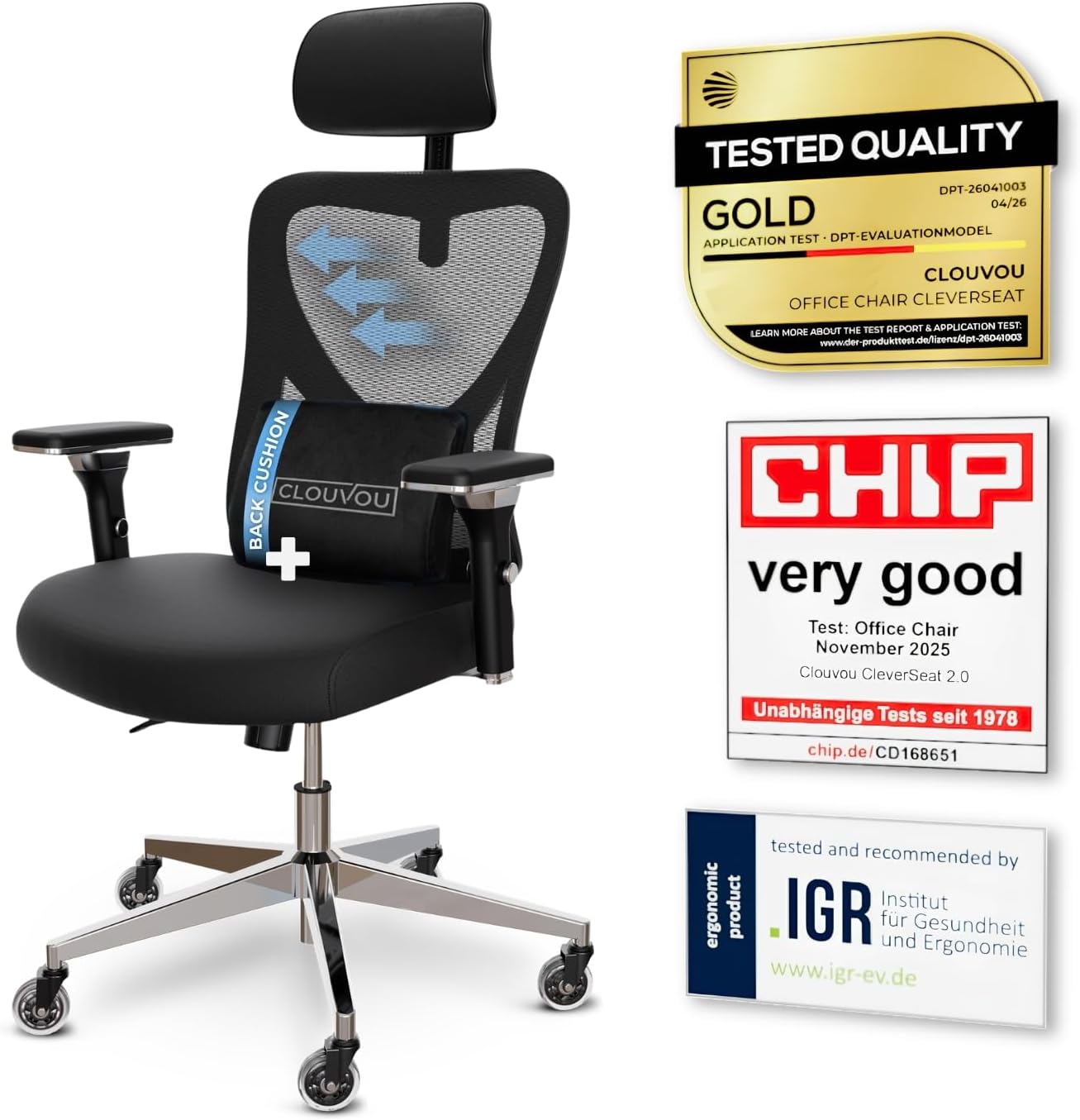
 Quick answer: For most people in 2026, our top pick among the best chairs for developers pick is the CleverSeat Ergonomic Office Chair — our #1 rated choice thanks to its breathable mesh back, adjustable 2D headrest, and strong 330 lb weight rating. See the full ranked comparison, alternatives, and buying advice below.
If you write code for a living, your chair matters almost as much as your keyboard. You sit for hours at a stretch, often hunched toward a monitor while debugging a stubborn function, and a cheap chair turns that into a sore back by 3 p.m. This guide breaks down the best chairs for developers by real use cases — long sessions, tight budgets, small home offices, and bigger frames — so you can match a chair to how you actually work.
Pros
- 4D armrests adjust up, down, forward-back and pivot, so elbow height lines up with almost any desk
- 3-position backrest tilt locks the recline angle instead of leaving it free-floating
- Blade-shaped casters are engineered to roll quietly across hard flooring
Cons
- Frame combines chromium-plated and plastic components rather than a full steel shell, so it may flex more than an all-metal frame under aggressive rocking
- Backrest tilt is limited to 3 fixed positions rather than a continuous recline lock
- No separate seat-depth figure is listed beyond the 21-inch footprint, so users near the 6.5 ft sizing ceiling may find the seat pan short
The chair measures 21"D x 21"W x 39"H in its assembled footprint, a compact base built for desks in home offices and shared workspaces. Backrest support is rated for users up to 6.5 ft tall, wider than the sizing window most mesh task chairs advertise.
- Frame combines chromium-plated steel components with plastic housings for the armrests and base shroud
- 3-position backrest tilt locks the recline angle rather than floating freely
- 4D armrests adjust height, width, depth and pivot angle independently
Because the footprint stays close to 21 inches square, the chair fits under standard desks without needing extra clearance, while the taller backrest window suits users who outgrow shorter task chairs.

Pros
- Adjustable lumbar pad follows the spine's natural curve for lower back positioning
- Breathable mesh backrest promotes airflow to reduce heat buildup during long sessions
- Flip-up armrests free up desk space when raised
- Adjustable headrest, lumbar depth, and seat height allow multi-point customization
Cons
- Rocking recline function has no listed lock at intermediate angles, only a full tilt
- Seat cushion uses virgin foam rather than gel or memory foam layering
- Dimensions of 19.6"D x 19.6"W x 40"H may feel compact for taller users
The chair measures 19.6"D x 19.6"W x 40"H and is rated to support up to 330 pounds, a higher ceiling than the roughly 250-pound capacity common on entry-level mesh task chairs. Seat height, headrest position, and lumbar depth all adjust independently.
- Overall size: 19.6"D x 19.6"W x 40"H.
- Weight capacity: 330 pounds.
- Frame: Alloy steel with a mesh and nylon build.
- Adjustments: Headrest, lumbar support, seat height, and flip-up armrests.
The compact base footprint suits smaller desk setups but may feel tight for users well over 6 feet tall.

Pros
- Designed with 1 Built for Big Tall Engineered as the ultimate ergonomic for reliable daily operation
- Designed with 2 50 Adjustable headrestscientifically reduce neck back pain during 8 for reliable daily operation
- Designed with 3 Dual-Mode Lumbar Switch between locked posture mode for deep for reliable daily operation
- Dimensions measure 16.9"D x 28.5"W x 46"H for spatial allocation
- Rated load capacity supports up to 330 pounds
Cons
- Requires measuring doorways and room clearance for Lumbar Support Off prior to placement

Pros
- Rated to support 350 Pounds
- Dimensions measure 20inchD x 20inchW x 40inchH
- Construction uses Foam for durability
- Adjustable components allow customized positioning
- Includes extended manufacturer warranty coverage
Cons
- Requires professional assembly or installation service
- Limited in monochrome color options available
- Some optional accessories sold separately

Pros
- Inflatable lumbar support lets the amount of lower-back pressure be adjusted rather than relying on a fixed foam bulge
- Flip-up armrests fold out of the way for cross-legged sitting on the extra-wide seat cushion
- Pneumatic lever adjusts seat height, with a separate control for tilt tension resistance
- Reinforced steel frame is rated to hold up to 275 pounds
- Bonded leather upholstery is built scratch-resistant to hold up better than a plain vinyl cover over daily use
Cons
- 275-pound weight capacity is on the lower end versus heavy-duty office chairs rated closer to 300-400 pounds
- Bonded leather is a layered material, which over years of flexing at the seams tends to peel or crack sooner than genuine top-grain leather
- No headrest is included on this model, so neck support during long sessions relies on the high-back shape alone rather than a dedicated headrest
This high-back executive chair measures 22.8"D x 26.8"W x 47.2"H overall and is rated to hold up to 275 pounds on a reinforced steel frame. An inflatable lumbar system allows the level of lower-back support to be fine-tuned rather than fixed at one shape.
- Overall size: 22.8"D x 26.8"W x 47.2"H
- 275-pound weight capacity
- Reinforced steel frame
- Faux (bonded) leather upholstery in black
The extra-wide seat cushion, combined with flip-up armrests, gives room to sit cross-legged rather than only in a standard forward-facing seated position, a detail worth noting for anyone who shifts position often during the day.

Pros
- 18-inch extendable footrest with 2-position angle adjustment supports a reclined break without leaving the chair
- 5D flip-up armrests adjust height, width, angle, and rotation, then fold flush to tuck under a desk
- 3D lumbar support adjusts up to 1.6 inches in depth and 2 inches in height to track different seated postures
Cons
- Footrest and 5D armrest mechanisms add moving parts that increase what there is to adjust and maintain over a simple fixed-arm chair
- Mist Black is the only finish offered, with no other color option
- Larger footprint at 26 x 24 inches needs more floor clearance than a compact task chair
The X100 measures 26"D x 24"W x 41"H and carries a 300 lb weight capacity, built for bigger frames than a standard mesh task chair. The 3D lumbar system adjusts depth by up to 1.6" and height by up to 2", with 15 degrees of rotation to track the spine's natural curve rather than pressing at one fixed point.
- Footprint: 26"D x 24"W x 41"H
- Weight capacity: 300 lb
- Lumbar adjustment: up to 1.6" depth, 2" height, 15-degree rotation
An 18" extendable footrest with 2-position angle adjustment pulls out from under the seat, adding leg support once the backrest is reclined for a break.

Pros
- Seat pan slides through five locking positions across 1.97 in of travel, so thigh length sets the seat depth
- Lumbar support moves 2.36 in vertically and 0.8 in in depth to meet the actual curve of your back
- 55D high-density foam seat under a breathable mesh back, so the cushion resists sagging over months
- Tested to BS EN 1335 and BIFMA X5.1, with a TUV-tested Class 4 gas lift in the column
- 44.5 in tall frame with three-point head, back and lumbar support, sized around users from 5 ft 4 in to 6 ft 0 in
Cons
- Capacity is 220 lb, below the 275 to 300 lb typical of full-size mesh task chairs
- Fit is tuned to a 5 ft 4 in to 6 ft 0 in height window, so shorter or taller sitters lose the contouring benefit
- Sold in pure black only, with no other finish offered in the range
This chair is specified around a defined body range rather than aiming at everyone.
- Intended for users between 5 ft 4 in and 6 ft 0 in and under 220 lb.
- Frame dimensions are 20 in deep, 21.26 in wide and 44.5 in tall including the headrest.
- The sliding seat pan moves through five positions over 1.97 in, letting you rest the whole thigh without pressure behind the knee.
- The lumbar block travels 2.36 in up and down and 0.8 in in and out.
Seat depth adjustment is the feature worth paying attention to here, since it is what stops shorter legs dangling or longer legs perching on the front edge. Check your height and weight against the stated range before ordering.
Pros
- Delivers rich stereo sound with enhanced bass drivers
- Rugged splash-proof housing protects against outdoor moisture
- Long-lasting internal rechargeable battery supports hours of playback
- Integrated carrying strap simplifies outdoor transport
Cons
- Playback time varies depending on volume level and bass settings
- Recharging requires access to a standard USB power source
Pros
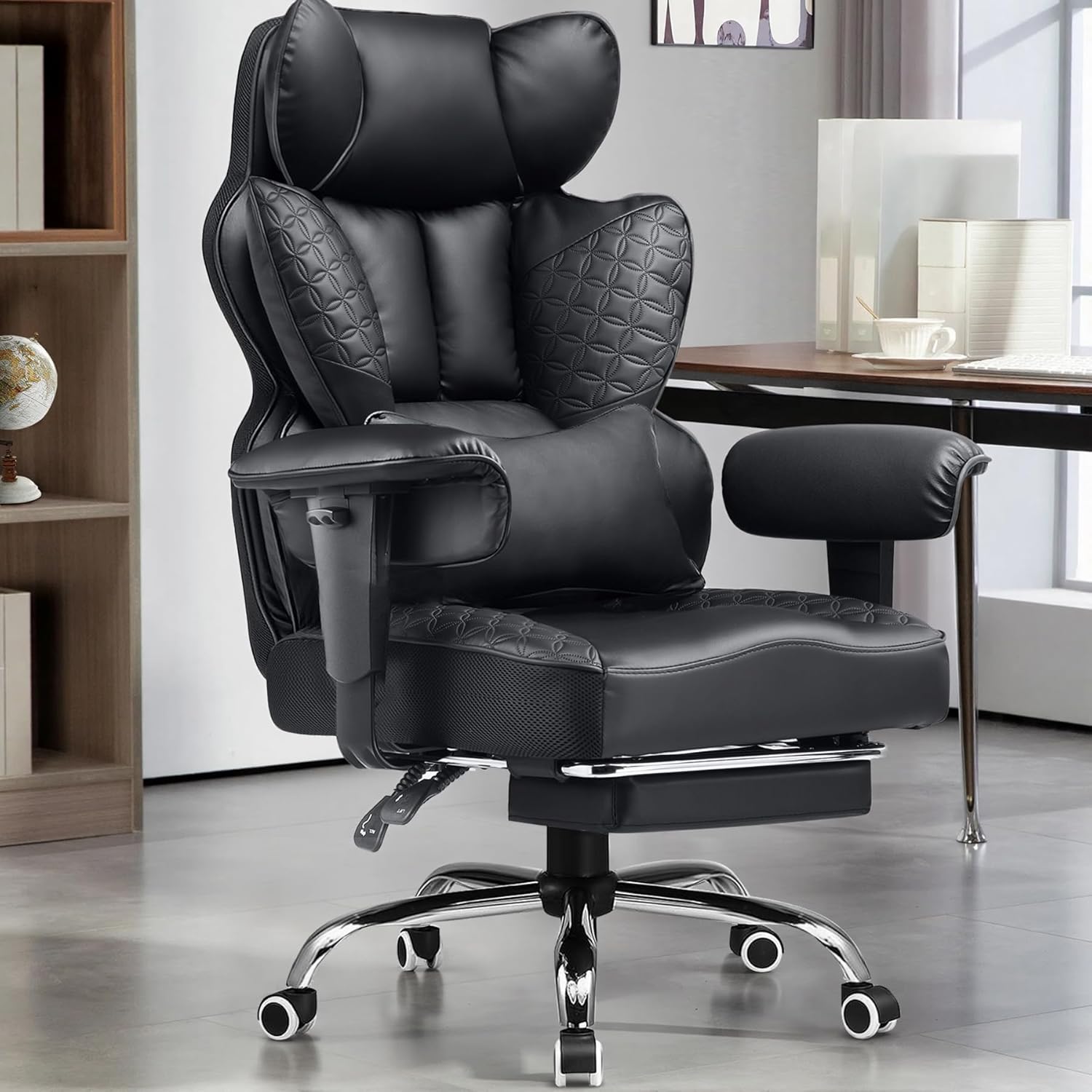
- 400-pound weight capacity supported by a sturdy metal frame built for larger users
- Spring-cushioned lumbar system paired with dual-layer high-density sponge targets lower back support during long sessions
- 3D saddle-shaped seat cushion distributes pressure evenly across the hips and thighs
- Embossed faux leather surface is scratch-resistant and pet-friendly, wiping clean without special cleaners
Cons
- 40-inch overall height and 31.5-inch width need more floor space than a compact gaming chair
- Faux leather construction runs warmer over long sessions than mesh-backed gaming chairs
- Sold in one matte-black colorway, with no alternate finish offered in this listing
Built specifically for larger and taller users, this gaming chair carries a 400-pound weight capacity through a sturdy metal frame. Overall dimensions come to 22.05" deep, 31.5" wide, and 40" high, giving it a larger footprint than a standard-size gaming chair to match its higher weight capacity.
The seat and backrest are upholstered in faux leather with an embossed pattern, chosen for a look similar to genuine leather while staying easier to wipe clean. The backrest features prominent side wings that wrap further around the back than a flat-panel backrest, intended to add lateral support during extended sitting.
A dedicated foot rest extends from the base, letting the chair convert between upright desk seating and a more reclined lounging position.

Pros
- Reclines from 90° to 135° with linkage armrests that move together with the backrest
- Weight capacity rated to 300 lbs on a reinforced steel frame and SGS-certified gas lift
- Built-in retractable footrest extends for leg support without leaving the seat
- Measures 27.5"D x 24.5"W x 46.5"H with a 360° swivel base and smooth-rolling casters
- PU leather upholstery over high-density foam is easier to wipe clean than a fabric surface
Cons
- PU leather upholstery does not breathe as well as a mesh or fabric chair during long sessions
- 300 lb weight capacity is lower than some heavy-duty gaming chairs rated to 400 lbs or more
The backrest reclines through a 90° to 135° range, with linkage armrests that move in sync with the backrest angle rather than staying fixed. Seat height and the lumbar cushion position are both adjustable, letting the chair be tuned to different desk heights and lower-back support needs.
A 360° swivel base paired with smooth-rolling casters allows free movement around a desk, and an SGS-certified gas lift handles the seat height adjustment mechanism specifically, a certification aimed at consistent, safe operation over repeated use rather than an unrated cylinder.
Overall dimensions measure 27.5"D x 24.5"W x 46.5"H, and the frame is rated to hold up to 300 lbs, supported by a reinforced, rust-resistant steel frame and a strong nylon base. That capacity covers most users but sits below some heavier-duty gaming chairs built for 400 lbs or more.
Assembly includes a detailed installation manual, a complete screw kit, and a QR code for setup reference, so the chair ships requiring standard at-home assembly rather than arriving fully built. Casters roll smoothly across both hard flooring and low-pile carpet, adding mobility once assembly is finished.
What Makes a Chair Great for Developers
Developers have different needs than the average office worker. You’re rarely walking to meetings or filing cabinets — you’re stationary, focused, and often typing in short intense bursts between long stretches of reading code. That changes what “good ergonomics” means for you.
Lumbar Support That Actually Adjusts
Static foam lumbar pads look supportive in a product photo but rarely sit where your spine actually curves. Look for adjustable lumbar support you can raise, lower, or tilt. This matters more the longer you sit, since your lower back fatigues first during marathon coding sessions.
Mesh vs. Padded Foam
Mesh backs breathe better, which matters if your office runs warm or you tend to overheat while concentrating. Padded foam seats feel plush at first but can compress and lose support after a year of daily use. Many of the best chairs for developers combine a mesh back with a denser foam seat for the best of both.
Weight Capacity and Frame Size
Don’t just check the “recommended” weight — check the maximum rated capacity, since chairs feel firmer and more stable well under their limit. If you’re over 250 lbs or over 6’2″, a big-and-tall model with a wider seat pan and reinforced base will hold up far longer than a standard chair.
Adjustability Where You Need It
Seat height, seat depth, armrest height, and recline tension all affect whether your wrists stay neutral over your keyboard. A chair with flip-up or 4D arms lets you tuck them out of the way when you lean in close to read code on a second monitor.
Best Chairs for Developers by Use Case
Instead of ranking chairs purely by price, we’ve matched each pick below to the situation it solves best. Think about how you actually work, then jump to the section that fits.
Best for Long Coding Sessions (8+ Hours)
The ProtoArc EC200 is built specifically with remote workers and programmers in mind, and it shows. Its adjustable seat depth means shorter and taller developers can both get proper thigh support, which reduces the leg fatigue that creeps in after a full day of pull requests. It lands in the sweet spot between budget chairs and premium ergonomic seating, with a high-back mesh design that keeps airflow moving during long debugging sessions.
Pair it with a sit-stand desk if you can — alternating posture throughout the day does more for long-term comfort than any single chair feature. You might also want to check our guide to the best desks for developers for setups that complement this kind of chair.
Most Affordable Pick
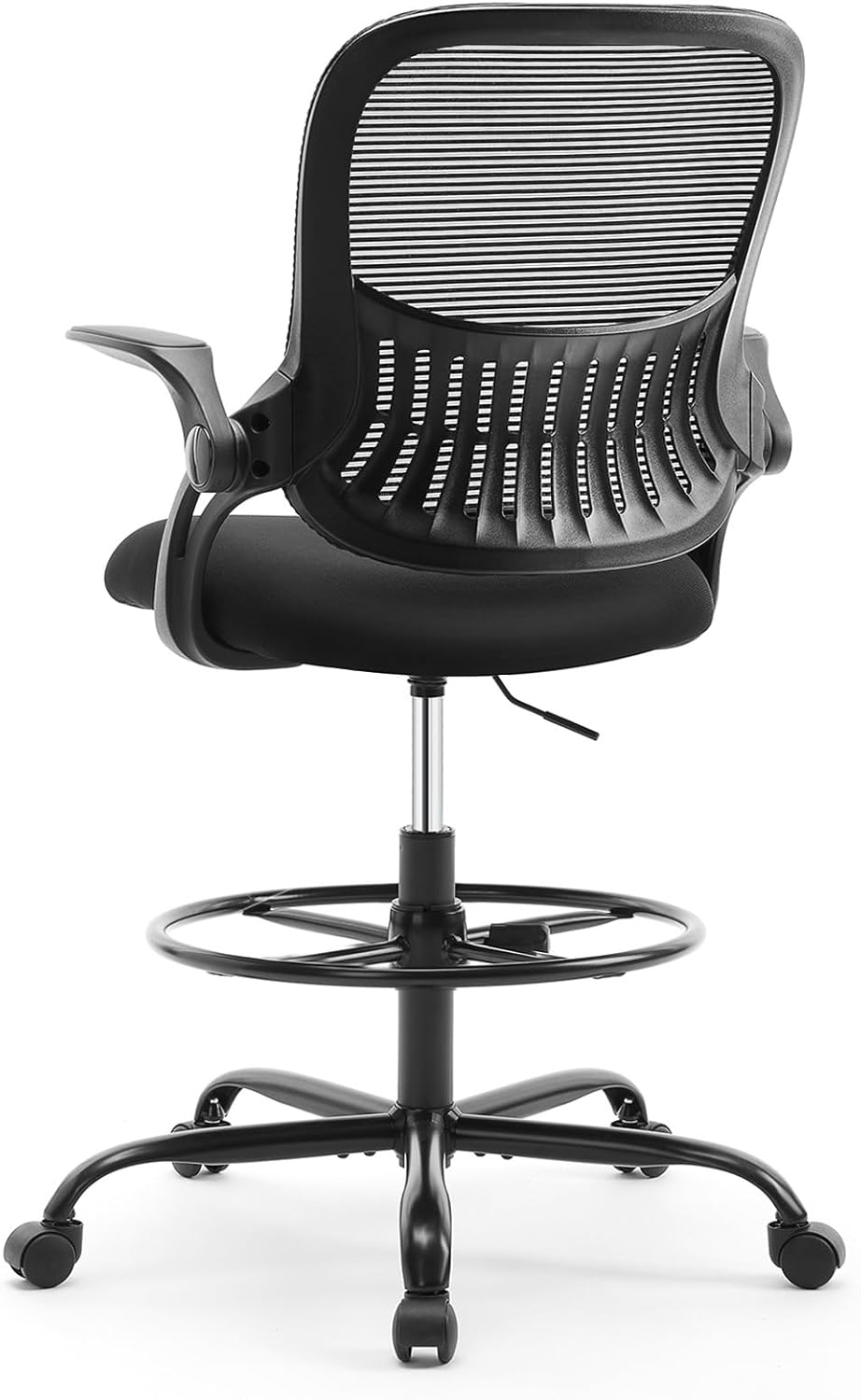
The Sweetcrispy Tall Drafting Chair is the most budget-friendly option here, and it’s a smart choice if you work from a taller desk or a kitchen-counter setup. It includes a footrest ring and flip-up arms, which is unusual at this price. It won’t match a premium mesh chair for all-day lumbar support, so treat it as a solid entry point rather than your forever chair if you code full-time.
Best for Small Home Offices
If floor space is tight, the Office Desk Chair with Molded Foam Cushion has a compact footprint without feeling cramped. Its 4-inch molded foam cushion holds its shape better than looser padding, and the padded flip-up armrests let you slide it fully under a small desk when you’re done for the day. It’s a practical pick for developers working from a spare bedroom or a corner nook.
A tidy desk setup helps too — see our picks for the best monitors for developers if you’re optimizing a compact workstation.
Best for Big and Tall Developers
The 330lb Big & Tall Lumbar Support Chair is rated for larger frames without sacrificing adjustability. It has dynamic lumbar support plus a forward-tilt seat option, which some developers prefer when leaning into a monitor for close reading. Reviewers also point out the adjustable headrest as a nice touch during shorter breaks between builds. This one is worth checking the current price on Amazon if standard chairs have felt undersized for you.
Best Gaming-Style Option
Not every developer wants a traditional office look. The N-GEN GAMING Chair brings a recliner-style build with a footrest and adjustable height, which suits developers who like to lean back during code reviews or long compile waits. It’s also one of the more affordable picks in this roundup, making it easy to try without a big commitment.
Best with Built-In Footrest
The ELABEST X100 stands out for its integrated footrest and 5D flip-up arms, giving you more micro-adjustments than most chairs in this price range. Its 3D lumbar support adjusts along three axes instead of just up and down, which can help if you tend to shift position frequently while thinking through a problem. It’s a bigger investment, so it makes the most sense if you already know you sit 8+ hours most days.
Common Mistakes When Buying a Chair for Coding
Even experienced developers get this wrong. A few patterns show up again and again in return and complaint data for office chairs.
- Buying on looks alone. A chair that photographs well isn’t the same as one that supports your spine for eight hours. Read the lumbar and adjustability specs before the aesthetics.
- Ignoring weight capacity. A chair rated right at your body weight will feel soft and unstable within months. Aim for a chair rated comfortably above your weight.
- Skipping armrest adjustment. Fixed arms that don’t match your desk height push your shoulders up and strain your neck over a full workday.
- Not measuring your space first. Some ergonomic chairs have wide bases that don’t fit well under compact desks — measure before you order.
Setting Up Your Chair for Coding Comfort
Even the best chair for developers won’t help much if it’s set up wrong. Start with seat height: your knees should sit roughly level with your hips, feet flat on the floor. Next, adjust the lumbar support so it sits in the curve of your lower back, not higher on your spine.
Set armrests so your elbows rest at about a 90-degree angle with your wrists straight over the keyboard. If you use a standing desk part of the day, keep the same lumbar and armrest habits so your body isn’t relearning posture every time you switch. A quiet, comfortable keyboard also reduces wrist strain — our best keyboards for developers guide covers options that pair well with an ergonomic chair setup.
Who Should Consider a Different Chair
Not everyone needs a heavy-duty ergonomic chair. If you split your day between a standing desk and short coding bursts, a lighter, simpler chair may be all you need — the extra adjustability on premium models won’t get used. Similarly, if you already own a well-fitted chair and just need better lumbar support, a standalone cushion might solve the problem for less money than replacing the whole chair. And if your workspace rotates between desks or rooms, a lighter chair without a heavy steel base will be easier to move.
For a broader comparison beyond this developer-focused list, our best ergonomic chairs roundup covers additional models across price points.
Frequently Asked Questions
What is the best chair for programmers who sit all day?
Look for adjustable lumbar support, a breathable mesh back, and a weight rating well above your body weight. The ProtoArc EC200 and CleverSeat both hold up well for full 8-hour workdays.
Is a gaming chair good for coding?
It can be, especially if you like reclining during breaks. Just make sure it has real lumbar adjustment and not just a strapped-on pillow, since that’s the main difference between a comfortable gaming chair and one that causes back pain over time.
How much should I spend on a chair for programming?
Most developers find a comfortable, durable chair between $130 and $250. Budget options under $100 work for lighter use, while chairs above $300 usually add features like 5D arms or premium upholstery rather than dramatically better support.
Mesh or leather chair for a home office?
Mesh is generally better for long coding sessions since it breathes and prevents the sweaty-back feeling leather can cause. Leather can look more polished for video calls but tends to trap heat over long sitting periods.
How often should I replace my office chair?
Most ergonomic chairs hold their support for three to five years of daily use. If the cushion has visibly compressed, the lumbar support no longer holds its position, or the gas lift sinks on its own, it’s time to compare specs and consider a replacement.