Daniel Okafor
 If you spend hours at a desk and finish the day with a stiff, aching neck, your chair may be the culprit. Finding the best desk chairs for neck pain is less about brand hype and more about understanding how a seat supports your head, shoulders, and spine through a long workday. The right chair keeps your neck in a neutral position, reduces the forward-head posture that strains muscles, and lets you relax instead of bracing yourself hour after hour.
This guide walks through what actually matters when you shop, how to match a chair to your body and habits, and which features quietly make or break neck comfort. Instead of rating models one by one, we focus on helping you choose confidently so you can order once and get it right.

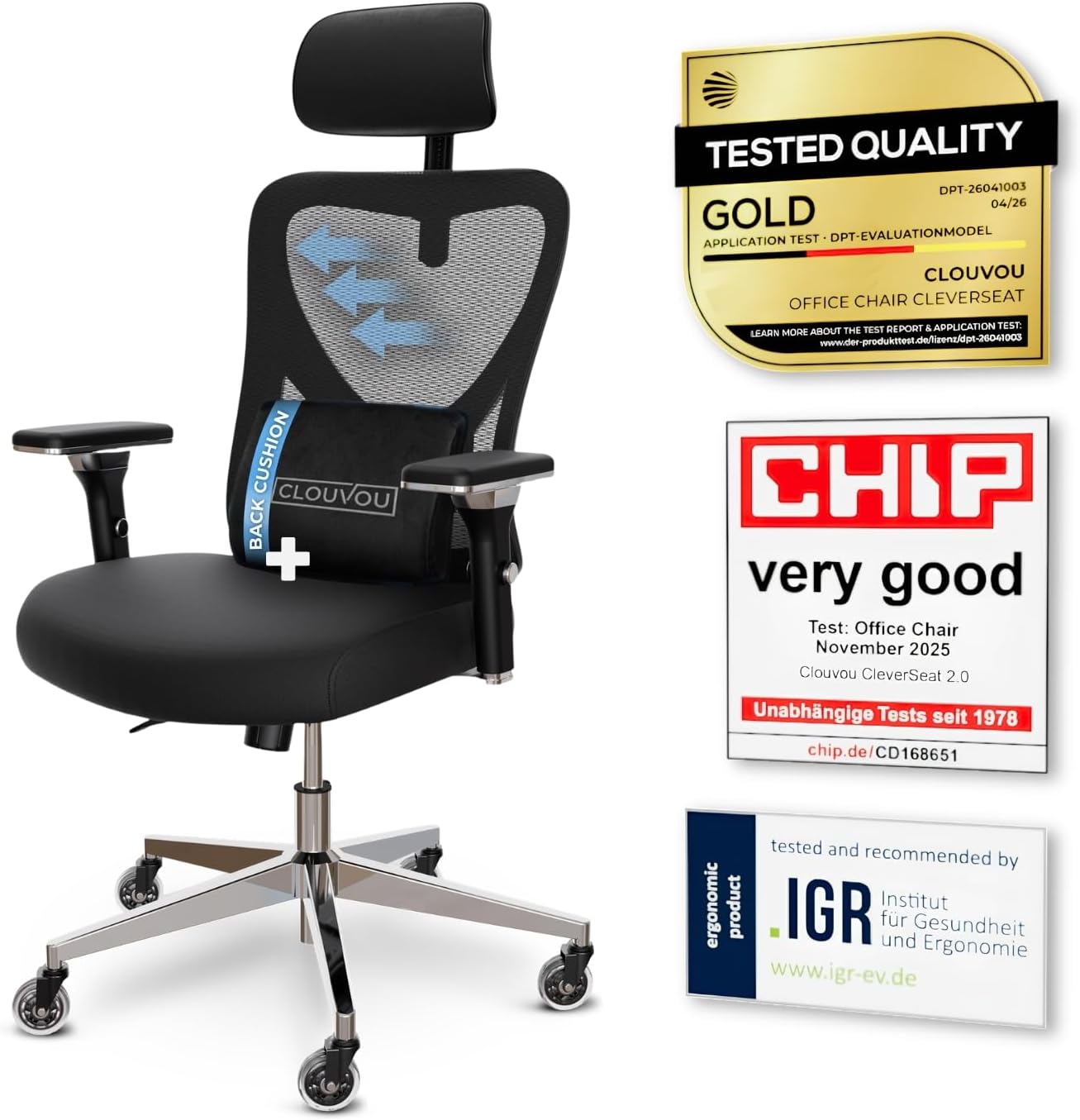
Pros
- 4D armrests adjust up, down, forward-back and pivot, so elbow height lines up with almost any desk
- 3-position backrest tilt locks the recline angle instead of leaving it free-floating
- Blade-shaped casters are engineered to roll quietly across hard flooring
Cons
- Frame combines chromium-plated and plastic components rather than a full steel shell, so it may flex more than an all-metal frame under aggressive rocking
- Backrest tilt is limited to 3 fixed positions rather than a continuous recline lock
- No separate seat-depth figure is listed beyond the 21-inch footprint, so users near the 6.5 ft sizing ceiling may find the seat pan short
The chair measures 21"D x 21"W x 39"H in its assembled footprint, a compact base built for desks in home offices and shared workspaces. Backrest support is rated for users up to 6.5 ft tall, wider than the sizing window most mesh task chairs advertise.
- Frame combines chromium-plated steel components with plastic housings for the armrests and base shroud
- 3-position backrest tilt locks the recline angle rather than floating freely
- 4D armrests adjust height, width, depth and pivot angle independently
Because the footprint stays close to 21 inches square, the chair fits under standard desks without needing extra clearance, while the taller backrest window suits users who outgrow shorter task chairs.

Pros
- Supports up to 350 lb, above the 300 lb capacity typical of mesh task chairs
- Adjustable lumbar pad and headrest let seat height and back curve be tuned independently
- Breathable mesh backrest promotes airflow across extended desk sessions
- Flip-up armrests free up desk space when raised out of the way
- Rocking recline function allows a lean-back break without leaving the seat
Cons
- Nylon frame construction rather than steel, so long-term load-bearing durability may lag heavier frames
- No tension lock mentioned for the rocking function, so recline resistance is not adjustable
- Seat height range is fixed to the gas cylinder travel, with no stated extended-height option
This task chair measures 20"D x 20"W x 45"H and is rated to hold up to 350 lb, higher than the roughly 250-300 lb ceiling common on entry-level mesh chairs. The frame uses nylon components paired with a virgin foam seat cushion for cushioning that resists flattening over time.
- Dimensions: 20" D x 20" W x 45" H
- Weight capacity: 350 lb
- Seat material: virgin foam cushion over a nylon frame
The higher weight capacity makes it a workable option for users who have outgrown standard-capacity task chairs.

Pros
- Designed with Customizable Spinal Support for Personalized Comfort Our ergonomic office chair for reliable daily operation
- Designed with 4D Soft-Padded Armrests for All-Day Comfort Designed for multi-scene usage for reliable daily operation
- Dimensions measure 22"D x 22"W x 15"H for spatial allocation
Cons
- Requires measuring doorways and room clearance for Ergonomic Mesh Off prior to placement
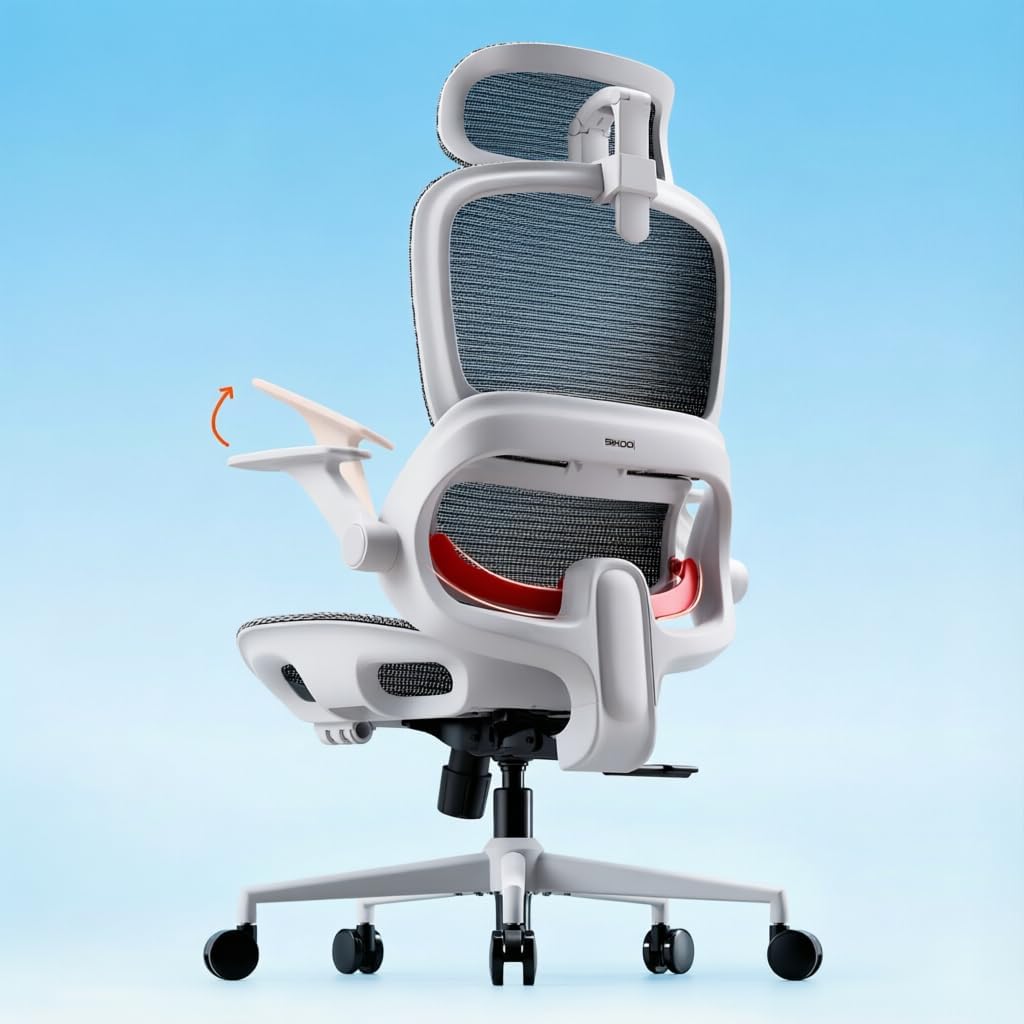
Pros
- Adaptive lumbar support follows the spine's curve as you shift between leaning forward and sitting upright
- Seat height adjusts from 18.3" to 21.9", covering a wide range of body heights and desk setups
- Three lockable recline angles at 110°, 125° and 135° let you switch from focused work to a reclined break
- Full-mesh backrest keeps air moving to reduce heat buildup during long afternoons
Cons
- Ships without a footrest, so buyers wanting leg support during recline need to add one separately
- Flip-up armrests adjust vertically but are not detailed as depth or width adjustable
- Grey is the color shown, limiting choice for buyers wanting to match a specific office palette
This chair is built for long desk sessions with adjustment ranges aimed at fitting a variety of body types.
- Seat height adjusts from 18.3" to 21.9", accommodating different desk heights
- Overall footprint of 28.3" D x 27.6" W x 51.6" H
- Weight capacity rated to 300 pounds
- A widened seat cushion spreads weight more evenly across the hips and thighs during long sits
Because the seat height range is fairly wide, most desk heights should be accommodated, though very tall or very short users should double-check the range against their specific desk before ordering.
Getting the chair set up involves standard task chair assembly plus a few adjustment points once built.
- Flip-up armrests move out of the way when not needed, useful for sliding fully under a desk
- Backrest recline locks at 110°, 125° or 135° depending on whether you want upright focus or a relaxed break
- An adjustable headrest supports the neck during typing, calls, or leaning back to think
- The chair ships without a footrest, so that accessory is not included in the box
Because assembly instructions typically ship in the box with labeled hardware, most buyers should expect a single-person build using basic tools.

Pros
- Dimensions of 20.08"D x 20"W x 53"H engineered for optimal spatial fitting
Cons
- Requires verifying placement clearance for 20.08"D x 20"W x 53"H prior to installation
- Requires gentle maintenance routines to preserve the Mesh, Metal finish
- Load weight limits should not exceed 250 Pounds during active operations

Pros
- Dimensions of 21.75"D x 19.75"W x 19"H engineered for optimal spatial fitting
Cons
- Requires verifying placement clearance for 21.75"D x 19.75"W x 19"H prior to installation
- Requires gentle maintenance routines to preserve the Polypropylene finish
- Load weight limits should not exceed 275 Pounds during active operations

Pros
- Dimensions of 26.37"D x 26.37"W x 49.8"H engineered for optimal spatial fitting
Cons
- Requires verifying placement clearance for 26.37"D x 26.37"W x 49.8"H prior to installation
- Requires gentle maintenance routines to preserve the Nylon finish

Pros
- Dimensions of 29.33"D x 29.33"W x 46"H provide appropriate sizing
- Constructed from Leather, Metal

Pros
- Dimensions of 27"D x 50"W x 49.2"H engineered for optimal spatial fitting
Cons
- Requires verifying placement clearance for 27"D x 50"W x 49.2"H prior to installation
- Requires gentle maintenance routines to preserve the Mesh, Metal, Plastic finish
- Load weight limits should not exceed 330 Pounds during active operations
Why Your Desk Chair Affects Neck Pain
Neck pain from sitting rarely comes from the neck alone. It usually starts lower down. When a chair lacks proper lumbar support, your lower back rounds, your upper back slumps, and your head drifts forward to compensate. That forward-head posture forces the muscles at the base of your skull to work overtime, and after several hours they tighten, ache, and sometimes trigger tension headaches.
A well-designed chair reverses this chain. Good lumbar support keeps your pelvis and spine aligned, which naturally stacks your shoulders and head over your hips. Once your spine is supported from the bottom, your neck no longer has to strain to hold your head up. This is why the most comfortable chairs for neck relief, like the Ergonomic Chair for Long Hours, pair adjustable lumbar support with a tall backrest that carries posture all the way up.
Key Features to Look for in a Neck-Friendly Chair
Not every ergonomic chair helps your neck. The label gets stamped on almost everything now, so it pays to know which specific features deliver relief. Focus on these when comparing options.
Adjustable Headrest
A headrest is the single most direct feature for neck comfort, but only if you can move it. Necks come in different lengths, and a fixed headrest often lands in the wrong spot, either pushing your head forward or sitting uselessly behind it. Look for a 3D or fully adjustable headrest you can raise, lower, and angle. Chairs such as the Ergonomic Chair with 3D Headrest and the CleverSeat Ergonomic Chair let you dial the support to cradle the base of your skull, which is exactly where tension collects.
Lumbar Support That Adjusts
As covered above, lumbar support is the foundation of neck relief. The best versions move up and down and in and out so you can match the curve to your own lower back. An adaptive or 2D lumbar system, like the one on the SIHOO B100 Office Chair, presses gently into the small of your back and keeps you upright without conscious effort. Static, built-in bulges are better than nothing, but adjustable is worth the small premium.
Breathable Backrest Material
Material affects how long you can sit comfortably. Mesh backs, found on chairs like the Ergonomic Mesh Chair and the Sweetcrispy Mesh Chair, flex to your spine and let heat escape, which keeps you from shifting into slouchy positions as you get warm. Leather and padded backs, such as the COLAMY Executive Chair, feel plush and hold structure well, though they run warmer. Choose based on your climate and how firm you like your support.
Recline and Tilt Tension
Sitting bolt upright all day is its own kind of strain. A chair that reclines lets you shift your weight and give your neck periodic breaks. Tilt-and-rock mechanisms, offered on chairs like the Ergonomic Chair with Tilt & Rock, take pressure off your spine when you lean back and let the backrest and headrest carry your head for a moment. Adjustable tilt tension is a bonus, since it lets lighter and heavier users recline with the right resistance.
Seat Depth and Height
Your neck also depends on your legs and hips being positioned well. Feet flat on the floor with knees at roughly 90 degrees keeps your pelvis stable. Adjustable seat height is standard, but seat-depth adjustment, available on premium options like the Vari Align Home Office Chair, ensures the seat supports your thighs without pressing behind your knees. Proper leg support stops you from sliding forward and rounding your upper body.
How to Choose the Right Chair for Your Situation
The best desk chair for neck pain is the one that fits your body, your desk, and your budget. Use these scenarios to narrow the field.
If You Sit for Very Long Hours
People who work eight or more hours at a desk need the most complete support package: adjustable headrest, adjustable lumbar, and a recline function. Prioritize chairs built specifically for long sessions, such as the Ergonomic Chair for Long Hours or the SIHOO B100, which are engineered to stay comfortable deep into the afternoon. The extra adjustability pays off when small posture corrections add up over a full day.
If You Want the Best Value
You do not have to spend a fortune for meaningful neck support. Budget-friendly options like the Sweetcrispy Managerial Chair and the Mimoglad Office Chair still include adjustable headrests and lumbar support at a lower price. They are a smart choice for a home office, a student desk, or a secondary workstation where you want relief without a big investment.
If You Prefer a Premium, Fully Adjustable Chair
If you plan to keep your chair for years and want every dimension tuned to your body, a higher-end model earns its cost. The Vari Align Chair and the CleverSeat Ergonomic Chair layer head and neck support on top of adjustable lumbar, seat depth, and armrest controls. That level of fine-tuning is ideal for anyone with existing neck issues who needs precise positioning.
If You Want a Balance of Comfort and Style
For a workspace that doubles as a living area, a chair that looks polished without sacrificing support fits best. The COLAMY Executive Chair and the TRALT Ergonomic Chair combine a cleaner leather look with headrest and lumbar features, giving you neck relief in a package that suits a visible home office.
Setting Up Your Chair to Protect Your Neck
Even the best chair only helps if you set it up correctly. Buying the chair is step one; adjusting it is step two, and it takes just a few minutes.
- Set seat height first. Adjust so your feet rest flat on the floor and your knees sit at about a 90-degree angle. This stabilizes your pelvis, which everything above depends on.
- Position the lumbar support. Slide it to fill the natural curve of your lower back. You should feel gentle contact that encourages you to sit tall, not a hard push.
- Adjust the headrest. Raise or angle it so it meets the base of your skull when you sit upright. It should support your head lightly when you lean back, not shove it forward.
- Tune armrest height. Your shoulders should stay relaxed with elbows near 90 degrees. Armrests set too high hike your shoulders toward your ears and tighten your neck.
- Set your monitor at eye level. The top of your screen should sit around eye height so you look straight ahead, not down. A great chair cannot fix a screen that forces you to crane your neck.
Take a minute to run through these steps whenever you get a new chair, and revisit them if your comfort changes. Chairs like the Ergonomic Mesh Chair with 4D armrests give you plenty of range to fine-tune each of these points.
Common Mistakes That Keep Neck Pain Around
Sometimes the chair is fine and the habits are the problem. Watch out for these patterns that undo good ergonomics.
- Ignoring the adjustments. Many people buy a feature-rich chair and never touch the dials. An unadjusted ergonomic chair is barely better than a basic one.
- Sitting still for hours. No posture is perfect if you hold it too long. Stand, stretch, and roll your shoulders every 30 to 60 minutes to keep neck muscles loose.
- Leaning into your screen. If your monitor is too far or too small, you will crane forward regardless of your chair. Bring the screen closer and higher.
- Cradling a phone against your shoulder. This classic habit twists your neck for minutes at a time. Use a headset or speaker instead.
- Choosing looks over support. A stylish chair with no headrest or lumbar adjustment will not solve neck pain, no matter how good it looks in the room.
Do You Really Need a Headrest for Neck Pain?
This is one of the most common questions, and the honest answer is that a headrest helps most people but is not strictly required for everyone. If your neck pain comes mainly from forward-head posture, a well-placed headrest gives your neck muscles somewhere to rest when you recline, breaking the cycle of constant tension. Models like the Mimoglad Chair and the TRALT Chair make that support affordable.
That said, some people find a fixed headrest gets in the way, especially if they sit upright most of the day. For them, excellent lumbar support and a tall backrest matter more than the headrest itself. If you are unsure, choose a chair with an adjustable headrest so you can experiment and remove or reposition it as needed rather than being stuck with one setting.
Making Your Final Decision
Choosing among the best desk chairs for neck pain comes down to matching features to how you work. Start with the non-negotiables: adjustable lumbar support and a tall backrest that keeps your whole spine aligned. Add an adjustable headrest if you recline often or already deal with neck tension. Then factor in your budget, your climate for mesh versus leather, and how much fine-tuning you want.
Every option here, from the value-focused Sweetcrispy Chair to the fully adjustable Vari Align Chair, is built to keep your head, neck, and spine in a healthier position through the workday. Pick the one that fits your body and your desk, take a few minutes to set it up correctly, and pair it with regular movement breaks. Do that, and you give yourself the best chance to leave neck pain behind and stay comfortable for the long hours ahead.