Marcus Bell
 Choosing the best gaming computer specs can feel overwhelming when every desktop promises high frame rates and future-proof performance. The truth is that a great gaming PC is not about chasing the most expensive parts, but about balancing the processor, graphics card, memory, and storage so that nothing bottlenecks your play. Whether you game at 1080p, 1440p, or 4K, understanding what each component does helps you buy smart and avoid overspending. This guide breaks down the specifications that actually matter, how they work together, and what to look for at different price points so you can match a build to your goals.


What Makes a Gaming Computer Fast
Every gaming PC is a team of components, and the weakest link sets your ceiling. A powerful graphics card paired with a slow processor or too little memory will never reach its potential. When people talk about the best gaming computer specs, they usually mean a balanced configuration where the CPU, GPU, RAM, and SSD each pull their weight for the resolution and refresh rate you plan to play at. Before you look at any single number, decide what you want out of your system: smooth 1080p esports, immersive 1440p single-player worlds, or high-refresh 4K gaming with every setting maxed out.
Your target resolution drives almost every other decision. Higher resolutions lean heavily on the graphics card and video memory, while competitive high-refresh gaming at lower resolutions puts more pressure on the processor. Once you know your goal, the rest of the specs fall into place naturally.
The Graphics Card: Your Most Important Spec
For gaming, the GPU is the single most important part of your build. It renders every frame, and its performance largely determines the resolutions and frame rates you can enjoy. Modern cards also carry their own pool of video memory (VRAM), which becomes critical as textures and resolutions grow.
Entry-Level GPUs for 1080p
If you play mostly at 1080p, cards like the NVIDIA RTX 5050 and RTX 5060 deliver excellent value. A machine such as the Skytech Storm pairs an RTX 5050 with a capable processor for budget-friendly 1080p gaming, while the Skytech Edge and Skytech Archangel step up to the RTX 5060 for stronger frame rates in demanding titles. The CyberPowerPC Gamer Xtreme also uses an RTX 5060, making it a solid all-rounder for players who want reliable performance without a premium price.
Mid-Range GPUs for 1440p
Stepping up to 1440p, you want more raw power and more VRAM. The RTX 5060 Ti and RTX 5070 shine here. The Skytech O11 Vision pairs an RTX 5060 Ti with 16GB of video memory, which is generous headroom for higher-resolution textures. The Skytech O11 Vision RTX 5070 pushes further with a 12GB RTX 5070, a sweet spot for smooth 1440p gaming at high settings. The CyberPowerPC RTX 5060 Ti is another capable option in this tier.
High-End GPUs for 4K and Beyond
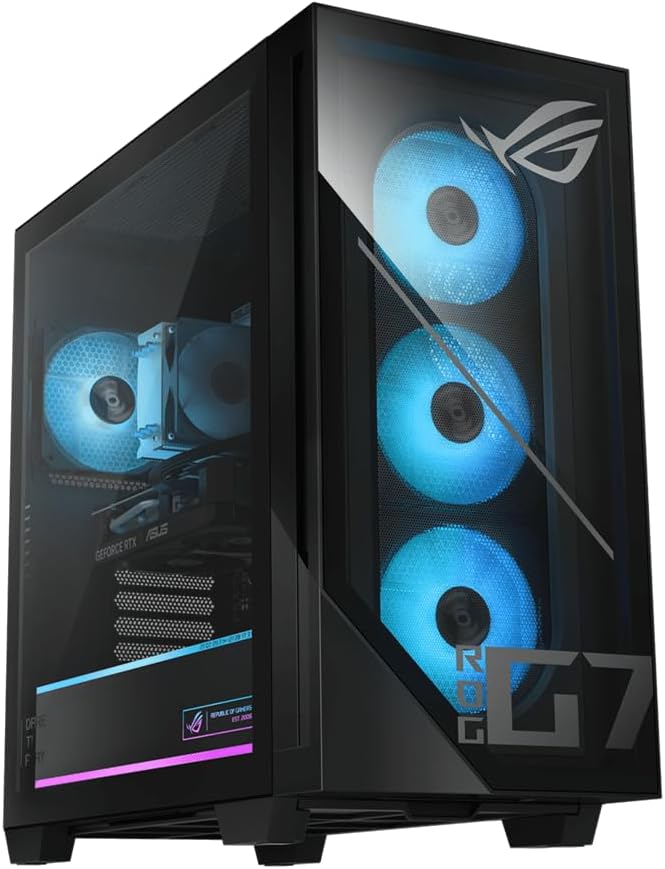
For 4K gaming or maximum settings at high refresh rates, look at the top cards. The ASUS ROG G700 features an RTX 5070 alongside a high-end Intel processor, while the Skytech Azure 3 brings an AMD RX 9070XT with 16GB of VRAM for demanding, high-resolution play. These are the machines built for enthusiasts who refuse to compromise.
The Processor: The Brain of Your Build
While the GPU handles rendering, the CPU manages game logic, physics, artificial intelligence, and feeding data to the graphics card. A strong processor prevents bottlenecks, especially in CPU-heavy games, simulations, and competitive titles running at high frame rates.
You will see two main camps: Intel Core and AMD Ryzen. Both are excellent, and the specific model matters more than the brand. Entry-level gaming machines often use chips like the Intel Core i5 or AMD Ryzen 5, which handle most games comfortably. The CyberPowerPC Gamer Xtreme VR uses a Core i5, a dependable choice for mainstream gaming, while the CyberPowerPC Core i7 steps up for players who also stream or multitask.
AMD’s X3D processors deserve special mention. Chips like the Ryzen 7 7800X3D found in the Skytech O11 Vision use extra cache memory that dramatically boosts gaming frame rates, making them favorites among enthusiasts. The flagship Skytech Azure 3 with its Ryzen 9 9850X3D sits at the very top of gaming CPU performance.
How Many Cores Do You Need
Most modern games run well on six to eight cores. A six-core chip is plenty for pure gaming at 1080p, while eight cores give you extra room for streaming, background apps, and future titles. Chasing a very high core count rarely helps gaming alone, so put your budget toward a strong GPU first, then a capable CPU that matches it.
Memory: How Much RAM for Gaming
RAM gives your system the short-term working space it needs to keep games and background tasks responsive. For 2026 and beyond, 32GB has become the comfortable standard for gaming, offering room for the game itself plus a browser, chat apps, and streaming software. Most of the systems worth considering, including the Skytech Edge and the Skytech O11 Vision, ship with 32GB.
You will also see two memory generations: DDR4 and DDR5. DDR5 is faster and found in newer platforms, benefiting high-refresh and CPU-bound gaming. Budget builds like the Skytech Storm use DDR4 to keep costs down, which is perfectly fine for mainstream play, while premium systems such as the Skytech Azure 3 use DDR5 for maximum performance. Sixteen gigabytes still works for lighter gaming, as seen on the CyberPowerPC Gamer Xtreme, but 32GB is the safer long-term choice.
Storage: Speed and Capacity
Storage affects how fast your games load and how many you can keep installed. A solid state drive (SSD) is essential; modern NVMe SSDs are far faster than old hard drives, cutting load times and eliminating stutter. Look for M.2 NVMe drives on the PCIe Gen4 standard for the quickest performance.
Capacity matters too. A 1TB SSD is the practical minimum today, since major games can each take 100GB or more. Most machines here, including the CyberPowerPC Core i7 and the Skytech Archangel, offer 1TB. If you keep a large library installed, a 2TB drive like the one in the Skytech Azure 3 saves you from constantly uninstalling titles to make room.
The Supporting Specs That Matter
Beyond the headline components, a few supporting specs separate a reliable build from a frustrating one.
- Power supply (PSU): A quality 80 Plus Gold rated unit, like the 650W and 850W supplies in the Skytech lineup, keeps your components fed and stable. Higher-end GPUs demand more wattage, so a generous PSU also leaves room for future upgrades.
- Cooling: Powerful parts generate heat. Machines with a 360mm ARGB liquid cooling loop, such as the Skytech O11 Vision RTX 5070, hold higher clock speeds longer and run quieter under load.
- Connectivity: Built-in Wi-Fi and Windows 11 are now standard across the systems here, so you can get online and gaming out of the box.
- Motherboard: The chipset determines upgrade potential. A board like the X670 in the Skytech O11 Vision supports future CPU and memory upgrades down the line.
Matching Specs to Your Budget
The best gaming computer specs for you depend heavily on how much you want to spend. Here is a simple way to think about the tiers.
Entry-level (around $1,100 to $1,300): Aim for an RTX 5050 or 5060, a Ryzen 5 or Core i5, 16GB to 32GB of RAM, and a 1TB SSD. Options like the Skytech Storm, the Skytech Edge, and the CyberPowerPC Gamer Xtreme deliver excellent 1080p gaming without breaking the bank.
Mid-range (around $1,400 to $2,000): Step up to an RTX 5060 Ti or 5070, a strong eight-core CPU such as a Ryzen 7, 32GB of DDR5, and better cooling. The Skytech O11 Vision and the Skytech O11 Vision RTX 5070 are prime examples that hit 1440p high settings with ease.
High-end (around $2,000 and up): Here you get flagship GPUs, top X3D processors, and generous storage. The ASUS ROG G700 and the Skytech Azure 3 target enthusiasts who want 4K performance and years of headroom.
Reading Reviews and Ratings Wisely
Specifications tell you what a machine can do on paper, but customer feedback tells you how it holds up in the real world. When comparing prebuilt gaming PCs, pay attention to both the rating and the number of reviews. A system with hundreds or thousands of reviews, like the Skytech O11 Vision RTX 5070 or the Skytech Archangel, gives you a much clearer picture of reliability than one with only a handful of ratings. High scores across a large sample suggest consistent build quality and support.
Final Thoughts on Choosing Gaming Specs
The best gaming computer specs are the ones that match your resolution goals, your favorite games, and your budget, all in balance. Prioritize the graphics card first, pair it with a capable processor, give yourself 32GB of RAM and a fast 1TB or larger NVMe SSD, and make sure the power supply and cooling can support it all. From budget 1080p machines like the Skytech Storm to flagship 4K powerhouses like the Skytech Azure 3, there is a well-balanced build for every kind of player. Focus on balance over hype, and you will end up with a gaming PC that stays fast and satisfying for years to come.