
 Marcus Bell
 If you game at 1920×1080, you do not need to spend a fortune, and that is exactly what makes shopping for the best 1080p graphics cards so satisfying. This resolution is the sweet spot for smooth frame rates, high refresh monitors, and titles that stay playable for years. The trick is matching the right GPU to your monitor, your CPU, and your budget without overpaying for horsepower you cannot use. Below you will find 10 cards ranked and explained, from ultra-budget entry chips to fast new-generation options with real future headroom. Each pick includes who it suits and who should skip it.
Quick answer: For most gamers in 2026, our top pick among the best 1080p graphics cards is the GIGABYTE RTX 3060 Gaming OC 12G — our #1 rated choice. Its 12GB frame buffer, proven cooling, and huge owner base make it the safest all-round buy. See the full ranked comparison, alternatives and buying advice below.

Pros
- 12GB of GDDR6 on a 192-bit bus, half again the frame buffer of most 8GB 1440p cards
- Three cooling fans with alternate spin directions to cut turbulence between blades
- Second-generation RT cores and third-generation Tensor cores unlock DLSS and hardware ray tracing
- Ampere streaming multiprocessors handle 1080p ultra settings and most 1440p titles at high
Cons
- Triple-fan shroud spans more than two slots and roughly 280 mm of length, so small-form-factor cases are out
- Uses GDDR6 rather than GDDR6X, so memory bandwidth trails higher Ampere tiers
This is the REV2.0 board of the Gaming OC, built on NVIDIA Ampere with a factory overclock applied out of the box.
- 12GB of GDDR6 on a 192-bit interface, which is the headline: most cards at this tier of performance carry 8GB.
- Second-generation RT cores handle ray tracing in hardware rather than through shader emulation.
- Third-generation Tensor cores drive DLSS, which is the practical way to hold frame rates once ray tracing is switched on.
- Three fans sit on one heatsink assembly, with the centre fan spinning opposite the outer pair to reduce air collision between blades.
The large frame buffer is what keeps this card useful beyond gaming. Texture-heavy titles, video timelines and local model work all fill VRAM quickly, and 12GB gives more room than the 8GB norm.
Check three things before ordering: card length, slot height and the power connector on your supply.
- The triple-fan cooler pushes the board past two expansion slots, so the PCIe slot directly below will be blocked in most mid-towers.
- Length runs to roughly 280 mm, which rules out compact ITX chassis and many slim office cases.
- A single 8-pin PCIe connector is required; an adapter from two Molex leads is not a sound substitute.
- NVIDIA lists a 550W system supply as the recommendation, so an older 400W unit should be replaced at the same time.
The card needs a PCIe x16 slot and a modern driver package. Measure from the rear bracket to the front of any drive cage before buying, since that clearance is where most upgrades run into trouble.
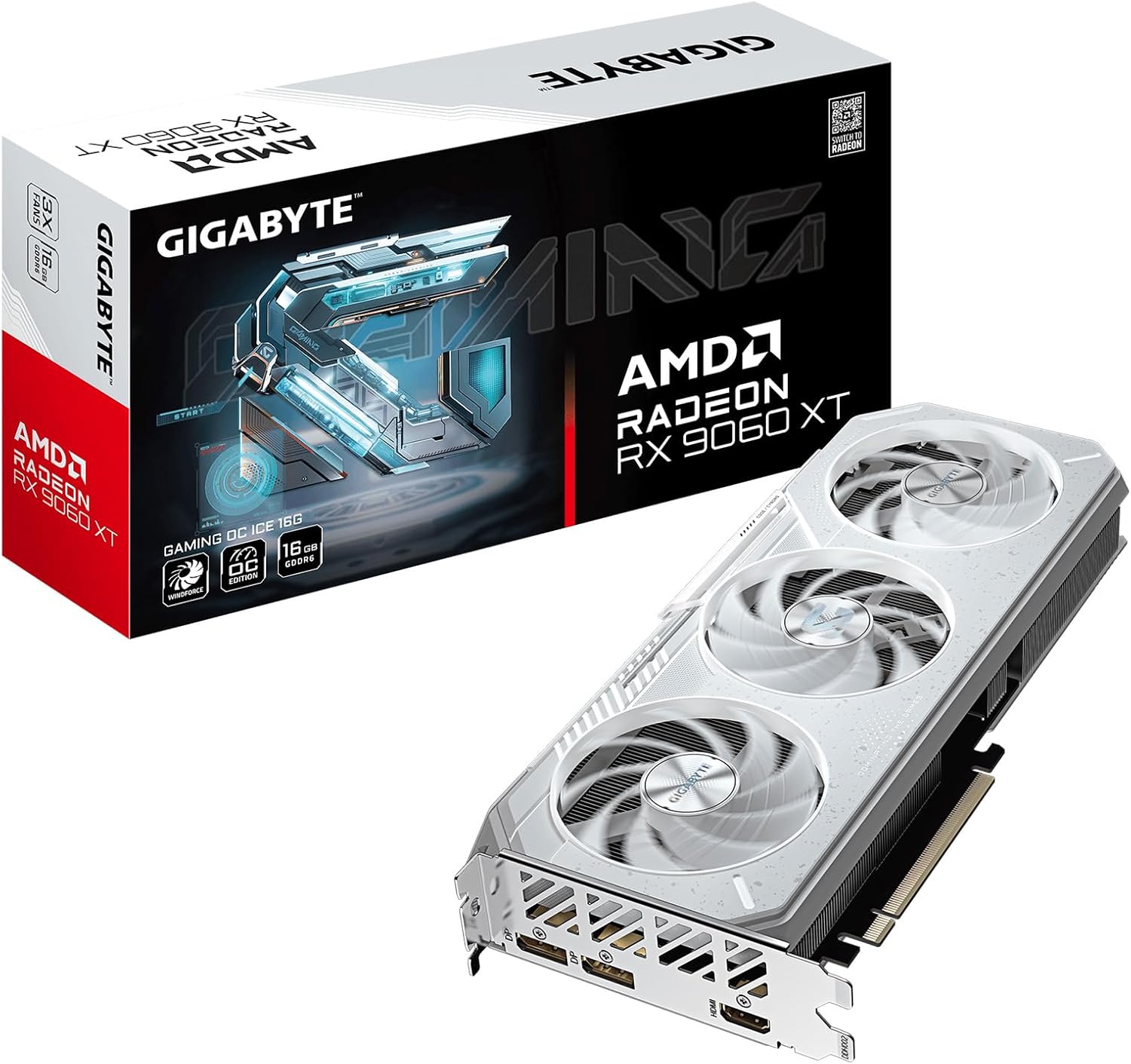
Pros
- Powered by Radeon RX 9060 XT - Built for longevity, AMD Radeon RX 9060
- WINDFORCE Cooling System - The WINDFORCE cooling system delivers
- RGB Lighting - With 16.7M customizable color options and numerous
- Reinforced Structure - The reinforced metal backplate with a bent edge,
- Dual BIOS (Performance Silent) - The factory default setting is

Pros
- 16 GB of GDDR6 holds high texture settings and local AI models that an 8 GB card cannot
- Factory tune lifts the core clock to 3320 MHz out of the box
- PCIe 5.0 host interface, backward compatible with PCIe 4.0 and 3.0 slots
- Triple-fan cooler with a physical dual BIOS switch for performance or silent fan curves
- Two DisplayPort outputs plus one HDMI, with a metal backplate resisting board flex
Cons
- Memory sits on a 128-bit bus, narrower than the 192 and 256-bit cards above it
- Three display outputs in total, so a four-monitor desk needs a second card or a hub
- RGB lighting and fan profiles are set through the maker software on Windows only
The card pairs a Radeon RX 9060 XT with 16 GB of GDDR6 on a 128-bit memory interface, and the factory tune raises the core clock to 3320 MHz.
- 16 GB of memory is generous for this class, and it is why the card handles high texture settings and local AI models that an 8 GB card cannot hold
- PCIe 5.0 host interface, fully backward compatible with PCIe 4.0 and 3.0 slots
- Display outputs are two DisplayPort and one HDMI
- A reinforced structure with a metal backplate resists board flex over time
The 128-bit bus is the trade against that capacity, since bandwidth is lower than on wider cards and very high resolutions lean harder on memory speed. At 1080p and 1440p, which is what this class targets, capacity matters more than bus width.

Pros
- 12 GB GDDR7 on a PCIe 5.0 interface with HDMI and DisplayPort 2.1 outputs
- 2.5-slot thickness keeps it inside the envelope small-chassis makers design around
- Fans stop below 50C and restart above 55C, so desktop work is silent
- Phase-change thermal pad melts to fill gaps between die and heatsink
- 3-year warranty, with dual BIOS for quiet or performance fan profiles
Cons
- 2.5-slot cooler still blocks the neighbouring expansion slot on most boards
- 12 GB of memory is below the 16 GB that some 4K titles now ask for
- Prime is the entry trim in the range, so clocks sit closer to reference than the higher tiers

Pros
- 8GB of GDDR7 memory on a PCIe 5.0 interface, paired with DLSS 4 multi frame support
- OC mode raises boost to 2565 MHz against a 2535 MHz default, with 623 AI TOPS quoted for AI workloads
- Fans stop entirely below 50C and restart above 55C, so the card is silent for desktop and video work
- Dual ball bearing fans are quoted at twice the life of sleeve bearings, behind a vented backplate
- A grade 304 stainless steel bracket and a 3-year warranty back the compact 2.5-slot build
Cons
- 8GB is the memory ceiling, and demanding titles at 1440p with high textures already push past it
- The 2.5-slot thickness blocks the neighbouring expansion slot in a small case
- An x8 PCIe link means an older PCIe 3.0 board caps the bandwidth available to the card
Built on the NVIDIA Blackwell architecture, this card pairs 8GB of GDDR7 with a PCIe 5.0 interface and DLSS 4.
- Boost clock runs at 2565 MHz in OC mode and 2535 MHz by default, selected in software with no firmware flashing required.
- AI throughput is quoted at 623 AI TOPS, relevant for local model work and creative tools as well as in-game upscaling.
- Display outputs are HDMI 2.1b and DisplayPort 2.1b, the newer pairing that supports higher refresh rates over a single cable than the previous generation.
DLSS 4 multi frame technology is what carries the card at 1440p; native rendering at that resolution with maximum settings will run into the 8GB memory limit before the core itself runs out of headroom.

Pros
- 8 GB of GDDR7 memory on a 128-bit interface with a PCIe 5.0 host connection
- Blackwell architecture with DLSS 4 frame creation in supported titles
- Fan blade design raises air pressure by 53.6 percent over the previous shape
- Semi-passive mode stops the fans entirely at idle and under light load
- Direct-contact copper plate paired with composite copper heat pipes
Cons
- 8 GB on a 128-bit bus is tight for 1440p with heavy texture packs and ray tracing
- DisplayPort and HDMI only, so a DVI or VGA monitor needs an active adapter
- In an older PCIe 3.0 system the card works but will not reach the bandwidth the 5.0 interface allows
Built on the NVIDIA Blackwell architecture with 8 GB of GDDR7 memory across a 128-bit interface, connected to the system over PCIe 5.0. Display output runs through DisplayPort and HDMI connectors, with DLSS 4 available for frame rate uplift in games that support it.
- 8 GB GDDR7 memory
- 128-bit memory interface
- PCIe 5.0 host connection
- Factory overclocked dual-fan model
GDDR7 raises per-pin bandwidth over GDDR6, which partly offsets the narrow bus. Even so, 8 GB is the figure to plan around: 1080p at high settings is comfortable, while 1440p with large texture packs and ray tracing leans hard on upscaling to hold a steady frame rate.

Pros
- 6GB of GDDR6 memory on a 96-bit bus gives enough headroom for most 1080p game libraries
- Two WINDFORCE fans split heat across separate zones instead of relying on a single blower
- 2nd-gen RT Cores and 3rd-gen Tensor Cores enable hardware ray tracing and DLSS upscaling
- Built on the same Ampere streaming multiprocessor design used in higher-tier RTX 30-series cards
Cons
- 96-bit memory bus is narrower than the 128-bit-plus buses on step-up RTX 30-series models, limiting bandwidth at 1440p and above
- 6GB of VRAM runs short of headroom on newer titles once texture settings are pushed to maximum at 4K
- No listed slot width or power-connector spec, so case and PSU clearance need to be checked before installing
This is an entry-point Ampere card aimed at players upgrading from integrated graphics or an older GPU rather than chasing maximum settings.
- Suited to 1080p gaming where 6GB of GDDR6 is enough for most current game textures
- DLSS support helps recover frame rate in supported titles without dropping resolution
- Compact dual-fan cooler fits small and mid-tower cases without needing extra case airflow planning
It is not the pick for 1440p or 4K gaming, where the 96-bit memory bus and 6GB capacity become limiting factors sooner than on higher-tier RTX 30-series cards. Creators doing light photo editing or video calls with occasional GPU-accelerated tasks will also find the RT and Tensor core set useful, but heavier 3D rendering or AI workloads are better served by a card with a wider memory bus.

Pros
- 12GB of GDDR7 memory on a 192-bit bus, well above the 8GB many 1440p cards ship with
- PCIe 5.0 interface, so bandwidth headroom stays intact on next-gen motherboards
- DLSS 4 frame generation support via the Blackwell architecture for upscaled frame rates
- WINDFORCE triple-fan cooling built into a small-form-factor-ready shroud for compact cases
Cons
- 192-bit memory bus is narrower than the 256-bit found on higher-tier Blackwell cards, capping raw bandwidth
- No listed card dimensions in this record, so double-check slot clearance before buying for a small-form-factor case
- 12GB VRAM is fixed and non-upgradeable, a ceiling for 4K texture packs in newer titles
Stepping up to this card makes the most sense if you are replacing a GPU with 8GB of memory or less, since the extra GDDR7 capacity gives more headroom for high-resolution textures and multitasking while a game is running. Because the memory is fixed at 12GB with no way to add more, buyers doing heavy 4K texture work or professional rendering may outgrow it faster than a 16GB-or-higher card.
- Good step up from 6-8GB previous-generation cards
- 192-bit bus limits headroom compared with 256-bit-and-up tiers
- No VRAM expansion after purchase
If your case is already SFF-sized, this card removes the need for a case change down the line, since the cooler was designed around that constraint from the start. Anyone planning to move to 4K gaming with maximum settings should treat 12GB as a mid-range ceiling rather than a long-term upgrade destination.

Pros
- 6GB of GDDR6 memory runs at 14 Gbps for smooth texture streaming at 1080p
- Boost clock ships pre-set at 1492 MHz, no manual overclocking needed
- Three outputs (1x DisplayPort 1.4a, 2x HDMI 2.1a) support a triple-monitor setup without adapters
- Ampere architecture adds dedicated Ray Tracing Cores and Tensor Cores for DLSS upscaling
Cons
- 96-bit memory interface is narrower than the 128-bit-plus buses on higher-tier GDDR6 cards, which limits bandwidth at higher resolutions
- 6GB of video memory gets tight in texture-heavy titles run above 1080p
- No USB-C output, so headsets or monitors needing that connector require a separate adapter
The card is built around the GeForce RTX 3050 chipset with a 96-bit memory interface feeding 6GB of GDDR6 running at 14 Gbps. Boost clock is factory-set to 1492 MHz, so there is no need to run an overclocking utility before the card performs at its rated speed.
- Chipset: GeForce RTX 3050, Ampere architecture
- Video memory: 6GB GDDR6 at 14 Gbps
- Memory interface: 96-bit
- Boost clock: 1492 MHz out of the box
The Ampere architecture also brings dedicated Ray Tracing Cores and Tensor Cores, which handle real-time lighting effects and DLSS upscaling without leaning on the shader cores for that work.
The RTX 3050 Ventus 2X 6G OC is positioned as an entry point into ray tracing and DLSS rather than a high-resolution gaming card. Its 6GB frame buffer and 96-bit bus put a ceiling on how far texture settings can be pushed before frame times climb, which matters most for anyone planning to add a higher-resolution monitor later.
- Comfortable target: 1080p with ray tracing and DLSS enabled
- Ceiling: 6GB memory limits texture pool size above 1080p
- Next step up: cards with 128-bit or wider buses and 8GB-plus memory
For a build that will stay at 1080p, the current specs cover the workload; anyone planning a jump to 1440p in the next year or two should treat this as a starting card rather than a long-term one.

Pros
- 6GB GDDR6 memory paired with 2nd-gen RT cores and 3rd-gen Tensor cores for ray tracing and DLSS support
- Dual Axial-tech fans with a barrier ring push more downward air pressure onto the heatsink
- Compact 2-slot card fits small-form-factor cases where larger cards will not clear
- PCIe 4.0 interface with HDMI 2.1 and DisplayPort 1.4a outputs cover modern display standards
- Backed by a 3 year warranty from ASUS
Cons
- A single power connector setup limits headroom for further factory overclocking versus higher-tier cards
- OC Mode boost clock requires switching profiles in GPU Tweak software rather than running by default
This card pairs 6GB of GDDR6 memory with NVIDIA's Ampere architecture, including 2nd-generation RT cores for ray tracing and 3rd-generation Tensor cores that power DLSS upscaling. The Ampere streaming multiprocessor design is built to raise FP32 throughput over the prior GPU generation while improving power efficiency.
- 2-slot card design at roughly 20cm long for compact case compatibility
- Dual Axial-tech fans with a smaller fan hub enabling longer blades and a barrier ring for added downward air pressure
- IP5X dust resistance on the fans for long-term reliability
OC Edition boost clock reaches 1537 MHz in OC Mode versus 1507 MHz in Default Mode, a difference applied by switching profiles in ASUS software rather than a permanently fixed higher clock.
What makes a great 1080p graphics card
A 1080p card only needs to push about 2 million pixels per frame. That is roughly a quarter of the workload of 4K. So mid-range and even entry silicon can deliver 60fps, and stronger cards easily feed 144Hz or 240Hz panels. Your goal is balance, not brute force.
Three specs matter most at this resolution. Video memory keeps textures loading smoothly, raw shader power sets your frame rate ceiling, and upscaling features stretch performance in demanding games. Get those right and you will not feel the need to upgrade for a long time.
Why VRAM still matters
Modern games lean on memory harder than they used to. 6GB is fine for esports and older titles, but 8GB is the comfortable floor for new AAA releases. Cards like the 12GB RTX 3060 and the 16GB Radeon RX 9060 XT give you room for high-resolution texture packs without stutter.
Upscaling and frame generation
NVIDIA DLSS and AMD FSR render at a lower internal resolution, then reconstruct a sharp image. This can lift frame rates by 40 percent or more. The newer RTX 50-series cards add DLSS 4, which helps older CPUs keep up with fast GPUs.
How to choose the best 1080p graphics cards for your build
Start with your monitor. A 60Hz screen pairs well with a budget card, while a 144Hz or 240Hz panel deserves more muscle. There is no point buying a fast GPU if your display caps the benefit.
Next, check your CPU. A weak processor will bottleneck a strong card at 1080p, because this resolution is more CPU-sensitive than 4K. Pair mid-range GPUs with a modern six-core chip or better for balanced results.
Finally, confirm physical fit and power. Measure your case clearance, count your PCIe power connectors, and make sure your supply has enough headroom. If you want the wider context, our guide to the best graphics cards for gaming covers higher resolutions too.
Match the card to the game
Competitive shooters reward high frame rates over eye candy, so a mid-tier card that hits 200fps in Valorant or CS2 is ideal. Story-driven AAA games benefit from more VRAM and ray tracing. Decide which type you play most before you buy.
Our top 1080p graphics card picks by use-case
Best overall: GIGABYTE RTX 3060 Gaming OC 12G
The GIGABYTE RTX 3060 Gaming OC earns the top spot on trust and balance. It holds a 4.7 rating across 3191 reviews, the largest owner base in this roundup. That 12GB buffer is generous for 1080p and lets you run high textures with confidence.
The triple WINDFORCE fan cooler keeps it quiet and cool, and DLSS support extends its life in newer titles. It is not the cheapest, but it is a dependable choice. It is not for you if you only play light esports games and want to spend less.
Best AMD value: GIGABYTE Radeon RX 9060 XT Gaming OC ICE 16G
Want maximum memory for the money? The GIGABYTE RX 9060 XT ICE packs 16GB of GDDR6 and PCIe 5.0. That headroom future-proofs you against texture-hungry games and even light 1440p dabbling.
It carries a 4.7 rating over 864 reviews and uses a compact two-slot design with server-grade thermal gel. If you prefer Team Red or plan to keep the card for years, it is a smart pick. Shoppers loyal to NVIDIA features may want a GeForce option instead. For more comparisons, see the best AMD graphics cards for gaming builds.
Best for high-refresh gaming: ASUS Prime RTX 5070
If you run a 240Hz panel or want headroom to spare, the ASUS Prime RTX 5070 delivers. With 12GB of fast GDDR7 and DLSS 4, it crushes 1080p and gives you a comfortable path to 1440p later.
It is SFF-ready, so it fits smaller cases, and it ships with a 3 year warranty. It is the priciest here, so it is overkill for casual players. Enthusiasts chasing every last frame will love it.
Best compact new-gen: GIGABYTE RTX 5070 WINDFORCE SFF
Building in a small form factor case? The GIGABYTE RTX 5070 SFF matches strong 50-series performance with a short triple-fan cooler. Its 12GB GDDR7 and PCIe 5.0 interface keep you current for years.
With a 4.7 rating, it targets buyers who value size and speed equally. Skip it if you have a full tower and can save money on a larger board.
Best mid-budget new-gen: ASUS Dual RTX 5060 OC
The ASUS Dual RTX 5060 hits a strong sweet spot. You get 8GB of GDDR7, DLSS 4, and a quiet 0dB fan mode that stops the fans during light loads.
It is ideal for a fresh 1080p build on a sensible budget. The 8GB buffer is enough for most current games at this resolution. Heavy modders who load huge texture packs may prefer a 12GB or 16GB card.
Best quiet alternative: GIGABYTE RTX 5060 WINDFORCE OC
The GIGABYTE RTX 5060 WINDFORCE offers the same new-gen platform. Its dual-fan cooler runs cool and quiet, and PCIe 5.0 keeps it ready for your next motherboard.
Choose it if you want RTX 50-series features without overspending. It suits 60Hz to 144Hz play beautifully. Competitive players who need a 16GB buffer should look elsewhere.
Best ultra-budget: GIGABYTE RTX 3050 WINDFORCE OC 6G
Spending as little as possible? The GIGABYTE RTX 3050 6G costs and handles esports titles at high frame rates. Its 6GB buffer suits Fortnite, Rocket League, and older AAA games at medium settings.
The two-fan cooler stays quiet, and the compact size fits tight builds. It is not built for maxed-out modern AAA gaming. For entry players, it is excellent value. See more affordable options in our best cheapest graphics cards guide.
Best backup budget picks: MSI and ASUS RTX 3050
Two more entry cards round out the list. The MSI RTX 3050 Ventus 2X offers Ampere efficiency and a compact dual-fan design. The ASUS Dual RTX 3050 adds a steel bracket and a 3 year warranty.
Both target the same shopper: someone building a first gaming PC on a tight budget. Pick whichever is cheaper or in stock. Neither is right for demanding ray-traced titles.
Practical buying guide: specs, sizes and compatibility
Card length is the most common surprise. Compact SFF models fit mini cases, while triple-fan boards need 300mm or more of clearance. Always measure before you buy.
Power draw scales with performance. Entry 3050 cards sip power and often skip extra connectors, while a 5070 needs a solid 650W supply or better. Check your PSU wattage and connector count first.
Also confirm your motherboard slot and outputs. All these cards use PCIe, and PCIe 5.0 boards are backward compatible with older slots. Match your monitor inputs to the card’s HDMI or DisplayPort connectors.
Do not forget your monitor and CPU pairing
A 240Hz esports monitor deserves a 5060 or 5070, not a 3050. Conversely, a 60Hz panel wastes the potential of a fast card. Balance the whole system, since 1080p leans heavily on CPU strength.
Common mistakes to avoid
The biggest error is overbuying. A 5070 is glorious, but it can sit idle behind a slow CPU or a 60Hz screen. Spend the saved money on RAM or storage instead.
The second mistake is under-provisioning VRAM. A 6GB card feels great today, then stutters when you install a texture-heavy AAA release. If you play modern blockbusters, choose 8GB or more.
Finally, do not ignore the platform. NVIDIA and AMD both deliver, but their upscaling and driver ecosystems differ. Read our best NVIDIA graphics cards breakdown if you are torn between brands.
Frequently asked questions
How much VRAM do I need for 1080p gaming?
For esports and older titles, 6GB is enough. For current AAA games, 8GB is the comfortable minimum. If you want long-term headroom, a 12GB card like the RTX 3060 or a 16GB Radeon RX 9060 XT gives you plenty of margin.
Is the RTX 3060 still worth buying for 1080p?
Yes. The GIGABYTE RTX 3060 Gaming OC pairs 12GB of memory with strong performance and DLSS support. Its 4.7 rating across 3191 reviews reflects proven reliability. It comfortably handles high settings at 1080p in most games.
Should I choose NVIDIA or AMD at this price?
Both are excellent. NVIDIA leads on DLSS and ray tracing, while AMD often gives more VRAM per dollar, like the 16GB RX 9060 XT. Pick based on the games you play and the features you value most.
Do I need a new power supply for these cards?
Entry cards like the RTX 3050 are very power friendly and work with modest supplies. A 5070 wants a quality 650W unit or better. Always verify your PSU wattage and PCIe connectors before installing.
Can these 1080p cards handle 1440p too?
The stronger picks can. A 5070 or 16GB RX 9060 XT will run many games at 1440p with tuned settings. The 3050 and 5060 are happiest at 1080p, where they deliver their best frame rates.
The bottom line
The best 1080p graphics cards give you smooth, high-refresh gaming without wasting money on power you cannot use. For most people, the GIGABYTE RTX 3060 Gaming OC blends memory, reliability, and value into the safest all-round buy. If you want new-generation features, the RTX 5060 and 5070 cards deliver, while the RX 9060 XT wins on raw VRAM. Match your card to your monitor, CPU, and case, and you will enjoy a fast, future-ready build for years.


Comments are closed.
No reviews yet. Be the first to share your experience!