
 Marcus Bell
 Picking the best pc cases for airflow can feel confusing once you start comparing mesh panels, fan counts, and dust filters across a dozen chassis. A case that traps heat forces your CPU and GPU to throttle, even with a great cooler installed. This guide breaks down what actually matters for cooling, then walks through 10 chassis that keep components cool without turning your desk into a wind tunnel. You’ll find picks for compact builds, full towers, and everything between, plus the mistakes worth avoiding before you buy.
Quick answer: If you only read one section, know this: for most builders in 2026, our top pick among the best pc cases for airflow is the NZXT H6 Flow RGB — our #1 rated pick thanks to its dual-chamber layout and three pre-installed fans. Keep reading for the full ranked comparison, use-case picks, and buying advice below.

Pros
- Ships with 3 pre-installed 120mm RGB fans, no separate fan purchase needed for basic airflow
- Dual-chamber layout separates the PSU and cables from the main build area for a cleaner look
- Perforated top and side panels are designed to filter dust while maintaining airflow
- Wide cable channels and included straps simplify routing behind the motherboard tray
Cons
- Case measures 17.13"H x 16.34"D, sized for a mid-tower build, not compact enough for small-form-factor systems
- RGB fans require compatible software or a hub to control lighting beyond the default pattern
The H6 Flow is a mid-tower ATX case built around a dual-chamber layout, with dimensions of 16.34"D x 11.3"W x 17.13"H.
- Case dimensions: 16.34"D x 11.3"W x 17.13"H
- Includes 3 pre-installed 120mm RGB fans
- Wraparound panoramic glass side and front panels
- Metal chassis construction
The dual-chamber design routes the power supply and most cabling into a separate compartment from the motherboard and GPU area, which keeps the visible build area cleaner and can improve thermal separation between hot and cool zones inside the case.

Pros
- Takes graphics cards up to 377 mm with the front fan slots empty, and still 317 mm with a front radiator and fans fitted
- Supports a 280 mm radiator at the front and a 240 mm radiator at the top
- Compatible with back-connect boards including ASUS BTF and MSI Project Zero for hidden cabling
- Ultra-fine steel mesh panels double as dust filters, with one 120 mm rear exhaust fan pre-installed
Cons
- Only one fan is included, so an airflow-focused build needs several more bought separately
- The micro-ATX footprint will not take a full ATX or E-ATX motherboard
- Fine mesh traps dust readily and needs vacuuming every couple of months to keep intake area open
This chassis is built around intake area. Ultra-fine steel mesh on the panels and a ventilated PSU shroud let front and bottom fans pull cool air straight to the components, while the mesh doubles as a dust filter.
- Liquid cooling fits a 280 mm radiator at the front and a 240 mm radiator at the top.
- Air cooling can use up to seven fans: two 140 mm front, two 140 mm top, two 120 mm bottom and one 120 mm rear.
- One 120 mm rear exhaust fan is pre-installed, so air leaves the box out of the carton, but intakes have to be added for a proper front-to-back path.
- The ventilated shroud lets bottom-mounted fans feed the main chamber rather than trapping air beneath the supply.
Fine mesh trades a little airflow for dust capture, so plan on vacuuming the front panel every couple of months.
Despite the micro-ATX footprint, this chassis is specified for full-size graphics cards, which is the trade-off most compact builds get wrong.
- Graphics card length: 377 mm with the front fan slots empty, 352 mm with front fans fitted, and 317 mm once a front radiator and fans are installed.
- Motherboard support runs to micro-ATX and smaller, so a full ATX board is out and the board choice has to follow the chassis.
- It supports back-connect motherboards including ASUS BTF and MSI Project Zero, which routes cabling entirely behind the tray.
- Decide the front cooling first, because the radiator choice directly sets the graphics card length still available.
Measure your intended card at its true length including the rear power connector shroud, not just the figure quoted for the board.

Pros
- Ships with 4 pre-installed 120mm ARGB PWM fans plus a 26-LED strip, so lighting and airflow are ready without buying extras
- Clears GPUs up to 420mm, CPU coolers up to 178mm tall, and top radiators up to 360mm for high-end builds
- Tool-less side panels speed up access to internal components during builds or upgrades
- Supports back-connect ATX and Micro-ATX motherboards for cleaner cable routing behind the panel
- Side-mounted USB-C port puts a modern connection within reach without reaching around to the front
Cons
- Tempered glass panels add weight and a fragility risk during moving or panel removal that steel-only cases avoid
- Included fans run up to 1800 RPM with noise reaching 30.8 dBA at full speed, audible under sustained heavy load
- Fits ATX, Micro-ATX, and Mini-ITX boards only, so E-ATX motherboards are not supported
The Vector V100 comes with 4 pre-installed 120mm ARGB PWM fans using hydraulic bearings, each capable of up to 1800 RPM, 61.47-60.4 CFM airflow, and 2.54-2.17 mm-H2O air pressure, with noise ranging 26.5-30.8 dBA depending on speed. A 26-LED ARGB strip adds further lighting, and both fans and strip daisy-chain together for a simpler cable run than wiring each component separately.
- 4x 120mm ARGB PWM fans included, hydraulic bearing design
- 26-LED ARGB strip with full spectrum color control
- Daisy-chain connectivity reduces individual cable runs
Fan and strip lighting sync with motherboard ARGB software, so color and effects can match other components already running compatible lighting ecosystems.
Internal clearance is built for high-end hardware: graphics cards up to 420mm, CPU air coolers up to 178mm tall, and a top-mounted radiator up to 360mm. That headroom leaves room to move from air cooling to a 360mm liquid loop, or to swap in a longer flagship GPU later, without the case itself becoming the limiting factor.
- 420mm max GPU length clearance
- 178mm max CPU cooler height
- 360mm top radiator support
A GPU support bracket is included to help offset the weight of longer graphics cards over time, reducing sag as heavier cards are installed.

Pros
- Supports GPUs up to 355mm long, or 300mm when a 360mm front radiator is installed
- Ships with two 140mm PWM fans pre-installed, rather than needing separate fan purchases
- Compatible with ATX, mATX, and ITX motherboards in one case
- 7 bridgeless expansion slots leave room for multi-card or unconventional build layouts
- Includes 2 combined 3.5-inch/2.5-inch drive mounts plus 2 dedicated 2.5-inch mounts for mixed storage setups
Cons
- Wood front panel material requires more careful handling during installation than an all-metal front
- Installing a 360mm front radiator reduces maximum GPU length from 355mm down to 300mm
- Tempered glass side panel adds weight and needs careful handling when removing it for internal access
This ATX mid tower measures roughly 17.6 inches deep, 8.46 inches wide and 18.46 inches tall, and combines a metal frame with a genuine walnut or oak wood front panel and a tempered glass side panel for viewing internal components. Two 140mm PWM fans come pre-installed, giving a working airflow setup before adding any aftermarket cooling.
- Metal frame paired with genuine wood front panel accents, cut from sustainably sourced walnut or oak
- Tempered glass side panel resists scratching while showing off internal components
- 2 pre-installed 140mm PWM fans provide baseline airflow without extra purchases
Front panel access uses an open-mesh design behind the wood slats for intake airflow, rather than a fully solid wood front that would restrict air movement.
The case supports ATX, mATX, and ITX motherboards in one shared layout, and GPUs up to 355mm in length fit with a standard configuration. Installing a 360mm radiator in the front reduces available GPU clearance to 300mm, so radiator size and GPU length need to be balanced against each other during planning.
- 355mm maximum GPU length in standard configuration without a front radiator
- 300mm GPU clearance remains available even with a 360mm front radiator installed
- 7 bridgeless expansion slots support multi-card or angled component layouts
Because GPU clearance changes depending on front radiator size, builders planning a large air-cooled GPU alongside front liquid cooling should measure both components against the case's clearance figures before buying.

Pros
- Build your legacy with the 7000D AIRFLOW, a full-tower case for your
- A high-airflow optimized steel front panel delivers massive airflow to
- The CORSAIR RapidRoute cable management system makes it simple and fast
- Includes three CORSAIR 140mm AirGuide fans and PWM fan repeater,
- A massive interior accommodates up to 12x 120mm or 7x 140mm cooling
Cons
- Requires verifying computer chassis clearance for 21.65"D x 9.76"W x 23.62"H

Pros
- Three 120 mm addressable RGB PWM fans arrive pre-installed in the front, each with eight LEDs and daisy-chained on one header
- Sliding steel fan rails accept units up to 200 mm in the front and 140 mm in the roof
- Cut-outs support rear-connector motherboards including ASUS BTF, MSI Project Zero and Gigabyte Stealth
- The inner side panel lifts out so fans can be mounted alongside the board tray instead of a cable cover
- The steel front panel is perforated in a three-dimensional Y pattern rather than left as a solid slab
Cons
- Modular parts such as the aluminium motherboard tray and alternative front I/O panels are sold separately
- All three supplied fans sit at the front, leaving the rear and roof positions empty
- Offered in black only in this configuration
Three 120 mm addressable PWM fans ship pre-installed behind a perforated steel front panel. The perforation uses a three-dimensional Y pattern designed to give air a low-obstruction path rather than forcing it through a flat mesh grille.
- Front rails take fans up to 200 mm
- Roof rails take fans up to 140 mm
- Side mounting available once the inner panel is removed
- Fans support a Zero RPM mode for near-silent behaviour at low load
The rail system is the useful part. Rather than fixed screw holes, the rails let you slide a fan to sit exactly over a graphics card or a radiator inlet. If you are running a high-power card, adding a rear exhaust fan is the first upgrade worth making, since all three included fans are intake.

Pros
- EXCEPTIONAL GPU COOLING-The PSU shroud is perforated on the side and
- LARGE RADIATOR SUPPORT-Supports up to a 360mm radiator in front and a
- HIGH-PERFORMANCE AIRFLOW-Ultra-fine mesh on the top, front, and side
- PRE-INSTALLED FANS-Equipped with two 120mm Quiet Airflow fans one in
Cons
- Requires verifying computer chassis clearance for 8.86"D x 16.93"W x 18.31"H

Pros
- Reinventing ATX Layout - The M-ATX chassis is designed for ATX
- Front Fans - The LANCOOL 207 comes with two pre-installed 140x140x30mm
- Four Pre-installed Fans with GPUs Bottom Fans - Two pre-installed
- Reinventing PSU Airflow The PSU at the front with an adapter cable,
- GPU Anti-Sag Bracket Adjustable Bracket Included - The LANCOOL 207 also
Cons
- Requires verifying computer chassis clearance for 17.9"D x 8.62"W x 17.9"H
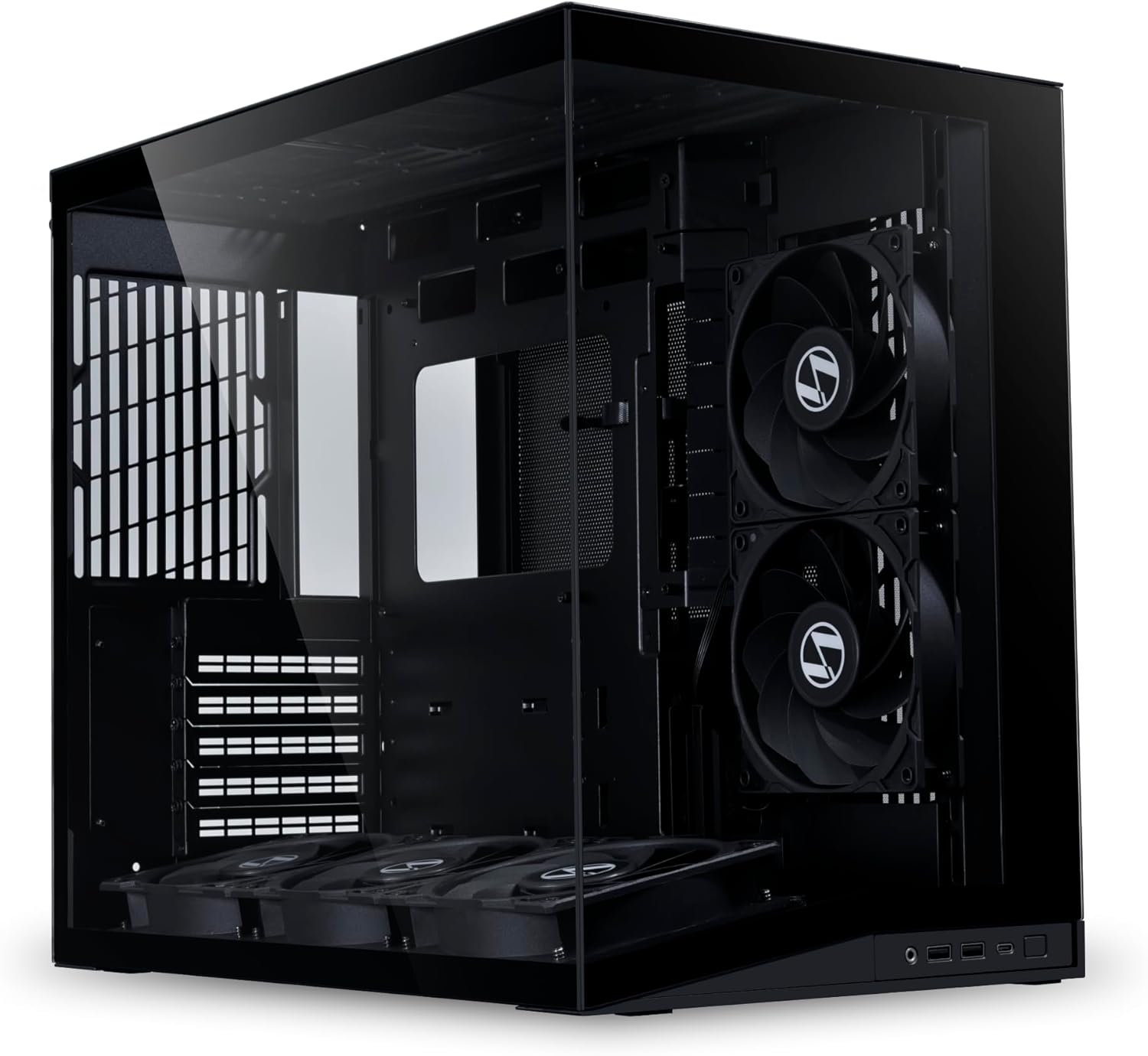
Pros
- Pre-installed 5 Fans Includes 5 pre-installed 120mm reverse blade fans
- Optimized Airflow The 10 slanted bottom design not only enhances direct
- Compact Design The protruded mesh side panel is designed to accommodate
- Motherboard Compatibility This chassis supports a variety of
- Equipped with horizontal and vertical GPU anti-sag brackets, this case
Cons
- Requires verifying computer chassis clearance for 16.68"D x 10.73"W x 15.41"H

Pros
- Triple-chamber layout physically isolates CPU radiator heat from the GPU and motherboard airflow path
- Dedicated front chamber fits up to a 360mm radiator without crowding the main compartment
- Ships with 3 pre-installed reverse-rotor RS120-R ARGB fans, saving a separate fan purchase
- Wraparound tempered glass panels give full visibility of the build from two sides
- Reverse motherboard support lets builders route front-panel cables away from the primary viewing angle
Cons
- Case measures 18.5"D x 13.39"W x 18.39"H, sizable enough that it needs a dedicated desk footprint
- Triple-chamber design adds internal walls that make cable routing more involved than a single open-frame case
- Tempered glass panels add weight and are more fragile in transit than mesh or steel side panels
Reverse motherboard support lets builders mount the board with connectors facing the opposite side, which keeps front-panel and power cables tucked behind the board rather than crossing the primary glass viewing panel. The case ships with three reverse-rotor RS120-R ARGB fans already installed, so a base airflow configuration is in place before adding cooling.
- 3 pre-installed reverse-rotor RS120-R ARGB fans included at purchase
- Reverse motherboard mounting option for cleaner cable presentation behind the board
- Case dimensions of 18.5"D x 13.39"W x 18.39"H accommodate full-size ATX builds
Because of the chamber walls, routing custom cables between chambers takes more planning than in a single-volume case, and builders should check clearance for oversized GPUs before finalizing parts.
What Makes a PC Case Great for Airflow
Airflow starts with the front panel. Mesh panels let air pass through almost unrestricted, while glass or solid steel fronts choke intake no matter how many fans you add. When you’re comparing options, check the open area percentage of the mesh if the listing mentions it — more open space generally means cooler components.
Fan placement matters just as much as fan count. A well-designed airflow case pulls in cool air low and at the front, then pushes hot air out the top and rear. This creates a clear path across your motherboard, GPU, and drives instead of stagnant pockets of warm air.
You’ll also hear the term positive air pressure. This means slightly more air comes in than goes out, which reduces dust buildup because air escapes through vents instead of getting pulled in through unfiltered gaps. Dust filters on the front, top, and bottom keep that incoming air clean over months of use.
Cable management plays a bigger role in cooling than most first-time builders expect. A case with a dedicated space behind the motherboard tray keeps cables from blocking fan intake, so even a modest airflow design performs better once wiring is tidy. If you want a deeper technical breakdown of fan configurations and mesh designs, our high-airflow PC cases guide covers the engineering side in more detail.
How We Compared These Airflow PC Cases
We looked at pre-installed fan count and type, since replacing stock fans adds cost most buyers skip. We also weighed mesh coverage, radiator support for future liquid cooling, and GPU clearance for today’s larger graphics cards.
Price-to-performance mattered too. A full tower needs to justify its cost with genuinely better thermals, not just size. We cross-checked customer ratings and review counts from the product data, since a 4.8-star average across nearly 1,800 reviews signals consistent real-world performance rather than a lucky batch of early buyers.
We also factored in build flexibility, like support for reverse-connect motherboards and modular fan mounts, because a case that adapts to newer components tends to stay relevant through more than one build cycle.
Best PC Cases for Airflow for Every Build
Not everyone needs the same chassis. Below are our top picks broken down by the situations real builders run into most often, from tight desks to full custom loops.
Best Overall: NZXT H6 Flow RGB
The NZXT H6 Flow RGB earns the top spot because it balances airflow, style, and price better than almost anything else on this list. Its dual-chamber design tucks the power supply and cables out of sight, so nothing blocks air moving across your motherboard and GPU.
Three RGB fans come pre-installed, and the panoramic glass still leaves enough mesh venting to keep temperatures in check. With a 4.8-star rating across 1,837 reviews, it’s a safe pick for a first serious airflow build. The trade-off is that its dual-chamber layout adds a bit more depth than slimmer cases, so measure your desk space first.
Best for Compact Builds: NZXT H3 Flow
Small desks don’t have to mean hot components. The NZXT H3 Flow is a Micro-ATX case that still fits a full-size GPU and supports back-connect motherboards for cleaner cable routing in a tight footprint.
It’s one of the more affordable options here without cutting corners on mesh coverage. If you’re set on a smaller form factor, browse our Micro-ATX PC cases roundup for more compact options built around the same airflow-first principles.
Best Full-Tower Airflow: CORSAIR 7000D Airflow
Builders running triple-radiator loops or multiple drives need room to breathe, and the CORSAIR 7000D Airflow delivers it. Its high-airflow front panel and three 140mm AirGuide fans move serious volumes of air through a genuinely spacious interior.
It’s the priciest case on this list, but the interior room means future upgrades rarely require buying a new chassis. It’s not the right fit if desk space is tight, since its full-tower footprint is noticeably larger than the mid-tower options here. For more oversized ATX options with this kind of expansion room, see our ATX PC cases comparison.
Best Value: CORSAIR 4000D RS ARGB
The CORSAIR 4000D RS ARGB gives you three pre-installed RS fans, a modular InfiniRail mounting system, and compatibility with back-connect boards like ASUS BTF and MSI Zero. With a 4.7-star rating, it’s a strong middle-ground pick if you want flexibility without paying full-tower prices.
Best Premium Panoramic Case: LIAN LI O11D Mini V2 Flow
If you want showcase looks without sacrificing cooling, the LIAN LI O11D Mini V2 Flow ships with five reverse-blade fans and a panoramic view that still prioritizes intake volume over pure looks. It’s compact for what it offers, though the layout suits builders comfortable with slightly tighter cable routing behind the tray.
Best RGB Airflow Case: LIAN LI LANCOOL 207
The LIAN LI LANCOOL 207 pairs four ARGB and PWM fans with mesh-optimized panels, giving you lighting flair without the thermal penalty some RGB-heavy cases carry. It’s a reasonable pick if aesthetics matter alongside cooling performance.
Best for Style-Conscious Builders: Fractal Design North
Not every airflow case needs to look industrial. The Fractal Design North uses a genuine walnut wood front over its mesh intake, pairing two 140mm PWM fans with a warmer aesthetic than typical gaming cases. With 3,462 reviews backing its 4.7-star rating, it’s a proven option if your build sits somewhere visible, like a living room or shared office.
Matching a Case to Your Use Case
Think about how you’ll actually use your PC before picking a case. If you’re gaming on a hot afternoon with the AC off, prioritize a case with strong front-to-back airflow like the 7000D Airflow over a purely stylish option.
If your desk sits in direct sunlight or a small bedroom without great ventilation, positive air pressure and a low-noise fan curve matter more than raw fan count. Builders running a single GPU under $500 in total case-plus-fans budget will usually get the best return from the 4000D RS or the H3 Flow rather than the full-tower option.
For streamers and content creators who need quiet operation during recordings, look at reverse-rotor or low-noise fan models, since standard high-static-pressure fans can add noticeable hum under load.
Common Mistakes to Avoid When Buying an Airflow Case
The biggest mistake is buying a glass-front case for looks, then expecting airflow-case temperatures. Tempered glass fronts restrict intake significantly compared to mesh, no matter how many fans sit behind them.
Another common error is ignoring GPU length and radiator clearance before ordering. Measure your graphics card and any planned cooler against the listed clearance specs, since returns on large cases can be costly to ship back.
Builders also forget dust filter maintenance. Even the best mesh panel collects buildup over a few months, and a clogged filter quietly undoes your airflow advantage. Clean filters every few weeks if you have pets or live somewhere dusty.
Finally, don’t assume more fans always equal cooler temperatures. Poorly positioned fans can create turbulence or fight each other instead of pushing air in one consistent direction. If you’d rather browse something smaller than a mid-tower first, our compact PC cases picks can help you compare footprint against cooling trade-offs.
Frequently Asked Questions
Do more fans always mean better airflow?
Not necessarily. Fan placement and direction matter more than raw count. Three well-positioned fans creating a clear intake-to-exhaust path often outperform five fans fighting each other’s airflow.
Is a mesh front panel really better than tempered glass for cooling?
Yes, in most cases. Mesh panels let air pass through with minimal resistance, while glass panels restrict intake even with fans mounted directly behind them. If cooling is your priority, mesh should win over looks.
What is positive air pressure and why does it matter?
Positive air pressure means more air enters your case than exits it. This reduces dust intake through unfiltered gaps and seams, since air is pushed out rather than pulled in from random openings.
How many fans do I need for good airflow?
Most airflow-focused cases perform well with two to four fans: one or two at the front for intake, one at the rear, and optionally one on top for exhaust. Adding more only helps if placement supports a clear airflow path.
Are airflow-optimized cases louder than solid-panel cases?
They can be slightly louder since less material blocks fan noise, but the difference is usually minor with quality fans. Many current airflow cases use low-noise fan curves that keep sound reasonable under typical loads.
Whichever case you land on, check the current price on Amazon before deciding, since availability and small price changes can shift which option offers the best value for your specific build and budget.


