
 Marcus Bell
 Building a full tower PC deserves a case that can actually handle the hardware you’re planning to cram inside it. If you’re shopping for the best full tower pc cases, you’re probably dealing with a multi-GPU workstation, a custom loop, or a hobby build that outgrew a mid-tower years ago. This guide breaks down what actually separates a true full tower from a slightly bigger mid-tower, then matches specific cases to real builds: airflow-first rigs, quiet workstations, RGB showcases, and tighter budgets.
Quick answer: For most people in 2026, the best full tower pc cases pick is the CORSAIR 7000D Airflow — our #1 rated choice thanks to its high-airflow front panel and huge interior. See the full ranked comparison, alternatives and buying advice below.

Pros
- Ships with 4 pre-installed 120mm ARGB PWM fans plus a 26-LED strip, so lighting and airflow are ready without buying extras
- Clears GPUs up to 420mm, CPU coolers up to 178mm tall, and top radiators up to 360mm for high-end builds
- Tool-less side panels speed up access to internal components during builds or upgrades
- Supports back-connect ATX and Micro-ATX motherboards for cleaner cable routing behind the panel
- Side-mounted USB-C port puts a modern connection within reach without reaching around to the front
Cons
- Tempered glass panels add weight and a fragility risk during moving or panel removal that steel-only cases avoid
- Included fans run up to 1800 RPM with noise reaching 30.8 dBA at full speed, audible under sustained heavy load
- Fits ATX, Micro-ATX, and Mini-ITX boards only, so E-ATX motherboards are not supported
The Vector V100 comes with 4 pre-installed 120mm ARGB PWM fans using hydraulic bearings, each capable of up to 1800 RPM, 61.47-60.4 CFM airflow, and 2.54-2.17 mm-H2O air pressure, with noise ranging 26.5-30.8 dBA depending on speed. A 26-LED ARGB strip adds further lighting, and both fans and strip daisy-chain together for a simpler cable run than wiring each component separately.
- 4x 120mm ARGB PWM fans included, hydraulic bearing design
- 26-LED ARGB strip with full spectrum color control
- Daisy-chain connectivity reduces individual cable runs
Fan and strip lighting sync with motherboard ARGB software, so color and effects can match other components already running compatible lighting ecosystems.
Internal clearance is built for high-end hardware: graphics cards up to 420mm, CPU air coolers up to 178mm tall, and a top-mounted radiator up to 360mm. That headroom leaves room to move from air cooling to a 360mm liquid loop, or to swap in a longer flagship GPU later, without the case itself becoming the limiting factor.
- 420mm max GPU length clearance
- 178mm max CPU cooler height
- 360mm top radiator support
A GPU support bracket is included to help offset the weight of longer graphics cards over time, reducing sag as heavier cards are installed.

Pros
- Dual Chamber Design.
- Space for Three 140mm Fans or Two 160mm Fans on Top and Bottom.
- Supports Thick 360mm Radiators on Top, Bottom, and Side Simultaneously.
- Full Cut-Out at Bottom with Interchangeable 120mm 140mm Fan Brackets.
Cons
- Requires verifying computer chassis clearance for 18.26"D x 11.93"W x 18.74"H

Pros
- Build your legacy with the 7000D AIRFLOW, a full-tower case for your
- A high-airflow optimized steel front panel delivers massive airflow to
- The CORSAIR RapidRoute cable management system makes it simple and fast
- Includes three CORSAIR 140mm AirGuide fans and PWM fan repeater,
- A massive interior accommodates up to 12x 120mm or 7x 140mm cooling
Cons
- Requires verifying computer chassis clearance for 21.65"D x 9.76"W x 23.62"H

Pros
- Three 120 mm addressable RGB PWM fans arrive pre-installed in the front, each with eight LEDs and daisy-chained on one header
- Sliding steel fan rails accept units up to 200 mm in the front and 140 mm in the roof
- Cut-outs support rear-connector motherboards including ASUS BTF, MSI Project Zero and Gigabyte Stealth
- The inner side panel lifts out so fans can be mounted alongside the board tray instead of a cable cover
- The steel front panel is perforated in a three-dimensional Y pattern rather than left as a solid slab
Cons
- Modular parts such as the aluminium motherboard tray and alternative front I/O panels are sold separately
- All three supplied fans sit at the front, leaving the rear and roof positions empty
- Offered in black only in this configuration
Three 120 mm addressable PWM fans ship pre-installed behind a perforated steel front panel. The perforation uses a three-dimensional Y pattern designed to give air a low-obstruction path rather than forcing it through a flat mesh grille.
- Front rails take fans up to 200 mm
- Roof rails take fans up to 140 mm
- Side mounting available once the inner panel is removed
- Fans support a Zero RPM mode for near-silent behaviour at low load
The rail system is the useful part. Rather than fixed screw holes, the rails let you slide a fan to sit exactly over a graphics card or a radiator inlet. If you are running a high-power card, adding a rear exhaust fan is the first upgrade worth making, since all three included fans are intake.

Pros
- Temperature Display Glance at your system status.
- iUnity Provides instant data on PC specs.
- 2 Cable Covers Included for Optimizing the Cable Routing.
- Type-C 10Gbps Port Ready.
- Dual 4mm Tempered Glass Side Panels for Better PC Showcase.
Cons
- Requires verifying computer chassis clearance for 20.55"D x 9.06"W x 20.55"H

Pros
- Supports up to 12 fans simultaneously with 6 PWM fans pre-installed
- CPU/GPU dual temperature display built-in
- 20.86"D x 9.64"W x 21.45"H for full E-ATX motherboards
Cons
- 21.45" height exceeds many desk and cabinet dimensions
- Walnut wood finish adds aesthetic but reduces part compatibility options
Supports extreme cooling configurations with up to 12 fan slots total. Pre-installed fans include 3x Tranquil 140mm PWM at front, 2x P12R PWM reverse fans on power supply shroud, and 1x Tranquil 140mm in rear.
Radiator Support:
- Simultaneous 420mm front + 360mm top radiator mounting
- Independent cooling zones with removable brackets
- Front, top, and PSU shroud bracket removal for custom setups
Innovative iShift PSU mount rotates 90 degrees for optimized cable management and airflow distribution. High-efficiency multi-directional vent design reduces hot spots throughout the chassis.

Pros
- Iconic angular mesh design provides filtered airflow
- Dual-layout interior fits E-ATX and SSI-EEB boards
- Supports up to 18 HDDs and 5 SSD mounts
- Exceptional water cooling with radiators up to 480mm
- Tempered glass side panel for viewing build
Cons
- Large form factor requires adequate desk space
- Heavy weight makes repositioning difficult alone

Pros
- Six PWM ARGB fans arrive pre-fitted, so no separate 120 mm fans are needed to populate intake and exhaust
- Tempered glass side door swings on magnets with a metal pull ring, so dust cleaning needs no screwdriver
- 15.35 x 8.07 x 18.98 inch shell takes a full ATX board while staying inside a mid-tower footprint
- Front panel carries two USB 3.0 ports plus audio for a headset and an external drive
- Addressable fans reach 16.8 million colours from a 3-pin motherboard header rather than a bundled controller
Cons
- Addressable lighting needs a 3-pin 5 V ARGB header; boards with only a 4-pin 12 V RGB header cannot drive the fans
- The carton holds the chassis and the six fans only, with no power supply, radiator or fan controller included
- Six fans plus a CPU cooler exceed the fan header count on many entry-level boards, so a PWM splitter hub may be needed
The shell measures 15.35 inches deep, 8.07 inches wide and 18.98 inches tall, the standard mid-tower envelope for a full ATX motherboard. Micro-ATX and mini-ITX boards drop onto the same standoffs, leaving spare room behind the tray for cable routing. Steel forms the frame and tempered glass the left panel, so the empty chassis has real mass before any hardware goes in. Front I/O covers two USB 3.0 ports plus audio, enough for a headset and an external drive without reaching behind the desk. Three numbers are worth checking before ordering: graphics card length, CPU cooler height and radiator thickness. The polygonal mesh front means intake is not choked by a solid door, but a 360 mm radiator with thick fans still deserves measuring against your board layout.
Six PWM ARGB fans arrive already mounted, which is unusual since most mid-towers ship with one or two. Two separate things need controlling:
- PWM speed runs from motherboard fan headers, so the fans idle slowly and ramp under load instead of spinning flat out all day.
- Addressable lighting needs a 3-pin 5 V ARGB header. Each fan then addresses 16.8 million colours through your board maker software.
Boards carrying only a 4-pin 12 V RGB header cannot drive addressable fans; lighting will default to a fixed pattern or need a separate controller. Count headers first, because six fans plus a CPU cooler is more connectors than many entry boards provide, and a PWM splitter hub is the simple fix. Upgraded bearings are quoted for service life, and the frames are standard 120 mm if you swap them later.

Pros
- Seven PWM ARGB fans fitted from the box, with mounting points for up to ten
- Clears graphics cards to 400 mm, air coolers to 165 mm and a 360 mm radiator in the roof
- 270-degree dual tempered glass wraps the front corner for an unbroken view of the components
- Front panel carries 1 x USB-C, 2 x USB 3.0 and separate microphone and audio jacks
- Power supply bay takes 140 mm units with the drive cage fitted, or 150 to 180 mm with it removed
Cons
- Fans need a 5V 3-pin addressable header, and boards with only a 12V 4-pin RGB header need a converter bought separately
- Two glass faces add weight and show fingerprints on a case already 18.5 in tall and 16.73 in deep
- The three reverse-blade intake fans are specific to this layout, so like-for-like replacements are not a shelf part
External size is 16.73 in deep, 8.35 in wide and 18.5 in tall, a standard mid-tower footprint.
- Graphics cards up to 400 mm long, which covers current triple-fan flagships
- Air coolers up to 165 mm tall, enough for the large dual-tower designs
- Top-mounted liquid coolers up to 360 mm
- Power supplies to 140 mm with the drive cage in place, 150 to 180 mm without it
Measure the card first, because 400 mm is generous but the longest custom-cooled models now approach it. The power supply note is the one people miss: modern high-wattage units often run 160 mm or longer, so plan on removing the drive cage if you are fitting one of those alongside a long card.
Lighting on all seven fans is addressable, and it is driven by the motherboard rather than a bundled remote.
- Needs a 5V 3-pin addressable RGB header, the current standard
- Boards with only a 12V 4-pin RGB header need a converter, which is not in the box
- Boards with no RGB header at all cannot drive the lighting effects
- Once connected, the fans sync with other components through the board vendor software
Check the motherboard manual before ordering, because the two header types look similar and plugging a 5V strip into a 12V header destroys the LEDs. If the board is recent, the header is almost certainly the 3-pin type. Fan power runs on separate 4-pin PWM connectors, so speed and lighting are wired independently of each other.
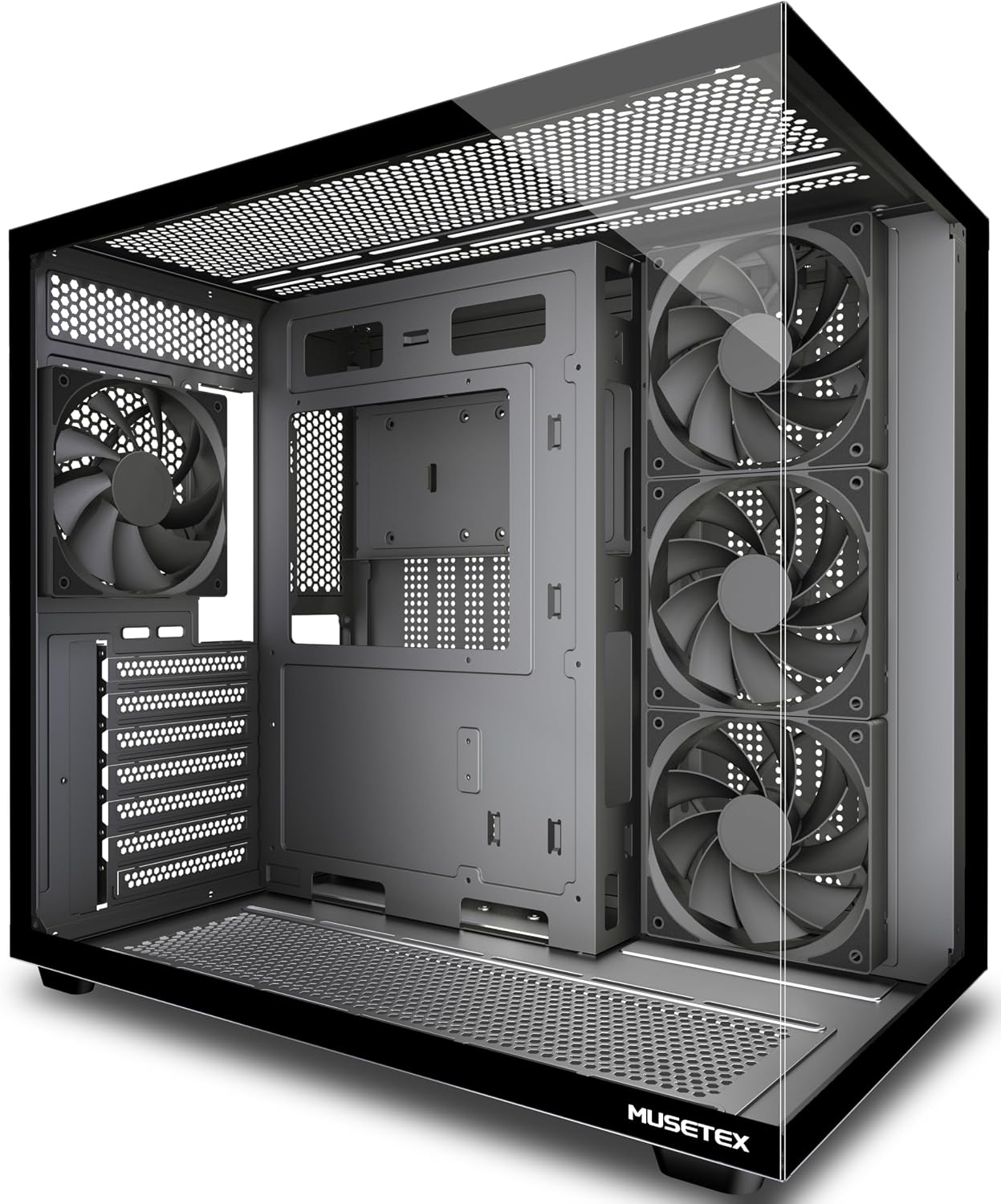
Pros
- Clears graphics cards up to 410 mm, CPU coolers to 160 mm and power supplies to 230 mm
- Four 120 mm fans pre-installed, three as side intake and one at the rear
- Top mount accepts a 360 mm liquid cooling radiator
- Front I/O carries 1 Type-C, 1 USB 3.0, 1 USB 2.0 plus mic and audio jacks
- Magnetic dust filters top and bottom over a dual-chamber layout
Cons
- Included fans have no LED or ARGB lighting, so any glow must be added separately
- 160 mm cooler ceiling rules out the tallest dual-tower air coolers
- Only one USB 3.0 port on the front panel alongside a slower USB 2.0
The case measures 16.73 in. deep by 10.83 in. wide by 15.67 in. high and takes ATX, Micro-ATX and Mini-ITX boards. Clearance is the number that decides a build, and these are the ceilings to check your parts list against.
- Graphics cards up to 410 mm long
- CPU air coolers up to 160 mm tall
- Power supplies up to 230 mm
- Top mount for a 360 mm radiator
A 410 mm card limit clears nearly every current graphics card, including triple-fan flagship models. The 160 mm cooler ceiling is the tighter figure, since several dual-tower air coolers stand taller than that, which makes the 360 mm top radiator the alternative for a hot processor.
What Makes the Best Full Tower PC Cases Different?
Case makers throw the word “tower” around loosely, so it helps to know the real difference before you buy. A true full tower is built around E-ATX or extended-ATX motherboard support, has room for 360mm-plus radiators front and top, and usually stands well over 22 inches tall. Mid-towers can look almost as big in a product photo, but they cut corners on GPU length, radiator stacking, or drive bays.
You’ll also notice full towers ship with more fan mounts, taller PSU shrouds, and dual tempered-glass panels as standard. That extra volume is the whole point: it lowers component temperatures because air has more room to move before it gets hot again.
Motherboard Sizing: ATX vs. E-ATX vs. Micro-ATX
Full tower cases support every common motherboard size, which is part of what makes them flexible. Standard ATX boards fit with plenty of room to spare, E-ATX boards up to roughly 10.7 x 13 inches usually fit without modification, and Micro-ATX boards work fine too, just with extra empty space around them.
If you’re not planning to use an E-ATX board, that extra clearance isn’t wasted space. It usually turns into more room for radiators, extra drive cages, or cleaner cable routing behind the tray. Before buying, check the case’s maximum motherboard dimensions against your board’s spec sheet, since “E-ATX support” isn’t standardized across brands.
How to Pick the Right Case for Your Build
Not every full-tower purchase is really about raw size. Most people land here because they want strong airflow, room for water cooling, or a case that won’t rattle their desk. Match your priority to one of the picks below instead of chasing the biggest box on the shelf, since the wrong priority order is the fastest way to overspend on features you won’t use.
Best for Airflow-Focused Gaming Builds
If your CPU and GPU run hot under load, prioritize a mesh front panel over glass. The CORSAIR 7000D Airflow earns its reputation here — its perforated front panel and three pre-installed 140mm fans move a lot of air without much extra noise. And a 4.7-star average across nearly 1,900 reviews, it’s a safe pick for anyone running a hot 3-slot GPU.
Best for Custom Water Cooling
Serious loop builders need radiator clearance more than anything else. The Antec Flux Pro supports up to 420mm radiators and already includes six PWM fans, which saves you the cost of buying cooling separately. Its 90-degree PSU mount also frees up cable routing space behind the motherboard tray, a detail loop builders tend to appreciate once they’re elbow-deep in tubing.
Best for RGB and Temperature Monitoring
If you want your build to double as a centerpiece, look at cases with a built-in display. The Antec Performance 1 FT includes a temperature readout on the front panel and four ARGB fans out of the box, so you’re not stuck buying a controller and extra lighting separately. If RGB lighting is the main draw for you, our best RGB PC cases guide compares more lighting-focused options side by side.
Best Quiet, Understated Option
Not everyone wants exposed RGB and mesh everywhere. The Fractal Design Meshify 2 XL uses a lightly tinted tempered-glass window and a more restrained look while still supporting full-size E-ATX boards, which makes it a good fit for a home office instead of a gaming den.
Premium Looks and Budget-Friendly Alternatives
Full towers don’t have to look like server racks. The Antec C8 Wood pairs a wooden front panel with a dual-chamber layout, which hides your PSU and cables behind a second wall instead of leaving them on display. It’s and rated 4.8 stars, making it one of the better-reviewed options if you want a full tower that doesn’t scream “gaming rig.” Antec backs most of its case lineup with a standard manufacturer warranty, which is worth checking before you buy if a wood-panel front is new territory for you.
If a full-size case turns out to be more than your desk, or your GPU, actually needs, it’s worth comparing against a mid-tower before you commit. Our best mid tower pc cases guide covers smaller options that still fit modern GPUs without eating half your room.
Full Tower vs. Mid Tower: Do You Need the Extra Size?
Full towers make sense when you’re running E-ATX motherboards, dual GPUs, or a large custom loop. If you’re building a single-GPU gaming PC around a standard ATX board, a mid-tower usually handles it just as well while taking up noticeably less desk space.
A compact mid-tower can still support 360mm radiators and full-length graphics cards; it just doesn’t have room for a second GPU. Before you buy a full tower purely out of habit, check our guide to the best pc cases for gaming to see whether a smaller footprint actually fits your setup better.
Compact and Budget-Friendly Mid-Tower Alternatives
Several cases worth mentioning here are technically mid-towers, and that’s worth pointing out rather than glossing over. If your build doesn’t need E-ATX support, they deserve a look too.
The Lian Li Vector V100 supports 420mm radiators and 4-slot GPUs despite its smaller ATX footprint, and its front-panel USB-C plus included GPU bracket make it a strong pick if you want most of the full-tower feature set without the extra height. For a tighter budget, the CORSAIR 4000D RS comes with three fans pre-installed and CORSAIR’s InfiniRail mounting system for under $90. For more small-footprint picks beyond mid-towers, see our best compact pc cases roundup.
Mistakes to Avoid When Buying a Full Tower Case
Full tower cases are forgiving on interior space but not on planning. A few mistakes show up again and again with first-time buyers.
- Ignoring GPU length versus radiator space. A 360mm front radiator and a 3.5-slot GPU can compete for the same few inches. Check clearance specs before assuming everything fits.
- Skipping the desk-space math. A full tower can stand 24+ inches tall. Measure your available space before ordering, not after it arrives.
- Buying more fans than the case needs. Some full towers already ship with four to six PWM fans pre-installed. Adding more without a plan just adds noise and dust intake.
- Overlooking cable management. Bigger cases mean longer cable runs. Look for a PSU shroud and enough tie-down points, or your build will look messier than a smaller case would have.
- Assuming every full tower supports every E-ATX board. “E-ATX” isn’t one fixed size across manufacturers. Compare your motherboard’s exact width and depth against the case’s supported dimensions before ordering.
Full Tower PC Cases: Frequently Asked Questions
Is a full tower case overkill for a single GPU build?
For most single-GPU setups, yes — a mid-tower will fit the same components with room to spare. Full towers make more sense once you add a second GPU, an E-ATX board, or a large custom loop.
Do full tower cases fit standard ATX motherboards?
Yes. Full towers support ATX boards along with the larger E-ATX standard, so you’re not locked into buying a bigger motherboard just because the case is bigger.
How many fans does a full tower case actually need?
Two to four fans in a front-to-back or bottom-to-top layout is enough for most builds. Many of the cases above already include four to six PWM fans, which covers typical airflow needs without extra spending.
Does a bigger case automatically mean better cooling?
Not by itself. Case size gives airflow room to circulate, but fan placement, filter quality, and front-panel design matter more than raw volume. A well-designed mid-tower can out-cool a poorly ventilated full tower.
Will a full tower case fit under a standard desk?
Check the height spec first, since many full towers exceed 22 inches, which is taller than some desk cutouts. Measure your available space before ordering if the case will sit on the floor rather than the desktop.
Is a wood-panel case like the Antec C8 as functional as a mesh case?
It depends on your airflow needs. Wood-front designs typically prioritize looks and noise dampening over raw airflow, so they suit quieter builds better than heavily overclocked, hot-running systems.
Whichever case you land on, prioritize the specs that match your actual build, like radiator clearance, GPU length, and airflow, over size for its own sake. A well-chosen mid-tower can outperform a full tower that’s fighting poor fan placement, and a genuine full tower earns its footprint once your parts list actually needs the room.


