
 Marcus Bell
 Picking a cooler gets confusing fast once you factor in socket compatibility, radiator clearance, and pump noise. If you’re hunting for the best CPU coolers under $200, you’re probably upgrading a mid-to-high-end build and want serious thermal headroom without paying flagship AIO prices. This guide breaks down what actually matters at this price point, then points you toward the options that fit gaming rigs, quiet home offices, and RGB-heavy showcase builds.
Quick answer: For most builders in 2026, our top pick among the best CPU coolers under $200 is the Noctua NH-D15 G2 LBC — our #1 rated pick for its blend of top-tier cooling, near-silent operation, and long-term reliability. See the full ranked comparison, alternatives, and buying advice below.

Pros
- 6.67-INCH CURVED 2K OLED SCREEN Transform your PC into a showcase build
- RATED FOR UP TO 320W TDP Built for demanding gaming, rendering,
- THREE PREINSTALLED DAISY-CHAIN FANS Three 120 x 30mm PWM ARGB fans
- CUSTOM MEDIA AND ARGB SYNC Upload PNG or JPG images, GIF animations,
- WIDE INTEL AND AMD COMPATIBILITY Includes mounting hardware for Intel
Cons
- Requires verifying computer chassis clearance for 15.63"L x 4.72"W x 1.06"H

Pros
- 8 heatpipes and 20% more surface area than the prior generation for improved heat dissipation
- Dual NF-A14x25r G2 140mm fans with speed-offset tuning for quieter operation under partial load
- Offset fin design leaves up to 59mm RAM clearance in single-fan mode
- Includes NT-H2 thermal compound, a thermal paste guard, and a full SecuFirm2+ mounting kit in the box
- Low Base Convexity plate is optimized for flat AMD AM5/AM4 CPU heat spreaders without needing offset mounting bars
Cons
- Not recommended for Intel LGA1700, LGA1200, or LGA115x sockets; those need the regular NH-D15 G2 or HBC version instead
- Weighs 1,525g with fans attached, heavy enough that some cases and motherboards need extra support for transport
- RAM clearance drops to 32mm when both fans are mounted, which can conflict with tall heatsink-equipped memory modules
The NH-D15 G2 LBC is a dual-tower air cooler built around 8 heatpipes and roughly 20% more surface area than the original NH-D15, paired with two NF-A14x25r G2 140mm fans running a speed-offset tune for acoustic balance between the front and rear fan. Measured with fans attached, it stands 168mm tall, 150mm wide, and 152mm deep, and weighs 1,525g.
- 8 heatpipes, dual 140mm NF-A14x25r G2 fans
- 168mm (H) x 150mm (W) x 152mm (D) with fans
- Copper base and heatpipes, aluminium fins
The base and heatpipes are copper with nickel-plated soldered joints, and the cooling fins are aluminium, a combination chosen for heat transfer efficiency rather than minimum weight, which is reflected in the cooler's substantial 1,525g mass.

Pros
- 8 heatpipes and 20% more fin surface area than the original NH-D15 raise heat-dissipation headroom for high-wattage CPUs
- Dual NF-A14x25r G2 140mm fans use a speed-offset tuning for quieter operation at idle and stronger airflow under load
- 59mm RAM clearance in single-fan mode fits tall heat-spreader memory without removing a fan
- Includes NT-H2 thermal paste and a Torx-based SecuFirm2+ mounting kit with its own screwdriver, so no separate paste or tools purchase is needed
- Weighs 1525g with both fans attached, supported by the included mounting system across AMD and Intel sockets
Cons
- At 168mm tall and 150mm wide with fans, it will not fit inside compact or small-form-factor cases without checking clearance first
- 1525g total weight puts real stress on the motherboard socket during shipping or transport if not handled carefully
- Dual-tower, dual-fan design blocks the top PCIe slot layout on some boards, reducing clearance for certain expansion cards
The NH-D15 G2 measures 168mm tall, 150mm wide and 152mm deep with both fans attached, and weighs 1525g. It uses 8 heatpipes and a copper base with aluminium cooling fins, offering roughly 20% more surface area than the original NH-D15. Two NF-A14x25r G2 140mm fans run with a speed-offset between them for acoustic tuning, plus PWM support for automatic speed control and included Low-Noise Adaptors for quieter operation.
- 8 heatpipes paired with copper base and aluminium fin construction
- RAM clearance reaches 59mm in single-fan mode, or 32mm running both fans
- Offset fin design clears the top PCIe x16 slot on most current motherboards
Because this is a large dual-tower cooler, case clearance matters more than with a smaller air cooler or an all-in-one liquid cooler. At 168mm tall with fans installed, it needs a case built for tall air coolers, and the dual-fan width can interfere with tall RAM modules or the top PCIe slot on some motherboard layouts depending on how the cooler is oriented.
- Requires checking case height clearance before installation, particularly in compact builds
- RAM height clearance drops from 59mm to 32mm if both fans are installed side-by-side
- Heavier coolers like this benefit from a case with horizontal motherboard orientation to reduce long-term socket strain

Pros
- Physical footprint measures 18"L x 9"W x 6"H for spatial placement
Cons
- Verifying dimensional clearance for Lian Li Galahad II LCD prior to setup is recommended
- Routine care preserves Aluminum appearance for Lian Li Galahad II LCD over time
Pros
- 8 heatpipes with 20% increased surface area
- Dual NF-A14x25r G2 fans with low-noise adaptors
- HBC version optimized for Intel LGA1700 CPUs
Cons
- Height of 168mm may conflict with tall RAM modules
- Specialized HBC version only optimal for LGA1700 socket
The Noctua NH-D15 G2 HBC features an advanced dual-tower design with 8 heatpipes and 20% increased surface area compared to the first generation, delivering superior thermal performance for demanding processors. The specialized High Base Convexity version provides optimal contact on concave Intel LGA1700 CPUs without requiring washers or contact frames that could warp the processor.
- 8 copper heatpipes transfer heat from CPU to aluminum cooling fins efficiently
- 20% larger surface area increases heat dissipation capacity significantly
- Dual NF-A14x25r G2 140mm premium fans with advanced aerodynamics
- Speed-offset configuration allows acoustic fine-tuning for quiet operation
Soldered joints and nickel plating ensure durability through years of operation, while the modular design supports installation on AMD AM5 sockets with optional offset mounting.

Pros
- 360mm radiator ships with three RX120 RGB fans already mounted, so nothing has to be screwed together before installation
- The 2.1 inch IPS screen runs at 480x480 with a 600 cd/m2 backlight and 30 FPS, bright enough to read live CPU temperature through tinted glass
- iCUE LINK daisy-chaining puts the whole loop on a single port at the included System Hub instead of six separate fan and RGB cables
- Three-phase FlowDrive pump carries a 6-year warranty and arrives with XTM70 thermal paste already applied
- Zero RPM mode stops the fans entirely at idle, and PWM control sets the balance between noise and cooling
Cons
- iCUE LINK uses proprietary connectors, so the fans and hub only interoperate with CORSAIR's own ecosystem and cannot be mixed with standard RGB fans on the same chain
- The assembly measures 15.59 inches long by 4.92 inches tall, which rules out compact cases and many top-mount positions
- Socket support stops at Intel LGA 1851 and 1700 and AMD AM5 and AM4, so LGA 1200 and older builds are not covered
Check both of these before ordering, because neither is adjustable after the fact.
- Sockets: Intel LGA 1851 and LGA 1700, AMD AM5 and AM4. Nothing older is listed
- Radiator envelope: 15.59 inches long by 4.92 inches tall including fans
That 15.59 inch length is standard for a 360mm unit, but the 4.92 inch height is the figure that catches people out. Top-mounting needs that clearance between the case roof and the motherboard, and many mid-towers with tall VRM heatsinks or high memory cannot take it. Front-mounting is often the safer route, at the cost of drawing warm air over the graphics card. If you are on LGA 1200, AM3+ or an older Intel HEDT platform, this cooler simply does not have a bracket for you.
Pros
- 8 heat pipes and 20 percent more fin surface area than the original NH-D15 raise heat dissipation for high-wattage CPUs
- Dual NF-A14x25r G2 140mm PWM fans with speed offset let idle noise stay low while ramping automatically under load
- Offset fin design leaves 59mm of RAM clearance in single-fan mode, clearing tall memory heat spreaders
- Compatible across AM5, AM4, LGA1851, LGA1700, LGA1200 and LGA115x sockets with included mounting hardware
- Ships with NT-H2 thermal paste and a Torx screwdriver, so no separate tools or paste purchase is needed
Cons
- Weighs 1525g with both fans mounted, heavy enough that motherboard sag or transport handling needs care
- 168mm height and 150mm width can clash with tall RAM or a case side panel in compact builds - clearance should be checked before buying
- Dual-fan configuration narrows RAM clearance to 32mm, which rules out tall heat-spreader memory unless the second fan is removed or raised
The NH-D15 G2 is a dual-tower air cooler built with 8 heat pipes and roughly 20 percent more surface area than the original NH-D15, cooled by two NF-A14x25r G2 140mm PWM fans with a speed offset between the two for acoustic fine-tuning. Full dimensions with both fans mounted come to 168mm height x 150mm width x 152mm depth, weighing 1525g. Construction uses a copper base and heat pipes with aluminium cooling fins, soldered and nickel-plated for heat transfer. Low-Noise Adaptors are included to cap fan speed for quieter idle running when maximum cooling headroom is not needed.
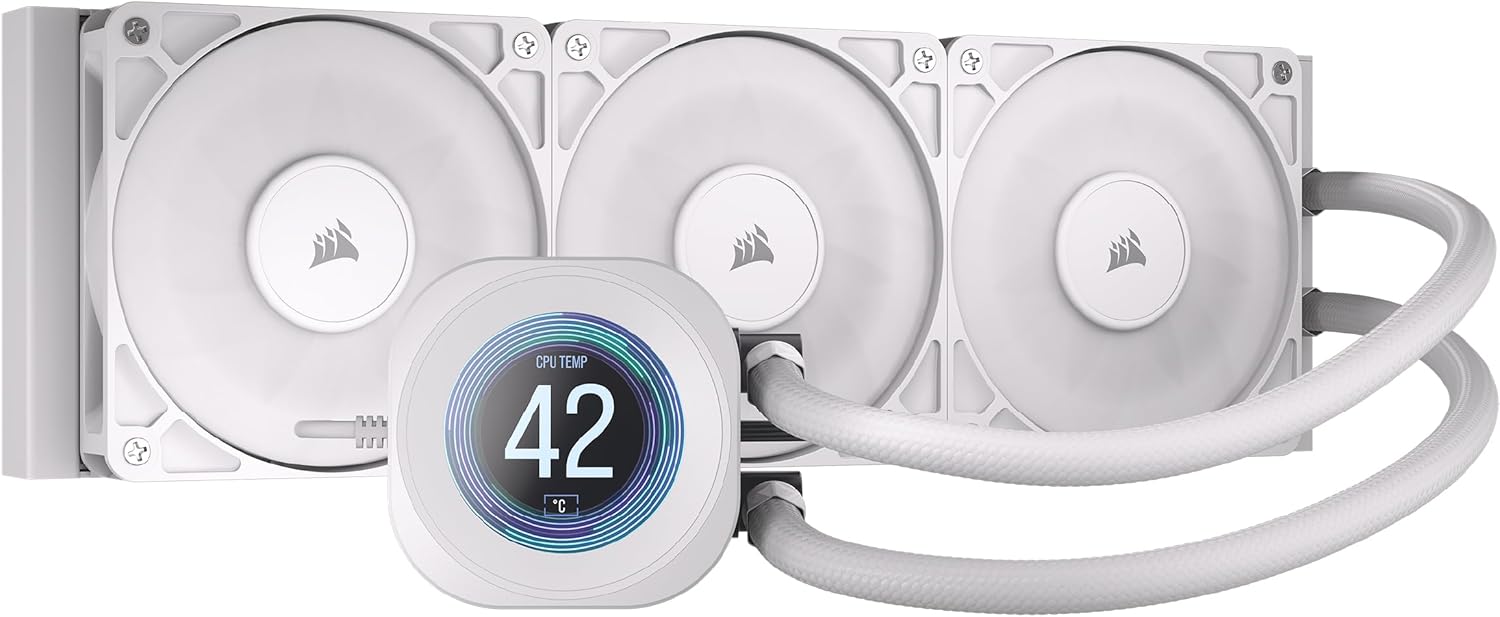
Pros
- 2.1-inch IPS LCD screen displays temperatures, GIFs, or custom images through iCUE software
- Convex cold plate with pre-applied thermal paste speeds up installation and improves contact with the CPU heat spreader
- Supports both current Intel LGA 1851/1700 and AMD AM5/AM4 sockets, covering recent CPU platforms without a separate mounting kit purchase
- Daisy-chained fan connections and a single 4-pin PWM header simplify cable routing versus wiring each fan separately
Cons
- 360mm radiator requires a case with enough clearance for a triple-fan radiator, ruling out smaller cases without that mounting space
- Fan noise ranges up to 36 dB(A) at maximum speed, higher than the pump's quiet 20 dBA figure under full fan load
- LCD customization through iCUE software adds a dependency on a separate software ecosystem for anything beyond default temperature display
This liquid cooler pairs a 360mm aluminum radiator with a copper cold plate, three RS120 fans, and a 2.1-inch IPS LCD screen, with a pump rated for low-noise operation at just 20 dBA.
- Fan speed ranges from 0 to 2,100 RPM (+/-10%), delivering 13.3 to 72.8 CFM of airflow
- Fan static pressure spans 0.20 to 4.15 mm-H2O depending on speed
- Tubing runs 450mm in length, using low-permeation rubber with a white sleeve
The convex cold plate with pre-applied thermal paste is designed to maximize contact with the CPU's integrated heat spreader, speeding up first-time installation.
Socket support covers Intel LGA 1851 and LGA 1700, along with AMD AM5 and AM4, with a mounting kit for all of these platforms included in the box rather than sold separately.
- Radiator dimensions of 396mm x 120mm x 27mm need a case with 360mm triple-fan clearance
- Daisy-chained RS120 fans connect through a single 4-pin PWM header
- Box contents include the cooler, three RS120 fans, mounting kit, PWM extension cable, and mounting screws
Builders should confirm their case supports a 360mm radiator before ordering, since the triple-fan radiator size is the main compatibility constraint rather than the CPU socket itself.

Pros
- 360mm radiator paired with an 8th-generation Asetek pump handles higher thermal loads than 240mm AIO coolers
- Anime Matrix mini-LED display shows core system stats or custom animations directly on the pump block
- Backed by a 6-year warranty, longer than the 3-5 year coverage typical of many AIO coolers
- Supports both AMD AM4/AM5/TR4 and Intel LGA 1700/1200/115x/1366/2011/2011-3/2066 sockets in one kit
Cons
- 360mm radiator size requires a case with three 120mm or equivalent fan mounting points, ruling out smaller builds
- White ARGB edition limits color matching in builds with different color-themed components
- Aluminum radiator construction is lighter than copper but generally trades some thermal conductivity for weight savings
This is a 360mm radiator all-in-one liquid cooler, meaning it needs a case with mounting space for a 360mm radiator and three fans, typically along the top or front panel.
- The larger radiator surface area supports higher sustained thermal loads than 240mm or 280mm alternatives.
- Aluminum construction keeps the radiator lighter than copper equivalents.
- ROG AF 12S ARGB fans ship pre-installed for airflow across the radiator fins.
Compact or mid-tower cases without a 360mm mount will not accommodate this cooler, so confirming radiator clearance before purchase avoids a fitment issue.

Pros
- 3.4-inch IPS LCD runs at 480x480 resolution with a 60Hz refresh rate and 500 nits brightness
- Hot-swappable screen uses a magnetic pogo-pin connection, so it can be replaced without powering down
- Slim 24mm-thick radiator (400x122x24mm) fits cases with tighter clearance than thicker 360mm radiators
- Three CL120 ARGB fans move up to 72 CFM airflow at a peak noise level of 31 dBA
- Compatible with LGA 1851/1700 and AM5/AM4 sockets, covering current Intel and AMD platforms
Cons
- Confirmed compatibility issue with ROG MAXIMUS Z890 EXTREME and HERO motherboards needs checking before install
- Advanced customization requires the USB-connected mode and L-Connect 3 software rather than working wirelessly alone
- Fan speed control tops out at 2200 RPM, below the peak RPM of some high-static-pressure alternatives
The radiator measures 400x122x24mm, a slim 24mm thickness aimed at fitting more case clearances than a bulkier design, and pairs with three CL120 ARGB fans spinning from 0 up to 2200 RPM for up to 72 CFM airflow at 3.0mmH2O static pressure. Peak noise is specified at 31 dBA.
- Slim 24mm radiator thickness at 400x122mm overall size
- 3x CL120 ARGB fans reaching up to 72 CFM airflow
- Fan noise specified at 31 dBA at full speed
The pump block houses a 3.4-inch IPS LCD at 480x480 resolution, 500 nits brightness and a 60Hz refresh rate, controllable wirelessly for basic themes or over USB with L-Connect 3 software for full customization.
How We Picked the Best CPU Coolers Under $200
At this budget you’re no longer choosing between “good” and “bad” coolers — every option here can tame a hot CPU. The real differences show up in noise level, socket support, and how much clearance the cooler eats up inside your case.
We weighed four things for every model: rated TDP against real gaming and rendering loads, dBA noise under full fan speed, compatibility with current AM5 and LGA1700/1851 sockets, and the price-to-performance sweet spot between $150 and $200. A cooler that’s technically faster but adds 8 more decibels isn’t automatically the better buy.
Warranty length and pump reliability also mattered for the liquid options. AIO pumps are the one moving part that can fail years down the road, so we leaned toward brands with a track record of long-term support.
Air Cooling vs. AIO Liquid Cooling: Which Fits Your Build
Dual-tower air coolers like the Noctua NH-D15 G2 line have no pump to wear out, run whisper-quiet at idle, and need zero maintenance after installation. The tradeoff is size — these towers can be 165mm tall and may block your top RAM slots.
AIO liquid coolers move heat to a radiator mounted at the front or top of your case, which frees up space around the socket and often looks better through a glass panel. If quiet operation matters more than looks, check out our breakdown of the best air CPU coolers; if you want radiator-based cooling with RGB and LCD screens, our guide to the best liquid CPU coolers goes deeper on that category.
Neither type is objectively better. A well-built dual-tower and a well-built 360mm AIO land within a couple degrees of each other under most gaming loads.
Top Picks by Use Case Under $200
Instead of ranking every unit the same way, match the pick below to how you actually use your PC. Each option comes from the same shortlist above, just filtered by the scenario it handles best.
Best Overall: Quiet, High-Airflow Builds
The Noctua NH-D15 G2 LBC (, 4.8 stars, 387 reviews) is our top overall pick. Its low base convexity design improves contact pressure on AMD AM5 and AM4 chips, and Noctua’s fan curve stays nearly silent below 70% load.
If black hardware matters more to you than Noctua’s signature brown fans, the Noctua NH-D15 G2 chromax.Black (, 4.8 stars, 223 reviews) delivers the same dual-tower performance with broader Intel and AMD socket support in an all-black finish. Anyone building a stealth or all-black setup should check the current price on Amazon before settling on a lighter-colored tower.
For readers specifically comparing coolers for FPS-heavy or streaming rigs, our dedicated best CPU coolers for gaming roundup covers sustained-load performance in more detail.
Best AIO for Gaming and Streaming Rigs
The CORSAIR Titan 360 RX LCD (, 4.6 stars, 1,267 reviews) is the most reviewed liquid cooler in this lineup, and for good reason. Its FlowDrive pump keeps noise low under sustained gaming loads, and the 360mm radiator gives it enough surface area for overclocked chips.
It’s also one of the few coolers here with a genuinely useful LCD screen for live temperature readouts instead of just decorative animations. If your case supports a top or front 360mm radiator, this is worth comparing specs against any air tower on this list.
Best Value Liquid Cooler Under $200
The CORSAIR Nautilus 360 RS LCD (, 4.6 stars, 498 reviews) is the most affordable 360mm AIO on this list without cutting corners on build quality. Daisy-chain cabling keeps the inside of your case tidier than most competing kits.
It won’t match the Titan’s raw thermal ceiling under extreme overclocks, but for a typical gaming or productivity build it holds temperatures well within safe range. Budget-conscious builders who still want liquid cooling and an IPS screen should see this pick first.
Best for RGB and Showcase Builds
The ASUS ROG Ryuo III 360 ARGB (, 4.6 stars, 484 reviews) pairs an Anime Matrix LED display with ARGB fans, making it one of the more customizable options for a glass-panel build. The Asetek 8th-gen pump is a proven platform with a long track record.
If your priority is a case that looks striking with the side panel off, this is a stronger match than a plain air tower, even if it doesn’t top the thermal charts.
Best LCD Display Cooler
The Lian Li Galahad II LCD (, 4.8 stars, 30 reviews) sits right at the top of the budget with a customizable square LCD panel and Lian Li’s redesigned pump housing. Review volume is lower than the Corsair and Noctua options, so weigh that against its strong early rating.
Also worth a mention: the darkFlash UV360 (, 5.0 stars, 5 reviews) offers a large curved 2K OLED screen and a high 320W TDP rating, but its review count is still thin. It’s a compelling pick if you want the biggest screen here, though buyers who prioritize a proven track record may prefer a more established brand first.
Common Mistakes to Avoid When Buying a CPU Cooler
Even a great cooler underperforms if it’s the wrong fit for your case or socket. These are the mistakes we see most often.
- Skipping radiator clearance checks. A 360mm AIO needs roughly 400mm of mounting space once you account for fans and a thick radiator; measure your case before ordering.
- Assuming socket compatibility without checking. AM5, AM4, and the various LGA sockets use different mounting brackets, and not every cooler ships with every bracket in the box.
- Buying the biggest tower without checking RAM clearance. Tall dual-tower coolers can physically block the first one or two DIMM slots, especially with taller RGB memory.
- Ignoring case airflow. A powerful cooler still struggles inside a case with poor intake and exhaust, since it can only move heat as fast as air actually leaves the case.
- Overtightening or undertightening mounting screws. Uneven pressure on the cold plate creates hot spots that show up as inconsistent temperatures under load.
Installation and Maintenance Tips
Mount pressure matters more than most people expect. Tighten mounting screws in a diagonal pattern, a little at a time, so the cooler seats evenly against the CPU’s integrated heat spreader.
Use a pea-sized amount of thermal paste for a single-nozzle cold plate, or a thin X pattern for larger contact surfaces like the ones on these dual-tower units. Too much paste can actually insulate rather than transfer heat.
For AIO coolers, orient the pump so its tubes exit from the bottom when mounted in a top or front radiator position — this keeps air bubbles away from the pump chamber and extends its lifespan. Clean radiator fins every few months if your case lacks dust filters, since clogged fins are one of the most common causes of rising temperatures over time.
Repaste air coolers every two to three years, and check AIO tubing for stiffness or discoloration around the fourth or fifth year of use.
Frequently Asked Questions
Is a $200 CPU cooler overkill for a mid-range build?
Not necessarily. Even mid-range chips run cooler and quieter under a higher-capacity cooler, and the extra thermal headroom leaves room for a mild overclock later without needing to upgrade cooling again.
Are AIO liquid coolers better than air coolers for performance?
Top-tier air and 360mm AIO coolers perform within a few degrees of each other on most CPUs. AIOs edge ahead on extreme overclocks, while air coolers win on long-term reliability and silence at idle.
How long do liquid CPU coolers typically last?
Most quality AIO pumps are rated for five to seven years of continuous use. Watch for rising idle temperatures or unusual pump noise as early signs it may need replacing.
Is a 240mm radiator enough, or should I get 360mm?
A 240mm radiator handles most mid-range CPUs comfortably, but a 360mm radiator gives more thermal headroom for higher-wattage chips and stays quieter at the same cooling load since its fans can spin slower.
Will a large dual-tower air cooler fit in my case?
Check your case’s maximum CPU cooler height, usually listed in the specs, against the cooler’s listed height. Most dual-tower coolers in this list need at least 165mm of clearance, so a compact case may not have room.
Whichever route you take, the coolers above cover the realistic range of needs at this price: quiet air cooling, showcase-ready RGB, and 360mm AIOs with usable LCD screens. Match the pick to your case size and noise tolerance first, then compare specs on Amazon for the exact model that fits your socket. If low noise is your top priority over raw looks, our guide to the best quiet CPU coolers can help you narrow things down further.


