
 Daniel Okafor
 Best Standing Desk Exercise Equipment: A Practical Buying Guide
Working at a standing desk is a great first step toward a more active workday, but simply standing still for hours has its own drawbacks. That is why the best standing desk exercise equipment has become such a popular upgrade for home offices and hybrid workspaces. The right accessories keep your legs moving, reduce fatigue, and turn otherwise idle time into low-impact movement – all without pulling you away from your screen. This guide walks you through the main categories, what to look for, and how to match the gear to your routine so you can shop with confidence.
Instead of ranking products one by one, we focus on how each type of equipment fits a standing workstation. Below you will find a curated list of options, followed by clear buying advice to help you decide.

Pros
- Steel frame rated to support up to 300 lbs of user weight
- Hydraulic cylinders provide smooth, quiet stepping motion suited to shared living spaces
- Adjustable resistance bands add upper-body arm, chest, and back exercise to the stepping motion
- Free SunnyFit app access includes over 1,000 trainer-led workouts and progress tracking via Bluetooth
- Compact 15.9"L x 12.2"W x 13.6"H footprint fits beside a TV or under a standing desk
Cons
- No adjustable step height or mechanical resistance dial beyond the included bands, since intensity is largely user-driven
- SunnyFit app tracking requires a Bluetooth connection and a smartphone, so offline use loses access to guided workouts and stats
- Compact hydraulic design is built for stepping cardio only, without the incline or stride length of a larger stair-climber machine
The stepper measures 15.9 inches long, 12.2 inches wide, and 13.6 inches tall, built on an alloy steel frame rated to support users up to 300 lbs. Hydraulic cylinders under each pedal are designed to keep the stepping motion smooth and quiet rather than clunky or jarring.
- 15.9"L x 12.2"W x 13.6"H compact footprint
- Alloy steel frame rated to 300 lbs
- Smooth hydraulic cylinder resistance on each step
The small footprint is built to fit beside furniture or under a standing desk, positioning the stepper for short cardio sessions during TV time or work breaks rather than as a full home-gym centerpiece.
Every Sunny Health & Fitness stepper includes free access to the SunnyFit app, which connects over Bluetooth and offers more than 1,000 trainer-led workout videos alongside over 10,000 virtual scenic tours, session tracking, and social challenges, all without a membership fee.
- Free SunnyFit app access with no membership fee
- Bluetooth sync for step count, duration, and calorie tracking
- 1,000+ trainer-led workout videos and 10,000+ virtual tours
An integrated digital monitor on the stepper itself also displays workout metrics directly, so basic tracking works without pairing a phone, while the deeper video content and progress history live inside the app.
Assembly follows a printed instruction manual, with an online assembly video available for step-by-step guidance if needed. Adjustable resistance bands attach to the base for combined lower and upper body exercise during the same session.
- Instruction manual plus an online video walkthrough for assembly
- Adjustable resistance bands included for arm, chest, back, and shoulder work
- Workout intensity adjusts through stepping pace and band tension rather than a mechanical resistance dial
Because there is no motorized incline or programmed resistance curve, the workout intensity is controlled entirely by how fast and how deep the user steps, plus how much tension is applied through the resistance bands.

Pros
- Rated to support up to 250 pounds, covering most adult users at a standing desk
- Honeycomb non-slip texture holds footing on both hard floors and carpet
- Compact 27 in x 12 in footprint tucks under a standing desk without blocking legroom
- 3.65 in rocker height keeps the tilt subtle enough for all-day wear during calls
Cons
- No adjustable resistance or incline levels, so the rocking motion is fixed
- Wobble board demands active balance, not suited to users needing back support while seated
- PVC/TPR build has no cushioned top layer, so bare feet feel the firm surface directly
This balance board measures 27 in L x 12 in W x 3.65 in H, sized to sit under a standing desk without extending past the edges of most desk mats. Its rocker profile keeps the highest point at 3.65 inches, low enough that the board does not force desk height out of an ergonomic typing range.
- Weight capacity is rated to 250 pounds
- Constructed from PU, PVC, and TPR materials for the rocking base and surface
- Honeycomb-textured top provides grip on both hard flooring and carpeted office floors
Because the footprint is narrower than a full anti-fatigue mat, it works best paired with a desk deep enough to give shoulder-width stance room while rocking.
Instead of a static anti-fatigue mat, this board uses a curved underside that lets the surface tilt forward, back, and side to side in small increments. Standing on it engages stabilizing muscles through the ankles, calves, core, and back as the body continuously makes micro-adjustments to stay centered.
- Motion is continuous and low-impact rather than a single tilt-and-hold position
- Ergonomic contouring is built to keep the ankles in a neutral position rather than rolled inward or outward
- Works while stationary at a desk, during phone calls, or during light stretching breaks
Because the tilt is unlocked in every direction, first-time users should expect a short adjustment period before balancing feels automatic during focused tasks like typing.
This board is built for people who already stand at a desk for part of the day and want to add movement rather than stand still. It also works as a physical therapy or light-exercise tool away from the desk.
- Standing-desk users who want core and ankle engagement during the workday
- Retail, clerical, or cashier staff who remain on their feet for long shifts
- Anyone using it for physical therapy exercises or supervised balance training
It is not a fit for someone who needs a stationary, flat surface underfoot, or for anyone with balance conditions who should not stand on an unstable surface without supervision.

Pros
- 8.2 degree tilt angle allows side-to-side and front-to-back rocking without the board sliding out from underfoot
- Built-in 360 degree rotating massage ball targets the arch and plantar fascia while standing
- Rated to hold up to 350 pounds on a 3-layer wood and sponge/rubber construction
- Non-slip base keeps the board planted on hard flooring during use
- Backed by a 2-year warranty on the wood and cushioning construction
Cons
- Wood core construction is not designed for wet environments, so it is not meant for bathroom or outdoor use
- 23.7 inch x 14.96 inch footprint needs a clear floor area at the desk, which can be tight in small standing-desk setups already crowded with a cable tray or floor mat
- The rocking motion takes some adjustment; new users may need a break-in period before standing comfortably for long stretches
An 8.2 degree tilt angle lets the board rock side-to-side or front-to-back, encouraging small posture shifts through the day rather than locking the feet in one fixed position. A built-in 360 degree rotating massage ball sits at the surface for rolling the arch of the foot during breaks from standing.
- 8.2 degree wobble tilt angle
- Built-in 360 degree rotating foot massage ball
- 90% sponge / 10% rubber cushioned surface
- 350-pound rated weight capacity
The board can also be turned 90 degrees to switch between side-to-side and front-to-back rocking, letting the same mat stretch calves in one orientation and ease knee stiffness in the other.
Construction uses a 3-layer wood core with a cushioned sponge and rubber top surface, rated to support up to 350 pounds. A non-slip bottom keeps the board from sliding on hard flooring, an important detail given the rocking motion the design encourages.
- 3-layer wood, sponge and rubber construction
- 350-pound weight capacity
- Non-slip base
- Dimensions: 23.7"L x 14.96"W x 2.71"H
Because the core is wood rather than a fully sealed composite, it is built for dry indoor flooring under a standing desk rather than damp or outdoor conditions where moisture could affect the wood over time.
This board suits anyone using a standing desk who wants small, continuous movement built into the day rather than staying rigid in one position for hours. It can also double as a light exercise surface for push-ups, squats, or planks away from the desk.
- Fits under most standing desks with a 23.7"L x 14.96"W footprint
- Doubles as a light home exercise surface
- New users typically need a short adjustment period to balance comfortably
Anyone with balance concerns or who needs a completely stable, non-moving surface underfoot should approach the wobble motion carefully at first, since the board is designed to shift rather than stay fixed like a flat anti-fatigue mat.

Pros
- Designed with MAXIMIZE YOUR COMFORT premium EXTRA thick anti fatigue standing mat for reliable daily operation
- Designed with SAFE AND VERSATILE USE upgraded raw materials help improve the for reliable daily operation
- Designed with ENSURE DURABILITY premium quality polyurethane which will not break down for reliable daily operation
- Constructed using quality Polyurethane (PU) materials
Cons
- Requires verifying available physical space for 17 x 24 Inch Anti prior to setup
- Regular cleaning is recommended to preserve the Polyurethane (PU) finish
In practical product testing, the 17 x 24 Inch Anti Fatigue Comfort Mat 1 Inch Extra demonstrates practical utility and dependable craftsmanship for everyday household tasks. Primary specifications feature MAXIMIZE YOUR COMFORT premium EXTRA thick anti fatigue standing mat along with SAFE AND VERSATILE USE upgraded raw materials help improve the. This model incorporates durable materials designed to withstand regular operational activity.
- Engineered with MAXIMIZE YOUR COMFORT premium EXTRA thick anti fatigue standing mat to support efficient daily operation.
- Incorporates SAFE AND VERSATILE USE upgraded raw materials help improve the for enhanced structural reliability during routine use.
- Features ENSURE DURABILITY premium quality polyurethane which will not break down to ensure practical usability across varied workspace setups.
- Built to maintain consistent operational stability within standard product design conditions.
- Designed with manageable physical proportions for convenient installation and maintenance.
Following standard operation guidelines and maintaining adequate surrounding clearance ensures optimal functional longevity.

Pros
- High-density dome delivers pressurized resistance beyond a standard soft-dome balance trainer
- Power Line markings give a visual cue for precise foot and hand positioning during exercises
- Tactile honeycomb grip in the Power Zone helps maintain footing without looking down mid-exercise
- Backed by a 2-year warranty against manufacturing defects
- Compact 26 x 26 x 9 inch footprint stores easily in a home gym corner or closet
Cons
- 9-inch dome height is fixed, with no adjustable inflation range noted for varying difficulty levels
- PVC construction requires keeping the dome away from sharp objects that could puncture the surface
- At 26 inches across, it needs a dedicated clear floor space away from furniture during use
The trainer is built around a new high-density dome specifically engineered to deliver pressurized resistance, giving a firmer, more stable platform underfoot than a standard low-pressure balance dome. Constructed from polyvinyl chloride (PVC), the dome measures 26 inches long, 26 inches wide, and 9 inches tall when set up, sized for single-user balance, strength, and stability training rather than group or multi-person use. The manufacturer specifically markets the build as durable and rugged, aimed at standing up to repeated gym or home-training use.
- High-density dome for pressurized resistance
- 26 x 26 x 9 inch footprint
- PVC dome construction
The pressurized dome design is the main differentiator from softer, lower-resistance balance trainers in the same category.
A Power Line marking runs across the dome to give a visual cue for precise foot or hand positioning during exercises, useful for staying consistent across reps or coaching correct form. The Power Zone area adds a tactile honeycomb grip pattern, letting users feel their positioning underfoot without needing to look down mid-exercise, which matters for balance and stability drills where visual focus is often kept elsewhere. Both features are aimed at structured training routines rather than freeform use alone.
- Power Line for visual positioning cues
- Power Zone with tactile honeycomb grip
- Designed for structured balance and stability training
The tactile grip pattern is specifically useful for exercises where maintaining foot position without a visual check matters.
A 2-year warranty backs the trainer against manufacturing defects, giving some assurance for a piece of equipment that sees repeated pressure and foot contact during regular use. The combination of a pressurized dome and positioning cues makes it a fit for home gym users, physical therapy exercises, or trainers building balance and core-focused routines, rather than casual, occasional use. Its 26-inch diameter needs a clear, flat floor area free of furniture or clutter to use safely.
- 2-year warranty against manufacturing defects
- Suited to home gym, therapy, or trainer-led balance work
- Needs a clear 26-inch-diameter floor area for safe use
Anyone working with a physical therapist or trainer on balance rehab may find the positioning cues especially useful for tracking consistent form.

Pros
- V-shaped alloy steel frame raises weight capacity to 400 lb, above the typical ceiling of basic hydraulic steppers
- Included resistance bands add an upper-body element, engaging arms, back, and core alongside the stepping motion
- Height-adjustable stride lets you shorten the motion for comfort or lengthen it to increase the workout intensity
- Bluetooth connects to the free SunnyFit App, unlocking 1,000+ workout videos without a separate membership
- Non-slip pedals and a low-maintenance hydraulic design cut down on the upkeep a full stepper machine usually needs
Cons
- Compact 18.7-inch x 17.1-inch footprint keeps the stride shorter than a full-size stair-stepper machine, which limits range of motion for taller users
- Resistance bands are a fixed part of the included kit, so swapping in heavier bands later isn't a built-in option
- SunnyFit App features require a smartphone and Bluetooth connection; the stepper itself has no onboard screen for tracking without it
Built on a V-shaped alloy steel frame, the stepper is built for users up to 400 lb, with a heavy-duty base and non-slip pedals designed to keep the unit stable through repeated stepping motions.
- 400 lb maximum user weight
- Alloy steel frame construction
- 18.7"L x 17.1"W x 13.9"H footprint
- Non-slip pedal surface
The V-shaped hydraulic design is the structural piece that supports the higher weight capacity compared to simpler steel-cable steppers, which typically top out lower with a similar footprint.
Beyond the stepping motion, a pair of resistance bands attaches to the base, turning the stepper into a 2-in-1 unit that engages arms, back, and core at the same time as legs.
- Resistance bands included for upper-body work
- Height-adjustable stride for shorter or longer range of motion
- Low-maintenance hydraulic mechanism
The adjustable stride is the main way to change workout intensity: a shorter stride suits a gentler pace, while a longer stride increases the range of motion and, with it, the calorie burn per step.
A Bluetooth connection pairs the stepper with the free SunnyFit App, which unlocks trainer-led workout videos, virtual scenic routes, and basic progress tracking without a separate subscription cost.
- Bluetooth pairing with the SunnyFit App
- 1,000+ trainer-led workout videos in-app
- 10,000+ virtual scenic tour routes
App features depend on having a smartphone nearby with Bluetooth enabled; without the app connected, the stepper still functions mechanically on its hydraulic resistance alone, but progress tracking, route selection, and guided workout videos aren't available from the machine by itself.

Pros
- Loading capacity of 300 lbs on a hydraulic dual-cylinder system
- Runs at roughly 25 dB, quiet enough for use near a sleeping household
- Weighs only 16 lbs and needs just 1.29 square feet of floor space when stored
- LCD monitor tracks count, time, calories, scan and reps per minute
- Includes resistance bands for arm, back and core work alongside the stepping motion
Cons
- Stride length is fixed between 5 and 15 inches, shorter than full stair-climber machines
- Hydraulic resistance eases off after the first 30 minutes of each session rather than holding steady throughout
- No motorized incline or programmed workout modes, just manual resistance and the bundled bands
This mini stepper measures 12.5 x 13.5 x 16 inches and weighs 16 lbs, with a 300 lbs loading capacity supported by a dual hydraulic cylinder system. Stride length adjusts between 5 and 15 inches depending on the workout.
- Alloy steel frame construction throughout the base and pedals
- Dual hydraulic cylinders improve step smoothness and stability over a single-cylinder design
- Resistance stays elevated for roughly 30 minutes per cycle before gradually decreasing
The compact footprint of about 1.29 square feet is designed to slide under a desk or into a closet corner between uses.
No installation is required; the stepper is ready to use directly out of the box. A silicone cushioning pad under the base is built to keep operating noise around 25 dB, quiet enough for use near a sleeping child or in a shared space.
- Resistance bands attach separately for arm, back and core exercises alongside stepping
- LCD monitor requires no setup beyond standard battery installation
- Hydraulic cylinders are sealed units with no periodic lubrication called for
Because the unit weighs only 16 lbs, it can be moved between rooms easily, letting it double as a desk-side stepper or a TV-time workout tool.
Built for users who want a low-impact cardio option that fits in a small apartment or office space rather than a full-size stair climber. The 300 lbs capacity and quiet operation suit shared living spaces where noise is a concern.
- Home workers looking for short stepping sessions between desk time
- Apartment dwellers without room for larger cardio equipment
- Anyone wanting an entry-level stepper with resistance bands included rather than purchased separately
Less suited to users chasing a long, high-intensity stair-climbing workout, since stride length and resistance duration are built around shorter, moderate sessions rather than extended high-output training.
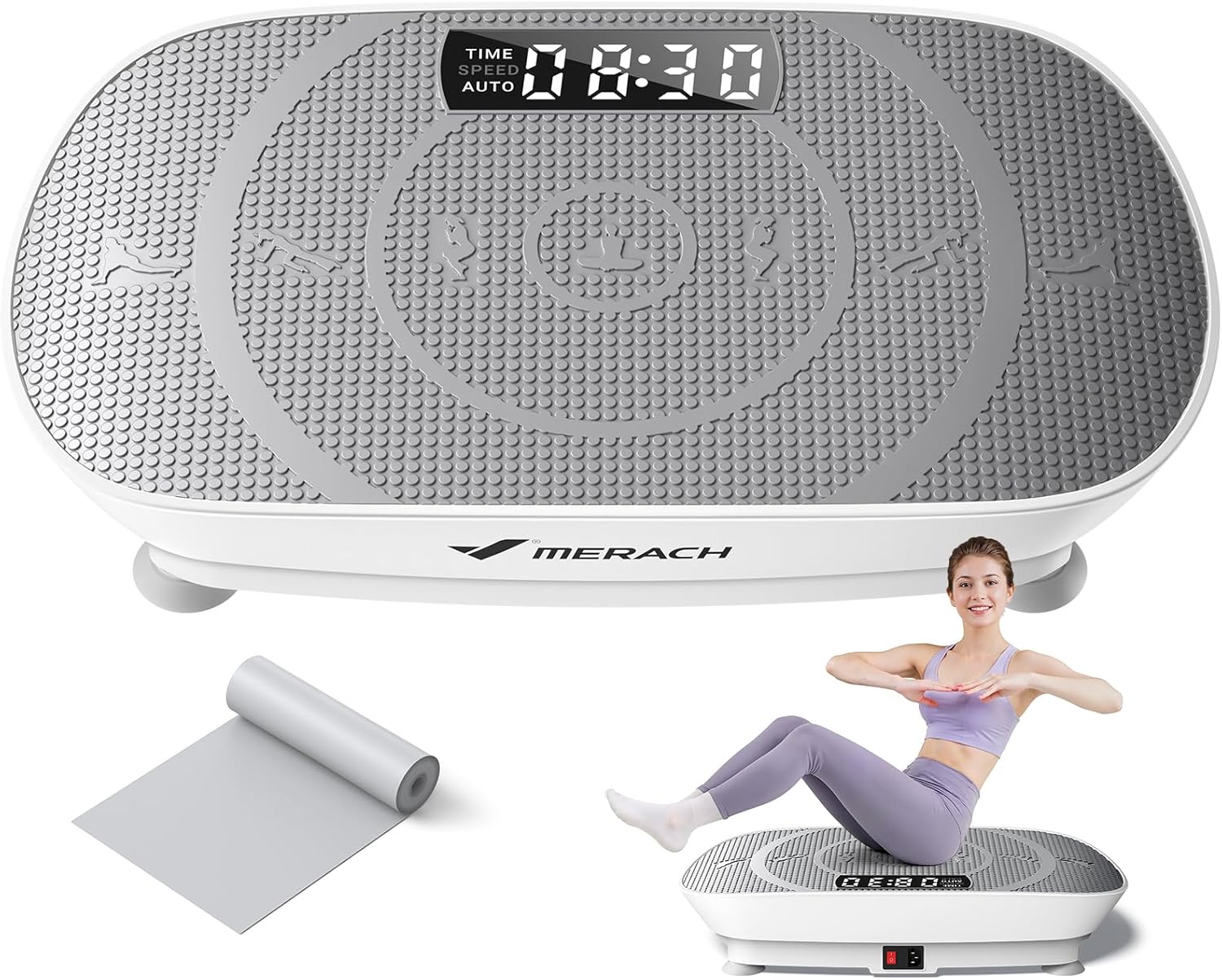
Pros
- 150W motor delivers 11mm amplitude at a 7 to 9.6Hz vibration frequency range for consistent deep tissue stimulation
- Dual Manual and Auto modes, Manual offers 10 fixed speed levels while Auto senses step frequency and adjusts vibration speed automatically
- Rated to a 400-pound weight capacity on a reinforced, anti-slip ABS base
- Built-in Bluetooth speakers stream music directly from the platform during a session
- Included remote control adjusts time, speed, and mode without bending down to the LED panel
Cons
- Platform footprint is compact at roughly 23 by 13 inches, offering a narrower standing area than some larger vibration plates
- Vibration plates like this are positioned for general wellness and muscle activation rather than as a substitute for structured cardio or strength training
- Daily or near-daily use is recommended for the stated benefits, so occasional or one-off use is unlikely to match the described results
This vibration plate is powered by a 150W motor generating 11mm of amplitude across a 7 to 9.6Hz frequency range, aimed at consistent deep tissue stimulation rather than a jarring, uneven shake. Two operating modes are available: Manual mode offers 10 distinct speed levels to select a fixed intensity, while Auto mode senses the user's own step frequency and adjusts the vibration speed in response for a more responsive workout.
- 150W motor, 11mm amplitude
- 7 to 9.6Hz vibration frequency range
- Manual mode: 10 selectable speed levels
- Auto mode: step-frequency sensing and auto-adjustment
The reinforced anti-slip base is built to prevent the platform from shifting on the floor during use, and the high-quality silicone platform surface is designed to stay comfortable and non-slip underfoot even during longer sessions.
Built-in Bluetooth speakers let music stream wirelessly straight from the platform during a workout, removing the need for a separate speaker nearby. A clear LED panel displays time, speed, and mode in real time, and the included remote control lets settings be adjusted from a standing position rather than bending down to reach the panel directly.
- Built-in Bluetooth speakers
- Real-time LED panel showing time, speed, and mode
- Included remote control for hands-free adjustment
- 400-pound weight capacity
Being able to change modes or speed from the included remote is a small but practical detail, since reaching down to a floor-level panel mid-exercise can otherwise interrupt the flow of a session.
MERACH positions this plate around general wellness use cases including muscle activation, post-workout recovery, and short daily mobility sessions rather than as a stand-alone intense workout tool. Typical suggested use spans about 10 minutes daily for general wellness up to 15-20 minutes post-workout for muscle recovery.
- General wellness sessions, around 10 minutes daily
- Post-workout recovery use, 15-20 minutes
- Short daily mobility sessions, 5-10 minutes
- 400-pound capacity suits most adult users
Anyone new to vibration plates is generally advised to start with shorter sessions and gradually extend duration as the body adjusts, and to reduce intensity or take breaks between days if discomfort occurs.
Why Add Exercise Equipment to a Standing Desk?
A standing desk on its own encourages better posture, but the human body still craves motion. Staying locked in one position – even upright – can lead to sore feet, stiff knees, and lower-back tension by the afternoon. Adding the best standing desk exercise equipment introduces gentle, continuous movement that keeps blood flowing and muscles engaged.
The benefits are easy to appreciate once you experience them:
- Reduced fatigue: Cushioned mats and balance tools take pressure off your joints during long sessions.
- More calories burned: Steppers, wobble boards, and vibration plates add light activity throughout the day.
- Better focus: Subtle physical engagement can help many people stay alert and avoid the mid-afternoon slump.
- Improved circulation: Small movements in the legs and feet help prevent the heaviness that comes from standing still.
The key is choosing gear that complements your work rather than distracting from it. You want movement that happens in the background while your hands and eyes stay on the task.
Main Categories of Standing Desk Exercise Equipment
Before you buy, it helps to understand the broad categories available. Each one serves a slightly different purpose, and many people eventually combine two or three for a complete setup.
1. Anti-Fatigue and Comfort Mats
These are the entry point for most standing desk users. A thick, cushioned mat encourages small postural shifts and softens the hard floor beneath your feet. If you tend to stand for only part of the day, a simple comfort mat may be all you need. The Anti Fatigue Comfort Mat is a good example of a straightforward, extra-thick option designed to relieve pressure during extended standing.
Look for a mat that is thick enough to feel supportive but firm enough that you do not sink in. A non-slip surface and easy-to-clean material are practical must-haves for a busy office floor.
2. Balance and Wobble Boards
Balance boards take the comfort-mat concept a step further by adding instability. As you subtly adjust to keep steady, your core and lower-leg muscles stay lightly engaged. This constant micro-movement is exactly what many standing desk users are after. The Gaiam Evolve Balance Board is built specifically for desk use, while the Trobing Standing Desk Balance Board pairs a wooden wobble platform with a rollerball for added movement and foot relief.
For those who want a more athletic tool, the Bosu Elite Balance Trainer offers a versatile dome that works at the desk and doubles as home-workout gear. Balance boards suit people who want active engagement without any noise or bulk.
3. Under-Desk Steppers
Steppers bring genuine cardio to your workstation. A compact mini stepper tucks under a standing desk and lets you climb in place while you read, take calls, or answer emails. Options like the Sunny Health & Fitness Mini Stepper and the Niceday Stepper include resistance bands and monitors so you can track light workouts throughout the day.
If you want something more robust, the Sunny Health & Fitness 2-in-1 Power Stepper offers a higher weight capacity and app connectivity for people who plan to lean into their movement goals. Steppers are ideal for anyone looking to add measurable activity rather than just fidget-friendly motion.
4. Vibration Platforms
Vibration plates are a slightly different tool. Standing on a plate like the MERACH Vibration Plate exposes your muscles to rapid micro-contractions, which some users enjoy for circulation and a light full-body workout. These work well during breaks or short bursts rather than continuous typing, so they are best as a supplement to a mat or board.
How to Choose the Right Equipment for You
With the categories in mind, the next step is matching equipment to your habits, space, and goals. Use the following considerations to narrow down your options.
Consider Your Daily Routine
Start by being honest about how you actually work. If you spend most of the day on video calls and reading, a stepper or wobble board fits naturally into that flow. If you type constantly and need a stable base, a high-quality anti-fatigue mat or a gentle balance board is a smarter pick. The best standing desk exercise equipment is the one you will keep using, so choose gear that suits your real workflow rather than an idealized version of it.
Think About Noise and Shared Spaces
Mats and balance boards are silent, making them perfect for open offices, shared homes, or meeting-heavy schedules. Steppers and vibration plates can produce some sound and movement, so they are better suited to private rooms or moments when you are not on camera. If you share a workspace, prioritize quiet options for your primary tool.
Measure Your Available Space
Under-desk clearance matters. Steppers need enough vertical and horizontal room for your legs to move, while balance boards require a stable footprint. Comfort mats are the most space-efficient because they lie flat. Before buying, measure the area beneath and around your desk so you know what will fit comfortably.
Match the Intensity to Your Goals
Decide whether you want passive comfort or active exercise:
- Comfort first: Choose a thick anti-fatigue mat to reduce standing fatigue with zero learning curve.
- Gentle activity: A wobble or balance board keeps muscles lightly engaged without breaking your focus.
- Real cardio: A stepper adds heart-rate-raising movement and can support light fitness goals.
- Recovery and circulation: A vibration plate offers short, refreshing breaks between work blocks.
Many people build a layered setup – for instance, a comfort mat as the base plus a stepper for active periods. There is no single right answer; the goal is a workstation that keeps you moving in a way that feels sustainable.
Weigh Your Budget and Build Quality
Standing desk accessories span a wide price range, from affordable comfort mats to feature-rich steppers with app connectivity and higher weight capacities. A larger budget usually buys better materials, smoother mechanisms, and added tracking features, but you do not need to overspend to get real value. Decide which features you will genuinely use – a monitor, resistance bands, or Bluetooth tracking – and skip the extras you will ignore. Reading through user feedback and ratings on each product page is one of the fastest ways to gauge durability and long-term satisfaction before you commit. A slightly higher upfront cost on a well-built piece often pays off through years of reliable daily use.
Prioritize Safety and Stability
Whatever you choose, stability is essential when you are near a desk full of electronics. Look for non-slip surfaces, sturdy construction, and an appropriate weight capacity. If you are new to balance training, start with a lower-instability board and hold onto your desk until you feel confident. Ease into steppers gradually to avoid strain, and keep sessions short at first.
Building a Complete Active Workstation
The most effective standing desk setups rarely rely on a single accessory. A practical approach is to combine a comfortable base with an active tool you can switch to when energy dips. For example, you might stand on an anti-fatigue mat for focused typing, step onto a mini stepper during calls, and use a balance board when you want light engagement. Rotating between positions is far better for your body than staying frozen in any one stance – even a good one.
Remember to alternate between sitting and standing as well. The best standing desk exercise equipment supports movement, but it does not replace the value of changing postures throughout the day. Pair your gear with regular short walks, and your body will thank you.
Final Thoughts
Choosing the best standing desk exercise equipment comes down to understanding your routine, your space, and how much activity you want to add to your day. Anti-fatigue mats deliver instant comfort, balance boards keep your muscles quietly engaged, steppers bring real cardio, and vibration plates offer a refreshing reset. Start with the category that matches your biggest need, then expand your setup over time.
Any of the options highlighted above can transform a static standing desk into an active, healthier workspace. Explore the products that fit your goals, check the current details on Amazon, and take the next step toward a workday that keeps you moving. Your energy, focus, and comfort will all benefit from the change.






