
 Priya Raghavan
 Switching to a sit-stand setup is one of the smartest moves you can make for your health and productivity, but the desk itself is only half the story. The right add-ons are what turn a plain height-adjustable frame into a comfortable, organized, and genuinely ergonomic workspace. If you are shopping for the best standing desk accessories, this guide walks you through every category that matters, what to look for, and how to build a setup that supports you from the floor up.
Below you will find a curated list of the most useful standing desk accessories, followed by a practical buying guide to help you choose what fits your body, your budget, and your daily workflow.
Pros
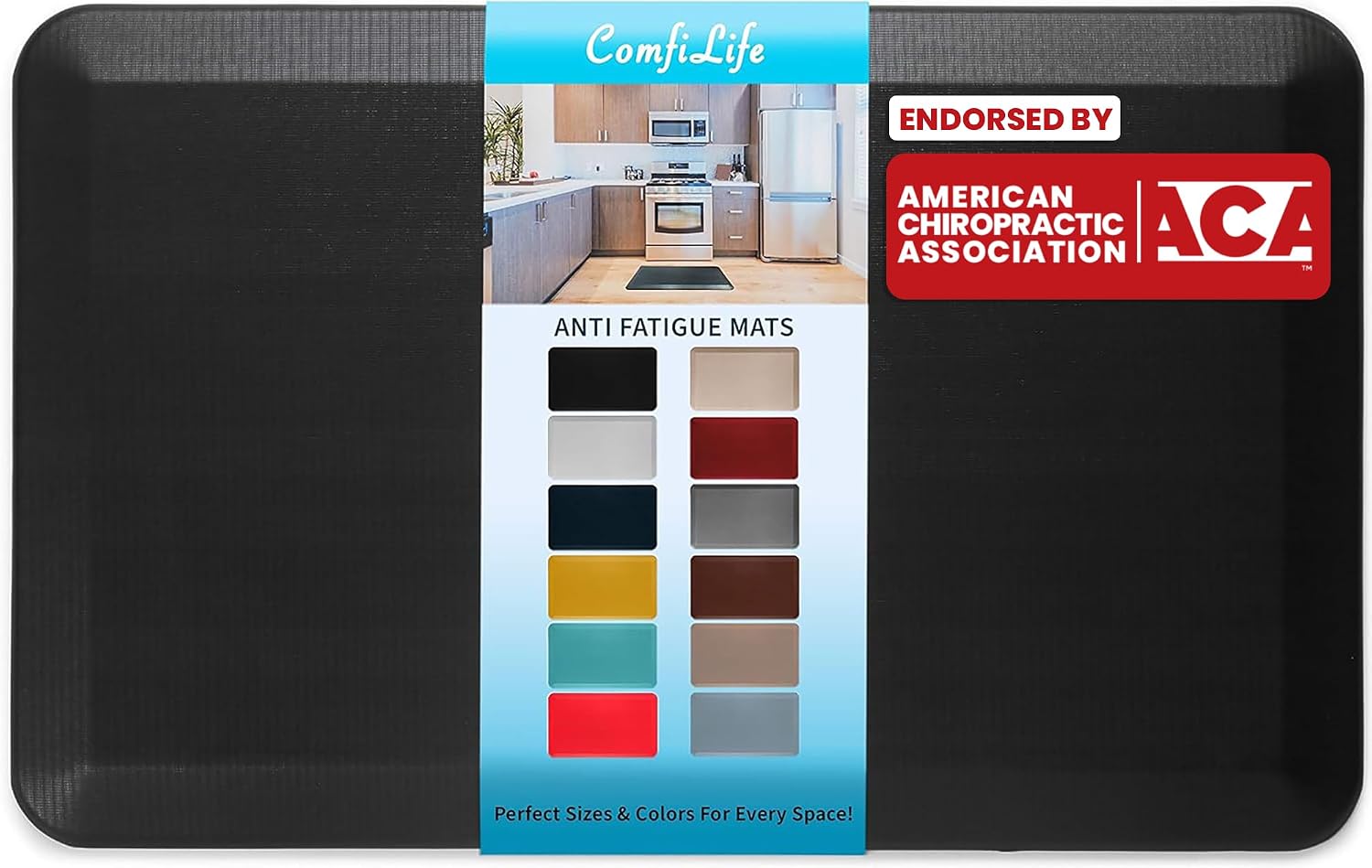
- 3/4 in high-density memory foam core keeps its loft under a standing desk instead of flattening out
- 20 by 32 in footprint fits a single standing position or a sink run without blocking a doorway
- Rubber non-slip underside grips tile and sealed hardwood so it does not creep when you shift weight
- Beveled edges taper down to the floor, cutting the trip lip at the front of the mat
- Wipe-clean stain-resistant top layer handles kitchen splashes and coffee drips
Cons
- Single 20 by 32 in size in this listing, so a wide sink run or a long desk needs two mats
- On thick pile carpet the foam loses most of its rebound, so it is really made for hard flooring
- Not machine washable; cleaning is limited to a damp cloth wipe
The mat measures 20 by 32 in with a 3/4 in core, which is at the thicker end for a home anti-fatigue pad. That depth lets your heel sink slightly so your calves keep making small adjustments, and that constant micro-movement is the mechanism behind less ache after an hour on your feet.
- High-density memory foam core that resists permanent compression
- Beveled edges taper down to the floor to reduce the trip lip
- Rubber underside grips tile, vinyl and sealed hardwood
One mat covers a single standing position, whether that is one spot at a standing desk or the space directly in front of a sink. A galley kitchen run, or a long desk where you move sideways, needs a second mat or a runner, since this size does not stretch to cover a walking zone.
Hard flooring is where the mat does its job. On tile, vinyl, laminate or sealed timber the foam has a firm surface to push against, so the rebound reaches your feet rather than being swallowed by the floor.
- Standing desks, where the core holds its shape through a full working day
- Kitchen sinks and prep counters during long cooking sessions
- Laundry rooms and workbenches, where you stand in one place for stretches
- Garage benches, thanks to the stain-resistant top layer
On thick pile carpet the benefit largely disappears, because the carpet already deforms and the mat simply rides on top, which can also let it slide. It is also not a chair mat: castors will dent and eventually tear a foam surface designed for bare feet and shoes.
The top layer is stain resistant and sealed, so cleaning is a wipe rather than a wash. A damp cloth with a little mild detergent lifts coffee, cooking oil and general kitchen grime, and the surface dries quickly enough to walk on within minutes.
- Wipe with a damp cloth; do not put it through a washing machine
- Avoid solvent cleaners and bleach, which dry out the top skin
- Lift and sweep underneath occasionally so grit does not scratch the floor
- Store flat rather than rolled, so the memory foam does not take a curl
The rubber backing needs a clean, dust-free floor to grip properly. If the mat starts creeping, the usual cause is dust underneath rather than a worn backing, so a quick sweep restores the hold.

Pros
- Height adjusts across a 2.1 to 21 inch range for both sitting and standing use
- 360 degree rotating base turns smoothly for face-to-face screen sharing
- Aluminum alloy build with a large, heavier base supports up to 22 lbs
- Dual pivot joints add stability compared to single-joint laptop risers
- Folds down for storage and ships fully assembled with no setup required
Cons
- Adjustment mechanism is intentionally stiff, requiring firm pressure to raise or lower the stand
- At maximum height, typing directly on the laptop can introduce vibration unless paired with a separate keyboard
- Very tall users may still need a taller desk to reach ideal standing ergonomics even at the 21 inch maximum
This telescopic stand adjusts through a 2.1 to 21 inch height range, built from aluminum alloy with a large, heavier base rated to support up to 22 lbs. A 360 degree rotating base and dual pivot joints are designed for stability beyond single-joint risers.
- Compatible with laptops sized 10 to 17 inches, including MacBook Pro
- Two pivot joints are built to be twice as strong as single-joint alternatives
- Folds flat for storage when not in use
The stiffness of the telescoping mechanism is a deliberate design choice, intended to hold position firmly at any height rather than drift under the laptop's weight.
The stand ships fully assembled, with a telescoping button used to switch between sitting and standing heights. A custom adjustment wrench is included in the package for fine-tuning the mechanism.
- No assembly required out of the box
- Telescoping button raises and lowers the stand with a light-to-firm press
- 360 degree base rotates smoothly at the turntable for repositioning the screen
At maximum extension, pairing the setup with a separate keyboard is recommended if typing directly on the laptop, since the tall, thin profile can introduce more vibration than a lower height.
Built for users wanting to switch between sitting and standing throughout the day without a full standing desk. The 360 degree base also suits video calls or presentations where the screen needs to turn toward another person.
- Remote workers alternating between sitting and standing laptop use
- Users needing to rotate a laptop screen for face-to-face sharing during calls
- Anyone wanting a stand built from aluminum alloy rather than plastic for long-term durability
Less suited to users planning to type directly on the laptop at full height for extended periods, since a wireless keyboard is recommended for a steadier typing experience at maximum extension.
Pros
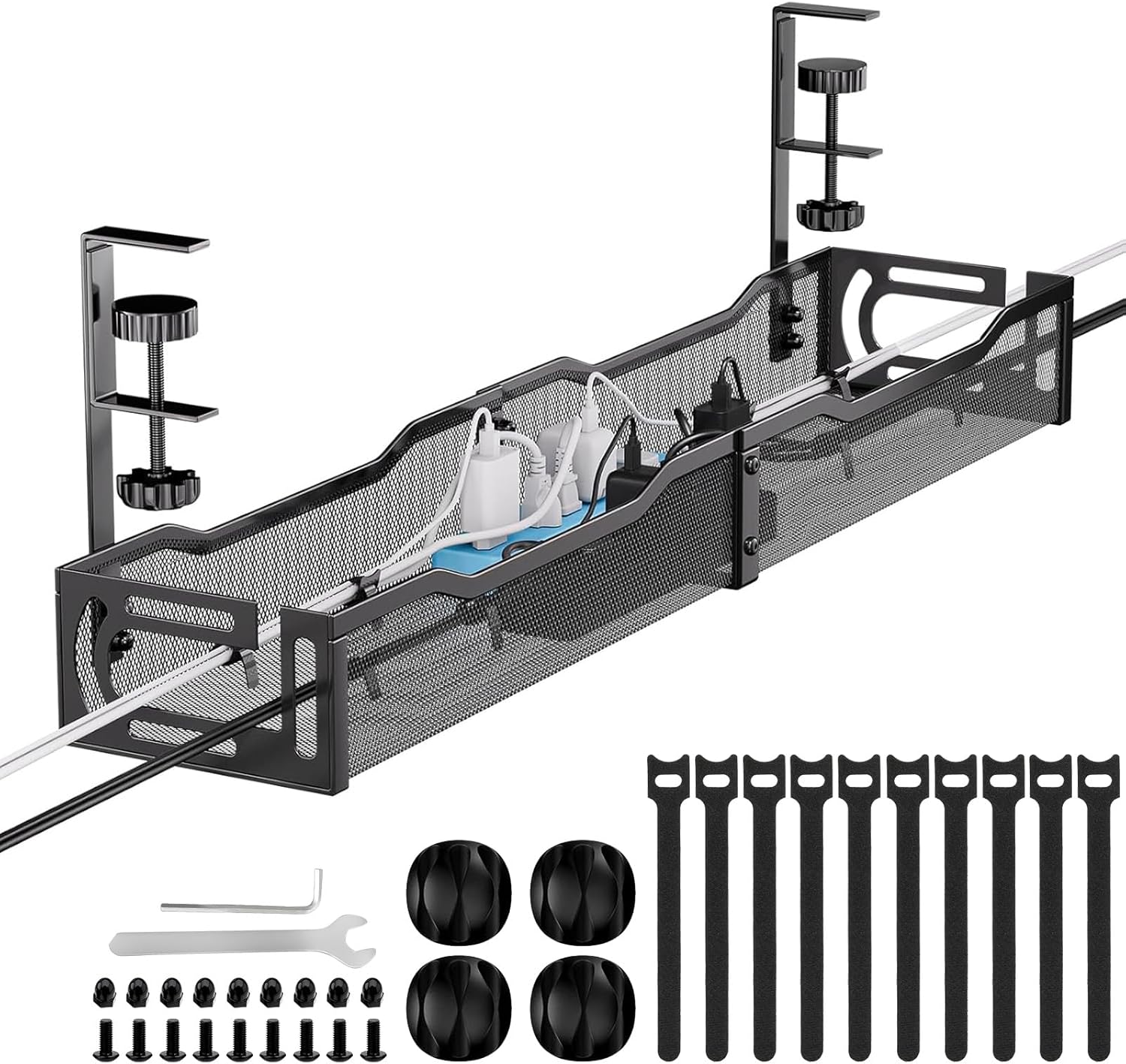
- 25" metal tray holds up to roughly 15 lbs of cables, enough for multiple power bricks and charging cables
- No-drill clamp mount fits desks from 0.4" to 2" thick without permanent holes
- Mesh construction keeps airflow around bundled cables, reducing heat buildup around power adapters
- Non-slip rubber pads on the clamp protect the desk surface from scratches during installation
- Splits into two sections for easier transport and fits both inward and outward mounting orientations
Cons
- 15 lb capacity limits it to cables and small adapters — it isn't built to hold a power strip or heavier hardware
- Clamp mount works only on desks between 0.4" and 2" thick, so unusually thick or thin desktops won't fit
- Open mesh sides mean cables are visible rather than fully enclosed, unlike a solid closed-tray design
The tray runs 25" long and holds roughly 15 lbs of cables and small accessories, enough for the cable clutter under a typical desk without becoming a mounting point for heavier gear like a power strip. It splits into two sections for easier handling during shipping and installation.
- 25" length, roughly 15 lb capacity
- Splits into two sections for easier transport
- Sized for standard desks and standing desks
Because the capacity is modest, it's built specifically for cable bundles rather than as a general-purpose under-desk shelf for heavier electronics.
A clamp-based, no-drill mount fits desks between 0.4" and 2" thick, with non-slip rubber pads protecting the desktop surface from scratching during clamping. The tray supports both inward and outward installation, so it can be repositioned without needing new mounting hardware.
- No-drill clamp mount, 0.4"-2" desk thickness
- Non-slip rubber pads at contact points
- Inward or outward mounting orientation
Desks thicker than 2" or unusually thin edges outside the 0.4"-2" range won't accept the clamp properly, so measuring the desk edge first avoids a mismatch after unboxing.
The tray's mesh structure is designed to let air circulate around bundled cables and power adapters, which reduces heat buildup compared to a fully enclosed solid tray — useful for setups running multiple chargers or a power brick together. The open sides also make it easy to route cables in and out without threading them through a single narrow slot.
- Mesh sides for ventilation around power adapters
- Open-side design for easy cable routing
- Reduces desk-surface clutter from hanging cords
The tradeoff of an open mesh design is visibility — anyone wanting cables fully hidden from view will still see bundled cords through the mesh, unlike a solid enclosed cable box.

Pros
- 15 AC outlets plus QC3.0 USB-A, PD3.0 USB-C, and two smart USB-A ports run up to 19 devices from one strip
- Clamps to desk edges up to 1.6" thick, so no drilling or wall outlet extension is needed
- 1200-joule surge protection guards sensitive electronics against voltage spikes
- 6 ft right-angle flat plug reaches hard-to-access wall outlets behind furniture
- Compact 8.46" x 2" x 2" footprint keeps the strip out of the way on a crowded desk edge
Cons
- Rated output caps at 125V/60Hz/12A/1500W total, so heavy appliances can't all run at once across 15 outlets
- PD 3.0 USB-C and QC 3.0 USB-A ports drop to reduced charging speeds when used together rather than alone
- Clamp mount requires a desk edge no thicker than 1.6", ruling out thicker table tops
This power strip packs 15 AC outlets alongside a QC 3.0 USB-A port, a PD 3.0 USB-C port, and two additional smart USB-A ports, enough connections to run up to 19 devices from a single clamp-mounted unit. Total output is rated at 125V/60Hz/12A/1500W, a ceiling worth checking against combined device draw before plugging in multiple high-wattage items like space heaters or monitors at once.
The QC 3.0 USB-A port delivers up to 5V/3A, 9V/2A, or 12V/1.5A, while the PD 3.0 USB-C port reaches 5V/3A, 9V/2.22A, or 12V/1.66A when used on its own; output drops when both fast-charging ports run simultaneously. The two smart USB-A ports supply a steady 5V/2A each, suited to phones and smaller accessories.
Rather than sitting loose on a desk or plugging into a wall strip, this unit clamps directly to a desk edge up to 1.6" thick using an upgraded plastic pad that protects the desktop surface from marks. That mounting style keeps the footprint at just 8.46"L x 2"W x 2"H, freeing up desk surface space that a traditional flat power strip would otherwise take up.
A 6 ft right-angle flat plug cord reaches wall outlets positioned behind furniture or in tight spaces without needing an extension cord, and a widely spaced reserved outlet accommodates large power adapters that would otherwise block neighboring sockets. An on/off switch at the unit lets the whole strip be powered down without unplugging each device individually.
Built from ABS fireproof material, the strip includes a layered safety system covering short-circuit, grounding fault, overload, and over-voltage protection, alongside a 1200-joule surge protector rated to absorb excess current before it reaches connected devices. That level of protection matters for a strip meant to power sensitive electronics like laptops, monitors, and chargers continuously through a workday.
The manufacturer recommends checking that each port functions correctly before relying on it for critical equipment. Because the strip sits at desk height rather than on the floor, it also reduces the everyday hazard of trailing floor cables and hard-to-reach outlets, keeping cords contained at the same level as the devices they power.

Pros
- Holds any 4 to 8 in handset with its case still fitted, so a thick rugged shell does not have to come off first
- Footprint of just 3.74 in wide by 3.15 in deep leaves room for a full keyboard on a shallow desk
- Cast acrylic body stays transparent, so it reads as almost invisible against a pale laminate or wood top
- Rubber pads on the cradle lip and base stop a glass back sliding and stop the base marking a veneer surface
- Open-back cradle lets a charging cable pass through from behind while the phone is seated
Cons
- Fixed viewing angle with no tilt hinge, so eye level depends entirely on how tall your desk chair sits
- Acrylic scratches more readily than anodised aluminium and shows fingerprints across the clear faces
- Cradle is cut for 4 to 8 in phones, so a tablet of any size is outside its range
The cradle is cut for handsets between 4 and 8 inches, measured with the case still fitted. That covers everything from a compact iPhone through to a Galaxy Ultra in a rugged shell, and it means you do not have to strip protection off every time the phone goes on the desk.
- Overall footprint of 3.74 in wide by 3.15 in deep, standing 2.56 in tall
- Open-back cradle so a charging cable can pass through from behind
- Rubber lip pads keep a glass back from sliding forward
Because the base is shallow, it sits between a monitor foot and a keyboard without stealing typing room. Heavier phones in a thick battery case will still stand, though the stand relies on its own mass and the rubber contact points rather than any clamp.
A fixed cradle angle suits a seated desk more than a bedside table. From a normal task chair the screen faces up towards you, so notifications and a silenced incoming call stay legible without picking the phone up.
- Desk: keeps the handset upright beside a monitor rather than face down under paperwork
- Kitchen counter: holds a recipe at reading height, clear of spills
- Bedside: puts an alarm within reach, though the angle is aimed at a seated eye line
The clear body is the deciding factor for many buyers. Against pale laminate or a wood top it almost disappears, which is a different intent from an aluminium stand meant to be seen. If you want the stand itself to be part of the desk look, a metal or wooden design makes more sense.
Acrylic behaves differently from metal or plastic composites. It stays optically clear for years when treated correctly, but it will haze quickly if you reach for the wrong bottle.
- Wipe with a damp microfibre cloth and a drop of dish soap, then dry immediately
- Skip ammonia glass cleaner, alcohol wipes and abrasive pads, all of which craze the surface
- Fine scratches can be polished out with a plastic polish, which is not possible on anodised metal
The rubber pads on the base and cradle lip are the parts that wear first. They stop the stand marking a veneer desk and stop the phone sliding, so if one lifts, a dab of contact adhesive restores it. There are no hinges, screws or moving joints to loosen over time.
Pros
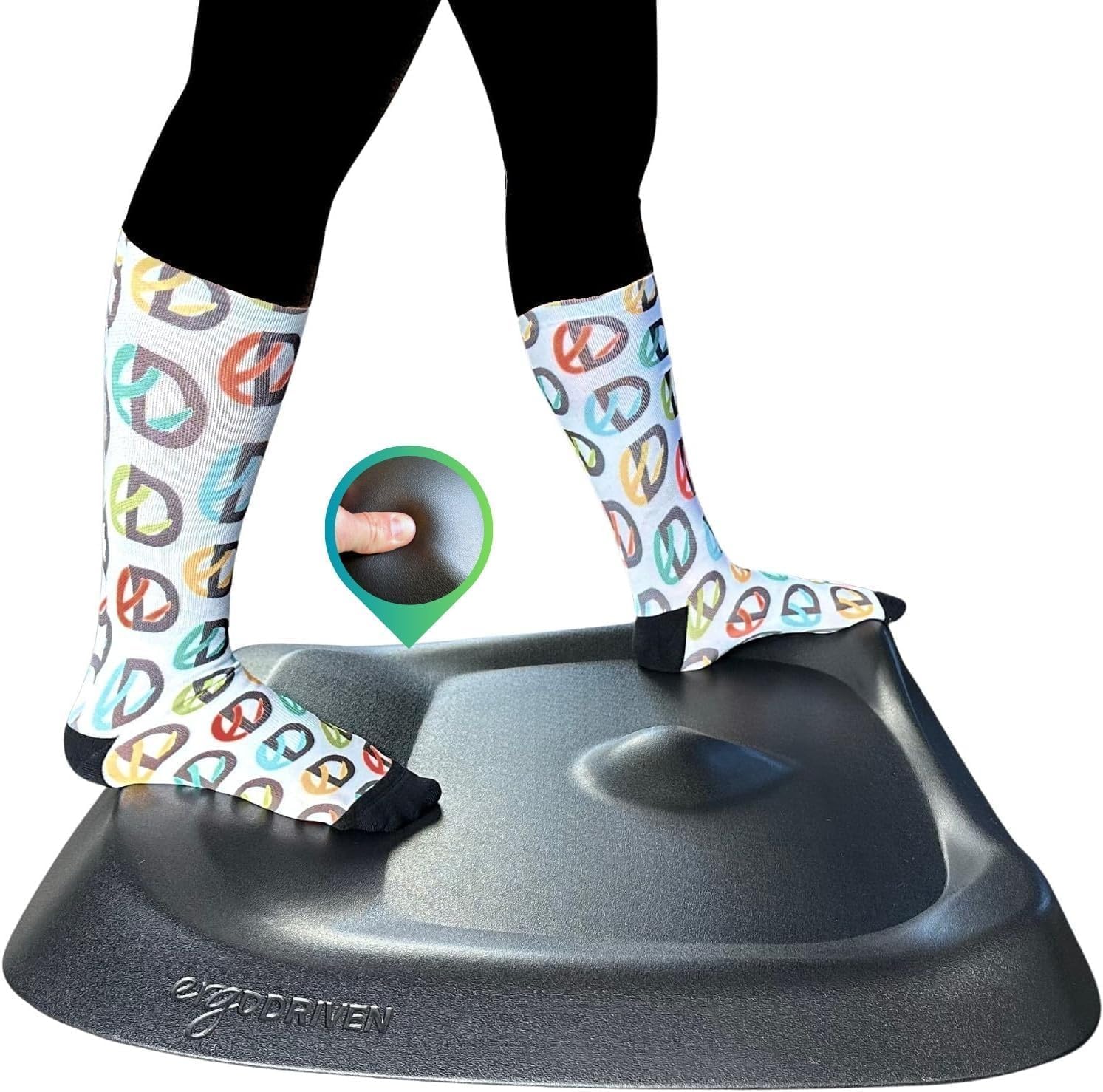
- 3D Calculated Terrain design keeps feet shifting position throughout the day, unlike flat anti-fatigue pads that let you settle into one spot
- PVC-free polyurethane foam core resists compacting under hours of daily standing, holding its cushioning longer than basic kitchen-style mats
- Contoured surface repositions with a single foot nudge, no bending down required to drag it back into place
- Terrain height is tuned for users taller than 5'4", matching the reach of most sit-stand desk setups
- Pebbled skin surface is built to handle daily foot traffic without the surface texture wearing smooth
Cons
- Not designed for users shorter than 5'4", where the terrain contours sit differently underfoot
- Raised terrain zones take an adjustment period if you're used to a flat, even mat surface
- Sold in a single Obsidian Black colourway, with no alternate finish offered
The surface is molded into a 3D Calculated Terrain rather than a flat pad, with raised and recessed zones spaced across the mat. This shape is designed to keep feet moving in small, natural shifts throughout a standing session instead of settling flat in one spot.
- Core is built from non-toxic, PVC-free polyurethane foam that resists compacting under repeated daily pressure
- A durable pebbled skin covers the foam, adding grip and slowing surface wear
- Terrain height is calibrated for users taller than 5'4", aligning with typical standing desk setups
Because the terrain varies across the mat, standing in different spots produces a different underfoot feel, which is the mechanism behind the reduced fatigue design.
Setup only requires placing the mat on the floor directly in front of a standing desk, with no assembly or adhesive strips involved. Because the terrain is molded with a front-to-back orientation, lining the mat up with the desk edge keeps the raised zones positioned correctly underfoot.
- Repositioning is done with a single foot nudge rather than bending down to drag a flat mat back into place
- The pebbled skin surface resists sliding on hard flooring such as wood, tile or laminate
- Being a single molded slab, there are no straps, wedges or separate parts to track or replace
Daily care is limited to wiping the surface, since the closed-cell foam core does not absorb spills the way an open-cell pad would.
This mat is built specifically for people who stand at a desk for extended stretches, rather than general kitchen or workshop use. The terrain height calibration is set for users taller than 5'4", which covers most adult desk workers using a standard or electric sit-stand desk.
- Best suited to home office and corporate desk setups where the mat stays in one spot for hours at a time
- Useful for anyone switching from flat anti-fatigue mats and finding their feet still stiffen after long stretches of standing
- Less suited to users under 5'4", who may find the terrain proportions less natural underfoot
It is not intended as a general kitchen or garage mat, since the shaped terrain is specifically tuned to the way feet shift during desk work rather than stationary chores.

Pros
- Clamp-mount installation attaches to a desk edge in about 3 minutes without drilling
- Rubber pads on the clamp protect desk surfaces from scratches during mounting
- Carbon steel tray holds about 15 pounds of cords, power strips, and small hubs
- Fits desk thicknesses from 0.4 to 2 inches, covering most standard desk edges
- Supports both inward and outward mounting orientation depending on desk layout
Cons
- 15-pound weight capacity limits how many devices and cables can sit inside at once
- Desk thickness must fall between 0.4 and 2 inches, so unusually thick or thin desks may not clamp securely
- Mesh basket design isn't fully enclosed, so dust can still settle on cables over time
This cable tray measures 13.38"L x 4.72"W and holds up to about 15 pounds of cords, power strips, and small hubs. Two holes on each side of the tray let cables pass through freely rather than bunching at the tray's edges.
- Tray size: 13.38"L x 4.72"W
- Weight capacity: approximately 15 pounds
- Two side holes per tray for cable pass-through
The carbon steel construction keeps the tray rigid under a loaded weight of cords and small devices, holding its shape better than lightweight plastic cable trays over repeated use.
Installation uses a clamp mount that grips the desk edge directly, with no drilling into the desk required, typically completing in about 3 minutes. Built-in rubber pads on the clamp cushion contact points to avoid scratching the desk surface during and after mounting.
- Clamp-mount installation, no drilling into the desk
- Rubber-padded clamp protects the desk finish
- Fits desk thickness from 0.4 to 2 inches
The tray can mount facing inward toward the user or outward away from the desk depending on available space underneath, giving some flexibility for desks with obstructions like drawers or support legs near the mounting edge.
Once mounted, the tray keeps power cords, outlet strips, and USB hubs lifted off the floor and out from underfoot, reducing tripping hazards and keeping loose cables away from a vacuum cleaner or foot traffic near a standing desk.
- Lifts cords and hubs off the floor, out from underfoot
- Keeps plugs and cables away from small children reaching underneath
- Mesh design allows airflow around bundled cables
For home offices and standing desks where floor cable clutter is a recurring annoyance, this tray offers a straightforward organizing point without permanently modifying the desk itself, which matters for rented spaces or desks that may be moved later.
Pros
- 350 lb weight capacity supports sustained foot pressure through a full workday
- 18-inch-wide rocking platform lets feet roll forward and back for active sitting
- Anti-slip rubber grips on the base plus a non-slip top surface hold position on hard flooring
- Solid wood construction ships fully built, with no assembly steps before use
- Curved rocker profile works under both seated desks and standing-desk setups
Cons
- Wood construction is heavier than plastic footrests, making it less convenient to carry desk to desk daily
- Fixed rocking curve only, with no adjustable height or angle-lock setting
- Bare wood surface has no fabric or gel padding layer for direct barefoot use
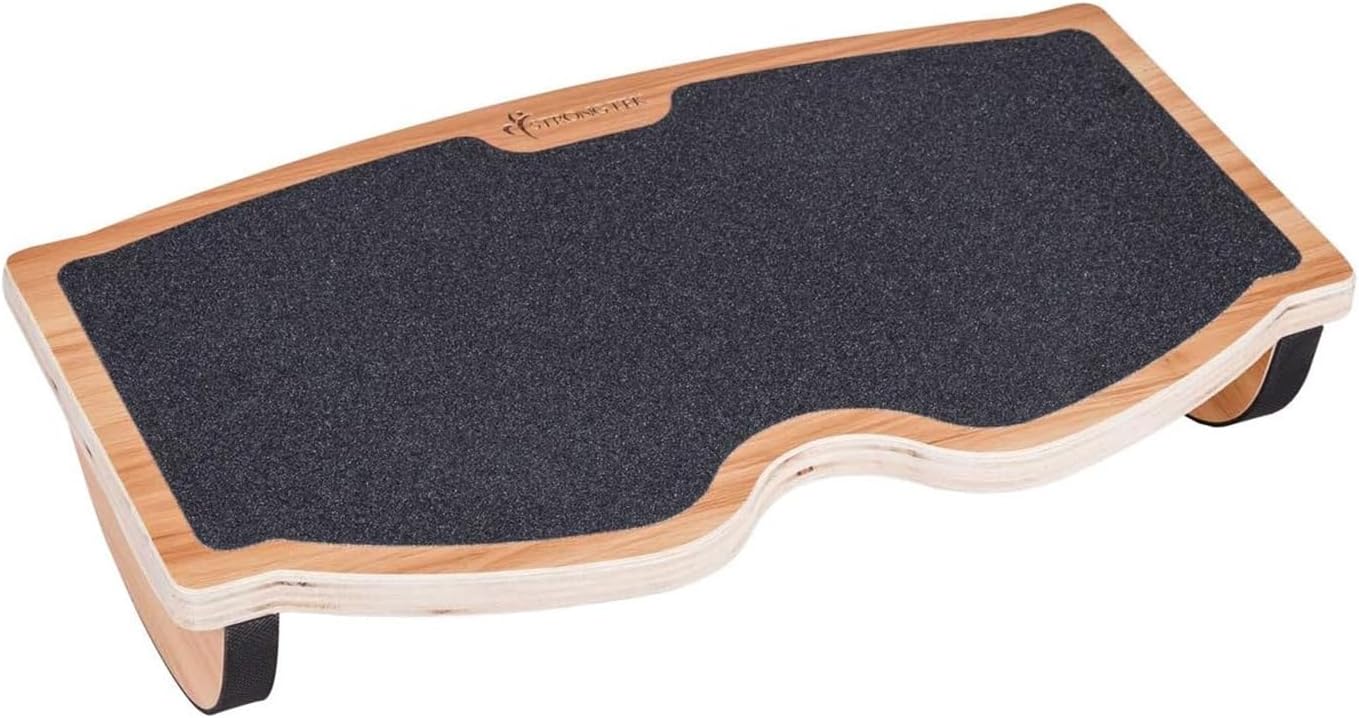
Built from solid wood with a curved rocker base, the footrest supports up to 350 lbs and is designed to roll forward and backward under light foot pressure, encouraging small movements that can help circulation during long seated sessions. The 18-inch width fits comfortably under most desks without crowding leg space.
- 350 lb weight capacity accommodates most users during regular desk sessions
- 18-inch width suits use under standard desks or standing-desk setups
- Rocking motion promotes small foot and ankle movement rather than static resting
Because the rocking curve is fixed rather than adjustable, the amount of tilt stays consistent regardless of how it is used throughout the day.
Anti-slip rubber grips line the base to keep the footrest from sliding on hard flooring, while a textured non-slip top surface keeps feet from sliding off during the rocking motion. The unit ships fully assembled, so there is no hardware to attach before first use.
- Rubber base grips resist sliding on tile, hardwood, or laminate flooring
- Non-slip top surface keeps footing secure during use
- No assembly required, so it is ready to place under a desk immediately
Because it arrives fully built, setup is limited to positioning it under the desk rather than attaching any parts.
The rocking design is aimed at users who sit for extended periods and want a way to shift foot position without leaving the chair, as well as those using a standing desk who want a place to rest one foot at a time. Its solid wood build favors a stationary desk setup over frequent relocation.
- Suited to office workers seated for multiple hours at a stretch
- Works under both seated desks and standing-desk configurations
- Better suited to a fixed desk placement than daily carrying between locations
Because there is no padding layer on the wood surface, users who prefer a cushioned footrest may want to pair it with socks or slippers rather than bare feet.
Pros
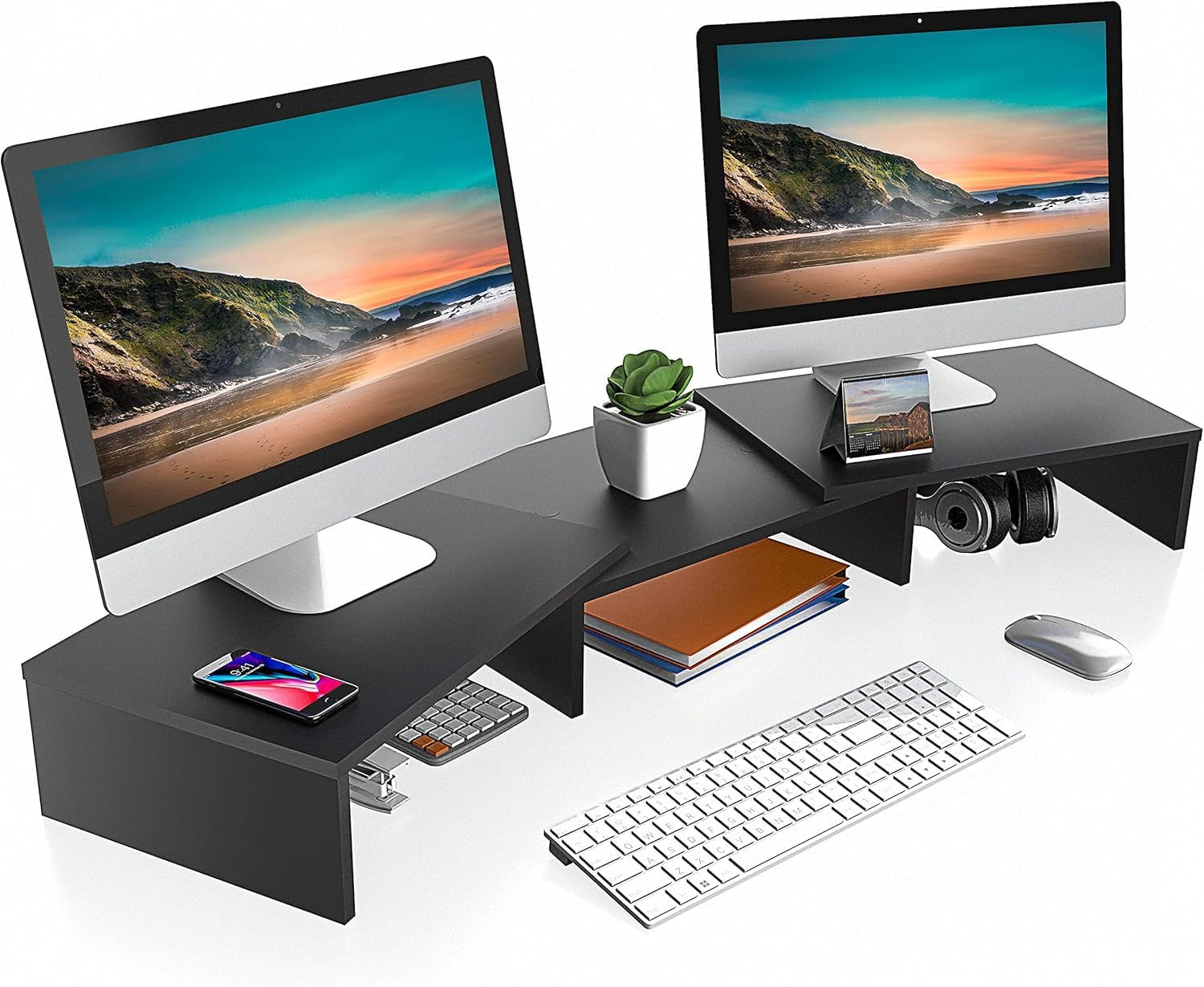
- Extends up to 42.7 inches wide, enough shelf space for two monitors side by side
- Raises screens 4 inches to bring eye level up and ease neck strain
- Holds up to 55 lbs across the 3-shelf MDF construction
- Hinged design allows straight-line or corner-desk configurations
- Assembles in about 5 minutes with pre-drilled holes and included screws
Cons
- Fixed 4 inch riser height is not adjustable, unlike stands with telescoping legs
- MDF wood construction adds more weight than an equivalent aluminum stand
- Rubber anti-slip feet require a flat, stable desk surface to prevent sliding on uneven surfaces
This 3-shelf monitor riser extends up to 42.7 inches wide and holds up to 55 lbs, built from 15mm MDF. It raises monitors 4 inches to bring screens closer to eye level, and is sized for displays 25 to 27 inches and larger.
- Adjustable length range of roughly 36.4 to 42.7 inches
- 3-shelf design creates space beneath for a keyboard, mouse or small desk items
- Hinges allow the stand to be angled for corner-desk or straight-line setups
The middle section and two side shelves can hold a speaker or secondary device alongside the monitors when there is room beyond the screens themselves.
Assembly uses pre-drilled holes: the base sections screw together and the two side parts mount to the middle section, with no extra tools needed beyond what is included. The process is designed to take about 5 minutes for one person.
- Instructions and hardware are included in the box
- Rubber skids on the leg bottoms are meant to prevent sliding on the desk surface
- Hinged sections let the stand pivot into a corner-desk arrangement after assembly
Because the riser height itself is fixed at 4 inches, positioning depends more on desk depth and width than on any further height adjustment after setup.
Built for anyone running two monitors side by side who wants extra shelf width and a modest eye-level boost. The 42.7 inch length and 55 lbs capacity are sized for larger dual-monitor and gaming setups.
- Dual-monitor desks needing more surface width than a single-monitor riser provides
- Corner desks that benefit from the hinged, angle-adjustable shelf sections
- Users wanting under-shelf space to tuck a keyboard and mouse out of the way
Less suited to single-monitor setups or desks needing continuous height adjustment, since the riser height stays fixed at 4 inches once assembled.

Pros
- Supports up to 17.6 lbs (8 kg), enough for most 15-16 in laptops even with an external drive attached
- Multiple height and angle positions let the screen line up with eye level to reduce neck strain
- Rubber mats and anti-skid silicone pads on the hook and base secure the laptop and prevent scratches
- Folds flat for storage or transport, fitting into a backpack side pocket
- Compatible with laptops from 10 to 15.6 in, covering most MacBook, Dell XPS, and ThinkPad models
Cons
- Ventilated open design offers passive airflow only, with no active fan for laptops running hot under heavy load
- Folded footprint still occupies desk or backpack space, unlike a stand that breaks down into a single flat panel
- Metal frame construction adds more weight than a plastic laptop stand of similar size
This stand supports laptops from 10 to 15.6 in and holds up to 17.6 lbs (8 kg) of weight, which covers most mainstream laptops including MacBook Air/Pro, Dell XPS, HP, ASUS, Lenovo ThinkPad, Acer, and Chromebook models.
- Sturdy metal frame is the main structural material supporting the rated weight
- Ventilation holes across the top surface add airflow beneath the laptop
- Two rubber mats on the hook plus anti-skid silicone pads on the top and bottom keep the laptop from sliding
Because the frame is metal rather than plastic, it holds its shape better under repeated height and angle adjustments than a lighter-duty stand.
Height and angle can both be adjusted to match individual posture needs, aiming to reduce neck fatigue, back pain, and eye strain from looking down at a flat laptop screen for long stretches.
- Multiple angle settings accommodate different desk heights and seating positions
- Smooth edges on the frame are designed to avoid scratching hands or wrists during adjustment
- No tools are needed to change height or angle once the stand is set up on a desk
Setting the stand so the top of the screen sits roughly at eye level is the general goal, and the adjustable range here is wide enough to fit most desk and chair combinations.
The stand folds down for storage or travel, sized to slip into a backpack side pocket for people who move between desks or work outside the home regularly.
- Foldable design makes it suited to travel, coworking spaces, or switching between a home and office desk
- Wide laptop size compatibility (10-15.6 in) covers most popular laptop brands and screen sizes
- Ventilated design pairs laptop cooling with the raised, angled position
For desk setups that never move, a larger fixed laptop riser might offer more stability, but for anyone who travels or switches locations often, the fold-flat design here is the main advantage.
Why Standing Desk Accessories Matter
A standing desk alone will not fix poor posture or fatigue. In fact, standing for long stretches on a hard floor can create new aches if you are not prepared. Accessories close that gap. They cushion your feet, keep your screen at eye level, tame cable clutter, and let you transition between sitting and standing without disrupting your rhythm. Think of them as the supporting cast that makes the main investment actually pay off.
The best standing desk accessories tend to fall into a handful of clear categories: floor comfort, screen and laptop positioning, cable and power management, and posture support. Getting at least one item from each group is usually enough to transform how a workstation feels.
Anti-Fatigue Mats: Comfort Starts at the Floor
The single most common regret among new standing desk owners is skipping a floor mat. Standing on tile, laminate, or thin carpet concentrates pressure on your heels and lower back, which quickly discourages you from standing at all. An anti-fatigue mat encourages micro-movements in your legs that keep circulation flowing and reduce that heavy, tired feeling.
There are two broad styles. Flat cushioned mats are simple, affordable, and easy to slide underfoot. A dependable option in this category is the ComfiLife Anti Fatigue Floor Mat, which uses thick supportive foam and a non-slip bottom that works equally well at a desk or in the kitchen. The second style is the contoured or terrain mat, designed with bumps and slopes that invite you to shift, stretch, and reposition your feet. The Ergodriven Topo Mat is the best known example of this approach, built for people who want active standing rather than a flat cushion.
How to Choose a Mat
- Thickness: Look for at least three-quarters of an inch of foam. Thicker mats absorb more pressure but can feel unstable for some users.
- Surface: Flat mats suit tight spaces and shoes; contoured mats reward barefoot or sock use with more stretching options.
- Grip: A non-slip base is essential on hard floors so the mat does not skate away when you step on and off.
Laptop Stands and Risers: Get Your Screen to Eye Level
Ergonomics experts agree on one rule above all: the top of your screen should sit roughly at eye level so your neck stays neutral. Laptop users almost always fail this test, because looking down at a built-in display forces the head forward and strains the upper spine. A stand fixes it instantly.
Height-adjustable and telescopic stands are ideal because they scale with you as you move between sitting and standing. The tounee Telescopic Laptop Stand raises a laptop through a wide height range and adds a swivel base for sharing your screen, making it a strong match for a sit-to-stand desk. If you want something lighter for travel or a minimalist desk, a folding metal riser like the Adjustable Laptop Stand lifts the machine, improves airflow, and packs down flat when you are done.
Pairing a laptop stand with an external keyboard and mouse is the classic ergonomic combination. It lets you raise the screen without lifting your hands, so your wrists stay relaxed and your neck stays tall.
Monitor Stands and Risers
If you run one or two external monitors, a riser does double duty. It lifts screens to the correct height and reclaims the space underneath for a keyboard, notebooks, or general clutter. Multi-shelf wooden risers add a warm, tidy look while keeping your line of sight comfortable. The FITUEYES Dual Monitor Stand offers adjustable length and angle so you can dial in a two-screen layout that suits your desk width, and the extra shelves are handy for storage.
When choosing a monitor riser, confirm its weight capacity against your displays, measure your desk depth, and decide whether you need a single wide platform or separate stands for a dual setup.
Cable Management: Tame the Chaos Behind the Desk
Cable management is the accessory category people ignore until it becomes a problem. On a standing desk it matters even more, because every time the surface rises and lowers, loose cords can snag, stretch, or unplug. A tidy cable run protects your gear and keeps the whole setup looking intentional.
Two tools cover most needs. A clamp-on cable spine or organizer routes cords neatly along the underside of the desk, and the Under Desk Cable Management tray does this with a no-drill clamp so you avoid making holes in your desktop. For power bricks and adapters, a mesh basket-style tray keeps everything off the floor. The Under Desk Cable Tray mounts with a clamp and gives you a hidden shelf for chargers and power strips that travels up and down with the desk.
Quick Cable Tips
- Leave slack so cords can extend fully when the desk reaches its highest position.
- Bundle power and data cables separately to reduce interference and make future changes easier.
- Mount power strips to the desk frame rather than the wall so everything moves as one unit.
Power Solutions Built for Standing Desks
A moving desk needs power that moves with it. Reaching down to a wall outlet every time you stand gets old fast, and stretched cords are a safety hazard. A clamp-mounted power strip solves this by putting outlets right at the edge of your desktop. The CCCEI Standing Desk Power Strip clamps to the desk edge and combines multiple widely spaced outlets with fast USB-A and USB-C charging, so laptops, monitors, phones, and lamps all stay powered as the surface rises. Widely spaced sockets are worth prioritizing because bulky adapters tend to block neighboring outlets on cramped strips.
Posture and Circulation Support
Standing all day is not automatically better than sitting all day. The goal is movement and variety. A foot rest or balance board encourages gentle motion that keeps your legs engaged and your circulation active. The StrongTek Wood Foot Rest works as a rocker and balance board under a standing desk, letting you shift your weight and stretch your calves without stepping away from your work. Small movements like these are what prevent the stiffness that comes from holding any single position too long.
Desk Organization and Everyday Extras
Once the big ergonomic pieces are in place, a few small accessories keep your surface functional and pleasant. A dedicated phone stand keeps your device visible for notifications and video calls without letting it slide around or bury itself under papers. The Lamicall Cell Phone Stand is a clean acrylic holder that props your phone at a readable angle and doubles as a tidy desk accent. Little touches like this reduce reaching and fumbling, which keeps you in your flow throughout the day.
How to Build Your Standing Desk Setup
You do not need every accessory at once. Building your setup in stages keeps costs manageable and lets you learn what your body actually needs. Here is a sensible order to prioritize.
- Start with the floor: An anti-fatigue mat delivers the biggest comfort upgrade for the lowest effort, so buy this first.
- Fix your screen height: Add a laptop stand or monitor riser so your neck stays neutral whether sitting or standing.
- Sort out power and cables: A clamp-on power strip and a cable tray keep the desk safe and clutter-free as it moves.
- Add movement: A foot rest or balance board introduces the micro-motion that makes long standing sessions sustainable.
- Finish with organization: A phone stand and other small holders keep your surface clear and your workflow smooth.
What to Look for Before You Buy
A few universal principles apply no matter which accessory you are considering. First, measure your desk. Cable trays, power strips, and monitor risers all have size and clamp thickness requirements, so check that they fit your desktop before ordering. Second, match accessories to how you actually work. A frequent traveler benefits from a foldable laptop stand, while a two-monitor power user needs a sturdy riser and generous power. Third, prioritize adjustability. Anything that can change height or angle will keep serving you as your setup evolves.
Finally, remember that comfort compounds. Each accessory solves a small friction point, and together they make standing feel effortless rather than something you tolerate. That is the real payoff of investing in quality add-ons.
Final Thoughts
A great workspace is built, not bought in a single box. The best standing desk accessories address comfort, ergonomics, organization, and movement, and you can add them one at a time as your needs become clear. Begin with an anti-fatigue mat to protect your feet, raise your screen to eye level with a stand or riser, keep power and cables under control, and introduce gentle motion with a foot rest. Layer in the small organizers last. Do that, and your standing desk will finally deliver the healthy, productive routine you set it up for in the first place.






