Daniel Okafor
 Choosing the Best Cooling Fans for PCs: A Complete Buying Guide
If your gaming rig runs hot, throttles under load, or simply sounds like a jet engine, upgrading your case fans is one of the cheapest and most effective fixes you can make. Finding the best cooling fans for PCs is not just about pushing more air. It is about balancing airflow, static pressure, noise levels, lighting, and price to match how you actually use your machine. Whether you are building a quiet productivity box, a compact ITX system, or a full RGB showpiece, the right fans keep your components cool and your temperatures stable.
This guide walks you through everything that matters when shopping for PC cooling fans, from bearing types and fan sizes to airflow versus static pressure. Along the way we will point to some of the most popular and highly rated options on the market so you can jump straight to products that fit your setup and budget.

Pros
- Rated MTTF above 150,000 hours, translating to roughly 17 years of continuous run time
- 4-pin PWM connector supports automatic motherboard-based speed control rather than a fixed voltage
- Fibre-glass reinforced PBT frame resists warping compared with plain plastic fan frames
- Noise tops out at 25.1 dB(A) even at the maximum rated 1700 RPM
- Pressure-optimized blade design suits both radiators and dense heatsink fins, not just open airflow
Cons
- Comes in grey only for this redux edition, without the two-tone colorway of the standard NF-P12 line
- No included anti-vibration mounts or Y-splitter cable in this version, those are optional accessories
- Single fan only in this listing, so a multi-fan setup means ordering more than one unit
The fan measures a standard 120x120x25mm and runs on 12V power through a 4-pin PWM connector, reaching a maximum of 1700 RPM. Noise output tops out at 25.1 dB(A) at full speed, which sits toward the quiet end for a fan pushing this level of static pressure.
- Size: 120x120x25mm
- Max speed: 1700 RPM, 4-pin PWM
- Max noise: 25.1 dB(A)
The blade design is pressure-optimized, meaning it is tuned for pushing air through restrictive surfaces like radiator fins or dense heatsinks rather than just moving air freely through open space, which makes it suited to both air coolers and liquid cooling radiators.
As a 4-pin PWM fan, it supports automatic speed adjustment from the motherboard, ramping up under load and idling down when the system is at rest without needing a manual fan curve. It fits any standard 120mm mounting position, including case intake, exhaust, air cooler, or radiator locations.
- Connector: 4-pin PWM
- Mounting: standard 120mm pattern
- Use cases: case airflow, air coolers, radiators
Because this is sold as a single fan, building a matched multi-fan setup for a radiator or full case airflow loadout requires ordering multiples of the same model, and accessories like anti-vibration mounts or Y-splitter cables are available separately rather than bundled here.
The frame is molded from fibre-glass reinforced PBT, a stiffer material than standard plastic fan frames, aimed at resisting warping from heat exposure near a hot GPU or radiator over years of use. Mean time to failure is rated above 150,000 hours, which works out to more than 17 years of continuous run time under normal conditions.
- Frame material: fibre-glass reinforced PBT
- Rated MTTF: greater than 150,000 hours
- Color: grey, redux edition
This redux edition trims the two-tone finish of Noctua's standard NF-P12 line down to a single grey colorway, so anyone matching a specific case color scheme should confirm this shade works before ordering multiples for a visible build.

Pros
- Broad 300-1,500 RPM PWM range lets the fan idle near-silent and only ramp up under load
- Square 140mm frame with 124.5mm mounting holes fits both radiators and standard 140mm case fan positions
- Backed by an SSO2 bearing design rated for over 150,000 hours MTTF
- Included Low-Noise Adaptor caps speed at 1200 RPM for builds prioritizing quiet over maximum airflow
- Anti-vibration mounts, extension cable, and a y-cable for running two fans off one header all come in the box
Cons
- Maximum noise output of 24.6 dB(A) at full 1500 RPM is quiet for the category but still audible in a silent room under load
- Brown and beige color scheme stands out visually inside cases built around black or RGB themes
- No ARGB or lighting of any kind, so it won't match builds centered on synchronized lighting
This is a 140x140x25mm square-frame fan running on 12V with a 4-pin PWM connector, spinning between 300 and 1,500 RPM depending on load, with a maximum noise level of 24.6 dB(A) at top speed.
- 140x140x25mm dimensions, square frame
- 300-1,500 RPM PWM range (1,200 RPM max with included Low-Noise Adaptor)
- MTTF rated over 150,000 hours
- Flow Acceleration Channels on the impeller for reduced vortex noise
The square frame with 124.5mm mounting hole spacing is the detail that matters most for radiator installs, since it lines up with standard 140mm radiator screw patterns rather than needing an adapter bracket.
Because of its square shape, this fan mounts on 140mm water-cooling radiators as easily as it does standard case fan positions, giving full coverage over the radiator surface for even airflow across the fin stack.
- Fits AIO and custom-loop 140mm radiators
- Also mounts as a standard 140mm case intake or exhaust fan
- Anti-vibration mounts included to reduce frame-transmitted noise
The included extension cable and y-cable extend its usefulness further, letting two PWM fans share a single motherboard header when a build needs more than one 140mm fan but the board is short on headers.
Out of the box, the fan runs its full 300-1,500 RPM PWM range for maximum airflow under heavy load. The bundled Low-Noise Adaptor caps the top speed at roughly 1,200 RPM for builds where quiet operation matters more than peak cooling.
- Full range: 300-1,500 RPM
- Low-Noise Adaptor caps speed near 1,200 RPM
- PWM control lets the motherboard auto-adjust based on temperature
Choosing between the two modes is really a trade-off between a small amount of extra cooling headroom at 1,500 RPM and lower audible noise at the capped speed, useful for near-silent builds placed close to a desk.

Pros
- 120mm SL Infinity 3 Pack with controller
- Dimensions of 4.73"L x 4.81"W x 0.99"H engineered for optimal spatial fitting
- Built with high grade Aluminum for lasting wear resistance
Cons
- Requires verifying placement clearance for 4.73"L x 4.81"W x 0.99"H prior to installation
- Requires gentle maintenance routines to preserve the Aluminum finish
Crafted with attention to functional details, the LIANLI Lian Li UNI Fan SL-Infinity 120-Triple Pack-ARGB brings efficient performance to your Case Fans. Daily usage reveals robust utility supported by 120mm SL Infinity 3 Pack with controller. Complementing its primary framework, the design also incorporates engineered hardware precision and smooth operation to optimize routine handling. Measurements of 4.73"L x 4.81"W x 0.99"H provide clear dimensional boundaries for precise space planning. User centered design choices streamline routine interactions and enhance practical convenience. Robust physical construction provides verified peace of mind during heavy daily usage. Thoughtful spatial layout allows versatile placement across modern living environments.
Focusing on material selection, this hardware is constructed to resist ongoing physical fatigue. Reinforced internal elements like practical installation attributes and space-saving structure maintain steady operational balance under continuous use. Solid structural engineering allows the unit to maintain physical stability under load. Constructed using quality Aluminum, outer surfaces withstand routine contact without losing visual appeal. User centered design choices streamline routine interactions and enhance practical convenience. Robust physical construction provides verified peace of mind during heavy daily usage. Thoughtful spatial layout allows versatile placement across modern living environments. Dependable hardware performance ensures consistent operational output throughout the year.
Maintaining optimal hardware conditions involves simple periodic inspection and spatial planning. Featuring long-term material resilience and easy care routines, ongoing operation remains intuitive across varied household routines. Wiping surfaces periodically with a soft cloth prevents dust accumulation in functional crevices. User centered design choices streamline routine interactions and enhance practical convenience. Robust physical construction provides verified peace of mind during heavy daily usage. Thoughtful spatial layout allows versatile placement across modern living environments. Dependable hardware performance ensures consistent operational output throughout the year. Precision engineering delivers a stable foundation tailored for active household demands. Carefully selected components ensure minimal maintenance overhead over long service life.

Pros
- Ultra-quiet UL-certified USB fans designed to cool various
- Features a multi-speed controller to set the fan’s speed to optimal
- Dual-ball bearings have a lifespan of 67,000 hours and allows the
- USB plug can power the fan through USB ports found behind popular
- Dimensions of 4.7"L x 1"W x 4.7"H engineered for optimal spatial fitting
Cons
- Requires verifying placement clearance for 4.7"L x 1"W x 4.7"H prior to installation
- Requires gentle maintenance routines to preserve the Rubber finish
Tailored for residential and professional settings, the ACInfinity AC Infinity S7 Quiet Dual 120mm USB Fan UL-Certified for addresses routine requirements effectively. Operational testing demonstrates clear performance benefits driven by Ultra-quiet UL-certified USB fans designed to cool various electronics and components.. In active use, the presence of Features a multi-speed controller to set the fan’s speed to optimal noise and airflow levels. eliminates common operational friction for homeowners. Measurements of 4.7"L x 1"W x 4.7"H provide clear dimensional boundaries for precise space planning. Robust physical construction provides verified peace of mind during heavy daily usage.
Engineering integrity remains a central attribute, with robust joints and reinforced surfaces. Hardware stability is reinforced through Dual-ball bearings have a lifespan of 67,000 hours and allows the fans to be laid flat or stand upright., ensuring dependable daily performance. Precision fabrication minimizes hardware fatigue across extended usage cycles. Constructed using quality Rubber, outer surfaces withstand routine contact without losing visual appeal. Robust physical construction provides verified peace of mind during heavy daily usage. Thoughtful spatial layout allows versatile placement across modern living environments. Dependable hardware performance ensures consistent operational output throughout the year. Precision engineering delivers a stable foundation tailored for active household demands.
Maximizing hardware utility relies on appropriate room placement and straightforward maintenance procedures. Incorporating USB plug can power the fan through USB ports found behind popular AV electronics and game consoles., routine adjustments can be performed efficiently without specialized hardware. Keeping the positioning area clear of excess clutter optimizes operational space and user comfort. Robust physical construction provides verified peace of mind during heavy daily usage. Thoughtful spatial layout allows versatile placement across modern living environments. Dependable hardware performance ensures consistent operational output throughout the year. Precision engineering delivers a stable foundation tailored for active household demands.

Pros
- Heavy duty cooling fan, 120x120x25 mm, 12V, 4-pin PWM, max. 3000
- Award-winning 120x25mm fan with Focused Flow frame for high static
- 12V 3000rpm model (43.5dB) with 4-pin PWM connector for automatic
- High-speed industrialPPC version for industrial heavy-duty
- Dimensions of 4.72"L x 4.72"W x 0.98"H engineered for optimal spatial fitting
Cons
- Requires verifying placement clearance for 4.72"L x 4.72"W x 0.98"H prior to installation
- Requires gentle maintenance routines to preserve the Fibre-glass reinforced polyamide finish
The Noctua Noctua NF-F12 iPPC 3000 PWM Heavy Duty Cooling Fan 4-Pin provides dependable operation suited for contemporary indoor Case Fans configurations. Technical integration focuses on functional efficiency, incorporating Heavy duty cooling fan, 120x120x25 mm, 12V, 4-pin PWM, max. 3000 RPM, max. 43.5 dB(A), greater than 150,000 h MTTF. Its balanced engineering incorporates Award-winning 120x25mm fan with Focused Flow frame for high static pressure and superior cooling efficiency to streamline day-to-day interactions. Measurements of 4.72"L x 4.72"W x 0.98"H provide clear dimensional boundaries for precise space planning. Dependable hardware performance ensures consistent operational output throughout the year.
Evaluating build quality and structural execution reveals strong manufacturing standards across components. The physical build incorporates 12V 3000rpm model (43.5dB) with 4-pin PWM connector for automatic speed control via 4-pin PWM fan headers, broad 750-3000rpm speed range, providing essential protection against surface wear. High tolerance assembly prevents unexpected mechanical looseness during daily operation. Constructed using quality Fibre-glass reinforced polyamide, outer surfaces withstand routine contact without losing visual appeal. Dependable hardware performance ensures consistent operational output throughout the year. Precision engineering delivers a stable foundation tailored for active household demands. Carefully selected components ensure minimal maintenance overhead over long service life.
Long-term operational satisfaction is supported by adhering to standard installation and cleaning practices. Thanks to High-speed industrialPPC version for industrial heavy-duty applications that require extreme cooling performance and advanced ingress protection, spatial alignment and initial setup progress smoothly for homeowners. Simple preventative care maintains mechanical responsiveness and aesthetic value over extended use. Dependable hardware performance ensures consistent operational output throughout the year. Precision engineering delivers a stable foundation tailored for active household demands. Carefully selected components ensure minimal maintenance overhead over long service life. Attention to manufacturing details ensures reliable utility for your Case Fans.

Pros
- Reaches up to 2500 RPM while staying rated at a max 31.2dB(A), aimed at cases needing both airflow and low noise
- 6-pole fan motor with 3 phases reduces vibration and power draw versus simpler motor designs
- Fluid-dynamic bearing (FDB) is rated for up to 300,000 hours of operation
- Ships with two mounting options - anti-vibration mounts for case use and plastic mounts for radiators or heat sinks
- Funnel-shaped fan frame and silence-optimized blades increase air pressure output for radiator and heatsink use
Cons
- 120mm size only in this listing, so larger 140mm case openings would need a different fan or an adapter
- 4-pin PWM connection only, with no included fan hub, so multiple fans need a case with enough headers or a separate splitter
- Plastic frame construction, not metal, though the funnel shape is engineered specifically for airflow rather than added rigidity
This 120mm fan spins up to 2500 RPM while staying rated at a maximum 31.2dB(A), aiming to deliver strong airflow without the noise increase that usually comes with higher fan speeds. A funnel-shaped frame and silence-optimized blades work together to increase air pressure, which matters most when the fan is mounted on a radiator or heat sink rather than open case airflow.
- Up to 2500 RPM at a rated max of 31.2dB(A)
- Funnel-shaped frame for increased air pressure
- 4-pin PWM speed control
The decreased distance between the blades and the frame is part of what boosts pressure output, letting the fan push air through dense radiator fins more effectively than a standard flat-frame fan.
A 6-pole motor with 3 phases keeps power consumption and vibration low, contributing to quiet operation especially at mid-range speeds where the fan is described as virtually inaudible. The fluid-dynamic bearing (FDB) is rated for up to 300,000 hours of continuous operation, a long-life design intended for fans that run nearly around the clock in an always-on PC.
- 6-pole, 3-phase motor for low vibration and power draw
- Fluid-dynamic bearing rated to 300,000 hours
- Near-inaudible operation at mid-range speeds
Because the bearing lifespan figure assumes typical operating conditions, running the fan constantly at maximum RPM in a hot case will shorten that rated lifespan somewhat versus PWM-regulated variable speed use.
The fan ships with two mounting options: pre-installed anti-vibration mounts that dampen noise-generating vibration for standard case installation, and a separate plastic mounting set intended for radiators or heat sinks where a firmer connection matters more than vibration dampening. Both options are included in the box rather than sold separately.
- Anti-vibration mounts pre-installed for case use
- Plastic mounting set included for radiators and heat sinks
- Measures 4.72"L x 0.98"W x 4.72"H
Because this listing covers the 120mm size only, builders needing a 140mm fan for a larger case opening or radiator will need to check a separate 140mm listing instead.
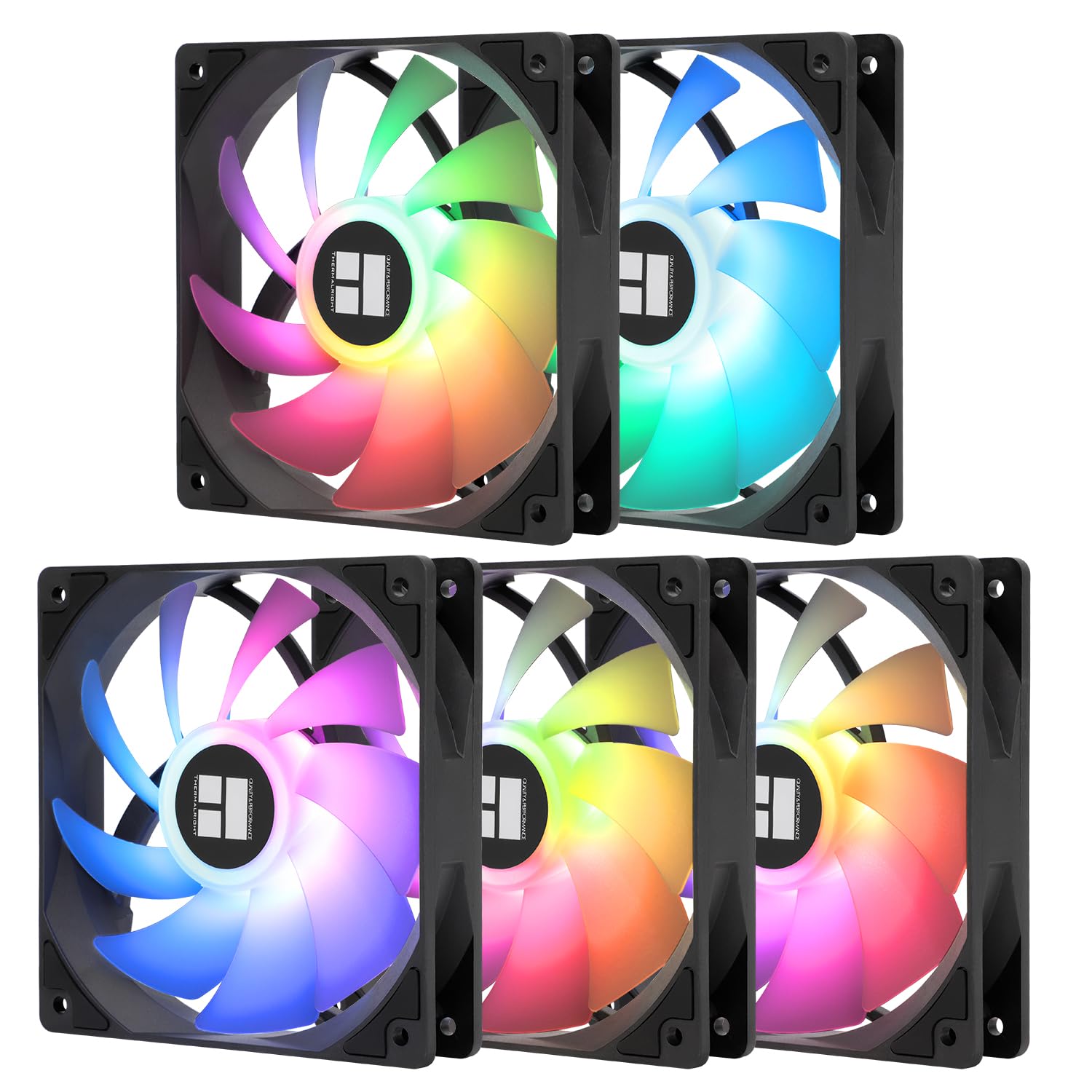
Pros
- 【High Performance Cooling Fan】 Automatic speed control of the
- 【Quality Bearings】The carefully developed quality S-FDB bearings
- [Excellent LED light] The high-brightness LED atomizing argb fan
- 【Silent Fan Size】 Model: TL-C12C-S X5, Size: 120*120*25mm, Speed:
- Dimensions of 4.72"L x 0.98"W x 4.72"H engineered for optimal spatial fitting
Cons
- Requires verifying placement clearance for 4.72"L x 0.98"W x 4.72"H prior to installation
- Requires gentle maintenance routines to preserve the Plastic, Rubber finish
Crafted with attention to functional details, the Thermalright Thermalright 5 Pack TL-C12C-S CPU Fan 120mm ARGB Case brings efficient performance to your Case Fans. Daily usage reveals robust utility supported by 【High Performance Cooling Fan】 Automatic speed control of the motherboard through the 4PIN PWM fan cable interface, which can determine the speed according to the temperature of the motherboard, with a maximum speed of 1550RPM. Configured with up to 55cm of cable for PWM series control of fans, ideal for cases and CPU coolers.. Complementing its primary framework, the design also incorporates 【Quality Bearings】The carefully developed quality S-FDB bearings solve the problem of pc cooling fan blade shaking in lifting mode, keeping fan noise to a minimum while providing maximum cooling performance when needed and extending the life of the fan. to optimize routine handling. Measurements of 4.72"L x 0.98"W x 4.72"H provide clear dimensional boundaries for precise space planning.
Focusing on material selection, this hardware is constructed to resist ongoing physical fatigue. Reinforced internal elements like [Excellent LED light] The high-brightness LED atomizing argb fan blade can effectively reflect the light, making the ARGB lighting effect softer, and it matches the cooler and case more perfectly. Up to 17 modes of light effects with ARGB support, color can be managed and synchronized through the port on motherboard. maintain steady operational balance under continuous use. Solid structural engineering allows the unit to maintain physical stability under load. Constructed using quality Plastic, Rubber, outer surfaces withstand routine contact without losing visual appeal.
Maintaining optimal hardware conditions involves simple periodic inspection and spatial planning. Featuring 【Silent Fan Size】 Model: TL-C12C-S X5, Size: 120*120*25mm, Speed: 1550RPM±10%, Noise ≤ 25.6dBA Connector: 4pin pwm, Current: 0.20A, Air Pressure: 1.53mm H2O, Air Flow: 66.17CFM, Higher air flow for improved cooling performance., ongoing operation remains intuitive across varied household routines. Wiping surfaces periodically with a soft cloth prevents dust accumulation in functional crevices. Attention to manufacturing details ensures reliable utility for your Case Fans. Using proper installation techniques maintains physical stability across daily activities. This balanced configuration fits smoothly into existing interior designs while maximizing efficiency.

Pros
- S-FDB bearing keeps blade wobble in check, holding noise to 25.6dBA or below at full 1550 RPM
- Delivers 66.17 CFM airflow with 1.53mm H2O static pressure, enough for both case circulation and radiator duty
- Silicone corner pads on all four sides dampen vibration transfer into the case panel
- 4-pin PWM control lets the motherboard ramp speed automatically with CPU temperature
- Sold as a 3-fan pack, enough to outfit intake, exhaust and a radiator in one purchase
Cons
- Maximum static pressure of 1.53mm H2O trails dedicated high-pressure radiator fans meant for thick, restrictive rads
- 55cm cable length may run short in larger full-tower cases with a fan hub mounted far from the header
- Fixed 120mm size only, with no 140mm option for cases built around larger fan mounts
Every spec on this fan points toward a balance of airflow, static pressure and noise for general case cooling.
- Frame measures 120 x 120 x 25mm, the standard case fan size fitting most mid-tower and full-tower builds
- Spins up to 1550 RPM, producing 66.17 CFM of airflow and 1.53mm H2O of static pressure
- Noise stays at or below 25.6dBA at full speed, thanks in part to the S-FDB bearing design
- Draws 0.20A through a 4-pin PWM connector, with roughly 55cm of cable to reach a motherboard header
Because the static pressure figure sits in the mid-range rather than at the high end, these fans suit open case airflow and thin radiators better than thick, highly restrictive radiator stacks.
These fans are built to drop into standard PC cases and coolers without special adapters.
- The 4-pin PWM connector works with any motherboard fan header that supports PWM speed control
- Standard 120mm mounting holes line up with the vast majority of case fan brackets and CPU air cooler frames
- Silicone corner pads add a small amount of cushioning, which can affect fit in cases with unusually tight fan shrouds
- Works equally well as a case intake or exhaust fan, or paired with a CPU air cooler for extra heat dissipation
Since the fans use a standard 120mm PWM footprint, they are a straightforward swap for stock case fans, though anyone mounting to a thin radiator should check static pressure needs against thicker aftermarket units.
Buying this fan as a 3-pack makes it easy to standardize airflow across an existing build.
- Replacing stock case fans with all three units at once keeps noise and airflow consistent front-to-back rather than mixing fan generations
- The PWM interface means fan curves can be tuned later through motherboard BIOS or fan-control software without rewiring anything
- Because the fans are 120mm only, upgrading a case built around 140mm mounts would require an adapter bracket or a different fan line entirely
- The S-FDB bearing is built for extended service life, so these fans can serve as a long-term baseline before considering higher static-pressure radiator fans later
For builders planning a future radiator upgrade, pairing these with a dedicated high-static-pressure fan model at that point is worth considering, since this fan's pressure output is better suited to open case airflow.

Pros
- 5-fan pack covers a full case rebuild or multiple coolers from one purchase
- 66.17 CFM airflow with 1.53mm H2O static pressure for meaningful case ventilation
- Rated at 25.6dBA maximum noise, quiet enough for a shared room setup
- Four silicone corner pads per fan reduce vibration and rattling against the case frame
- 4-pin PWM connector lets the motherboard auto-adjust fan speed based on temperature
Cons
- Unlit version, with no RGB or ARGB lighting for builds that want visible lighting on every fan
- Maximum speed is capped at 1550RPM, lower than some high-static-pressure fans built for dense radiators
- PWM control depends on the motherboard's fan headers supporting 4-pin PWM; 3-pin-only headers will not get full speed control
Each 120mm fan spins up to 1550RPM, rated for 66.17 CFM airflow and 1.53mm H2O static pressure, with maximum noise specified at 25.6dBA. The 4-pin PWM connector draws 0.20A and supports up to roughly 55cm of cable length for routing to case or cooler headers.
- 120x120x25mm, up to 1550RPM +/-10%
- 66.17 CFM airflow, 1.53mm H2O static pressure
- Noise rated at 25.6dBA maximum, 4-pin PWM connector
S-FDB bearings are used specifically to reduce blade shake at lower speeds, which is typically where lower-grade fan bearings introduce the most audible rattle.
The 120x120x25mm size fits the most common case fan and CPU cooler mounting standard, so these work as direct replacements for stock case fans or as an addition to a CPU air cooler needing extra airflow. The 4-pin PWM connector requires a motherboard or fan hub header that supports PWM control.
- Standard 120mm mounting, fits most cases and air coolers
- 4-pin PWM header required for full speed control
- 5-pack covers a full case fan replacement in one purchase
On 3-pin-only fan headers, these fans will still spin but lose the PWM-based automatic speed adjustment, running instead at a fixed or voltage-based speed depending on the header.
Four silicone corner pads per fan absorb vibration where the frame meets the case panel, which is typically where fan-generated rattle carries into the rest of the case rather than from the blades themselves. Combined with the S-FDB bearings, that keeps operation under the rated 25.6dBA even as PWM speed ramps up under load.
- Silicone corner pads reduce frame vibration and rattle
- S-FDB bearings for reduced blade shake over time
- Automatic PWM speed control based on motherboard temperature readings
This is the unlit version of the fan, so anyone specifically wanting RGB or ARGB lighting synced across their case should look at lit fan variants instead, since this pack has no onboard lighting.

Pros
- Lite 120 Fan: Redesigned hybrid frame optimal airflow and stability
- Blade Design: Revised curved blade design improves airflow and
- Dynamic PWM Fan: A PWM 4-pin header allows adjustable fan speeds
- Frosted Blade Design: The frosted blade enhances the dispersion of
- Built with high grade Plastic, Polybutylene Terephthalate for lasting wear resistance
Cons
- Requires gentle maintenance routines to preserve the Plastic, Polybutylene Terephthalate finish
- Best placed in well ventilated indoor spaces away from excess moisture
Integrating thoughtful design principles, the Cooler Master MF120 Lite 120mm PC Case Fan Liquid Cooler enhances daily routines within Case Fans areas. From an operational perspective, this model emphasizes key capabilities such as Lite 120 Fan: Redesigned hybrid frame optimal airflow and stability with optimized PWM blades, while simplifying the installation.. Additionally, the integration of Blade Design: Revised curved blade design improves airflow and boosts cooling efficiency. enhances overall usability during continuous activity. Quality craftsmanship supports long term satisfaction for residential and professional settings. User centered design choices streamline routine interactions and enhance practical convenience.
Structural analysis confirms an emphasis on long-term mechanical resilience and component stability. Designed for lasting service, the structure leverages Dynamic PWM Fan: A PWM 4-pin header allows adjustable fan speeds from 650 to 1,750 RPM, to balance noise and airflow. to minimize mechanical stress. Advanced joint reinforcement guards against structural sagging or premature joint wear. Constructed using quality Plastic, Polybutylene Terephthalate, outer surfaces withstand routine contact without losing visual appeal. Quality craftsmanship supports long term satisfaction for residential and professional settings. User centered design choices streamline routine interactions and enhance practical convenience. Robust physical construction provides verified peace of mind during heavy daily usage.
Following practical maintenance guidelines ensures the unit retains its performance properties. Highlighting Frosted Blade Design: The frosted blade enhances the dispersion of aRGB lighting, creating a vibrant and customizable luminous effect., initial assembly and positioning remain straightforward using basic tools. Gentle surface cleaning with non-abrasive tools keeps outer materials looking clean and pristine. Quality craftsmanship supports long term satisfaction for residential and professional settings. User centered design choices streamline routine interactions and enhance practical convenience. Robust physical construction provides verified peace of mind during heavy daily usage. Thoughtful spatial layout allows versatile placement across modern living environments.
Why PC Cooling Fans Matter More Than You Think
Every component inside your case generates heat, and heat is the enemy of performance and longevity. When temperatures climb too high, your CPU and GPU automatically reduce their clock speeds to protect themselves, a process known as thermal throttling. That means fewer frames per second in games and slower renders in creative work. A well planned set of case fans creates a steady flow of cool air in and hot air out, keeping your parts in their comfort zone.
Good airflow also protects your investment. Sustained high temperatures shorten the lifespan of everything from capacitors to storage drives. Spending a little on quality fans now can save you from replacing expensive hardware later. On top of that, modern fans run far quieter than the stock units bundled with most cases, so your PC can stay cool without becoming a distraction.
Understanding Fan Size and Placement
The most common PC fan size is 120mm, and for good reason. It fits almost every case, radiator, and cooler on the market, and it strikes an excellent balance between airflow and noise. If your case supports it, 140mm fans move more air at lower speeds, which usually means quieter operation. Larger fans spin slower to shift the same volume of air, so they generate less turbulence and noise.
Placement is just as important as size. As a rule of thumb, mount fans at the front and bottom of the case as intakes to draw cool air in, and fans at the rear and top as exhausts to push hot air out. Aim for slightly more intake than exhaust to create positive pressure, which helps keep dust from settling inside through unfiltered gaps.
How Many Fans Do You Need?
A basic build runs well with two intakes and one exhaust. Larger cases with power hungry graphics cards benefit from three or more intakes to feed cool air directly to the GPU. Multi packs make it easy and affordable to fill every mount. Options like the Thermalright TL-C12C-S five pack or the Thermalright TL-C12C X5 give you enough fans for a full build at a very low cost per unit, while the Thermalright TL-C12C X3 three pack suits smaller cases.
Airflow vs Static Pressure: Pick the Right Type
Not all fans are designed to do the same job, and this is where many first time builders get tripped up. There are two broad categories, and choosing correctly makes a real difference to your temperatures.
- Airflow fans are optimized to move a large volume of air across open spaces. They are ideal as case intakes and exhausts where there is little obstruction. A classic example is the Noctua NF-A14, a 140mm fan built for high volume, quiet airflow.
- Static pressure fans are engineered to force air through dense obstacles like radiator fins and heatsinks. If you run a liquid cooler or a packed heatsink, static pressure is what you want. The Noctua NF-P12 redux and the heavy duty Noctua NF-F12 iPPC 3000 are well known for strong pressure performance.
Many modern fans, including the be quiet! Silent Wings 4, are tuned to perform respectably at both tasks, which makes them a flexible choice if you want one fan model throughout your build.
Noise Levels and Why They Matter
Fan noise is measured in decibels, and a difference of just a few dB can be the gap between an inaudible PC and an annoying hum. If you use your computer in a quiet room, work late at night, or record audio, low noise fans are worth prioritizing. Brands like be quiet! and Noctua have built their reputations on near silent operation, using specially shaped blades and vibration dampening frames.
Look for fans with PWM control, which lets your motherboard automatically adjust fan speed based on temperature. This means the fans stay slow and quiet when your PC is idle and only ramp up when there is heat to remove. Nearly every fan in this guide supports 4-pin PWM, so you get smart, responsive cooling without manual tweaking. For a whisper quiet desktop or media setup, the AC Infinity MULTIFAN S7 is a popular USB powered option that also works for cabinets and receivers.
Bearing Types: The Detail That Affects Lifespan
The bearing is the small component that lets the fan blade spin, and it has a big impact on longevity and noise. Understanding the basics helps you avoid fans that grow loud after a year of use.
- Sleeve bearings are cheap and quiet when new but tend to wear faster, especially when mounted horizontally.
- Ball bearings last longer and handle heat well, though they can be slightly noisier.
- Fluid dynamic and hydraulic bearings offer the best mix of long life and quiet operation. Premium fans often use custom versions, such as the S-FDB bearing found in several Thermalright models.
If you plan to keep your build for many years, spending a little more on a quality bearing pays off. This is one area where established brands justify their price.
RGB and Aesthetics: Cooling That Looks Good
For many builders, a PC is as much about the look as the performance. If you have a case with a glass side panel, lighting can transform the whole build. Addressable RGB, often labeled ARGB, lets you control each LED individually for smooth gradients and effects synced to your motherboard software.
The Lian Li UNI Fan SL-Infinity triple pack is a standout for showpiece builds, featuring an infinity mirror design, daisy chain wiring to cut cable clutter, and an included controller. For a more affordable splash of color, the Cooler Master MF120 Lite three pack includes ARGB lighting and a splitter to keep wiring tidy. Just remember that lighting does not improve cooling on its own, so balance style with the airflow and pressure factors above.
Matching Fans to Your Build and Budget
The best choice depends entirely on what you are building. Here is a simple way to think about it based on your priorities.
For the Quiet Enthusiast
If silence is your top priority, focus on premium airflow and pressure fans with excellent bearings. The Noctua NF-P12 redux and be quiet! Silent Wings 4 are proven performers that keep noise to a minimum even under load.
For the Budget Builder
When you need to cool a full case without spending much, multi packs deliver the best value. The Thermalright TL-C12C-S five pack and the Thermalright TL-C12C X3 give you solid airflow and ARGB options at a fraction of the cost of premium single fans.
For the High Performance Rig
Overclockers and workstation users who push their hardware hard should look at high RPM, high pressure fans. The Noctua NF-F12 iPPC 3000 is built for demanding thermal loads and radiator duty, while the Noctua NF-A14 covers larger 140mm mounts with quiet, high volume airflow.
Installation Tips for Maximum Cooling
Buying great fans is only half the job. To get the most from them, pay attention to the details during installation. Check the arrows on the fan frame, which show the direction of airflow and blade rotation, so you mount intakes and exhausts the correct way around. Keep cables tidy and routed behind the motherboard tray to avoid blocking airflow inside the chamber.
Clean your dust filters regularly, because a clogged filter starves your intakes and undoes all your careful planning. If your case and fans support daisy chaining, like the Lian Li UNI Fan lineup, use it to reduce cable clutter and simplify your setup. Finally, spend a few minutes in your motherboard software to build a sensible fan curve, so your PC stays cool under load and quiet at idle.
Final Thoughts on the Best Cooling Fans for PCs
The best cooling fans for PCs come down to matching the right fan to the right job. Prioritize static pressure for radiators and heatsinks, airflow for open case mounts, quiet bearings for longevity, and ARGB if aesthetics matter to you. Trusted brands like Noctua and be quiet! deliver premium quiet performance, while Thermalright and Cooler Master offer excellent value multi packs that cool an entire build affordably.
Take a moment to assess your case size, your cooling needs, and your budget, then choose fans that check those boxes. With the right setup, you will enjoy lower temperatures, longer hardware life, and a quieter, better performing PC. Browse the options above to find the fans that fit your build and start cooling smarter today.