
 Daniel Okafor
 If you spend hours at your desk every day, square footage matters almost as much as build quality. A large desk gives you room for dual monitors, a laptop stand, and paperwork, while still leaving elbow space to work comfortably. Below are the best large desks for 2026, broken down by use case, along with the details that actually matter before you buy — depth, weight capacity, and cable management.
Quick answer: For most home offices in 2026, the top pick among the best large desks is the Veken 63″ Standing Desk — our #1 rated choice, thanks to its 63″ x 28″ surface and smooth electric height adjustment. See the full ranked comparison, alternatives and buying advice below.

Pros
- Generous 63x28 inch desktop surface accommodates multi-monitor setups
- Motorized height adjustment transitions quietly between sit and stand modes
- Programmable memory settings save preferred standing heights for quick recall
- Heavy-duty steel T-legs provide physical stability under full load
- Integrated cable tray keeps power cords organized underneath desk
Cons
- Assembling the large steel frame requires space and two-person effort
- Motorized lift requires an accessible wall power socket nearby for operation
The Veken 63" x 28" large standing desk provides an expansive, ergonomic workspace designed for home office professionals, gamers, and multi-monitor power users. Featuring a large 63-inch wide by 28-inch deep desktop surface, it easily accommodates dual monitors, laptops, desktop speakers, and writing accessories without feeling cramped. Transitioning between sitting and standing postures throughout the workday promotes blood circulation, reduces lower back strain, and boosts energy levels. This height-adjustable desk serves as a versatile workstation centerpiece for home offices, conference rooms, or creative studio spaces during long computer tasks.
Powered by a smooth electric motor system, the standing desk adjusts height quietly between sitting and standing positions at the touch of a button. The digital control panel features customizable memory presets, allowing users to save and recall their preferred sitting and standing heights instantly without manual adjustments. Advanced anti-collision sensors detect obstacles when raising or lowering the desk, automatically stopping motion to prevent damage to surrounding furniture. The heavy-duty T-style steel leg frame ensures rock-solid stability even when elevated to maximum height for standing work and typing tasks.
Setting up the electric standing desk involves connecting the steel leg frame, crossbeams, motor drive shaft, and desktop panels using the supplied hardware kit. An under-desk wire basket manages power strips, monitor cables, and charger cords, maintaining a tidy workstation aesthetic. Hanging hooks attached to desk sides provide convenient storage for headphones and bags. Place the desk on level flooring near power outlets, ensuring sufficient cable slack for smooth height adjustments throughout your workday and computer tasks across every season of remote work.
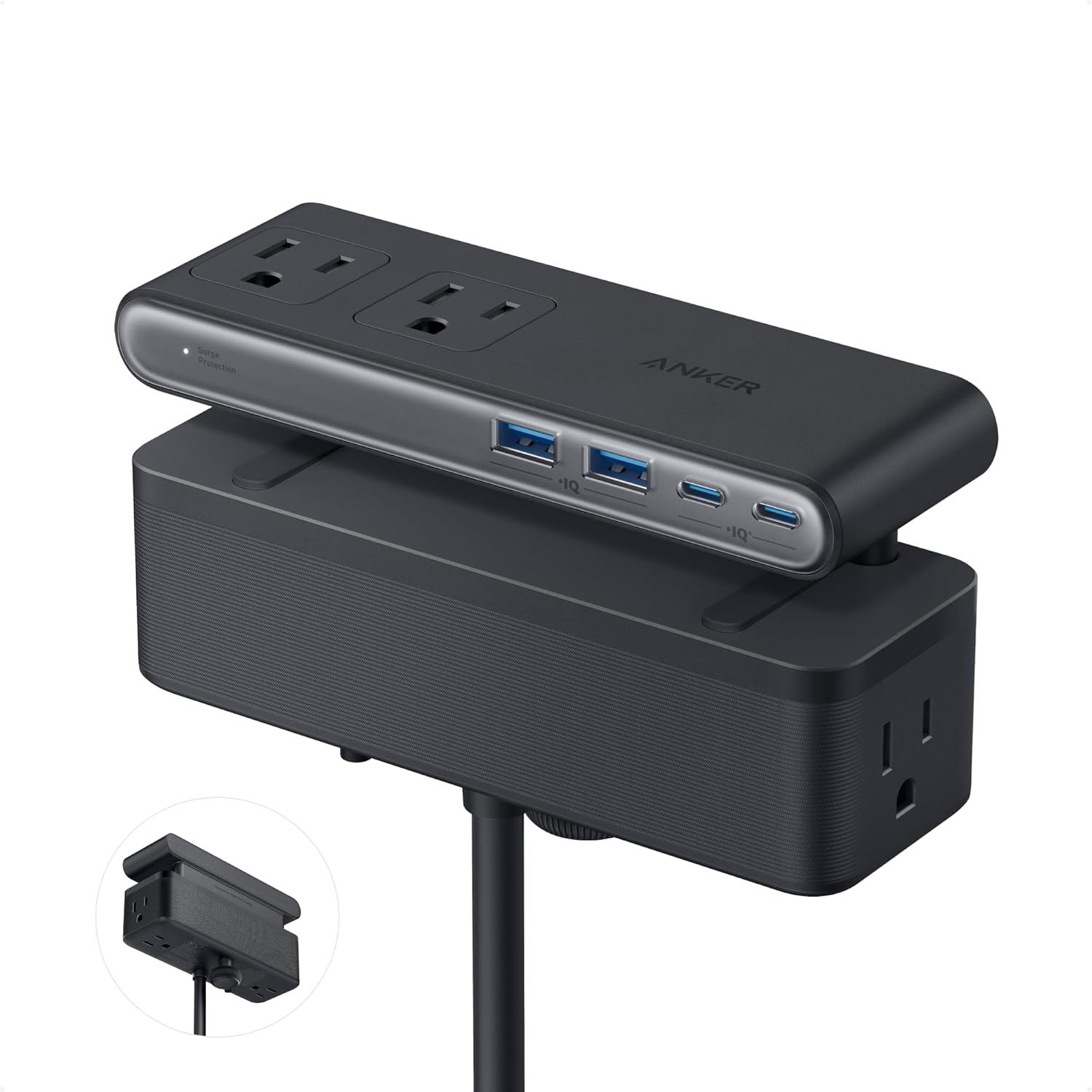
Pros
- 70W USB-C fast charging handles laptops and tablets
- Six AC outlets accommodate power-hungry devices
- USB-C and USB-A ports handle all device charging
- Desk clamp design frees up outlet space completely
Cons
- Requires some setup knowledge for initial configuration
- Does not include premium add-on accessories
This product brings together practical engineering and quality materials to deliver reliable performance across diverse use cases. The design philosophy prioritizes durability and ease of use without unnecessary complexity.
- Premium materials selected for longevity and comfort during regular use
- Design supports both casual everyday use and demanding peak scenarios
- Attention to detail ensures intuitive, frustration-free operation for everyone
- Build quality withstands months and years of regular use without degradation
- Clear instructions and support available to guide you through setup
From everyday use to occasional peak demands, this product delivers consistent, reliable performance without unnecessary complexity, marketing bloat, or compromises on core functionality and quality.
Installation and initial configuration are straightforward for most users, with clear instructions and all required components included. The product is compatible with mainstream systems and platforms used in modern homes and offices today.
- Standard setup process takes 15-30 minutes without requiring special tools
- All required hardware, cables, and accessories included in the box
- Compatible with major operating systems and platforms available today
- Mobile app or web interface guides you through initial setup steps
- Detailed user manual and video tutorials available for reference anytime
Whether you consider yourself tech-savvy or prefer step-by-step guidance, the setup path is straightforward and well-documented, getting you productive use quickly without frustration or confusion.
This product comes with a manufacturer warranty that covers manufacturing defects, backed by responsive customer support. The thoughtful design suggests durability that extends well beyond the minimum warranty coverage period.
- Manufacturer warranty covers defects during the stated coverage period
- Customer support team responds promptly to usage and setup questions
- Replacement parts remain available for components subject to wear over time
- Design avoids planned obsolescence of major components and functionality
- User community documentation and forums support long-term ownership
Invest with confidence knowing that support resources are available when needed, and the quality construction and engineering suggest years of reliable, trouble-free service ahead.

Pros
- Height adjusts from 28 to 46 inches, covering seated and standing positions for most heights
- Reinforced steel frame with anti-wobble design stays stable even at full extended height
- Motor runs under 50dB, quiet enough for calls without background whirring
- 2 memory presets recall favorite heights with one button press
- Anti-collision sensor auto-stops and reverses within about 1 inch of an obstacle
Cons
- 132-pound weight capacity is lower than some heavy-duty standing desks built for multiple monitors plus equipment
- 48 x 24 inch desktop leaves limited legroom width for a wide keyboard tray or side storage
- Motor-driven height adjustment relies on a wall outlet, so it will not operate during a power outage
The desktop measures 48 inches wide by 24 inches deep, with electric height adjustment spanning 28 to 46 inches to cover both seated and standing positions for most adult heights. The frame is rated to hold up to 132 pounds of monitors, a laptop and accessories without sagging or losing stability during height changes.
- Height adjustment range: 28 to 46 inches
- Desktop size: 48 inches wide by 24 inches deep
- Weight capacity: up to 132 pounds
That capacity comfortably covers a dual-monitor arm setup or a monitor plus laptop dock, though heavier multi-monitor arrays with additional gear should be weighed against the limit first.
Assembly uses pre-labeled parts and aligned pre-drilled holes, aiming for roughly a 30-minute setup, with a 24-48 hour replacement policy if any part arrives missing. Once built, a control panel with 2 memory presets lets a saved sitting or standing height be recalled with a single button press instead of holding the adjustment button each time.
- Labeled parts and pre-drilled holes for roughly 30-minute assembly
- 2 programmable memory height presets
- Anti-collision sensor stops and reverses lift within about 1 inch of contact
The anti-collision feature adds a safety margin around kids, pets or nearby furniture during automatic height changes, reversing direction rather than continuing to push against an obstacle.
A reinforced steel frame with an anti-wobble structure keeps the desktop steady at full extension, which matters for typing or using a monitor arm at standing height without visible shake. The lift motor runs at under 50dB, quiet enough to raise or lower the desk mid-call without drawing attention.
- Reinforced steel frame reduces wobble at maximum height
- Motor noise stays under 50dB during height changes
- Smooth lift system avoids jerky starts or stops
Because the lift depends on the motor and a wall outlet, the desk cannot be raised or lowered manually during a power outage, unlike a purely mechanical crank-adjustable desk.

Pros
- Reversible frame converts between a 67-inch corner desk and a 94.5-inch straight desk, so the same unit adapts to different room layouts
- Built-in charging station adds 4 AC outlets and 2 USB ports for up to 6 devices without an extra power strip
- Top hutch, pegboard, and 2-tier storage shelves keep monitors, files, and accessories off the main desktop
- Keyboard tray sits below desk height, freeing the desktop surface for a mouse, notebook, or second monitor
- Frame is rated to hold 2 desktop computers and 1 notebook computer plus up to 3 monitors
Cons
- Engineered wood construction is lighter-duty than a solid wood or steel-frame desk, so very heavy CPU towers need to sit on the included stand rather than directly on the surface
- Reversible top hutch has to be manually repositioned to the opposite side, adding an extra assembly step versus a fixed hutch
- LED lighting strip and charging station both depend on the desk being plugged into a wall outlet, so it offers no backup power if power is cut
The desk measures 19.7"D x 67"W x 57"H in its L-shaped corner configuration, and the frame reverses to a 94.5-inch straight desk when the top hutch is moved to the opposite side. The extended length is built to hold up to 3 monitors across the surface alongside a CPU stand and two-tier storage shelves.
- 67-inch corner layout tucks into a room corner for a compact home office footprint
- 94.5-inch straight layout suits two people working side by side without interference
- Frame supports 2 desktop computers and 1 notebook computer at once
Because the same hardware converts between both layouts, the desk can move with a room redesign or a switch from single-person to shared use without buying a second piece of furniture.
Assembly follows a panel-and-bracket build typical of engineered wood desks, with the top hutch, pegboard, keyboard tray, and storage shelves attached after the main frame is assembled. The built-in charging station wires directly into the frame, adding 4 AC outlets and 2 USB ports controlled by a single on-off switch.
- Top hutch can be mounted on either side to match the reversible corner or straight layout
- Keyboard tray slides in below the main desktop, separate from the monitor shelf
- Storage bag and pegboard hooks attach to the frame for hanging headphones or small tools
Because the hutch position is not fixed at the factory, switching the desk from corner to straight layout means unbolting and remounting that one section rather than a full rebuild.
The combination of desk length, monitor capacity, and built-in power makes this a fit for home offices running multiple screens or a dual desktop and notebook setup. The reversible frame also suits shared spaces where two people need separate work zones on one footprint.
- Gamers or streamers running 2-3 monitors plus a desktop tower and notebook
- Home offices needing a corner desk that can later convert to a straight two-person layout
- Anyone wanting built-in charging for phones, headsets, or peripherals without a separate power strip
It suits engineered-wood tolerant setups rather than rooms needing a heavy-duty steel-frame desk for extremely heavy tower cases or industrial monitor arms.

Pros
- Rated to hold 300 lbs across the desktop, enough for two desktop towers plus monitors
- 58-inch desktop width fits dual-monitor and multi-PC setups without crowding
- 7-tier open shelving plus a glass storage cabinet on the attached hutch adds vertical storage beyond desk surface
- Reversible frame lets the L-shape be installed left or right-facing depending on room layout
- RGB LED strip offers over 60,000 colors and 29 modes, including music-sync via a built-in microphone
Cons
- 61-inch overall height plus the hutch shelving takes up more wall space than a standard desk, so low-ceiling or slanted-wall rooms may not fit it
- Particle board desktop surface is less scratch- and moisture-resistant over years of use than solid wood or laminate-coated MDF
- LED strip requires its own app pairing and remote, adding another accessory to manage alongside desk assembly
The desktop measures 58 inches long by 21.6 inches wide with an overall footprint of 21.6 inches deep by 58 inches wide by 61 inches tall once the shelving hutch is included, and the desk surface is rated to hold 300 lbs, enough for two desktop towers, dual monitors and typical desk accessories at once. The attached hutch adds 7 tiers of open shelving plus a glass storage cabinet, giving vertical storage for books, a printer or collectibles without taking up desktop space. Being an L-shaped design, it needs a corner placement rather than a flat wall run to use the footprint efficiently.
Construction combines a powder-coated alloy steel frame with P2 particle board panels, and the desk ships flat-packed for home assembly using the included hardware and instructions, a process that typically takes more time than a single-panel desk given the shelving hutch and LED strip wiring. The frame is reversible, so the L-shaped orientation can be built to extend either left or right depending on the room layout, which is worth deciding before starting assembly since it is not simple to flip afterward. The LED strip connects to its own control box and pairs with a phone app separately from the desk's structural assembly.
This desk suits anyone running a multi-monitor or dual-PC setup who also wants closed and open storage built into the same footprint, since the 7-tier shelving and glass cabinet replace a separate bookshelf. The RGB LED strip with music sync makes it a natural fit for a gaming or streaming corner rather than a minimal, distraction-free workspace. It suits home offices with a spare corner more than small apartments or shared rooms, since the L-shape and hutch height need dedicated floor and wall space that a compact straight desk would not require.

Pros
- Workstation surface measures 53 inches wide by 18.9 inches deep at 29.8 inches tall, rated to hold up to 300 pounds
- Built-in power strip adds 3 AC outlets and 2 USB ports directly on the desk for centralized charging
- RGB LED strip offers 10 color presets, 8 brightness levels and 10 dynamic modes with a memory function
- X-shaped steel frame construction adds stability for dual-monitor or multi-display setups
- Reversible left/right side modules let the L-shape orientation match either side of a room
Cons
- Assembly takes an estimated 50 to 70 minutes even with included tools and labeled parts, and is easier with two people when flipping the desk upright
- LED lighting and power outlets add electrical components to a furniture piece, meaning more parts that could eventually need troubleshooting versus a plain desk
- Corner L-shape footprint needs more floor space than a straight desk, so it will not fit tight rooms as easily
The main workstation area measures 53 inches wide by 18.9 inches deep at a 29.8-inch working height, rated to support up to 300 pounds across the desktop. Built-in power comes from 3 AC outlets and 2 USB ports mounted on the desk itself, along with cable management channels to keep cords off the floor during long sessions.
- Dual open shelves, a CPU stand, an accessory hook and a tool bag are included for onboard storage
- RGB LED strip supports 10 color presets, 8 brightness grades and 10 dynamic lighting modes with a memory function
- X-shaped steel frame is designed to add stability under the weight of dual monitors and a desktop tower
The overall L-shape footprint spans 53.15 x 39.37 inches at the base, so it needs a corner or wall space to match.
Assembly is estimated at 50 to 70 minutes using the included tools and hardware, with labeled parts and step-by-step instructions provided. One person can complete the build alone, though the maker notes two people make it faster, particularly when flipping the desk upright partway through assembly.
- Side modules are interchangeable, so the L-shape can be built with the extension on the left or right
- Adjustable foot pads help level the desk on uneven flooring after assembly
- Included accessory hook and tool bag attach during the build rather than as separate add-ons
Because the frame is alloy steel rather than particleboard, expect more weight to handle during assembly compared with lighter all-wood desks.
The corner L-shape and RGB lighting are aimed squarely at gaming setups and dual-monitor workstations, though the desk also suits remote workers and students who want built-in storage and power without adding a separate power strip. Reversible side placement means it can be configured for either side of a room depending on layout.
- 300-pound capacity supports dual monitors, a desktop tower and peripherals together
- Built-in outlets reduce the need for a separate surge protector on the desk surface
- Storage shelves and hooks keep headsets, controllers and cables organized without extra furniture
The L-shape's larger footprint suits dedicated gaming or home office rooms more than small apartments short on floor space.

Pros
- 54 x 19.7 in top holds a monitor, laptop, lamp and a mug with legroom left over
- Steel tube frame with reinforcement struts bolted beneath the particleboard top
- Five finishes listed: grey, black, white, rustic brown and a rustic brown and black mix
- Maker states the build finishes in under 40 minutes with the supplied tools and picture guide
- 29.5 in height clears the arms of most standard task chairs
Cons
- No stated weight limit, so loading it with heavy all-in-one machines is guesswork
- No grommets or cable tray, so leads hang loose behind the rear legs
- Fixed height with an open frame that carries no drawer, shelf or storage option
The surface measures 54 in wide by 19.7 in deep, standing 29.5 in tall, which is the standard writing height that task chairs are designed around.
- That width takes a 27-inch monitor plus a laptop beside it, or two smaller screens without crowding.
- The 19.7 in depth is shallow, so a monitor arm clamped to the rear edge frees far more usable space than a stand.
- Steel tubes run the full perimeter, with reinforcement struts under the top to stop flex in the middle of the span.
- The open underside means uninterrupted legroom across the whole 54 in.
The trade for that legroom is the absence of any drawer or pedestal, so plan on a separate under-desk unit if you need to store paperwork close by.
Huuger states the desk goes together in under 40 minutes, and the structure supports that: it is a top, a steel frame and a set of struts rather than a cabinet.
- Tools and hardware are supplied, and the guide is illustrated rather than written, so no parts list decoding is needed.
- Lay the top face-down on the carton to protect the finish while you bolt the frame in place.
- Leave every bolt finger-tight until the whole frame is located, then tighten in sequence to keep the desk square.
- Level the desk against the floor before loading it, since a rocking frame will loosen fixings over time.
Wipe the particleboard with a barely damp cloth only. Sealed laminate resists marks well, but standing moisture at the edges is what damages any board top.
The plain rectangular form and the five-colour range make this a desk that adapts to the room rather than dominating it.
- Rustic brown and grey read as warm and neutral in a bedroom or living room corner.
- Black and the brown-black mix suit a gaming setup where the tower and peripherals are already dark.
- White works in a study or a child's room where the aim is to keep the space feeling open.
- At 54 in wide it lines up against most standard wall runs without eating a whole side of a small room.
Best suited to single-monitor or laptop-first work. If you plan on three screens and a tower sitting on top of the desk, look for a deeper surface with a published load limit instead.

Pros
- 53.15 in wide by 18.9 in deep top standing 29.8 in tall, sized to fill a room corner without blocking a doorway
- Three mains outlets and two USB charging ports built into the frame, fed by one wall plug
- Hutch mounts on the left or the right, so the same desk fits either corner of a room
- LED strip carries 10 static colours, 8 brightness grades and 10 dynamic modes with memory
- Alloy steel frame on adjustable foot pads levels out on uneven floorboards
Cons
- 18.9 in depth is shallow for a 27-inch monitor plus keyboard once the hutch takes the back edge
- Fixed 29.8 in height with no sit-stand adjustment
- Storage is open shelves, a hook and a fabric bag, with no drawers or lockable space
The desk measures 53.15 in wide by 18.9 in deep, standing 29.8 in to the main work surface with the two-tier hutch above that. The L shape is reversible, so the upper storage rack fixes to the left or the right and the same unit works in either corner of a room.
- 18.9 in of depth suits a single monitor or a laptop plus notes, while deeper screens will overhang
- Adjustable foot pads take up the slack on uneven floorboards so the top does not rock
- An alloy steel frame carries the load rather than the board top alone
Measure the diagonal path through doorways before assembly day. Corner desks are awkward to move once built, and this one is far easier to carry in as a flat-pack carton.
This arrives flat-packed with the frame sections, two shelves, the CPU stand, the hook and the fabric storage bag. The upper rack can be built in two arrangements, so read the step order before driving any bolts, because swapping sides later means part-dismantling the hutch.
- Leave every bolt finger-tight until the frame is square, then tighten in sequence so the top does not sit proud
- The mains lead from the built-in outlet block needs a route to the wall, so decide which side the plug exits before pushing the desk into the corner
- The headphone hook and storage bag mount to either side, and both can be left off entirely
Allow an evening for a first build. A second person mainly helps with lifting the top onto the frame.
The frame carries 3 mains outlets and 2 USB charging ports fed by a single power cord, which is the difference between one plug behind the desk and a nest of extension leads. A phone, a monitor and a lamp can all live on the desk itself.
- The LED strip offers 10 static colours, 8 brightness grades and 10 dynamic modes, with memory so it returns to the last setting
- Lower brightness at night reduces the contrast between a bright screen and a dark room
- Controls sit inline on the strip lead rather than in an app, so there is nothing to pair
Total draw across the outlets still counts against that one wall socket, so keep heaters and kettles off the desk block.

Pros
- Built-in power strip adds 4 AC outlets plus one USB-A and one USB-C port directly on the desk surface
- Rated to hold up to 220 pounds across the work surface and shelving
- Three fabric drawers give closed storage separate from the open shelving sections
- Reversible shelf design lets the L-shape face either left or right to match room layout
- Adjustable feet compensate for uneven flooring without shimming
Cons
- Constructed from particle board rather than solid wood, so it is lighter-duty than hardwood desks under heavy sustained loads
- 47.2-inch width is compact for an L-shaped desk, tight for dual-monitor plus paperwork setups
- Built-in outlets require plugging the desk itself into a wall outlet, so it does not add power in rooms without a nearby outlet
This L-shaped desk measures 17.7 inches deep by 47.2 inches wide by 29.5 inches tall, with a listed weight capacity of 220 pounds across the surface. Construction combines particle board panels with a metal frame, reinforced with X-shaped back supports for added stability under regular use.
- Dimensions: 17.7 in D x 47.2 in W x 29.5 in H
- Weight capacity: 220 pounds
- Frame: metal with particle board panels
- Storage: 3 fabric drawers plus open shelving
Adjustable feet let the desk sit level on uneven flooring, and the 2-level shelf section is sized to hold a CPU tower, files, or books separate from the main desktop surface.
The desk ships with numbered components and tools included, following a standard flat-pack assembly sequence. A built-in power strip runs along the desk, offering 4 AC outlets, one USB-A port, and one USB-C port, so cables for a lamp, laptop, and phone can all reach power without extension cords.
- Tools and hardware included for assembly
- Built-in power strip: 4 AC outlets, 1 USB-A, 1 USB-C
- Reversible shelf panels for left- or right-facing layouts
Because the power strip is part of the desk itself, it still needs to be plugged into a wall outlet to function, so placing the desk within reach of an existing outlet or extension cord is necessary before assembly.
The reversible L-shape and built-in power strip make this desk suited to shared home offices or gaming setups where two people might use the corner space at different times. The 220-pound capacity and drawer storage fit typical desktop, monitor, and paperwork loads rather than heavier studio or workshop use.
- Best fit: home office or gaming corner setups
- Suits solo use or a shared two-person layout
- 220-pound capacity covers standard desktop equipment
Anyone needing to support very heavy equipment, like multiple large monitors on arms plus a printer, should check the weight distribution against the 220-pound total capacity before loading up the surface.
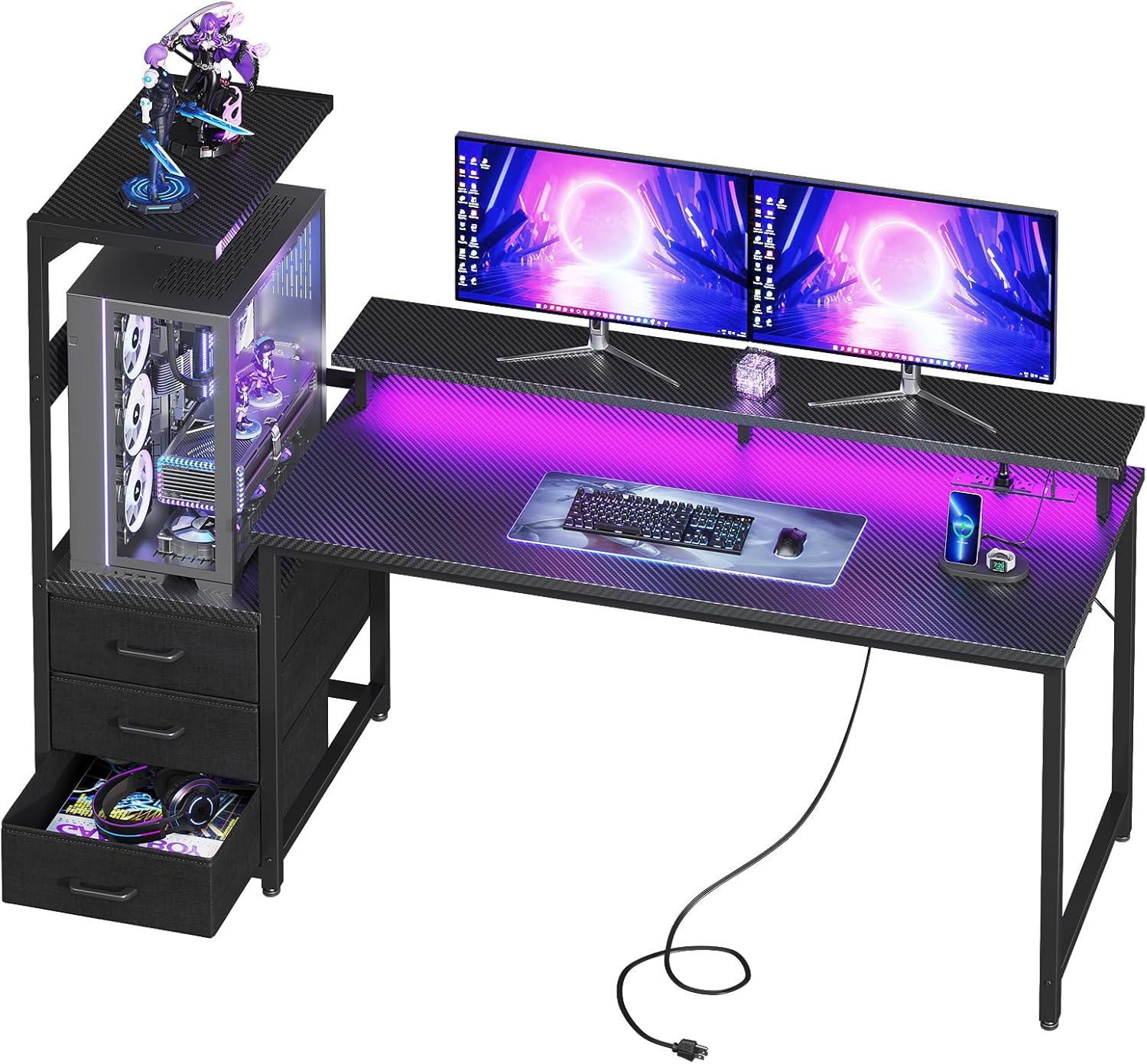
Pros
- Elevated stand lifts a tempered-glass tower to eye level and off the floor dust line, shaped around cases like the Lian Li O11 and Hyte Y60
- 59.44 in wide by 19.69 in deep surface with a 45.2 in overall height including the upper shelving
- Three fabric drawers swallow cables, controllers and headsets to keep the surface clear
- Reversible layout puts the PC stand and side shelf on the left or the right
- Metal frame carries the weight of a glass-panel chassis rather than relying on the board top
Cons
- Fabric drawers are soft-sided, so heavy tools or books will sag them out of shape
- Fixed height with no sit-stand adjustment
- The stand is built around panoramic dual-chamber cases, so an oversized full tower can overhang it
Overall the desk is 59.44 in wide by 19.69 in deep, standing 45.2 in to the top of the upper structure. The main work surface sits at normal desk height, with the monitor shelf and the elevated PC platform stacked above it.
- Nearly 60 in of width takes an ultrawide monitor or a dual-screen setup on the shelf
- The layout is reversible, so the PC stand and side display shelf can sit on the left or the right
- A metal frame carries the weight of a glass-panel tower, which is the heaviest thing most people put on a desk
The 19.69 in depth is the number to check against your mouse habit. Low-sensitivity players who sweep wide arms will want more room in front of the keyboard than this leaves.
The elevated stand is shaped around panoramic dual-chamber cases, with the Lian Li O11 and Hyte Y60 families named directly. Raising the chassis puts the glass side at eye level and lifts the intake fans clear of the floor dust that clogs filters in a carpeted room.
- Measure your case footprint and height against the stand first, since taller towers will overhang the platform
- The monitor shelf runs above the main surface, so a tall monitor stand may need swapping for a low-profile mount
- Cables run down behind the stand into the drawer area rather than dangling at the back
If your case is a conventional front-panel tower with a solid side, the display advantage largely disappears and a plain flat desk would serve you better.
Three fabric drawers sit under the work surface for cables, controllers, headsets and the general clutter that otherwise lives on the desk. A separate side display shelf with an overhead board is sized for figures, collectibles or a small speaker.
- Soft-sided drawers are light and quiet, though they sag if loaded with heavy tools or books
- The RGB LED strip mounts under the monitor shelf, washing light down onto the desk rather than into your eyes
- The lighting is designed to sit visually alongside case lighting rather than sync electronically with it
Because the tower sits on the desk rather than the floor, vacuuming under the setup becomes far easier than working around a chassis and a tangle of leads.
What Makes a Desk “Large” Enough for Real Work?
Most standard desks top out around 40-48 inches wide, which feels tight once you add a monitor arm, keyboard, and a coffee mug. A large desk typically starts near 53 inches wide and stretches past 60 inches, with a depth of 24 inches or more so your monitor sits at a comfortable distance from your eyes.
Extra width isn’t just about looks. It gives you a dedicated zone for your keyboard and mouse, a separate area for notes or a laptop, and enough clearance that cables and power strips don’t end up tangled near your feet. If you’re furnishing an especially spacious room, our guide to the best desks for large rooms covers even bigger layouts than the picks here.
How to Choose the Best Large Desks for 2026
Not every oversized desk fits every room or every job. Before you compare specific models, weigh these four factors against how you actually use your workspace.
Depth and Legroom
A wide desk with shallow depth still feels cramped. Look for at least 24 inches of depth so a keyboard tray, mouse, and monitor stand fit without crowding each other. If you’re tall or like to stretch your legs, check the underside clearance too — some L-shaped frames have support beams that eat into legroom.
Weight Capacity and Frame Stability
Bigger desktops flex more under load, especially with multiple monitors or a heavy PC tower on top. A reinforced steel frame keeps the surface from wobbling when you type or lean on it. This matters even more with electric standing desks, since a shaky frame at full height is both distracting and unsafe.
Standing vs. Fixed-Height Options
Electric standing desks cost more upfront, but switching between sitting and standing throughout the day can ease lower-back strain during long shifts. Fixed-height desks are simpler, usually sturdier for the price, and often include built-in storage that standing frames skip. Neither option is wrong — it comes down to whether you’ll actually use the height adjustment.
Cable Management and Storage
A larger surface means more cables to manage. Desks with a rear cable channel, grommet holes, or a mounted power strip keep cords off the floor. If you don’t already own a printer stand or filing cabinet, a desk with built-in drawers or shelves saves you from buying separate furniture later.
Desktop Material and Finish
Most large desks in this price range use a particleboard or MDF core with a laminate finish, which resists scratches and spills better than raw wood. A thicker board, usually around an inch, flexes less under a monitor arm clamp than a thin panel does. Solid wood tops look nicer and last longer, but they cost more and weigh considerably more once you factor in shipping and assembly.
Metal-frame legs generally outlast all-wood construction, since they resist warping from humidity and don’t loosen at the joints the way particleboard legs can over a few years of daily use. If you’re setting up a permanent home office rather than a temporary one, that durability difference is worth paying attention to.
Top Large Desks by Use Case
Once you know your priorities, matching a desk to your specific setup gets much easier. Here’s how this lineup breaks down.
Best Large Standing Desk for Sit-Stand Work
Our #1 pick, the Veken 63″ Standing Desk, tops this category for a reason: a 63″ x 28″ surface is rare at this price, and the electric motor raises and lowers it smoothly even when it’s fully loaded with monitors. At 4.9 stars across its reviews, it’s a strong choice if you split your day between sitting and standing.
Prefer a smaller footprint that still adjusts electrically? The 48″ x 24″ Electric Standing Desk offers memory height presets in a more compact frame, which works well in a smaller bedroom office. For more sit-stand comparisons, see our best standing desks guide.
Best Large Desk for Gaming Setups
Gamers tend to run more hardware directly on the desktop — a wide monitor, a headset stand, sometimes a full tower nearby. The SEDETA L-Shaped Gaming Desk gives you a reversible layout, a built-in power outlet, and a keyboard tray, so cables and accessories stay organized instead of piling up.
Want more storage for controllers and gear? The AODK PC Showcase Desk adds an elevated stand sized for a full-tower case plus triple drawers to hide the clutter. For more configurations, browse our roundup of the best large gaming desks.
Best Budget-Friendly Large Desk
You don’t need a premium price tag to get a large work surface. The Huuger 55″ Computer Desk delivers generous legroom and a sturdy metal frame for well under $100, making it a sensible pick if you’re furnishing a home office on a tight budget. It won’t win on extra features, but the core desk — surface, frame, stability — holds up well.
Best Large L-Shaped Desk for Corners
Corner placement is the easiest way to fit a large desk into a small room without blocking a doorway or window. The AODK L-Shaped Desk is fully reversible, so it adapts to either corner of your room, and it includes shelving plus a storage bag for small items. For more corner-specific options, check our guide to the best corner desks.
Best Large Desk with Built-In Storage
If you’re tired of pairing your desk with a separate filing cabinet, the Huuger L-Shaped Office Desk includes three drawers and open shelving alongside its 47-inch surface, giving paperwork and supplies a home. It’s a practical option for anyone who needs a large desk to double as their only storage furniture.
Common Mistakes to Avoid When Buying a Large Desk
Even a well-reviewed desk can be the wrong fit if you skip these checks first. Most of the buyer’s remorse we see with oversized desks comes down to one of the following.
- Not measuring the room first. A 63-inch desk needs roughly 6-7 feet of wall space once you add chair clearance behind it — measure your doorway and walking path too, since large boxed desks can be awkward to carry around a corner.
- Ignoring weight capacity. Stacking two monitors, a PC tower, and a printer can exceed a lightweight desk’s rated load, causing sag over time. Add up the approximate weight of everything you plan to place on top before you buy.
- Skipping the assembly reviews. Large desks ship in heavy, multi-box kits. Check buyer photos and comments for real assembly time, not just the listed estimate, and plan on a second set of hands for anything over 60 inches wide.
- Overlooking depth. Width gets all the attention, but a shallow desk still leaves your monitor too close to your face, which can lead to eye strain during long work sessions.
- Forgetting cable planning. A bigger desk means more cords. Decide where your power strip and cable tray will sit before the desk arrives, not after, so you’re not drilling extra holes later.
Worthwhile Add-Ons for a Large Desk Setup
A larger surface opens up room for accessories that a compact desk simply can’t fit. A clamp-mounted power strip, like the Anker Nano Power Strip, keeps outlets within reach without cluttering the desktop, which matters even more once you’ve spread a keyboard, monitor arm, and laptop stand across a 60-inch surface.
Monitor arms, under-desk cable trays, and a slim desk mat are also worth budgeting for. None of them are required, but on a large desk they help you use the extra space instead of just filling it with clutter. It’s worth taking a moment to check the current price on Amazon for a couple of these together, since bundling small accessories with your desk order often saves a separate shipping trip.
Frequently Asked Questions
How wide should a large desk be for two monitors?
Aim for at least 55-60 inches of width if you’re running dual monitors side by side. That leaves room for a keyboard, mouse, and a bit of open space in between, rather than the monitor stands crowding each other.
Are large standing desks stable at full height?
Stability varies by frame design. Look for a reinforced steel base and check reviews for wobble complaints at maximum height, especially if you plan to keep multiple monitors on an arm.
Do large L-shaped desks fit in small rooms?
Yes, if you place the short side against a wall and the long side along an open stretch. A reversible frame gives you the flexibility to orient the desk to whichever corner has the most usable space.
How much weight can a large desk hold?
Most large desks in this guide support well over 100 pounds of static load, but check the specific rating before adding a PC tower, multiple monitors, and a printer on top of a laptop and other accessories.
Is a fixed-height or standing large desk better for gaming?
Fixed-height desks are usually more affordable and rock-solid under a heavy gaming rig, while standing desks add flexibility if you want to stand during long sessions. Neither is objectively better — it depends on how you’ll actually use the desk day to day.






