
 Daniel Okafor
 Quick answer: For most people just starting out in 2026, the best desks for beginners is the SHW Mission Desk — our #1 rated choice. It has a rock-solid frame and thousands of verified buyers who never had to send it back. See the full ranked comparison, alternatives and buying advice below.
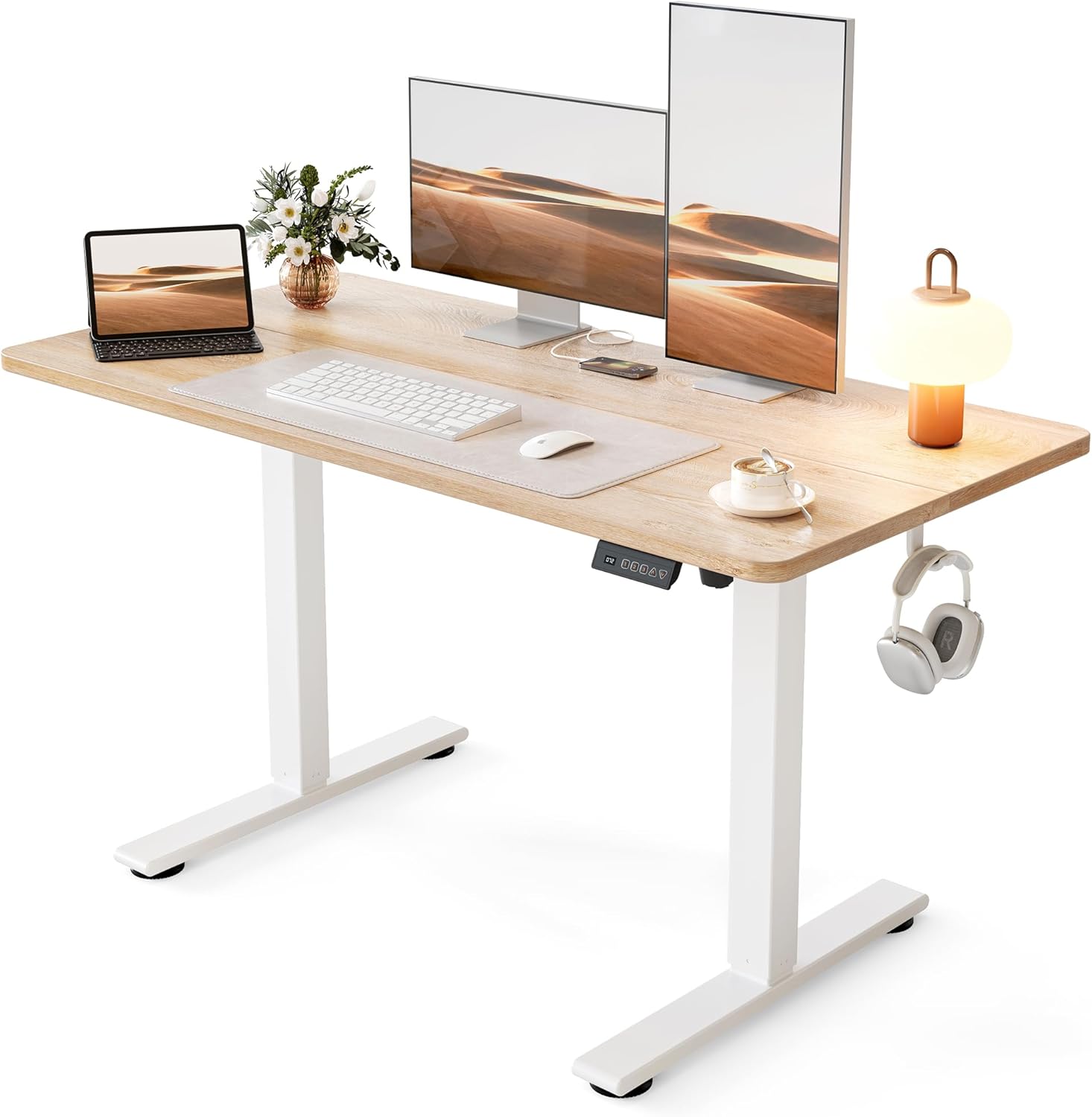
Pros
- Lifts from 28.3 in. to 46.5 in., covering seated typing and standing work for most adults
- Steel frame carries up to 176 lb, enough for dual monitors, a laptop dock and a desk lamp
- Motor runs under 45 dB, quiet enough to raise the top mid video call
- 3 memory presets recall exact seated and standing heights with one touch
- Frame tested through 100,000 lift cycles before shipping
Cons
- Only 24 in. deep, so a wide monitor stand crowds the keyboard area
- Spliced two-piece top leaves a seam running across the work surface
- No cable tray is listed among the included parts, so wire management is a separate job
The top measures 48 in. wide by 24 in. deep, which holds two 24 in. monitors side by side, or one ultrawide with room in front for a keyboard and notebook.
- Height travel runs 28.3 in. to 46.5 in.
- Steel frame rated to 176 lb of gear
- Frame tested through 100,000 lift cycles
- Listed footprint 24 in. D x 48 in. W x 27 in. H
At 24 in. of depth, a deep monitor stand eats into arm room, so a clamp-mounted arm frees the back edge and buys back several inches. Standing users above 6 ft 3 in. should measure elbow height against the 46.5 in. ceiling before committing, since that figure is the hard limit of the columns.
The desk arrives as two leg columns, a crossbar and a spliced two-piece top that bolts together from underneath. Expect a flip-and-lift step at the end, so a second pair of hands makes the final turn much easier on a carpeted floor.
- All screws and the hex tool ship in the carton
- Controller stores 3 height presets
- Motor stays under 45 dB during travel
- Low-VOC board finish for indoor air quality
Set the presets once your chair and monitor are in place: seated height should put elbows at roughly 90 deg, and standing height a touch below elbow level. Route the power lead down one leg with adhesive clips, since no tray is included.
This is a single-user home workstation rather than a shared studio bench. The 48 in. span suits a laptop plus one or two monitors, a lamp and a notebook, and the 24 in. depth keeps it usable in a bedroom corner or against a hallway wall.
- Sit-stand switching several times a day
- Rooms where a quiet motor matters during calls
- Setups comfortably under the 176 lb load ceiling
- Interiors that suit a white frame with a maple top
It is a weaker fit if you run a very deep curved panel with wide feet, need a third monitor across the span, or want a finish that matches dark furniture, since the frame and top combination is fixed.

Pros
- Steel-reinforced frame supports up to 50 kg (110 lb) of static load
- Tabletop measures 55.1 x 19.7 inches, enough room for a monitor and paperwork side by side
- Adjustable feet correct for uneven floors and protect flooring from scratches
- Ships at 24 lb, light enough for one person to reposition after assembly
Cons
- Particleboard top is less scratch- and moisture-resistant than solid wood or laminate-coated MDF
- Sold only in the Ebony Black and Black colorway
- No cable management channels or grommets are included for routing cords
The desk measures 55.1 inches wide, 19.7 inches deep, and 29.9 inches tall, giving enough tabletop area for a monitor, keyboard, and paperwork without crowding. The particleboard top sits on a steel frame rated for a maximum static load of 50 kg (110 lb).
- Tabletop: 55.1"W x 19.7"D
- Overall height: 29.9"
- Static load capacity: 50 kg / 110 lb
- Product weight: 24 lb (10.9 kg)
The steel tube frame is the main load-bearing element, while the particleboard top provides the flat working surface, so weight should stay distributed across the tabletop rather than concentrated at one edge.
The desk ships with labeled components and simplified instructions intended for a single-person setup without professional help. Adjustable feet at the base of each leg let you compensate for uneven flooring, which also helps eliminate wobble during typing or writing.
- Clearly labeled parts and simplified instructions
- Adjustable feet correct for floor unevenness
- Feet also protect flooring from scratches during moves
- Accessory kit included in the box alongside the frame and top
Because the frame relies on steel tubing rather than a solid wood base, assembly is lighter to handle but does require following the torque sequence in the instructions to keep the frame from racking out of square.
This desk fits students, remote workers, or anyone furnishing a bedroom, study, or living room corner who needs a compact work surface rather than a full executive desk. The 55.1-inch width comfortably fits a monitor and laptop together, while the 24-pound weight makes it easy to move between rooms.
- Small bedrooms, apartments, or shared living spaces
- Users who want a lightweight desk they can reposition themselves
- Simple computer or study setups rather than heavy multi-monitor rigs
It's a weaker fit for anyone who needs a scratch-resistant or moisture-resistant surface for drafting, crafts, or frequent spills, since particleboard tops are less forgiving than laminate or solid wood.

Pros
- Weight capacity rated to 110 lb, enough for a monitor, laptop, and desk accessories together
- Thick metal frame with a powder-coated surface adds durability versus lightweight particleboard desks
- Waterproof, scratch-resistant desktop surface simplifies cleaning spills around a keyboard or coffee mug
- Multifunctional hooks built into the frame let you hang headphones or bags without extra hardware
- Assembly takes about 20-30 minutes using the included tools and instructions
Cons
- 39.4-inch width is compact for anyone needing dual monitors or a wide keyboard-and-mouse working area
- No cable management grommet or tray is mentioned, so cords may need separate organizing
- Metal frame construction adds more assembly weight to maneuver into a corner than an all-particleboard desk
The desk measures 39.4"W x 18.9"D x 29"H, with a weight capacity rated to 110 lb across the desktop.
- Thick metal frame paired with a powder-coated surface for added structural durability
- Desktop is waterproof and scratch-resistant, simplifying cleanup around a keyboard or coffee mug
- 40-inch overall footprint is sized to fit corners and small home office spaces without dominating the room
- Metal frame construction is built to resist wobble better than lightweight particleboard desks of a similar size
The compact width suits a single monitor and laptop setup more than a dual-monitor workstation.
The desk ships with clear instructions and installation tools, aimed at a straightforward build without outside help.
- Assembly is estimated to take about 20-30 minutes when parts and screws are matched carefully to the instructions
- Multifunctional hooks attach directly to the frame during assembly for hanging headphones or bags
- Metal frame components should be checked against the parts list before tightening final screws
Because the frame is metal rather than particleboard, it holds up to repeated assembly and disassembly if you plan to move it later.
The compact 40-inch size and corner-friendly design make this desk suited to smaller rooms rather than a dedicated home office.
- Small bedrooms, apartments, or classroom-style setups where floor space is limited
- Buyers wanting a simple writing or study table rather than a large executive desk
- Available in classic black, modern rustic brown, and pure white finishes across multiple sizes
Anyone needing space for dual monitors or a wide keyboard-and-mouse combo may find the 39.4-inch width too narrow for a comfortable layout.

Pros
- 48 inch wide by 23.8 inch deep top takes two 24 inch monitors side by side or one 34 inch ultrawide
- Powder-coated steel frame under an engineered wood surface carries a 50 kg distributed load
- Water-resistant and scratch-resistant finish wipes clean after spills without marking
- Anti-slip pads under each leg stop creep on hard floors and protect laminate
- Backed by a 5-year limited warranty
Cons
- Height is fixed at 28 inches with no adjustment, so it cannot be used standing
- No grommet holes are cut in the top, leaving cables to run around the back edge
- The 50 kg ceiling limits heavy dual monitor arms combined with a tower on the deck
The working surface measures 48 inches wide by 23.8 inches deep, sitting at a fixed 28 inch height that matches standard task-chair geometry. That width takes two 24 inch monitors side by side, or a 34 inch ultrawide with room for a full keyboard in front, while the depth keeps a screen far enough back for comfortable focus rather than forcing you to sit close. Load capacity is quoted at 50 kg spread across the top, which covers a tower, two screens and a laptop dock without complaint.
- 48 x 23.8 inch engineered wood top on a powder-coated steel frame
- Fixed 28 inch height, the common seated desk standard
- 50 kg distributed load ceiling
The desk arrives flat-packed with labelled hardware and printed instructions. One person can complete the build, though turning the assembled desk upright afterwards is easier with a second pair of hands given the steel frame weight. Anti-slip pads fitted under each leg keep the desk planted on hard floors and protect laminate from scoring when it is nudged. The top carries a water-resistant, scratch-resistant finish, so a knocked mug wiped up promptly leaves no ring, and SHW backs the unit with a 5-year limited warranty.
- Labelled hardware and step-by-step instructions in the box
- Anti-slip foot pads fitted to each leg
- 5-year limited warranty from the manufacturer
This is a fixed-height writing and computing desk for a spare room, a bedroom corner or a shared study, aimed at people who want a stable surface without a motor, a controller or a mains socket nearby. The mission-style frame and dark finish read as furniture rather than office equipment, which matters when the desk lives in a living space that guests see. Anyone who needs to alternate between sitting and standing during the working day should look at a powered frame instead, because the legs here do not adjust at all.
- Suits laptop work, study and light dual-monitor setups
- No power required, so placement is not limited by socket position
- Not suitable for anyone who needs standing-height work

Pros
- Alloy steel R-frame carries a stated 150 lb across the 47-inch top, enough for a mid-tower plus two 24-inch panels
- Four leg pads screw down individually, so the frame stops rocking on carpet or uneven floorboards
- Two grommet holes and a clip-on cable box drop power leads straight to the floor
- Cup holder and headphone hook hang off the frame edge, keeping the shallow 23.45-inch depth clear
- Carbon fibre textured laminate hides fingerprints far better than a gloss black surface
Cons
- Fixed 29.55-inch height with no sit-stand adjustment beyond the levelling pads
- 23.45-inch depth is shallow, so a deep monitor stand pushes the screen close to your face
- MDF core beneath the laminate swells permanently if a spill is left standing
The surface measures 47 inches wide by 23.45 inches deep and sits at a fixed 29.55 inches high, which lines up with standard task chairs rather than drafting stools. The steel frame is quoted at a 150 lb load, so a mid-tower, two 24-inch panels and a laptop dock stay comfortably inside the limit.
- The curved front edge pulls the keyboard zone closer to the body than a straight-edged slab
- 23.45 inches of depth suits a single monitor arm better than a wide twin-screen stand
- The levelling pads take up a few millimetres of floor variation each
Measure the alcove first. The frame is rigid, so nothing can be trimmed down to fit a tight recess.
Everything arrives in one flat carton: the R-shaped steel legs, the laminated top, the cross-brace, the cup holder, the headphone hook and all fixings. Build it on the floor with the top face down on the packaging so the laminate does not pick up scuffs.
- Start every leg bolt by hand and leave them loose until the cross-brace is seated, then tighten in sequence
- Decide whether the hook and cup holder sit on the left or right before you close up the fixings
- Wind the four pads out until the frame stops rocking, checking with a spirit level on the top
One person can manage the build, though a second pair of hands makes flipping the finished desk far less awkward.
A 47-inch width targets a single-screen or compact twin-screen station rather than a triple-monitor wall. It handles a console setup, a laptop plus an external panel, or a tower parked on the floor underneath.
- Students and teens working in a bedroom corner where a 63-inch top simply will not fit
- Anyone who wants a drinks holder and headset hook built in rather than clamped on afterwards
- Renters who need furniture that breaks back down into a flat carton on moving day
It suits standing work poorly, since the height cannot change, and it is the wrong choice for stacking heavy studio speakers and a laser printer together. Treat the 150 lb figure as a working ceiling, not a target.

Pros
- Holds up to 176 lb (80 kg) on a 32 by 19.69 in. top, enough for a monitor arm and a tower
- X-shaped rear brace stops the diagonal wobble plain four-leg frames pick up over time
- Open-leg layout leaves the knee area clear, so a chair with fixed arms still tucks under
- Scratch-resistant particle board surface wipes clean after coffee rings and pen marks
- Offered in six sizes and several finishes, from plain white to warm wood tones
Cons
- Fixed 29.7 in. height with no adjustment, so taller sitters cannot raise the work surface
- No drawers, tray or cable grommets, so storage and lead routing need separate accessories
- Particle board core swells if a spill is left to soak into a cut edge
The top measures 32 in. wide by 19.69 in. deep and stands 29.7 in. tall, close to standard dining-table height and a match for most task chairs.
- Load: up to 176 lb (80 kg) spread across the surface
- Frame: reinforced steel legs with an X-shaped brace at the back
- Top: scratch-resistant particle board panel
In practice that footprint takes a 27 in. monitor, a full-size keyboard and a mouse, though a second display means stepping up to one of the wider sizes in the range. Depth is the tighter figure: at 19.69 in. a deep monitor stand eats into typing room, so a clamp-on arm frees up genuinely useful space.
Parts arrive pre-labelled and the instructions run in numbered steps, so one person can finish the build in well under half an hour without a second pair of hands.
- Lay the top face down on the carton to avoid scuffing the finish
- Attach both leg frames before fitting the X brace, then tighten everything in sequence
- Level the desk on the floor it will live on, not on carpet it will later leave
Keep the supplied hex key. Bolts on flat-pack steel frames settle after a few weeks of use, and a quick re-tighten removes any creak that develops. Ongoing care is limited to wiping the top with a damp cloth and keeping standing water away from the cut edges of the board.
This size fits situations where floor area is the constraint rather than the workload: dorm rooms, a bedroom corner, a rental apartment nook or a spare-room desk that has to leave walking space around it.
It suits a laptop or single-monitor setup, students working from books and a notebook, and anyone who wants a writing surface that does not dominate the room. The open frame reads as light rather than bulky, which helps in a small space.
It is a weaker match for a three-monitor workstation, heavy legacy display gear, or anyone who needs drawers built in. Users over roughly six feet may also want a taller surface, since the height is fixed.

Pros
- 31.5 by 17.7 in. top on a 31.1 in. frame, sized to slot into a bedroom or dorm corner
- Two tiers of removable fabric drawers hang under the top, keeping the work surface clear
- Two iron hooks screw on for a headset or bag, and come off again if they are not wanted
- Thick P2 particle board surface is waterproof and anti-collision treated against daily knocks
- Adjustable leg pads plus non-slip protectors level the frame and spare hard floors from scratches
Cons
- Fabric drawers have no rigid sides or runners, so heavy files make the pockets sag
- 17.7 in. depth is shallow for a large monitor plus keyboard unless the screen is arm-mounted
- Listed in black only for this size, with no other finish in the same layout
A compact writing and gaming desk: 31.5 in. wide, 17.7 in. deep and 31.1 in. tall, a shade higher than a standard desk and best paired with a chair that adjusts.
- Top: spliced P2 particle board, scratch-resistant and waterproof coated
- Storage: two-tier open fabric drawers, removable as a unit
- Extras: two iron hooks for a headset or bag
- Frame: steel with extra fixed brackets and adjustable leg pads
Taking the fabric drawers off gives a clean open frame and a little more legroom, which is worth doing if the desk is used mainly for a laptop. With them fitted, the pockets swallow notebooks, cables and controllers that would otherwise clutter the top.
Everything needed is in the carton, including the tool, so no trip to the toolbox is required. Most people finish in 20 to 30 minutes working from the illustrated manual.
- Fit the steel brackets to the underside of the top before standing the frame up
- Hang the fabric drawer unit last, once the legs are square
- Screw the hooks onto whichever side suits your handedness, or leave them off entirely
- Wind the leg pads until the desk sits flat and stops rocking
The non-slip pads under each leg do two jobs: they stop the frame skating on laminate and they cut the scraping noise when the desk is nudged. Wipe the top with a damp cloth and keep standing water off the cut edges.
The small footprint is the whole point. It fits a dorm room, a bedroom alcove, a rental studio or a teenager needing a homework station that does not swallow the floor.
For gaming it takes a single monitor, keyboard and mouse comfortably, with the hooks holding a headset clear of the surface. For study it holds a laptop, a notebook and a lamp with room left to write by hand.
Where it struggles is a full workstation: dual monitors, a large mouse mat and a docking station will crowd a 31.5 in. top, and the shallow depth puts a big screen close to the eyes. In that case a wider desk from the same layout family is the better call.

Pros
- 54 x 19.7 in top holds a monitor, laptop, lamp and a mug with legroom left over
- Steel tube frame with reinforcement struts bolted beneath the particleboard top
- Five finishes listed: grey, black, white, rustic brown and a rustic brown and black mix
- Maker states the build finishes in under 40 minutes with the supplied tools and picture guide
- 29.5 in height clears the arms of most standard task chairs
Cons
- No stated weight limit, so loading it with heavy all-in-one machines is guesswork
- No grommets or cable tray, so leads hang loose behind the rear legs
- Fixed height with an open frame that carries no drawer, shelf or storage option
The surface measures 54 in wide by 19.7 in deep, standing 29.5 in tall, which is the standard writing height that task chairs are designed around.
- That width takes a 27-inch monitor plus a laptop beside it, or two smaller screens without crowding.
- The 19.7 in depth is shallow, so a monitor arm clamped to the rear edge frees far more usable space than a stand.
- Steel tubes run the full perimeter, with reinforcement struts under the top to stop flex in the middle of the span.
- The open underside means uninterrupted legroom across the whole 54 in.
The trade for that legroom is the absence of any drawer or pedestal, so plan on a separate under-desk unit if you need to store paperwork close by.
Huuger states the desk goes together in under 40 minutes, and the structure supports that: it is a top, a steel frame and a set of struts rather than a cabinet.
- Tools and hardware are supplied, and the guide is illustrated rather than written, so no parts list decoding is needed.
- Lay the top face-down on the carton to protect the finish while you bolt the frame in place.
- Leave every bolt finger-tight until the whole frame is located, then tighten in sequence to keep the desk square.
- Level the desk against the floor before loading it, since a rocking frame will loosen fixings over time.
Wipe the particleboard with a barely damp cloth only. Sealed laminate resists marks well, but standing moisture at the edges is what damages any board top.
The plain rectangular form and the five-colour range make this a desk that adapts to the room rather than dominating it.
- Rustic brown and grey read as warm and neutral in a bedroom or living room corner.
- Black and the brown-black mix suit a gaming setup where the tower and peripherals are already dark.
- White works in a study or a child's room where the aim is to keep the space feeling open.
- At 54 in wide it lines up against most standard wall runs without eating a whole side of a small room.
Best suited to single-monitor or laptop-first work. If you plan on three screens and a tower sitting on top of the desk, look for a deeper surface with a published load limit instead.
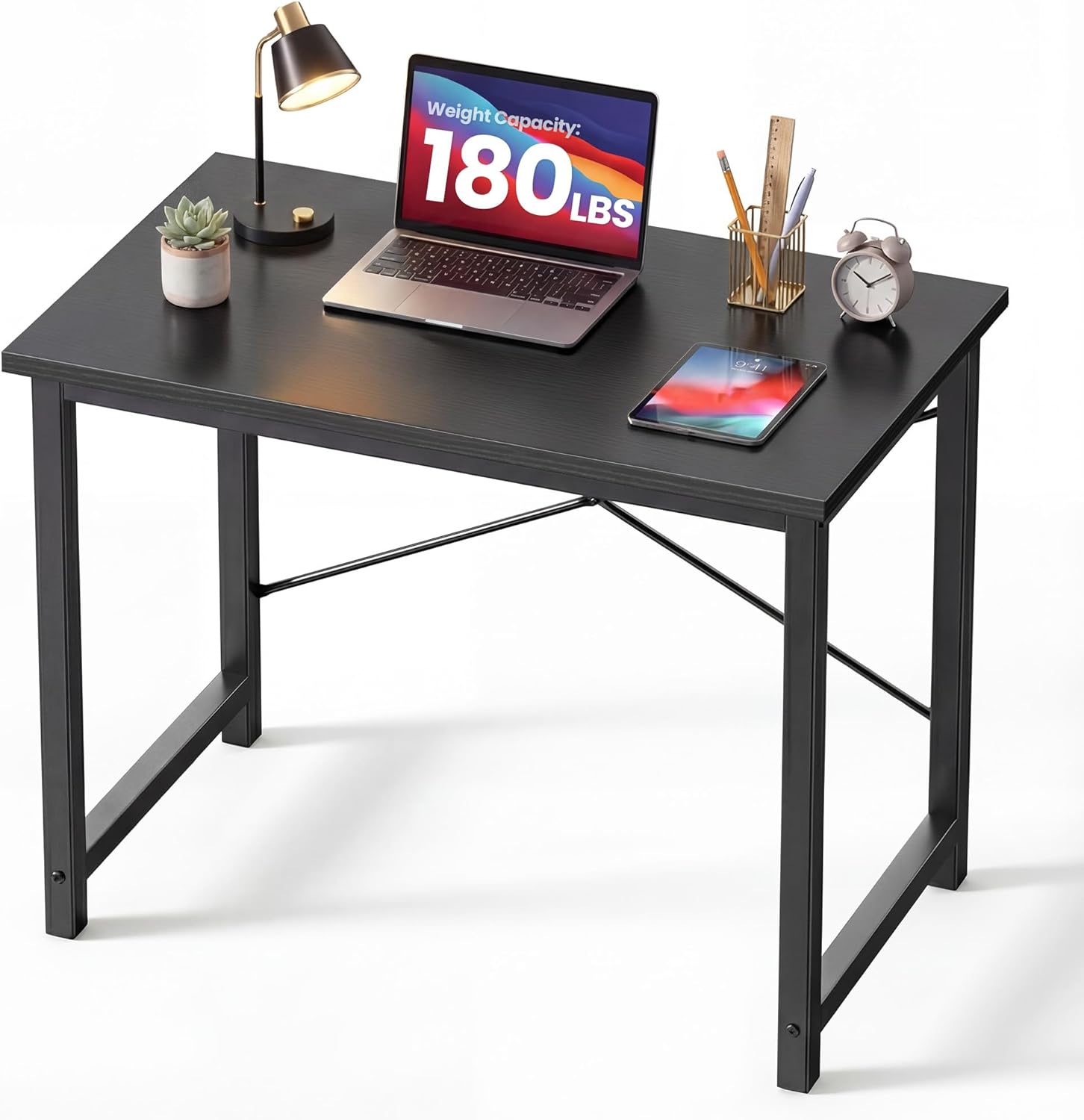
Pros
- Steel square-tube legs stated to carry 265 pounds, enough for a tower, printer and two screens
- X-brace under the frame resists the diagonal wobble that shows up while typing on a lightweight desk
- Top listed at 31.5 inches wide by 19.69 inches deep, standing 29.69 inches high, sized for a narrow bedroom wall
- High-density engineered wood surface with a wear-resistant coating that shrugs off mug rings and pen pressure
- Offered in six lengths from 32 to 63 inches and three colourways, so the same design scales to a larger room later
Cons
- 19.69 inch depth is shallow, so a 27 inch monitor sits close unless it moves onto an arm
- The maker states dual-monitor use begins at the 55 inch size, so this length is a single-screen desk
- Fixed height with no drawers, cable tray or under-desk storage of any kind
Two structural details do the work on a desk this size.
- Thick square-tube steel legs rather than folded angle, which is why the stated capacity reaches 265 pounds
- An X-brace across the frame, the part that stops diagonal racking, which is the specific wobble you feel through the keyboard when a desk is braced only at the ends
The dimensions to plan against are 31.5 inches wide, 19.69 inches deep and 29.69 inches high. That height is standard for a task chair with a 17 to 21 inch seat, so your forearms sit level without a footrest. The 265 pound figure is generous for the footprint, and in practice the limiting factor is surface area rather than strength, since you run out of desktop long before you run out of load capacity.
Everything needed to build the desk is included, with no separate trip to a hardware shop involved.
- All fixings and the required tools ship in the carton alongside printed instructions
- Work with the top face down on the packaging so the wear-resistant coating is not scratched during the build
- Attach both legs and the X-brace loosely, then tighten everything once the frame is square, which is what prevents a permanent lean
It is a small parts count, so most people are finished well inside an hour. Once upright, check it on the actual floor rather than a rug, since a bedroom floorboard slope shows up as a rock that no amount of retightening fixes. Revisit the bolts after a couple of weeks of use, as any new bolted frame beds in slightly.
At 31.5 inches wide this is one of the smaller desks in the range, and that defines its use.
- Bedrooms and box rooms, where the desk has to tuck against a short wall or into an alcove
- Students working from a laptop with a notebook beside it
- Secondary stations such as a hallway console, a craft table or a place to park a printer
The maker sells the same design at 40, 44, 47, 55 and 63 inches, and states that dual monitor setups start at the 55 inch sizes. If you already run two screens, choose a longer version from the outset. The shallow 19.69 inch depth is the other thing to check honestly, since a large monitor on a stock stand will sit closer to your eyes than is comfortable.

Pros
- Compact 32 x 19 inch desktop supports up to 154 lbs of weight
- Height adjusts electrically between 28.3 and 46.5 inches with 4 memory presets
- Alloy steel frame with heavy-duty rails supports smooth sit-to-stand transitions
- M8 screw holes on the feet accept optional aftermarket casters
- Lift mechanism tested to withstand 50,000 cycles under full load
Cons
- 32 x 19 inch desktop is compact, leaving less room than a full-size desk for dual monitors plus peripherals
- 154 lb capacity trails HUANUO's larger 47 inch desk model, which supports more weight
- Casters are not included despite the pre-drilled mounting holes for them
The 32 inch by 19 inch desktop is sized for small rooms and corners, supporting up to 154 lbs across the surface while the frame transitions between sitting and standing heights.
- Desktop measures 32 inches wide by 19 inches deep
- Height adjusts electrically from 28.3 to 46.5 inches
- Alloy steel frame with heavy-duty rails for stability while raising or lowering
Because the tabletop is narrower and shallower than a full-size desk, it leaves less room for a dual-monitor setup or larger accessories, though it fits more easily into apartments, bedroom corners, and small home offices where a larger desk would not. The 154 lb capacity comfortably covers a single monitor, laptop, and small peripherals.
Assembly includes all hardware and a numbered instruction sheet, with most of the work involved in attaching the alloy steel legs to the desktop and wiring the control panel.
- 4 programmable memory presets recall a set height with one touch
- M8 screw holes on the feet accept aftermarket casters, sold separately
- Lift mechanism tested to 50,000 cycles under full rated load
As with other desks in this line, casters are not included in the box even though the feet are pre-drilled for them, so a mobile version of this desk requires an additional purchase. Once set, the memory presets recall exact heights instantly rather than requiring the up or down button to be held each time.
The compact footprint suits single-monitor setups in tight spaces, such as a dorm room, apartment corner, or small home office where a full-size desk would not fit.
- Pairs well with under-desk treadmills or walking pads given the smaller footprint
- 154 lb capacity covers a monitor, laptop dock, and small desk accessories
- Height range of 28.3 to 46.5 inches suits a wide range of user heights when standing
Remote workers, students, and freelancers working from a small room benefit most from the compact size, while anyone needing to support dual monitors, a printer, or heavier equipment should look at a larger desk model instead, given the lower weight capacity here.
Setting up your first home workspace shouldn’t feel like a research project. If you’re hunting for the best desks for beginners, you probably just want something sturdy, easy to assemble, and priced fairly enough that a wrong choice won’t sting. Below, you’ll find the exact criteria to check before you buy, plus 10 picks matched to real starter setups — small bedrooms, first gaming rigs, and simple home offices.
What First-Time Desk Buyers Should Check Before Buying
You don’t need an engineering degree to pick a good desk, but a few details separate a comfortable setup from a wobbly regret. Most beginners focus only on price and end up disappointed by a desk that flexes under a monitor or takes two hours to assemble. Walk through these four checks before you add anything to your cart, and you’ll avoid the return-and-reorder cycle that trips up so many first-time buyers.
Measure Your Space First
Grab a tape measure before you shop. A desk that looks compact in photos can still crowd a small bedroom once you add a chair and walking room. Leave at least 30 inches of clearance behind the desk so you can pull your chair out comfortably.
Fixed Height vs. Adjustable Height
Fixed desks cost less and have fewer parts to assemble, which makes them friendly for a first purchase. Adjustable models cost more upfront, but they let you alternate between sitting and standing, which matters if you’ll be at the desk for long stretches.
Frame Material and Stability
Look for steel frames over thin particleboard legs. A wobbly desk is distracting, and it won’t hold up if you’re typing, gaming, or resting a monitor arm on top. Cross braces near the legs add extra rigidity, which matters more than people expect once you start typing quickly or shifting your weight while seated. Reviews mentioning “sturdy” or “no wobble” are a good sign for beginners who want a set-it-and-forget-it setup, rather than one that needs tightening every few weeks.
Cable Management and Add-Ons
Grommet holes, hooks, and under-desk trays keep cords from turning into a tangled mess. These extras seem minor, but they save you from buying separate organizers later, which is a common hidden cost first-time buyers overlook.
Best Desks for Beginners by Use Case
Not every beginner needs the same desk. Here’s how the 10 options above match up to common starter scenarios, so you can skip straight to the one that fits your room and budget.
Best for Small Bedrooms and Apartments
If floor space is tight, the Casaottima Small Desk is worth a look. At just 40 inches wide, it tucks into a corner without dominating the room, and the built-in headphone hook keeps your desktop clear. This is a smart pick if you’re setting up a first workspace in a studio or shared bedroom.
Best for Sit-Stand Flexibility
If you already suspect you’ll be sitting for hours, an adjustable desk is worth the extra cost. The Cubiker Standing Desk gives you electric height control across a 48-inch top, so you can stand up during calls and sit back down for focused work. Beginners often skip standing desks to save money, then wish they’d started with one — this is a reasonable middle ground.
Best for a First Gaming Setup
Gamers have different needs than a typical home office: more surface area, a cup holder, and cable routing for multiple peripherals. The BestOffice Gaming Desk covers all three at a beginner-friendly price, with a carbon-fiber-textured top that resists scratches from controllers and keyboards. If you’re building out a broader setup, our guide to gaming desks compares more options for different room sizes.
Best Budget-Friendly Pick
The VASAGLE Computer Desk keeps things simple: a clean 55-inch top, a basic steel frame, and a price low enough that it won’t strain a first-apartment budget. It’s a solid no-frills option if you mainly need a flat surface for a laptop and a lamp.
Best for Standing on an Even Tighter Budget
Height adjustability usually comes at a premium, but the HUANUO Standing Desk narrows that gap. It offers four memory height presets on a compact 32-inch frame, which makes it a practical starter option if you want sit-stand flexibility without a big up-front cost. Pair it with our roundup of standing desks if you want to compare more adjustable models before deciding.
Common Mistakes First-Time Desk Buyers Make
A few patterns show up again and again with beginner purchases. Knowing them ahead of time can save you a return shipment.
- Buying based on looks alone. A desk can photograph well and still flex under a heavy monitor. Check the weight capacity listed in the product details, not just the finish.
- Ignoring legroom. Cross bars and drawer units can eat into the space under the desk. If you’re tall or use a footrest, check the clearance measurements first.
- Skipping cable planning. Beginners often buy a desk, then scramble for cable clips and power strips afterward. Look for built-in grommets or hooks from the start.
- Assuming bigger is always better. An oversized desk in a small room makes the whole space feel cramped. Match the desk to your room, not the other way around.
Assembly Tips for a Smooth First Setup
Most beginner-friendly desks ship flat-packed, and assembly is usually the part people dread most. It doesn’t have to be complicated if you follow a simple order of operations.
Unpack everything and lay out the hardware before you start — missing a bag of screws mid-build is the most common holdup. Attach the legs to the frame loosely first, then tighten everything once the desk is square. Save the desktop attachment for last, and always assemble on a soft surface like a rug or cardboard to avoid scratching the top.
If you’re installing an adjustable desk, plug it in and test the height presets before you load it up with a monitor. It’s much easier to troubleshoot an electrical issue with an empty desktop than after you’ve mounted a two-monitor arm. Keep the original box for at least a week, too. If a panel arrives scratched or a bracket is missing, most sellers want the packaging back for an exchange.
Who Should Consider a More Advanced Desk Instead
A beginner desk isn’t the right call for everyone. If you already know you need a large L-shaped surface for dual monitors and a printer, sizing up now can save you from re-buying within a year. Likewise, if back pain is already a concern, it’s worth reading about ergonomic setups. Our ergonomic desks guide covers features like tilt adjustment and curved fronts that go beyond what most starter desks offer. And if you’re outfitting a shared home office rather than a single desk, compare full-size layouts before you settle on a compact model. Swapping out a desk later usually means redoing your cable setup too.
Matching a Desk to Your Budget
Most beginner desks land between $25 and $90, and price differences usually come down to three things: frame material, height adjustability, and desktop size. If you’re deciding where to spend more, put your money into frame stability first. A shaky base undermines everything else, while a slightly smaller top is easy to work around. Once stability is covered, adjustable height is the next upgrade worth paying for, since it extends how comfortably you can use the desk over time.
Frequently Asked Questions
What size desk is best for a beginner?
Anything between 32 and 48 inches wide works well for a single monitor and laptop setup. Measure your room first, and leave at least 30 inches of clearance behind the desk for your chair.
Do beginners need a standing desk?
Not necessarily. A fixed-height desk is simpler to assemble and usually cheaper, which makes it a fine starting point. If you expect to sit for long stretches each day, an adjustable model is worth the extra cost.
How long does it take to assemble a starter desk?
Most beginner desks take 30 to 60 minutes with basic tools, which are usually included. Adjustable desks with electric motors can take slightly longer because of the extra wiring.
Is a cheap desk worth buying for a first setup?
Yes, as long as it has a steel frame and decent reviews for stability. You can always upgrade later — the goal with a first desk is a solid, functional surface, not a lifetime purchase.
What weight capacity should a beginner desk have?
Look for at least 100 pounds of capacity if you’re using a monitor, laptop, and accessories. Standing desks generally list separate ratings, so check the moving weight limit if you plan to raise and lower it daily.
Picking your first desk comes down to matching a few honest priorities: your room size, your budget, and whether you’ll sit or stand. None of the options above force you to trade stability for a lower price. Each one is built for the kind of straightforward, no-drama setup a first-time buyer actually wants. Compare specs on the picks above and check current pricing on Amazon before you settle on the one that fits your room.






