
 Ryan Delgado
 Your desktop deserves sound that matches the screen in front of you. The best computer speakers turn thin, tinny laptop audio into full music, clear voices and gaming punch you can actually feel. This guide ranks 10 proven models, from $20 USB pairs to THX-certified 2.1 systems with real subwoofers. You will see which speaker suits a cramped desk, a movie night, or a competitive shooter. We lean on real ratings and review counts, not hype, so you can match a set to your budget and space. Read on for the ranked list, use-case picks and a plain-English buying guide.
Quick answer: For most desks in 2026, our top pick among the best computer speakers is the Logitech Z623 — our #1 rated choice. It pairs 400 watts of peak power and THX certification with a 4.6 rating across 11468 reviews. See the full ranked comparison, alternatives and buying advice below.
Pros
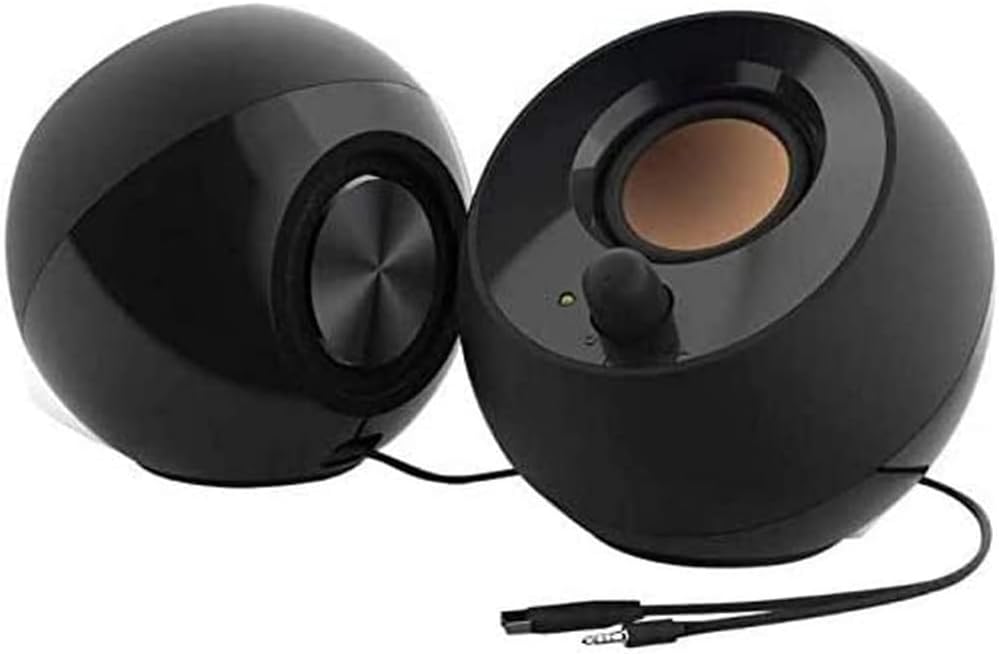
- Runs entirely off one USB-A port for power, with no mains adapter or wall socket needed
- Drivers are angled 45 degrees upward, aiming sound at ear height instead of at your chest
- Rear-facing passive radiators add low-end weight without a separate subwoofer box
- Frequency response spans 100 Hz to 17 kHz
- Volume dial sits on the front face of the powered cabinet, within thumb reach
Cons
- The low end stops at 100 Hz, so sub-bass in film and electronic music simply is not there
- Audio arrives over a 3.5 mm jack while USB supplies only power, so a spare USB-A port and a free headphone socket are both required
- USB bus power caps total output, making these desk-distance speakers rather than room fillers

Pros
- 3.5mm AUX input lets a phone or tablet share the same speakers as the PC
- Front-mounted volume control and headphone jack sit within reach on the right speaker
- Two-speaker design keeps desk footprint smaller than multi-satellite systems
- Passive design pulls power without a separate amplifier box to place on the desk
Cons
- Wired connection only, with no Bluetooth or wireless pairing option
- Single 3.5mm aux input means only one alternate source can be connected at a time alongside the PC

Pros
- THX-certified 2.1 system delivers 400 watts peak / 200 watts RMS across two 35-watt satellites and a 130-watt subwoofer
- RCA and 3.5mm inputs let up to three source devices stay connected at once without swapping cables
- Controls for power, volume, bass and headphone jack sit on the right satellite for reach without leaving the desk
- Compatible with TVs, PCs, smartphones, tablets, DVD/Blu-ray players, PlayStation, Xbox and Wii through a standard headphone jack or RCA input
Cons
- Wired-only connections, with no Bluetooth or wireless streaming option built in
- Sold in black only, with no other finish offered
The Z623 is built around a THX-certified 2.1 layout: two satellite speakers rated at 35 watts each plus a 130-watt subwoofer, for a combined 400 watts peak / 200 watts RMS power figure. Power specifications:
- 2 satellites at 35 watts each
- 1 subwoofer rated at 130 watts
- 400 watts peak / 200 watts RMS combined output
- THX certification for tuned, accurate sound reproduction
THX certification means the system was tested against a fixed set of audio benchmarks rather than tuned by ear alone, which is meant to keep bass, midrange and treble balanced across music, movies and games rather than favoring one frequency range over another.

Pros
- 32W total peak power (16W RMS) from 2.75-inch full-range drivers with a rear bass port for added low end
- Three EQ-tuned modes (Game, Music, Movie) switch the sound profile without a separate software app
- Triple input support across 3.5mm AUX, Bluetooth, and USB sound card covers PC, console, and mobile sources
- 12 RGB lighting effects add ambient lighting without needing a separate lighting strip
- Includes a dedicated subwoofer output for anyone wanting to add a powered sub later
Cons
- No stated dimensions, so checking desk footprint ahead of purchase means relying on box photos alone
- 16W RMS per channel is modest for filling a larger room, better suited to near-field desktop listening
- RGB lighting and always-on power draw mean the speakers stay plugged into an outlet rather than running portably
Each speaker houses a 2.75-inch full-range driver with a rear bass port, delivering 16W RMS per channel for 32W of total peak power, along with a dedicated subwoofer output for anyone wanting to add a sub later. Three EQ-tuned modes, Game, Music, and Movie, switch the sound profile via a control on the unit rather than a companion app.
- Rear bass ports extend low-end output beyond what the compact 2.75-inch drivers could produce alone
- Game, Music, and Movie modes are professionally tuned presets rather than a manual EQ that needs adjusting
- A subwoofer output jack allows expansion for anyone who wants deeper bass than the built-in drivers provide
The 16W RMS spec suits near-field desktop listening rather than filling a large living room, so expectations should match a desk setup rather than a home theater.
Pros
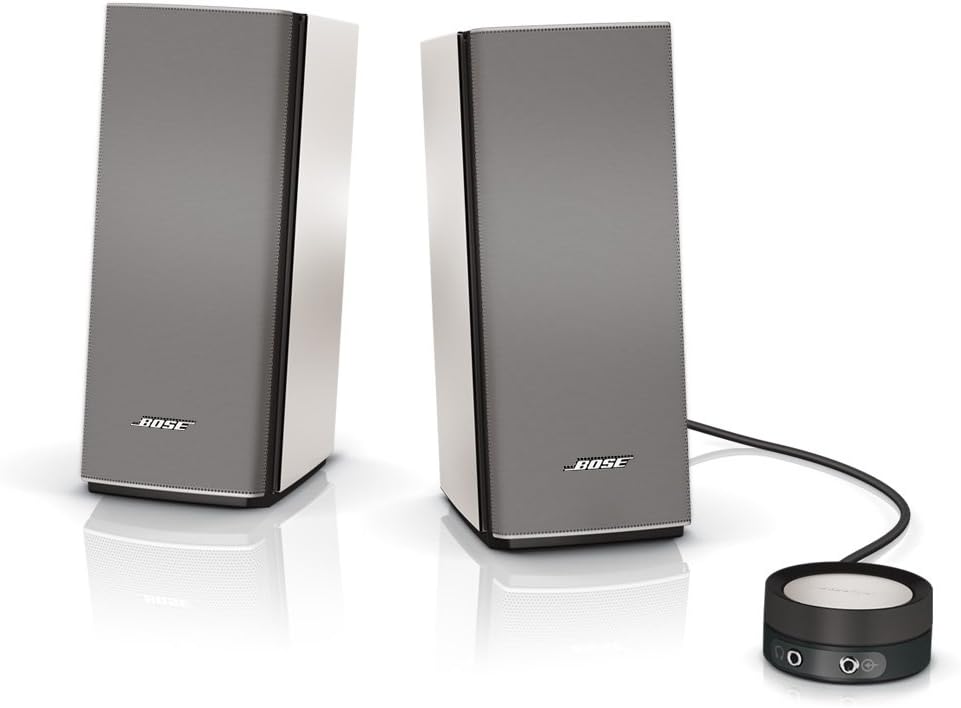
- TrueSpace stereo processing creates a wide two-channel soundstage from just two speakers, no separate bass module needed
- Control pod handles volume, mute, and includes a headphone jack plus auxiliary input in one unit
- Active electronic equalization balances low, mid, and high frequencies for more natural tone
- Compact speaker footprint at 3.54"D x 4.72"W x 8.66"H per speaker fits tight desk space
- Advanced port design and driver combination deliver low-note output without a subwoofer
Cons
- No wireless or Bluetooth connectivity — the system relies on wired connections through the control pod
- Two-speaker design with no included subwoofer means bass depth tops out below what a dedicated bass module system would deliver
Each speaker measures 3.54 inches deep, 4.72 inches wide, and 8.66 inches tall — compact enough to sit on either side of a monitor without crowding the desk.
- 3.54"D x 4.72"W x 8.66"H per speaker
- Sleek, space-saving design with no bass module to place separately
- Requires AC power, not a battery-powered speaker
The compact footprint makes the pair easy to position around a monitor or laptop stand, but since the system depends on AC power and a wired connection to function, it is built as a stationary desk setup rather than something to move between rooms or take on the road.

Pros
- 200 watts of peak power and 110 dB in-room output, comfortably beyond desk listening levels
- A 6.5 inch side-firing ported subwoofer carries the low end so the 3 inch satellite midranges stay clean
- Horn-loaded tweeters aim treble at the seated position instead of spraying it across side walls
- A wired control pod puts main volume and a separate subwoofer gain dial within reach on the desktop
- A single 3.5 mm input works with a PC, TV, console or phone with no drivers to install
Cons
- One 3.5 mm analogue input only, with no optical, USB or Bluetooth, so digital sources need their own converter
- Amplification lives inside the subwoofer, so both satellites and the control pod must cable back to it
- Satellites stand 8.5 inches tall and the sub is roughly 10 inches on each side, which crowds a shallow desk
Each satellite is a two-way design pairing a 3 inch midrange with a horn-loaded tweeter. The horn controls dispersion, sending more of the treble energy toward the listener and less into the desk and side walls, which is why the system stays clear at low volume as well as loud.
- Peak power: 200 watts
- Maximum in-room output: 110 dB
- Subwoofer: 6.5 inch side-firing driver in a ported cabinet
- THX certification against the multimedia specification
The horn approach is efficient, meaning more sound per watt, so the amplifier rarely strains at desk distances. Character is forward and detailed rather than soft. If you find treble sharp, angling the satellites slightly off-axis from your ears tames it without losing the imaging.
Plan the space before ordering. The subwoofer measures roughly 9.5 by 9.8 by 10.2 inches and the satellites stand about 8.5 inches tall on a 4.2 by 5.67 inch base.
- Satellites sit either side of a monitor, angled toward the seat
- The subwoofer fires from its side, so leave a hand's width clear of that face
- Floor placement under the desk works and keeps the desktop free
- The control pod needs a reachable spot near the keyboard
Because the amplifier is inside the subwoofer, all cables converge there. That fixes the sub reasonably close to the satellites and the pod, so a distant corner placement is not practical. On a shallow desk, putting the satellites on small stands or wall brackets recovers useful surface area.

Pros
- 2.1 channel setup with a dedicated subwoofer adds real bass beyond typical 2-speaker setups
- 50W peak / 25W RMS combined power output across satellites and subwoofer
- Wired control pod handles volume and power without reaching behind the desk
- Standard 3.5mm input works with any device that has a headphone jack, not just PCs
- Compact subwoofer footprint (8.99"H x 5.91"W x 8.66"D) fits under or beside a desk
Cons
- Wired 3.5mm connection only, no Bluetooth for wireless source switching
- Requires an AC power adapter, so placement is limited by outlet access
- 25W RMS rated power is modest next to larger 2.1 systems, so maximum volume in bigger rooms is limited
The system splits sound across two satellite speakers and a dedicated subwoofer, with 50W peak / 25W RMS combined power delivering a fuller low end than typical 2-speaker desktop setups. Balanced acoustics are tuned across the 3.5mm input, so the sound profile stays consistent regardless of source device.
- 2.1 channel layout: two satellites plus one subwoofer
- 50W peak / 25W RMS combined power
- 3.5mm input compatible with any headphone-jack device
The subwoofer measures 8.99"H x 5.91"W x 8.66"D, small enough to sit on a desk or floor beside it, while the satellite speakers stay compact at 5.76"H x 3.52"W x 3.19"D each.

Pros
- USB 5V bus power means one cable does the job, with no wall adapter hunting for a spare mains socket
- 3.5mm aux input accepts any headphone-jack source, so a console or tablet can share the same pair
- In-line volume dial sits on the cable within thumb reach rather than hidden behind the cabinet
- Each cabinet measures 2.6 by 2.88 by 3.9 inches, small enough to flank a 24 inch monitor stand
- Padded scratch-free base leaves a glass or lacquered desk unmarked, and a bottom radiator adds low-end lift
Cons
- Analogue 3.5mm input only, so there is no Bluetooth and no USB audio path
- Occupies a full-size USB-A port and the headphone jack at once, awkward on a two-port ultrabook
- Offered in black with a blue LED accent only, with no alternative finish
Each cabinet is 2.6 inches deep, 2.88 inches wide and 3.9 inches tall, so a pair consumes less desk width than a paperback laid flat. The base is padded and scratch-free, which matters on glass or lacquered surfaces where bare rubber feet often leave marks.
- One USB-A lead carries power and a separate 3.5mm plug carries audio, so two connections leave the desk
- The volume control sits in-line on the cable rather than on the cabinet, so it can be placed wherever your hand naturally falls
- A blue LED confirms power and stays visible in a dark room
Plan the cable route before committing. A laptop with only USB-C ports needs a hub, because one full-size USB-A port stays occupied for as long as the speakers are powered.

Pros
- 25 W RMS and 50 W peak split across two satellites and a dedicated subwoofer
- Wired control pod puts power, volume and a headphone jack within reach on the desk
- Single 3.5 mm input works with a PC, laptop, television, console, phone or tablet
- Compact subwoofer measuring 12.9 x 9.4 x 6.2 in tucks under a desk rather than dominating the room
- Headphone jack on the pod means no reaching behind a tower to swap outputs
Cons
- Only one 3.5 mm input, so using both a PC and a television means unplugging one each time
- No wireless, optical or USB input, so a television with digital audio out alone needs a converter
- Satellite cables are captive and short, which limits how far apart the two speakers can be placed
The system delivers 25 W RMS, 50 W peak, spread across two satellites and a subwoofer that handles the low end.
- RMS is the continuous figure and the one that matters; peak describes short bursts only.
- 25 W is plenty for a desk at arm's length and adequate for a bedroom, but it is not a system for filling an open-plan lounge.
- The separate subwoofer is what distinguishes this from flat stereo desk speakers - bass comes from a dedicated driver in a ported box rather than a small satellite cone.
Tuning aims at balanced full-range sound with enhanced low end, which suits games, films and general music rather than critical mixing work. The satellites handle voices and dialogue cleanly at normal desk levels.

Pros
- Pairs up to two Bluetooth devices plus one wired 3.5mm source, switching between them with Easy-Switch
- Delivers 10W peak / 5W RMS combined output from an active driver plus a passive bass radiator per speaker
- On-speaker headphone jack and controls put pairing, power, and volume within easy reach
- Bluetooth 4.2 covers phones, tablets, TVs, and computers without needing a dongle
Cons
- No standalone battery — the speakers run on external power, so they are desk-bound rather than portable
- Combined 5W RMS output is modest for anything beyond near-field desktop listening
The Z207 is built for desktop use, combining wired and wireless inputs in one compact stereo pair.
- 10W peak / 5W RMS combined output from active drivers plus passive bass radiators
- Bluetooth 4.2 pairs up to two devices, switchable via Logitech Easy-Switch
- One 3.5mm wired input for a third connected device
Easy-Switch lets you pause playback on one paired device and resume on another without re-pairing, which is useful when alternating between a phone and a computer at a desk. The passive radiator in each speaker is meant to extend bass response beyond what the single active driver alone would produce.
What computer speakers actually are
Computer speakers are powered speakers built for a desk. They contain their own amplifier, so you plug them straight into a PC or laptop. That separates them from passive bookshelf speakers, which need a receiver.
Most sets connect over a 3.5mm headphone jack, USB, or Bluetooth. Some use all three. A 2.0 system uses two speakers only. A 2.1 system adds a dedicated subwoofer for deeper bass.
The right choice depends on your desk size, your ears, and how loud you like things. A writer wants clean voices for calls. A gamer wants rumble and stereo cues.
How to choose the best computer speakers
A few specs separate a great set from a frustrating one. Weigh these before you buy.
2.0 versus 2.1 layout
2.0 pairs sit flat on the desk and save space. They deliver tidy stereo but limited low end. 2.1 systems add a subwoofer under the desk for bass in music and games.
Pick 2.0 for small rooms and voice-heavy work. Pick 2.1 if movies, bass and gaming matter. The Logitech Z623 shows how much impact a real sub adds.
Power and volume
Watts hint at headroom, not just loudness. The Z623 quotes 400 watts peak, while a Logitech Z313 lists 50 watts peak. Higher headroom means cleaner sound at high volume.
Do not obsess over peak numbers alone. Driver size and cabinet design matter just as much. A well-tuned 32W set can beat a boomy 100W one.
Connections and compatibility
Check the inputs your devices need. USB power suits laptops and keeps cables simple. A 3.5mm aux jack works with almost anything, including consoles.
Bluetooth lets you stream from a phone without unplugging your PC. If you switch sources often, a set like the Logitech Z207 earns its keep. Confirm your PC has the matching port before ordering.
Best computer speakers by use case
Different desks need different speakers. Match your priority to one of these picks.
Best overall
The Logitech Z623 balances power, price and clarity better than anything on this list. THX certification signals tuned, controlled output, not just volume. It is an investment, but it lasts for years.
It is not for tiny desks or quiet apartments, since the sub demands floor space. If bass rules your day, it is the safe pick. For more sub-focused options, browse our roundup of the best 2.1 computer speakers with dedicated subwoofers.
Best budget
The Creative Pebble is the value champion here. It costs and holds a 4.6 rating across a staggering 67798 reviews. Far-field drivers angle sound up toward your ears for cleaner detail.
These USB-powered orbs sip power and need no wall plug. They will not shake the room, so bass lovers should look elsewhere. For casual music and calls, they punch far above the price.
Best rock-bottom price
The Amazon Basics 2.0 undercuts almost everything. With 81476 reviews and a 4.4 rating, it is a dependable first upgrade. A front volume knob and 3.5mm aux input keep it simple.
Sound is functional rather than thrilling, and there is no subwoofer. Buy it for a dorm, a spare PC, or a child’s desk. It beats built-in laptop speakers easily.
Best for small spaces
The Bose Companion 2 delivers rich sound from a compact footprint. It carries a 4.6 rating across 17568 reviews. A headphone jack and second input add handy flexibility.
There is no separate sub, which keeps the desk clear. Bose tuning gives it warmth that cheaper 2.0 sets miss. It suits apartments where a big subwoofer would annoy neighbors.
Best premium sound
The Bose Companion 20 targets listeners who value refinement over raw bass. Its 4.6 rating reflects clean mids and a wide soundstage. A wired control pod puts volume and mute at your fingertips.
It is a 2.0 system, so deep-bass fans may want more low end. Choose it for detailed music, podcasts and clear dialogue. It rewards good source files.
Best THX power
The Klipsch ProMedia 2.1 is a longtime desktop legend. THX certification and a 4.5 rating across 11794 reviews back its reputation. It delivers crisp highs and forceful, room-filling bass.
It is loud and physically large, so quiet workers may find it overkill. Bass and volume seekers will love it. Pair it with a sturdy desk that can handle the sub.
Best for gaming
The Edifier G2000 mixes 32W output with RGB lighting for a gaming desk. Bluetooth, USB and 3.5mm inputs cover every device. It looks the part and sounds punchy.
The lights are optional if you prefer a clean look. Positional audio helps in shooters and open-world titles. Explore more gamer-focused sets in our guide to the best computer speakers for gaming setups.
Best affordable 2.1
The Logitech Z313 brings a subwoofer to a tight budget. It offers 50 watts peak power and strong bass. A wired control pod handles volume and headphone use.
Do not expect Klipsch-level slam at this price. It is ideal for a first bass upgrade without spending big. A similar Logitech Z313 remote model sells.
Best with Bluetooth
The Logitech Z207 adds wireless streaming to a simple 2.0 pair. You switch between PC audio and phone playback fast. It keeps your desk tidy with just two speakers.
Bass is modest, as expected from a compact stereo set. It suits people who stream from a phone all day. Wired inputs remain for gaming and video calls.
A practical buying guide
Beyond the picks, a few habits help you buy smart. Use this checklist before you add to cart.
Match size to your desk
Measure the space beside your monitor first. Slim 2.0 speakers fit shallow desks and shared workspaces. A 2.1 sub needs floor room, usually a foot square.
Cable length matters too. A subwoofer often tethers the speakers, limiting placement. Confirm reach before committing to a big system.
Think about the room, not just the specs
A loud system in a small room quickly overwhelms. In an apartment, a tuned 2.0 pair beats a booming sub. Larger rooms and open plans reward extra power.
Consider neighbors and housemates. Bass travels through walls and floors easily. A headphone-friendly control pod gives you a quiet fallback.
Plan your inputs ahead
List every device you want connected. A PC, a console and a phone may each need a different port. Pick a set that covers all of them at once.
USB power simplifies laptop setups with one cable. Bluetooth removes clutter for phone streaming. If in doubt, prioritize a 3.5mm aux input for universal use.
Common mistakes to avoid
A few missteps ruin an otherwise good purchase. Sidestep these traps.
- Chasing peak wattage while ignoring driver quality and tuning.
- Buying a big 2.1 system for a tiny, quiet room.
- Forgetting to check which ports your PC actually has.
- Skipping reviews on fit, hiss and control-pod reliability.
- Overpaying for features, like RGB, you will never use.
Read owner feedback on the exact model, not the brand. A 4.4 rating across 16102 reviews tells a fuller story than a marketing page. For a broader shortlist, compare our favorite best PC speakers for work and play.
Frequently asked questions
Are 2.1 speakers worth it over 2.0?
For music, movies and gaming, a subwoofer adds bass that 2.0 sets cannot match. The extra depth makes explosions and basslines feel physical. If you mostly take calls, a clean 2.0 pair is enough. It also saves desk and floor space.
Do I need USB or 3.5mm speakers?
USB speakers draw power and sometimes audio through one cable, which suits laptops. A 3.5mm aux jack works with nearly any device, including consoles and phones. Many sets offer both for flexibility. Choose based on the ports your main device provides.
How much should I spend on computer speakers?
Around $20 buys a solid upgrade over laptop audio, like the Creative Pebble. Spending $60 to $90 adds a subwoofer or Bluetooth. Premium picks near $200, such as the Klipsch ProMedia 2.1, deliver serious power. Match the budget to how much you listen.
Can these speakers connect to a phone or console?
Many can, through Bluetooth or a 3.5mm aux input. Sets like the Logitech Z207 stream from phones wirelessly. The Logitech Z313 accepts consoles and tablets over aux. Always confirm the specific inputs before buying.
Will better speakers improve gaming?
Yes, clearer stereo helps you place footsteps and gunfire. A subwoofer adds impact that pulls you into the action. RGB models like the Edifier G2000 also suit a gaming desk visually. Sound cues can genuinely sharpen your reactions.
The bottom line
Good desktop audio is one of the cheapest upgrades you can make. The Logitech Z623 leads for power and value, while the Creative Pebble wins on budget. Pick 2.0 for tight, quiet spaces and 2.1 for bass and gaming. Check your ports, measure your desk, and read model-specific reviews first. With the right match from this list, your 2026 setup will finally sound as sharp as it looks.




