
 Ryan Delgado
 If you want cinema-style bass and clear dialogue without wiring five speakers, the best 2.1 computer speakers deliver exactly that. A 2.1 setup pairs two stereo satellites with a dedicated subwoofer, so you get punchy low end and crisp mids from a compact footprint. That balance suits desks, gaming rigs, small living rooms, and music listening equally well. This guide ranks 8 proven systems by sound quality, power, connectivity, and price. You will see clear picks for tight budgets, bass lovers, wireless setups, and premium desktop audio. Every recommendation cites real ratings and review counts, so you can match a system to your space with confidence.
Quick answer: For most desktop listeners in 2026, our top pick among the best 2.1 computer speakers is the Klipsch ProMedia 2.1 — our #1 rated choice. See the full ranked comparison, alternatives and buying advice below.

Pros
- 200 watts of peak power and 110 dB in-room output, comfortably beyond desk listening levels
- A 6.5 inch side-firing ported subwoofer carries the low end so the 3 inch satellite midranges stay clean
- Horn-loaded tweeters aim treble at the seated position instead of spraying it across side walls
- A wired control pod puts main volume and a separate subwoofer gain dial within reach on the desktop
- A single 3.5 mm input works with a PC, TV, console or phone with no drivers to install
Cons
- One 3.5 mm analogue input only, with no optical, USB or Bluetooth, so digital sources need their own converter
- Amplification lives inside the subwoofer, so both satellites and the control pod must cable back to it
- Satellites stand 8.5 inches tall and the sub is roughly 10 inches on each side, which crowds a shallow desk
Each satellite is a two-way design pairing a 3 inch midrange with a horn-loaded tweeter. The horn controls dispersion, sending more of the treble energy toward the listener and less into the desk and side walls, which is why the system stays clear at low volume as well as loud.
- Peak power: 200 watts
- Maximum in-room output: 110 dB
- Subwoofer: 6.5 inch side-firing driver in a ported cabinet
- THX certification against the multimedia specification
The horn approach is efficient, meaning more sound per watt, so the amplifier rarely strains at desk distances. Character is forward and detailed rather than soft. If you find treble sharp, angling the satellites slightly off-axis from your ears tames it without losing the imaging.
Plan the space before ordering. The subwoofer measures roughly 9.5 by 9.8 by 10.2 inches and the satellites stand about 8.5 inches tall on a 4.2 by 5.67 inch base.
- Satellites sit either side of a monitor, angled toward the seat
- The subwoofer fires from its side, so leave a hand's width clear of that face
- Floor placement under the desk works and keeps the desktop free
- The control pod needs a reachable spot near the keyboard
Because the amplifier is inside the subwoofer, all cables converge there. That fixes the sub reasonably close to the satellites and the pod, so a distant corner placement is not practical. On a shallow desk, putting the satellites on small stands or wall brackets recovers useful surface area.

Pros
- 25 W RMS and 50 W peak split across two satellites and a dedicated subwoofer
- Wired control pod puts power, volume and a headphone jack within reach on the desk
- Single 3.5 mm input works with a PC, laptop, television, console, phone or tablet
- Compact subwoofer measuring 12.9 x 9.4 x 6.2 in tucks under a desk rather than dominating the room
- Headphone jack on the pod means no reaching behind a tower to swap outputs
Cons
- Only one 3.5 mm input, so using both a PC and a television means unplugging one each time
- No wireless, optical or USB input, so a television with digital audio out alone needs a converter
- Satellite cables are captive and short, which limits how far apart the two speakers can be placed
The system delivers 25 W RMS, 50 W peak, spread across two satellites and a subwoofer that handles the low end.
- RMS is the continuous figure and the one that matters; peak describes short bursts only.
- 25 W is plenty for a desk at arm's length and adequate for a bedroom, but it is not a system for filling an open-plan lounge.
- The separate subwoofer is what distinguishes this from flat stereo desk speakers - bass comes from a dedicated driver in a ported box rather than a small satellite cone.
Tuning aims at balanced full-range sound with enhanced low end, which suits games, films and general music rather than critical mixing work. The satellites handle voices and dialogue cleanly at normal desk levels.

Pros
- Subwoofer delivers 18 watts on its own, with 30 watts RMS total power across the full 2.1 system
- Dual RCA jacks plus a 3.5mm input let it connect to a games console, DVD player, or phone without an adapter
- Down-firing 10.2cm ported subwoofer is built to add bass without needing a separate amplifier
- Integrated headphone jack on the right satellite allows private listening without unplugging the main speakers
- Bass level can be adjusted directly from a knob on the back of the subwoofer, rather than through software
Cons
- Wired-only design with no Bluetooth or wireless option, so a cable must run from the source device
- Rated 30 watts RMS is modest next to larger 2.1 systems, so very large rooms may need a more powerful setup
This 2.1 system produces 30 watts (RMS) of total power, with the down-firing, ported subwoofer contributing 18 watts on its own for deeper bass than the satellite speakers could manage alone. Logitech's 360-degree sound design projects audio evenly around the room rather than focusing it narrowly forward, so the listening position matters less than with directional speakers.
Peak output is rated at 60 watts, giving some headroom above the sustained RMS figure for louder moments in movies or games without immediately distorting.

Pros
- 120 watts peak power (60W RMS) drives 2.25-inch full-range drivers plus a front-facing subwoofer
- 3.5mm and RCA inputs let up to three compatible devices connect and switch between them without unplugging cables
- Wired control pod places power, volume and bass adjustment within reach, separate from the main speaker cabinet
- Extra 3.5mm input and headphone jack sit directly on the control pod for quick device swaps
- Front-facing subwoofer design directs bass output into the room rather than toward a wall or floor
Cons
- Wired-only design requires a permanent cable connection to the source device, unlike Bluetooth speaker alternatives
- No app or onboard equalizer is included, so sound tuning is limited to the physical volume and bass knobs on the control pod
- Subwoofer cabinet adds a second unit to place and cable-manage, taking up more desk or floor space than a single soundbar-style speaker
This 2.1 system delivers 120 watts of peak power (60 watts RMS) through 2.25-inch full-range drivers paired with a dedicated front-facing subwoofer for bass. The full-range drivers are designed with wide sound directivity to fill a room rather than focus sound narrowly toward one listening position.
- 120W peak power, 60W RMS
- 2.25-inch (5.7cm) full-range drivers
- Dedicated front-facing subwoofer for bass
The subwoofer's front-facing placement is built to project bass directly into the room, which typically gives punchier low-end output than a rear- or downward-firing subwoofer design in a similar system.
The system connects through both 3.5mm and RCA inputs, supporting up to three compatible devices such as a computer, game console, TV, tablet or smartphone. A wired control pod handles power, volume and bass adjustments, and includes its own extra 3.5mm input plus a headphone jack for quick access without reaching behind the speakers.
- 3.5mm and RCA input support
- Wired control pod with volume, bass and power controls
- Extra 3.5mm input and headphone jack on the control pod
Because the system is wired rather than wireless, connecting a new source device means plugging in a cable rather than pairing over Bluetooth, which some buyers may see as a limitation versus wireless speaker systems.

Pros
- Thx-certified 2.1 speaker system brings your music, movies and games to
- 400watts of peak 200watts (RMS) gives you the power to listen as loud
- Rca and 3.5mm inputs make it easy to plug in up to three Audio devices
- Two satellite speakers and a powerful subwoofer deliver sound big
- Physical dimensions measure 11.87"D x 17.31"W x 12.25"H for spatial planning
Cons
- Requires verifying desktop clearance for 11.87"D x 17.31"W x 12.25"H dimensions
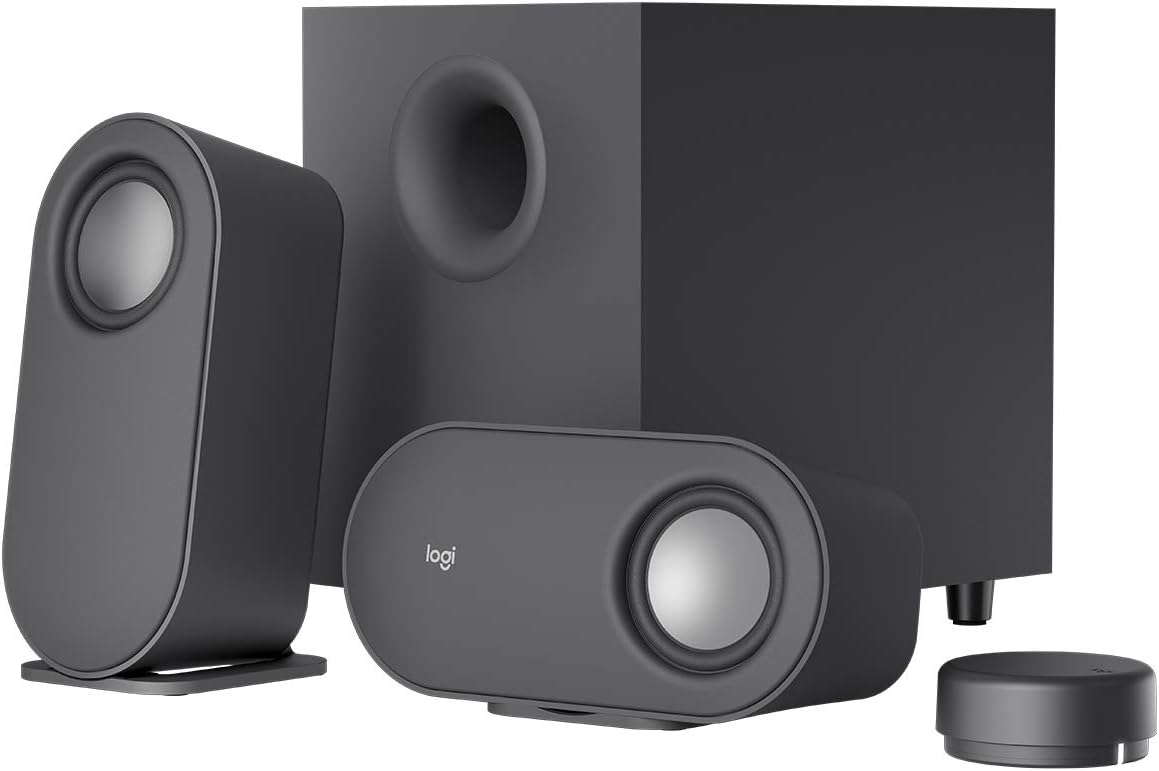
Pros
- 80W peak / 40W RMS output with a down-firing subwoofer adds low-end punch beyond typical desktop speaker pairs
- Wireless control dial adjusts volume and bass from up to 30m line of sight without touching the speaker
- Connects up to 3 devices simultaneously via Bluetooth, micro USB, and 3.5mm input
- Dual-position satellite speakers can lay horizontally or vertically to fit different desk layouts
- 20W bass channel uses digital signal processing to keep low-end output free of muddiness
Cons
- Micro USB connection is used rather than USB-C, which some newer accessory ecosystems have moved away from
- Wireless control dial runs on its own power source, adding one more component to keep charged or battery-stocked
- No dedicated headphone output on the control dial, audio routes only through the satellite speakers and subwoofer
The Z407 system is rated at 80W peak power and 40W RMS, split between two satellite speakers and a ported, down-firing subwoofer that adds low-end weight to music, movies, and games. A dedicated 20W bass channel runs through digital signal processing aimed at keeping the low end clear rather than muddy at higher volumes.
Satellite speakers use an oval shape finished in graphite gray, and can be positioned horizontally or vertically depending on desk space, letting the setup adapt to different monitor and desk layouts. Sound tuning was done specifically for near-field desktop listening rather than filling a large room.

Pros
- Control pod handles volume and headphone jack access without reaching behind the subwoofer
- Compact subwoofer delivers 25 watts RMS total system power while fitting into tight desk spaces
- Two-cable setup connects satellite speakers to the subwoofer, then the subwoofer to the computer, with no separate amp needed
- 10 x 10 x 11 inch subwoofer footprint sits comfortably under a desk rather than taking up desktop space
Cons
- Connects via a standard 3.5mm analog jack only, with no Bluetooth or USB digital input listed
- Total system output caps at 25 watts RMS, modest next to powered desktop speakers rated well above that
- As a renewed unit, cosmetic wear or a non-retail box is possible depending on the refurbishment grade
The Z313 system centers on a compact subwoofer rated at 25 watts RMS total output, paired with two satellite speakers for stereo separation. A dedicated control pod sits within reach on the desk, handling volume adjustment and headphone routing without needing to reach around to the subwoofer itself for basic controls.
- 25 watts RMS total system power
- Compact subwoofer plus stereo satellite speakers
- Control pod for volume and headphone access
25 watts RMS suits desktop and near-field listening, but it won't fill a large room the way a dedicated bookshelf speaker pair would.

What a 2.1 computer speaker system actually is
The “2.1” name describes the driver layout. The “2” is a pair of satellite speakers for left and right stereo. The “.1” is a separate subwoofer that handles deep bass frequencies. This split lets small satellites stay clear while the sub does the heavy lifting.
The payoff is range. You hear footsteps in a shooter, spoken dialogue in a film, and bass in a track all at once. A single soundbar or laptop speaker cannot match that separation. That is why 2.1 remains the sweet spot for desks.
These systems also stay affordable. You skip the rear speakers and receiver of a 5.1 rig. You still gain a real subwoofer that makes music and games feel physical rather than thin.
Who a 2.1 system is not for
Surround-sound purists chasing rear-channel effects should look at 5.1 instead. People in thin-walled apartments may find a large sub too loud for neighbors. And true studio mixers usually prefer flat-response monitors over bass-forward consumer speakers.
How to choose the best 2.1 computer speakers
Start with power, measured in watts RMS rather than peak. RMS reflects sustained, honest output. Peak figures look bigger but tell you little about real volume.
Next, weigh the subwoofer size. A larger cone moves more air and reaches lower notes. But bigger subs also demand more floor space under your desk.
Then check your inputs. A single 3.5mm jack works for one device. RCA, dual aux, or Bluetooth let you connect a PC, console, and phone at once. Match the ports to the gear you own.
Key specs to compare
- Watts RMS: the realistic loudness figure, not the peak number on the box.
- Subwoofer driver: larger cones dig deeper into bass frequencies.
- Inputs: 3.5mm, RCA, USB, and Bluetooth decide device flexibility.
- Controls: a wired pod or knob beats reaching behind the sub.
- Certification: THX badges signal tested output and tonal accuracy.
Finally, trust the crowd. High review counts smooth out one-off defects. A speaker with 11,794 reviews at 4.5 stars is a safer bet than an unproven newcomer.
Best 2.1 computer speakers by use-case
Different desks need different systems. Below, each pick targets a specific buyer so you can self-match quickly.
Best overall: Klipsch ProMedia 2.1
The Klipsch ProMedia earns the top spot with 4.5 out of 5 stars across 11,794 reviews. Its THX certification and horn-loaded tweeters produce sharp, detailed highs. The subwoofer adds tight, controlled bass that never turns muddy.
It costs more than the rest. You pay for clarity and build quality that hold up for years. Gamers and music fans who want reference-grade desktop sound will not regret it.
Best budget: Logitech Z313
The Logitech Z313 delivers 50 watts of peak power. It carries 4.4 stars from a massive 16,102 reviews. That track record makes it the safest cheap choice.
You get a compact sub and a wired control pod with a headphone jack. It will not shake a large room. For dorms, home offices, and everyday listening, it is plenty.
Best cheapest: Logitech Z313 (Renewed)
Shopping on a shoestring? The Z313 Renewed drops to while keeping the same core design. It holds a respectable 4.2-star average across 693 reviews.
Renewed units are inspected and tested, not brand new. Expect minor cosmetic wear at most. It is a smart pick for a second PC or a kid’s setup.
Best for punchy bass: Logitech Z533
The Logitech Z533 pushes 120 watts peak. Its down-firing subwoofer produces the booming low end that action games crave. It rates 4.4 stars over 1,102 reviews.
You also get 3.5mm and RCA inputs plus a wired control pod. That flexibility suits a mixed PC and console desk. Bass haters should look elsewhere, but everyone else will grin.
Best for movies: Logitech Z623
The Logitech Z623 is THX certified and rated at 400 watts peak. This renewed unit costs and holds 4.4 stars. It fills a living room with room-shaking effects.
Multiple inputs let you hook up a TV, PC, and game console together. If you watch films at your desk, this system brings theater weight. It is overkill for quiet background music.
Best wireless: Logitech Z407
The Logitech Z407 adds Bluetooth and a wireless control dial. You can skip cable clutter and change volume from across the room. It scores 4.3 stars across 3,841 reviews.
USB and 3.5mm inputs join the Bluetooth for wired reliability. The rotary puck is a genuine convenience for tidy desks. Latency-sensitive competitive gamers should use the wired input.
Best refined sound: Bose Companion 3 Series II
The Bose Companion 3 favors balanced, natural tone over raw thump. Its 4.2-star rating reflects fans of clean vocals and smooth midrange. A control pod puts volume and a headphone jack at your fingertips.
Bass runs warm rather than aggressive, which suits acoustic and jazz listeners. It is a mature, understated system. Bass-heavy gamers may want the Z533 or Z623 instead.
Practical buying guide: sizes, specs, and compatibility
Measure your desk before buying. Satellites need roughly 4 to 8 inches of width each. The subwoofer usually lives on the floor, so confirm clearance under the desk.
Check cable length too. Sub-to-satellite wires are often fixed, so a distant sub can strain them. Keep the sub within a few feet of your speakers.
For connectivity, count your source devices. A PC-only user needs just one 3.5mm jack. If you juggle a console, TV, and phone, prioritize RCA or Bluetooth models like the Z407 or Z533.
Matching a system to your room
Small desks pair well with the Z313 or a Logitech Z323-class system. Their modest subs will not overwhelm a bedroom. Larger spaces reward the higher wattage of the Z623 or Klipsch ProMedia.
If you are still comparing formats, our broader roundup of the top-rated computer speakers for every budget covers stereo and soundbar options too. That helps if 2.1 is not your only consideration.
Common mistakes to avoid
The biggest error is chasing peak-watt marketing. A 400-watt peak often means far lower sustained output. Focus on RMS and real reviews instead.
Another mistake is ignoring inputs. Buyers grab a single-jack model, then cannot add a console later. Spend a little more for RCA or Bluetooth if your setup will grow.
People also skip placement. A subwoofer crammed in a corner can boom unevenly. Give it a few inches of breathing room from walls for cleaner bass.
Do not overlook gaming needs
Competitive players need positional accuracy, not just volume. Clear satellites help you locate footsteps and gunfire. For a deeper look, see our guide to the best speaker systems built for gaming and immersive sound.
If you are outfitting a full battlestation, the right desk and seat matter as much as audio. Pairing speakers with a supportive chair from our desktop audio and setup recommendations keeps long sessions comfortable. Balanced ergonomics protect both your ears and your back.
Frequently asked questions
Are 2.1 speakers better than a soundbar?
For desktop use, usually yes. A 2.1 system gives true left-right stereo separation, which a single soundbar cannot match. The dedicated subwoofer also delivers deeper bass. Soundbars win only on cable simplicity and shelf space.
How many watts do I need for a desk?
Most desks are well served by 25 to 60 watts RMS. The Logitech Z313 handles a bedroom or office easily. Reserve higher-power systems like the Z623 for larger rooms or heavy movie use.
Can I connect a 2.1 system to a TV or console?
Yes, if it has the right ports. Look for RCA, optical-to-aux adapters, or Bluetooth. Models such as the Logitech Z533 and Z407 accept multiple inputs, so a PC, TV, and phone can share the speakers.
Do renewed speakers sound worse than new ones?
No, the sound is identical when the unit passes inspection. Renewed products like the Z313 are tested and may show light cosmetic wear. They save real money and typically include a limited warranty.
Is Bluetooth worth it for computer speakers?
It is if you stream from a phone or want a tidy desk. The Z407 lets you switch sources wirelessly and control volume remotely. For competitive gaming, use the wired input to avoid any audio delay.
The bottom line
A great 2.1 system upgrades every game, film, and playlist on your desk. The Klipsch ProMedia leads on clarity and proven reliability, while the Logitech Z313 covers tight budgets brilliantly. Pick the Z623 for movie muscle, the Z407 for wireless freedom, or the Bose Companion 3 for refined tone. Match the wattage and inputs to your room, then buy with confidence.




