
 Daniel Okafor
 Hunting for an outlet under your desk every time your laptop dies gets old fast. If you’re shopping for the best desks with built in power, you’re really solving a wiring problem: fewer extension cords, no more crawling behind furniture, and a worktop that actually charges your gear where you sit. Below you’ll find the 10 picks worth considering for 2026, how to judge outlet quality and placement, and which style fits your room, budget, and setup.
Quick answer: For most shoppers in 2026, the best desks with built in power is the ODK 75″ L-Shaped Desk — our #1 rated choice, backed by thousands of verified owner reviews, a built-in outlet, and enough surface for a dual-monitor setup. See the full ranked comparison, alternatives, and buying advice below.

Pros
- Built-in 2 AC outlets (125V/12A) and 2 USB ports (5V, 2.4A, 12W) charge multiple devices right at the desktop
- 48" tabletop rated to a 210 lb weight capacity leaves room for a monitor setup plus paperwork
- 5-cubby hutch and 2 pull-out drawers separate everyday items from stored paperwork or odds and ends
- 5 ft power cord reaches an outlet without needing an extension cord in most room layouts
- 6 support legs with anti-slip foot pads add stability beyond a standard 4-leg frame
Cons
- Engineered wood and MDF construction is less impact-resistant than solid wood over years of heavy use
- Assembly is required, including wiring the built-in outlets and USB ports into the desktop
- Sold in black or white only, with no wood-tone or alternate finish option
The tabletop measures 48"W x 24"D at a 43.5"H hutch height, with a tabletop weight capacity rated to 210 lbs. Six support legs with anti-slip foot pads add stability across that full width.
- 48"W x 24"D x 43.5"H overall dimensions
- 210 lb tabletop weight capacity
- Engineered wood and MDF construction with PVC edge sealing
- 5-cubby hutch plus 2 pull-out drawers
That combination of a wide desktop and dedicated hutch storage gives room for a full monitor and keyboard setup while keeping books, files, and smaller items organized in the cubby shelving above the work surface.
The desk integrates 2 AC outlets (125V/12A) and 2 USB ports (5V, 2.4A, 12W) directly into the desktop, fed by a 5 ft power cord, so devices can charge without running cables to a wall outlet across the room.
- 2 built-in AC outlets, 125V/12A
- 2 USB charging ports, 5V/2.4A/12W each
- 5 ft power cord length
- Illustrated assembly instructions with labeled parts
Because the desk needs to be assembled with the outlets and cord routed through the frame, setup takes longer than a pre-built desk, though labeled parts and illustrated steps are included to guide the process from start to finish.
Two pull-out drawers with round knobs and sliding rails keep private items or odds and ends out of sight, while the open 5-cubby hutch keeps frequently used books or supplies within easy reach above the desktop.
- 2 pull-out drawers with smooth sliding rails
- 5-cubby open storage hutch
- Easy-to-clean desktop surface
The desk suits students, remote workers, or gamers who want charging, storage, and workspace combined into one compact footprint rather than separate furniture pieces. Because the frame relies on engineered wood rather than solid hardwood, it's better suited to normal desktop use than to supporting unusually heavy equipment beyond the rated 210 lb tabletop capacity.

Pros
- Designed with Build-in Power Outlet The computer table is equipped with 2 for reliable daily operation
- Designed with Large Usable Space With a spacious 59 x 24150 x for reliable daily operation
- Designed with Robust Sturdy Structure The laptop desk is made with thick for reliable daily operation
- Dimensions measure 24"D x 59"W x 30"H for spatial allocation
Cons
- Requires measuring doorways and room clearance for GOFLAME 59 Compute prior to placement
- Periodic inspection of fasteners is recommended to maintain structural stability
From an ergonomic evaluation standpoint, the GOFLAME 59 Computer Desk Modern Simple Study Writing balances structural support with daily physical comfort for home office or living environments. Primary specifications feature Build-in Power Outlet The computer table is equipped with 2 along with Large Usable Space With a spacious 59 x 24150 x. This model incorporates durable materials designed to withstand regular operational activity. Overall physical measurements of 24"D x 59"W x 30"H provide clear boundaries for spatial planning in your room.
- Engineered with Build-in Power Outlet The computer table is equipped with 2 to support efficient daily operation.
- Incorporates Large Usable Space With a spacious 59 x 24150 x for enhanced structural reliability during routine use.
- Features Robust Sturdy Structure The laptop desk is made with thick to ensure practical usability across varied workspace setups.
- Built to maintain consistent operational stability within standard furniture seating conditions.
- Designed with manageable physical proportions for convenient installation and maintenance.
To maximize longevity and seating posture, ensure all bolts are tightened securely during initial assembly and place on level flooring.

Pros
- Designed with Extra-Large workspacedesigned with a spacious 70 x 24 inch desktop for reliable daily operation
- Designed with Flexible Charging Where You Need itcharge your laptop phone speakers for reliable daily operation
- Designed with One Desk for Every roomfrom working remotely to studying writing for reliable daily operation
- Dimensions measure 23.6"D x 70.9"W x 29.5"H for spatial allocation
- Constructed using quality Metal materials
Cons
- Requires measuring doorways and room clearance for PRAISUN 70x24 Inch prior to placement
- Periodic inspection of fasteners is recommended to maintain structural stability
From an ergonomic evaluation standpoint, the PRAISUN 70x24 Inch Computer Desk with Power Outlets balances structural support with daily physical comfort for home office or living environments. Primary specifications feature Extra-Large workspacedesigned with a spacious 70 x 24 inch desktop along with Flexible Charging Where You Need itcharge your laptop phone speakers. This model incorporates durable materials designed to withstand regular operational activity. Overall physical measurements of 23.6"D x 70.9"W x 29.5"H provide clear boundaries for spatial planning in your room.
- Engineered with Extra-Large workspacedesigned with a spacious 70 x 24 inch desktop to support efficient daily operation.
- Incorporates Flexible Charging Where You Need itcharge your laptop phone speakers for enhanced structural reliability during routine use.
- Features One Desk for Every roomfrom working remotely to studying writing to ensure practical usability across varied workspace setups.
- Built to maintain consistent operational stability within standard furniture seating conditions.
- Designed with manageable physical proportions for convenient installation and maintenance.
To maximize longevity and seating posture, ensure all bolts are tightened securely during initial assembly and place on level flooring.

Pros
- Designed with Ergonomic Monitor shelfdesigned as a standing desk with monitor shelf for reliable daily operation
- Designed with Electric Height adjustmentthis electric standing desk smoothly adjusts from 28.3 for reliable daily operation
- Designed with Built-in Charging stationequipped with 3 AC outlets 1 Type C for reliable daily operation
- Dimensions measure 14.57"D x 49.8"W x 6.1"H for spatial allocation
- Rated load capacity supports up to 80 kg
Cons
- Requires verifying available physical space for Klicelor Electric prior to setup
- Regular cleaning is recommended to preserve the Metal finish
In practical product testing, the Klicelor Electric Standing Desk with Shelf 48 Inch demonstrates practical utility and dependable craftsmanship for everyday household tasks. Primary specifications feature Ergonomic Monitor shelfdesigned as a standing desk with monitor shelf along with Electric Height adjustmentthis electric standing desk smoothly adjusts from 28.3. This model incorporates durable materials designed to withstand regular operational activity. Overall physical measurements of 14.57"D x 49.8"W x 6.1"H provide clear boundaries for spatial planning in your room.
- Engineered with Ergonomic Monitor shelfdesigned as a standing desk with monitor shelf to support efficient daily operation.
- Incorporates Electric Height adjustmentthis electric standing desk smoothly adjusts from 28.3 for enhanced structural reliability during routine use.
- Features Built-in Charging stationequipped with 3 AC outlets 1 Type C to ensure practical usability across varied workspace setups.
- Built to maintain consistent operational stability within standard product design conditions.
- Designed with manageable physical proportions for convenient installation and maintenance.
Following standard operation guidelines and maintaining adequate surrounding clearance ensures optimal functional longevity. Rated maximum load capacity supports up to 80 kg for safe long-term use.
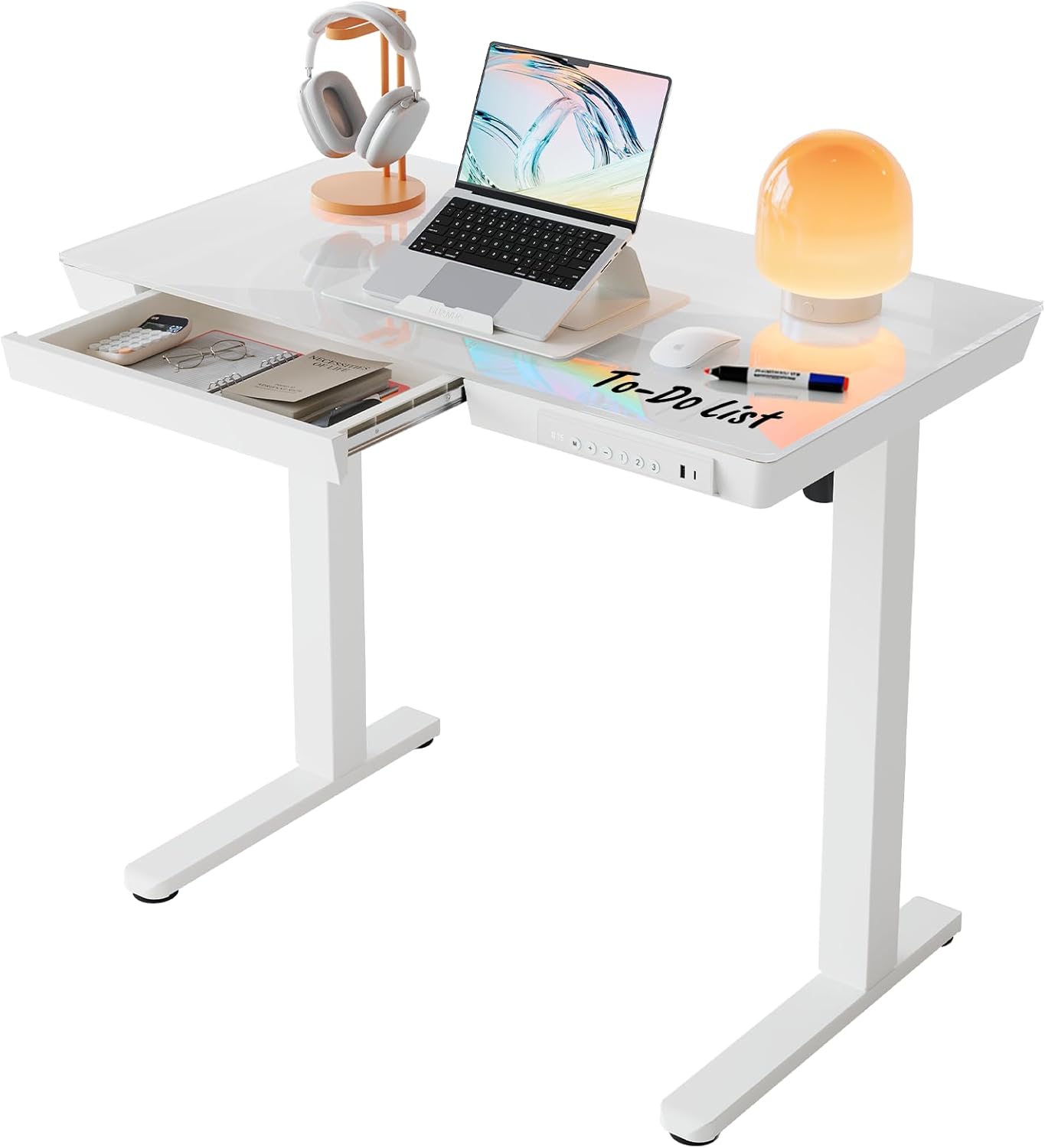
Pros
- Height range 28.3–46.5 inches with 3 memory presets
- USB-A and USB-C charging ports built-in
- Tempered glass desktop supports dry-erase markers
- Supports 110 pounds load capacity
Cons
- Requires power outlet for motorized adjustment
- Glass surface shows fingerprints and dust
This standing desk accommodates both sitting and standing work with a wide height adjustment range of 28.3 to 46.5 inches, making it suitable for users of different heights and physical requirements. The desktop measures 34.7 inches deep by 19.7 inches wide, providing generous surface area for dual monitors, keyboards, and additional workspace accessories without feeling cramped or cluttered.
- Desktop dimensions: 34.7 inches deep by 19.7 inches wide with ample work surface
- Maximum load capacity of 110 pounds safely supports computers, monitors, and office equipment
- Tempered glass surface is durable and resists scratches from daily use and equipment placement
- Height adjustment range of 28.3 to 46.5 inches accommodates sitting and standing positions
- Available in multiple width options from 35 to 48 inches to fit various room dimensions
The motorized system distributes weight evenly across the full height range, ensuring smooth and stable transitions between sitting and standing throughout your entire workday without wobbling or instability.
Assembly is straightforward thanks to a one-piece tabletop design and pre-installed motor components that eliminate complex setup steps. The included smart control panel and USB charging ports reduce the need for additional accessories and cable management complications during initial installation.
- Three programmable height presets save optimal heights for common working positions
- Built-in USB-A and USB-C charging ports conveniently charge phones, tablets, and peripherals
- Pull-out drawer beneath desktop provides secure storage for office supplies and documents
- Carbon steel frame construction with reinforced joints ensures exceptional stability and durability
- Motorized adjustment operates smoothly and quietly without disturbing focus or nearby colleagues
The intuitive control panel features single-touch preset buttons for quick transitions. Setup typically takes under 30 minutes with basic tools, and the desk is ready for immediate use without extended calibration or configuration procedures.
This standing desk works particularly well for professionals balancing sedentary desk tasks with periods of standing for creativity and engagement. It suits diverse work environments from home offices to corporate settings where flexibility and adaptability benefit productivity and physical wellness.
- Writers and software developers who benefit from postural variation during extended work sessions
- Anyone transitioning from traditional sitting-only desks to more active and dynamic workstations
- Creative professionals using the glass surface for brainstorming notes and whiteboard-style ideation
- Office workers managing multiple monitors, keyboards, and peripherals requiring stable workspace
- Health-conscious professionals seeking to reduce sedentary time and promote better posture habits
The compact footprint and cable management design make it ideal for smaller home offices and shared corporate workspaces where space efficiency and professional appearance matter equally for productivity and organization.

Pros
- Electric height range of 28.3 to 46.5 inches across 3 memory presets, covering both seated and standing positions without manual cranking
- Built-in 3 outlets and 2 USB ports let you charge devices at the desk instead of running an extension cord
- U-shaped 55.1-inch top plus a full-size monitor stand holds 2 monitors while leaving desktop space clear
- Steel frame rated to 154 lbs, enough for dual monitors, a laptop dock and desk accessories together
- LED strip offers 10 colours and 10 lighting modes built into the frame, no separate light bar needed
Cons
- Footprint of 29.1 x 55.1 inches with a U-shaped corner needs more floor space than a straight desk of the same width
- 154 lb capacity is lower than some steel-frame standing desks rated past 200 lbs, so heavy dual-monitor arm setups should check total load
- Only offered in white in this listing, with no alternate finish
The desktop measures 29.1"D x 55.1"W, finished with a U-shaped corner extension that adds side workspace beyond a standard rectangular top. Height adjusts electrically from 28.3" to 46.5", covering seated and standing positions for most adult heights.
- 3 preset memory buttons recall favourite heights without re-adjusting each time
- Steel frame construction supports up to 154 lbs of desktop load
- Monitor stand section accommodates 2 monitors side by side
- 3 power outlets and 2 USB ports are built into the frame
The U-shape trades a larger footprint for additional side surface, so measuring available floor space before assembly is worthwhile, particularly in home offices where the desk sits in a corner.
The desk ships with labeled parts and step-by-step instructions covering frame assembly, tabletop attachment and cable routing for the LED strip and outlets.
- Frame legs and crossbars connect first, forming the electric lift base
- Tabletop and monitor stand attach on top of the assembled frame
- LED strip and outlet wiring route through the frame before the control panel is mounted
Because the U-shape and monitor stand add extra panels compared with a single flat desktop, assembly runs longer than a basic two-leg standing desk, and having a second person on hand for the tabletop step makes alignment easier. A hex key set and all screws are included, so no separate tools are required.
The combined U-shape, monitor stand and lift range fit users who run a multi-monitor setup or split time between sitting and standing during the workday.
- Home office workers who want side storage plus a raised monitor shelf
- Gamers running dual monitors with peripherals spread across the extra corner space
- Anyone alternating between seated and standing postures during long work sessions
The 154 lb capacity comfortably covers 2 monitors, a laptop and typical desk accessories, though setups adding heavy monitor arms or multiple peripherals should total their equipment weight against that limit first. The larger U-shaped footprint suits a dedicated office corner more than a small shared workspace.

Pros
- Designed with Space-Saving Storage hutchmaximize your workspace with the integrated hutch and for reliable daily operation
- Designed with Built-In Power outletsequipped with a built-in power strip desktop outlet for reliable daily operation
- Designed with Large Workstation Surface The wide desktop offers generous room for for reliable daily operation
- Dimensions measure 22.8"D x 42.5"W x 53"H for spatial allocation
- Constructed using quality Engineered Wood materials
Cons
- Requires verifying available physical space for WINAZ 43 Black Gam prior to setup
- Regular cleaning is recommended to preserve the Engineered Wood finish
In practical product testing, the WINAZ 43 Black Gaming Desk with Hutch and Built-in demonstrates practical utility and dependable craftsmanship for everyday household tasks. Primary specifications feature Space-Saving Storage hutchmaximize your workspace with the integrated hutch and along with Built-In Power outletsequipped with a built-in power strip desktop outlet. This model incorporates durable materials designed to withstand regular operational activity. Overall physical measurements of 22.8"D x 42.5"W x 53"H provide clear boundaries for spatial planning in your room.
- Engineered with Space-Saving Storage hutchmaximize your workspace with the integrated hutch and to support efficient daily operation.
- Incorporates Built-In Power outletsequipped with a built-in power strip desktop outlet for enhanced structural reliability during routine use.
- Features Large Workstation Surface The wide desktop offers generous room for to ensure practical usability across varied workspace setups.
- Built to maintain consistent operational stability within standard product design conditions.
- Designed with manageable physical proportions for convenient installation and maintenance.
Following standard operation guidelines and maintaining adequate surrounding clearance ensures optimal functional longevity.
Pros
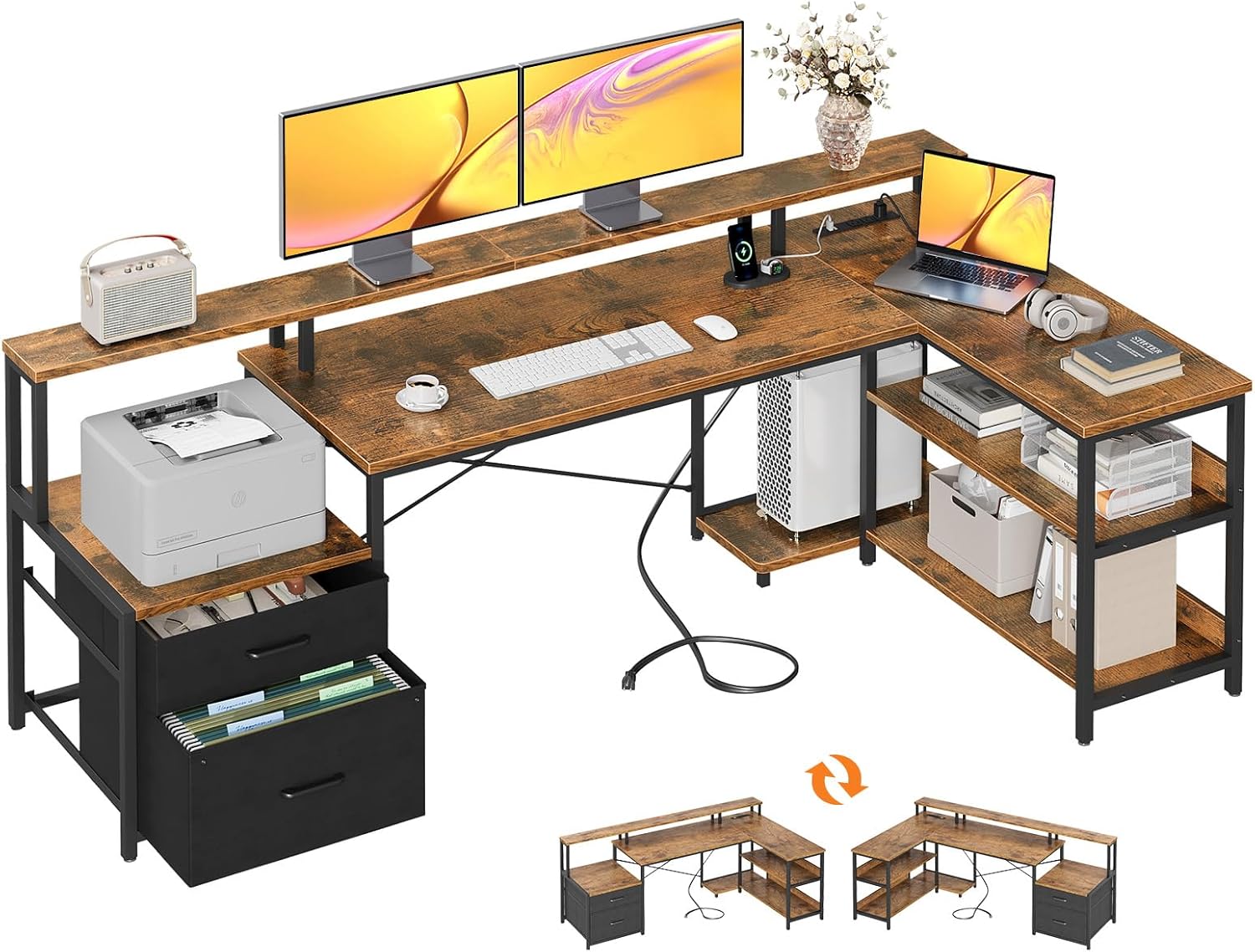
- 【Large L-Shaped Desktop】 Spacious L-shaped surface easily fits dual
- 【Smart Storage Built In】Features 2 file drawers, a printer cabinet,
- 【Built-In Power & USB Ports】 Integrated power outlet with USB ports
- 【Ergonomic Monitor Shelf】 Raised monitor stand promotes proper
- Dimensions of 39.4"D x 74.5"W x 35"H engineered for optimal spatial fitting
Cons
- Requires verifying placement clearance for 39.4"D x 74.5"W x 35"H prior to installation
- Requires gentle maintenance routines to preserve the Alloy Steel finish
Tailored for residential and professional settings, the ODK ODK 75 L Shaped Desk with File Drawers Work from Home addresses routine requirements effectively. Technical integration focuses on functional efficiency, incorporating 【Large L-Shaped Desktop】 Spacious L-shaped surface easily fits dual monitors, laptops, and daily work essentials—ideal for home office, study, or multitasking.. Its balanced engineering incorporates 【Smart Storage Built In】Features 2 file drawers, a printer cabinet, open shelves, and a CPU stand to keep your workspace organized and clutter-free. to streamline day-to-day interactions. Measurements of 39.4"D x 74.5"W x 35"H provide clear dimensional boundaries for precise space planning.
Evaluating build quality and structural execution reveals strong manufacturing standards across components. The physical build incorporates 【Built-In Power & USB Ports】 Integrated power outlet with USB ports keeps your devices charged and cables neatly managed., providing essential protection against surface wear. High tolerance assembly prevents unexpected mechanical looseness during daily operation. Constructed using quality Alloy Steel, outer surfaces withstand routine contact without losing visual appeal. Carefully selected components ensure minimal maintenance overhead over long service life. Attention to manufacturing details ensures reliable utility for your Home Office Desks. Using proper installation techniques maintains physical stability across daily activities.
Long-term operational satisfaction is supported by adhering to standard installation and cleaning practices. Thanks to 【Ergonomic Monitor Shelf】 Raised monitor stand promotes proper posture and reduces neck and back strain during long work or study sessions., spatial alignment and initial setup progress smoothly for homeowners. Simple preventative care maintains mechanical responsiveness and aesthetic value over extended use. Carefully selected components ensure minimal maintenance overhead over long service life. Attention to manufacturing details ensures reliable utility for your Home Office Desks. Using proper installation techniques maintains physical stability across daily activities. This balanced configuration fits smoothly into existing interior designs while maximizing efficiency.

Pros
- Built-in power strip adds 4 AC outlets plus one USB-A and one USB-C port directly on the desk surface
- Rated to hold up to 220 pounds across the work surface and shelving
- Three fabric drawers give closed storage separate from the open shelving sections
- Reversible shelf design lets the L-shape face either left or right to match room layout
- Adjustable feet compensate for uneven flooring without shimming
Cons
- Constructed from particle board rather than solid wood, so it is lighter-duty than hardwood desks under heavy sustained loads
- 47.2-inch width is compact for an L-shaped desk, tight for dual-monitor plus paperwork setups
- Built-in outlets require plugging the desk itself into a wall outlet, so it does not add power in rooms without a nearby outlet
This L-shaped desk measures 17.7 inches deep by 47.2 inches wide by 29.5 inches tall, with a listed weight capacity of 220 pounds across the surface. Construction combines particle board panels with a metal frame, reinforced with X-shaped back supports for added stability under regular use.
- Dimensions: 17.7 in D x 47.2 in W x 29.5 in H
- Weight capacity: 220 pounds
- Frame: metal with particle board panels
- Storage: 3 fabric drawers plus open shelving
Adjustable feet let the desk sit level on uneven flooring, and the 2-level shelf section is sized to hold a CPU tower, files, or books separate from the main desktop surface.
The desk ships with numbered components and tools included, following a standard flat-pack assembly sequence. A built-in power strip runs along the desk, offering 4 AC outlets, one USB-A port, and one USB-C port, so cables for a lamp, laptop, and phone can all reach power without extension cords.
- Tools and hardware included for assembly
- Built-in power strip: 4 AC outlets, 1 USB-A, 1 USB-C
- Reversible shelf panels for left- or right-facing layouts
Because the power strip is part of the desk itself, it still needs to be plugged into a wall outlet to function, so placing the desk within reach of an existing outlet or extension cord is necessary before assembly.
The reversible L-shape and built-in power strip make this desk suited to shared home offices or gaming setups where two people might use the corner space at different times. The 220-pound capacity and drawer storage fit typical desktop, monitor, and paperwork loads rather than heavier studio or workshop use.
- Best fit: home office or gaming corner setups
- Suits solo use or a shared two-person layout
- 220-pound capacity covers standard desktop equipment
Anyone needing to support very heavy equipment, like multiple large monitors on arms plus a printer, should check the weight distribution against the 220-pound total capacity before loading up the surface.

Pros
- Built-in power station adds 3 outlets and 2 USB ports directly on the desktop for charging nearby
- RGB LED lighting offers 20 colors, 22 modes and 5 brightness levels controlled without a separate app
- Reversible layout lets the shelf unit mount on either the left or right side to match room layout
- Fabric file cabinet holds letter, A4 or legal-size documents in a closed compartment off the floor
- Eight adjustable feet compensate for uneven flooring and protect against scratching
Cons
- Metal frame construction pairs with a composite desktop, so heavy weight in one corner such as a large monitor arm is best kept near a leg for support
- Two-tier shelving is fixed to upper or lower mounting holes only, not a continuously adjustable track
- RGB lighting requires the desk plugged into a wall outlet at all times to stay powered, adding one more cable to the setup
At 51.2 inches wide, 18.9 inches deep and 34.5 inches tall, the desktop is sized for a two-monitor setup plus a keyboard tray's worth of working space. Storage comes from a fabric file cabinet sized for letter, A4 and legal documents, an open shelf, and a drawer for smaller items like a printer or office supplies.
- 51.2 x 18.9 x 34.5 inch desktop dimensions
- Fabric file cabinet fits letter, A4 and legal-size folders
- Two-tier adjustable shelving plus one drawer
The file cabinet keeps paperwork off the open shelf and out of dust, which suits anyone working from printed documents alongside a monitor setup rather than an all-digital workflow.
The shelf unit is reversible, meaning it can be assembled on either the left or right side of the desk depending on room layout and which side has better wall clearance. Two-tier shelves mount into upper or lower pre-drilled holes, and eight adjustable feet level the frame on uneven flooring while protecting the floor finish from scratching.
- Reversible shelf mounting, left or right side
- Shelves adjustable between upper and lower mounting holes
- Eight adjustable feet for leveling and floor protection
Because the shelf side is set during assembly rather than tool-free afterward, deciding on left or right placement before building saves having to redo hardware later.
A built-in power station on the desktop provides 3 AC outlets and 2 USB ports, cutting down on cables run to a separate wall strip for phones, headsets or a desk lamp. RGB LED lighting adds 20 colors and 22 modes across 5 brightness levels, and a raised monitor shelf lifts a screen closer to eye level to reduce neck strain during long sessions.
- 3 AC outlets and 2 USB ports built into the desktop
- RGB lighting with 20 colors and 22 modes
- Raised monitor stand for closer-to-eye-level screen height
The onboard outlets rely on the desk itself being plugged into a wall socket, so the power station only works once that connection is made and does not run independently.
What “Built-In Power” Actually Means on a Desk
Not every desk labeled “with power” works the same way. Some models route a single outlet strip through a grommet hole in the tabletop, while others integrate multiple AC outlets and USB-A or USB-C ports directly into the frame or a side rail. The best desks with built in power give you both AC plugs for monitors and dock stations, plus fast USB-C charging for phones and laptops, without an extra power strip cluttering your floor.
Placement matters as much as port count. A charging strip mounted too far back forces you to reach over your keyboard, while one tucked under the front edge is easy to use one-handed. Look for photos or listing details that show exactly where the outlets sit before you buy.
How to Choose the Right Powered Desk for Your Space
Picking the right desk comes down to four practical factors: how many devices you charge daily, how much surface area you need, whether you want height adjustability, and how the cord routing works with your room layout.
Outlet and USB-C Count
If you run a monitor, a dock, a lamp, and a phone charger at once, count outlets carefully. Two AC plugs plus one USB-C port is fine for a laptop-only setup, but a full desktop rig with multiple monitors benefits from three or four AC outlets. Faster USB-C ports with power delivery charge laptops directly, so you can skip the bulky laptop brick entirely.
Desk Style: Standing, L-Shaped, or Compact Writing
Your workflow should drive the shape. A height-adjustable standing desk suits anyone who alternates between sitting and standing through the day, while an L-shaped or corner layout gives gamers and multi-monitor setups more elbow room. If your best standing desks shortlist already leans toward sit-stand models, prioritize ones where the power strip is mounted on the fixed frame, not the moving top, so cables don’t stretch or snag during height changes.
Cable Management and Grommet Placement
A powered desk only stays tidy if the cord routing is thought through. Grommet holes near the back corner keep charging cables out of your lap, and a side hook or cubby for headphones or a power strip keeps the desktop clear. Cheap models sometimes bolt on a power strip as an afterthought, so check reviews for complaints about loose wiring before you commit.
Best Desks with Built-In Power by Use Case
Rather than ranking every model the same way, it helps to match a desk to how you’ll actually use it. Here’s how the lineup breaks down by need.
Best Overall: Roomy L-Shaped Layout
The ODK L-Shaped Desk earns the top spot for a reason: its 75-inch corner layout gives you room for two monitors and a laptop side by side, the built-in outlet sits within easy reach of the main desktop, and file drawers keep cords and paperwork off the surface. It’s the safest pick if you want one desk that handles work calls, gaming, and file storage without a second furniture purchase. If your room favors corner placement, browse our best corner desks guide for more layout-specific options.
Best for Small Home Offices
Tight rooms don’t need a giant corner unit. The GOFLAME 59″ Computer Desk keeps a straight, space-efficient footprint while still packing a built-in power outlet, a removable shelf, and a side hook for headphones. It’s a smart match if you want charging convenience without giving up a whole corner of the room. Anyone comparing standard desk sizes should also see current pricing and specs across our best office desks roundup.
Best for Gaming Setups
Gamers tend to run more gear at once: a PC tower, a monitor, RGB lighting, and a headset charger. The WINAZ Gaming Desk pairs a built-in power outlet with a hutch and three-tier storage shelves, so controllers, cables, and accessories have a home instead of piling up on the desktop. If you’re weighing several gaming-focused layouts, our best gaming desks guide compares more options side by side.
Best Height-Adjustable Pick
For anyone who wants to stand periodically, the HUANUO Glass Standing Desk combines electric height adjustment with a drawer and USB charging ports built into the frame. The tempered-glass top is easy to wipe down, and the one-piece tabletop means less assembly than most flat-pack alternatives. It’s worth the higher price if back or neck strain from sitting is a real concern for you.
Best Value Under $100
If budget is the deciding factor, the Huuger L-Shaped Desk delivers a built-in power outlet, three drawers, and open shelving for well under $100. It won’t have the premium finish of pricier models, but reviewers consistently note it’s sturdy enough for daily work and gaming use. Pair it with a compact chair if floor space is limited.
Best for Multi-Device Households
Shared home offices or dual-monitor streaming setups often need more than two outlets. The PRAISUN 70×24 Computer Desk stands out with four AC outlets plus USB and USB-C ports on a heavy-duty metal frame, giving you enough capacity for a monitor, dock, lamp, and phone charger simultaneously without a power strip. The extra-large 70-inch top also leaves room for a second person to work alongside you.
Best Budget Gaming Pick with LED
If ambient lighting matters to your setup, the Furologee 51″ Desk includes a built-in power outlet and LED lighting strip alongside a file cabinet and monitor stand. It’s a reasonable middle ground between the bare-bones budget options and the pricier standing desks, especially if you want a desk that already looks the part for a streaming or gaming corner.
Common Mistakes When Buying a Powered Desk
A few recurring issues show up in owner reviews across nearly every brand, so it helps to check for them before you buy.
- Ignoring outlet location: A power strip mounted at the back of a deep desk can be hard to reach without standing up.
- Skipping the amperage limit: Most built-in strips cap out around 13 amps combined, so avoid plugging in space heaters or high-draw appliances.
- Overlooking desktop material near the outlet: Particleboard around a grommet hole can chip over time; look for reinforced edges or metal trim.
- Assuming all USB ports are equal: Some built-in USB-A ports charge slowly compared to a wall adapter, which matters if you’re topping off a tablet overnight.
- Forgetting to measure clearance: Standing desks need extra vertical space when raised, so measure your ceiling height and any overhead shelving first.
Setup and Cable Management Tips
Once your desk arrives, a little cable planning goes a long way. Route your monitor and dock cables through the grommet hole before securing the desktop, so you’re not fishing wires through a finished surface later. Velcro cable ties along the underside of the desk keep charging cords from tangling with your legs, and a small under-desk tray can hold a router or power brick out of sight. If your desk has a side hook, use it for headphones rather than letting cables droop into your workspace.
For height-adjustable models, leave a few extra inches of slack in every cable so raising the desk doesn’t yank a plug loose. Reviewers who skip this step are the ones who report outlets pulling away from the frame after a few months of regular use.
Frequently Asked Questions
Do desks with built-in power cost significantly more than regular desks?
Expect to pay roughly $20 to $50 more than a comparable desk without power. Given that a decent power strip and surge protector cost nearly as much separately, the built-in version is usually worth the difference.
Are built-in desk outlets safe to use with surge protectors plugged in?
Yes, most built-in strips already include surge protection, but check the product listing to confirm before daisy-chaining another power strip into it, since stacking protectors can trip a breaker under heavy load.
Can I add a power outlet to a desk that doesn’t have one?
You can retrofit a clamp-on power strip or under-desk outlet kit, but it won’t sit as flush or look as clean as a built-in option, and you’ll still need to drill a grommet hole yourself in most cases.
How many outlets do I actually need on a desk?
Two AC outlets and one USB-C port cover a basic laptop setup. If you run a desktop PC, a second monitor, or streaming gear, look for at least three AC outlets plus multiple USB ports.
Do standing desks with built-in power cost more to maintain?
Not typically. The motor and the power strip are separate systems, so a standing desk with built-in power doesn’t need more maintenance than a stationary one — just periodic checks that cables have enough slack when you raise the desktop.
Whichever model you land on, the outlet placement and cord routing matter just as much as the price tag. Compare specs and availability on the picks above, match the shape to your room, and you’ll end up with a desk that keeps your gear charged without a tangle of extension cords underneath it.




