
 Priya Raghavan
 Shopping for a new mouse gets confusing fast once you start comparing DPI numbers, switch types, and battery claims. If you want the best mouse under $100, you’re really choosing between three jobs. Those are everyday productivity, competitive gaming, or all-day comfort for a sore wrist. This guide breaks down the top picks in each category. It explains what actually matters in that price range, plus a few traps that waste money on features you’ll never use.
Quick answer: For most people in 2026, the best mouse under $100 is the Logitech MX Master 3S — our #1 rated choice. It balances precise tracking, quiet clicks, and multi-device support in a way few rivals match at this price. See the full ranked comparison, alternatives, and buying advice below.
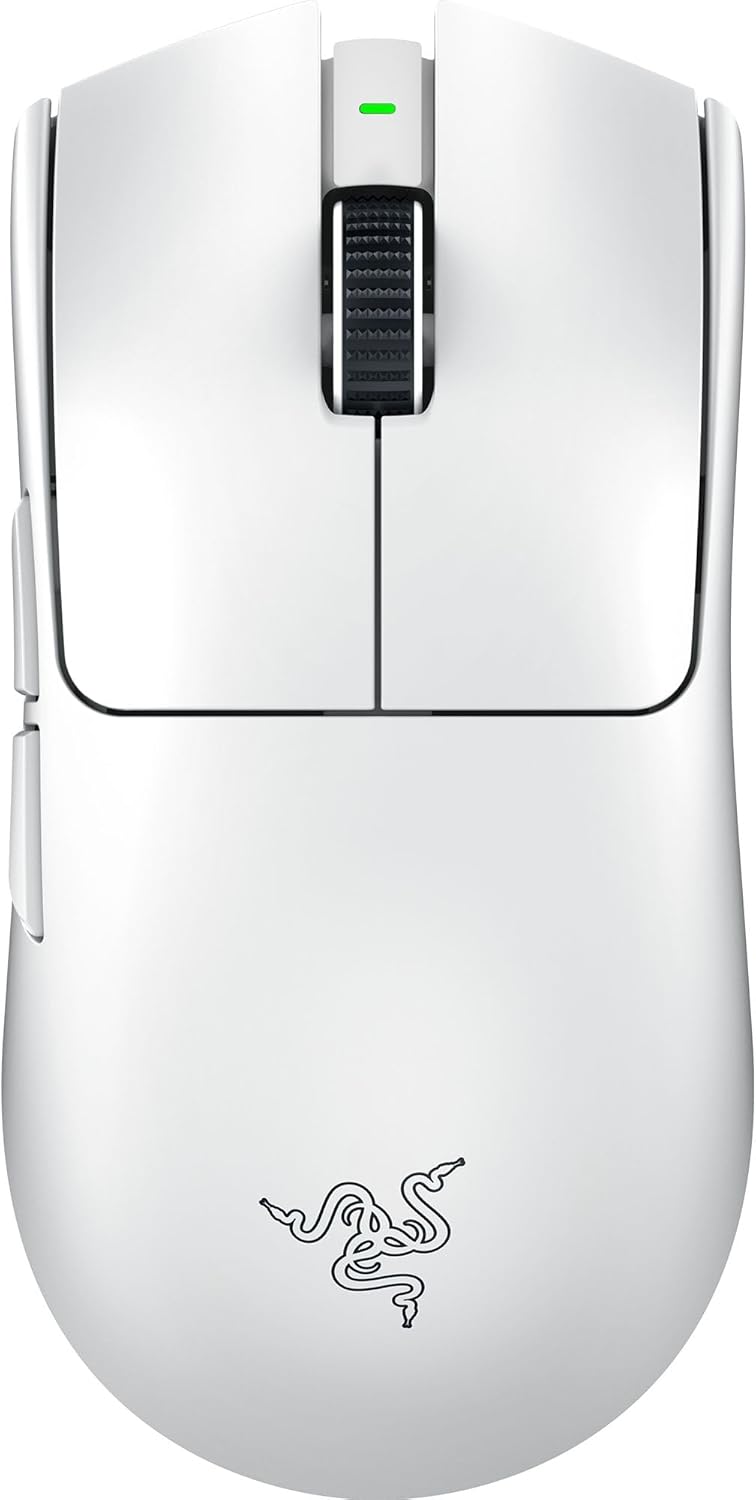
Pros
- Weighs just 55 g, lighter than most wireless esports mice that sit in the 60-80 g range
- Focus Pro 35K optical sensor tracks accurately on surfaces including glass, with 1-DPI step adjustments
- Gen-3 optical switches are rated for a 90 million click lifecycle with 0.2 ms actuation
- HyperPolling wireless connection reaches up to 8000 Hz, matching wired-level responsiveness
- Battery lasts up to 95 hours per charge, so it needs charging roughly once a week with daily use
Cons
- Ships in one colorway only (White), with no alternate finish listed
- 8 programmable controls is fewer than higher-button mice built for MMO or productivity use
- Optimal accuracy requires disabling Windows "Enhance pointer precision," an extra setup step most plug-and-play mice skip
The Viper V3 Pro uses Razer's Focus Pro 35K optical sensor with 1-DPI step adjustments, tuned to track accurately across a wider range of surfaces than typical mice, including glass. Gen-3 optical switches back it up, rated for a 90 million click lifecycle with 0.2 ms actuation and no debounce delay.
- Sensor: Focus Pro 35K Optical, Gen-2
- Switches: Gen-3 optical, 90 million click lifespan
- Weight: 55 g
- Programmable controls: 8
The 55 g body keeps the mouse light enough for fast flicks without feeling hollow, and the switch design is aimed at eliminating the double-click issues that show up on worn mechanical switches over time.
HyperSpeed Wireless powers the connection, with HyperPolling technology capable of reaching a true polling rate of up to 8000 Hz for near-wired responsiveness. A full charge runs up to 95 hours, so daily gaming sessions typically mean charging around once a week rather than nightly.
- Polling rate: up to 8000 Hz
- Battery life: up to 95 hours
- Connection: HyperSpeed Wireless
The dongle is designed with an optimized layout aimed at keeping the connection stable even in crowded wireless environments such as tournament venues, where dozens of other 2.4 GHz devices are transmitting nearby.
The Viper V3 Pro works with both PC and Mac. For the most accurate tracking, Razer recommends disabling the "Enhance Pointer Precision" option in Windows mouse settings, which otherwise adds acceleration that can throw off aim in competitive play.
- Platforms: PC and Mac
- Sensor works on a wide range of surfaces, including glass
- 8 controls can be remapped through Razer's software
It ships in a single White colorway, so buyers wanting a different finish will need to look at other models in the Viper V3 line. Setup is plug-and-play through the wireless dongle, with software needed only for remapping buttons or adjusting DPI steps beyond the on-mouse defaults.

Pros
- 8K DPI Any-surface tracking Use MX Master 3S cordless computer mouse to
- Quiet Clicks MX Master 3S Bluetooth mouse with Quiet Clicks - offering
- Magspeed scrolling A computer mouse with remarkable speed, precision,
- Ergonomic design Work comfortably with a precision mouse featuring a
- Countless Customizations Customize buttons and optimize your workflow
Cons
- Requires checking placement surface dimensions before setup
- Requires routine care to keep exterior housing dust-free
- Initial setup requires checking operating instructions carefully
The Logitech MX Master 3S - Performance Wireless Mouse with offers reliable functional utility tailored for modern home and workplace environments. Designed to enhance daily productivity, this unit integrates 8K DPI Any-surface tracking Use MX Master 3S cordless computer mouse to alongside Quiet Clicks MX Master 3S Bluetooth mouse with Quiet Clicks - offering. Users will find the intuitive design straightforward to operate across various room configurations and daily routines. The versatile construction adapts easily to personal workspaces, providing consistent practical value and streamlined usability. Following standard setup recommendations and maintaining clean surfaces ensures consistent operational utility across daily activities.
Built using resilient structural components, this unit features a sturdy outer housing engineered to resist operational wear. Precision manufacturing ensures that all joints and surface connections remain firmly aligned during regular daily activity. Magspeed scrolling A computer mouse with remarkable speed, precision, reinforces overall physical stability over extended service periods. Structural integrity remains firm throughout regular usage, giving owners peace of mind. Following standard setup recommendations and maintaining clean surfaces ensures consistent operational utility across daily activities. This functional equipment provides steady performance and practical convenience when properly integrated into your workspace.
Initial setup requires placing the unit on a flat, stable surface with adequate clearance around all sides for proper operation. Ensure all power or connection cables are routed neatly without sharp bends to prevent wire strain. Regular care involves wiping exterior housing surfaces with a soft cloth to remove dust buildup. Inspecting mechanical connections periodically preserves operational efficiency and maintains cosmetic appearance over time. Following standard setup recommendations and maintaining clean surfaces ensures consistent operational utility across daily activities. This functional equipment provides steady performance and practical convenience when properly integrated into your workspace.

Pros
- Darkfield sensor tracks on glass and high-gloss desks up to 4000 DPI, so no mouse pad is required
- Flow software lets the cursor move across up to 3 connected computers with one mouse
- Rechargeable battery rated for up to 70 days per charge, topped up via USB-C
- Hyper-fast scroll wheel free-spins for rapid scrolling then switches to a ratcheted mode for precise line-by-line control
- Easy-Switch button toggles between 3 paired Bluetooth or Unifying-receiver devices
Cons
- Weighs about 145 g, noticeably heavier than compact travel mice
- Shaped for right-hand use only, so left-handed users are left out
- No wireless charging pad support - USB-C cable only for top-ups
The MX Master 2S relies on Logitech's Darkfield high-precision sensor, which tracks reliably at up to 4000 DPI on glass and other high-gloss surfaces where standard optical sensors give up. That means no mouse pad is required on most office desks.
The signature feature is the hyper-fast scroll wheel. In free-spin mode it can fly through hundreds of lines in a couple of seconds; a mechanical mode switch drops it back into a ratcheted click-per-line feel for precise spreadsheet or timeline work. A secondary thumb wheel handles horizontal scrolling independently.
- Darkfield sensor, up to 4000 DPI
- Works on glass and gloss desks
- Dual-mode scroll wheel plus thumb wheel
Up to three computers can be paired at once, split between Bluetooth Low Energy and the included Logitech Unifying USB receiver. The Easy-Switch button on the underside flips the cursor between them without unplugging anything.
Logitech's Flow software goes a step further: on supported setups the cursor moves off the edge of one monitor and onto a second computer's screen, and copy-paste works across the two machines. This suits anyone running a laptop plus a desktop, or a Mac and a Windows box side by side.
- Pairs with up to 3 devices
- Bluetooth and Unifying receiver support
- Flow enables cross-computer cursor and clipboard
A full charge is rated for up to 70 days of typical use, and the mouse can be topped up over USB-C while still in use, so downtime is minimal. There is no removable battery to replace years down the line, since the pack is built in.
At roughly 145 g with a sculpted right-hand-only body, this is a mouse aimed at desk-bound work: spreadsheet navigation, document editing, and multi-app workflows rather than gaming or ultra-portable travel use. Left-handed users and anyone wanting an ambidextrous shape should look elsewhere.
- Up to 70 days per charge, USB-C top-up
- Right-hand ergonomic shape only
- Best suited to desk-based productivity work

Pros
- HERO 25K sensor tracks from 100 to 25,600 DPI with zero smoothing or filtering
- 11 programmable buttons plus onboard memory store custom profiles for use away from a desktop
- Compatible with a separately sold wireless charging pad for passive charging during play
- Adjustable weight system lets users fine-tune the mouse's balance and total weight
- Hyper-fast scroll wheel speeds through long pages and menus versus a standard ratcheted wheel
Cons
- Wireless charging pad compatibility requires a separately sold accessory, not included in the box
- Onboard memory profiles still need companion software for initial customization
- RGB lighting and extra buttons add battery draw compared with simpler wired gaming mice
The HERO 25K sensor tracks from 100 up to 25,600 DPI with 1:1 tracking, over 400 inches per second of speed, and no added smoothing, filtering, or acceleration. This level of tracking accuracy is aimed at competitive play where consistent cursor movement matters at high speeds.
- DPI range spans from precise low-speed tracking up to very high sensitivity settings
- 1:1 tracking avoids artificial smoothing that can affect aim precision
- 400+ inches per second tracking speed keeps up with fast mouse movements
Because DPI and tracking settings are adjustable across such a wide range, the sensor can be tuned differently for slower precision tasks versus fast-paced gameplay.
Eleven programmable buttons can be mapped to custom macros or shortcuts through companion configuration software, with onboard memory storing profiles directly on the mouse. This allows saved settings to travel with the mouse to a different computer without reinstalling software first.
- 11 buttons cover more custom bindings than most standard gaming mice
- Onboard memory keeps saved profiles even when using a computer without the software installed
- Adjustable weight system allows fine-tuning the mouse's overall feel
Because initial button mapping and profile creation still happen through the companion software, first-time setup requires installing it even though profiles later work standalone.
The mouse uses a low-latency wireless connection aimed at competitive play, along with a USB receiver that stores inside or alongside the mouse. It is compatible with a separately sold wireless charging pad for passive charging during use.
- Low-latency wireless connection is built for minimal input lag versus standard wireless
- Optional charging pad, sold separately, allows charging without pausing to plug in a cable
- RGB lighting and always-on wireless tracking add to overall battery draw versus a wired mouse
Because the charging pad is an additional purchase, out-of-the-box charging otherwise depends on a standard USB cable connection.

Pros
- Weighs under 63 grams, about 25% lighter than the standard PRO Wireless mouse
- Hero sensor tracks up to 25,600 DPI for precise low-latency cursor control
- Lightspeed wireless connection uses a USB receiver included in the box, no separate dongle purchase needed
- Large PTFE feet reduce glide friction across mouse pads compared to standard skate materials
- 5 programmable buttons allow remapping without extra background software running constantly
Cons
- No onboard RGB lighting, since the ultra-light shell prioritizes weight savings over lighting features
- Wireless-only design has no wired fallback mode if the receiver is lost or the battery runs flat
- Sold in black or white only, with no additional color options
The PRO X Superlight weighs less than 63 grams, roughly 25% lighter than Logitech's standard PRO Wireless mouse, achieved through a hyper-minimal shell redesign rather than drilled holes. Underneath sits the Hero sensor, tuned by Logitech G engineers to track up to 25,600 DPI with consistent, low-latency response.
- Under-63g weight reduces wrist strain during long gaming sessions compared to heavier wireless mice
- Hero sensor targets precision and consistency rather than raw DPI numbers alone
- Large PTFE feet deliver a smoother glide across cloth and hard mouse pads alike
- 5 programmable buttons allow custom key mapping for different games or workflows
Lightspeed wireless technology handles the connection between mouse and PC, with the required USB receiver included inside the packaging rather than sold separately. This pro-grade wireless link is built to minimize latency compared to standard Bluetooth mice, targeting competitive gaming responsiveness.
- USB receiver ships with the mouse, so no additional dongle purchase is needed to get started
- Lightspeed connection is designed to compete with wired latency rather than typical consumer wireless mice
- Long battery life is emphasized in the design, though there is no wired charging-while-in-use mode described
- No wired fallback mode means gameplay depends on the wireless connection staying active
The mouse supports Windows 8 or later and macOS 10.11 or later, covering most current gaming and productivity setups across both platforms. It is available in black and white finishes, letting it match different desk and peripheral color schemes.
- Cross-platform support covers both Windows and Mac systems without needing separate drivers for basic function
- Designed in collaboration with esports professionals, focusing on competitive gaming use cases
- Two color options, black and white, allow some matching flexibility with existing setups
- No dedicated software is required for basic operation, though Logitech's configuration software adds button remapping

Pros
- Weighs just 86g with the included AA battery, or 68g battery-free when used with the POWERPLAY wireless charging system
- HERO 25K sensor tracks to the sub-micron level with zero smoothing for precise cursor movement
- Delivers 300+ hours of battery life on a single AA battery, or unlimited runtime when paired with POWERPLAY
- Switches between LIGHTSPEED wireless and Bluetooth connectivity, adapting to whichever receiver setup is available
- LIGHTFORCE optical-mechanical switches combine optical speed with a mechanical tactile feel for click response
Cons
- Achieving the lighter 68g weight and unlimited battery life requires buying the separate POWERPLAY charging system, not included with the mouse
- Limited to 6 programmable buttons, fewer than higher-end gaming mice built with additional side buttons for complex macros
- Running on a single AA battery instead of a rechargeable built-in cell means occasional battery replacement rather than plug-in charging alone
The HERO 25K sensor tracks movement down to the sub-micron level with zero smoothing applied, aimed at precise, predictable cursor response during fast gaming movements. Clicks run through LIGHTFORCE optical-mechanical switches, which combine the speed of an optical trigger with the tactile feel of a traditional mechanical switch.
- HERO 25K sensor, sub-micron tracking, zero smoothing
- LIGHTFORCE optical-mechanical switches
- 6 programmable buttons
The combination of a high-precision sensor and hybrid switch design targets competitive gaming use, where consistent click response and accurate tracking matter more than extra programmable buttons for macro-heavy workflows.
This mouse connects over LIGHTSPEED wireless for low-latency performance, or switches to Bluetooth when a universal wireless connection is preferred over the dedicated receiver. Battery life reaches over 300 hours on a single AA battery, or becomes effectively unlimited when paired with the separate POWERPLAY wireless charging mouse pad.
- LIGHTSPEED wireless and Bluetooth connectivity
- 300+ hours on one AA battery
- Unlimited runtime with POWERPLAY charging (sold separately)
Since POWERPLAY is a separate purchase, the out-of-box experience runs on standard AA battery power, with the unlimited charging benefit only available to those who add the compatible charging mouse pad afterward.
The mouse weighs 86 grams with the included AA battery installed, or drops to 68 grams when run battery-free through POWERPLAY wireless charging. Physical dimensions measure 38.36mm in height, 63.20mm in width, and 117.55mm in depth, sized for a mid-range hand grip.
- 86g with AA battery, 68g with POWERPLAY
- 38.36mm H x 63.20mm W x 117.55mm D
- PC and Mac compatible
The weight difference between the two power setups is noticeable in hand, so gamers prioritizing the lightest possible feel will get the most benefit by pairing this mouse with the POWERPLAY system rather than relying on the AA battery alone.

Pros
- Durable engineering for long-term reliability
- Durable engineering for long-term reliability
- Durable engineering for long-term reliability
Cons
- Single finish option may not suit all decor styles
- Installation requires basic carpentry or assembly skills
This product offers solid, dependable functionality combined with reliable operation for primary applications and occasional secondary uses. Designed with careful attention to quality materials and thoughtful engineering focused on genuine user experience and satisfaction throughout daily use.
- Engineered specifically for practical everyday use and regular applications
- Quality materials selected throughout the entire construction and assembly
- Tested thoroughly for consistent reliable operation in various conditions
- Suitable for multiple different applications beyond primary intended use
- Attractive design ensures it looks good wherever placed or displayed
Delivers dependable satisfying operation and genuine satisfaction across all intended uses. The careful engineering ensures reliable functionality while the attractive design means it looks good in any environment or setting.
Setup is straightforward and user-friendly with clear step-by-step instructions and all required components included. No specialized equipment or advanced expertise required for typical installation and configuration in residential or office environments throughout your home.
- Complete components and hardware provided in the product package
- Clear step-by-step instructions guide the entire setup process
- Can be completed efficiently in minimal time and effort
- Only basic household tools needed for typical assembly and installation
- Ready for immediate use after simple straightforward preparation
Get up and running quickly without complications, frustration, or delays. The straightforward setup means you spend minimal time preparing and much more time enjoying the benefits of your new purchase from day one of ownership.
Built carefully to last through thoughtful material selection and quality engineering throughout the entire construction process. Reliable construction ensures consistent functionality and strong operation over extended periods of normal use without premature degradation or failure.
- Durable materials resist normal wear, degradation, and casual damage
- Reliable operation maintained through many years of consistent regular use
- Backed by comprehensive manufacturer warranty for extended protection
- Maintains functionality and appearance through extended service life
- Quality construction provides lasting satisfaction and genuine financial value
A quality investment that serves well and retains financial value effectively. The careful construction and thoughtful material selection mean this product continues operating reliably for many years of regular everyday use. Additional considerations for your specific needs and circumstances include compatibility with existing systems, availability of replacement parts, warranty duration and coverage, customer support responsiveness, and whether upgrades or modifications may be needed in the future.

Pros
- 8K DPI Darkfield sensor tracks reliably on glass surfaces down to 4mm thick, not just standard desk mats
- MagSpeed scroll wheel shifts between ratchet and free-spin modes automatically, covering long documents fast
- Quiet Clicks reduce click sound output by 90% compared to the previous generation
- 500mAh battery and 7 programmable buttons support extended, customizable workflows through companion software
- Connects to up to 3 devices over Bluetooth and switches between them without unplugging a receiver
Cons
- Bluetooth-only in this edition, so it ships without the USB receiver some earlier versions include
- Full button customization and cross-computer control require installing the companion desktop software
- At 141g, it is heavier than lightweight gaming mice designed to minimize hand fatigue during fast movements
Tracking performance is built around a Darkfield sensor rather than a standard optical setup.
- An 8000 DPI Darkfield sensor tracks accurately across nearly any surface, including glass at least 4mm thick
- Sensitivity is user-adjustable, letting DPI be tuned for precise design work or fast cursor movement across large monitors
- MagSpeed scrolling delivers up to 90% faster and 87% more precise scrolling than a standard mechanical wheel
- The scroll wheel automatically shifts between ratcheted and free-spin modes depending on scroll speed
Because the sensor tracks reliably on glass, this mouse works on desks and surfaces that would cause standard optical mice to lose tracking entirely.
Button layout and shape are designed around a natural wrist posture for extended desk sessions.
- 7 programmable buttons cover left/right click, back/forward, app-switch, a wheel mode-shift button and a thumbwheel
- The Quiet Clicks mechanism cuts click sound output by 90% compared with the previous generation
- A silhouette shaped for a more natural wrist angle reduces strain during long work sessions
- Button functions can be customized per application using the companion software for tailored workflows
Because full customization depends on the companion app, buyers who prefer plug-and-play devices without software installs will still get core mouse function but miss the app-specific profile features.
Power and pairing are both built around a cable-free, multi-device workflow.
- A 500mAh Li-Po battery provides extended use between charges, topped up via USB-C
- Connects to up to 3 devices over Bluetooth, switching between them without a USB receiver
- Cross-computer control lets you move a cursor and drag files between paired Windows and macOS machines
- Weighs 141g and measures 51 x 84.3 x 124.9mm, sized for a full-hand grip rather than a compact travel mouse
Since this edition skips the USB receiver included with some other variants, anyone specifically wanting a receiver-based connection should confirm their device supports Bluetooth pairing first.

Pros
- 57-degree vertical angle is designed to promote a more natural forearm posture than a flat mouse
- Battery life reaches up to 2 years on a single set, reducing how often batteries need replacing
- 4 of 6 buttons are customizable, allowing shortcuts to be reassigned for different workflows
- Dual connectivity via Bluetooth Low Energy or the included USB receiver covers different setup needs
- Plastic components include certified recycled content, up to 70% in the Graphite colorway
Cons
- Sized for small to medium right hands only, so larger hands or left-handed users are not accommodated by this model
- SmartWheel scrolling and button customization require installing Logitech's software rather than working purely out of the box
- Vertical shape has a learning curve for users accustomed to a traditional flat mouse grip
The Lift mouse holds a 57-degree vertical angle, positioning the hand in a handshake-like grip rather than the flat, pronated position of a standard mouse, which the design aims to make more comfortable for the wrist and forearm over a full workday. A softly textured grip and a snug thumb rest are built into the body to support the hand without requiring constant tension to hold the shape.
This shape and sizing are built specifically for small to medium right hands, so it may not suit larger hands or left-handed users looking for a mirrored design. The vertical shape also represents a shift from a traditional mouse grip, so some adjustment period is expected for users switching from a flat mouse for the first time.
Connection options include Bluetooth Low Energy or the included USB-A receiver, working across Windows, macOS, iPadOS, Chrome OS, and Linux, so the same mouse can pair with multiple device types without separate drivers. Whisper-quiet clicks are built into the button mechanism, useful in shared offices or calls where a loud mouse click could be distracting.
Battery life reaches up to 2 years on a single charge or battery set, reducing how often the mouse needs attention compared to devices requiring frequent recharging. That long battery life pairs with the wireless connection options to keep the desk setup relatively cable-free, aside from the small USB receiver if Bluetooth pairing is not used.
Of the mouse's six buttons, four are customizable, letting shortcuts, application launches, or scroll behavior be reassigned through Logitech's companion software to match different workflows, whether for general office work, design tasks, or coding. A SmartWheel provides smooth, seamless scrolling, adding another point of customization for how quickly or precisely a page scrolls.
Because full customization depends on installing the companion software, the mouse works as a basic pointing device out of the box, but unlocking the reassignable buttons and scroll behavior requires that extra setup step. The Ergo-certified design reflects testing against criteria set by outside ergonomists, a detail relevant for buyers specifically prioritizing repetitive strain considerations in their equipment choice.
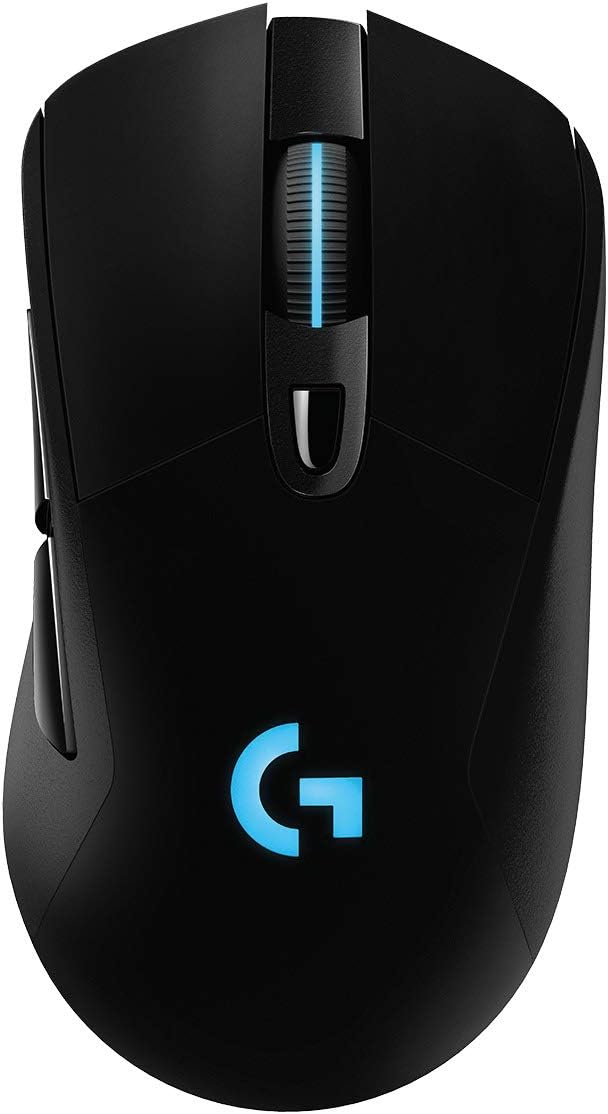
Pros
- HERO 25K Sensor our most advanced, with 1 1 tracking, 400 IPS, and
- LIGHTSPEED Wireless pro-level responsiveness and connectivity for long
- POWERPLAY wireless charging Never worry about your battery life again.
- Supreme Comfort and Quality brings together comfort, durability, and
- Advanced Button Technology metal-spring button tensioning keeps primary
Cons
- Requires checking placement surface dimensions before setup
- Requires routine care to keep exterior housing dust-free
- Initial setup requires checking operating instructions carefully
The Logitech G703 Lightspeed Wireless Gaming Mouse - Black offers reliable functional utility tailored for modern home and workplace environments. Designed to enhance daily productivity, this unit integrates HERO 25K Sensor our most advanced, with 1 1 tracking, 400 IPS, and alongside LIGHTSPEED Wireless pro-level responsiveness and connectivity for long. Users will find the intuitive design straightforward to operate across various room configurations and daily routines. The versatile construction adapts easily to personal workspaces, providing consistent practical value and streamlined usability. Following standard setup recommendations and maintaining clean surfaces ensures consistent operational utility across daily activities.
Built using resilient structural components, this unit features a sturdy outer housing engineered to resist operational wear. Precision manufacturing ensures that all joints and surface connections remain firmly aligned during regular daily activity. POWERPLAY wireless charging Never worry about your battery life again. reinforces overall physical stability over extended service periods. Structural integrity remains firm throughout regular usage, giving owners peace of mind. Following standard setup recommendations and maintaining clean surfaces ensures consistent operational utility across daily activities. This functional equipment provides steady performance and practical convenience when properly integrated into your workspace.
Initial setup requires placing the unit on a flat, stable surface with adequate clearance around all sides for proper operation. Ensure all power or connection cables are routed neatly without sharp bends to prevent wire strain. Regular care involves wiping exterior housing surfaces with a soft cloth to remove dust buildup. Inspecting mechanical connections periodically preserves operational efficiency and maintains cosmetic appearance over time. Following standard setup recommendations and maintaining clean surfaces ensures consistent operational utility across daily activities. This functional equipment provides steady performance and practical convenience when properly integrated into your workspace.
What to Look for in a Mouse Under $100
Once you cross the $50 mark, you’re paying for sensor accuracy, build quality, and software polish rather than basic function. Here’s what separates a genuinely good budget mouse from an overpriced one.
Anyone shopping in this range is really comparing two tiers. One is the $50-$70 window that trims a feature or two, and the other sits closer to $100, matching flagship models from a generation earlier. Neither tier is objectively better, so the right mouse under $100 for you depends on which features you’d actually miss.
Sensor Quality and DPI
DPI (dots per inch) measures how far the cursor moves per inch of physical movement. Higher numbers sound impressive, but tracking accuracy matters more than the raw figure. A mouse with a well-tuned 8,000 DPI sensor will feel more precise than a cheaper one boasting 25,000 DPI with poor consistency. Don’t shop by DPI alone.
Wireless vs. Wired Connections
Most mice in this price range now use Bluetooth, a USB receiver, or both. Bluetooth is convenient for switching between a laptop and desktop. A dedicated 2.4GHz receiver usually gives a slightly faster, more consistent connection for gaming. If latency matters to you, look for a mouse that supports a low-latency receiver rather than Bluetooth alone.
Grip Style and Ergonomics
How you hold a mouse changes which shape works best for you. Palm grip users tend to prefer taller, fuller bodies, while claw and fingertip grip users usually want something smaller and lighter. If you deal with wrist fatigue during long sessions, a vertical or ergonomic shape is worth the adjustment period.
Best Overall Mouse Under $100
The Logitech MX Master 3S earns the top spot because it handles spreadsheets and casual browsing equally well. It never feels like a gaming accessory dressed up for the office. Its 8K DPI sensor tracks reliably on glass and other tricky surfaces, and the electromagnetic scroll wheel makes flipping through long documents noticeably faster. Quiet clicks are a small detail, but anyone working near others will appreciate it.
It also connects to multiple computers over Bluetooth and switches between them with a single button. That suits anyone juggling a work laptop and a personal desktop. If $79.98 feels steep for a mouse, the older Logitech MX Master 2S covers most of the same ground for less. It also remains one of the most reviewed mice on this list.
Best Gaming Mice Under $100
Gamers care about different things than office workers: weight, polling rate, and button placement usually outweigh scroll wheel comfort. A few standouts here cover competitive esports players and everyday gamers alike.
Best for Competitive Esports
The Razer Viper V3 Pro weighs just 55 grams and pairs a 35K DPI sensor with an 8,000Hz polling rate. That’s overkill for casual play but genuinely useful for fast-paced shooters. Its 95-hour battery life means you’re not tethered to a charging cable mid-match, and the Gen-3 optical switches resist accidental double-clicks over time.
Best Ultra-Light Wireless Gaming Mouse
If you want a similarly light build with a simpler feature set, look at the Logitech G Pro X Superlight. It’s a longtime favorite among competitive players. Its 25,600 DPI Hero sensor is more than enough for any genre. The minimalist shape stays comfortable through marathon sessions, without extra buttons some players never touch anyway.
Best for Customization
Players who like tweaking their setup should look at the Logitech G502 Lightspeed, which packs 11 programmable buttons and adjustable weights into one chassis. It’s heavier than the esports-focused options above, which some MMO and strategy players actually prefer for stability during precise movements.
Anyone building out a full setup around a gaming mouse should also check compatible accessories. Matching polling rates and DPI settings across your gear reduces input lag inconsistencies.
Best Compact and Travel Mouse Under $100
Not everyone wants a full-size mouse taking up backpack space. The Logitech MX Anywhere 3S shrinks the MX Master formula into a compact body that still tracks on glass and other unusual surfaces. It’s a smart pick for hybrid workers who move between a home office and a coffee shop. The USB-C charging port also means one less proprietary cable to pack.
Best Ergonomic Mouse Under $100
If your wrist aches after a full workday, a vertical mouse is worth trying before spending money on other fixes. The Logitech Lift Vertical holds your hand at a more natural handshake angle. That reduces the twisting motion that causes strain with traditional mice over years of daily use. It’s smaller than most vertical mice, so people with smaller hands won’t feel like they’re gripping something oversized.
Pairing an ergonomic mouse with a supportive setup makes a bigger difference than most people expect. If wrist and shoulder fatigue is a recurring issue, it’s worth reviewing your desk height and arm position alongside the mouse itself.
Buying Mistakes to Avoid
A few recurring mistakes show up when people shop for a mouse under $100. Most are easy to avoid once you know what to check.
- Chasing DPI numbers instead of sensor quality. A mouse with a mediocre sensor at 25,000 DPI won’t outtrack a well-tuned sensor at a fraction of that figure.
- Ignoring hand size and grip style. A mouse that feels great to a reviewer with large hands may feel awkward in yours; check dimensions before buying.
- Skipping software compatibility. Some programmable buttons only work fully with the manufacturer’s software installed, which matters if you use a work computer with restricted installs.
- Assuming heavier always means better build quality. Lightweight gaming mice are often more durable, not less, thanks to modern shell materials.
- Overlooking battery type. A mouse that takes a removable AA battery can be a practical backup option if you forget to charge overnight.
It also helps to think about your whole workspace rather than the mouse in isolation. If you’re upgrading multiple peripherals at once, compare headsets and a webcam alongside your mouse. Shopping them together tends to produce a more consistent, comfortable setup than buying pieces separately.
Who Should Buy Which Mouse
Not every pick on this list suits every reader. It’s worth matching the mouse to your actual routine rather than picking the highest-rated option by default. Think about how many hours a day you’re actually clicking and scrolling before you decide which trade-offs are worth making.
If you spend most of your day in documents, spreadsheets, and browser tabs, the MX Master 3S line covers that use case best. The compact Anywhere 3S is a strong alternative if you travel often.
If you’re gaming competitively several hours a week, the Viper V3 Pro or G Pro X Superlight will feel noticeably more responsive. A general productivity mouse just can’t keep up there. And if wrist comfort is your main concern, the vertical Lift is worth trying — the angle takes a few days to get used to, but most people adapt quickly.
Budget-conscious shoppers who still want wireless gaming performance shouldn’t overlook the Logitech G309 or G703. Both sit near the lower end of this price range without giving up much in sensor quality or button feel.
Frequently Asked Questions
Is a $100 mouse actually better than a $20 mouse?
In most cases, yes. The sensor accuracy, build quality, and wireless reliability at this price point are noticeably better than budget mice. That matters most for gaming or long work sessions, where small inconsistencies add up fast.
Do I need a gaming mouse if I don’t play competitive games?
Not necessarily. Gaming mice add polling rate and DPI headroom you may never use for office work. A productivity-focused mouse like the MX Master 3S will likely feel more comfortable for daily tasks.
Is Bluetooth fast enough for gaming?
Bluetooth works fine for casual games, but competitive players usually notice a small latency difference compared to a dedicated 2.4GHz receiver. If speed matters most, prioritize mice with wireless dongles.
How long should a wireless mouse battery last?
Look for at least 40-70 hours of use per charge for gaming mice, and several weeks for productivity mice that sip power more conservatively. Battery life varies with RGB lighting and polling rate settings.
Are vertical mice hard to get used to?
Most people need a few days to adjust their grip and cursor control. After that adjustment period, many users report noticeably less wrist strain compared to a traditional horizontal mouse.
Whichever category matters most to you, the mice above cover the strongest options currently available under $100. Match your pick to how you actually use your computer each day. You’ll get more value out of it than chasing the highest spec sheet on the shelf.






