 Daniel Okafor
A cramped, cluttered battlestation kills both your posture and your reaction time. The right riser or desk fixes that in minutes. This guide to the best monitor stands and desks for gaming pulls together 10 picks that lift your screen to eye level, tame your cable mess, and free up room for a full-size mouse sweep. You will find airflow-vented risers, dual-screen platforms with drawers, RGB accent shelves, and one full-size gaming desk with built-in power. Every product below is drawn from real listings with real ratings and review counts, so you can match a pick to your setup, your space, and your budget with confidence.
Quick answer: For most players in 2026, our top pick among the best monitor stands and desks for gaming is the HUANUO Monitor Stand — our #1 rated choice. It hits a rare mix of 3-height adjustment, airflow vents, and 19397 reviews at 4.7 stars. See the full ranked comparison, alternatives and buying advice below.

Pros
- Designed with Sleek Bamboo Acrylic Design The mix of natural bamboo and for reliable daily operation
- Designed with Built-in LED Light Strip Integrated ambient lighting adds a modern for reliable daily operation
- Designed with Customizable RGB Lighting 7 solid colors 3 dynamic modes jump for reliable daily operation
- Dimensions measure 31.5 x 7.87 x 3.98 inches for spatial allocation
- Constructed using quality Bamboo materials
Cons
- Requires verifying available physical space for Bamboo Monitor Sta prior to setup
- Regular cleaning is recommended to preserve the Bamboo finish

Pros
- Physical footprint measures 42 x 9.5 x 4.75 inches for spatial placement
Cons
- Spacious wall or desk clearance needed for Simple Trending Dual M
- Careful cable routing recommended for Simple Trending Dual M wall mounting

Pros
- Three height settings at 3.94", 4.72" and 5.51" adjust with a button press on each leg
- Supports up to 44 lbs, enough for a monitor, laptop or small printer combined
- 12.40" x 7.09" of storage space underneath organizes office supplies out of sight
- Ventilated powder-coated steel platform helps dissipate heat under a laptop
- Assembles tool-free by screwing four legs onto preassembled bolts
Cons
- Fits laptops up to 15.6" wide only if the laptop width stays under 9.25", so larger laptops will not sit securely
- Height adjusts in 3 fixed steps rather than a continuous range
- Stacking two stands for double storage requires buying a second unit separately
The stand offers 3 fixed height settings at 3.94", 4.72" and 5.51", adjusted by pressing buttons built into each leg, and supports up to 44 lbs across monitors, laptops, printers or gaming consoles placed on top.
- 3 height settings: 3.94", 4.72", 5.51"
- 44 lb weight capacity
- Anti-slip rubber pads on the base and platform
Raising the platform to one of the three heights is meant to bring a screen closer to eye level, which can ease neck and back strain built up during long stretches of screen time at a lower, unadjusted height.
Underneath the platform sits 12.40" x 7.09" of open storage space for organizing office supplies, keeping a desk surface clearer. The platform itself is powder-coated steel with ventilation built in, designed to help dissipate heat from a laptop placed on top rather than trapping it underneath.
- 12.40" x 7.09" underneath storage area
- Ventilated, powder-coated steel platform
- Two stands can be stacked to double storage space
The ventilation matters most for laptop use, where trapped heat under a closed or clamshell-mode laptop can otherwise build up during extended sessions.
The stand fits laptops up to 15.6" as long as the laptop's width stays under 9.25", alongside monitors, printers and other desk equipment within the 44 lb limit. Assembly requires no tools: the four legs simply screw onto bolts preassembled into the platform.
- Laptop compatibility up to 15.6" (width under 9.25")
- Tool-free, four-leg assembly
- Suited to monitors, laptops, printers and gaming consoles
Because the width limit is fairly specific, it is worth measuring a laptop's actual width before buying if it sits close to the 9.25" threshold.

Pros
- Design The monitor stand for the desk has a large 14.6 x 9.3 inches
- Ergonomic The height-adjustable monitor riser can raise a computer
- Ventilated The computer stand has a large sturdy platform with vented
- Organization The sleek modern black design complements any desk while
- Package Includes 3 Height Adjustable Metal Monitor Stand Riser x
Cons
- Requires verifying desktop clearance for 14.6 x 9.3 x 3.9 inches dimensions

Pros
- Two slide-out drawers add storage for pens, sticky notes, and small mobile devices
- 36.22-inch width comfortably spans two monitors side by side
- Rated to hold up to 100 pounds across the riser surface
- Wood construction with a rustic brown finish adds a stable, heavier base than lightweight plastic risers
- Raises screens to reduce neck and eye strain from looking down at a low display
Cons
- At 36.22 inches wide, it needs a correspondingly deep and wide desk to sit properly
- Fixed riser height is not adjustable once assembled
- Wood finish is limited to the rustic brown colorway shown in this listing
This monitor stand measures 36.22"L x 8.66"D x 4.92"H, wide enough to support two monitors side by side or one larger widescreen display. It carries a maximum weight capacity of 100 pounds across the platform.
- Dimensions: 36.22"L x 8.66"D x 4.92"H
- Weight capacity: up to 100 pounds
- Two built-in slide-out drawers for desk storage
The extra width sets it apart from single-monitor risers, giving enough surface area to keep two screens level and at matching height without needing two separate stands on a shared desk.

Pros
- 3 adjustable widths (16.5", 18.5", or 20.5") match different monitor and desk sizes
- Holds up to 55 lbs, enough for a full-size monitor plus items placed underneath
- Built-in storage drawer and a hidden tablet/phone holder keep small items off the open desktop
- Rubberized non-slip legs and an internal metal plate keep the platform stable under an ultrawide monitor
- Folds flat and needs no assembly, ready to use straight out of the box
Cons
- ABS plastic construction is lighter-duty than a metal monitor stand, which may show wear sooner under very heavy daily use
- Underneath clearance is fixed by the leg height setting chosen, so a full-size mechanical keyboard needs the stand set to its taller positions to fit
- Single white finish only, with no alternate color offered in this listing
The stand offers 3 width settings — 16.5", 18.5", and 20.5" — to match different monitor bases and desk depths, and unfolds to an 18.09-inch leg span at full extension. Raising the platform brings the monitor closer to eye level, which is the main ergonomic goal of a riser like this during long work sessions.
Folding the legs down creates open space underneath for a full-size mechanical keyboard once work is done, turning the stand into extra desk real estate rather than a fixed obstruction.

Pros
- Retractable length adjusts from 32" to 40", so it can shrink down for a single monitor or extend for a dual-monitor setup
- Rated to hold about 70 lbs, enough for two monitors plus accessories on top
- Raises screens to a more comfortable eye level, which can help with neck and back strain from looking down at a low display
- Underneath clearance fits a full-size keyboard, freeing up desk surface for other items
Cons
- Assembly involves fitting wood boards into a metal sliding section, which takes more setup than a single-piece riser
- Wood construction means it needs more care around spills than an all-metal stand
The stand's length telescopes from 32" to 40", letting it shrink down when only one monitor is in use or extend to hold two screens side by side. At full extension it measures roughly 40" wide by 9.25" deep by 4.72" tall, built from a combination of wood decking and a metal sliding frame.
- Adjustable length: 32"-40"
- Height: 4.72"
- Depth: 9.25"
- Weight capacity: about 70 lbs
Four wood legs support the platform, and the metal sliding section is what allows the length adjustment without the riser feeling loose or wobbling under load.
This riser is built for anyone running two monitors, or a monitor plus a laptop, who wants to reclaim desk space underneath for a keyboard, notebooks, or other office items. The adjustable 32"-40" length makes it flexible enough to also work as a single-monitor riser when only one screen needs raising.
- Dual-monitor desk setups
- Home offices needing extra under-screen storage
- Anyone whose monitor sits too low for comfortable eye-level viewing
Buyers wanting a taller lift than 4.72" for a more pronounced ergonomic boost should look at a stand built specifically for greater height adjustment.

Pros
- Adjustable to 4 height positions (4.00", 4.80", 5.50", 6.10") for optimal eye level
- Storage area holds 12.50" x 7.00" of desk items, reducing clutter
- Supports up to 44 lbs, suitable for monitors, laptops, printers
- Wood construction with warm finish fits modern office aesthetics
Cons
- Storage footprint is compact at 12.50" x 7.00", limited for large accessories
- Available only in brown finish, no color options for matching different desks

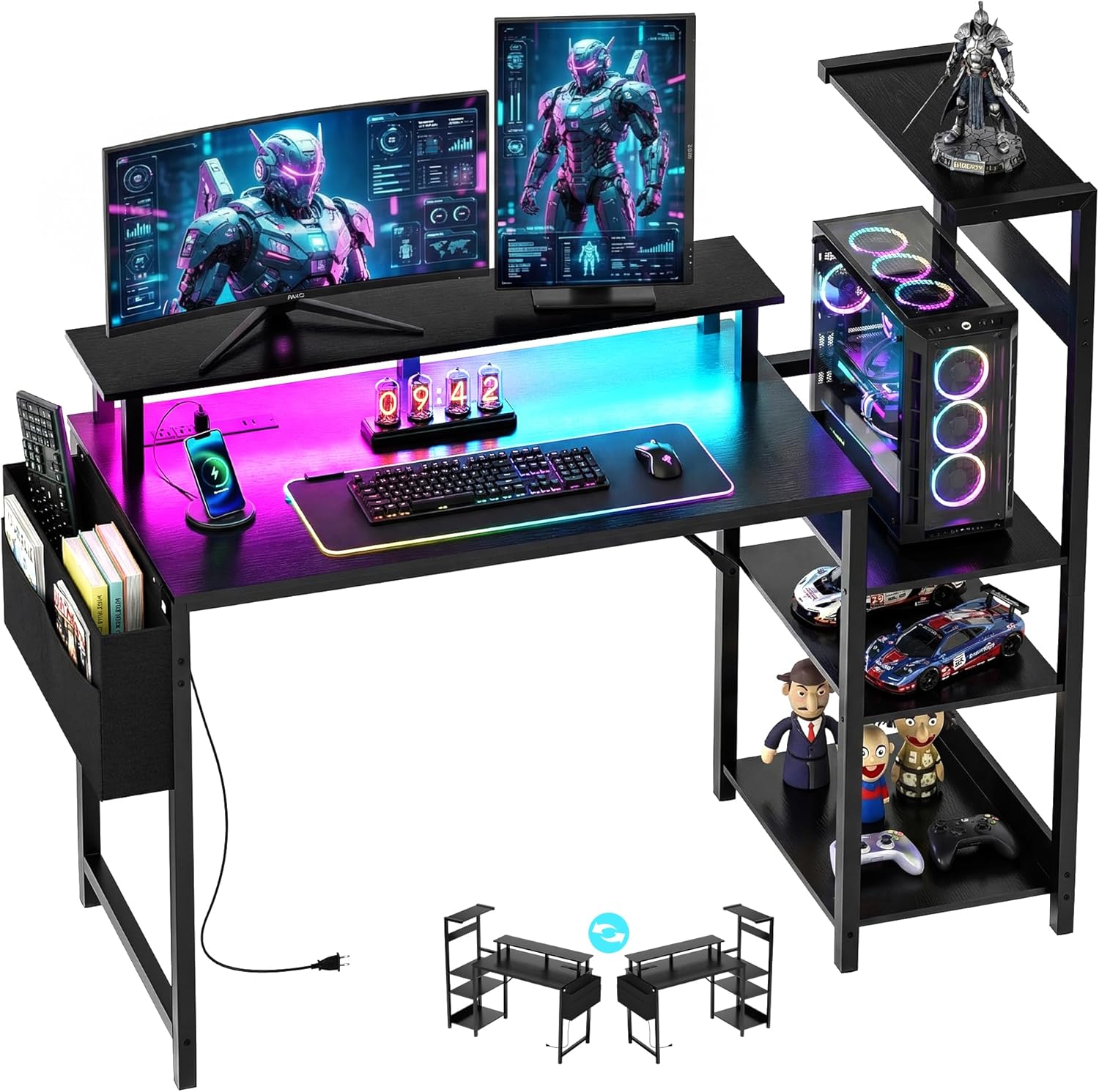
Pros
- 70.8-inch width with a 55 x 21.6-inch desktop area holds two full computer setups side by side
- 3-tier storage shelves separate a CPU tower, speakers, and console gear instead of piling them on the desktop
- Built-in RGB LED strip offers over 60,000 colors and 29 modes, including music-reactive sync via a built-in microphone
- Integrated 2-outlet, 2-USB charging station powers up to 4 devices without a separate power strip
- Cup holder and headphone hook keep drinks and headsets off the desk surface during long sessions
Cons
- Weight capacity of 55 lbs on the desktop limits how much monitor and accessory weight can sit on top at once
- RGB lighting requires an app connection to access the full 29 modes, adding a setup step beyond plug-and-play
- 70.8-inch width needs a dedicated wall run, too large for narrow bedrooms or shared desk corners
The desktop spans 70.8 inches wide by 21.6 inches deep, with a listed weight capacity of 55 lbs across the main surface. Three tiered storage shelves sit to the side, sized to hold a CPU tower, speakers, or console hardware separately from the desktop workspace, and the layout is wide enough to fit two complete computer setups.
A built-in monitor shelf raises screens above the main desktop, following ergonomic eye-level positioning without requiring a separate monitor riser purchased on top of the desk itself.

Pros
- Adjustable height from 28 to 47 inches fits users 5'2" through 6'4"
- Installation takes minutes with included hardware and simple tools
Cons
- Limited compatibility with non-standard third-party accessories
What a gaming monitor stand or desk actually does
A monitor stand raises your display so the top of the screen sits at or just below eye level. That single change reduces neck strain during long sessions. It also reclaims the dead space under your monitor for a keyboard, headset, or controller.
A gaming desk goes further. It gives you the surface area, cable routing, and sometimes the power outlets that a serious multi-device rig needs. Both solve the same core problem: getting your screen higher and your gear organized.
Riser versus full desk: which do you need?
Pick a riser if your current desk is solid but too low. Risers are cheap, fast to set up, and easy to move. Pick a full gaming desk if your surface is small, wobbly, or lacks depth for large monitors.
Depth matters more than width for gaming. A 27-inch or 32-inch panel wants at least 24 inches of depth so you sit back far enough. Shallow desks push the screen too close and strain your eyes.
How to choose the best monitor stands and desks for gaming
Focus on five things: load capacity, height, footprint, ventilation, and storage. Get those right and the rest is personal taste. Here is how each factor plays out in a real setup.
Weight capacity and stability
Gaming monitors are heavier than office panels because of larger stands and higher refresh-rate hardware. Check that a riser handles your monitor plus anything you park on top. Wobble under a fast keyboard slam is a dealbreaker, so favor solid wood, bamboo, or reinforced metal legs.
Adjustable height and airflow
Adjustable legs let you dial in eye level whether you sit or perch. The HUANUO Monitor Stand offers 3 height settings and vented slots that let a laptop or router breathe underneath. Airflow vents are a quiet upgrade if you tuck a mini PC or console beneath the shelf.
Single versus dual monitor width
Dual-screen players need a wide platform that spans both stands evenly. A single riser under two monitors invites tipping. If you run side-by-side panels, size the base to your total width before you buy.
Top picks by use-case
Every gamer has a different bottleneck. Below, each recommendation targets a specific need so you can self-match instead of guessing. Prices and ratings come straight from the current listings.
Best overall value: HUANUO Monitor Stand
With a 4.7 rating across 19397 reviews, this riser is the safe default. You get 3-height adjustment, airflow vents, and a footprint that clears space for your keyboard. It is not for dual 32-inch panels, but for a single monitor it is hard to beat. This is the pick most players should start with.
Best budget riser: ECOLOVI Wood Stand
If you want eye-level height for under twelve dollars, the ECOLOVI Wood Stand costs and holds a 4.7 rating. It is a simple adjustable wood platform with no drawer or lights. Choose it when you want function over features and a warm wood look on a tight budget.
The OPNICE Desk Organizer Riser is a close runner-up. Both keep things minimal, so skip them if you crave built-in storage.
Best for small spaces: WALI Monitor Stand
The WALI Monitor Stand packs underneath storage into a compact frame. With 15745 reviews at 4.7 stars, it is a proven pick for cramped dorm desks or apartment battlestations. Slide a keyboard and mouse under it to clear your surface fast.
Best with storage drawer: Klearlook Foldable Riser
The Klearlook Foldable Riser costs and folds flat for easy moves. It adds a storage drawer plus a tablet and phone slot, handy for a second-screen Discord or stats display. The white finish suits bright, clean setups rather than blacked-out rigs.
Best RGB accent: Bamboo RGB Stand
Want your riser to match your lighting? The Bamboo RGB Stand spans 31.5 inches with acrylic legs and built-in RGB lights. Its 5.0 rating is early but promising. It suits streamers who want the shelf itself to glow, though the review count is still small at 6.
Dual-monitor and multi-screen setups
Running two or three displays changes everything about your stand choice. You need a wide, balanced base and enough desk depth behind it. Here are the platforms built for it.
Best dual-monitor riser with storage
The Simple Trending Dual Stand pairs a drawer with 2 pen holders at a 4.8 rating. For heavier storage needs, the WESTREE Dual Stand adds two drawers. Both span two monitors and corral the clutter that two-screen rigs generate.
If you want length you can tune, the Across-Star Dual Riser adjusts from 32 to 40 inches. That flexibility helps when your two panels are different sizes. For deeper comparisons across two-screen builds, our guide to the best gaming desks for dual monitors breaks down surface depth and mount options in detail.
Scaling to three or more screens
Triple-monitor sim rigs and trading-style layouts demand more width than any single riser gives. At that point a purpose-built desk usually wins. If you are planning a wraparound wall of screens, the roundup on the best desks for a multi-monitor setup gaming covers weight limits and mount clearance. You can also compare the best gaming desks for multiple monitors to see which surfaces handle three or more panels without sagging.
Best full gaming desk: SEDETA 70.8″ Desk
When a riser is not enough, upgrade the whole surface. The SEDETA Gaming Desk stretches 70.8 inches wide and costs at a 4.7 rating across 555 reviews. It bundles LED lights, storage shelves, a built-in monitor stand, power outlets, and a cup holder.
That much width fits dual or triple monitors with room for a full keyboard and a wide mouse pad. The onboard power outlets cut down cable runs to the wall. It is overkill for a single-monitor casual setup, but ideal for a committed main rig.
Practical buying guide: sizes, specs, and compatibility
Measure before you buy. A stand that looks perfect online can crowd your keyboard or overhang your desk edge. These quick checks save a return.
Match the width to your monitors
For a single 24-to-27-inch panel, a 20-to-24-inch riser is plenty. For dual monitors, aim for 32 inches or more of platform width. Adjustable-length models like the Across-Star handle mismatched screens without leaving a gap.
Confirm desk depth and height clearance
Add the riser height to your monitor stand and check it against your seated eye level. Too tall forces you to tilt your head up, which is as bad as too low. Leave a few inches of clearance under the shelf if you plan to slide a keyboard beneath it.
Think about materials and finish
Bamboo and solid wood resist wobble and age well under heat from nearby hardware. Metal frames carry more weight and often add underneath storage. Match the finish to your setup: black for stealth builds, wood for warm rooms, white or RGB for bright streaming corners.
Common mistakes to avoid
Most bad stand purchases trace back to a handful of errors. Dodge these and you will get it right the first time.
- Ignoring weight capacity: a riser that flexes under a heavy monitor is unsafe and distracting.
- Buying a single riser for two monitors: uneven load leads to tipping and rocking.
- Forgetting airflow: tucking a console or mini PC under a solid shelf traps heat.
- Overpaying for features you skip: RGB and drawers add cost you may not use.
- Skipping the tape measure: the wrong width or height ruins otherwise great gear.
Start from your actual pain point. If your neck aches, prioritize height. If your desk is chaos, prioritize storage and cable routing.
Frequently asked questions
Do I need a gaming desk or just a monitor stand?
If your current desk is sturdy and deep enough, a stand is the cheaper, faster fix. It raises your screen and clears surface space for pennies compared to a new desk. Choose a full desk only when your surface is too small, shallow, or unstable for your rig.
How high should my gaming monitor sit?
The top of the screen should land at or slightly below your eye level when you sit upright. That keeps your neck neutral through long sessions. Adjustable-height risers like the HUANUO let you fine-tune the position instead of guessing.
Can one riser hold two monitors safely?
Only if the platform is wide enough to support both stands evenly. A narrow riser under two panels shifts weight to the edges and can tip. For dual setups, pick a purpose-built dual stand such as the WESTREE or Across-Star.
Are RGB monitor stands worth it?
They are worth it for streamers and anyone building a coordinated lighting theme. The glow adds ambiance but no performance benefit. If lighting is not your priority, a plain wood or metal riser saves you money.
What is the most cost-effective option?
Budget wood risers like the ECOLOVI or the OPNICE deliver the core height benefit for the least money. They skip drawers and lights but nail the ergonomics. Spend more only when you specifically want storage or RGB.
The bottom line
Your best pick comes down to one question: what is your setup missing? For a single screen and broad appeal, the HUANUO riser gives you height and airflow at a fair price. Dual-monitor players should size up to the Simple Trending, WESTREE, or Across-Star platforms. And if your whole surface needs an upgrade, the SEDETA desk brings width, power, and lighting in one buy. Measure your space, match the pick to your pain point, and build a station that keeps you comfortable through every session.