
 Ryan Delgado
 Streaming to Twitch or YouTube lives and dies by audio quality. Picking the best headsets for streaming means balancing a clean microphone, comfortable long-session fit, and reliable connectivity. Whether you’re doing a quick solo stream or a five-hour raid night, your headset shapes how you sound and how long you can wear it. Creators also care about things gamers rarely think about, like how the mic sounds on a VOD or whether the earcups look bulky on camera. This guide breaks down what matters for streaming audio, then ranks picks by budget, setup, and priority so you can match a headset to how you actually broadcast.
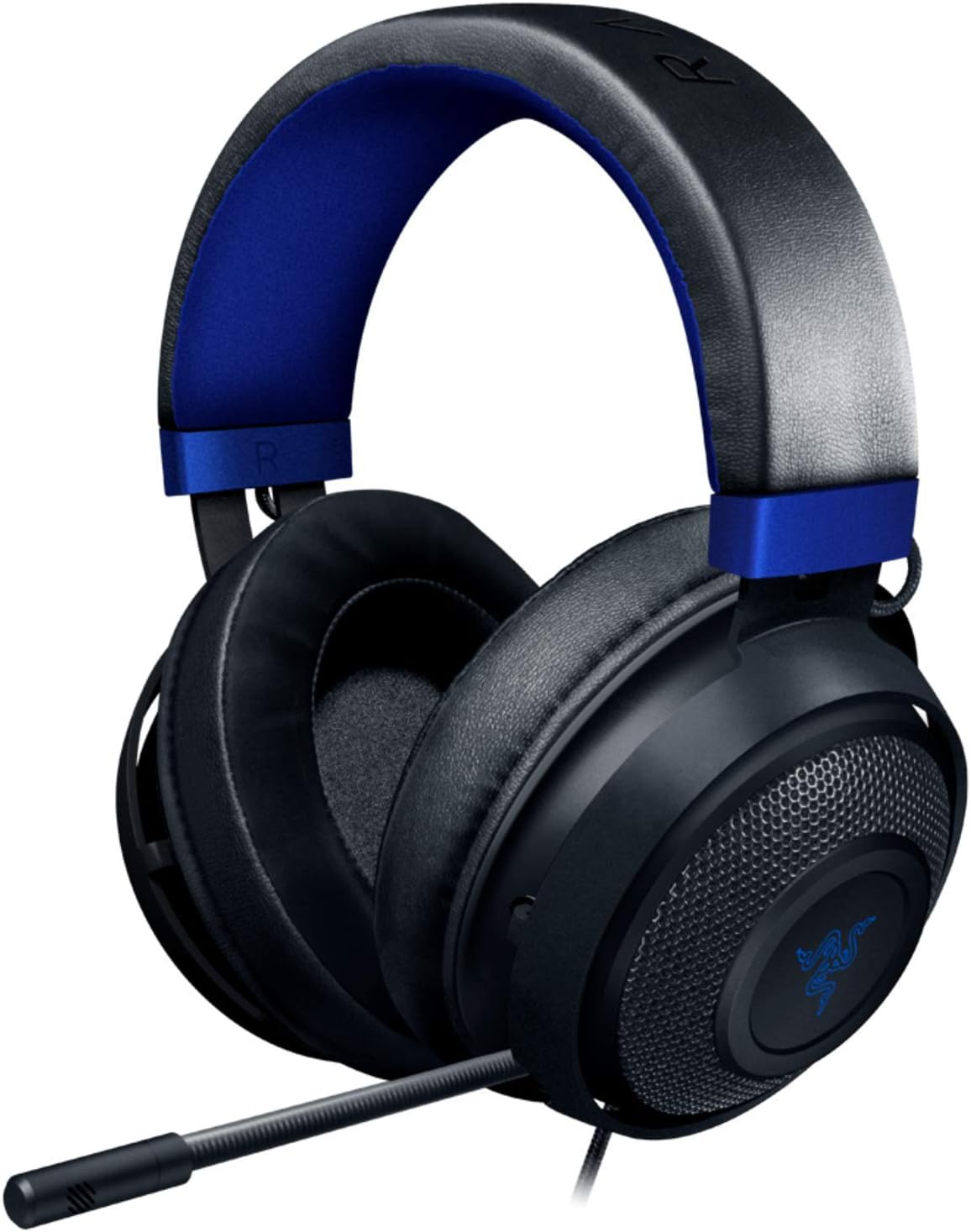
Quick answer: For most people in 2026, our top pick among the best headsets for streaming is the Razer Kraken — our #1 rated choice. See the full ranked comparison, alternatives and buying advice below.
Pros
- Custom-tuned 50 mm drivers, larger than the 40 mm units fitted to most mid-size headsets
- Bauxite aluminium headband frame flexes rather than cracking under desk knocks
- Oval ear cushions are infused with cooling gel to slow heat build-up over long sessions
- Retractable cardioid microphone tucks fully into the left cup when not in use
- In-line wheel and mute switch adjust volume without opening any software
Cons
- 7.1 surround is a software layer for Windows 10 64-bit only, so consoles and Mac get plain stereo
- Wired 3.5 mm connection only, with no wireless option and no USB path for inline amplification
- Passive isolation only, with no active noise cancelling for a noisy commute
Sound comes from custom-tuned 50 mm drivers, a step up in cone area from the 40 mm units common in this class, and that extra area is where the low-end weight in explosions and engine notes comes from. Positional 7.1 surround is a software layer rather than physical speakers, applied by a driver on Windows 10 64-bit.
- Stereo imaging is wide enough to place footsteps left and right without the surround layer
- Bass is emphasised, so a manual equaliser helps if you also listen to acoustic music
- Consoles and Mac receive plain stereo through the 3.5 mm jack
For competitive shooters the surround profile widens the stage and helps with cues from behind. For single-player games and music, the untouched stereo signal is the cleaner choice.

Pros
- TriForce 50mm drivers split tuning across highs, mids, and lows instead of one full-range driver handling the whole spectrum
- At 240g, it's light enough for long sessions, with thicker headband padding and memory foam ear cushions
- Bendable HyperClear cardioid mic can be shaped to sit close to the mouth for clearer pickup
- Closed earcups provide passive noise isolation without needing a battery or active noise-cancelling circuitry
- 3.5mm jack works across PC, Mac, PS4, PS5, Switch, and mobile devices without pairing or drivers
Cons
- 7.1 surround sound only activates on Windows 10 64-bit through Razer's software, so consoles and Mac get stereo output instead
- Xbox One requires a separate stereo adapter that isn't included in the box
- Wired-only 3.5mm connection means no standalone Bluetooth mode for phone calls away from a console or PC
The headset is built around TriForce 50mm drivers, a design that splits the driver into three sections tuned separately for highs, mids, and lows, aiming for clearer detail across the frequency range than a single full-range driver typically delivers.
- 50mm TriForce drivers with separated high/mid/low tuning
- 7.1 surround sound available on Windows 10 64-bit only
- Closed-back earcups for passive noise isolation
On platforms outside Windows 10 64-bit, including consoles and Mac, the headset still outputs full stereo audio through the 3.5mm jack; it's specifically the virtual 7.1 surround processing that's tied to the Windows software.

Pros
- 40mm drivers cover a 20Hz-20,000Hz frequency range for detailed low-end and treble in games
- Braided cable construction resists pulling, crushing and tangling near a busy desk
- Omni-directional swappable microphone rated at -38dB±3dB sensitivity isolates voice from fan noise
- Synthetic leather ear cushions and an adjustable headband suit multi-hour play sessions
- Roughly 3m USB cable length reaches from a desk to a couch setup
Cons
- USB-only interface, so it will not connect to PS4 or Xbox One consoles
- 7.1 virtual surround needs a separate software install and drops to stereo on Mac
- At approximately 340g it is heavier than earbud or open-back alternatives for travel
The SA902 uses 40mm drivers with a 20Hz-20,000Hz frequency range and a sensitivity of 114±3dB at 1kHz, aiming for a full spread of bass and treble rather than a narrow mid-range. Impedance sits at 32 Ohm with a max power handling of 30mW, typical figures for a USB-powered gaming set rather than a high-impedance studio headphone.
- Swappable omni-directional microphone rated at -38dB±3dB sensitivity, with a 50Hz-10kHz pickup range
- 7.1 virtual surround processing runs through bundled software rather than the hardware alone
- USB plug carries both audio and mic signal over a single cable
Because the surround effect is software-driven, the accompanying driver disc or a download from the manufacturer site needs to be installed before the 360-degree field activates on Windows machines.

Pros
- TriForce 50mm Gen-2 drivers separate highs, mids, and lows for clearer footstep and cue detection than single-driver designs
- 70-hour battery life on a charge outlasts most wireless gaming headsets rated for a single day of play
- Detachable 9.9mm cardioid microphone removes for storage or travel, and auto-mutes when pivoted upward
- Three connectivity modes - 2.4GHz HyperSpeed Wireless, Bluetooth, and wired USB - cover PC, console, and mobile without separate dongles
Cons
- 7.1 surround sound is a virtual, software-processed effect rather than true multi-driver surround hardware
- Switching between 2.4GHz and Bluetooth modes depends on SmartSwitch Dual Wireless pairing, which adds a setup step over a single fixed connection
- Sold in black only, with no alternate colorway listed
Audio comes from TriForce 50mm Gen-2 drivers, tuned to separate highs, mids, and lows for clearer footstep and cue detection, backed by 7.1 surround sound processing for positional awareness. The detachable 9.9mm HyperClear Cardioid microphone uses a unidirectional pickup pattern to reduce background noise pickup during voice chat.
- TriForce 50mm Gen-2 drivers
- 7.1 virtual surround sound processing
- Detachable 9.9mm cardioid microphone
The mic auto-mutes when pivoted upward and detaches fully when not needed, useful for anyone switching between gaming sessions and mic-free listening.
The headset connects through three modes - 2.4GHz HyperSpeed Wireless, Bluetooth, and wired USB - covering PC, console, and mobile devices without needing separate hardware for each. A single charge delivers up to 70 hours of battery life, and SmartSwitch Dual Wireless lets the two wireless modes swap without unpairing.
- 2.4GHz HyperSpeed Wireless, Bluetooth, and USB modes
- Up to 70 hours of battery life per charge
- SmartSwitch Dual Wireless for switching connections
Because SmartSwitch governs the wireless mode change, moving between a 2.4GHz PC dongle and a Bluetooth phone connection takes a deliberate switch step rather than an automatic handoff.

Pros
- Tri-connect flexibility switches between LIGHTSPEED 2.4GHz wireless, Bluetooth, and wired USB A-to-C without needing separate adapters
- Full-bandwidth 48kHz/16-bit microphone paired with Blue VO!CE software delivers broadcast-quality voice clarity
- PRO-G audio drivers output synchronized 48kHz/24-bit audio for lower distortion and richer bass
- Rated for up to 60 hours of battery life with RGB lighting disabled
- Lightweight 280g build with a washable suspension band suits marathon sessions
Cons
- Battery life drops noticeably below 60 hours whenever LIGHTSYNC RGB lighting is left active
- Wireless range tops out around 30 meters, so walking far from the receiver or paired device will cut the connection
- Compatible with PC and Nintendo Switch/Switch 2, but console-specific voice customization runs through G HUB, which is PC software only
Three connection modes cover most setups: LIGHTSPEED 2.4GHz wireless for PC gaming in busy RF environments, Bluetooth for pairing with mobile devices, and wired USB A-to-C for uninterrupted play when battery life or interference is a concern. Rated battery life reaches up to 60 hours with RGB lighting turned off, dropping when LIGHTSYNC effects stay active.
- LIGHTSPEED 2.4GHz, Bluetooth, and wired USB A-to-C modes
- Up to 60 hours battery life (lighting off)
- Wireless range up to 30 meters
- LIGHTSYNC RGB in up to 16.8 million colors
Switching to the wired USB connection keeps the headset usable even after the battery runs down, without waiting for a recharge.

Pros
- 45mm studio drivers deliver extended frequency response (20 Hz-20 kHz) matching professional monitoring standards
- Cardioid condenser microphone based on iconic 20 Series design rejects background noise while capturing voice clarity
- Includes two interchangeable earpad styles (M50x sealed and mesh) permitting you to tune isolation vs breathability
- Flexible boom arm positions microphone 2-3cm from lips for optimal recording distance without manual repositioning
Cons
- 2-metre permanently attached XLR cable requires audio interface or mixer; USB-only configuration unavailable in this model
- Earcup acoustic isolation suited for quiet studios may cause heat buildup during 4+ hour streaming sessions in warm rooms
- M50x sealed earpads reduce external noise by 20-30dB but create slight midrange colouration in close monitoring

Pros
- Frequency response 15Hz 25,000 H.Headphones fit type Over-Ear.The
- Dual Chamber Drivers for more distinction and less distortion
- Signature award winning comfort
- Durable aluminum frame with expanded headband
- Detachable braided cable with convenient in line audio control
Pros
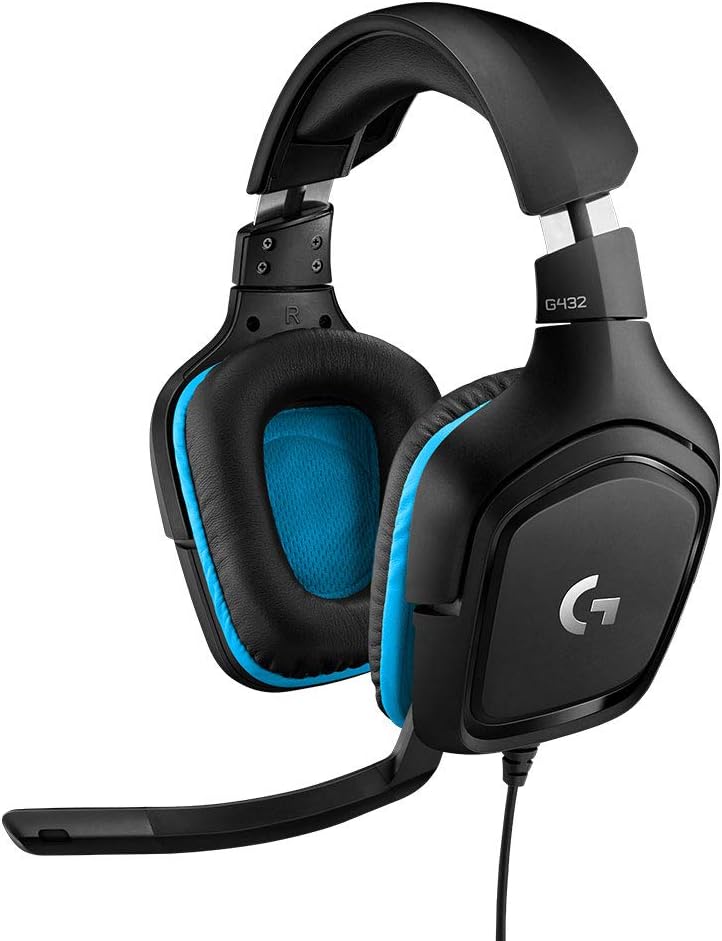
- 50 mm drivers paired with DTS Headphone:X 2.0 positional processing through the bundled USB sound card
- A 6 mm boom mic mutes itself when flipped up, so there is no inline switch to hunt for mid-round
- Both a USB adapter and a 3.5 mm cable are included, covering PC, Mac, Switch and PlayStation from one set
- Ear cups rotate 90 degrees to lie flat on a desk or sit against the collarbone between matches
- Leatherette pads and headband keep clamping pressure off the ear itself
Cons
- DTS Headphone:X 2.0 needs the G HUB software on Windows or macOS; over 3.5 mm on console it is plain stereo
- Wired only, with no wireless variant, so the cable stays tethered to the machine
- Leatherette pads seal well but trap heat, which mesh or velour alternatives avoid over long sessions
Each cup carries a 50 mm driver, larger than the 40 mm units common in this class, which helps with low-frequency weight for explosions and engine noise. Surround comes from DTS Headphone:X 2.0, a software layer applied by the USB sound card rather than by extra physical drivers.
- Virtual channels go beyond a fixed 7.1 layout to place height cues
- Processing runs only when the USB connection and software are in use
- The analogue 3.5 mm path stays plain stereo
Positional audio is most useful in competitive shooters where footstep direction matters. In music and film, many listeners switch the effect off and run stereo, since the processing widens the stage at the expense of centre focus. Both modes are a toggle away in software, so it is worth testing per game.
Two connection routes ship in the box. The USB sound card handles surround processing on PC and Mac, while the 3.5 mm cable covers everything with a headphone jack.
- PC and Mac: USB for full surround plus mic controls, or 3.5 mm for stereo
- PlayStation 5 and 4: 3.5 mm into the controller for stereo game and chat audio
- Nintendo Switch: 3.5 mm on the handheld jack, or into a docked controller
- Phones and tablets: 3.5 mm, subject to the device having a jack or a dongle
The practical catch is that surround and any equaliser settings live in software on a computer. Moving the headset to a console strips those back to whatever the console mixes natively, so treat the surround feature as a PC benefit rather than a universal one.
Pros
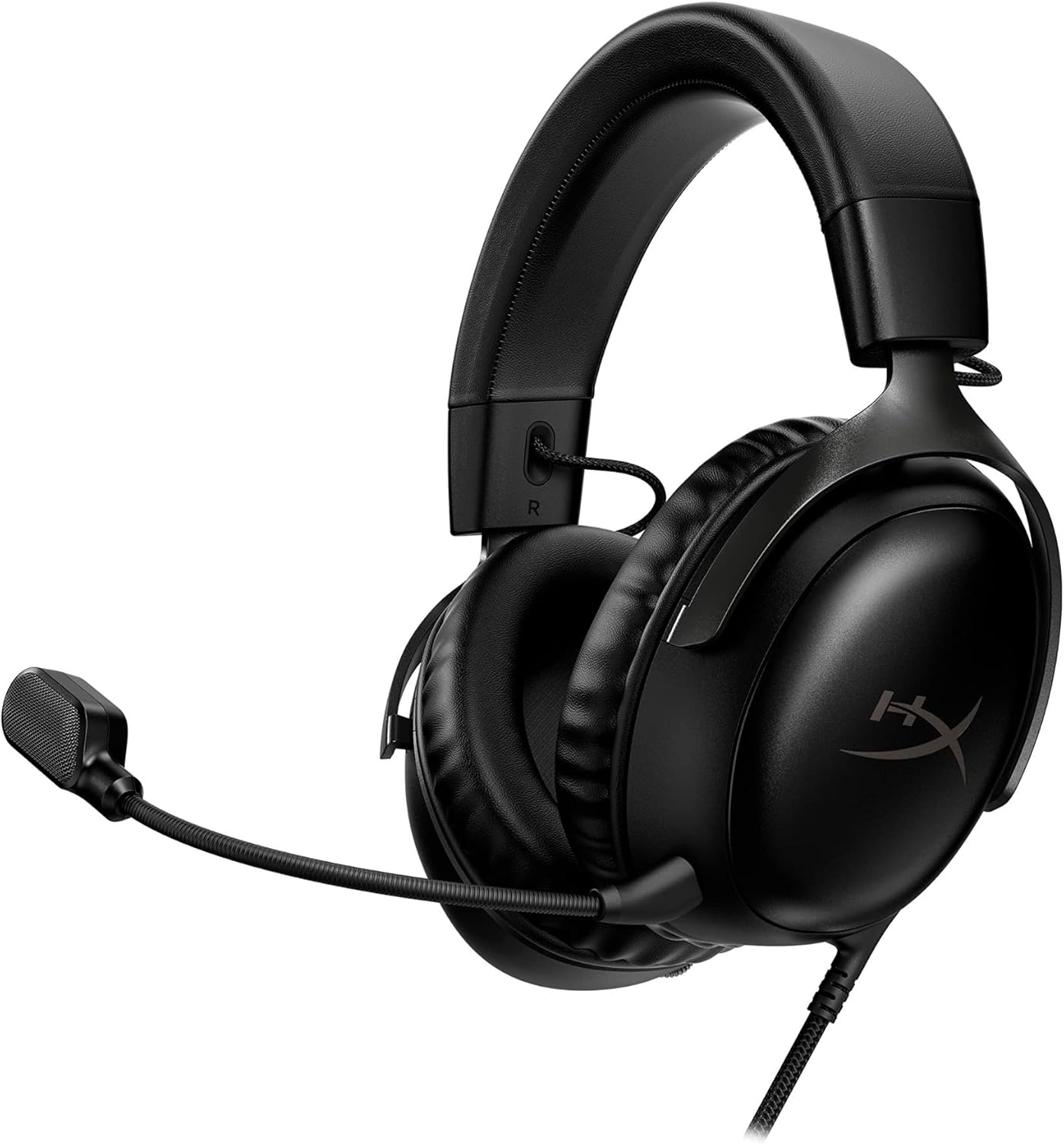
- Comfort is King Comfort s in the Cloud III s DNA. Built for gamers who
- Audio Tuned for Your Entertainment Angled 53mm drivers have been tuned
- Upgraded Microphone for Clarity and Accuracy Captures high-quality
- Durability, for the Toughest of Battles The headset is flexible and
- DTS Headphone X Spatial Audio A lifetime activation of DTS Spatial

Pros
- Weighs just 8.5 oz (240g), lighter than the brand's own G733 wireless model
- 40mm neodymium drivers deliver the headset's stereo output for game and voice audio
- Flip-to-mute microphone lets you silence input by flipping it up, without a separate mute button
- Discord Certified for verified clarity on voice calls, not just in-game audio
- Compatible via 3.5mm jack with PC, PlayStation, Xbox, and Nintendo Switch/Switch 2
Cons
- Wired-only 3.5mm connection, so there is no wireless or Bluetooth mode on this model
- Volume control lives on the ear cup roller rather than as a separate inline remote
- Single 3.5mm jack limits use on devices without a matching port unless an adapter is added
Connection runs entirely through a 3.5mm audio jack, making setup as simple as plugging into a PC, laptop, or console without pairing or drivers. The headset is confirmed compatible with PlayStation 5, PlayStation 4, Xbox One, Xbox Series X|S, and Nintendo Switch/Switch 2 through this same 3.5mm connection.
- 3.5mm audio jack, plug-and-play setup
- Compatible with PC, PS5, PS4, Xbox One, Xbox Series X|S, Switch/Switch 2
- No wireless or Bluetooth mode
Because it is wired-only, this headset suits desks and consoles positioned close enough for a cable, while anyone wanting to roam untethered around a room will need to look at a wireless model instead.
What Makes a Headset Good for Streaming
A streaming headset has different priorities than a headset built purely for competitive gaming. You need a microphone your viewers can understand clearly, not just one that’s “good enough” for teammates in a match. You also need something you can wear for hours without it becoming a distraction on camera.
Microphone Clarity Comes First
Your viewers judge production quality by how you sound, often more than how the game looks. Look for a cardioid or unidirectional mic pattern, which picks up your voice while rejecting keyboard clatter and room noise. Detachable or flip-to-mute mics are a bonus, since you can quickly go quiet during a break without fumbling for a software mute button.
Comfort for Multi-Hour Broadcasts
Streams regularly run two to four hours, sometimes longer. Memory foam ear cushions and a light clamping force matter far more here than they do for a 45-minute match. Heavier headsets with stiff headbands can start causing pressure discomfort well before your stream wraps up.
Wired vs. Wireless for a Streaming Rig
Wired headsets avoid dropouts and battery anxiety, which matters when you’re live and can’t just pause to recharge. Wireless models free you from cable clutter around your capture card and mixer, which is nice for cam-heavy setups. If you’re unsure which fits your desk better, our guide to the best wired headsets and our roundup of the best wireless headsets both dig deeper into the trade-offs.
Platform and Software Compatibility
Check whether a headset works cleanly with your capture setup before you buy. Some wireless models need a USB dongle that can conflict with a crowded USB hub already running a capture card, stream deck, and webcam. If you switch between PC and console mid-week, prioritize models with simple 3.5mm or USB-C connections over ones tied to a single proprietary app.
The 10 Best Streaming Headsets by Scenario
Below are the 10 picks we recommend for 2026, organized by the situation they fit best rather than a strict ranking. Match your setup and budget to the scenario that sounds most like yours.
Best Overall Streaming Headset: Razer Kraken
The Razer Kraken earns its spot as the top pick for a reason: a retractable noise-isolating mic, a lightweight aluminum frame, and broad compatibility across PC, consoles, and mobile. With a 4.5 rating across roughly 48,530 reviews, it’s a dependable choice if you stream across multiple platforms and don’t want to juggle different headsets. It’s wired, so you won’t deal with battery levels mid-broadcast. It’s not the lightest option on this list, so if you have a smaller frame, try it on before committing to hours-long wear.
Best Budget Wired Pick: HyperX Cloud III
If you’re just starting to stream and don’t want to overspend before you know it’s a habit that sticks, the HyperX Cloud III is worth checking the current price on Amazon for. Angled 53mm drivers, a memory foam fit, and a 10mm mic keep vocal clarity solid. It works across PC, PlayStation, and Xbox, so it travels well if you switch platforms often. Bass-heavy listeners may want to EQ it slightly for a flatter monitoring mix.
Best Wireless for a Clutter-Free Desk
Streamers running a webcam, capture card, and stream deck already have enough cables fighting for space. The Logitech G522 Lightspeed cuts the mic and headphone cord entirely, with up to 60 hours of battery and a detachable Blue VO!CE-tuned microphone. It’s pricier, but the long battery life means you’re unlikely to run dry mid-stream. If your budget is tighter, this one is easy to skip in favor of a wired pick below.
Best for Dedicated Streaming Setups: Audio-Technica StreamSet
The Audio-Technica StreamSet is built specifically around content creation rather than gaming first. It pairs studio-grade monitoring headphones with a broadcast mic and USB interface in one bundle. That’s a real investment, but it removes the need to buy a separate audio interface and mic later. Casual streamers who only go live occasionally probably won’t recoup that cost as quickly.
Best Budget Wireless: Razer BlackShark V3 X HyperSpeed
Not every wireless setup needs to cost over a hundred dollars. The Razer BlackShark V3 X covers 2.4GHz, Bluetooth, and USB connections, with a cardioid mic and roughly 70 hours of battery life. It’s a solid middle ground if you want to cut the cord without paying flagship pricing. Reviews on this newer model are still limited, so weigh that against its lower price.
Best Ultra-Budget Wired Pick: Logitech G335
The Logitech G335 is proof you don’t need to spend much to sound clear on stream. It has a flip-to-mute mic and memory foam earpads, and it works across PC, PlayStation, Xbox, and Switch. It won’t outperform pricier picks on build materials, but for casual or occasional streamers it’s hard to beat the value. Just don’t expect the same driver detail as the higher-priced picks on this list.
Most Comfortable for Marathon Sessions: HyperX Cloud Alpha
Long charity streams and raid nights punish uncomfortable headsets fast. The HyperX Cloud Alpha uses dual-chamber drivers and leatherette memory-foam cushions that hold up over multi-hour sessions. Its detachable mic also means you can pull it off during breaks without unplugging the whole headset. The leatherette pads run warmer than cloth alternatives, so it’s worth considering if you stream in a hot room.
Two other solid options worth a look if the picks above don’t quite fit: the Razer BlackShark V2 X is a lighter, budget-friendly wired option, and the SADES SA902 brings 7.1 surround sound and LED lighting at an entry-level price for streamers who also want in-game positional audio for aim-heavy titles.
Common Mistakes When Buying a Streaming Headset
Even experienced streamers make avoidable choices when upgrading their audio gear. A little planning before checkout saves you from a return shipment later. Here’s what to watch for:
- Buying based on RGB lighting instead of mic quality — viewers hear your mic, they never see your lights.
- Ignoring clamping force and weight, then discovering the headset hurts after two hours on camera.
- Choosing wireless without checking real-world battery life against your typical stream length.
- Skipping compatibility checks if you stream from a console alongside your PC setup.
- Assuming a higher price always means a better mic — some budget picks outperform pricier ones for voice clarity.
- Forgetting to test mic monitoring levels before going live, which can lead to shouting over your own audio without realizing it.
Streaming Headset FAQs
Do I need a separate microphone, or is a headset mic enough?
For most new streamers, a good headset mic like those on the Razer Kraken or HyperX Cloud III is enough to sound clear. Once your channel grows, you might consider a dedicated USB mic for finer tonal control. Our best headsets with microphone guide covers picks where mic quality is the main focus.
Is wireless or wired better for streaming?
Wired headsets are more reliable for long, uninterrupted broadcasts since there’s no battery to manage. Wireless is worth it if desk clutter or camera framing is a bigger concern for you than the small risk of a mid-stream recharge.
How much should I spend on a streaming headset?
Budgets between $40 and $130 cover most casual to serious streamers well, based on the picks above. Only go higher, toward something like the Audio-Technica StreamSet, if you specifically want a combined mic-and-headphone interface bundle.
Can I use a regular gaming headset for streaming?
Yes — most gaming headsets work fine for streaming as long as the mic sounds clear and the fit is comfortable for hours at a time. If you’re also curious how these compare to headsets built for competitive play, check our best headsets for gaming roundup.
Does a headset mic sound worse than a standalone microphone?
Not necessarily — headset mics with cardioid pickup patterns, like the ones on the BlackShark V3 X and Cloud Alpha, can sound clean and close-range. Standalone mics usually offer more tonal control, but they add cost and desk space many streamers don’t need yet.
Picking the right headset comes down to matching your actual streaming habits, not chasing the flashiest spec sheet. If you stream across multiple platforms, start with the Razer Kraken. If you’re testing the waters before committing more budget, the Cloud III or G335 get you sounding clear without overspending. Whichever you land on, prioritize mic clarity and comfort over lighting and marketing claims, and your stream audio will hold up long after the first session.




