
 Marcus Bell
 Choosing the Best Desks for PCs: A Complete Buying Guide
Finding the best desks for PCs is about far more than picking a flat surface to hold a monitor. A good computer desk shapes your posture, keeps your cables tidy, gives your peripherals room to breathe, and can even boost how much you actually get done in a day. Whether you are building a serious gaming rig, setting up a productive home office, or squeezing a workstation into a small apartment, the right desk makes everything easier. This guide walks you through what matters when shopping for one of the best desks for PCs, so you can match a desk to your space, your gear, and your budget with confidence.
Below you will find a curated list of popular PC desks to browse, followed by a practical framework for choosing. Take a look at the lineup, then read on to learn how to narrow the field.

Pros
- Generous 63x28 inch desktop surface accommodates multi-monitor setups
- Motorized height adjustment transitions quietly between sit and stand modes
- Programmable memory settings save preferred standing heights for quick recall
- Heavy-duty steel T-legs provide physical stability under full load
- Integrated cable tray keeps power cords organized underneath desk
Cons
- Assembling the large steel frame requires space and two-person effort
- Motorized lift requires an accessible wall power socket nearby for operation
The Veken 63" x 28" large standing desk provides an expansive, ergonomic workspace designed for home office professionals, gamers, and multi-monitor power users. Featuring a large 63-inch wide by 28-inch deep desktop surface, it easily accommodates dual monitors, laptops, desktop speakers, and writing accessories without feeling cramped. Transitioning between sitting and standing postures throughout the workday promotes blood circulation, reduces lower back strain, and boosts energy levels. This height-adjustable desk serves as a versatile workstation centerpiece for home offices, conference rooms, or creative studio spaces during long computer tasks.
Powered by a smooth electric motor system, the standing desk adjusts height quietly between sitting and standing positions at the touch of a button. The digital control panel features customizable memory presets, allowing users to save and recall their preferred sitting and standing heights instantly without manual adjustments. Advanced anti-collision sensors detect obstacles when raising or lowering the desk, automatically stopping motion to prevent damage to surrounding furniture. The heavy-duty T-style steel leg frame ensures rock-solid stability even when elevated to maximum height for standing work and typing tasks.
Setting up the electric standing desk involves connecting the steel leg frame, crossbeams, motor drive shaft, and desktop panels using the supplied hardware kit. An under-desk wire basket manages power strips, monitor cables, and charger cords, maintaining a tidy workstation aesthetic. Hanging hooks attached to desk sides provide convenient storage for headphones and bags. Place the desk on level flooring near power outlets, ensuring sufficient cable slack for smooth height adjustments throughout your workday and computer tasks across every season of remote work.

Pros
- Designed with Adjustable Open Shelves Modern computer desk features open storage with for reliable daily operation
- Designed with Reversible Design Easy Assembly Enjoy ultimate flexibility with a reversible for reliable daily operation
- Designed with Modern Office Desk With rustic oak wood grain finish and for reliable daily operation
- Dimensions measure 23.6"D x 53"W x 29.5"H for spatial allocation
- Rated load capacity supports up to 300 Pounds
Cons
- Requires measuring doorways and room clearance for EXCEFUR Modern Com prior to placement
- Periodic inspection of fasteners is recommended to maintain structural stability
From an ergonomic evaluation standpoint, the EXCEFUR Modern Computer Desk for Home Office PC Gaming balances structural support with daily physical comfort for home office or living environments. Primary specifications feature Adjustable Open Shelves Modern computer desk features open storage with along with Reversible Design Easy Assembly Enjoy ultimate flexibility with a reversible. This model incorporates durable materials designed to withstand regular operational activity. Overall physical measurements of 23.6"D x 53"W x 29.5"H provide clear boundaries for spatial planning in your room.
- Engineered with Adjustable Open Shelves Modern computer desk features open storage with to support efficient daily operation.
- Incorporates Reversible Design Easy Assembly Enjoy ultimate flexibility with a reversible for enhanced structural reliability during routine use.
- Features Modern Office Desk With rustic oak wood grain finish and to ensure practical usability across varied workspace setups.
- Built to maintain consistent operational stability within standard furniture seating conditions.
- Designed with manageable physical proportions for convenient installation and maintenance.
To maximize longevity and seating posture, ensure all bolts are tightened securely during initial assembly and place on level flooring. Rated maximum load capacity supports up to 300 Pounds for safe long-term use.
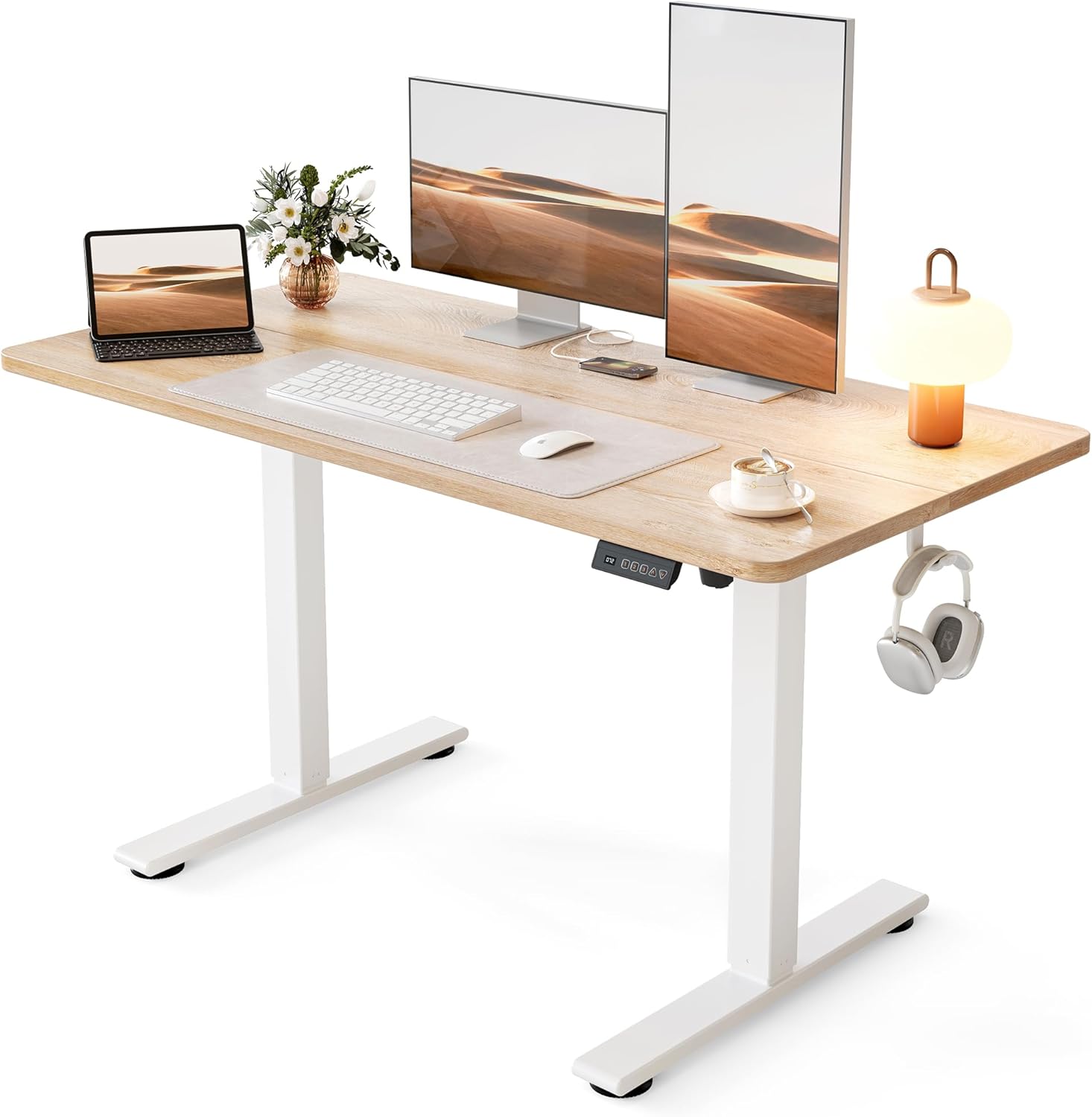
Pros
- Lifts from 28.3 in. to 46.5 in., covering seated typing and standing work for most adults
- Steel frame carries up to 176 lb, enough for dual monitors, a laptop dock and a desk lamp
- Motor runs under 45 dB, quiet enough to raise the top mid video call
- 3 memory presets recall exact seated and standing heights with one touch
- Frame tested through 100,000 lift cycles before shipping
Cons
- Only 24 in. deep, so a wide monitor stand crowds the keyboard area
- Spliced two-piece top leaves a seam running across the work surface
- No cable tray is listed among the included parts, so wire management is a separate job
The top measures 48 in. wide by 24 in. deep, which holds two 24 in. monitors side by side, or one ultrawide with room in front for a keyboard and notebook.
- Height travel runs 28.3 in. to 46.5 in.
- Steel frame rated to 176 lb of gear
- Frame tested through 100,000 lift cycles
- Listed footprint 24 in. D x 48 in. W x 27 in. H
At 24 in. of depth, a deep monitor stand eats into arm room, so a clamp-mounted arm frees the back edge and buys back several inches. Standing users above 6 ft 3 in. should measure elbow height against the 46.5 in. ceiling before committing, since that figure is the hard limit of the columns.
The desk arrives as two leg columns, a crossbar and a spliced two-piece top that bolts together from underneath. Expect a flip-and-lift step at the end, so a second pair of hands makes the final turn much easier on a carpeted floor.
- All screws and the hex tool ship in the carton
- Controller stores 3 height presets
- Motor stays under 45 dB during travel
- Low-VOC board finish for indoor air quality
Set the presets once your chair and monitor are in place: seated height should put elbows at roughly 90 deg, and standing height a touch below elbow level. Route the power lead down one leg with adhesive clips, since no tray is included.
This is a single-user home workstation rather than a shared studio bench. The 48 in. span suits a laptop plus one or two monitors, a lamp and a notebook, and the 24 in. depth keeps it usable in a bedroom corner or against a hallway wall.
- Sit-stand switching several times a day
- Rooms where a quiet motor matters during calls
- Setups comfortably under the 176 lb load ceiling
- Interiors that suit a white frame with a maple top
It is a weaker fit if you run a very deep curved panel with wide feet, need a third monitor across the span, or want a finish that matches dark furniture, since the frame and top combination is fixed.

Pros
- 325-pound weight capacity across the tabletop, generous for dual monitor arms and full desktop setups
- 2 AC outlets plus 2 PowerIQ USB ports power up to 4 devices without a separate power strip
- Monitor stand raises 2 displays at once, cutting neck strain versus flat-desk monitor placement
- Cable management grommets and a 2-layer storage shelf keep cords and gear off the 94.5-inch desktop
Cons
- LED light strip depends on a companion app for full color and music-sync control, adding a setup step beyond plug-and-play
- At 94.5 inches wide, it needs a dedicated wall or room length most single-person home offices do not have
- Keyboard tray is sized for 108-key or 87-key boards specifically, so oversized ergonomic keyboards may not fit cleanly
The desk spans 19.7"D x 94.5"W x 30"H and is rated to hold up to 325 pounds across its metal frame, enough for dual monitor arms, two full desktop setups, and shared accessories at once. A 2-layer storage shelf and printer stand add space beyond the main desktop.
- 325 lb weight capacity supported by a stable thick metal frame
- 94.5-inch width fits two people working side by side without crowding
- 2-layer middle storage shelf adds space separate from the desktop surface
Because the desk is built around a shared 94.5-inch surface rather than two separate desks pushed together, it needs a continuous wall run of that length to sit properly.
Assembly includes the desk frame, printer stand, keyboard tray, monitor stand, and the 94.5-inch LED strip with its remote/app pairing. Cable grommets built into the desktop route power and monitor cables down through the frame instead of leaving them exposed.
- Cable management grommets keep cords routed through the desktop rather than tangled on top
- Adjustable feet level the desk on uneven flooring
- LED strip pairs to a companion app for color and music-sync control, with a built-in mic for sound-reactive lighting
The waterproof desktop surface adds some protection against spills near the keyboard tray and power strip area, worth noting for a two-person setup sharing drinks at the desk.
The dual layout suits two people working, gaming, or studying side by side in the same room without needing two separate desks pushed together. Built-in power and USB ports cut down on extension cords for shared electronics.
- Couples, roommates, or siblings who want to work or game side by side
- Home offices with a long, uninterrupted wall able to fit a 94.5-inch desk
- Gamers who want RGB lighting and monitor stands built into the desk itself
It is a poor fit for smaller rooms or single-user setups, where the 94.5-inch width would leave far more desktop than one person needs.

Pros
- Built-in wireless charging pad on the desktop charges a phone without a cable across the surface
- Overall footprint of 55"W x 37.4"D x 59"H with an L-shaped layout fits into a corner instead of needing two walls
- Reversible design lets the shelving side switch from left to right to match room layout
- 5 open shelves plus a movable CPU stand add storage and keep a desktop tower off the floor
- Rated to hold 100 pounds, covering a monitor setup, books, and desk accessories together
Cons
- Weight capacity is rated at 100 pounds, lower than steel-frame desks in this category rated for 300 pounds
- Engineered wood panels, rather than solid wood, make up the desktop and shelving surfaces
- Full assembly is required, with hardware and instructions included but no pre-built option in this listing
The desk's overall footprint runs 55 inches wide by 37.4 inches deep by 59 inches tall, built as an L-shape with an attached hutch. The desktop surface itself measures about 39 inches along its working edge, while the bookcase portion measures 15.74 inches wide by 37.4 inches deep, giving separate work and storage zones in one footprint.
- 55"W x 37.4"D x 59"H overall dimensions
- Desktop working surface of about 39 inches
- 5 open shelves plus a movable CPU stand
- 100-pound weight capacity
Because it's an L-shape design, it fits into a corner rather than needing two separate walls of clear space, though the 59-inch height with the hutch attached takes up more vertical wall space than a desk without one.
All assembly hardware, tools, and illustrated instructions are included, built around an engineered wood desktop and shelving supported by a powder-coated steel frame. The desk is designed to be reversible, so the shelf side can be set up on the left or right depending on how the corner of the room is laid out.
- All hardware and illustrated instructions included
- Reversible left-shelf or right-shelf configuration
- Powder-coated steel frame under engineered wood panels
- Adjustable feet pads level the desk on uneven flooring
Because the shelf side is reversible rather than fixed, the same desk can be reconfigured if the room layout changes later, without needing to buy a different left- or right-handed model.
A wireless charging pad is built into the desktop surface, letting a compatible phone charge just by resting on the marked spot rather than plugging in a cable. That's paired with a movable CPU stand that keeps a desktop tower off the floor and away from dust and moisture, useful in a home office with hard flooring.
- Built-in wireless charging pad on the desktop
- Movable CPU stand protects the tower from moisture and dust
- 5 open shelves for books, files, or decorative storage
This desk suits a home office corner needing both work surface and visible storage in one piece, though anyone needing to hold more than 100 pounds of equipment, such as multiple monitor arms and heavy books, may want a steel-frame desk rated higher instead.

Pros
- Reversible design converts between a 62.2-inch L-shaped corner desk or an 86.6-inch straight two-person desk
- Built-in charging station with 4 outlets and 2 USB ports powers up to 6 devices at once from the desk itself
- Top hutch, 2 fabric drawers, and a storage cabinet door give multiple dedicated storage zones without separate furniture
- Desktop is made from FSC certified wood, supporting responsibly sourced material sourcing
Cons
- Metal frame construction with a large 62.2 to 86.6 inch footprint needs a sizable room to accommodate either configuration
- Charging station relies on the desk's own power switch, so devices lose power entirely when it is switched off
- Fabric drawers are less durable under heavy repeated use than solid wood or metal drawer boxes
This desk measures 18.9 inches deep by 62.2 inches wide by 65 inches tall in its L-shaped corner configuration, and can be reconfigured into an 86.6-inch straight desk for two people working side by side. The top hutch can be positioned on either the left or right side depending on room layout.
- 2 fabric storage drawers plus 1 storage cabinet door for organization
- Desktop surface made from FSC certified wood
- Metal frame provides the structural support for both configurations
Because the desk reverses between two distinct layouts, measuring your available wall or corner space for both options helps decide which configuration fits best long-term.
Storage is split across a top hutch, 2 fabric drawers, and a cabinet door, giving separate zones for books, files and everyday supplies. A built-in charging station adds 4 power outlets and 2 USB ports, enough to charge up to 6 devices at once, controlled by a single on-off switch for safety.
- On-off switch cuts power to all outlets and USB ports together
- LED strip lighting adds ambient lighting around the desk frame
- Assembly follows the included hardware and instructions for the metal frame
Because the power switch controls the entire charging station at once, individual devices cannot stay powered if the main switch is turned off.
This desk suits home offices and gaming setups needing both a large work surface and built-in storage in one piece of furniture, especially where two people might share a long desk configuration. The LED lighting and charging station lean toward a gaming-oriented setup rather than a minimalist office look.
- Good fit for shared home offices needing an 86.6-inch two-person layout
- L-shaped configuration suits corner placement in smaller rooms
- Built-in charging station benefits desks running multiple devices simultaneously
Anyone wanting a compact, minimal-footprint desk should measure carefully first, since both configurations of this desk take up significant floor space.

Pros
- Spacious 55-inch width accommodates dual monitors plus keyboard and accessories
- Supports up to 149 kg, well above typical desk equipment loads
- Sturdy Z-shaped metal legs provide stable base without wobbling
- Simple assembly requires just 15 minutes with included tools
- Smooth particleboard top resists scratches from daily use
Cons
- Fixed height at 29.5 inches may feel low for users over 6 feet tall
- Desktop is not height-adjustable for sitting or standing work positions
The extra-large 55-inch desktop provides ample workspace for modern multi-monitor setups, office supplies, and decorative elements without requiring constant reorganization. The smooth particleboard surface resists scratches from keyboard and mouse movement while maintaining a professional appearance suitable for both home offices and professional environments.
- Width of 55 inches accommodates dual 27-inch monitors side by side with keyboard between them
- Depth of 23.6 inches allows monitor stands and pull-forward peripherals without excessive reach required
- Height of 29.5 inches aligns with standard office desk heights for most users between five feet four inches and six feet
- Smooth finish top prevents snagging cables or damaging monitor bases during repositioning
- Neutral gray color coordinates with most office furniture and lighting fixtures without clashing
The spacious layout eliminates cramped feeling common with compact desks, enabling comfortable positioning of multiple monitors and peripherals for enhanced productivity and reduced neck strain from excessive head turning.
Heavy-duty Z-shaped metal legs provide exceptionally stable base that supports full loads without wobbling or flexing. The steel construction withstands aggressive keyboard and mouse use common in intensive computing work without structural fatigue or loosening of connections over months of use.
- Welded steel frame construction eliminates squeaks and movement common with bolted frames
- Z-shaped leg design positions legs at desk perimeter away from foot traffic and chair wheels
- Extra-thick 1.97-inch steel tubing provides superior rigidity compared to standard 1.5-inch alternatives
- Adjustable foot pads prevent rocking on uneven floors and reduce scratching of floor finishes
- Capacity performance level of 149 kilograms accommodates weighted keyboard trays and monitor arms simultaneously
The engineered frame design prioritizes stability during daily use, providing confidence that premium monitors and peripherals remain secure even during movement and repositioning throughout the workday.
Tool-free assembly requires only simple connection of legs to desktop using included hardware and installation templates. The straightforward design means most users complete setup in fifteen minutes without requiring power tools or professional assistance, enabling immediate productivity after delivery.
- Color-coded leg components correspond to marked positions on desktop for intuitive assembly
- Pre-drilled holes and pilot guides prevent assembly errors that could damage threaded inserts
- Included Allen wrench tightens connections securely without requiring additional tools from your toolbox
- Detailed pictorial instructions use images rather than text for universal clarity across language barriers
- YouTube assembly videos available showing step-by-step process for visual learners preferring video guidance
The streamlined assembly process and robust hardware ensure the desk remains stable and level for years of daily use, eliminating the need for periodic re-tightening common with poorly designed furniture options.

Pros
- Electric lift adjusts smoothly from 27.95 to 45.67 inches to cover sitting and standing heights
- 3 programmable memory buttons recall preferred heights instantly
- Frame is tested for 50,000 lift cycles at up to 220 lbs (100 kg) of loaded weight
- 1-inch-thick desktop resists flex under monitors and heavier equipment
- Motor runs below 45dB, quiet enough for shared home office spaces
Cons
- 60 x 28-inch top is fixed in size, so it will not suit a corner or L-shaped office layout
- Requires a nearby power outlet for the electric lift motor to function
- Cable management is built in but still needs manual routing during setup
The desk lifts electrically between 27.95 and 45.67 inches, covering both seated and standing positions on the same frame. Maximum loaded capacity is rated to 220 lbs (100 kg), supported by a 2.5mm steel base and a reinforced double-beam frame.
The desktop itself is 1 inch thick across a 60 x 28-inch surface, sized to hold multiple monitors and other equipment without visible flex. DeskShow states the lifting mechanism has been tested through 50,000 lift cycles, aimed at withstanding years of daily height changes.
- 3 programmable memory buttons store preferred sit and stand heights
- Motor runs at under 45dB during height changes
- Cable management channel keeps cords routed along the frame
Programming a height involves adjusting the desk to the desired position and holding the corresponding memory button, after which that height can be recalled with a single press. The quiet motor is built to avoid disrupting calls or shared home office spaces during adjustment.
Buttons sit within reach while seated, so a height change can be triggered without standing up or leaning across the desktop to reach a separate control panel.
This desk suits anyone alternating between sitting and standing through a workday, particularly with multiple monitors or heavier equipment given its rated 220 lb capacity. The fixed 60 x 28-inch top works for a single dedicated workstation rather than a shared or sectional office layout.
An outlet is required near the desk for the electric lift motor to run, since there is no manual crank or battery-powered alternative included.
The double-beam steel frame and 1-inch desktop are built to keep the surface stable while standing and typing, rather than flexing under repeated height changes.

Pros
- 【Extra-Large Desktop Workspace】The 71" x 37" desktop offers
- 【Rock-Solid Stability】Built with integrated dual crossbeam and
- 【Powerful Motor & Smart Controller】Equipped with a high-performance
- 【1" Thickened Desktop】Crafted from FSC-certified wood, the
- Dimensions of 37"D x 71"W x 28.3"H engineered for optimal spatial fitting
Cons
- Requires verifying placement clearance for 37"D x 71"W x 28.3"H prior to installation
- Requires gentle maintenance routines to preserve the Alloy Steel finish
- Load weight limits should not exceed 220 Pounds during active operations
The FEZIBO FEZIBO 71 x 37 Inch Electric Standing Desk with Integrated is engineered to address the operational demands of Home Office Desks environments. Key physical design elements prioritize user comfort through 【Extra-Large Desktop Workspace】The 71" x 37" desktop offers well-organized zones for monitors, PC towers, printers, audio equipment, and other work accessories. Deeper 37" tabletop is perfect for users who rely on multi-screen setups. Equipped with 【Rock-Solid Stability】Built with integrated dual crossbeam and thickened & extended alloy steel frame, this standing desk delivers up to 150% greater stability than standard desks. Supports up to 220 lbs with no wobble even at full height — perfect for work or gaming, the hardware delivers reliable structural support under regular demands. Measurements of 37"D x 71"W x 28.3"H provide clear dimensional boundaries for precise space planning.
Component assessment indicates careful selection of durable materials tailored for active usage. Key structural features including 【Powerful Motor & Smart Controller】Equipped with a high-performance motor, this desk adjusts smoothly from 28.3" to 46.5" (under 50 dB). The intelligent control panel saves up to 3 preset heights, and built-in 18W USB-C port supports PD 3.0 fast charging for your phone or other devices support overall longevity during regular operational cycles. Careful manufacturing ensures that frame connections retain rigidity over long term use. Constructed using quality Alloy Steel, outer surfaces withstand routine contact without losing visual appeal. Rated for a maximum load of 220 Pounds, the build offers verifiable safety margins.
Preserving structural integrity over extended service life is achieved through consistent daily care. Attributes like 【1" Thickened Desktop】Crafted from FSC-certified wood, the 1-inch-thick surface is scratch-resistant and built to last. Monitor arm-friendly design supports clamp mounts, ideal for multi-monitor and ergonomic setups allow hassle-free integration into existing room configurations. Preventing prolonged exposure to harsh environmental factors helps preserve original finish quality. Attention to manufacturing details ensures reliable utility for your Home Office Desks. Using proper installation techniques maintains physical stability across daily activities. This balanced configuration fits smoothly into existing interior designs while maximizing efficiency.

Pros
- L Shaped Gaming Table: The l shaped design of the new Homall super
- Super Gaming Style: The amazing carbon fiber material covers the
- Large Gaming Surface: Designed for gaming, the Homall l gaming
- Gamer Friendly: The table is equipped with a detachable monitor
- Dimensions of 17"D x 50.4"W x 27.5"H engineered for optimal spatial fitting
Cons
- Requires verifying placement clearance for 17"D x 50.4"W x 27.5"H prior to installation
- Requires gentle maintenance routines to preserve the Alloy Steel finish
- Load weight limits should not exceed 220 Pounds during active operations
Crafted with attention to functional details, the Homall Homall L Shaped Gaming Desk Computer Corner Desk PC Gaming brings efficient performance to your Home Office Desks. Practical hands-on evaluation highlights core functional attributes including L Shaped Gaming Table: The l shaped design of the new Homall super gaming desk can effectively use the corner space while providing more storage space. Same time, switching to this gaming desk will release the center area of the room and make the activity space wider. Make your game room full of energy.. Furthermore, features like Super Gaming Style: The amazing carbon fiber material covers the desk, even including the bottom baffle, which makes the whole table full of fabulous gloss and delicate touch. Plus the detail dark red pattern mezzanine and unique z shaped chair legs. Bring you the double enjoyment of vision and touch. ensure seamless adaptability across varied spatial layouts. Measurements of 17"D x 50.4"W x 27.5"H provide clear dimensional boundaries for precise space planning.
High standards of material craftsmanship ensure the framework manages daily physical loads easily. Materials engineering centers on Large Gaming Surface: Designed for gaming, the Homall l gaming table is composed of two large gaming tables with a length of 50.4 inches (W). In addition to the monitor, mouse, and keyboard, there's plenty of space for other gaming devices, and there is also have enough space for you to operate and enjoy the joy of victory., preserving visual appeal and physical integrity over time. Thoughtful material placement preserves functional responsiveness throughout continuous service. Constructed using quality Alloy Steel, outer surfaces withstand routine contact without losing visual appeal. Rated for a maximum load of 220 Pounds, the build offers verifiable safety margins.
To optimize operational lifespan and maintain visual quality, proper setup and care routines are recommended. With user-friendly details such as Gamer Friendly: The table is equipped with a detachable monitor stand, which can be easily fixed on any table edge according to your needs, even including the corner part. Plus adjustable footpads, reasonable using height, and a stable using environment provide stable support for your gaming equipment and awaken your passion for gaming., setting up the equipment requires minimal effort. Routine visual checks ensure that mounting hardware and structural screws stay properly tightened. Attention to manufacturing details ensures reliable utility for your Home Office Desks.
Why the Right PC Desk Matters
Your desk is the foundation of your entire setup. If it is too small, your monitor sits too close and your keyboard hangs off the edge. If it is unstable, every mouse click sends a wobble through your screen. And if the height is wrong, you will feel it in your neck, wrists, and lower back after just a few hours. Investing a little time in choosing among the best desks for PCs pays off every single day you sit down to work or play.
Beyond comfort, the right desk helps you stay organized. Built-in shelves, drawers, cable management channels, and monitor risers turn a chaotic pile of wires and accessories into a clean, focused environment. That tidiness is not just about looks – a clear desk genuinely helps you concentrate.
Key Factors to Consider When Buying a PC Desk
Before you commit, run through these core considerations. Each one narrows your options and pushes you toward the desk that truly fits your needs.
Size and Surface Area
Start with measurements. Measure the wall or corner where the desk will live, then leave room to walk around and open drawers. Next, think about what sits on top: a single monitor and laptop need far less space than a triple-monitor gaming array with a full-size keyboard, mousepad, and speakers. Wide desks like the Veken Standing Desk or the ultra-long SEDETA Two Person Desk give you sprawling room for multiple screens and accessories, while a compact model such as the Casaottima Gaming Desk suits tighter spaces.
Standing vs. Sitting Desks
Sit-stand desks have become one of the most requested features among the best desks for PCs, and for good reason. Alternating between sitting and standing throughout the day reduces fatigue and keeps you moving. Electric height-adjustable models like the Cubiker Standing Desk, the Electric Standing Desk, and the large FEZIBO Standing Desk let you change positions at the push of a button, often with memory presets that remember your favorite heights. If you spend long hours at your PC, a standing option is well worth considering.
L-Shaped and Corner Desks
If you need maximum surface without eating up an entire wall, an L-shaped desk is a smart move. Corner designs make efficient use of otherwise wasted space and give you two working zones – one for your main screen and one for paperwork, a second monitor, or a laptop. The Tribesigns L-Shape Desk, the SEDETA L Shaped Desk, and the Homall L Shaped Desk all wrap around a corner to maximize usable area while keeping your footprint reasonable.
Storage and Organization
Consider how much you need to stash within arm’s reach. Desks with hutches, shelves, and drawers keep books, controllers, cables, and supplies organized and out of the way. Models like the EXCEFUR Computer Desk include reversible storage shelves, while several gaming-oriented options add fabric drawers and monitor risers. If your space is limited, that built-in storage can replace a separate cabinet entirely.
Build Quality and Stability
A desk that wobbles undermines everything else. Look for sturdy steel frames, thick tabletops, and a weight capacity that comfortably exceeds the total load of your PC, monitors, and peripherals. Double-beam frames, like those found on many electric standing desks, add rigidity that keeps your setup rock-solid even when you are typing quickly or the desk is raised to standing height.
Gaming Features
Gamers often want a little extra flair and function. Integrated LED lights, headphone hooks, cup holders, power strips with USB ports, and dedicated monitor stands are common on gaming desks. Options such as the Casaottima Gaming Desk and the SEDETA Gaming Desk bundle these extras together, so your accessories stay powered and your battlestation looks the part.
Matching a Desk to Your Setup
Now that you know the key factors, here is how to translate them into a decision based on your specific situation.
For the Home Office
If your PC is primarily a work machine, prioritize a clean surface, good ergonomics, and enough storage to keep documents in order. A height-adjustable desk helps you stay comfortable through long workdays, and an L-shaped model gives you room to spread out paperwork alongside your screen. The Tribesigns L-Shape Desk with its hutch and shelves is a strong fit for a productive, tidy office corner.
For Gaming
Gamers should look for width, cable management, and those quality-of-life extras. A wide surface accommodates a large mousepad and multiple monitors, while built-in power strips and LED accents complete the atmosphere. Compact gaming desks work well in bedrooms and dorms, and larger corner units suit dedicated game rooms. The Homall L Shaped Desk and the SEDETA Gaming Desk are popular picks for building an immersive station.
For Small Spaces
Tight on room? Focus on compact footprints and vertical storage. A smaller desk with a hutch or riser lets you build upward instead of outward, keeping your floor clear. The EXCEFUR Computer Desk and the Casaottima Gaming Desk pack useful storage into modest dimensions, making them ideal for apartments and shared rooms.
For Shared or Dual Setups
If two people work or game side by side, or you simply want an expansive single surface, an extra-long desk is the answer. A two-person desk gives each user their own zone while sharing a clean, continuous top. The SEDETA Two Person Desk stretches wide enough to comfortably seat two, with a monitor stand and integrated power to keep both stations running.
Ergonomics: Getting the Height and Position Right
No matter which desk you choose, proper ergonomics protect your body over the long haul. Aim for a setup where your elbows rest at roughly a 90-degree angle when typing and the top of your monitor sits at or just below eye level. A standing desk makes hitting these targets easier because you can fine-tune the height precisely. If you go with a fixed-height desk, pair it with an adjustable chair and, if needed, a monitor riser or keyboard tray to dial in the right posture. Small adjustments here prevent the aches that build up over months of use.
Cable Management and a Clean Setup
One overlooked hallmark of the best desks for PCs is thoughtful cable management. Grommets, under-desk trays, clips, and channels route your power and data cables out of sight, so your workspace looks polished and stays safe from snags. Many modern desks, especially electric standing models, build cable management directly into the frame. Even if yours does not, a few adhesive clips and a cable sleeve go a long way toward a professional finish.
Setting a Budget
PC desks span a wide price range, and more expensive does not always mean better for you. Budget-friendly desks under $100 can serve casual users and small setups perfectly well, while premium electric standing desks command a higher price for their motors, memory presets, and heavy-duty frames. Decide which features you genuinely need – a motorized lift, extra storage, gaming extras, or sheer size – and spend where it counts. The lineup above covers everything from affordable compact desks to spacious adjustable workstations, so there is a fit for most budgets.
Final Thoughts on Choosing the Best Desks for PCs
The best desks for PCs are the ones that disappear into your routine – stable enough to trust, roomy enough for your gear, and comfortable enough to sit at for hours without a second thought. Start by measuring your space and listing what has to fit on top. Decide whether you want the flexibility of a standing desk, the extra room of an L-shaped design, or the compact efficiency of a smaller model. Factor in storage, cable management, and any gaming features you care about, then set a budget that reflects your priorities.
With those criteria in hand, browse the options above and pick the desk that checks your boxes. A well-chosen PC desk is a small upgrade that quietly improves every session at your computer, whether you are working, creating, or gaming. Take your time, weigh the features that matter most to you, and you will land on a desk that serves you well for years to come.






