
 Ryan Delgado
 A white webcam is a small detail that makes a real difference on a light desk setup, where a black camera often looks out of place. If you’re searching for the best white webcams for 2026, you need more than a matching color — you want sharp video, a clear microphone, and a body that actually blends with your monitor or keyboard. This guide compares 10 white webcams across resolution, field of view, low-light handling, and build quality, so you can match performance and looks in one purchase.
Quick answer: For most people shopping in 2026, the best white webcams pick is the NexiGo N660P — our #1 rated choice thanks to its sharp autofocus lens, dual noise-canceling mics, and a clean white shell that pairs well with most desk setups. See the full ranked comparison, alternatives, and buying advice below.

Pros
- Captures 1080p video at 30 frames per second through a wide-angle lens
- Built-in noise-canceling microphone keeps voice clear during calls in noisy environments
- Automatic light correction adjusts brightness and color for low-light or overly bright rooms
- Works via plug-and-play across USB 2.0, 3.0, and 3.1 without extra driver downloads
- Includes a rotatable tripod and sliding privacy cover, plus a 5ft USB cable for flexible desk placement
Cons
- No listed autofocus feature, so image sharpness may vary at different distances from the lens
- 1080p resolution caps out below 4K webcams now available for streaming or content creation
- Automatic light correction cannot fully substitute for a proper ring light in very dim rooms
This webcam records 1080p video at 30 frames per second through a wide-angle lens, paired with a built-in noise-canceling microphone for clearer voice pickup during calls.
- Automatic light correction technology adjusts brightness and color to suit different lighting conditions
- The wide-angle lens fits more of a room or more people into frame than a standard-angle webcam
- Noise-canceling audio helps voice stay clear during webinars, conferences, or livestreams with background noise
This combination targets everyday video calls, online teaching, and light streaming use rather than professional broadcast setups that call for 4K resolution or manual exposure control.
The webcam connects over USB 2.0, 3.0, or 3.1 and works without installing additional drivers, so setup is limited to plugging in the included 5ft USB cable.
- Compatible with desktop PCs and laptops running standard USB video class drivers
- The 5ft cable gives flexibility to position the webcam away from the computer itself
- A rotatable tripod mount allows angle adjustment beyond a fixed monitor clip
Because it relies on standard USB video drivers rather than proprietary software, compatibility spans most modern operating systems without a dedicated companion app.
A rotatable tripod lets the webcam angle up, down, or sideways for the right framing on a desk or shelf, rather than relying solely on a monitor clip.
- A slide-over privacy cover physically blocks the lens when the camera is not in use
- The tripod mount also supports placement away from a monitor, such as on a shelf or desk stand
- White housing color matches lighter desk setups and monitor finishes
The physical privacy cover offers a simple hardware-level safeguard against unintended recording, appealing to anyone who prefers a physical block over relying purely on software camera permissions.

Pros
- Designed with Fast Autofocus Enhanced audioengage your audience with crystal-clear audio. The for reliable daily operation
- Designed with Distortion-Free lensour precision-engineered distortion-free lens preserves natural proportions and shapes for reliable daily operation
- Designed with Sliding Privacy coverget started in seconds with a simple USB for reliable daily operation
Cons
- Requires verifying available physical space for NexiGo N660P Pro 4 prior to setup
- Regular cleaning is recommended to preserve the surface finish
In practical product testing, the NexiGo N660P Pro 4K Webcam with Distortion-Free Lens demonstrates practical utility and dependable craftsmanship for everyday household tasks. Primary specifications feature Fast Autofocus Enhanced audioengage your audience with crystal-clear audio. The along with Distortion-Free lensour precision-engineered distortion-free lens preserves natural proportions and shapes. This model incorporates durable materials designed to withstand regular operational activity.
- Engineered with Fast Autofocus Enhanced audioengage your audience with crystal-clear audio. The to support efficient daily operation.
- Incorporates Distortion-Free lensour precision-engineered distortion-free lens preserves natural proportions and shapes for enhanced structural reliability during routine use.
- Features Sliding Privacy coverget started in seconds with a simple USB to ensure practical usability across varied workspace setups.
- Built to maintain consistent operational stability within standard product design conditions.
- Designed with manageable physical proportions for convenient installation and maintenance.
Following standard operation guidelines and maintaining adequate surrounding clearance ensures optimal functional longevity.

Pros
- Full Clarity Look clearer in video calls with Full HD 1080p resolution
- Auto-Light Balance RightLight boosts brightness by up to 50%, reducing
- Privacy with a Slide The integrated webcam cover makes it easy to get
- Built-In Mic The built-in microphone lets others hear you clearly
- Easy Plug-And-Play The Brio 100 works with most video calling
Cons
- Requires checking placement surface dimensions before setup
- Requires routine care to keep exterior housing dust-free
- Initial setup requires checking operating instructions carefully
The Logitech Brio 100 Full HD 1080p Webcam for Meetings and offers reliable functional utility tailored for modern home and workplace environments. Designed to enhance daily productivity, this unit integrates Full Clarity Look clearer in video calls with Full HD 1080p resolution alongside Auto-Light Balance RightLight boosts brightness by up to 50%, reducing. Users will find the intuitive design straightforward to operate across various room configurations and daily routines. The versatile construction adapts easily to personal workspaces, providing consistent practical value and streamlined usability. Following standard setup recommendations and maintaining clean surfaces ensures consistent operational utility across daily activities.
Built using resilient structural components, this unit features a sturdy outer housing engineered to resist operational wear. Precision manufacturing ensures that all joints and surface connections remain firmly aligned during regular daily activity. Privacy with a Slide The integrated webcam cover makes it easy to get reinforces overall physical stability over extended service periods. Structural integrity remains firm throughout regular usage, giving owners peace of mind. Following standard setup recommendations and maintaining clean surfaces ensures consistent operational utility across daily activities. This functional equipment provides steady performance and practical convenience when properly integrated into your workspace.
Initial setup requires placing the unit on a flat, stable surface with adequate clearance around all sides for proper operation. Ensure all power or connection cables are routed neatly without sharp bends to prevent wire strain. Regular care involves wiping exterior housing surfaces with a soft cloth to remove dust buildup. Inspecting mechanical connections periodically preserves operational efficiency and maintains cosmetic appearance over time. Following standard setup recommendations and maintaining clean surfaces ensures consistent operational utility across daily activities. This functional equipment provides steady performance and practical convenience when properly integrated into your workspace.

Pros
- 1920 x 1080 at up to 60 frames per second, double the 30 fps cap of most conferencing cameras
- Autofocus keeps a subject sharp when leaning in or holding an object to the lens
- Dual stereo microphones with noise reduction and echo cancellation
- Sliding privacy shutter physically blocks the lens rather than relying on a software indicator
- A 6.5 ft USB cable and 360 degree rotation, so a floor-standing tower still reaches the desk
Cons
- A 78 degree field of view frames one or two people, not a meeting table
- Many conferencing platforms negotiate 30 fps regardless, so 60 fps mainly pays off in recording software
- The control software is a Windows application, leaving macOS users to adjust the image inside their calling app
The camera outputs 1920 x 1080 at up to 60 frames per second, double the 30 fps most conferencing webcams cap at, which is what keeps hand gestures and head movement looking smooth rather than stuttery on a stream.
- Autofocus holds a subject sharp when leaning in or holding something up to the lens, unlike a fixed-focus camera
- Automatic white balance and exposure control adjust for dim or backlit rooms
- Field of view is 78 degrees, a tighter frame that keeps a cluttered room out of shot
Software control lets exposure, contrast and white balance be locked for a repeatable look between sessions. Note that many conferencing platforms negotiate 30 fps regardless of what the camera can send, so the 60 fps mode shows its worth mainly in recording and streaming applications.
Two stereo microphones sit in the housing, with noise reduction and echo cancellation applied before the audio reaches the computer.
- Sensitivity is high enough to capture a speaker standing back from the desk rather than leaning into the camera
- Stereo capture sounds more natural than a single mono capsule for recorded content
- A sliding privacy shutter physically blocks the lens and slides back when the camera is needed
The shutter is the part that matters most day to day. Software indicator lights can be defeated; a piece of plastic across the glass cannot. For anyone leaving a desktop running in a bedroom or a shared office, it removes the doubt without resorting to tape over the lens. Audio still trails a dedicated USB microphone for serious podcast work.
The camera is plug and play over USB, with no driver download required to get a picture.
- A 6.5 ft USB cable reaches a tower sitting on the floor without an extension lead
- The clip sits on a laptop lid or a monitor bezel, and the head rotates 360 degrees to point away from the screen
- The body measures 3.62 by 4.86 by 2.36 in in a white finish
- Listed for Windows 7, Windows 8 and later, plus Android 5.0 and above with a supported calling client
It works with OBS, Zoom, Skype, FaceTime, Teams and Twitch. The control software is a Windows application, so macOS users get the camera and microphones but manage image settings inside their calling app. The clip suits flat bezels; very thick or curved monitor edges are better served by a tripod.

Pros
- Captures up to 1080P at 100FPS, or 720P at 150FPS for smoother motion than standard 30/60FPS webcams
- 1/2.8" Stacked CMOS sensor with Dual Native ISO and 2.9um pixels targets stronger low-light performance
- AI Framing with group mode automatically adjusts composition as people move in and out of view
- Gesture control lets you trigger camera actions without touching a keyboard or mouse
- Includes a built-in privacy cover for physically blocking the lens when not in use
Cons
- Digital zoom only (4x), with no optical zoom like some other cameras in the same lineup
- 1/2.8" sensor size is the smallest currently offered across the brand's webcam lineup
- Full AI Framing, Beauty Mode and Smart Scene customization depend on installing a companion desktop app
The Meet SE captures video up to 1080P at 100FPS, with additional modes at 1080P@60FPS and 720P@150FPS for smoother motion capture.
- Sensor is a 1/2.8" Stacked CMOS with Dual Native ISO and 2.9um pixel size
- Staggered HDR and 12-bit dynamic color range are built in for varied lighting conditions
- Digital zoom reaches 4x, with no optical zoom on this model
Compared with higher-tier webcams in the same lineup that use larger 1/1.5" or 1/1.28" sensors and optical zoom, the Meet SE trades some low-light headroom and zoom range for a smaller, more compact form factor.
Framing and adjustment features run through onboard AI combined with a companion desktop app for deeper customization.
- AI Framing includes a group mode that recognizes individuals or groups and adjusts composition in real time
- Gesture control allows camera actions to be triggered with hand gestures instead of manual settings
- Beauty Mode and Sleep Mode are available as additional processing options
Core video capture works without installing anything extra, but unlocking the full range of AI Framing behaviors, Beauty Mode adjustments and gesture customization requires downloading and configuring the companion software on the connected computer.
The webcam is built as plug and play, with a built-in privacy cover for when the camera is not in use.
- Suited to remote meetings, streaming and general desktop or laptop video calls
- A compact, capable form factor keeps desk footprint small compared to larger streaming cameras
- Flexible mounting supports both monitor-clip and desktop placement
Streamers or professionals wanting the highest frame rates and AI framing without stepping up to a larger 4K sensor camera will find the Meet SE a middle ground; those needing 4K resolution or optical zoom should look further up the same lineup instead.
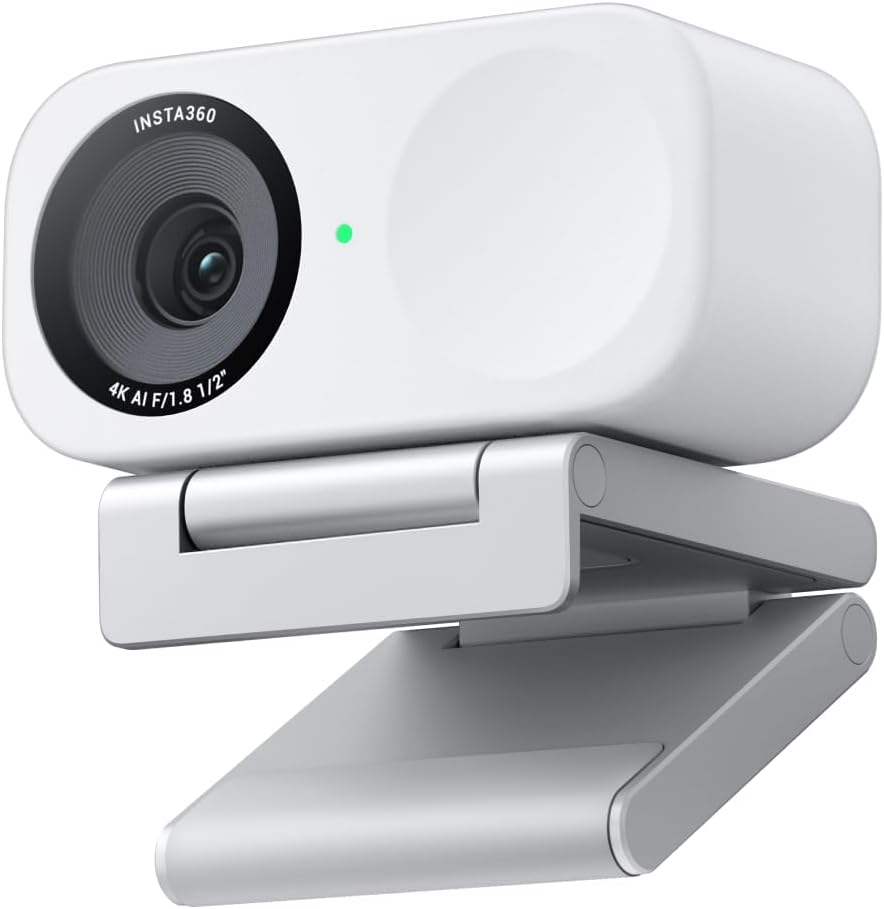
Pros
- 1/2-inch image sensor captures 4K video with HDR and low-light processing for more detail than typical smaller-sensor webcams
- Phase Detection Auto Focus keeps footage sharp during movement, rather than the slower contrast-based autofocus many webcams use
- Auto framing tracks and zooms to keep one person or a full group in view without manual adjustment
- Hand gestures or a smartphone app can trigger AI tracking, zoom, and Whiteboard mode without touching the camera
- DeskView mode adds an overhead angle for showing physical objects or handwriting during a call, alongside the standard front-facing view
Cons
- Auto framing and gesture control rely on companion software running, so full functionality is tied to installing the desktop app rather than working as a plain USB webcam
- Natural bokeh depth-of-field simulation is a processed effect rather than true optical depth of field from a larger camera sensor
- DeskView and Whiteboard modes require repositioning the camera or its included stand, adding setup steps beyond a fixed webcam angle
A 1/2-inch sensor captures 4K video with HDR and low-light handling, paired with Phase Detection Auto Focus that locks onto a subject quickly rather than hunting for focus during movement.
- 1/2-inch sensor for 4K capture with HDR support
- Phase Detection Auto Focus (PDAF) for fast, accurate focus lock
- Auto framing zooms and adjusts to keep one person or a group in frame
- Natural bokeh effect simulates a shallow depth of field
Auto framing and bokeh both rely on the camera's onboard processing, so results depend on the companion software being installed and configured.
Audio runs through an AI noise-canceling system designed to filter background sound, aimed at keeping voice communication clear during calls or streams from busier rooms.
- AI noise-canceling algorithm filters background noise
- Built for clear voice pickup in calls, streams, and recordings
- Works alongside auto framing so audio focus tracks with visual framing
Because noise cancellation is processed through the camera rather than a separate microphone accessory, sound quality depends on the built-in mic rather than an external one. For calls in consistently loud environments, positioning the camera closer to the speaker still improves clarity beyond what noise filtering alone can fix.
Control options include hand gestures, recognized directly by the camera, and a smartphone app for remote adjustment, both used to trigger AI tracking, zoom, and switching into DeskView or Whiteboard mode.
- Gesture control for zoom and AI tracking without touching the camera
- Smartphone app for remote adjustment
- Compatible with Zoom, Teams, Twitch, and other common call and streaming platforms
DeskView and Whiteboard modes both require physically repositioning the camera or its stand, so switching between a face-forward call and an overhead desk view is a manual step rather than a software-only toggle.

Pros
- 1080p resolution paired with RightLight 2 auto light correction keeps the image visible in dim home-office lighting
- Mono noise-reducing microphone cuts background sound so voice comes through clearly on calls
- Spin-to-cover privacy shutter blocks the lens physically, no software toggle required
- Certified for Zoom, Microsoft Teams, and Google Meet, so setup skips extra driver hunting on major platforms
- USB-C connection and a compact 1.77" x 2.09" x 2.58" body keep desk or laptop-lid mounting simple
Cons
- Mono mic pickup is single-channel, not the stereo capture found on higher-tier webcams for richer sound
- Logi Tune app is not available on Chrome OS, limiting customization on Chromebook setups
- Fixed lens with no optical zoom or pan/tilt motor, so framing depends entirely on physical placement
The webcam captures 1080p Full HD video and uses RightLight 2 technology to automatically compensate for dim or uneven lighting common in home offices. A built-in mono noise-reducing microphone suppresses background sound so voices stay clear on calls.
- 1080p Full HD resolution for clear video calls
- RightLight 2 auto light correction for low-light rooms
- Mono noise-reducing microphone for clearer voice pickup
- Spin-to-cover privacy shutter built into the lens housing
Because the microphone is mono rather than stereo, audio favors clarity of a single speaker over the fuller, layered sound stereo mics pick up in group settings.
This webcam is certified for Zoom, Microsoft Teams, and Google Meet, and connects over USB-C to most modern laptops and desktops without extra drivers. It is also compatible with the Nintendo Switch 2 console for video chat use beyond typical PC meetings.
- Certified for Zoom, Microsoft Teams, and Google Meet
- USB-C connection for plug-and-play setup on most systems
- Compatible with Nintendo Switch 2 console
- Logi Tune app available for further customization, except on Chrome OS
Chrome OS users can still use the webcam for basic video calls, but lose access to the Logi Tune app's color and image adjustments.
The body is made with a minimum of 48% post-consumer recycled plastic, giving it a subtly speckled finish rather than a uniform matte shell. A physical spin-to-cover privacy shutter blocks the lens directly, so coverage does not depend on closing a laptop lid or software setting.
- Minimum 48% recycled plastic construction
- Physical privacy shutter spins closed over the lens
- Compact size fits most laptop lids and monitor mounts
- Available in a white finish for a lighter desk aesthetic
Because the shutter is mechanical rather than digital, it stays effective even if the camera app itself is left running in the background.

Pros
- Faster and More Precise Autofocus V15AF webcam has an autofocus
- Full HD PC Webcam for Single Person The multi-layer high-quality glass
- 2 Built-in Noise Cancelling Microphones Dual-mic webcam with two
- Auto Light Correction Easy Setup V15-AF webcam has a low-light
- Privacy Protection Compatibility V15AF webcam has two sensitive
Cons
- Requires checking placement surface dimensions before setup
- Requires routine care to keep exterior housing dust-free
- Initial setup requires checking operating instructions carefully
The NUROUM V15AF 2K Webcam for PC 1080p 60FPS AutoFocus Web offers reliable functional utility tailored for modern home and workplace environments. Designed to enhance daily productivity, this unit integrates Faster and More Precise Autofocus Nuroum V15AF webcam has an autofocus alongside Full HD PC Webcam for Single Person The multi-layer high-quality glass. Users will find the intuitive design straightforward to operate across various room configurations and daily routines. The versatile construction adapts easily to personal workspaces, providing consistent practical value and streamlined usability. Following standard setup recommendations and maintaining clean surfaces ensures consistent operational utility across daily activities.
Built using resilient structural components, this unit features a sturdy outer housing engineered to resist operational wear. Precision manufacturing ensures that all joints and surface connections remain firmly aligned during regular daily activity. 2 Built-in Noise Cancelling Microphones Dual-mic webcam with two reinforces overall physical stability over extended service periods. Structural integrity remains firm throughout regular usage, giving owners peace of mind. Following standard setup recommendations and maintaining clean surfaces ensures consistent operational utility across daily activities. This functional equipment provides steady performance and practical convenience when properly integrated into your workspace.
Initial setup requires placing the unit on a flat, stable surface with adequate clearance around all sides for proper operation. Ensure all power or connection cables are routed neatly without sharp bends to prevent wire strain. Regular care involves wiping exterior housing surfaces with a soft cloth to remove dust buildup. Inspecting mechanical connections periodically preserves operational efficiency and maintains cosmetic appearance over time. Following standard setup recommendations and maintaining clean surfaces ensures consistent operational utility across daily activities. This functional equipment provides steady performance and practical convenience when properly integrated into your workspace.
Pros
- Full HD 1080p capture with RightLight auto light balance lifting brightness by up to 50 percent
- Mechanical sliding shutter covers the lens, so privacy does not depend on software
- USB-A plug-and-play over standard UVC, with no driver install and no external power
- Compatible with Microsoft Teams, Zoom, Google Meet and the Nintendo Switch 2 GameChat mode
- Housing built from a minimum of 34 percent post-consumer recycled plastic
Cons
- Caps at 1080p with no 4K or 60 fps mode for higher-detail recording
- Fixed focus rather than autofocus, so documents held close to the lens stay soft
- USB-A cable is fixed, so USB-C-only laptops need an adapter or hub
The sensor captures Full HD 1080p, the resolution most conferencing platforms cap at anyway, so nothing is lost to a downscale at the far end.
- RightLight auto light balance lifts brightness by up to 50 percent against earlier models from the same maker, aimed squarely at a desk with a window behind it
- Focus is fixed rather than automatic - clean for a face at normal desk distance, softer if you hold a page up close
- Automatic exposure copes with the shift when a lamp switches on partway through a call
Against a typical built-in laptop camera, the gain shows up in low light and colour handling rather than in raw pixel count. If you need 4K, 60 fps or hardware background blur, this sits below that class of camera.
Setup is a cable and nothing else. The camera terminates in USB-A and is recognised as a standard UVC device.
- No driver installation on Windows or macOS; the maker's tuning utility is optional if you want to adjust the image
- Works with Microsoft Teams, Zoom, Google Meet and the other common conferencing platforms
- Also listed as compatible with the Nintendo Switch 2 GameChat mode
- The body measures about 4.1 in wide, 2.87 in deep and 1.26 in tall with a hinged clip for a monitor or laptop lid
If your machine has only USB-C sockets you will need a simple adapter or hub, since the cable itself is USB-A and cannot be swapped out. The clip grips thin bezels and folds flat for packing.
A physical shutter slides across the lens. That is a mechanical block rather than a software toggle, so no application can defeat it.
- Slide it shut between meetings and the camera cannot see the room, whatever is running in the background
- The shutter is moulded into the housing, so there is no stick-on cover to peel away or lose
Audio comes from a single built-in microphone tuned for speech at desk distance. It is fine for meetings, carrying a normal speaking voice clearly enough that colleagues do not ask you to repeat yourself. It is not a content-creation microphone: there is no stereo pair, no noise-cancelling array and no gain control. Anyone streaming or recording seriously should add a separate USB or XLR microphone and keep the built-in one as a fallback.

Pros
- Records and streams at full 1080p resolution at 60 fps for smoother motion than the 30 fps webcams common in this category
- Auto-framing keeps the subject centered even when moving left or right, without needing to manually reposition the camera
- USB-C connection delivers a high-bandwidth, stable link instead of relying on older USB-A video bandwidth
- Mounts in landscape or portrait orientation on a monitor, laptop lid, or standard tripod thread
- Works natively with OBS, XSplit, and Streamlabs OBS, plus video calls in Teams, Meet, and Zoom
Cons
- USB-C only, so older computers without a USB-C port need an adapter or hub to connect it
- Digital auto-framing and exposure adjustments run through Logitech Capture software, which is Windows/Mac only and adds a second app to install
- Sold in a single Off-White colorway, with no other finish offered
StreamCam records and streams in Full HD 1080p at 60 fps, using a premium glass lens with smart autofocus to keep detail sharp as the subject moves. Auto-framing tracks a person left or right in the shot, and intelligent exposure adjusts automatically as room lighting changes.
- Full HD 1080p resolution at up to 60 fps
- Glass lens with smart autofocus, not a fixed-focus plastic lens
- Auto-framing keeps the subject centered without manual repositioning
- Intelligent exposure adapts to changing light during a call or stream
The camera does not include optical zoom, so framing a wider shot means moving the camera itself or cropping in software rather than zooming the lens.
StreamCam is built to work directly with the streaming software creators already use, including Open Broadcaster Software (OBS), XSplit, and Streamlabs OBS, so footage can be pushed straight to Twitch, YouTube, or other platforms. It also functions as a standard webcam for everyday video calls.
- Native support for OBS, XSplit, and Streamlabs OBS
- Works as a standard camera source in Microsoft Teams, Google Meet, and Zoom
- Compatible with Nintendo Switch 2's GameChat mode
- Logitech Capture software unlocks extra automated focus and exposure controls on PC/Mac
Logitech Capture is required for the deeper automation features, so users who skip installing it only get the camera's baseline autofocus and exposure behavior.
A fast USB-C connection carries the video signal, aiming for a steadier stream than older USB 2.0 links can offer during long sessions. The camera mounts in landscape or portrait orientation directly on a desktop monitor or laptop lid, or on any standard tripod thread for a more flexible setup.
- USB-C connection for a high-bandwidth, stable video feed
- Landscape or portrait mounting for vertical or horizontal framing
- Fits directly onto a monitor or laptop lid without extra hardware
- Standard tripod thread compatibility for desk or floor stand setups
A USB-C to USB-A adapter or cable may be needed on older desktops and laptops that only have legacy USB-A ports.
What to Check Before You Buy a White Webcam
Not every “white” webcam is the same shade — some lean bright white, others are closer to off-white or cream. If you’re matching a specific desk or monitor bezel, check product photos closely before you decide, and read a few reviews to see how the color looks in real lighting rather than a studio photo. Beyond color, a few specs matter far more to daily use than the finish, especially if you’re on video calls for hours most weeks.
- Resolution: 1080p is plenty for most video calls; 4K helps if you record content or crop your frame often.
- Field of view (FOV): A wider FOV suits multi-person calls, while a narrower one keeps the background tighter for solo streaming.
- Autofocus: Fixed-focus cameras can blur when you lean in or out; autofocus keeps you sharp as you move.
- Microphone quality: Built-in mics vary a lot — noise-canceling dual mics sound noticeably clearer on calls.
- Mounting: Confirm the clip fits your monitor thickness, especially with slim or curved displays.
- Privacy cover: A sliding shutter is a simple feature that matters once you use it daily.
Lighting also matters more than most buyers expect. A webcam with auto-light correction compensates for a bright window or dim room, so you don’t need to buy a separate light just to look presentable on a call. If your desk sits near a window, prioritize a model with strong auto-exposure handling over one with a slightly higher resolution.
The Best White Webcams for 2026, by Use Case
Instead of ranking these purely by spec sheet, it helps to match a webcam to how you actually use it — daily meetings, live streaming, or content creation. Here’s how the top picks in our roundup break down.
Best Overall: NexiGo N660P
The NexiGo N660P earns the overall pick because it balances price, reliability, and features better than almost anything else on this list. It records 1080p at 60fps, autofocuses quickly, and includes dual mics with noise cancellation for cleaner calls. With thousands of reviews behind it, it’s a safe choice if you want one camera that handles meetings, casual streaming, and everyday use without fuss. The trade-off is that it isn’t built for 4K capture, so heavy content creators may want more resolution headroom.
Best 4K Option: NexiGo N660P Pro
If you want more detail for recordings or thumbnails, the NexiGo N660P Pro steps up to 4K with a distortion-free lens and 3D noise reduction. It still shoots smooth 1080p at 60fps when you don’t need the extra resolution, which keeps file sizes and bandwidth in check. This is the pick for anyone editing footage afterward or zooming in during a stream. If you mainly join video calls, the resolution bump won’t matter much — see our best 4K webcams guide if you want to compare more 4K-first options.
Best for AI Auto-Framing: OBSBOT Meet SE
The OBSBOT Meet SE uses AI tracking to keep you centered in the frame as you move around your desk, which is genuinely useful if you gesture a lot on calls. Its HDR handling also copes better with bright windows behind you than most fixed cameras. The gesture controls feel like a gimmick at first, but they’re handy for muting or taking a photo hands-free during a presentation. It costs more than a basic webcam, so it suits people who present often rather than casual users.
Best Premium Pick: Insta360 Link 2C
The Insta360 Link 2C sits at the top of this list on price, and the AI-powered auto-framing and gesture control explain why. It tracks your movement smoothly across the frame instead of just cropping in digitally, which looks far more natural on camera. The noise-canceling mic is also a step above entry-level webcams. This one makes sense if you’re on camera for hours a day and want the setup to feel closer to a production camera than a plug-in webcam.
Best Budget Pick: Logitech Brio 100
For anyone who just needs a dependable white webcam without spending much, the Logitech Brio 100 is hard to beat. It covers the basics well: 1080p video, automatic light correction, a built-in mic, and a physical privacy shutter. It won’t wow you with extra features, but it’s backed by a huge number of reviews and a brand with a long track record in webcams. This is the pick if your main goal is simply upgrading from a laptop’s built-in camera.
Best for Streaming and Content Creation: Logitech StreamCam
The Logitech StreamCam is built with creators in mind, offering smooth 1080p at 60fps and vertical mounting for social-style clips. Its color and exposure handling are tuned for streaming lighting setups rather than plain office lighting. If you’re building a dedicated stream or recording setup, this is worth comparing against the AI-framing models above. Casual users on tight budgets are usually better served by a cheaper pick from this list.
A few other options are worth a look if the picks above don’t quite fit: the Logitech Brio 300 offers USB-C connectivity and a similar feature set to the Brio 100 at a mid-range price. Whichever model you’re leaning toward, it’s worth taking a moment to check the current price on Amazon, since webcam pricing shifts fairly often.
Common Mistakes to Avoid When Buying a White Webcam
A surprising number of webcam purchases go wrong for reasons that have nothing to do with the camera’s specs. Here are the mistakes we see most often.
- Assuming every “white” finish matches: Off-white and bright white can clash noticeably next to a pure white desk or monitor.
- Buying 4K without the bandwidth for it: A slow upload speed can make 4K footage choppier than a well-optimized 1080p stream.
- Ignoring the microphone entirely: Video quality gets the attention, but a weak mic is what people actually notice on a call.
- Skipping the privacy cover: A basic sliding shutter is worth far more once you’re using the camera every day.
- Overlooking mount compatibility: Ultra-thin monitors and curved screens don’t always fit a standard webcam clip.
Does Webcam Color Actually Affect Performance?
No — the sensor, lens, and software inside the camera determine image quality, not the paint on the housing. A white finish is purely a styling choice, though it can show fingerprints and dust a little more visibly than black plastic. If you’re deciding between otherwise-identical models in different colors, choose based on your desk and lighting setup rather than any performance difference. The one practical note: lighter plastics can look slightly worn faster with heavy daily handling, so a quick wipe-down now and then keeps it looking sharp.
Matching a White Webcam With the Rest of Your Setup
A white webcam usually isn’t a standalone purchase — it’s one piece of a coordinated desk. If you’re building out a lighter, cleaner-looking workspace, it’s worth planning the whole setup together rather than buying pieces one at a time. Start with the surface you work on: a light white desk shows off a white webcam far better than a dark one does.
From there, a matching white keyboard and a white monitor tie the look together, since the webcam usually sits right on top of the display and is one of the first things people notice on a video call. None of this changes how the camera performs, but a setup that looks intentional tends to feel more pleasant to work at every day, which is reason enough for a lot of buyers. If your desk chair still doesn’t fit the theme, it’s worth checking the current price on a few options before you finish the room.
Frequently Asked Questions
Do white webcams perform differently than black ones?
No. Color is a cosmetic choice and has no effect on sensor quality, autofocus speed, or microphone performance. Choose based on specs first, then pick the finish that matches your setup.
Will a white webcam match every white desk setup?
Not automatically. Shades vary between bright white, off-white, and cream, so check close-up product photos and reviews before assuming a perfect match.
Is 1080p enough, or should I get a 4K webcam?
1080p is enough for the vast majority of video calls and casual streaming. Consider 4K only if you record footage for editing or often crop tightly into the frame.
Can a white webcam handle gaming and streaming setups?
Yes, models with autofocus, higher frame rates, and AI framing work well for streaming and casual gaming overlays. Prioritize low-light performance and frame rate over resolution if streaming is your main use case.
How do I keep a white webcam looking clean over time?
Wipe the housing with a dry microfiber cloth weekly, and avoid setting it near food or drinks on your desk. Light plastic shows smudges faster than dark plastic, so a quick habit goes a long way.




