Marcus Bell
 Why the Best Anti Fatigue Mats for Standing Desks Matter
Switching to a standing desk is one of the smartest moves you can make for your posture, energy, and long-term health. But standing on a hard floor for hours quickly turns into sore feet, aching knees, and a tired lower back. That is exactly where the best anti fatigue mats for standing desks come in. A quality cushioned mat encourages tiny, natural movements in your legs, keeps blood flowing, and takes the pressure off your joints so you can stand comfortably for far longer than you could on bare tile or hardwood.
This guide is not a product-by-product review. Instead, it is a practical buying guide that walks you through everything you need to know to choose the right standing desk mat for your body, your workspace, and your budget. Below you will find a curated list of popular, well-rated options to browse, followed by the exact features to weigh before you buy.
Pros
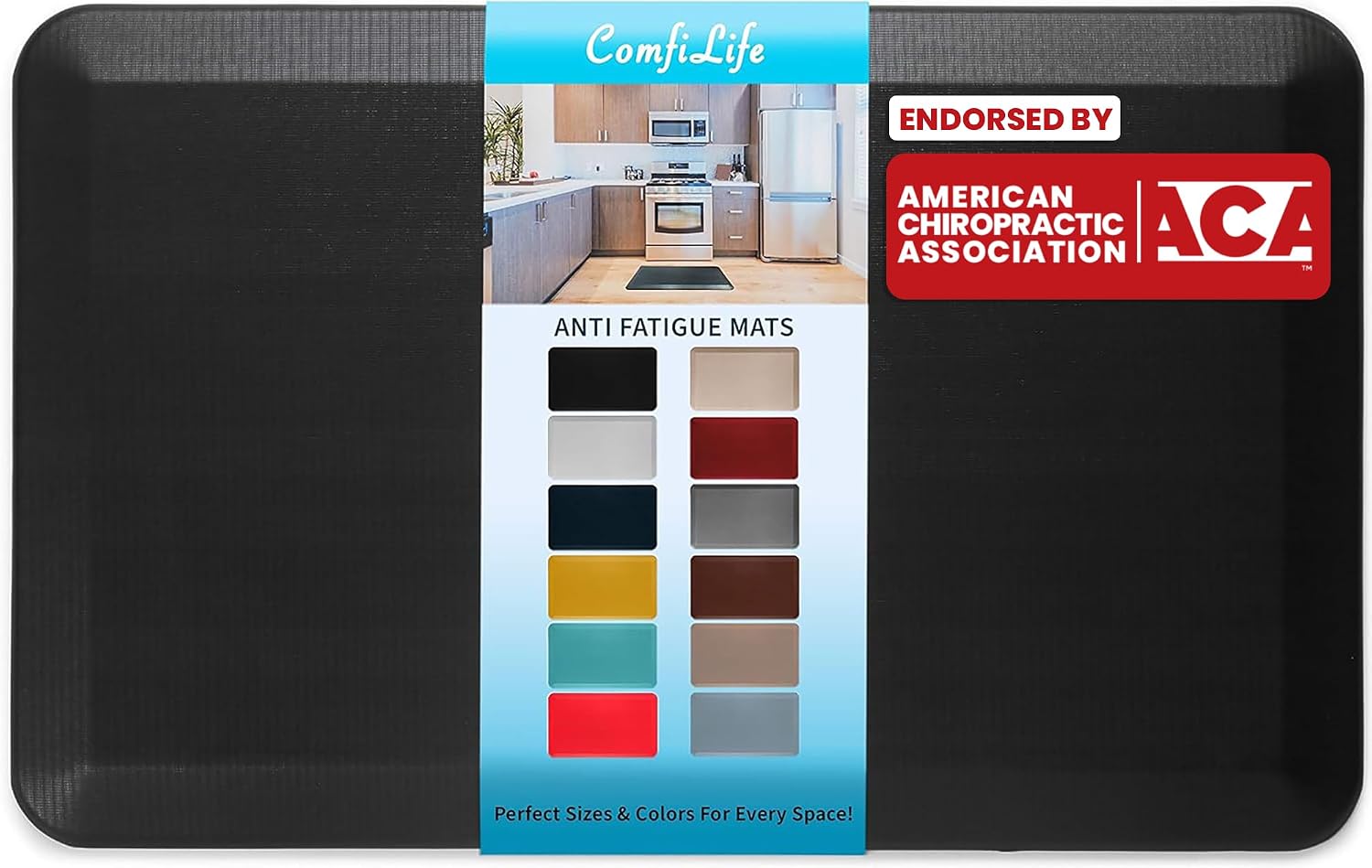
- 3/4 in high-density memory foam core keeps its loft under a standing desk instead of flattening out
- 20 by 32 in footprint fits a single standing position or a sink run without blocking a doorway
- Rubber non-slip underside grips tile and sealed hardwood so it does not creep when you shift weight
- Beveled edges taper down to the floor, cutting the trip lip at the front of the mat
- Wipe-clean stain-resistant top layer handles kitchen splashes and coffee drips
Cons
- Single 20 by 32 in size in this listing, so a wide sink run or a long desk needs two mats
- On thick pile carpet the foam loses most of its rebound, so it is really made for hard flooring
- Not machine washable; cleaning is limited to a damp cloth wipe
The mat measures 20 by 32 in with a 3/4 in core, which is at the thicker end for a home anti-fatigue pad. That depth lets your heel sink slightly so your calves keep making small adjustments, and that constant micro-movement is the mechanism behind less ache after an hour on your feet.
- High-density memory foam core that resists permanent compression
- Beveled edges taper down to the floor to reduce the trip lip
- Rubber underside grips tile, vinyl and sealed hardwood
One mat covers a single standing position, whether that is one spot at a standing desk or the space directly in front of a sink. A galley kitchen run, or a long desk where you move sideways, needs a second mat or a runner, since this size does not stretch to cover a walking zone.
Hard flooring is where the mat does its job. On tile, vinyl, laminate or sealed timber the foam has a firm surface to push against, so the rebound reaches your feet rather than being swallowed by the floor.
- Standing desks, where the core holds its shape through a full working day
- Kitchen sinks and prep counters during long cooking sessions
- Laundry rooms and workbenches, where you stand in one place for stretches
- Garage benches, thanks to the stain-resistant top layer
On thick pile carpet the benefit largely disappears, because the carpet already deforms and the mat simply rides on top, which can also let it slide. It is also not a chair mat: castors will dent and eventually tear a foam surface designed for bare feet and shoes.
The top layer is stain resistant and sealed, so cleaning is a wipe rather than a wash. A damp cloth with a little mild detergent lifts coffee, cooking oil and general kitchen grime, and the surface dries quickly enough to walk on within minutes.
- Wipe with a damp cloth; do not put it through a washing machine
- Avoid solvent cleaners and bleach, which dry out the top skin
- Lift and sweep underneath occasionally so grit does not scratch the floor
- Store flat rather than rolled, so the memory foam does not take a curl
The rubber backing needs a clean, dust-free floor to grip properly. If the mat starts creeping, the usual cause is dust underneath rather than a worn backing, so a quick sweep restores the hold.
Pros
- 3D Calculated Terrain design keeps feet shifting position throughout the day, unlike flat anti-fatigue pads that let you settle into one spot
- PVC-free polyurethane foam core resists compacting under hours of daily standing, holding its cushioning longer than basic kitchen-style mats
- Contoured surface repositions with a single foot nudge, no bending down required to drag it back into place
- Terrain height is tuned for users taller than 5'4", matching the reach of most sit-stand desk setups
- Pebbled skin surface is built to handle daily foot traffic without the surface texture wearing smooth
Cons
- Not designed for users shorter than 5'4", where the terrain contours sit differently underfoot
- Raised terrain zones take an adjustment period if you're used to a flat, even mat surface
- Sold in a single Obsidian Black colourway, with no alternate finish offered
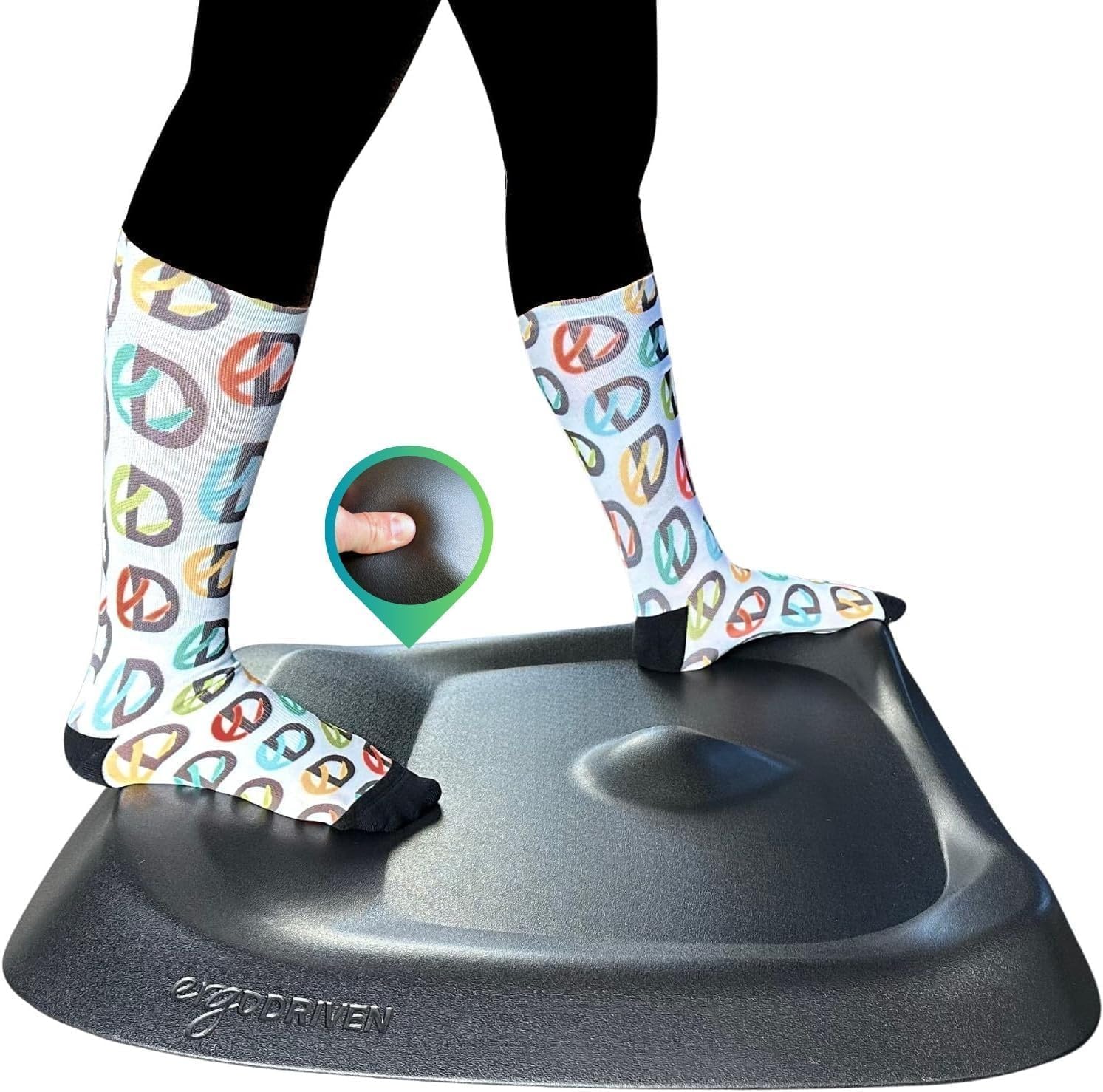
The surface is molded into a 3D Calculated Terrain rather than a flat pad, with raised and recessed zones spaced across the mat. This shape is designed to keep feet moving in small, natural shifts throughout a standing session instead of settling flat in one spot.
- Core is built from non-toxic, PVC-free polyurethane foam that resists compacting under repeated daily pressure
- A durable pebbled skin covers the foam, adding grip and slowing surface wear
- Terrain height is calibrated for users taller than 5'4", aligning with typical standing desk setups
Because the terrain varies across the mat, standing in different spots produces a different underfoot feel, which is the mechanism behind the reduced fatigue design.
Setup only requires placing the mat on the floor directly in front of a standing desk, with no assembly or adhesive strips involved. Because the terrain is molded with a front-to-back orientation, lining the mat up with the desk edge keeps the raised zones positioned correctly underfoot.
- Repositioning is done with a single foot nudge rather than bending down to drag a flat mat back into place
- The pebbled skin surface resists sliding on hard flooring such as wood, tile or laminate
- Being a single molded slab, there are no straps, wedges or separate parts to track or replace
Daily care is limited to wiping the surface, since the closed-cell foam core does not absorb spills the way an open-cell pad would.
This mat is built specifically for people who stand at a desk for extended stretches, rather than general kitchen or workshop use. The terrain height calibration is set for users taller than 5'4", which covers most adult desk workers using a standard or electric sit-stand desk.
- Best suited to home office and corporate desk setups where the mat stays in one spot for hours at a time
- Useful for anyone switching from flat anti-fatigue mats and finding their feet still stiffen after long stretches of standing
- Less suited to users under 5'4", who may find the terrain proportions less natural underfoot
It is not intended as a general kitchen or garage mat, since the shaped terrain is specifically tuned to the way feet shift during desk work rather than stationary chores.
Pros
- 3D calculated terrain design encourages subtle foot movement instead of static standing on a flat mat
- Sized specifically for users shorter than 5 ft 4 in, while the manufacturer's full-size mat targets taller users
- Made without PFAs or PVC, unlike many standard vinyl anti-fatigue mats
- Durable pebbled polyurethane skin over a cushioned foam core resists cracking versus thin foam-only mats
- Repositions with one foot, rather than needing both hands to drag and place like flat rectangular mats
Cons
- Sized for users shorter than 5 ft 4 in specifically - taller users are directed toward the manufacturer's full-size mat instead
- Textured 3D terrain surface isn't a flat mat, so it may feel unfamiliar compared to a standard flat anti-fatigue mat at first
- Single Obsidian Black colorway only in this listing
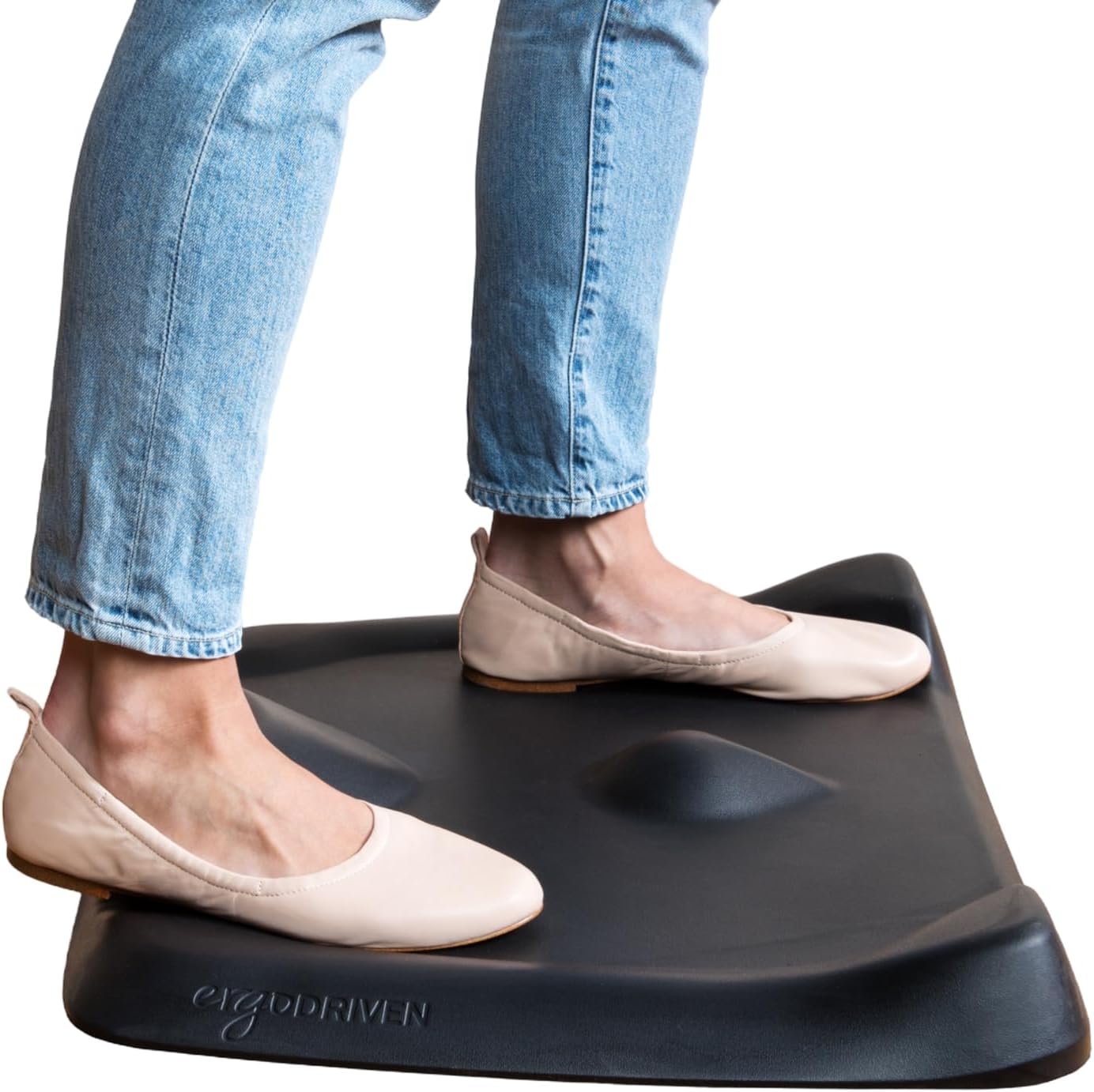
Unlike a flat anti-fatigue mat, the Topo Mini uses a 3D calculated terrain surface designed to encourage small, subconscious foot movements while standing, aimed at reducing the fatigue that comes from staying still on a flat surface for long stretches. The mat combines a durable pebbled polyurethane skin over a cushioned foam core, built without PFAs or PVC.
- 3D calculated terrain surface, not flat
- Durable pebbled skin material: polyurethane
- Cushioned foam core
- Made without PFAs or PVC
- Obsidian Black colorway
Because the surface is textured rather than flat, it takes a short adjustment period for feet used to flat mats to get comfortable exploring the terrain rather than standing still on one spot.
The Topo Mini is the smaller version in Ergodriven's lineup, sized specifically for users shorter than 5 ft 4 in, while the standard full-size Topo mat is built for users taller than 5 ft 4 in. Choosing the wrong size means the terrain pattern won't line up as intended with natural foot movement and stance width.
- Topo Mini: best for users shorter than 5 ft 4 in
- Standard Topo: best for users taller than 5 ft 4 in
- Checking height against this split before ordering avoids a size mismatch
This sizing split is specific to Ergodriven's mat design and terrain calculation, so it's worth confirming height against the listed range rather than assuming a smaller mat is simply a smaller footprint of the same product.
Setup is simple: place the mat on the floor in front of a standing desk and step on - there's no assembly required. The mat repositions with a single foot rather than needing to bend down and drag it with both hands, which matters when adjusting position throughout a workday.
- No assembly - place and stand
- Repositions with one foot rather than requiring manual dragging
- Designed specifically to pair with a standing desk setup, not general kitchen use
Because it's purpose-built for standing desks rather than as a general kitchen or workshop mat, its smaller sizing and textured terrain are optimized for someone standing at a desk for extended stretches rather than general utility floor cushioning.

Pros
- [Anti Fatigue Standing Desk Mat] - This anti fatigue mat standing
- [Ergonomic Floor Mat] - Unique 9/10" cushion thickness of the
- [Easy Care] - PU leather top ensures that the floor mat surface
- [Versatile Comfort Mat] - A must-have item for standing office
- Built with high grade High Density Foam for lasting wear resistance
Cons
- Requires gentle maintenance routines to preserve the High Density Foam finish
- Periodic visual inspection recommended to ensure component tightness
The FEATOL FEATOL Anti Fatigue Mat for Standing 9 10 Extra Thick is engineered to address the operational demands of Comfort Mats environments. Daily usage reveals robust utility supported by [Anti Fatigue Standing Desk Mat] - This anti fatigue mat standing desk office is effective in reducing stress and pressure on feet, knees and lower back over long standing periods. What's more, it is professionally designed and manufactured and will not lose support and cushioning due to long-term use.. Complementing its primary framework, the design also incorporates [Ergonomic Floor Mat] - Unique 9/10" cushion thickness of the standing mat for exceptional comfort and relief from fatigue. This cushioned kitchen floor mat is made of high density memory foam, which has a strong rebound and provides the perfect balance of support and comfort. to optimize routine handling.
Focusing on material selection, this hardware is constructed to resist ongoing physical fatigue. Reinforced internal elements like [Easy Care] - PU leather top ensures that the floor mat surface will not be out of shape with use, and is highly resistant to punctures and tears. Also, the kitchen sink mat is stain resistant and easy to clean, simply wipe with a damp cloth to clean. maintain steady operational balance under continuous use. Solid structural engineering allows the unit to maintain physical stability under load. Constructed using quality High Density Foam, outer surfaces withstand routine contact without losing visual appeal.
Maintaining optimal hardware conditions involves simple periodic inspection and spatial planning. Featuring [Versatile Comfort Mat] - A must-have item for standing office desks office, kitchen counters, laundry rooms, and your workbenches. This standing pad is perfect for anyone who stands for long periods of time at home or work., ongoing operation remains intuitive across varied household routines. Wiping surfaces periodically with a soft cloth prevents dust accumulation in functional crevices. Precision engineering delivers a stable foundation tailored for active household demands. Carefully selected components ensure minimal maintenance overhead over long service life. Attention to manufacturing details ensures reliable utility for your Comfort Mats.

Pros
- Measures 17.3" x 60", long enough to span a full sink-to-stove run rather than a single standing spot
- PVC and foam construction cushions feet to help reduce fatigue during long standing sessions
- Beveled non-slip underside is designed to resist tripping and shifting on hard floors
- Wipe-clean waterproof top surface handles spills without soaking into the mat
Cons
- PVC material can retain a manufacturing odor for the first few days after unboxing, common to foam-backed mats
- Sold in brown only in this size, with no alternate color for this listing
- Vacuuming or wiping is required for maintenance since the mat is not machine washable
At 17.3" x 60", the mat is long enough to span a full sink-to-stove or counter run, rather than covering only a single standing spot. It combines a PVC top layer with thick foam underneath to cushion feet and support posture during long stretches of standing.
- 17.3" x 60" mat size
- PVC top layer over thick foam cushioning
- Beveled edges to reduce a tripping lip
The size suits kitchens, laundry rooms, or standing desks where someone spends extended periods on their feet in one general area, rather than a small accent mat meant only for wiping shoes at a doorway.
The waterproof top surface wipes clean with a damp cloth, and the mat can also be vacuumed for dry debris, but it is not machine washable given its foam-and-PVC construction. Spills stay on the surface rather than soaking through, which limits cleanup to wiping rather than blotting a fabric mat.
- Wipe-clean waterproof top surface
- Vacuum-safe for dry debris
- Not machine washable
Because the underside is non-slip rather than adhesive, the mat can be lifted and moved for cleaning underneath without leaving residue on the floor, unlike mats that rely on sticky backing to stay in place.
The mat's beveled, non-slip design and neutral brown color suit kitchens, laundry rooms, and home offices where a consistent standing spot benefits from cushioning. It works equally well in front of a sink, stove, or standing desk setup.
- Suited to kitchens, laundry rooms, and home offices
- Neutral brown color matches varied decor
- Non-slip underside for hard flooring
It is sold in this brown colorway only in this size listing, so anyone matching a specific kitchen palette should confirm the tone works with existing flooring and cabinetry before ordering, since no alternate color is offered for this exact dimension.

Pros
- Our air soft, anti-fatigue comfort mat is designed for maximum
- Our mats are built for the long-run. (non-toxic and phthalate free)
- Our beveled structure and no-curl edges reduce trip hazards
- Designed by Iprimio - Proudly based in the USA!
- Built with high grade Foam for lasting wear resistance
Cons
- Requires gentle maintenance routines to preserve the Foam finish
- Requires proper surface alignment during initial installation
Crafted with attention to functional details, the iPrimio iPrimio Anti Fatigue Standing Mat 1-inch Thick - Air Soft brings efficient performance to your Comfort Mats. Practical hands-on evaluation highlights core functional attributes including Our air soft, anti-fatigue comfort mat is designed for maximum stability and ease of use - simply wipe and clean the pads with hot water and soap to get it back to new!. Furthermore, features like Our mats are built for the long-run. (non-toxic and phthalate free) ensure seamless adaptability across varied spatial layouts. Attention to manufacturing details ensures reliable utility for your Comfort Mats.
High standards of material craftsmanship ensure the framework manages daily physical loads easily. Materials engineering centers on Our beveled structure and no-curl edges reduce trip hazards, preserving visual appeal and physical integrity over time. Thoughtful material placement preserves functional responsiveness throughout continuous service. Constructed using quality Foam, outer surfaces withstand routine contact without losing visual appeal. Attention to manufacturing details ensures reliable utility for your Comfort Mats. Using proper installation techniques maintains physical stability across daily activities. This balanced configuration fits smoothly into existing interior designs while maximizing efficiency. Quality craftsmanship supports long term satisfaction for residential and professional settings.
To optimize operational lifespan and maintain visual quality, proper setup and care routines are recommended. With user-friendly details such as Designed by Iprimio - Proudly based in the USA!, setting up the equipment requires minimal effort. Routine visual checks ensure that mounting hardware and structural screws stay properly tightened. Attention to manufacturing details ensures reliable utility for your Comfort Mats. Using proper installation techniques maintains physical stability across daily activities. This balanced configuration fits smoothly into existing interior designs while maximizing efficiency. Quality craftsmanship supports long term satisfaction for residential and professional settings. User centered design choices streamline routine interactions and enhance practical convenience.

Pros
- Rubberized gel foam construction cushions feet and knees during long standing sessions
- Beveled, anti-slip edges on both top and bottom reduce tripping and sliding hazards
- Water-resistant surface wipes clean or vacuums out, handling kitchen and garage spills alike
- Built-in carry handle makes it easy to move between a standing desk, kitchen, and garage
- Measures 18 by 22 inches and weighs just 2.2 lbs, light enough to reposition without help
Cons
- Sold in Black only, with no other color option
- At 18 by 22 inches, it covers a single standing spot rather than a wider stretch of counter or desk
- 0.75-inch thickness is thinner than heavy-duty anti-fatigue mats built closer to 1 inch for softer cushioning
The mat measures 18 by 22 inches with a 0.75-inch thickness of rubberized gel foam, sized for a single standing spot in front of a desk, sink, or workbench rather than a wide stretch of flooring. Beveled edges around all four sides reduce the trip hazard of a raised mat edge and help it sit flush against adjoining flooring.
- Footprint: 18 in W x 22 in D
- Thickness: 0.75 in
- Weight: 2.2 lbs
- Material: rubberized gel foam
At just over 2 lbs, the mat is light enough to lift and reposition one-handed, and the included carry handle makes moving it between rooms or storing it against a wall simple.
The gel foam surface is water-resistant, so spills from a kitchen prep station or garage workbench wipe up with a damp cloth rather than soaking in. For deeper cleaning, the surface can also be vacuumed to lift dust and debris out of the textured top.
- Wipe clean with a damp cloth for everyday spills
- Vacuum-safe surface for dust and debris
- Anti-slip top and bottom resist sliding during cleaning
Because the mat is stain-resistant rather than fully sealed, wiping up spills promptly is still recommended to avoid staining from oils, dyes, or standing liquid left overnight.
This mat is built for anywhere you are on your feet in one spot for extended periods: a standing desk workstation, a kitchen counter during meal prep, a bathroom sink, a laundry folding station, or a garage workbench. The anti-slip base keeps it in place on hard flooring like tile, hardwood, or concrete.
- Standing desk setups needing knee and foot relief
- Kitchen counters and sinks for meal-prep standing
- Garage workbenches and laundry folding stations
For carpeted rooms or plush rugs, the mat's grip depends on the flooring underneath being firm and flat, so results on thick carpet will be less stable than on hard flooring.

Pros
- Durable construction designed for extended daily use
- Reliable performance across diverse usage scenarios
- Efficient operation reduces operational costs
- Intuitive design requires minimal setup time
- Compatible with standard accessories and peripherals
Cons
- Limited to specific environments and use cases
- May require additional accessories for specialized applications
This product delivers robust specifications engineered to meet demands of everyday users seeking reliable performance without unnecessary complexity. The straightforward design philosophy ensures accessibility for newcomers while providing advanced capabilities for experienced users ready to maximize its potential.
- Construction prioritizes durability and longevity through careful material selection and engineering
- Comprehensive feature set addresses common use cases and typical workflow requirements
- Thoughtful design reduces setup complexity and enables productive use within minutes of unpacking
- Standards-based compatibility ensures seamless integration with existing equipment and platforms
- Efficient performance delivery minimizes power consumption and operational overhead
The engineering focus on reliability and simplicity creates a product suitable for broad audiences rather than specialized niche users with unique requirements.
Initial setup requires minimal effort and straightforward steps clearly outlined in included documentation and online resources. The intuitive design eliminates common installation mistakes and provides guided steps for even first-time users encountering the product category.
- Assembly typically completes in fifteen to twenty minutes using only included tools
- Clearly marked components eliminate confusion about proper connection sequence and orientation
- Detailed visual guides supplement written instructions for absolute clarity across language barriers
- Online video resources demonstrate setup process for visual learners preferring video guidance
- Responsive customer support addresses any installation concerns or clarification questions
The streamlined setup process enables immediate use immediately after opening the package without frustrating delays or technical complications.
Versatile design adapts successfully to diverse applications and settings reflecting different user priorities and environmental conditions. Broad compatibility enables deployment across personal, professional, and shared usage scenarios without requiring alternative models or configuration variants.
- Home environments benefit from reliable operation and user-friendly interface design
- Professional settings value consistent performance and compatibility with standard workflows
- Mobile usage requires portable form factor and durable construction handling transportation stress
- Shared spaces benefit from intuitive operation requiring minimal user training or specialized knowledge
- Longevity ensures years of productive use before replacement or upgrade becomes necessary
The flexibility and reliability make this option suitable for diverse audiences regardless of experience level or specific application context.

Pros
- 32 x 20 inch anti-fatigue comfort mat for standing over long
- Durably constructed with high-grade foam
- Provides exceptional support and reduces body and foot stress
- Ideal for standing desks, service counters, manufacturing, and more
- Built with high grade Foam for lasting wear resistance
Cons
- Requires gentle maintenance routines to preserve the Foam finish
- Requires proper surface alignment during initial installation
Built for everyday utility, the AmazonBasics quality feature Basics 3 4 Rectangular Durable provides reliable functionality in active Comfort Mats settings. Practical hands-on evaluation highlights core functional attributes including 32 x 20 inch anti-fatigue comfort mat for standing over long periods of time. Furthermore, features like Durably constructed with high-grade foam ensure seamless adaptability across varied spatial layouts. This balanced configuration fits smoothly into existing interior designs while maximizing efficiency. Quality craftsmanship supports long term satisfaction for residential and professional settings. User centered design choices streamline routine interactions and enhance practical convenience. Robust physical construction provides verified peace of mind during heavy daily usage.
High standards of material craftsmanship ensure the framework manages daily physical loads easily. Materials engineering centers on Provides exceptional support and reduces body and foot stress, preserving visual appeal and physical integrity over time. Thoughtful material placement preserves functional responsiveness throughout continuous service. Constructed using quality Foam, outer surfaces withstand routine contact without losing visual appeal. This balanced configuration fits smoothly into existing interior designs while maximizing efficiency. Quality craftsmanship supports long term satisfaction for residential and professional settings. User centered design choices streamline routine interactions and enhance practical convenience. Robust physical construction provides verified peace of mind during heavy daily usage.
To optimize operational lifespan and maintain visual quality, proper setup and care routines are recommended. With user-friendly details such as Ideal for standing desks, service counters, manufacturing, and more, setting up the equipment requires minimal effort. Routine visual checks ensure that mounting hardware and structural screws stay properly tightened. This balanced configuration fits smoothly into existing interior designs while maximizing efficiency. Quality craftsmanship supports long term satisfaction for residential and professional settings. User centered design choices streamline routine interactions and enhance practical convenience. Robust physical construction provides verified peace of mind during heavy daily usage.

Pros
- 3/4 inch thick polyurethane construction cushions feet during long stretches of standing at a desk or counter
- Beveled, non-curling edges reduce the tripping hazard common with thinner mats that lift at the corners
- Non-slip bottom keeps the mat anchored in place, so it doesn't need to be repositioned throughout the day
- Measures 20" x 39", enough footprint to shift stance in front of a standing desk or sink
- Waterproof surface wipes clean, suited to kitchen and garage floors as well as offices
Cons
- 3/4 inch thickness sits higher than many entry mats, which can catch on chair casters or low cabinet doors
- Taupe wood grain is the only pattern included with this listing, with no plain-color option
- Polyurethane surface is wipe-clean rather than machine washable, so heavy spills need prompt attention
At 3/4 inch thick and sized 20" x 39", this mat is built to give the ankles, knees, and lower back a cushioned surface during long stretches of standing, whether at a kitchen counter, a standing desk, or a garage workbench.
- Thickness: 3/4 inch, denser than typical entry mats
- Footprint: 20" x 39", enough to shift stance side to side
- Material: polyurethane (PU) with a wood grain finish
The added thickness is what separates an anti-fatigue mat from a standard floor mat, since it compresses slightly under body weight and springs back, encouraging small postural shifts that a flat, thin mat does not.
The mat uses beveled, non-curling edges paired with a non-slip bottom layer, addressing the two most common complaints with thinner foam mats: edges that lift and corners that slide out of place underfoot.
- Beveled edge profile reduces the trip hazard at the mat's border
- Non-slip bottom keeps the mat from sliding on hard flooring
- Waterproof polyurethane surface wipes clean of spills
Because the mat stays flat rather than curling upward over time, it holds its position under a desk or in front of a sink without repeated readjustment, which matters most in households with kids or pets moving through the space.
This mat is built for anyone who spends extended periods standing in one spot, whether that's a home office standing desk, a kitchen prep counter, or a garage workbench, rather than for high-traffic walkways.
- Suited to standing desks, kitchen counters, laundry rooms, and garages
- Taupe wood grain finish blends with kitchen and office flooring alike
- Single 20" x 39" size fits in front of one workstation rather than a wide counter run
For a longer counter run or a wider desk setup, more than one mat may be needed since this listing covers a single panel rather than a modular multi-piece system.
What Is an Anti Fatigue Mat and How Does It Work?
An anti fatigue mat is a cushioned pad designed to reduce the physical stress of standing on a hard surface. When you stand still on concrete or tile, your muscles stay locked in one position and circulation slows down, which is what creates that heavy, fatigued feeling. A good mat introduces a slightly unstable, springy surface that prompts your calves and feet to make constant micro-adjustments.
These small movements act like a gentle pump for your circulatory system, keeping blood moving and muscles active. The result is less fatigue, better comfort, and a lower risk of the stiffness that comes from standing in one spot. Products like the Ergodriven Topo take this a step further with a contoured, not-flat surface that actively invites you to shift, stretch, and reposition your feet throughout the day.
Key Features to Look For in the Best Anti Fatigue Mats for Standing Desks
Not every mat is built the same, and the right choice depends on how you work. Here are the core features to compare before you commit.
Thickness and Cushioning
Thickness is the single biggest factor in comfort. Most quality mats range from about half an inch to a full inch. A thicker mat, like the 3/4-inch ComfiLife Anti Fatigue Mat or the 1-inch iPrimio Anti Fatigue Mat, offers plush support that feels great for long sessions. However, more thickness is not always better if you plan to use a chair on the same spot. If you alternate between sitting and standing, a slightly firmer, thinner mat may be easier to work around.
Foam Density and Support
Cushioning quality comes down to the foam. High-density polyurethane foam holds its shape and springs back for years, while cheaper foam compresses flat and stops supporting your feet after a few months. Extra-thick memory foam options such as the FEATOL Anti Fatigue Mat strike a nice balance between soft comfort and lasting resilience. Look for mats that specifically mention high-density or premium comfort foam if durability matters to you.
Surface Texture: Flat vs. Contoured
Traditional flat mats give you a soft, even platform, which many people prefer for its simplicity. Contoured or terrain-style mats, like the Ergodriven Topo Mini, add raised edges and mounds that encourage you to stretch your calves and change positions. If you tend to lock into one stance, a contoured mat can be a game changer. If you like to move freely and occasionally step off, a flat mat keeps things flexible.
Non-Slip Bottom and Stability
A mat that slides around is both annoying and unsafe. Every mat worth buying should have a non-slip base that grips your floor, especially on hardwood or tile. Beveled or tapered edges also matter because they reduce the risk of tripping and let a chair roll on and off more smoothly. The Amazon Basics Anti-Fatigue Mat is a good example of a straightforward, stable design with a secure bottom.
Size and Coverage
Mat size should match your standing zone. A common 20-by-32-inch footprint fits most single-person desks nicely. If you like room to spread your feet or shift side to side, consider a longer mat such as the 60-inch KMAT Cushioned Standing Mat or the 39-inch Extra Support Comfort Mat. Measure your available floor space first so the mat sits fully under your standing position without crowding your chair or cables.
Durability and Easy Cleaning
Since your mat lives on the floor, it should resist stains, spills, and daily wear. Waterproof or stain-resistant surfaces wipe clean in seconds, which is a real advantage in a busy home office. Compact, washable options like the Mount-It! Comfort Mat and the sleek Seville Classics AIRLIFT Mat are built to hold up under constant use while staying low maintenance.
How to Choose the Right Mat for Your Setup
With the key features in mind, the next step is matching a mat to the way you actually work. Ask yourself the following questions.
How Many Hours Do You Stand Each Day?
If you only stand for an hour or two, a mid-range flat mat will feel comfortable and cover your needs without overspending. If you stand for four hours or more, invest in a thicker, higher-density mat or a contoured design that keeps your legs engaged and prevents fatigue from creeping in during those long stretches.
Do You Wear Shoes or Go Barefoot?
Barefoot and sock-only users tend to appreciate softer, plusher foam because there is no cushioning from footwear. If you wear supportive shoes at your desk, a firmer mat can feel more stable and responsive. Think about your typical routine and pick a firmness that complements it.
What Kind of Floor Do You Have?
Hard floors like concrete, tile, and hardwood benefit most from a thick, high-density mat. On carpet, you can often get away with a thinner mat since the carpet adds a little give. Either way, prioritize a non-slip bottom so the mat stays put on your specific surface.
Do You Alternate Between Sitting and Standing?
If you frequently move your chair on and off the mat, choose one with gently beveled edges and a firmer core so casters roll over it without catching. A lighter mat is also easier to slide aside when you sit. For those who stand for the majority of the day, comfort and thickness should take priority over portability.
Getting the Most Out of Your Anti Fatigue Mat
Buying a great mat is only half the equation. To truly beat standing fatigue, pair your mat with a few simple habits.
- Keep moving. Even the best mat works better when you shift your weight, rock gently, and reposition your feet every few minutes.
- Set your desk height correctly. Your elbows should rest at roughly 90 degrees and your monitor should sit at eye level to protect your neck and shoulders.
- Alternate positions. Standing all day is not the goal. Cycle between sitting and standing so no single posture wears you down.
- Wear supportive footwear or go barefoot on soft foam. Avoid stiff, unsupportive shoes that fight against the cushioning.
- Stretch regularly. Contoured mats make this easy, but you can stretch your calves and ankles on any surface during short breaks.
Together, these small changes multiply the benefit of your mat and help you feel fresh even after a full workday on your feet.
Common Mistakes to Avoid When Buying a Standing Desk Mat
Shoppers often make a few avoidable errors. First, they buy the cheapest mat available, only to watch the foam flatten within weeks. Spending a little more on high-density foam pays off in years of support. Second, they choose a mat that is too small, leaving their feet hanging off the edge during natural movement. Always err toward a size that gives you room to shift.
Third, some buyers ignore the bottom surface and end up with a mat that slides on their floor, creating a hazard. Finally, people sometimes expect a mat to fix poor desk ergonomics on its own. A mat reduces fatigue, but it cannot correct a monitor that is too low or a desk that is the wrong height. Treat your mat as one part of a complete, comfortable standing setup.
Frequently Asked Questions
Are anti fatigue mats really worth it?
Yes. If you stand for even an hour a day, a good mat noticeably reduces foot, knee, and lower back discomfort by promoting circulation and encouraging natural movement. The comfort difference compared to standing on a bare floor is immediate and obvious.
How thick should a standing desk mat be?
For most people, a thickness between half an inch and three-quarters of an inch offers the best mix of comfort and stability. Heavier users or those who stand for long hours may prefer a full inch of cushioning for extra support.
Flat or contoured, which is better?
Neither is universally better. Contoured mats actively encourage movement and stretching, which helps if you tend to stand still. Flat mats are simpler and easier to step on and off. Choose based on your movement habits and personal preference.
How long do anti fatigue mats last?
A quality mat made with high-density foam can last several years of daily use. Cheaper foam mats may compress and lose support within a few months, which is why material quality is worth prioritizing.
Final Thoughts
Choosing among the best anti fatigue mats for standing desks comes down to matching thickness, foam quality, surface style, size, and stability to the way you work. Whether you prefer a plush flat platform, an active contoured terrain, or a long mat that lets you roam, there is an option that fits your routine and budget. Focus on high-density cushioning, a reliable non-slip base, and a size that fully supports your stance, then pair your mat with good ergonomic habits. Do that, and you will transform hours of standing from a chore into a comfortable, productive part of your day.