
 Marcus Bell
 Picking the best thermal paste syringe sounds trivial until you’re staring at a dozen tubes with wildly different conductivity ratings, viscosities, and applicator tips. A syringe format matters because it controls how precisely you can dot, spread, or line the compound onto a CPU or GPU die without making a mess of your socket or VRM area. Below you’ll find our top picks organized by real build scenarios, plus the buying criteria that actually move the needle on temperatures.
Quick answer: For most people in 2026, the best thermal paste syringe is the ARCTIC MX-4 — our #1 rated choice thanks to its easy-to-control viscosity and huge track record across desktop builds. See the full ranked comparison, alternatives and buying advice below.

Pros
- Metal-free, non-conductive carbon microparticle formula, so a slip onto nearby SMD components will not short the board
- 4 g syringe covers roughly 15 to 20 desktop CPU applications at a pea-sized dot
- Manufacturer states an 8-year service life, so one application normally outlasts the build
- Continuous-use range of -50 to 150 C covers sub-ambient loops and hot mini-ITX cases alike
- Viscosity of 31,600 poise spreads under mount pressure without needing a spreader card
Cons
- No spatula or cleaning wipe in this variant, so you supply isopropyl and a lint-free cloth
- Grey compound stains PCB and fabric and will not wash out of clothing
- Conductivity trails liquid-metal compounds by a few degrees under sustained full load, which is the trade for being non-conductive
The 4 g syringe holds enough carbon-microparticle compound for roughly 15 to 20 standard desktop CPU applications, or fewer if you are covering a large heatspreader such as an AM5 or LGA 1700 lid.
- Density: 2.50 g/cm3
- Viscosity: 31,600 poise, thick enough to stay put yet still spread under mount pressure
- Volume resistivity: 3.8 x 10^13 ohm-cm, effectively an insulator
- Continuous-use range: -50 to 150 C
- Colour: grey
Stated service life is eight years, so a single application normally spans the whole life of the build. The formula has stayed the same across packaging revisions, and each tube carries an authenticity code you can verify with the manufacturer before use.
Strip the old compound first. Isopropyl alcohol at 90 percent or higher on a lint-free cloth clears both the heatspreader and the cooler base; neither item is included here, so buy them separately.
A pea-sized dot in the centre of the lid suits most square LGA and AM5 chips. Rectangular Threadripper and older HEDT lids do better with a thin line down each axis. Lower the cooler straight down and tighten the mounting screws in a diagonal cross pattern, a quarter turn at a time, so the compound spreads evenly and no air pocket forms in a corner.
Do not spread it with a card unless you are covering a bare GPU die, where a thin even film matters more. Any smear that reaches surrounding capacitors is harmless because the formula carries no metal, but wipe it away anyway to keep the board readable.
Because the formula is metal-free and non-conductive, it is safe on every socket type in current use, on bare GPU dies, on laptop heat pipes and on memory or VRM heatsinks. There is no risk of bridging pins on a shim-less die, and no galvanic corrosion of an aluminium cooler base, which rules out the two failure modes that make liquid metal risky for a first-time builder.
The trade is raw conductivity: liquid-metal compounds shift a few more degrees under sustained full load. For an air tower, an all-in-one loop or a console teardown, that gap rarely changes fan behaviour. Storage is simple too, since the compound does not cure inside the tube, so a partly used 4 g syringe stays usable for later builds if you cap it and keep it out of direct sun.

Pros
- Carbon microparticle formula is metal-free and non-conductive, so a stray smear cannot short a socket pin
- Volume resistivity of 3.8 x 10^13 ohm-cm alongside a density of 2.50 g/cm3 and a viscosity of 31,600 Poise
- Holds up across a continuous-use range of -50 to 150 degrees C
- A 4 g tube covers roughly ten desktop CPU mounts at 0.3 to 0.4 g each
- Plastic spatula included for spreading an even film on bare dies and rectangular heat spreaders
Cons
- No thermal conductivity figure in W/mK is published for the compound, so a direct spec comparison against rivals is not possible
- The 4 g tube suits a home builder but runs out quickly on a repair bench doing weekly rebuilds
- Surface cleaning solution is not included; the MX Cleaner is a separate item
The compound is built around carbon microparticles rather than metal oxides or liquid metal. Those particles fill the microscopic pits in a processor lid and a cooler base, replacing the trapped air that would otherwise sit in the gap and block heat flow.
- Density is quoted at 2.50 g/cm3 with a viscosity of 31,600 Poise, giving a firm but spreadable body
- Volume resistivity of 3.8 x 10^13 ohm-cm means it does not conduct electricity
- Continuous-use range spans -50 to 150 degrees C, covering sub-ambient loops through to a heavily loaded overclock
Because the formula is metal-free, paste that escapes onto a socket pin or a surface-mount component will not short anything, and there is no corrosion risk to a copper or nickel cooler base of the kind liquid metal introduces.
A plastic spatula is in the box, which matters because the consistency of this compound suits spreading as much as the single pea-dot method.
- Clean both mating surfaces with isopropyl alcohol first; the dedicated cleaning solution is sold separately and is not bundled here
- A central dot works for square heat spreaders, while the spatula suits rectangular lids and bare dies where an even film matters more
- Seat the cooler in one straight motion and tighten in a diagonal cross pattern so trapped air is pushed outward
There is no cure or burn-in period, so temperatures read true from the first boot. The compound does not dry out or crack in service, so a remount months later usually needs only a fresh clean and a new layer rather than scraping hardened residue off the lid.
Four grams sounds small but goes a long way on typical desktop hardware.
- A standard AM5 or LGA1700 heat spreader takes roughly 0.3 to 0.4 g per application, so the tube covers around ten CPU mounts
- A bare GPU die needs less, while a large workstation socket or a heat-spreader-free laptop chip needs more careful metering
- Leftover compound stores for years if the cap is refitted and the tube kept out of direct sun
For anyone repasting one machine every couple of years, this quantity outlasts the hardware itself. A repair bench turning around several rebuilds a week will prefer a larger tube of the same formula to avoid constant cap-fiddling. The included spatula is a single plastic tool, so a busy workshop will want spares of it.

Pros
- Better Than Liquid Metal Super carbon nano-grade super thermal
- Safe For You And Your PC Strong insulation performance, withstand
- Easy to Use Thermal paste has ideal consistency and is very easy to use
- High Durability Low thermal resistance can keep mushy for a long time.
- Safety Application Suitable for CPU radiator or chip. High-temperature
Cons
- Requires verifying desktop clearance for 5.28"L x 0.35"W x 0.35"H dimensions
- Requires routine care to keep exterior housing dust-free
- Initial setup requires checking operating instructions carefully
The 10 Pack HY880 Thermal Paste Kit-5.15 W MK 1 G Pcs High offers reliable functional utility tailored for modern home and workplace environments. Designed to enhance daily productivity, this unit integrates Better Than Liquid Metal Super carbon nano-grade super thermal alongside Safe For You And Your PC Strong insulation performance, withstand. Users will find the intuitive design straightforward to operate across various room configurations and daily routines. The versatile construction adapts easily to personal workspaces, providing consistent practical value and streamlined usability. Physical dimensions measuring 5.28"L x 0.35"W x 0.35"H allow for straightforward spatial planning prior to final placement.
Built using resilient structural components, this unit features a sturdy outer housing engineered to resist operational wear. Precision manufacturing ensures that all joints and surface connections remain firmly aligned during regular daily activity. Easy to Use Thermal paste has ideal consistency and is very easy to use reinforces overall physical stability over extended service periods. Structural integrity remains firm throughout regular usage, giving owners peace of mind. Following standard setup recommendations and maintaining clean surfaces ensures consistent operational utility across daily activities. This functional equipment provides steady performance and practical convenience when properly integrated into your workspace.
Initial setup requires placing the unit on a flat, stable surface with adequate clearance around all sides for proper operation. Ensure all power or connection cables are routed neatly without sharp bends to prevent wire strain. Regular care involves wiping exterior housing surfaces with a soft cloth to remove dust buildup. Inspecting mechanical connections periodically preserves operational efficiency and maintains cosmetic appearance over time. Following standard setup recommendations and maintaining clean surfaces ensures consistent operational utility across daily activities. This functional equipment provides steady performance and practical convenience when properly integrated into your workspace.

Pros
- Quoted at 13.9 W/m.K in the maker's own comparison chart
- Carbon micro-particle formula is metal-free and non-conductive, so a smear across pins or components will not short anything
- 1.8 g syringe stretches to roughly eight to ten standard desktop processor applications
- An application toolkit with a spreader is included rather than sold separately
- Stated to hold its performance for at least 5 years before a repaste is worth considering
Cons
- The conductivity figure comes from the manufacturer rather than an independent test house
- 1.8 g goes quickly on large graphics heatspreaders, where one repaste can use a sizeable share of the tube
- No thermal pads are supplied, so a full graphics card rebuild still needs memory and power stage pads sourced separately
The compound is built around carbon micro-particles rather than metal, and the maker's own comparison chart puts it at 13.9 W/m.K. That sits in the same territory as other well-regarded non-conductive pastes, though the figure comes from the manufacturer rather than an independent laboratory.
- The consistency is designed to spread under mounting pressure without needing heat cycles to settle.
- Stated to hold performance for at least 5 years before reapplication is worth considering.
- Suitable for processors, graphics dies, integrated circuits and bare heatsink contact surfaces.
In practice the gap between two good compounds is usually a degree or two, while the gap between a good compound and a dried-out old application can be ten or more. Most of the gain comes from repasting at all, and from laying down an even, thin layer.
Metal-loaded compounds conduct electricity, which is why a stray smear across capacitors or socket pins can end a motherboard. This formula is metal-free and non-conductive, so contact with pins or surface-mounted components does not create a short circuit.
- Safe against the aluminium coldplates that liquid metal must never touch.
- Cleans off with isopropyl alcohol and a lint-free cloth rather than needing abrasives.
- Forgiving for a first attempt, since an over-generous application is a cosmetic problem rather than an electrical one.
That safety margin is the main argument for a carbon-based compound over liquid metal. Liquid metal transfers heat better in absolute terms, but it demands careful masking, it attacks aluminium, and it is unforgiving of a slip with the applicator inside a live socket area.
The kit includes application tools, which is what separates it from a bare syringe. A spreader lets you lay a thin, even film across the heatspreader rather than relying on mounting pressure alone to distribute a central blob.
- Remove every trace of the old compound first; isopropyl alcohol and a lint-free wipe are the standard method.
- A pea-sized amount covers a typical desktop heatspreader, so 1.8 g stretches to roughly eight to ten applications.
- Larger graphics dies and wide heatspreaders consume noticeably more per application.
Mount the cooler in a cross pattern, tightening each screw a couple of turns at a time, so pressure lands evenly and the compound spreads rather than squeezing out one side. Remember that no thermal pads are supplied, so a graphics card rebuild needs those sourced separately.
Pros
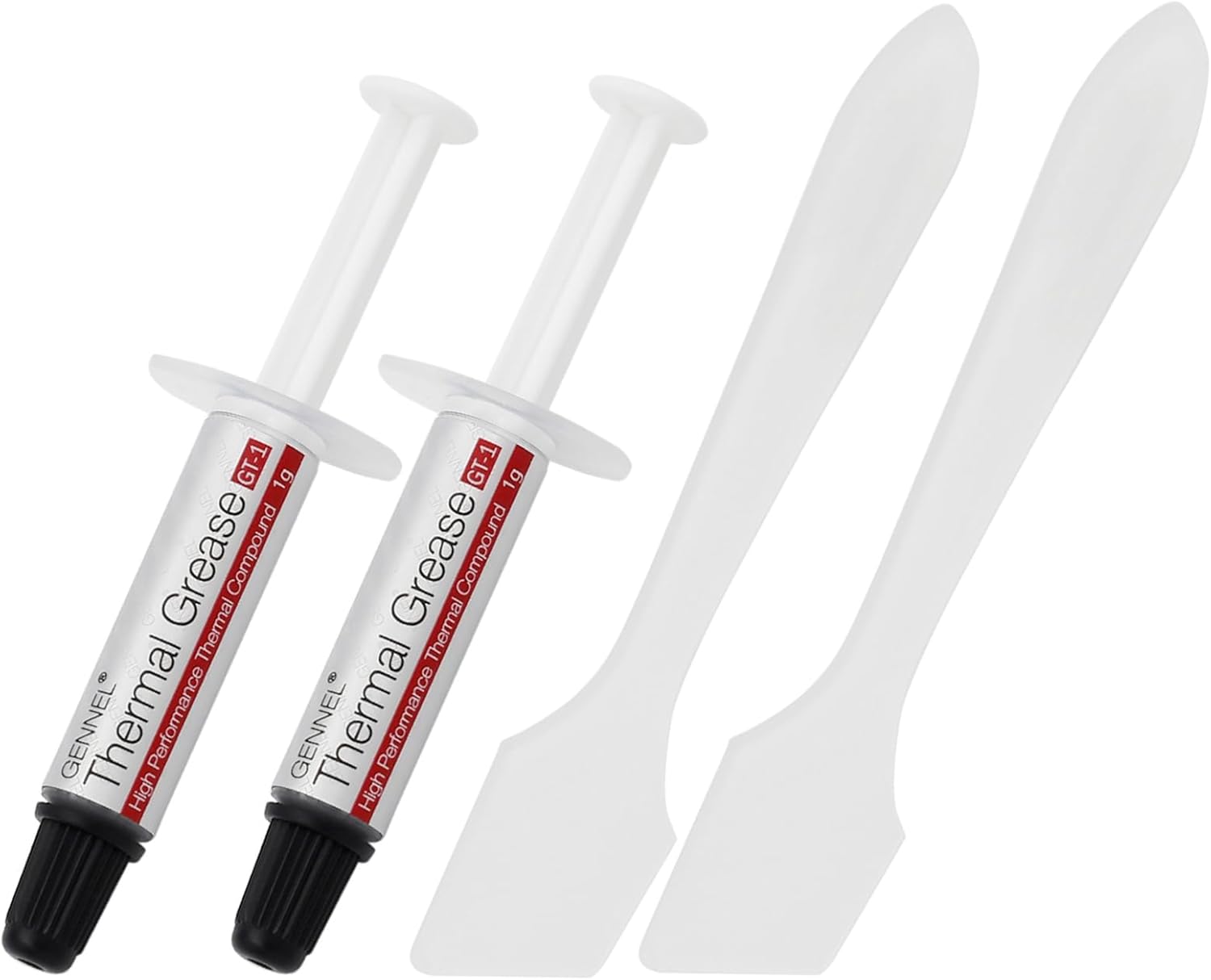
- Two 1 gram syringes rather than one, enough for a re-seat or a second machine
- Working range spans -50C to 240C, covering cold starts and sustained full load
- Non-conductive, non-volatile and flame retardant, so a stray smear will not short a board
- Kit adds cleaning wipes, spatulas and finger cots that usually have to be sourced separately
Cons
- No thermal conductivity figure in W/mK is published for the compound
- 1 gram per syringe covers only a handful of desktop applications before it runs out
- Silicone-based grease, so it cannot match liquid metal on a delidded or bare-die chip
The kit is built around beginners doing a first cooler swap, and the sequence is short.
- Remove the old cooler and clean both surfaces with a supplied wipe until no residue remains
- Put on a finger cot to keep skin oils off the heat spreader
- Apply a pea-sized dot at the centre of the chip, or spread a thin layer with the included spatula
- Seat the cooler straight down and tighten the mounting screws in a diagonal pattern, a turn at a time
The mistake that raises temperatures is over-application. A thick layer insulates instead of filling microscopic gaps, and the excess squeezes out onto the socket. The compound is described as viscously balanced for easy spread and clean-up, which means it will not string and drag the way stiffer pastes do when a cooler comes back off.
The compound works across -50C to 240C, a span that covers everything from a cold garage start to a heavily loaded processor under a stress test. It is a carbon and silicon compound rather than a metal one, and that chemistry defines its safety profile.
- Non-conductive, so a smear on nearby pins will not short a board
- Non-volatile, so it resists drying and pumping out under thermal cycles
- Flame retardant
- No corrosion risk to the die, heat spreader or heatsink base
That non-conductive property is the reason to choose a compound like this for a first build. Liquid metal moves heat better but destroys aluminium coolers and kills boards if it runs. This trades a few degrees for the freedom to be slightly messy without consequence.
The pack contains two 1 gram syringes rather than one, plus the accessories that otherwise have to be bought separately or improvised from a bank card and kitchen roll.
- Cleaning wipes for stripping the old compound
- Plastic spatulas for spreading an even layer
- Finger cots to keep the surfaces clean
One gram covers several standard desktop processors, so two syringes leave room for a re-seat, a laptop repaste or a console heatsink later. The packaging measures roughly 2.95 by 0.98 by 0.71 inches, small enough to live in a toolbox drawer. Store it capped and upright, since grease left in an open syringe divides over time, and squeeze the first bead onto a wipe after long storage before anything touches a chip.

Pros
- Thermal conductivity rated above 3.17 W/m-k, ahead of many stock pastes bundled with coolers
- Working temperature range spans -50°C to 240°C, covering everything from cold boots to sustained load
- Non-electrically-conductive formula reduces short-circuit risk if a small amount contacts nearby components
- 20g tube covers multiple CPU/GPU applications rather than a single one-off use
- Includes a spatula for spreading, so no separate tool purchase is needed
Cons
- Silver-based paste is not listed as non-curing, so reapplication intervals should follow standard thermal-paste practice rather than assumed lifetime use
- No stated viscosity or spreading pattern guidance beyond the general 4-step instructions, so first-time users may over- or under-apply
- Packaging is a single 20g tube with no smaller sample size offered for one-time users
This silver thermal paste is rated for thermal conductivity above 3.17 W/m-k and thermal resistance below 0.067°C-in2/W, figures that place it ahead of many pastes bundled free with stock coolers. It's rated across a working temperature range of -50°C to 240°C (-58°F to 464°F).
- Thermal conductivity: greater than 3.17 W/m-k
- Thermal resistance: less than 0.067°C-in2/W
- Working range: -50°C to 240°C
The formula is non-electrically-conductive, non-toxic, and non-corrosive, reducing the risk of damage if a small amount spreads beyond the die during application, unlike liquid-metal compounds that require careful masking.
The 20g tube is rated for use across CPU, GPU, heatsinks, LED assemblies, and gaming console chipsets, including PS4 and Xbox hardware. A spatula is included for spreading the paste evenly during application.
- 20g tube volume for multiple applications rather than a single use
- Spatula included for spreading, no separate tool needed
- Suitable for CPU, GPU, LED, and console chipset use
The listing's instructions cover cleaning the old paste off first, applying a fresh layer, spreading it evenly, then reinstalling the cooler, following the same general process most thermal pastes require rather than a shortcut method.
Rated to handle temperatures from -50°C up to 240°C, this paste is built to keep working through both cold startup conditions and sustained high-load heat rather than breaking down at one extreme.
- Wide -50°C to 240°C working range covers most consumer PC and console use cases
- Flame-retardant, non-volatile formula reduces fire risk near heat sources
- Long-term stability claimed for extended use without reapplication
Since the listing doesn't specify a recommended reapplication interval or a pump-out resistance figure, users running sustained high loads (24/7 servers, mining rigs) should still monitor temperatures over time rather than assuming indefinite performance.

Pros
- Thermal conductivity rated at 1.93 W/m-k, aimed at pulling heat away from a CPU or GPU die efficiently
- Stays workable across a wide -30°C to 280°C temperature range, so it resists drying out or cracking through normal PC case temperature swings
- Comes as 20 individual 1g packs, enough for roughly 20 separate CPU or GPU applications from one purchase
- Metal-free, non-electrically conductive compound removes the short-circuit risk that some metal-based pastes carry near exposed pins
- Suited to CPUs, GPUs, chipsets, and console hardware like the PS4, covering more than one device type per pack
Cons
- Each pack holds just 1 gram, enough for roughly one or two applications, so larger multi-GPU builds may need several packs
- No included spreading tool or applicator, so a separate spatula or card is needed for an even application
- Carbon-based formula is not a liquid-metal compound, so it will not match the peak heat transfer of high-end liquid-metal pastes
The compound is rated at 1.93 W/m-k thermal conductivity, a carbon-based formula built to pull heat away from a CPU or GPU die and transfer it to the heatsink base. It stays workable across a wide temperature span, from -30°C up to 280°C, without drying out or turning crumbly in normal case temperature swings.
- Carbon-based composition rather than a silver or liquid-metal formula
- Stable texture across a wide temperature range reduces the chance of the paste hardening over time
- Each purchase includes 20 individual 1g packs rather than one larger tube
Because it ships in small single-use packs, unopened portions stay fresh for a future application instead of drying out in an open tube.
The compound is compatible with CPUs, GPUs, chipsets, and console hardware such as the PS4, making one pack useful across several different builds. Each 1g pack is close to a single-application size for a typical desktop CPU or a small GPU die.
- Works across CPU, GPU, and console hardware without a device-specific formula
- 1g portion size is close to a one-application amount on a standard desktop CPU heat spreader
- No spreading tool included, so a card, spatula, or the packaging edge is needed to spread it evenly
Multi-GPU builds or larger heat spreaders may use up a full 1g pack in a single application, so buying extra packs for bigger jobs is worth planning for.
Because the compound is metal-free and non-electrically conductive, it carries no short-circuit risk if a small amount contacts nearby pins or traces on a CPU or GPU, unlike some metal-based thermal compounds. This makes it a safer choice for less experienced builders applying paste near sensitive components.
- Non-electrically conductive formula reduces the chance of damage from stray paste near circuit pins
- Beginner-friendly consistency spreads without needing special tools or techniques
- Best applied in a thin, even layer rather than a thick blob to avoid squeeze-out onto the board
Suitable for first-time builders re-pasting a CPU cooler as well as experienced users doing a GPU repaste.

Pros
- 100g tube covers many CPU or GPU reapplications rather than a single one-off use
- White silicone-carbon compound formulated for coolers, heatsinks and GPU or VGA contact surfaces
- Suited to voltage regulator, MOSFET and transistor contact points, not just CPU or GPU dies
- Listed as compatible across all coolers rather than tied to one cooler brand
Cons
- No thermal conductivity figure (W/mK) is listed, so it cannot be compared on paper against ceramic or metal-based pastes
- Silicone-carbon formula is non-metallic, so it will not match the peak conductivity of liquid-metal compounds
- No spreader or application tool is mentioned as included, so a clean spread relies on your own tools
This kit ships as a single 100g tube of white silicone-carbon thermal compound, sized well beyond the small 1 to 3g syringes bundled with most coolers. That volume is meant for repeated reapplications across builds rather than a one-time job on a single CPU or GPU.
- 100g tube for multiple thermal paste applications
- White silicone-carbon compound formulation
- Sized for builders doing more than one install
Because no exact thermal conductivity figure is listed in this dataset, it should be treated as a general-purpose compound rather than a specialist high-performance paste until confirmed on the packaging.
The compound is described as suitable for all coolers and cooling heatsink interfaces, extending beyond typical CPU coolers to GPU and VGA cards. It is also listed for use on LED modules, voltage regulators, MOSFETs and transistors, which is a broader range than most single-purpose CPU pastes.
- Works across CPU and GPU cooler interfaces
- Suited to GPU and VGA card contact points
- Also listed for LED, voltage regulator, MOSFET and transistor contacts
That range makes it a reasonable pick for electronics hobbyists working on more than just a single desktop build.
The 100g size and broad component compatibility point this toward PC builders and overclockers who reapply paste across several systems, plus electronics hobbyists needing compound for power components like MOSFETs and voltage regulators, not just a CPU.
- PC builders doing repeated thermal paste swaps
- Overclockers reseating coolers more often than average
- Hobbyists working on GPU, LED or voltage regulator repairs
Anyone wanting a single small syringe for a once-off laptop repair may find the 100g tube larger than they need for that specific job.

Pros
- Rated at 12.5 W/mK thermal conductivity, above typical stock paste in the 3-5 W/mK range
- Stays stable without drying out at temperatures up to 80 degrees C, so repaste intervals stretch longer
- Kit bundles 3 applicators, 3 spatulas and 6 cleaning pads, covering a full CPU and GPU repaste without extra purchases
- Nano-aluminum and zinc oxide fillers help it settle into microscopic surface irregularities for better contact
- Usable for at least 3 years after opening when resealed and stored at room temperature
Cons
- No thermal conductivity figure is printed on the packaging itself, only in marketing material
- Precise, slow spreading is required - rushed application can leave the paste lifting off the surface
- Cleanup still needs care around exposed pins or contacts before reapplication
Kryonaut is rated at 12.5 W/mK thermal conductivity, aimed at demanding builds and overclocked systems that generate more heat than stock cooling setups typically handle. The compound is engineered to stay stable and not dry out at sustained temperatures up to 80 degrees C.
- 12.5 W/mK thermal conductivity figure
- Stable performance without drying up to 80 degrees C
- Nano-aluminum and zinc oxide filler compound
The nano-aluminum and zinc oxide particles are designed to fill microscopic surface irregularities on a CPU or GPU die for more even contact with the cooler.
This set includes 3 applicators, 3 spatulas and 6 CPU cleaning pads, enough tools to clean and repaste more than one component without buying separate accessories. The syringe applicator is built for precise dosing, since too much or too little paste both reduce contact quality.
- 3 x applicator syringes
- 3 x spreading spatulas
- 6 x cleaning pads for surface prep
Application should be slow and deliberate - spreading too quickly can cause the paste to lift off the surface instead of laying flat, which reduces its effectiveness.
With proper storage in its original packaging, Kryonaut remains usable for at least 3 years after opening, and often longer. The syringe should be resealed after each use and kept at room temperature rather than exposed to heat or direct sunlight between applications.
- Usable for 3+ years after opening with proper storage
- Best applied at room temperature for easier spreading
- Surface should be fully clean and grease-free before application
Thermal conductivity figures are not printed on the retail packaging itself, so buyers relying on that number should reference the manufacturer's technical documentation.

Pros
- An 8 g syringe covers roughly thirty mainstream CPU applications, enough for a workshop rather than one build
- Carbon-filler compound is neither electrically conductive nor capacitive, so stray smears cannot short nearby components
- Reaches full thermal performance immediately with no burn-in period after mounting
- Viscosity suits direct-die contact on delidded CPUs, bare GPU dies and console processors
- Measurably lower thermal resistance than the MX-4 compound it succeeds, around 20% in the maker's testing
Cons
- High viscosity makes the syringe stiff to dispense; warming it for ten minutes first is close to essential
- Falls a few degrees behind liquid metal under extreme sustained loads
- An 8 g quantity is far more than a single build consumes, so most of it sits in storage between uses
The compound reaches full thermal performance immediately after mounting, with no burn-in period, so a temperature check taken straight after a build reflects what you will still see months later.
- Clean first. Remove old compound with isopropyl alcohol and a lint-free cloth from both the die or heat spreader and the cooler base.
- Quantity: a pea-sized blob in the centre for a mainstream CPU, or a thin cross for large server-class heat spreaders.
- Let pressure spread it. Mount the cooler evenly, tightening screws diagonally a turn at a time, rather than spreading by hand with a card.
Viscosity is high by design, since that resists pump-out under thermal cycling, but it makes the syringe stiff. Warming it in a pocket or a warm room for ten minutes before use makes dispensing far easier to control.
The formulation is carbon-filler based in a silicone gel carrier, and the maker quotes measurably lower thermal resistance than the MX-4 compound it replaces — around a 20% improvement in their own testing.
- Not electrically conductive and not capacitive, so a smear reaching the substrate or a nearby surface component will not cause a short or a discharge.
- That property matters most on direct-die work: delidded CPUs, bare GPU dies and console processors, where silicon sits surrounded by exposed circuitry.
- No metal particles such as silver or diamond dust are used, which is exactly what keeps it safe to handle around live hardware.
Against liquid metal it gives up several degrees under extreme sustained loads, but liquid metal carries real risks around aluminium and exposed traces. For most builds this is the sensible compromise.
Eight grams is a workshop quantity rather than a single-build quantity. A mainstream desktop CPU takes well under a quarter of a gram per application, so the syringe covers roughly thirty repastes — more if you are frugal, fewer on large heat spreaders or laptop dies with several contact points.
- Typical use case: someone maintaining several machines, repasting a laptop annually, or building systems for friends and family.
- For a single CPU, most of the syringe will sit in a drawer between builds.
- Storage: cap it firmly and keep it at room temperature, since the carrier gradually stiffens once air reaches it.
An authenticity check on the packaging lets you confirm the syringe is genuine, which is a real concern with widely counterfeited thermal compounds.
What to Look for in a Thermal Paste Syringe
Not every syringe is built the same, and the differences change how easy your first application goes. Here’s what to check before you add one to your cart.
Viscosity and Spread
Thicker compounds resist pump-out over time but are harder to spread thin. Runnier pastes spread easily with light pressure but can migrate on vertical GPU mounts. If you’re new to repasting, look for a medium-viscosity syringe that forgives an imperfect dot method.
Thermal Conductivity
Conductivity is usually listed in W/mK. Higher numbers generally mean better heat transfer, but the gap between a 8.5 W/mK paste and a 12.5 W/mK paste rarely shows up as more than a couple of degrees on air cooling. Don’t chase the spec sheet at the expense of ease of use.
Conductive vs Non-Conductive
Carbon and ceramic-based pastes stay electrically non-conductive, so a small overflow onto the socket won’t short anything. Silver- and liquid-metal-based compounds conduct electricity and can cause damage if they touch exposed pins or contacts, so they demand a steadier hand.
Applicator Tip Design
A narrow syringe tip gives you a clean, controlled dot in the center of the die. Wide-bore tips push out paste faster but make small, precise dabs harder, which matters more on compact laptop or mini-ITX coolers.
Cost Per Application
A 1g syringe might only cover two or three repastes, while a 20g tube can handle an entire LAN party’s worth of machines. If you build or maintain PCs regularly, a larger syringe usually costs less per application even though the sticker price looks higher.
Best Thermal Paste Syringe Picks for 2026
These picks cover the situations you’re most likely to run into, from a first CPU repaste to a full overclocked rig with a hot GPU.
Best Overall Value
The ARCTIC MX-4 with Spatula earns its spot as an easy recommendation because it pairs a forgiving, medium-thick compound with a spreading tool in the box. You get a clean, even layer on the first try instead of guessing at the dot-and-mount method. At $5.49, it’s an easy add-on to any build budget.
Best for High-Conductivity Silver Paste
If you want maximum thermal transfer and don’t mind being extra careful during application, the GT-1 Silver Thermal Paste two-pack gives you backup syringes for a second build or a future reapplication. Silver-based paste like this is electrically conductive, so keep it away from exposed board contacts while you work.
Best for Larger or Multiple Builds
The G107 20g Silver Thermal Paste syringe is sized for anyone repasting several machines a year, or running a small repair shop. One tube realistically covers a dozen applications, which brings the per-use cost down well below single-gram tubes.
Best for Overclocking and Sustained Loads
For a heavily overclocked CPU pushing sustained high wattage, the Thermal Grizzly Kryonaut kit is worth the higher price. It’s formulated to hold up under extended thermal cycling better than budget pastes, and the bundled applicators and cleaning pads make reapplication painless. If overclocking is your main use case, our best thermal paste for overclocking guide breaks down more options in this tier.
Best Upgrade Pick for Modern CPUs and GPUs
The ARCTIC MX-6 is a newer formula aimed at higher core-count CPUs and power-hungry graphics cards that run hotter than older hardware. Its 8g syringe gives you enough for a CPU and a GPU repaste in the same session, which is handy if you’re servicing both at once.
Best Bulk Kit for Home Labs
Anyone maintaining several PCs, servers, or a home lab setup should look at the Easycargo 100g Thermal Paste Kit. It trades ultimate performance for volume, so you’re not rationing paste across builds. Pair it with our best thermal paste kit roundup if you want bundled tools alongside the compound itself.
Does It Matter If the Paste Is for a CPU or a GPU?
Technically, most syringe-format thermal pastes work on both a CPU and a GPU die. The real difference is mounting orientation and die size. GPU dies are often larger and rectangular, so a wider dot pattern or an X-shaped spread covers the surface better than the single center dot that works fine on a square CPU.
Vertical mounting on some GPU coolers can also cause runnier pastes to slide before the cooler fully clamps down, so a slightly thicker syringe is often the safer pick for graphics cards. If you’re specifically repasting a video card, our best GPU thermal paste guide dives deeper into GPU-specific application methods. For CPU-only builds, check our best CPU thermal paste picks for options tuned to socket-mounted coolers.
Common Mistakes When Buying and Applying Thermal Paste
Even experienced builders trip up on a few recurring issues. Knowing them ahead of time saves you a repaste down the line.
- Using too much paste. A pea-sized dot or thin line is plenty for most CPUs. Excess paste can squeeze onto the socket or board and create a mess, especially with conductive silver formulas.
- Skipping the old paste cleanup. Dried, cracked paste under a new layer traps air pockets and hurts heat transfer. Always wipe the old compound off with isopropyl alcohol before reapplying.
- Ignoring cure time. Some pastes need a burn-in period of a few thermal cycles before they reach their best performance. Don’t judge a paste’s quality from day-one temperatures alone.
- Buying based on conductivity number alone. A slightly lower W/mK rating from an easier-to-apply paste often beats a top-spec paste applied unevenly.
- Storing syringes improperly. Leaving a part-used syringe uncapped or in a hot car can dry it out before your next build. Cap it tightly and store it at room temperature.
Who Should Skip a Premium Syringe
Not everyone needs a $30+ high-performance paste. If you’re running a stock-clocked office PC or a light productivity build with a stock cooler, a budget option like the ARCTIC MX-4 or the GT-1 Silver two-pack will keep temperatures perfectly reasonable. Save the premium silver and diamond-infused compounds for overclocked systems, small-form-factor builds with limited airflow, or GPUs running demanding workloads for hours at a time.
On the flip side, if you’re a hobbyist who repastes every year during spring cleaning, a single small syringe might leave you short. Larger tubes like the G107 20g or the Easycargo 100g kit make more sense if you expect to reapply paste more than once or twice.
How to Apply Thermal Paste From a Syringe
Application method matters as much as the paste itself. Here’s a quick rundown you can follow regardless of which syringe you choose.
- Clean the old paste off both the cooler base and the CPU or GPU die with isopropyl alcohol and a lint-free cloth.
- Apply a pea-sized dot in the center of a square CPU die, or a thin X pattern across a larger rectangular GPU die.
- Mount the cooler with even, moderate pressure so the paste spreads naturally under clamping force.
- Avoid spreading paste manually with a card unless the syringe includes a spatula and the paste is specifically rated for manual spreading.
- Run a stress test after mounting to confirm temperatures look normal before closing up the case.
Frequently Asked Questions
How often should I replace thermal paste?
Most builds are fine going two to four years between applications. Pastes that dry out or pump out of place sooner will show rising idle and load temperatures as a warning sign.
Is silver thermal paste better than carbon-based paste?
Silver-based compounds typically transfer heat slightly better, but they’re electrically conductive and need careful application. Carbon and ceramic pastes are safer for beginners and still perform well for most builds.
Can I use CPU thermal paste on a GPU?
Yes, in almost all cases the same syringe works for both. Just adjust your spread pattern for the GPU’s larger, often rectangular die.
How much thermal paste should I actually use?
A pea-sized dot or a thin rice-grain line is enough for most CPUs. Using more doesn’t improve cooling and can create overflow onto surrounding components.
Do more expensive syringes always perform better?
Not necessarily. Price often reflects included accessories, tube size, or niche conductivity gains rather than a dramatic temperature difference for typical desktop use.
Whichever syringe you land on, the biggest temperature gains come from clean application and proper mounting pressure, not from chasing the highest conductivity number on the label. Match the paste to your build type, budget, and how often you expect to reapply it, and you’ll keep your CPU or GPU running cool for years.






