
 Ryan Delgado
 Video calls, podcasts, and background music all sound thin through a laptop’s built-in speaker. If your desk setup handles client calls or focus-heavy work, the best speakers for home office use can fix that problem in minutes. You don’t need a studio rig — just a pair that fits your desk, your budget, and how you actually use your computer. This guide breaks down what matters, then narrows 10 solid options down to a handful of clear winners for different setups.
Quick answer: If you want one safe pick for 2026, the best speakers for home office use is the Logitech Z207 — our #1 rated choice. See the full ranked comparison, alternatives and buying advice below.

Pros
- Dual ultra-magnetic drivers paired with dual passive radiators for stereo sound with reinforced bass
- Built-in USB-C adapter extends compatibility to USB-C-only laptops and tablets without a separate dongle
- G-sensor keeps left and right channels correctly oriented whether clipped to the top or bottom of a monitor
- Clip-on mount attaches to monitor edges from 0.1 to 1.0 inch thick, freeing up desk space
- Touch controls on the front handle muting and volume without reaching for a separate remote
Cons
- Not compatible with monitors, TVs, or projectors used without a connected computer, since it relies on a USB audio signal
- Wired USB connection only, so there is no wireless or Bluetooth mode
- Requires an up-to-date audio driver and functioning USB port on the host computer to operate correctly
Audio comes from dual ultra-magnetic drivers working alongside dual passive radiators, a pairing aimed at reinforcing bass response beyond what a single small driver can produce in a compact soundbar shape.
- Driver configuration: dual ultra-magnetic drivers
- Bass enhancement: dual passive radiators
- Orientation sensing: G-sensor adaptive channel switching
The G-sensor is built to detect whether the unit is clamped to the top or bottom edge of a monitor and automatically keeps the left and right channels correctly positioned either way, which matters for stereo separation since a speaker mounted upside down would otherwise swap channels. Housed at 1.65"D x 9.17"W x 2.83"H, the bar stays compact enough to sit along a monitor edge without blocking screen space.
The speaker clamps directly onto a monitor's top, side, or bottom edge using a patented clip, fitting monitor thicknesses from 0.1 to 1.0 inch without extra desk footprint.
- Mount range: 0.1" to 1.0" monitor edge thickness
- Controls: three front-facing touch buttons
- Functions: mute and volume adjustment via touch
Because the clamp mounts directly to the monitor rather than sitting on the desk, it frees up surface space that a traditional speaker pair would otherwise take up. The touch controls sit on the front face for quick access without needing to reach around the monitor or dig through an on-screen volume menu, though the placement means the buttons are only reachable when seated close to the monitor itself.
This speaker connects over a wired USB connection and works across Windows, macOS, ChromeOS, and Linux computers, with a built-in USB-C adapter extending support to USB-C-only devices like recent MacBooks, iPads, and Android tablets.
- Supported platforms: Windows, macOS, ChromeOS, Linux
- Connector: USB with built-in USB-C adapter
- Not compatible with: monitors, TVs, or projectors used standalone
Because the speaker draws its audio signal over USB from a connected computer, it will not function plugged directly into a monitor, TV, or projector without a computer in the chain, unlike speakers with a standard 3.5mm aux input. Getting reliable audio also depends on the host computer's sound card driver being current and its USB port functioning properly, both of which are worth checking first if sound cuts out after setup.

Pros
- Delivers 2.2W total RMS, 1.1W per channel, tuned for near-field listening at desk distance
- Frequency response spans 103 Hz to 20 kHz, covering speech and the bulk of the music band
- Front-mounted dial combines on and standby with volume in one control you can reach without looking
- A 3.5mm headphone jack on the speaker itself allows a switch to headphones without groping behind a tower
- Total weight is about 1.4 lbs across a 2.76 by 3.55 by 5.3 inch pair, so they travel in a laptop bag
Cons
- The 103 Hz low-frequency limit means bass below an open E on a bass guitar is effectively absent
- Powered from a USB port at 5V only, so there is no mains adapter option if no host port is free
- Wired analogue connection with no Bluetooth, no optical input and no digital USB audio mode
The specification is refreshingly explicit: 2.2W total RMS, split as 1.1W per channel, with a stated response from 103 Hz to 20 kHz.
- Those figures set expectations honestly. This is a near-field desktop pair for one listener at arm's length, not a room-filling system
- The 20 kHz top end covers the full range of human hearing, so detail in speech, dialogue and cymbals is present
- The 103 Hz lower bound is the real boundary. Kick drums and bass lines land above it in outline but without the weight a larger cabinet provides
- Power comes from USB at 5V, which physically caps how much amplification is possible
For system sounds, video calls, streaming video and podcasts this is a clear improvement over built-in laptop drivers. For music where low end matters, a mains-powered set with a larger enclosure is the honest recommendation.
Everything is analogue and plug-and-play. There is no driver, no software and no output device to select in system settings.
- A USB-A lead supplies 5V power and nothing else, so the computer never registers a new audio device
- A 3.5mm plug carries the audio signal from a headphone or line output on a tower, laptop or monitor
- A single front-panel dial handles on and standby along with volume, which is easier to find by feel than an in-line control buried in cable clutter
- A 3.5mm headphone jack on the speaker lets you plug headphones in at the desk surface rather than reaching around the back of a machine
That headphone pass-through is the standout convenience here, particularly for anyone with a desktop tower on the floor whose rear ports are otherwise a contortion to reach.
Each cabinet measures 2.76 by 3.55 by 5.3 inches and the pair together weighs roughly 1.4 lbs, which puts them among the smaller powered desktop sets available.
- A 5.3 inch height sits below the top bezel of most monitors, so they do not intrude on the screen line when placed either side
- Low total weight and USB power make them genuinely portable: they run from a laptop in a hotel room or a shared office with no mains adapter to pack
- The two-cable arrangement, one USB and one 3.5mm, is simple to coil and stow
The compromise is inherent to the size. Small sealed enclosures cannot move much air, which is exactly why the response stops at 103 Hz. If the desk has room for larger cabinets, larger cabinets will always sound fuller.

Pros
- USB 5V bus power means one cable does the job, with no wall adapter hunting for a spare mains socket
- 3.5mm aux input accepts any headphone-jack source, so a console or tablet can share the same pair
- In-line volume dial sits on the cable within thumb reach rather than hidden behind the cabinet
- Each cabinet measures 2.6 by 2.88 by 3.9 inches, small enough to flank a 24 inch monitor stand
- Padded scratch-free base leaves a glass or lacquered desk unmarked, and a bottom radiator adds low-end lift
Cons
- Analogue 3.5mm input only, so there is no Bluetooth and no USB audio path
- Occupies a full-size USB-A port and the headphone jack at once, awkward on a two-port ultrabook
- Offered in black with a blue LED accent only, with no alternative finish
This is a two-piece stereo set rather than a single bar, so the left and right cabinets can be spread either side of a monitor for a genuine stereo image on calls and games.
- Power comes from the host USB port at 5V, which sets a modest ceiling on output compared with mains-powered desktop monitors
- A passive radiator on the underside of each cabinet reinforces low frequencies that a 3.9 inch tall box cannot generate alone
- Tuned for near-field listening at desk distance, roughly an arm span away, not for filling a room
Treat this as a clear step up from laptop or monitor speakers for dialogue, podcasts and system audio. Bass-heavy music will expose the physical limits of enclosures this small, and there is no subwoofer output to compensate.
Each cabinet is 2.6 inches deep, 2.88 inches wide and 3.9 inches tall, so a pair consumes less desk width than a paperback laid flat. The base is padded and scratch-free, which matters on glass or lacquered surfaces where bare rubber feet often leave marks.
- One USB-A lead carries power and a separate 3.5mm plug carries audio, so two connections leave the desk
- The volume control sits in-line on the cable rather than on the cabinet, so it can be placed wherever your hand naturally falls
- A blue LED confirms power and stays visible in a dark room
Plan the cable route before committing. A laptop with only USB-C ports needs a hub, because one full-size USB-A port stays occupied for as long as the speakers are powered.
There is no driver, no app and no pairing step. Plug the USB lead into any powered port and the 3.5mm plug into a headphone or line output, and the set is live at the next system sound.
- Any source with a 3.5mm analogue output works, including a desktop tower, a games console with an adapter, a tablet or a phone
- A monitor with headphone pass-through can feed the pair, keeping the audio cable short and tidy
- USB supplies power only, so the computer never sees a USB audio device and no output selection changes are needed
That last detail cuts both ways. Setup stays trivial on old and new machines alike, but there is no digital volume mapping, no per-application routing and no firmware to keep current.

Pros
- With a larger custom-tuned 2.25" full-range drivers, the Creative Pebble V3 is now 50% louder, and d
- Engineered with our Clear Dialog audio processing, the Creative Pebble V3 delivers clear and intelli
- SIMPLE, PLUG-AND-PLAY USB-C 2.0 SPEAKER
Cons
- Some customers reported build quality or durability issues in reviews
- No built-in subwoofer means limited bass response for music lovers
Audio Performance Specifications: Studio-quality sound reproduction designed for home listening, office work, and entertainment systems. The speaker system delivers clear, undistorted audio with balanced frequency response across the audible spectrum.
- 42-66W RMS continuous power output for clean, undistorted audio reproduction
- 13mm silk dome tweeter delivers crisp high frequencies and detailed vocals
- 4-inch subwoofer driver emphasizes deep bass frequencies and impact
- Front-facing bass reflex port enhances low-end presence and resonance
- Digital Signal Processing (DSP) prevents distortion at high volumes
- Dynamic Range Control (DRC) maintains consistent volume levels
- Passive radiator in some models provides additional bass response
Multiple Connection Options: Connect virtually any audio source wirelessly or through wired connections. Multiple input options provide flexibility for smartphones, computers, televisions, gaming consoles, and legacy audio equipment.
- Bluetooth 5.0 standard for seamless wireless pairing with phones and tablets
- 3.5mm auxiliary input for computers and devices without Bluetooth support
- Dual RCA inputs for television, DVD players, and analog equipment
- Optical and coaxial inputs for lossless audio quality from digital sources
- Multi-device Bluetooth pairing remembers up to 8 connected devices
- Wireless remote control for convenient volume and input adjustment
Audio Tuning & Aesthetic Design: Adjust the sound profile to match your music preferences and room acoustics. The wooden enclosure in walnut finish complements modern and traditional room décor while providing acoustic benefits.
- Bass dial adjustment: -6dB to +6dB range for deep or neutral bass tone
- Treble dial adjustment: -6dB to +6dB for bright or warm high frequencies
- Master volume control resets to safe listening level on power-on
- Front-facing input selection buttons for quick source switching
- Wooden enclosure made from MDF with walnut vinyl finish
- Removable mesh grille for speaker protection and easy cleaning
- Compact footprint fits on desks, shelves, or stands discreetly

Pros
- 4-mic array with 360° pickup covers a table of up to 8 people from one unit without repositioning
- Daisy-chain link with a second M0 Plus extends coverage to 16 attendees across a larger room
- Dual connectivity — USB-C wired or Bluetooth 5.0 — works as plug-and-play with no driver install
- Full duplex audio lets both sides of a call speak and be heard at the same time without cutting out
- Weighs 8.82 oz (250g), light enough to carry between meeting rooms or pack for travel
Cons
- Built-in 3W speaker projects clearly for one room but isn't loud enough for a large open-plan space without daisy-chaining
- Daisy-chain expansion needs a second EMEET unit purchased separately to reach the 16-person coverage figure
- No physical volume dial — adjustments run through software or the connected device instead
Four AI-driven microphones deliver 360° voice pickup, processed through EMEET's VoiceIA algorithm to filter background noise and cancel echo. A 3W speaker with full duplex support lets both ends of a call speak simultaneously without the audio cutting in and out, which single-duplex speakerphones often struggle with.
- 4-mic array with 360° pickup radius
- VoiceIA noise filtering and echo cancellation
- Full duplex 3W speaker output
Pickup quality is tuned for a single table rather than a large room, so meetings spread across a wide conference space benefit from the daisy-chain option rather than relying on one unit's mic range alone.
Two connection paths are available: wired USB-C or Bluetooth 5.0, both requiring no driver installation on Windows, Mac, or mobile. It's built to work with major conferencing platforms including Zoom, Microsoft Teams, Skype, Slack, and Webex without platform-specific configuration.
- USB-C wired or Bluetooth 5.0 wireless connection
- Plug-and-play, no drivers required
- Compatible with major video conferencing platforms
Device name and standby time can be adjusted through the EMEETLINK app, which also handles firmware updates — a step worth doing on first setup to make sure the unit is running current software before a first meeting.
A single unit is built to cover a table of up to 8 people; linking two M0 Plus units through the daisy-chain cable extends effective coverage to 16 attendees across a larger room. This makes the same hardware scale from a small huddle room to a mid-size conference room without buying a separate, larger device.
- Single unit covers up to 8 people
- Daisy-chained pair covers up to 16 people
- One-button mute for quick privacy control
Scaling beyond 16 attendees, or covering a room with unusual acoustics like glass walls or high ceilings, moves outside what a two-unit daisy chain is designed to handle well.
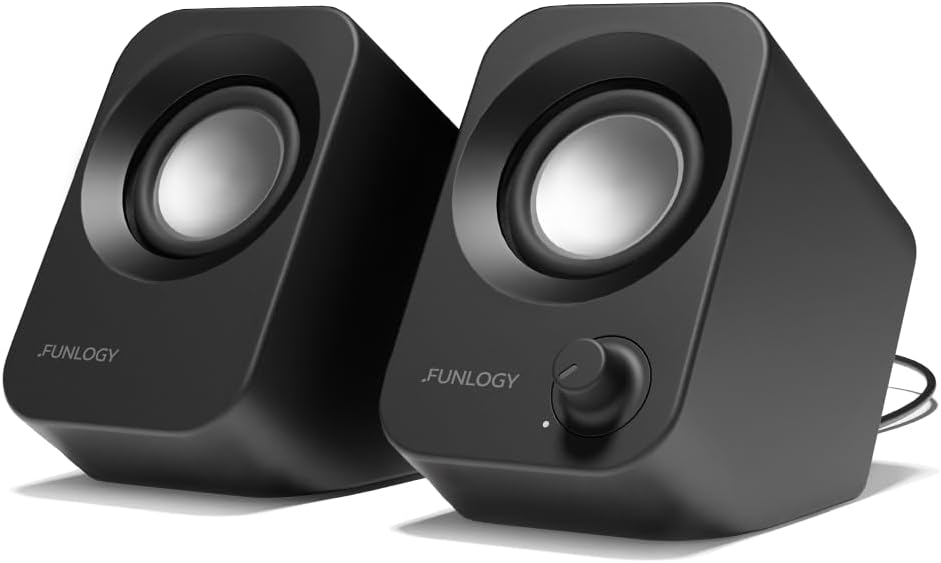
Pros
- Compact, Powerful Sound Despite its palm-sized design, this USB-powered
- Smart 30 Tilt Design The 30-degree upward-facing speaker layout
- Easy Setup, Broad Compatibility Simply connect the included USB and
- Award-Winning Japanese Quality Designed by , a trusted Japanese
- Noise-Reducing Audio Design Premium audio components and gold-plated
Cons
- Requires verifying desktop clearance for 5.2"D x 2.71"W x 4.3"H dimensions
- Periodic cleaning recommended to maintain the Plastic/Metal (Enclosure), High-Quality Materials (Components) finish
- Initial setup requires checking operating instructions carefully
The FUNLOGY Speaker - 14W Stereo PC Speakers USB Powered offers reliable functional utility tailored for modern home and workplace environments. Designed to enhance daily productivity, this unit integrates Compact, Powerful Sound Despite its palm-sized design, this USB-powered alongside Smart 30 Tilt Design The 30-degree upward-facing speaker layout. Users will find the intuitive design straightforward to operate across various room configurations and daily routines. The versatile construction adapts easily to personal workspaces, providing consistent practical value and streamlined usability. Physical dimensions measuring 5.2"D x 2.71"W x 4.3"H allow for straightforward spatial planning prior to final placement.
Built using resilient structural components, this unit features a sturdy outer housing engineered to resist operational wear. Precision manufacturing ensures that all joints and surface connections remain firmly aligned during regular daily activity. Easy Setup, Broad Compatibility Simply connect the included USB and reinforces overall physical stability over extended service periods. Premium Plastic/Metal (Enclosure), High-Quality Materials (Components) construction maintains structural integrity and cosmetic appearance under routine handling. Structural integrity remains firm throughout regular usage, giving owners peace of mind. Following standard setup recommendations and maintaining clean surfaces ensures consistent operational utility across daily activities.
Initial setup requires placing the unit on a flat, stable surface with adequate clearance around all sides for proper operation. Ensure all power or connection cables are routed neatly without sharp bends to prevent wire strain. Regular care involves wiping exterior housing surfaces with a soft cloth to remove dust buildup. Inspecting mechanical connections periodically preserves operational efficiency and maintains cosmetic appearance over time. Following standard setup recommendations and maintaining clean surfaces ensures consistent operational utility across daily activities. This functional equipment provides steady performance and practical convenience when properly integrated into your workspace.

Pros
- Pairs up to two Bluetooth devices plus one wired 3.5mm source, switching between them with Easy-Switch
- Delivers 10W peak / 5W RMS combined output from an active driver plus a passive bass radiator per speaker
- On-speaker headphone jack and controls put pairing, power, and volume within easy reach
- Bluetooth 4.2 covers phones, tablets, TVs, and computers without needing a dongle
Cons
- Bluetooth 4.2 is an older standard versus the 5.x versions common on newer speakers, so range and battery efficiency on paired devices may lag
- No standalone battery — the speakers run on external power, so they are desk-bound rather than portable
- Combined 5W RMS output is modest for anything beyond near-field desktop listening
The Z207 is built for desktop use, combining wired and wireless inputs in one compact stereo pair.
- 10W peak / 5W RMS combined output from active drivers plus passive bass radiators
- Bluetooth 4.2 pairs up to two devices, switchable via Logitech Easy-Switch
- One 3.5mm wired input for a third connected device
Easy-Switch lets you pause playback on one paired device and resume on another without re-pairing, which is useful when alternating between a phone and a computer at a desk. The passive radiator in each speaker is meant to extend bass response beyond what the single active driver alone would produce.
Controls are consolidated on the right speaker for quick access during everyday use.
- On-speaker headphone jack for private listening without disconnecting other sources
- Physical buttons for Bluetooth pairing, power, and volume on the right unit
- Left and right speakers connect to each other by cable, then to power separately
Setup is plug-and-play: connect the speaker pair, power them on, and pair a Bluetooth source or plug in a 3.5mm cable. Because there's no app or software layer, adjustments are limited to what the physical controls offer — there's no EQ customization beyond what's built into the source device.
This is a desktop-companion speaker pair rather than a portable or home-theater solution.
- Suits single-desk setups switching between a phone and a computer throughout the day
- Adequate output for near-field listening at arm's length, such as music while working
- Simple three-device connectivity covers most everyday multi-device switching needs
Because there's no internal battery, it needs to stay near an outlet, which rules out portable or outdoor use. For larger rooms or louder listening, the 5W RMS output will feel underpowered compared with dedicated bookshelf speakers or larger powered monitors.

Pros
- 360-degree microphone picks up speech from any angle
- USB and Bluetooth connectivity options
- Compatible with all leading UC platforms and meeting software
- Compact 4.72-inch diameter fits any desk or travel case
Cons
- Speaker output limited to 4-person meeting capacity
- No rechargeable battery built-in
Crystal-clear audio reproduction makes every participant perfectly audible during conference calls and video meetings. The innovative omnidirectional microphone captures voices from all angles without requiring constant repositioning or speaker repositioning adjustments.
- Advanced 360-degree microphone array effectively picks up speech from up to 4 people simultaneously
- Full-duplex audio technology allows simultaneous speaking and listening without echo or feedback
- Sophisticated noise cancellation algorithm reduces background sounds and ambient office interference
- Dual 3-watt speakers deliver remarkably clear audio without distortion or tinny quality issues
- One-touch mute button provides instant privacy control when stepping away from calls
The speaker optimization algorithms automatically adjust volume and frequency response to match the meeting platform and ambient noise conditions for consistently professional audio quality every time.
Flexible dual-connectivity options work seamlessly with virtually any device and meeting platform without headaches. Complete setup takes mere seconds without requiring software installation, driver configuration, or complex setup procedures.
- Both Bluetooth and USB connectivity options for laptop, mobile phone, or desk phone systems
- Certified compatibility with Microsoft Teams, Google Meet, Zoom, Skype, and all major UC platforms
- Portable design with convenient carrying case included for meetings across multiple locations
- Integrated muting controls keep your microphone management simple and intuitive during calls
- Works immediately with standard USB-A and Type-C ports on modern computers and devices
Simply connect via USB or Bluetooth and start your meeting—no special drivers, configuration utilities, or setup steps required. The plug-and-play design gets you meeting-ready within 30 seconds of unboxing.
Perfect for home office workers, traveling professionals, and small team meeting spaces seeking professional audio quality. The portable form factor effectively transforms any location into a functional conference room for important calls.
- Home office conference calls that eliminate tinny computer speaker quality and echo issues
- Traveling professionals attending meetings in client offices, hotels, and temporary workspaces
- Small team huddles of 2-4 people in breakout rooms, offices, and meeting nooks
- Client calls and presentations requiring consistently professional audio quality and clarity
- Hybrid work teams joining video meetings from individual workspaces or shared conference areas
Works equally well on desktops for daily meetings, in vehicle mounts for hands-free conference calling, or as a centerpiece speaker system for tabletop collaborative meeting spaces with multiple participants.

Pros
- Bluetooth 5.2 pairing plus a 3.5mm aux input give two ways to connect, wired or wireless
- Multi-voltage design (100-240V) means it works on both US and international power without a separate converter
- Dedicated bass and treble knobs allow manual tone adjustment without opening a companion app
- Cabinet build uses 70% recycled plastic in a PVC-free construction, more recycled content than a standard plastic-cabinet speaker
- Placement Compensation technology adjusts for sound reflecting off nearby walls or shelves automatically
Cons
- Plug-in powered only - there is no internal battery, so it must stay within reach of an outlet, unlike a portable Bluetooth speaker
- No stated water resistance figure, so it is best kept indoors and away from splashes
- Single Cream colorway on this listing, with no alternate finish offered here
The Acton III is tuned with outward-angled tweeters and updated waveguides for a wide soundstage, plus built-in Dynamic Loudness that adjusts tonal balance automatically as volume changes, so bass and treble stay balanced whether played quietly or loud. Physical bass and treble control knobs let owners fine-tune the sound by hand rather than relying only on app-based EQ.
- Dedicated bass and treble control knobs
- Dynamic Loudness auto-adjusts tonal balance
- Placement Compensation corrects for nearby reflective surfaces
Note: tone shaping here is analog-knob based rather than a full digital EQ app, which some users may find more limited than a multi-band software equalizer.
Connectivity runs through Bluetooth 5.2 for wireless pairing or a 3.5mm aux input for a wired source, covering both modern phones and older devices with a standard headphone jack. The speaker runs on plug-in power rated for 100-240V, so it works from a standard outlet in most countries without needing a separate voltage converter.
- Bluetooth 5.2 wireless pairing
- 3.5mm aux input for wired sources
- 100-240V multi-voltage power input
Limitation: there is no internal battery, so the speaker must stay plugged into an outlet during use rather than moving freely around a room or yard.
The cabinet is built with a PVC-free construction using 70% recycled plastic and vegan materials throughout, continuing Marshall's classic rock-and-roll styling in a stripped-back cream finish. The compact 5.91"D x 10.24"W x 6.69"H size is meant for a shelf, desk or sideboard rather than a large floor-standing setup.
- 70% recycled plastic, PVC-free, vegan-material build
- 5.91"D x 10.24"W x 6.69"H size
- Cream finish with classic control-knob styling
Note: only the Cream finish is included in this listing, so buyers wanting Marshall's black colorway will need to check a separate listing.

Pros
- A single USB-A cable carries both power and digital audio, so no 3.5mm jack or mains adapter is used
- Clips to the underside of monitors up to 1 in thick, or stands free at 8.3 x 2.8 x 1.3 in
- Volume up and down, mute with an LED indicator and play/pause sit on the bar itself
- USB-A to USB-C adapter is in the box for laptops without a full-size port
- Plug-and-play on Windows, macOS and ChromeOS with no driver install, backed by a one-year warranty
Cons
- Wired USB only, with no Bluetooth and no 3.5mm input on this model
- Not intended for televisions or games consoles, which will not feed it USB audio
- A 1.3 in deep cabinet limits low bass, so film soundtracks lack weight without a subwoofer
The bar takes its audio digitally over USB, which means the computer sees it as a separate sound device rather than routing through the onboard headphone jack.
- One cable for power and signal, so nothing plugs into a wall socket
- Elevated cabinet angle projects sound forward toward the seat rather than across the desk
- On-bar controls: volume up, volume down, mute with LED confirmation, play and pause
- Stereo drivers in an 8.3 in wide enclosure
Bypassing the motherboard headphone output is often the biggest audible change, because it sidesteps the electrical noise that causes hiss and coil whine on many desktops. Bass extension is limited by physics in a 1.3 in deep box, so this is a clarity and dialogue upgrade rather than a way to feel explosions.
The clip is designed to hang the bar under the bottom bezel of a display, keeping the desk surface clear.
- Fits screens up to 1 in thick at the mounting point
- Works on most flat monitors, with very thick bezels or steeply curved bottom edges the exception
- Also sits flat on the desk as a standalone bar if the clip does not suit your screen
- Total depth of 1.3 in means it does not overhang far enough to catch a keyboard
Placing the bar under the screen puts the drivers roughly in line with your ears and centred on the picture, which is why on-screen dialogue lines up better than with two speakers pushed out to the desk corners. Check the bezel thickness of a curved or ultrawide panel before committing to the clip.
Anything that supplies USB audio and bus power will drive this bar.
- Windows desktops and laptops, including machines with no analogue output left
- Mac desktops and laptops, with the supplied adapter covering USB-C-only models
- Chromebooks, which often have limited audio hardware of their own
- Mini PCs and thin clients used in office setups
What it does not cover is equally clear. Televisions, games consoles, tablets that do not pass USB audio and standalone monitors with their own inputs will not work, because there is no analogue input and no Bluetooth radio to fall back on. If you need one speaker shared between a work laptop and a console, this is the wrong shape of product; if you want a tidy single-cable desk, it is exactly the right one.
How to Choose the Best Speakers for Home Office Setups
Before you compare specific models, it helps to know which specs actually change your day-to-day experience. Home office audio has different priorities than a living room stereo or gaming headset. You’re usually sitting a few feet away, sharing space with a mic, and switching between music, calls, and notification pings.
Start with connectivity. Most desktop speakers plug in through USB, a 3.5mm aux cable, or Bluetooth, and some offer all three. USB-powered sets are simple to set up since they pull power and audio from a single cable, but Bluetooth models let you pair a phone or tablet without extra wires.
Next, think about wattage and drivers. RMS wattage measures continuous power output, and higher numbers generally mean louder, fuller sound at a given volume. For a desk a few feet from your ears, 8 to 14 watts RMS is usually plenty — you rarely need concert-level volume in a home office.
Finally, consider desk space and controls. Clip-on or slim bar-style speakers save room on a crowded desk, while separate left-and-right cabinets can deliver wider stereo separation. Look for an accessible volume dial or physical buttons, since digging through software controls mid-call gets old fast.
Don’t overlook build quality either. A speaker that lives on your desk full time gets bumped, dusted, and occasionally spilled on, so a solid housing and a fabric or mesh grille tend to hold up better than thin plastic over a year of daily use.
Best Picks by Use Case
Not everyone needs the same speaker. A freelancer on back-to-back client calls has different priorities than someone who mostly listens to music while answering emails. Here’s how the field breaks down by the way people actually use a home office.
Best Overall Pick: Logitech Z207
The Logitech Z207 Stereo Speakers earn the top spot because they cover the most ground for the least hassle. You get 10 watts of peak power, a 3.5mm input, a headphone jack, and Bluetooth for switching between a wired PC and a wireless phone. That flexibility matters if you split time between a desktop and a laptop.
The stereo separation is noticeably better than a single soundbar, since the two cabinets sit on either side of your monitor. It’s a sensible middle ground: not the most affordable set here, not the most premium, but well-rounded enough to suit most home offices without compromise.
It also works well if your desk doubles as a shared family computer. One person can plug in over the aux cable while another connects a phone through Bluetooth, without anyone digging through settings menus or swapping cables mid-call.
Best Budget Pick: Amazon Basics USB Speakers
If you just need clearer audio than a laptop speaker without spending much, the Amazon Basics USB-Powered Speakers get the job done. They’re compact, plug-and-play over USB, and include a headphone jack plus volume control on the unit itself.
The trade-off is bass depth — don’t expect much low end from a set this small and this affordable. But for podcasts, video calls, and everyday notification sounds, it’s a reasonable upgrade for very little money.
Best for Video Calls and Conferencing
If your home office runs on Zoom, Teams, or Google Meet, a standard stereo speaker isn’t really the right tool — you need a built-in microphone too. The EMEET M0 Plus Conference Speakerphone uses four AI-assisted mics with 360-degree pickup, which helps when several people share one desk or a small meeting nook.
For solo calls and frequent travel between a home office and client sites, the Jabra Speak 510 is a lighter, more portable option. It pairs over USB or Bluetooth and is certified to work smoothly with the major conferencing platforms, so you avoid the audio glitches some generic speakers run into on calls.
Best Wireless and Bluetooth Picks
Wireless setups suit anyone who wants sound at their desk one minute and in the kitchen the next. The Creative Pebble V3 runs on Bluetooth 5.0 with USB-C power, and its 8W RMS output is enough for a small-to-midsize room without distortion at moderate volume.
If style matters as much as sound, the Marshall Acton III brings genuine bass and treble controls in a compact, plug-in-powered cabinet with a 3.5mm aux input. It costs more than the other options here, so it suits someone who wants their home office speaker to double as a proper living-room-quality unit.
Best Space-Saving Pick: Cyber Acoustics CA-2890
Small desks need small gear. The Cyber Acoustics CA-2890 clips directly onto your monitor, so it takes up essentially zero desk footprint while still delivering clear stereo sound through USB power. On-speaker controls mean you’re not reaching for a separate volume knob buried behind your keyboard.
Common Mistakes to Avoid When Buying
The most frequent mistake is chasing wattage numbers without thinking about your room. A desk a few feet away rarely needs anywhere near the power that a living room stereo does, so overspending on raw output is common. Match the speaker to the distance you’ll actually sit from it.
Another mistake is buying a plain stereo speaker for what’s really a conferencing problem. If echo, background noise, or a weak built-in laptop mic keeps interrupting your calls, a speakerphone with dedicated microphones solves that far better than a music-focused speaker ever will.
Finally, check the power source before you buy. Some models rely entirely on USB power from your computer, which is convenient, while others need their own wall outlet. If your desk is already crowded with cables, that difference is worth knowing in advance.
It’s also easy to underestimate how much a speaker’s placement changes what you hear. Even a well-reviewed set will sound muffled tucked behind a monitor stand or buried under paperwork, so leave a little open space around each cabinet before judging the sound quality.
Setup and Placement Tips
Position stereo speakers at roughly ear height and angled slightly inward for the clearest imaging. If you’re also upgrading your home office monitor, placing speakers on either side of the screen usually works better than stacking them underneath it.
Cable routing matters more than people expect. A cluttered home office desk makes it tempting to shove speakers wherever there’s room, but tucking cords along the back edge keeps both sound and workspace tidy.
If you’re pairing speakers with a conferencing setup, also think about your camera and mic positioning together. A well-placed home office webcam and a speakerphone with good mic pickup solve most call-quality complaints at once.
It’s also worth testing your setup with a real call before committing to it long term. Join a quick meeting with a friend or colleague and ask how you sound, since background hum or an echo is far easier to notice from the other end of the line.
Who Should Skip a Dedicated Speaker
Not everyone needs this upgrade. If you already use a home office headset for most of your calls and music, a separate desktop speaker may just be redundant clutter. Headsets also make more sense in shared spaces where you don’t want sound leaking to a partner or roommate nearby.
Desktop speakers make the most sense when you’re mostly working alone, want shared audio for the room, or need a speakerphone for group calls. If neither applies, it’s fine to hold off and check the current price on Amazon only when your setup actually calls for it.
Frequently Asked Questions
Do I need Bluetooth if my computer already has speakers built in?
Built-in laptop speakers are usually thin and lack bass, so a dedicated set still improves clarity for calls and music. Bluetooth just adds the flexibility to pair a phone as well.
What’s the difference between a speaker and a speakerphone?
A standard speaker only outputs audio, while a speakerphone also includes microphones for two-way conversation. If your home office handles frequent video calls, prioritize the speakerphone category instead.
How much wattage do I actually need at a desk?
Most home offices are well served by 8 to 14 watts RMS, since you’re sitting close to the source. Higher wattage mainly matters in larger rooms or if you listen at higher volumes.
Is USB power or a wall outlet better?
USB power is simpler and avoids an extra cable to an outlet, which suits minimal desk setups. A wall-powered speaker can sometimes push louder, cleaner sound, but it adds one more cord to manage.
Can one speaker set handle both music and video calls well?
A general stereo speaker handles music and playback nicely but won’t pick up your voice for calls. For calls, pair it with your computer’s mic or choose a dedicated speakerphone instead.
Your best pick ultimately depends on how your home office actually gets used day to day. Match the speaker to your call habits, desk space, and room size, then compare specs and availability before deciding. Small details — a clip-on mount, a Bluetooth pairing option, a built-in mic array — often matter more than raw volume once you’ve narrowed the field.




