
 Priya Raghavan
 Quick answer: For most people in 2026, the best quiet keyboards pick is the SteelSeries Apex 3 — our #1 rated choice. See the full ranked comparison, alternatives and buying advice below.
Typing next to a sleeping partner, a napping baby, or a coworker on a call is stressful when every keypress sounds like a drumroll. If you share a small apartment, work in an open office, or record audio at your desk, the search for the best quiet keyboards usually starts after one too many complaints about clacking. The good news is that quiet does not have to mean mushy or slow. Modern switches, dampening foam, and scissor mechanisms let you type fast without disturbing anyone nearby. This guide breaks down what actually makes a keyboard quiet, then matches specific models to real use cases like gaming, home offices, and shared spaces. By the end, you should know exactly which switch type and layout fits how you actually work.

Pros
- Whisper-quiet gaming switches specified for over 20 million keypresses with no audible click
- IP32 protection covers dripping water and solid debris above 2.5mm such as crumbs and pet hair
- Ten-zone RGB illumination with reactive effects across the full-size layout
- Magnetic wrist rest attaches and detaches with no clips or tools
- Three cable exit channels moulded underneath route the lead left, centre or right
Cons
- Uses quiet gaming switches rather than mechanical stems, so there is no tactile click and no hot-swap option
- Lighting is divided into ten zones instead of per-key control
- Wired only, and IP32 covers drips rather than a full glass of liquid poured across the deck
SteelSeries fits whisper-quiet gaming switches rather than mechanical stems, specified for over 20 million keypresses. The practical difference is sound and feedback: there is no audible click and no sharp tactile bump, just a soft, low-friction press that bottoms out quietly. That makes the board workable in a shared room, during a late session next to someone sleeping, or in an office where a clicky mechanical would irritate colleagues. Anyone who wants crisp typewriter response will find this muted by comparison. Gaming-grade anti-ghosting handles simultaneous inputs during combat.
- Over 20 million keypresses of quoted switch life
- Near-silent actuation with a soft bottom-out
- Anti-ghosting for multiple simultaneous keypresses
IP32 is the specific protection standard here, and reading it correctly avoids disappointment. The 3 covers solid objects above 2.5mm, meaning crumbs, dust and pet hair, while the 2 covers dripping water when the board sits tilted up to 15 degrees. A knocked glass dripping onto the deck should be survivable if you unplug and drain it promptly, but submerging the board or pouring a pint across it is well outside the standard. Three cable routing channels underneath let the lead exit left, centre or right to keep the desk tidy.
- IP32 protection against drips and larger debris
- Three cable exit channels moulded into the underside
- Full-size layout including a number pad
The board measures 17.52 inches long, 5.94 inches deep and 1.57 inches tall, so it needs a desk at least twenty inches wide once you allow mouse clearance to the right of the number pad. The magnetic wrist rest attaches and detaches without clips, adding roughly two inches of depth when fitted, and snaps back on in a second if you move the keyboard across to a console. A clickable metal roller and dedicated media keys sit above the number pad for volume and playback without opening software.
- 17.52 x 5.94 x 1.57 inch full-size chassis
- Magnetic wrist rest attaches and removes with no tools
- Metal volume roller plus dedicated media keys

Pros
- Tri-mode wireless connection supports Bluetooth 5.0, 2.4GHz, and Type-C
- High-capacity 10,000mAh battery delivers extended operational uptime
- Pre-lubed silent switches damp keystroke acoustics effectively
- Hot-swappable PCB design allows easy 3-pin and 5-pin switch swaps
- Compact 96% layout includes dedicated rotary media control knob
Cons
- Key remapping driver software is designed for Windows PC platforms
- Large battery capacity slightly increases overall keyboard weight
Crafted for ultra-quiet typing performance, this gasket-mounted wireless mechanical keyboard features internal dampening foam layers that reduce case resonance and keystroke reverberation. Factory pre-lubed silent switches combined with oil-resistant PBT keycaps produce a smooth, cushioned typing feel with minimal acoustic distraction. The compact 96% desk-saving layout retains dedicated arrow keys and a numeric keypad, making it an ideal keyboard choice for shared office spaces, late-night typing sessions, or quiet home workspaces where silent key operation is essential for concentration and daily productivity throughout long workdays.
Equipped with an internal 10,000mAh battery, this mechanical keyboard offers exceptional operational uptime without requiring frequent recharging cables. Multi-mode wireless connectivity allows rapid switching between 2.4GHz USB dongle mode, Bluetooth 5.0 wireless pairing, and Type-C wired mode across desktop PCs, laptops, and mobile devices. Typing enthusiasts can seamlessly manage multiple paired computers from a single desk setup without cable clutter, creating an organized workspace for coding, writing, and gaming during daily work routines, office projects, and home study sessions throughout the week.
A hot-swappable PCB allows swapping key switches easily without using soldering irons, supporting both 3-pin and 5-pin mechanical switches. The compact 96% layout includes a metal rotary knob for instant volume adjustments and lighting control. South-facing RGB backlighting illuminates key legends evenly, providing customizable lighting effects via software drivers to match your personal computer setup, desktop gaming aesthetic, and daily office typing workflow needs. Dedicated macro software enables remapping key functions for specialized software applications across all your daily computer typing tasks.

Pros
- Single USB-A Nano receiver pairs both keyboard and mouse, freeing up ports versus separate dongles
- Rated wireless range up to 33 ft keeps the connection stable across a typical room
- 36-month keyboard and 12-month mouse battery life cuts down how often batteries need replacing
- Spill-resistant keyboard design and adjustable tilt legs add durability and typing-angle control most basic combos skip
- Keyboard uses 54% recycled plastic and the mouse 49%, more than many combos in this category disclose
Cons
- 2.4GHz wireless only, with no Bluetooth option, so it needs a free USB-A port for the receiver
- Ambidextrous mouse shape has no side buttons at all, limiting it to basic left/right/scroll input
- Battery life figures (36 and 12 months) are manufacturer estimates that will vary with actual usage patterns
The keyboard uses a full-size layout with dedicated F-keys, a number pad, and arrow keys, built around low-profile, quiet keys aimed at office and home typing rather than mechanical-style feedback. Sturdy tilt legs let you adjust the typing angle, and the spill-resistant design is meant to survive the occasional spilled drink without damaging the internals.
- Full-size layout with number pad and F-keys
- Low-profile, quiet keycaps
- Adjustable tilt legs
- Spill-resistant internal design
The included mouse is shaped to work equally for left- and right-handed use, with smooth cursor tracking on most desk surfaces. It skips side buttons and DPI switching, keeping the control set to the basics: left click, right click, and scroll, which suits general browsing and document work rather than gaming or detailed photo editing.
Both the keyboard and mouse connect through a single USB-A Nano receiver, so only one USB port is used for the whole combo rather than two separate dongles. The wireless range is rated at up to 33 feet, using the 2.4GHz band rather than Bluetooth, which keeps setup to plugging in the receiver with no pairing menus to navigate.
- Single USB-A Nano receiver for both devices
- 2.4GHz wireless connection, no Bluetooth
- Rated range: up to 33 ft
- Plug-and-play setup, no software required
Because it relies on 2.4GHz rather than Bluetooth, this combo will not pair directly with tablets or laptops that only have Bluetooth and no spare USB-A port; a USB-C adapter is needed on USB-C-only laptops. Eight multimedia hotkeys give quick access to volume, playback, and browser shortcuts without opening a settings app.
The keyboard's battery life is rated at up to 36 months and the mouse at up to 12 months, with physical on/off switches on both devices to extend that further when not in use. These figures assume typical daily use, so heavy typists or gamers running the mouse constantly should expect shorter real-world runtime.
- Keyboard: up to 36-month rated battery life
- Mouse: up to 12-month rated battery life
- Physical on/off switches on both devices
- Overall dimensions: 20"L x 6.2"W x 1.8"H
Both devices use replaceable batteries rather than a built-in rechargeable cell, which means no charging cable to keep track of, but it does mean keeping spare AA or AAA batteries on hand once the originals run down. The combo ships in a Rose colorway only, with no other finish offered in this listing.
Pros
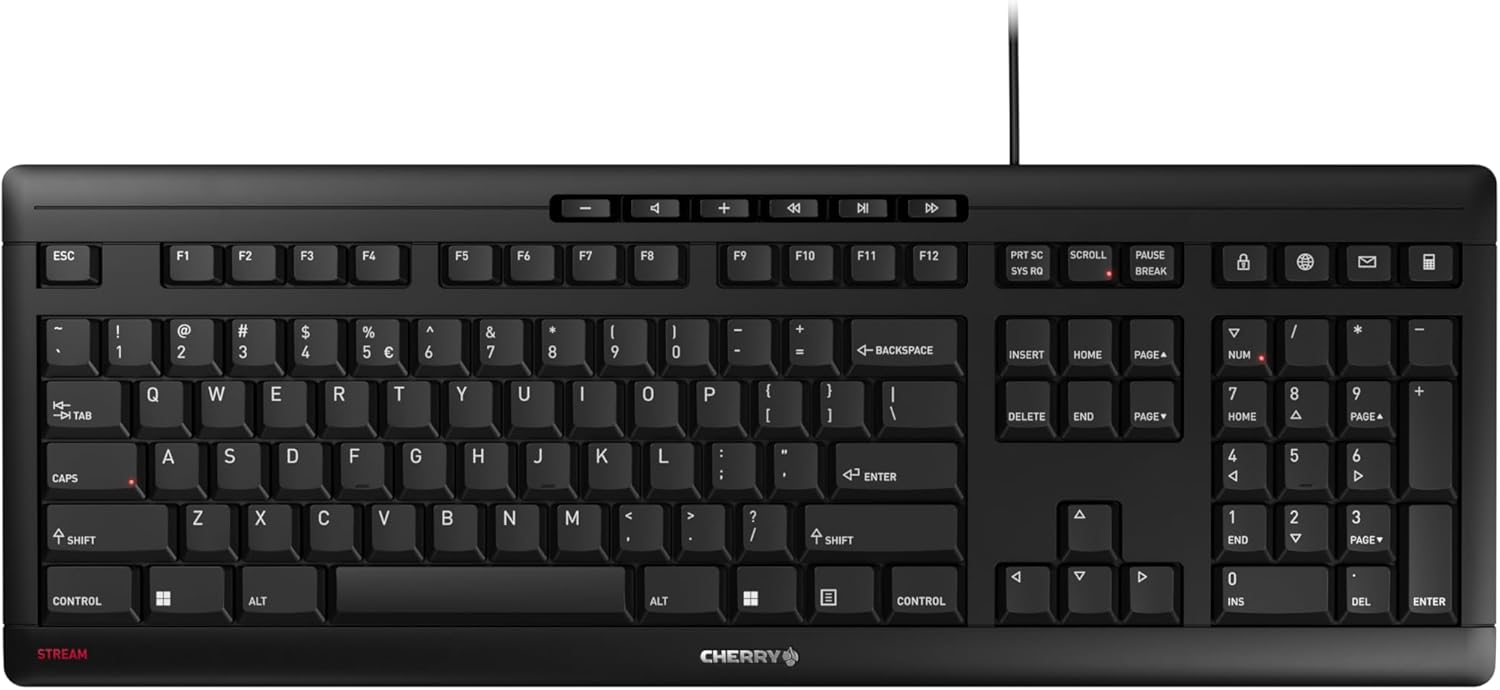
- CHERRY SX scissor switches deliver a defined pressure point while keeping keystrokes whisper-quiet
- Integrated metal plate plus 8 rubber feet keep the slim keyboard from sliding during fast typing
- 10 additional keys cover browser, email, media, and calculator shortcuts without extra software
- Abrasion-resistant key lettering stays legible after extended daily use
- Carries the GS mark (Tested Safety) certification alongside a low-profile flat design
Cons
- Wired-only via USB-A, so it offers no Bluetooth or 2.4GHz wireless connection option
- No backlighting specified in the feature set, which limits visibility for typing in low light
- Only 2 fold-out feet for incline adjustment, offering a single tilt angle rather than multiple height settings
The keyboard measures 18.23 inches long, 6.42 inches wide, and 0.71 inches thick — a flat, low-profile build that includes a full numeric keypad. It connects over a wired USB-A connection in a standard QWERTY layout.
- 18.23"L x 6.42"W x 0.71"H
- Full numeric keypad included
- Wired USB-A connection
- CHERRY SX scissor switch mechanism
The CHERRY SX scissor switches are the core of the typing feel, engineered for a precise pressure point that stays quieter than the switch mechanism used in the previous CHERRY Stream generation.
An integrated metal plate combined with 8 rubber feet on the underside gives the slim keyboard torsional stiffness and keeps it from sliding during fast typing sessions. Two fold-out feet let you set a single incline angle.
- Integrated metal plate for rigidity
- 8 rubber feet to prevent sliding
- 2 fold-out feet for a fixed incline angle
- Abrasion-resistant key lettering
Because there are only two incline positions — flat or the single fold-out angle — typists who prefer a specific ergonomic tilt beyond that one setting will not find additional height adjustment built into the frame.
Built to reduce typing volume compared to the previous CHERRY Stream generation, this keyboard targets shared offices, calls, and home workspaces where a loud mechanical or membrane keyboard would be disruptive.
- Open-plan offices where keyboard noise carries
- Home workers taking calls near their desk
- Frequent typists who want a precise, quiet scissor-switch feel
The 10 additional multimedia and office keys — covering browser, email, calculator, and playback controls — are aimed at users who want quick shortcuts without installing separate software to remap keys. Being wired-only, it suits a fixed desk setup rather than a keyboard switched wirelessly between devices.
Pros
- Rated for up to 10 million key actuations without loss of input quality
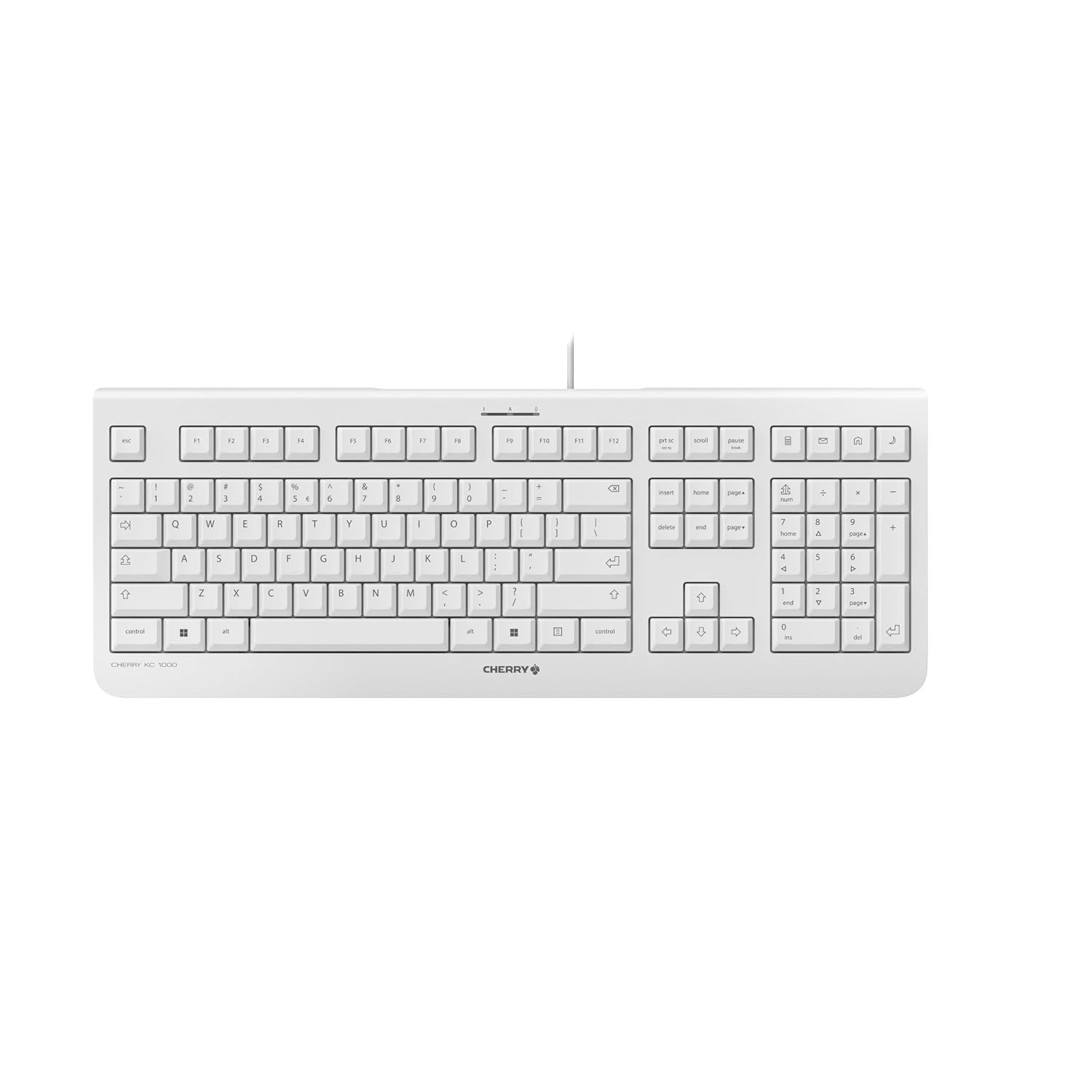
- Full-size layout includes a dedicated number pad and cursor keys
- Four hotkeys give one-touch access to calculator, email, browser, and sleep mode
- Short-travel soft keys keep typing quiet enough for a shared open-plan office
Cons
- Wired-only USB-A connection, with no wireless or Bluetooth option
- 180 cm cable limits how far the keyboard can sit from the connected PC or laptop
- Sold in a single Pale Gray colorway in this listing
The KC 1000 uses a full-size layout that includes cursor keys and a dedicated number pad alongside the main key block, aimed at office tasks that mix typing with numeric entry. Short-travel soft keys are built for precise, fast typing while keeping noise down, which matters in open-plan offices with several people typing nearby at once.
- Full-size layout with number pad and cursor keys
- Short-travel, quiet soft-key mechanism
- Slim, flat overall profile
- Durable key labeling designed to resist wearing off
Keys are rated for up to 10 million actuations without a drop in input quality, which points to a mechanism built for sustained daily office typing rather than light occasional use.
The keyboard connects over USB-A with a plug-and-play design, so it works as soon as it's plugged into a PC or laptop without extra drivers. The cable measures 180 cm, giving reasonable slack for positioning the keyboard away from the port itself, though it remains a wired-only connection with no Bluetooth or wireless receiver option.
- USB-A plug-and-play connection
- 180 cm cable length
- No wireless or Bluetooth alternative
- Four hotkeys: calculator, email, browser, and sleep mode
Three blue status LEDs indicate Caps Lock, Num Lock, and Scroll Lock at a glance, which is a small but useful detail for keeping track of key states during typing.
This keyboard suits office workers who want a straightforward, full-size wired keyboard for daily typing and data entry rather than a compact or wireless setup. The quiet short-travel keys make it a practical choice for shared workspaces where several people are typing near one another throughout the day.
- Office workers needing a full-size layout with a number pad
- Shared or open-plan workspaces where quiet typing matters
- Users who prefer a simple wired connection over wireless setup and battery management
It is a weaker fit for anyone specifically wanting a wireless or compact keyboard, since this model is wired-only and full-size.

Pros
- SilentTouch technology cuts click and typing noise by over 90% versus Logitech's own MK270 combo
- Single 2.4GHz USB receiver covers both keyboard and mouse across a 10 m range
- Keyboard battery is rated for 36 months and the mouse for 18 months, both with physical on/off switches
- Spill-resistant keyboard deck tested against up to 60 ml of liquid spillage
- Plastic housings include certified post-consumer recycled content, 71% in the keyboard and 49% in the mouse
Cons
- Officially listed as compatible with Windows and Chrome OS only, with no Mac-specific driver support called out
- Connects only through the bundled 2.4GHz USB receiver, with no Bluetooth pairing option for laptops short on USB ports
- Full numpad layout adds width, so it will not suit tight desks that need a compact keyboard footprint
SilentTouch technology is built into both the keyboard keys and mouse clicks, with Logitech citing over 90% less click and typing noise compared with its own MK270 combo, measured by an independent lab at 1 meter. The keyboard keeps a full numpad plus 8 shortcut keys for media and volume control, aimed at data entry and everyday productivity rather than gaming.
- Mouse uses a contoured, ambidextrous-friendly shape with smooth tracking on most desk surfaces
- Keyboard deck is spill-resistant, tested against spills up to 60 ml of liquid
- Sturdy tilt legs let the keyboard angle adjust for typing comfort
The quieter click and key feel is aimed at shared offices, calls, or late-night typing where a loud clatter would be disruptive.
Both devices pair to a single tiny USB receiver over a 2.4GHz connection with a stated range of about 10 m, and Logitech advertises a 3-second setup time once the receiver is plugged in. Battery life is rated at 36 months for the keyboard and 18 months for the mouse, and both include physical on/off switches to help hit those runtimes.
- No Bluetooth pairing mode is offered; the combo depends on the bundled USB receiver
- The receiver is small enough to leave plugged into a laptop USB port without protruding far
- Long stated battery life reduces how often batteries need replacing compared with combos lacking on/off switches
Losing the single paired USB receiver would mean re-pairing is not possible without contacting Logitech support, since keyboard and mouse ship pre-paired to that one receiver.
This is a full-size layout with a dedicated numpad, so it needs more desk width than a tenkeyless or compact board, but it suits users who regularly enter numbers or spreadsheets. The listing calls out compatibility with Windows and Chrome OS specifically, along with confirmed support for Windows 11.
- Plastic parts include certified recycled content, 71% in the keyboard and 49% in the mouse, for buyers weighing material sourcing
- Ambidextrous mouse shape works for either hand, though it lacks the contoured grip of dedicated left or right-hand designs
- No mention of macOS driver support, so Mac users may find some shortcut keys behave differently
Fits best on standard-width office desks where a numpad is useful; users tight on space may prefer a compact keyboard without the numpad column.

Pros
- 2.4 GHz wireless connectivity keeps a stable connection without a Bluetooth pairing step
- Keyboard battery lasts up to 24 months and mouse battery up to 12 months on a single set of cells
- 11 hot keys plus 4 programmable F-keys give quick access to media controls
- Nano USB receiver stores inside the mouse for travel without a separate dongle case
- Low-profile, whisper-quiet keys reduce typing noise in shared workspaces
Cons
- 2.4 GHz USB receiver only, with no Bluetooth pairing option for devices without a USB-A port
- Runs on AA/AAA batteries rather than a built-in rechargeable cell, so spares need to be kept on hand
- No backlighting on the keyboard, so low-light typing means working without illuminated keys
The combo uses 2.4 GHz wireless technology rather than Bluetooth, pairing both the keyboard and mouse to a single nano USB receiver. This keeps the connection fast with minimal input delay or dropouts, closer to a wired feel than typical Bluetooth accessories.
- Single nano receiver handles both keyboard and mouse signals
- 2.4 GHz band avoids common Bluetooth pairing steps and device limits
- Wireless encryption on the signal reduces the chance of interference from nearby devices
Because it relies on the included receiver rather than a computer's built-in Bluetooth radio, the combo works the same way across most PCs, laptops, and ChromeOS devices without extra driver installation.
Setup is plug-and-forget: the nano receiver plugs into any open USB-A port, and the keyboard and mouse are pre-paired at the factory. The receiver can also be stored inside the mouse's battery compartment for travel, so it is less likely to be lost when packing a laptop bag.
- Compatible with Windows and ChromeOS systems out of the box
- 11 hot keys and 4 programmable F-keys handle common multimedia shortcuts without extra software
- Ambidextrous mouse shape with rubberized side grips suits both left- and right-handed use
No dedicated pairing software is required for basic operation, though F-key programming may depend on the host system's own settings.
Battery life is stated at up to 24 months for the keyboard and up to 12 months for the mouse, though actual runtime depends on usage patterns. Both devices run on standard AA or AAA cells rather than a built-in rechargeable battery.
- Keyboard and mouse use separate replaceable batteries rather than a shared rechargeable pack
- Low-profile keys and a simple LED indicator help signal when charge is running low
- No charging cable is needed, since power comes from swappable batteries
Because there is no rechargeable cell, keeping spare AA and AAA batteries on hand avoids downtime if either device runs out mid-task.

Pros
- 36-month keyboard battery life and 18-month mouse battery life off a single set of AA/AAA cells
- 10 m (33 ft) 2.4GHz wireless range from one nano USB receiver shared by both devices
- Full-size layout with a dedicated number pad, unlike many slim combos that drop it
- Keyboard measures just 0.76 inches thick and the mouse weighs only 100 g, keeping the desk footprint low
- 12 customizable FN keys assignable through the included companion software for shortcut control
Cons
- Mouse has only 3 buttons with no customizable side buttons for extra shortcuts
- Runs on 1 AA and 2 AAA batteries rather than a rechargeable built-in cell
- Single 2.4GHz nano receiver connection only - no Bluetooth pairing option on this combo
The keyboard measures 14.7 x 5.6 x 0.76 inches and weighs 19.9 oz (566 g) including batteries, while the mouse is a compact 1 x 2.3 x 4.2 inches at 100 g. Both devices run off replaceable batteries rather than an internal rechargeable cell - 2 AAA cells power the keyboard for up to 36 months, and 1 AA cell powers the mouse for up to 18 months.
- Keyboard: 14.7 x 5.6 x 0.76 in, 566 g, 2 AAA batteries, up to 36-month life
- Mouse: 1 x 2.3 x 4.2 in, 100 g, 1 AA battery, up to 18-month life
- Auto-sleep on both devices helps preserve battery between sessions
Battery life figures assume typical use; heavier daily typing or gaming-level mouse movement will shorten the interval before cells need replacing.
Both the keyboard and mouse pair to a single nano USB receiver over 2.4GHz, giving plug-and-play setup with roughly 10 m (33 ft) of range under normal conditions. The receiver typically ships tucked inside the mouse's battery compartment or loose in the box packaging.
- One nano receiver drives both keyboard and mouse - no separate dongles
- 2.4GHz connection, not Bluetooth, so it needs a free USB-A port
- Compatible with Windows 10 or later, Windows 8, Windows 7, and Microsoft Surface devices
Because there's no Bluetooth mode, a laptop with only USB-C ports will need an adapter to use the receiver, and losing the receiver means the combo cannot be paired again without a replacement dongle from Logitech.
This combo suits anyone setting up a quiet home or shared office desk who still wants a full number pad rather than the compact layouts common on ultra-slim keyboards. The low-profile scissor keys and noise-reduced mouse clicks are aimed at open-plan spaces or late-night use where sound matters.
- Good fit for spreadsheet or data-entry work needing a number pad
- Suited to Windows PCs and Surface devices rather than Mac-specific layouts
- Reasonable choice for anyone wanting long battery intervals over a rechargeable pack that needs regular charging
It's a weaker fit for anyone wanting programmable side mouse buttons, Bluetooth multi-device switching, or a backlit keyboard, since none of those are part of this particular combo.

Pros
- 1500mAh Li-Po battery runs up to 10 days per charge with backlighting on, stretching to about 5 months with it off
- Pairs up to 3 devices via Bluetooth LE or the included Logi Bolt USB receiver, switching with a keystroke
- Backlit keys light up as hands approach and adjust automatically to ambient light
- Weighs 810g with a low-profile 1.56-inch height for a flatter wrist angle than standard keyboards
- Pale Grey model uses 11% post-consumer recycled plastic in its housing
Cons
- Logi Bolt receiver is not interchangeable with other Logitech USB receivers, so a lost dongle means ordering the specific replacement
- Full Smart Actions customization needs the Logi Options+ app, with only basic functions working without it on unsupported systems
- Bluetooth pairing can conflict with FileVault-enabled Macs at boot, requiring the USB receiver as a workaround
The keyboard uses a low-profile design with spherically-dished keys shaped for fingertips, aimed at a fast, quiet typing feel. It measures 17.74 x 5.81 x 1.56 inches and weighs 810g.
- Low-profile key design, 1.56" height
- Weight: 810g
- 11% post-consumer recycled plastic in the Pale Grey housing
The low-profile height is intended to keep the wrist at a more comfortable angle during long typing sessions compared to a taller, standard keyboard. The spherical key shape is also meant to cradle fingertips more naturally than flat-profile keys, reducing typos during fast typing.
A 1500mAh Li-Po battery is rated for up to 10 days of use with backlighting turned on, or roughly 5 months with the backlight off. Charging is done over USB-C.
- Battery: 1500mAh Li-Po, USB-C rechargeable
- Up to 10 days per charge with backlighting on
- Pairs up to 3 devices via Bluetooth LE or the Logi Bolt receiver
Switching between the 3 paired devices is done with a dedicated keystroke, without needing to re-pair through a settings menu each time. A low-battery warning also appears in the connected computer's notification area before the keyboard actually runs out of charge.
The keyboard is built to work across Windows, macOS, Linux, Chrome OS, iOS, iPadOS, and Android, though full customization features require the Logi Options+ app, currently available for Windows and macOS only.
- Basic typing functions work without extra software on most systems
- Logi Options+ app enables Smart Actions and lighting customization
- Logi Bolt USB receiver works around Bluetooth-specific FileVault issues on macOS
On systems outside Windows and macOS, expect core typing and backlighting to work, but advanced Smart Actions shortcuts will not be configurable.

Pros
- Single nano USB receiver pairs both the keyboard and mouse, freeing up a second USB port compared with separate dongles
- Wireless range up to 10 meters (33 feet) covers a standing desk setup or a couch a few feet from the PC
- Full-size layout includes a numeric keypad and 12 multimedia shortcut keys for volume, play/pause and search
- Adjustable tilt legs on the keyboard raise the typing angle for more comfortable wrist positioning
- Auto-sleep power saving mode extends battery life between charges when the combo sits idle
Cons
- Batteries are not included, so AA or AAA batteries need to be bought separately before first use
- Some Fn multimedia shortcuts are not compatible with every OS, and Mac use requires a separately purchased USB-C adapter
- No backlighting on the keyboard, so it is not suited to typing in low-light conditions
The keyboard keeps a full-size layout with a numeric keypad and 12 dedicated multimedia keys for volume, playback and search, connecting alongside the mouse through a single 2.4GHz nano USB receiver. Range extends up to 10 meters (33 feet), enough for a desk setup or controlling a connected PC from across a small room.
- Full-size keyboard with numeric keypad
- 12 multimedia shortcut keys
- 2.4GHz wireless range up to 10m (33ft)
- Single nano USB receiver for both devices
Silent membrane keys and a quiet mouse click mechanism keep the combo usable in shared offices or late-night use without disturbing others nearby.
Setup is plug and play: the nano receiver plugs into one USB-A port and both devices connect automatically, no software install required. The combo works across Windows, Mac OS and Linux, switching mode with Fn+Q for Windows or Fn+W for Mac OS.
- Plug-and-play nano USB receiver, no software needed
- Compatible with Windows, Mac OS and Linux
- Fn+Q and Fn+W mode switching for Windows and Mac
- Auto-sleep mode conserves battery when idle
Mac users connecting to a USB-C-only port will need to buy a separate USB-C adapter, since the receiver itself is a standard USB-A dongle.
The 33-foot range and quiet operation suit shared home offices, open-plan workspaces, or a living room setup where the PC sits a few feet from the couch. Adjustable tilt legs and the numeric keypad make it a reasonable fit for spreadsheet-heavy office work as well as everyday browsing.
- Shared home offices needing quiet keys
- Living room PC or media center setups
- Office desks wanting a numeric keypad for data entry
Gamers wanting near-zero input lag may prefer a dedicated gaming keyboard and mouse, since this combo is built around comfort and quiet typing rather than competitive response times.
What Makes a Keyboard Truly Quiet
Noise comes from three places: the switch mechanism, the keycap material, and how the board sits on your desk. Membrane and scissor-switch keyboards are naturally hushed because the keys travel a short distance before hitting a rubber dome. Mechanical keyboards can be quiet too, but only when they use linear switches with dampening rings or silicone pads.
Look for terms like “silent switch,” “whisper quiet,” or “SilentTouch” in the product description. These usually mean the manufacturer added foam layers or rubber o-rings to soften both the keypress and the release. A stable case matters too, since a hollow or thin chassis can amplify vibration even with quiet switches installed.
Keep in mind that quieter is not always better for typing feel. Some people who love tactile mechanical switches find silent linear switches feel a little flat. It is a real trade-off between sound and sensation, so think about which one you value more before you buy.
Best Quiet Keyboards for 2026 by Use Case
There is no single board that fits every desk, so the picks below are grouped by the situation you are probably shopping for. If you want a broader comparison across typing styles first, our best keyboards guide covers the full lineup before you narrow things down by noise level.
Best Quiet Keyboard for Gaming
The SteelSeries Apex 3 pairs whisper-quiet gaming switches with 10-zone RGB lighting, so you get responsive keypresses without the sharp clack of standard mechanical switches. Reviewers consistently praise the soft bottom-out feel, and the IP32 water resistance helps it survive spilled coffee during late-night sessions.
With a 4.6 rating across more than 8,000 reviews, it is a safe pick if you want gaming-grade responsiveness without waking up the household. It is less ideal, though, for people who want a compact tenkeyless layout, since the full-size frame takes up more desk space.
Best Quiet Keyboard for Home Office Multitasking
The Logitech MK295 combo bundles a full-size keyboard with SilentTouch switches and a matching silent-click mouse, which makes it one of the easier ways to quiet down an entire desk setup at once. With a 4.4 rating from nearly 14,000 buyers, it has a long track record in shared offices and video-call-heavy households.
Because it connects wirelessly through a single USB receiver, cable clutter is not an issue either. For more picks built around all-day office tasks, see our best workstation keyboards roundup. The main trade-off here is a fairly basic membrane feel, so heavy typists who want a firmer keystroke may want to compare specs against a mechanical option instead.
Best Premium Silent Typing Keyboard
If budget is not the main concern, the Logitech MX Keys S delivers some of the most refined quiet typing available today. Its low-profile keys are tuned for a fluid, precise stroke, and the spherically dished keycaps help your fingers land accurately without extra force.
It also includes per-key backlighting and multi-device Bluetooth pairing, which is handy if you switch between a work laptop and a personal desktop. Writers and coders who type for hours daily may also want to compare options in our best keyboards for developers guide. At a 4.4 rating from over 3,600 reviewers, satisfaction is high, though the higher price point suits people who type for a living more than occasional users.
Most Budget-Friendly Quiet Keyboard
For a tight budget, the Cherry KC 1000 keeps things simple with a slim wired design, whisper-quiet typing, and a built-in number pad. At $14.34 with a 4.5 rating, it proves you do not need a premium price tag to cut down on desk noise.
It skips extras like backlighting or programmable macro keys, so gamers and power users may find it limiting. For basic browsing, email, and spreadsheet work, though, it is hard to beat on value.
Best Wireless Mechanical Option for Silent Typing
The SOLAKAKA KI99 Pro is worth checking the current price on Amazon if you want mechanical switch feel without the noise. It uses hot-swappable, pre-lubed silent switches inside a gasket-mounted case, which softens vibration and reduces the hollow ping some cheaper mechanical boards produce.
RGB backlighting and wireless connectivity round out the feature set. Since it is a newer release with a smaller review base, it is worth comparing specs and availability against more established options if you prefer a longer track record before buying.
Best Compact Quiet Keyboard for Small Desks
The Logitech MK470 trims away the numpad and excess bezel to fit tight desks without losing a quiet typing feel. It pairs a low-profile quiet keyboard with a slim, silent mouse, so the whole combo stays compact and hushed at the same time.
At $33.99 with a 4.4 rating from nearly 8,000 buyers, it suits laptop stands, shared dorm desks, and small home offices where every inch of surface counts. Just note that dropping the numpad is not ideal if you regularly enter long strings of numbers for spreadsheets or accounting work.
Quiet Keyboards for Shared Spaces and Night Shifts
Open offices, studio apartments, and households with a night-shift worker all share the same problem: someone nearby needs quiet while someone else needs to keep typing. In these situations, prioritize a low-profile or membrane design over a loud mechanical board, even if the mechanical option looks more appealing on paper.
Placing a foam or rubber desk mat under the keyboard also helps absorb vibration that would otherwise carry through a shared wall or thin desk. Combined with a silent-switch keyboard, this small addition can noticeably cut down on complaints from roommates or coworkers.
How to Choose a Silent Keyboard That Fits Your Setup
Once you know your use case, a few technical details separate a genuinely quiet keyboard from one that just claims to be. Working through these factors before you buy will save you a return shipment later.
Switch Type and Actuation Noise
Membrane and scissor switches are the quietest by default, which is why most budget and office keyboards use them. If you want a mechanical feel, look specifically for linear switches labeled “silent” or “silent red,” since standard clicky or tactile switches will always be louder.
Wired vs Wireless
Wireless boards reduce desk clutter and let you sit further from your monitor, but they add a small amount of input lag and require battery charging. If going cable-free matters most, our best Bluetooth keyboards guide covers more wireless options beyond this list. Wired keyboards respond instantly and never run out of power, which some gamers still prefer despite the extra cable.
Build Quality and Typing Feel
A dense, well-braced case absorbs vibration better than a thin plastic shell, which matters even if the switches themselves are quiet. Keycap material affects sound too: PBT keycaps tend to produce a deeper, softer tone than thinner ABS caps on cheaper boards.
Common Mistakes to Avoid When Buying a Quiet Keyboard
The most common mistake is assuming “wireless” automatically means “quiet.” Plenty of wireless keyboards use loud, clicky switches, so always check the listing for specific silent-switch language before adding it to your cart.
Another mistake is ignoring keycap height and travel distance. Tall keycaps with long travel tend to produce louder bottom-out noise, even with a dampened switch underneath. If a coworker or roommate is sensitive to sound, a low-profile design like the MX Keys S is usually a safer bet.
Finally, do not overlook desk surface and placement. A hard desk without any padding underneath the keyboard will transmit vibration and amplify noise, no matter how quiet the switches are rated to be.
A fourth mistake is buying based on marketing language alone. Terms like “quiet” or “silent” are not regulated, so cross-check reviews and rating counts to confirm buyers actually experienced lower noise before you commit.
Frequently Asked Questions
Are mechanical keyboards ever truly silent?
No mechanical keyboard is completely silent, but silent linear switches with dampening rings come close. They significantly reduce both the press and release sound compared to standard clicky switches.
Do quiet keyboards cost more than regular ones?
Not necessarily. Budget membrane keyboards like the Cherry KC 1000 are naturally quiet and affordable, while premium quiet mechanical boards carry a higher price for the added engineering.
Is a wireless or wired quiet keyboard better for an office?
Wireless models usually work best in shared offices since they reduce cable clutter and let you position the keyboard more freely. Wired options make sense if you need zero input lag for gaming or fast typing.
Can I make a loud keyboard quieter without replacing it?
Yes, adding O-ring dampeners to the keycaps or placing a desk mat underneath the keyboard can noticeably reduce noise. These low-cost fixes work well if you are not ready to replace your current setup.
How long do quiet keyboard switches typically last?
Most silent switches are rated for tens of millions of keystrokes, similar to standard mechanical switches. Membrane keyboards have a shorter typical lifespan but are inexpensive enough to replace when needed.






