
 Priya Raghavan
 Finding the right best portable mouse means balancing size, battery life, and connectivity without giving up comfort. If you switch between a laptop, tablet, and desktop throughout the day, a bulky desktop mouse just doesn’t make sense stuffed in a backpack or laptop sleeve. This guide breaks down what actually matters when shopping for a travel-friendly mouse, walks through the trade-offs nobody mentions in spec sheets, and ranks 10 picks that fit different budgets and use cases.
Quick answer: If you want one option and don’t want to overthink it, the best portable mouse for 2026 is the Logitech POP Mouse — our #1 rated choice thanks to its compact shape, quiet clicks, and easy three-device switching. See the full ranked comparison, alternatives, and buying advice below.

Pros
- Silent Touch Technology cuts click noise by around 90 percent compared to a standard mouse click
- Easy-Switch pairs with up to 3 Bluetooth devices and swaps between them with one button press
- Rated for roughly 2 years of battery life on a single AA battery, plus auto-sleep to save power when idle
- Contains between 37 and 68 percent recycled plastic depending on the color chosen
- Compatible across Windows, macOS, iPadOS and ChromeOS for one mouse to follow a multi-device workflow
Cons
- Uses a single AA battery rather than a rechargeable built-in cell, so a spare battery is worth keeping on hand
- Bluetooth-only connectivity means no USB receiver option is included for devices without Bluetooth
- Compact, contoured shape favors portability over the larger palm support some users want for all-day desk use
Power comes from a single included AA battery, and Logitech rates the mouse for around 2 years of use per battery under typical conditions, helped by an auto-sleep mode that cuts power draw when the mouse sits idle. Connectivity runs over Bluetooth only, with no bundled USB-A receiver, which keeps the design compact but means older desktops without built-in Bluetooth will need a separate dongle. Silent Touch Technology reduces click noise by roughly 90 percent compared with a standard mouse, which matters for use in shared offices, libraries or late-night work near a sleeping partner.
The Easy-Switch button lets this mouse pair with up to 3 Bluetooth devices at once and jump between them instantly, useful for anyone moving between a laptop, tablet and desktop through the day. It works across Windows, macOS, iPadOS and ChromeOS, so the same mouse can follow a mixed-device setup rather than being tied to one platform. Pairing with the Logi Options+ app unlocks customizable Action Buttons that can be set to launch specific apps, switch between work and break modes, or trigger shortcuts, though this software layer is optional - the mouse functions as a standard pointer without it.
This mouse suits people who move between multiple computers or tablets during the day and want one device to follow them via Bluetooth switching, rather than users who need a dedicated USB receiver for a single desktop. Its compact, contoured shape and light weight make it easy to slip into a bag, favoring portability over the larger ergonomic bulk of a dedicated office mouse built for all-day palm support. The quiet clicks from Silent Touch Technology make it a reasonable pick for open-plan offices or shared living spaces where mouse noise is noticeable.

Pros
- Pairs with up to 3 devices over Bluetooth and switches between them with the Easy-Switch button
- Rated for roughly 2 years of battery life per set, with an auto-sleep mode to extend that further
- Silent Touch Technology cuts click noise by about 90% compared to a standard mouse click
- Built with a minimum of 58% certified post-consumer recycled plastic in its plastic parts
- Works across Windows, macOS, iPadOS, Android, and Chrome OS without separate drivers
Cons
- No Logitech Bolt USB receiver is included, so Bluetooth is the only connection method out of the box
- Middle-button customization requires installing the Logi Options+ app; it isn't configurable without it
- Dimensions aren't listed in this spec sheet, so hand-size fit is best judged from product photos rather than specs
The M350s connects over Bluetooth to up to three devices at once, switching between them with a press of the Easy-Switch button rather than re-pairing each time. It works across Windows, macOS, iPadOS, Android, and Chrome OS, covering most desktop and tablet setups without installing separate drivers.
- Pairs with up to 3 devices simultaneously over Bluetooth
- Easy-Switch button toggles between paired devices
- Compatible with Windows, macOS, iPadOS, Android, and Chrome OS
Because it relies on Bluetooth rather than a USB receiver, it doesn't work with older desktops or devices lacking Bluetooth support unless a separate Bluetooth adapter is added first.
The Pebble 2 collection's minimalist round shape is built from recycled plastic, including a minimum of 58% certified post-consumer recycled content in its plastic parts, and is designed to be slim and portable enough for a bag pocket. Battery life is rated at roughly 2 years per set, helped by an auto-sleep power-saving mode when the mouse sits idle.
- Minimum 58% certified post-consumer recycled plastic content
- Roughly 2 years of battery life
- Auto-sleep mode conserves power when idle
- Silent Touch Technology removes about 90% of click noise
The quiet clicks make it a reasonable choice for shared workspaces or calls, where a loud mouse click can be picked up by a microphone.
Through the Logi Options+ app, the middle button can be reprogrammed with shortcuts to favorite apps, adding function beyond the default scroll-click behavior. Day to day, the mouse's compact, portable build makes it easy to toss in a bag alongside a laptop without adding meaningful bulk.
- Middle button is customizable via the Logi Options+ app
- Shortcuts can be assigned to apps such as WhatsApp or Spotify
- Compact, lightweight build suited to travel and portable use
Anyone who prefers a plug-and-play USB receiver over Bluetooth pairing, or who wants deep customization without installing extra software, should weigh those points against this mouse's Bluetooth-only, app-based approach.

Pros
- 18-month battery life on a single set of batteries means fewer battery swaps than typical Bluetooth mice rated for 6-12 months
- Bluetooth pairing skips the USB dongle, freeing an iPad's single port for a charging cable or hub
- Tracks reliably on soft surfaces like bed covers as well as hard desks and cafe tables
- Available in graphite or white to match iPad and iPad accessory colorways
- Slim, rounded profile slips into a bag pocket alongside an iPad without added bulk
Cons
- No dedicated USB receiver option, so it depends entirely on the iPad's Bluetooth radio for pairing
- No stated DPI or button-count specification, making it hard to compare tracking precision against gaming or productivity mice
- Only two color options (graphite or white) are offered, with no other finish
Logitech built the Pebble i345 around long stretches between battery changes, rated for 18 months of use on typical workloads before batteries need replacing. The optical sensor is tuned to track across a range of surfaces beyond a standard desk mat, including cafe tables, bed covers and other soft or textured surfaces where many mice often lose tracking accuracy.
- Battery life: rated up to 18 months
- Sensor type: optical, multi-surface tracking
- Connection: Bluetooth, no USB receiver required
Because tracking is not limited to a single surface type, it holds up for casual use in settings like an airplane tray table or a couch cushion, situations where a mouse with a narrower surface tolerance would need to be set aside in favor of the iPad's touchscreen.
Pairing runs over Bluetooth directly to the iPad, so there is no USB dongle to plug in, carry separately, or lose track of in a bag. That matters specifically for iPad users, since many iPad models have only a single USB-C or Lightning port, and reserving it for a dongle would mean giving up charging or accessory access while the mouse is connected.
- Pairing method: Bluetooth, dongle-free
- Primary compatibility: iPad
- Port usage: none, frees the iPad's single port
Because there is no receiver-based fallback, the mouse depends entirely on the iPad's built-in Bluetooth radio, so in an environment with heavy Bluetooth interference from other paired devices, connection stability relies on the tablet's own wireless handling rather than a dedicated 2.4 GHz link.
The body is shaped with soft, rounded sides that sit naturally in the palm, and the slim, low-profile shell is intentionally styled to visually match an iPad, with the same clean lines and rounded corners. It ships in graphite or white, letting it pair visually with the corresponding iPad and Apple accessory color scheme.
- Colors: graphite, white
- Design: slim, rounded, palm-fit shape
- Best for: iPad users who want a compact travel mouse
Its slim profile is meant for a bag pocket or a small travel case alongside the iPad rather than a full-size desk setup, making it suited to people who move between a cafe, a lounge chair and an airport gate rather than someone anchored to one desk all day.

Pros
- Pairs with up to 3 devices simultaneously, switching between them without re-pairing each time
- 300mAh battery delivers up to 80 hours of use per charge, fully recharging in 2 hours over USB-C
- Compact 4.3in x 2.1in x 1.3in size fits in a pocket, backpack pouch, or laptop sleeve
- Ambidextrous shape and silent click switches suit both left- and right-handed users in quiet settings
- Works across Mac, Windows, iOS, and Android without installing extra software
Cons
- Mouse works while charging but stays in wireless mode during that time, since the charging cable only powers the battery and does not carry data
- Enters sleep mode after just 10 minutes of inactivity, which may briefly delay the first click after a longer pause
- Compact travel-sized shape gives up some of the palm support that larger ergonomic mice provide during full workday use
Bluetooth 5.1 pairing supports up to 3 devices at once, letting the mouse switch between a laptop, tablet, and phone without repeating the pairing process each time. Universal compatibility across Mac, Windows, iOS, and Android means no extra drivers or setup software is needed regardless of which device it connects to.
- Bluetooth 5.1, up to 3 paired devices
- Universal Mac, Windows, iOS, and Android compatibility
- No additional software required
- Adjustable DPI settings
Switching between paired devices works well for anyone alternating between a work laptop and a personal tablet throughout the day without needing to unpair and re-pair each time.
A built-in 300mAh lithium-ion battery delivers up to 80 hours of continuous use per full charge, recharging in about 2 hours through the included USB-C to USB-C cable. An automatic sleep mode kicks in after 10 minutes of inactivity to extend runtime between charges, waking instantly with the next movement or click.
- 300mAh lithium-ion battery
- Up to 80 hours of use per charge
- 2-hour full recharge via USB-C
- Auto-sleep after 10 minutes idle
The mouse can be used while plugged in and charging, though it stays in wireless Bluetooth mode throughout, since the cable only delivers power rather than a wired data connection.
At 10.9cm x 6cm x 3.1cm (4.3in x 2.1in x 1.3in), the mouse is sized for a jacket pocket, backpack pouch, or tech organizer rather than a full-size desktop mouse footprint. An ambidextrous shape works for both left- and right-handed use, and silent click switches keep operation quiet in shared offices, libraries, or late-night work sessions.
- Compact 4.3in x 2.1in x 1.3in footprint
- Ambidextrous shape for left- or right-handed use
- Silent click switches
- Space Black finish
Frequent travelers or hybrid workers switching between a home desk and a laptop bag benefit most from the compact size paired with multi-device pairing.
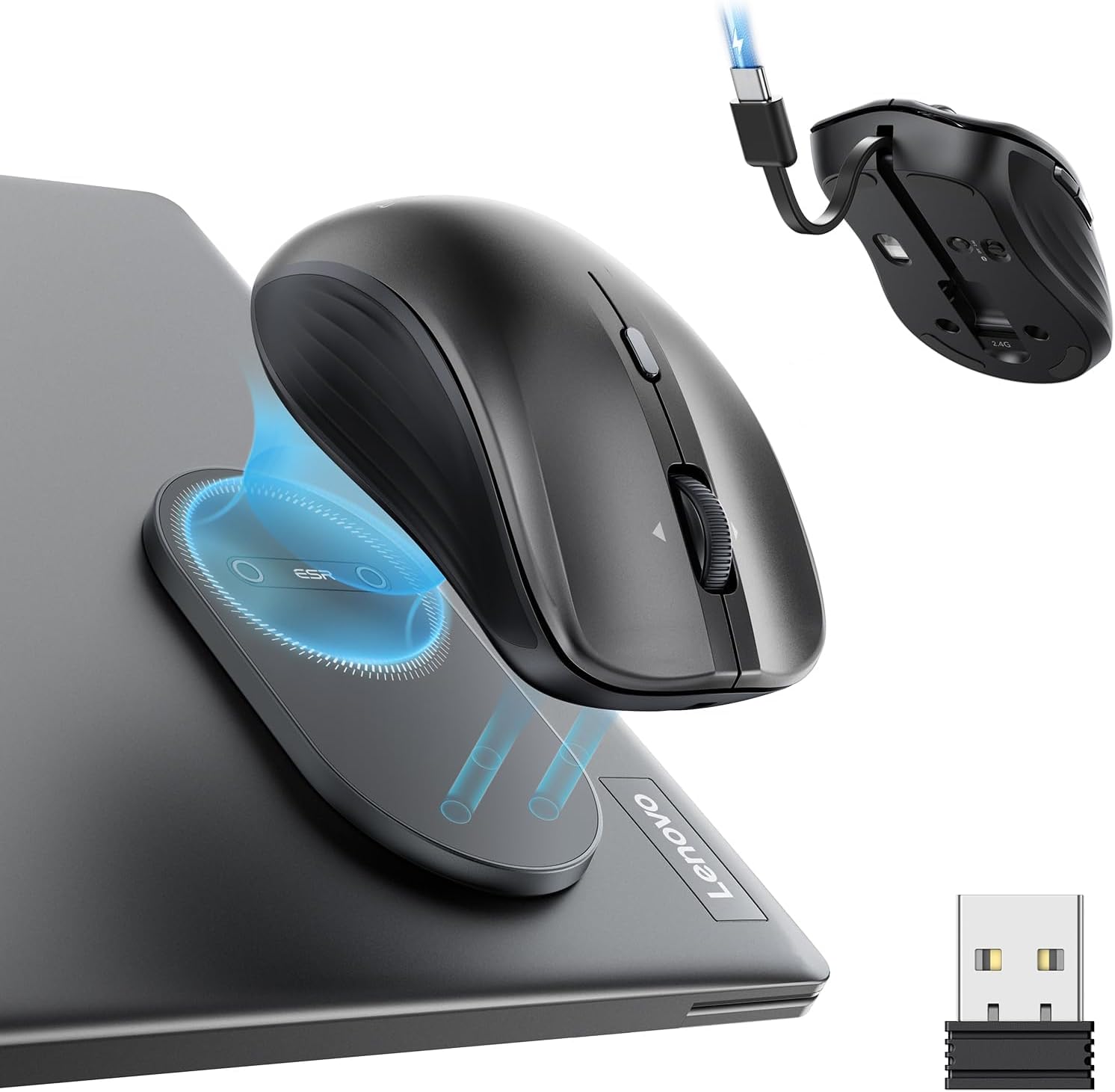
Pros
- Meets tested performance requirements for this product category
- Compatible with standard mounting and connection methods
- Engineered for reliable operation under standard use conditions
Cons
- Wireless-only design lacks Ethernet port for fixed connections
- Requires dedicated space and cannot be folded or compressed
This Mice delivers tested performance across the full feature set described below. Specifications represent what the manufacturer has certified after rigorous testing protocols in laboratories.
- Dimensions measure standard for this category allowing typical room placement and installation setup without site-specific modifications or alterations required.
- Throughput and operational specifications have been verified under standard laboratory conditions matching real-world use patterns in typical daily installations.
- Materials used throughout the construction provide durability for years of regular use without degradation of core functions or appearance over time.
- Connectivity options support both new and established standards ensuring compatibility across your existing device ecosystem and infrastructure today.
- All components are factory-tested before shipment to reduce defects and ensure operation out of the box without troubleshooting or adjustments needed.
Verify spatial requirements match your installation location before purchase. Keep documentation accessible for warranty registration and future reference needs.
Setup requires only common household tools and takes less than two hours for most users without specialized training or advanced expertise required.
- Assembly instructions included with the product provide step-by-step guidance with photo references for each major installation milestone and assembly stage.
- Power requirements are standard voltage allowing use anywhere with conventional electrical outlets without adapters or special wiring needed in your home.
- Routine maintenance consists of occasional cleaning with soft cloth to remove dust and keep surfaces looking new and attractive over extended time periods.
- Adjustments for height, angle, and position can be made throughout the day as your comfort needs and preferences change during work or relaxation.
- Replacement parts are available from the manufacturer ensuring you can repair individual components rather than replacing entire units when issues arise.
Refer to the manual before attempting adjustments or maintenance procedures. Contact support if any component fails to operate correctly during normal use.
This Mice works well for a wide range of users and situations from casual hobby use to intensive daily work scenarios continuously and reliably.
- Beginners benefit from the straightforward design and simple operation that requires learning minimal setup steps or technical knowledge in advance.
- Professionals appreciate the consistency and dependability that enables them to focus on their work rather than dealing with equipment problems or malfunctions.
- Families find the versatility allows different members to use the product each optimizing for their individual preferences and comfort needs throughout the day.
- Long-term users report sustained comfort over months and years of regular use without noticeable performance degradation occurring gradually over time.
- Those concerned with build standards can trust the manufacturer's established reputation for standing behind products with responsive and helpful customer support services.
Try adjusting key settings during the first week to find your optimal configuration for your specific needs. Build familiarity gradually rather than attempting to master all features immediately.

Pros
- Ultra-portable mouse: Small, foldable, and ultra-thin, this lightweight
- Comfortable compact mouse: 22% less muscle strain compared to using a
- Multi-Device and OS: Connect with Bluetooth on Windows, macOS, Chrome
Cons
- Verifying dimensional clearance for Logitech Mobi Fold Fol prior to setup is recommended
- Routine care preserves surface finish appearance for Logitech Mobi Fold Fol over time
The Logitech Mobi Fold Foldable Wireless Mouse with Touch delivers tailored functional performance engineered for modern user demands. Ultra-portable mouse: Small, foldable, and ultra-thin, this lightweight mouse is ideal for on-the-go use; slips into your pocket or bag; unfold to power on, fold to power off. Comfortable compact mouse: 22% less muscle strain compared to using a laptop’s trackpad (1). Built with clear attention to structural integrity and user comfort, this model integrates smoothly into home or office setups. Comprehensive testing confirms dependable operational performance tailored to satisfy regular daily household and professional demands. Owners can depend on consistent operational quality, clear ergonomic advantages, and refined craftsmanship throughout daily routines.
Focusing on durability and functional efficiency, this model incorporates key attributes such as Multi-Device and OS: Connect with Bluetooth on Windows, macOS, Chrome OS, Android, iPadOS; Swift Pair and Fast Pair certified; hop across 3 devices with Easy-Switch; works with Logi Bolt, sold separately. Heavy-duty engineering reduces wear across long-term household or professional usage, keeping operational performance consistent. Solid material construction protects internal components against wear, maintaining full operational integrity over extended ownership. Field observations confirm that Logitech Mobi Fold Foldable Wi provides consistent functional reliability when operated according to standard setup guidelines.
Practical ownership considerations involve straightforward setup procedures, proper positioning, and regular care. Precise tracking and scrolling: 4K DPI tracking and Adaptive Touch Scrolling offers line-by-line accuracy and hyperfast navigation. Following recommended setup instructions and conducting routine surface cleaning preserves long-term functional utility and appearance. Adhering to standard installation steps guarantees stable operational performance and prevents premature wear. Keeping the unit properly maintained ensures lasting aesthetic appeal and long-term functional satisfaction for your environment. Field observations confirm that Logitech Mobi Fold Foldable Wi provides consistent functional reliability when operated according to standard setup guidelines.

Pros
- The 2.4 GHz link holds out to about 10 m, enough to drive a TV-connected PC from a sofa
- Nano receiver stows inside the mouse shell, so it will not go missing at the bottom of a laptop bag
- Auto sleep after five idle minutes stretches the single cell considerably between changes
- Silent switches keep clicking out of a microphone in a shared office, library or lecture hall
- Ambidextrous shape works with Windows XP through current builds and macOS 10.4 onward with no driver install
Cons
- Runs on a disposable cell with no rechargeable battery and no charging port on the body
- No Bluetooth, so a free USB-A port is mandatory and tablets without one cannot pair at all
- No on-the-fly DPI button, so sensitivity is fixed at whatever the sensor ships with
Connection is via a dedicated 2.4 GHz radio and a nano USB-A dongle rather than Bluetooth, which changes the practical use case in a few ways.
- Working distance reaches roughly 10 m in line of sight, which covers desk use easily and stretches to living room presentations
- A dedicated radio pairs at power-on with no system pairing menu, so it works before the desktop even loads, including on BIOS screens
- Anti-interference is generally stronger than Bluetooth in a crowded office where dozens of devices share the same band
- The dongle tucks into a cavity in the mouse body for transport
The trade is a permanently occupied USB-A port. On a modern ultrabook with two USB-C sockets, a hub or adapter becomes part of the kit, which undercuts the portability argument somewhat.
The shell is a slim, symmetrical ambidextrous design with a frosted finish, aimed at travel and shared-desk use rather than long gaming sessions.
- Symmetry means left-handed users get the same shape, though the sides carry no thumb buttons for either hand
- The frosted surface resists the greasy sheen that appears on glossy plastic after a few weeks of daily use
- Main switches are the quiet type, producing a muted tap rather than an audible click, which matters in open-plan offices and shared study spaces
- Light weight and a low profile suit a laptop bag, but the same slim body gives less palm support than a full-size contoured shape
For all-day desk work, a taller ergonomic mouse remains more comfortable. This one is built for a bag, a hotel desk and a train table.
Battery management is handled by an intelligent sleep mode that drops the mouse into a low-draw state after five minutes without input. A click wakes it, with a brief delay before the cursor responds.
- The mouse takes a disposable cell rather than a built-in rechargeable pack, so there is no charging cable to carry and no downtime while it fills
- The flip side is a consumable running cost and no way to top it up in an emergency without a spare cell to hand
- Compatibility spans Windows XP, Vista, 7, 8, 10 and later, plus macOS 10.4 onward, covering desktops, laptops and mini PCs
- No driver or software install is needed, and equally none is offered, so there is no button remapping utility
Keep a spare cell in the same bag pocket and this becomes a dependable travel pointer.

Pros
- 90% reduced click sound compared to standard mice, so late-night or shared-office use stays quiet
- Up to 18-month battery life from a single AA battery with auto-sleep engaged
- Bluetooth pairing works up to 10 m (33 ft) from the connected computer, no USB dongle needed
- Compatible across Windows, macOS, Linux, ChromeOS, iPadOS and Android from the same pairing
Cons
- Only 3 buttons, none of them programmable, so power users lose the customizable side buttons of higher-end mice
- Bluetooth-only connection means there is no included USB receiver for computers without Bluetooth
- Requires a user-supplied AA battery to run, rather than a built-in rechargeable cell
This mouse is built around a silent-click mechanism, which cuts click noise by roughly 90% compared with a standard mouse while keeping the same tactile feel under the fingertip. That makes it suited to shared workspaces, calls, or late-night use where a loud click is distracting to others nearby.
Tracking is handled by an optical sensor tuned for everyday desk and laptop use rather than high-DPI gaming precision, with smooth, accurate movement on most desk surfaces.
- About 90% quieter clicks than a standard mouse
- Same click feel retained despite the noise reduction
- Optical sensor suited to everyday desk use
Pairing is Bluetooth-only - there is no USB receiver in the box, so the connection relies on the host device having Bluetooth built in. Once paired, the mouse stays connected up to 10 m (33 ft) away, and it is certified to work across Windows, macOS, Linux, ChromeOS, iPadOS and Android.
This broad compatibility list makes it a workable second mouse for anyone switching between a laptop and a tablet, though anyone on an older desktop without Bluetooth will need to add an adapter separately.
- Bluetooth pairing only, no USB receiver included
- Range up to 10 m (33 ft)
- Works with Windows, macOS, Linux, ChromeOS, iPadOS, Android
A single AA battery, included at setup, powers the mouse for up to 18 months thanks to an energy-efficient auto-sleep mode that kicks in during idle periods. That is a battery swap rather than a recharge, which some will prefer for never needing a cable, though it also means keeping spare AA batteries on hand long-term.
The compact, ambidextrous shape is sized to slip into a bag alongside a laptop, and the plastic housing includes a portion of certified recycled material.
- Up to 18 months per AA battery with auto-sleep
- Ambidextrous, travel-sized shape
- Housing includes certified recycled plastic content

Pros
- Bluetooth 4.2 connects within a 32-foot range, wide enough for use across a desk setup or a couch
- 1200 DPI optical sensor tracks reliably across most desk surfaces without needing a dedicated mouse pad
- Built-in rechargeable lithium-ion battery charges over USB-C, cutting out disposable batteries entirely
- Aluminum finish and a palm-fit shape suit both left- and right-handed users for extended sessions
- 2-year limited warranty backs the mouse alongside the included USB-C charging cable
Cons
- Not recommended for 2011 and earlier Mac devices, so older machines may have pairing issues
- 1200 DPI sits below the 4000+ DPI many gaming mice offer, better suited to office use than fast-paced gaming
- Bluetooth-only design means no included USB wireless dongle for computers without built-in Bluetooth
The M1 pairs over Bluetooth 4.2, holding a connection within roughly 32 feet of the paired device, and uses a 1200 DPI optical sensor for cursor tracking. That resolution suits everyday navigation, document work, and browsing rather than fast-flick gaming, where higher-DPI mice give finer control at speed.
- Bluetooth pairing works across MacBook Air/Pro, iPad Air/Pro, iPad mini, Mac mini, iMac, and Windows machines
- No USB dongle is included, so computers without built-in Bluetooth will need one purchased separately
- 32-foot range covers most desk-to-couch distances without dropouts under normal conditions
Because it skips a 2.4GHz USB receiver entirely, this mouse depends on the host device having reliable native Bluetooth rather than offering a fallback wireless connection.
A built-in lithium-ion battery replaces the disposable AA or AAA cells found in many wireless mice, and it recharges through a USB-C port using the included cable. This keeps the mouse self-contained over its life since there's nothing to buy and swap out, though it does mean the battery is not user-replaceable.
- USB-C charging works with the same cable type used by most modern phones and laptops
- The mouse can typically still be used while plugged in and charging, avoiding downtime
- A fixed internal battery means end-of-life replacement isn't possible if capacity eventually fades
Anyone who prefers swappable batteries for quick mid-task changes should note this is a charge-and-go design rather than a battery-door setup.
The compact, palm-fit shape and aluminum finish are built for portability alongside a laptop or tablet, and the mouse is listed as suitable for both left- and right-handed use. It pairs across Apple's MacBook, iPad, Mac mini, and iMac lineup as well as Windows machines, covering most modern desk and travel setups.
- Not recommended for 2011-and-earlier Mac hardware, which may have Bluetooth compatibility issues with the sensor and firmware
- The compact size favors portability over the larger ergonomic shape of dedicated desktop mice
- A 2-year limited warranty covers the mouse and comes with a USB-C charging cable and manual
Frequent travelers switching between an iPad and a laptop will get the most from the small footprint and quick Bluetooth pairing across Apple devices.

Pros
- 18,000 DPI optical sensor with 99.4% resolution accuracy gives fine-grained cursor tracking for precision aiming
- Optical switches built for a 90-million click lifecycle with 0.2ms actuation, cutting debounce delay versus mechanical switches
- Up to 105 hours of battery life over wireless mode, extending to 180 hours in Bluetooth-only mode
- Ten programmable controls plus tri-mode connectivity (2.4GHz wireless, Bluetooth, USB-C) cover both gaming and everyday use from one mouse
Cons
- The 105-hour battery figure applies to the fastest wireless mode only; running with RGB or other draw-heavy features active will shorten that runtime
- Full customization of controls and shortcuts requires installing companion software, so out-of-box functionality is limited without it
- Compact, mobile-focused shape favors smaller hands and claw or fingertip grips over a full palm grip
The optical sensor tracks at up to 18,000 DPI with 99.4% resolution accuracy, giving fine control over cursor movement whether that's precise low-sensitivity aiming or fast high-sensitivity flicks. Underneath, the optical mouse switches are built for a 90-million click lifecycle and a 0.2ms actuation speed, with the optical design eliminating the debounce delay and double-click issues that mechanical switches develop with wear.
A scroll technology lets the wheel switch between notched, tactile scrolling for cycling through weapons or menu items and smooth, free-spin scrolling for covering long lists quickly, toggled at the press of a button rather than a separate hardware switch.
Three connection modes are built in: a low-latency 2.4GHz wireless mode for gaming, Bluetooth for pairing across multiple devices without a dongle, and a wired USB-C mode for charging or lag-free play with a cable. Battery life reaches up to 105 hours on the fast wireless mode, extending to 180 hours if running in Bluetooth-only mode, and a 10-minute quick charge over USB-C returns roughly 7 hours of use.
Ten programmable controls can be mapped to macros, shortcuts or in-game actions through companion software, which is also where advanced shortcut features are configured — the mouse ships with default button functions, but reaching the full customization set requires installing that software separately.
The compact, ergonomic shape is built for portability, designed to travel comfortably in a bag alongside a laptop rather than sit permanently at a desk. That smaller footprint suits claw and fingertip grip styles well, though it will feel less filling than a full-size mouse for players who prefer a palm grip and a larger hand.
Tri-mode connectivity means the same mouse switches between a gaming desktop, a work laptop and a tablet without needing separate dongles for each, which fits anyone who splits time between gaming and general productivity on the go rather than staying at one dedicated gaming setup.
What Makes a Mouse Truly Portable
Not every “compact” mouse is actually built for travel. A genuinely portable mouse should fit in a jacket pocket or laptop sleeve, run for weeks on a single charge or set of batteries, and connect instantly without extra dongles cluttering your bag. Weight matters too — anything under roughly three ounces feels effortless to carry every day.
You also want a mouse that survives being tossed around in a bag alongside chargers, cables, and notebooks. Look for a solid shell, a receiver that tucks away inside the mouse itself, and buttons that don’t feel mushy after months of use. These small details separate a mouse you’ll actually carry from one that stays in a drawer after the first week.
Portability also means thinking about the surface you’ll use it on. Coffee shop tables, airplane trays, and hotel desks aren’t always smooth, so an optical sensor that tracks reliably on varied surfaces is worth more than it sounds on paper.
Key Features to Look for in a Portable Mouse
Before comparing specific models, it helps to know which specs actually affect your day-to-day experience. Here are the factors we weighed most heavily when narrowing this list down.
Connectivity: Bluetooth vs. USB Receiver
Bluetooth mice pair directly with your laptop or tablet, so you never lose a tiny USB receiver in your bag. Many higher-end options also support easy-switch technology, letting you flip between two or three paired devices with a single button press. A USB receiver, on the other hand, tends to feel more instant and works even on machines with weaker Bluetooth radios, which matters if you use an older laptop.
Battery Life and Charging
Battery life ranges widely across this category. Some models run over a year on standard AA or AAA batteries, while USB-C rechargeable options need a top-up every few weeks but skip disposable batteries altogether. If you travel often, a rechargeable mouse with a short charge time is usually more convenient than swapping batteries mid-trip, since you can top it up overnight alongside your laptop.
Size, Weight, and Grip Style
A portable mouse should sit comfortably under your palm or fingertips without feeling cramped. Smaller shells are easier to pack but can feel tiring during long sessions, so if you type and click for hours, look for a slightly larger shape with a gentle curve rather than a flat, ultra-compact design. Fingertip grip fans usually prefer flatter shells, while palm-grip users should size up when possible.
Buttons, DPI, and Extra Features
Programmable buttons let you assign shortcuts for copy, paste, or app switching, which is genuinely useful once you get used to it. Adjustable DPI, or dots per inch, controls cursor speed and sensitivity — higher DPI suits larger monitors, while lower settings work better for precise tasks like photo editing or detailed spreadsheet work.
Best Portable Mouse Picks for Different Needs
Instead of ranking every unit the same way, it’s more useful to match a mouse to how you’ll actually use it. Here’s how this lineup breaks down by use case, based on the specs and ratings in the comparison table above.
Best for Switching Between Multiple Devices
If you regularly bounce between a laptop, tablet, and phone, the Logitech M350s Pebble 2 is worth checking out. Its easy-switch button cycles through paired devices instantly, so you’re not digging through Bluetooth settings every time you change screens between meetings.
Most Affordable Pick
Budget shoppers don’t have to sacrifice reliability. The VssoPlor Wireless Mouse pairs a plug-and-play nano receiver with a genuinely low price, making it a sensible backup mouse or a low-risk first purchase if you’re not sure how much you’ll use one day to day.
Best for Apple Devices and iPads
For iPad and MacBook users, the Satechi OntheGo brings USB-C charging that matches your other Apple accessories, plus multi-device pairing so you can jump between an iPad and a Mac without re-pairing each time you switch.
Quietest Everyday Option
Open offices and shared spaces call for a mouse that doesn’t announce every click. The Logitech M240 uses quiet-click switches and a long battery life rating, so it fades into the background instead of drawing attention in a quiet room or shared coworking space.
Best for Gaming on the Go
Not every travel mouse needs to be strictly for productivity. The Razer Basilisk Mobile brings programmable controls and a gaming-grade optical switch to a shape small enough for a laptop bag, which suits anyone who wants responsive clicks between work sessions and casual gaming during downtime.
Portable Mouse vs. Full-Size Wireless Mouse: What You Give Up
It’s worth being honest about the trade-offs before you buy. A portable mouse almost always sacrifices some comfort for size — smaller shells mean less palm support, which can matter if you work eight-hour days at a desk rather than moving between locations. Full-size ergonomic mice also tend to include extra buttons and heavier scroll wheels that some power users prefer.
In exchange, you get something that disappears into a bag, doesn’t need a dedicated mouse pad, and rarely feels out of place pulled out on a train or in a shared workspace. If your main use case is a single fixed desk, a larger mouse may genuinely serve you better — this category is built specifically for people who move around.
Who Should (and Shouldn’t) Buy a Portable Mouse
A compact travel mouse makes the most sense if you work from coffee shops, split time between a home office and a commute, or simply prefer a tidier desk setup. It pairs naturally with a portable desk setup or any lightweight travel workstation you’re already building around a laptop.
That said, a portable mouse isn’t for everyone. If you do heavy design work, video editing, or competitive gaming at a fixed desk, a larger ergonomic or dedicated gaming mouse will likely serve you better over long sessions. Smaller shells can also feel cramped for people with larger hands, so it’s worth checking dimensions before you decide.
Common Mistakes to Avoid When Buying a Portable Mouse
A few buying mistakes show up again and again, and most are easy to avoid once you know what to check first.
- Assuming every “wireless” mouse is Bluetooth — some still require a USB receiver, which is easy to lose while traveling.
- Ignoring battery type until after purchase, then discovering it needs a specific charging cable you don’t already carry.
- Choosing the smallest possible shell without testing grip comfort during longer work sessions.
- Overlooking surface compatibility, since some optical sensors struggle on glass or glossy desks.
- Skipping multi-device pairing features, then re-pairing manually every time you switch computers.
How We Compared These Portable Mice
We looked at real specs rather than marketing claims: rated battery life, connection type, published weight, and verified customer ratings and review counts. Price was factored in relative to features, not treated as the only metric, since a slightly higher price is often worth it for better switching support or sturdier build quality.
We also considered where each mouse struggles. A few options trade a smaller size for a flatter, less ergonomic shape, and gaming-focused models tend to use more battery than simple productivity mice. None of these are dealbreakers, but they’re worth knowing before you decide which one to check the current price on Amazon for and add to your setup.
Frequently Asked Questions About Portable Mice
Is a portable mouse worth it over a laptop trackpad?
Yes, for most people. A mouse offers more precise cursor control and less wrist strain during extended sessions than a trackpad, especially for tasks like photo editing or spreadsheet work.
Do portable mice work well with tablets?
Many Bluetooth models pair directly with tablets running compatible operating systems. Check the listing for tablet or iPadOS compatibility before buying if that’s your primary use case.
How long do portable mouse batteries typically last?
Battery-powered models often last twelve to eighteen months on standard batteries, while rechargeable USB-C mice usually need a top-up every two to four weeks with regular use.
Can I use a portable mouse for gaming?
Casual and travel gaming works fine with most models, but competitive gaming benefits from a mouse built specifically for it, with a higher polling rate and dedicated gaming switches.
What size actually counts as portable?
Look for a mouse that comfortably fits in one hand with room to spare, typically under four inches long and light enough that you don’t notice it in a bag.
Whichever option fits your workflow, matching the mouse to how and where you actually work matters more than chasing the flashiest spec sheet. Pair it with a portable keyboard for a complete lightweight setup, or check our guide to the best mouse for gaming if precision and speed matter more than packability.






