
 Daniel Okafor
Shopping for the best portable monitors comes down to a simple trade-off: screen real estate versus what fits in your bag. A second screen makes spreadsheets, code, and video calls easier to manage, but only if it’s light enough that you’ll actually pack it. This guide walks through the specs that matter — resolution, ports, brightness, and stand design — then matches specific models to how you actually work, whether that’s gaming between meetings, editing photos on a plane, or just needing a reliable extra display for under $100. You’ll find our full ranked list right below, followed by buying advice pulled from real travel and desk setups.
Quick answer: For most people in 2026, the best portable monitors pick is the cocopar 15.6” Portable Monitor — our #1 rated choice, thanks to a sharp 1080P panel, built-in speakers, and a cover stand that doubles as protection in transit. See the full ranked comparison, alternatives, and buying advice below.

Pros
- Portable Monitor for Laptops laptop screen extender is the
- Plug and Play USB-C Monitor portable laptop monitor provides 2
- FHD Portable Monitor VESA Mountable Featuring a 1080P resolution, 60
- Portable and Light Weight travel monitor for laptop is the
- Your Go-To Screen Anywhere Perfect for remote work, business trips,
Cons
- Requires verifying desktop clearance for 0.2"D x 14.12"W x 8.8"H dimensions
Pros
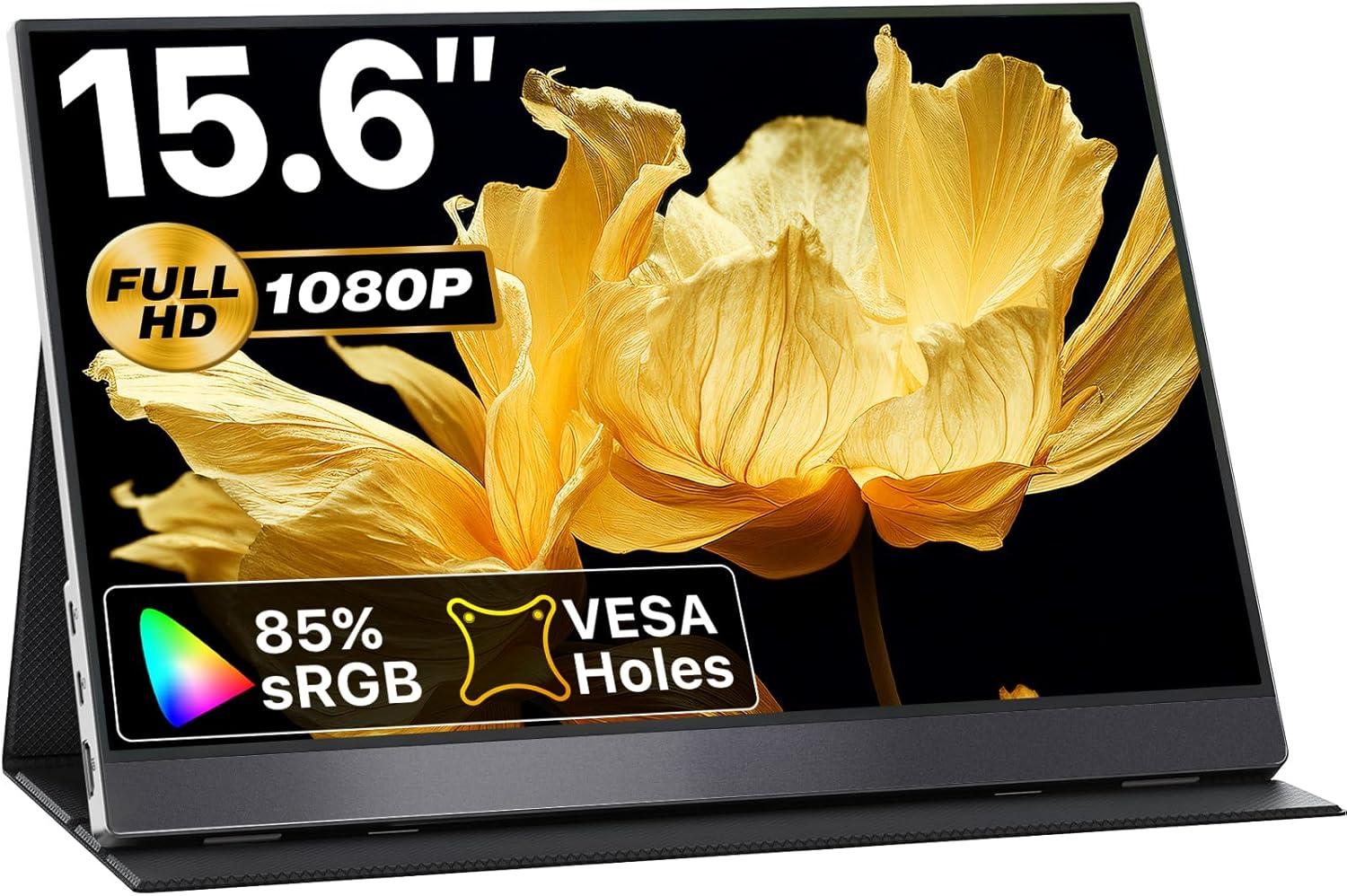
- 1080P IPS panel covers 85% of the sRGB gamut with a 178-degree viewing angle for consistent color off-axis
- Weighs just 1.4 lb (2.3 lb with the cover attached), among the lighter options for a 15.6-inch second screen
- Single USB-C cable carries both power and video over Thunderbolt 3/4/5 or DP Alt Mode, no separate power brick needed
- Dual VESA mounting holes (75x75mm) support both landscape and portrait orientation
- Built-in speakers and a 3.5mm jack cover audio without needing a separate connection
Cons
- USB-C single-cable operation requires a Thunderbolt 3/4/5 or DP Alt Mode port; older laptops without one need an HDMI cable and separate power instead
- Older iPhones (pre-15 series) need a separate Lightning Digital AV Adapter, not included, to connect
- At 0.23 inches thin, the panel relies on its included cover stand for support rather than a rigid built-in kickstand
The panel is a 15.6-inch IPS display running at 1080P Full HD resolution, covering 85% of the sRGB color gamut with a 178-degree viewing angle intended to keep colors consistent even when viewed from the side. At 1.4 lb bare (2.3 lb with the included cover), it is built to travel in a bag alongside a laptop without adding significant weight.
- 15.6-inch IPS panel, 1080P Full HD resolution
- 85% sRGB color gamut coverage
- 1.4 lb weight (2.3 lb with cover)
The color accuracy and viewing angle make it a reasonable second screen for photo editing or design work on the move, not just document viewing.
Two VESA mounting holes (75x75mm) let the monitor attach to a standard mount in either landscape or portrait orientation, useful for coding in a tall window or running a secondary vertical display alongside a primary screen. Built-in speakers cover casual audio needs directly, while a 3.5mm headphone jack is available for private listening or an external speaker setup.
- 75x75mm dual VESA mounting holes
- Landscape and portrait orientation support
- Built-in speakers plus 3.5mm audio output
The included cover doubles as a stand, so for a permanent VESA-mounted setup, the cover can be removed once the monitor is fixed to an arm or wall mount.

Pros
- 18.5-inch Large Screen, Lightweight Equipped with an 18.5-inch 1080p
- Wide Compatibility, Well Designed With two USB-C ports and one upgraded
- VESA Mountable and Integrated Stand The portable laptop monitor has two
Cons
- Requires verifying desktop clearance for 0.55"D x 16.6"W x 10.1"H dimensions

Pros
- Physical footprint measures 0.54"D x 16.6"W x 10.06"H for spatial placement
Cons
- Spacious wall or desk clearance needed for acer Portable Monitor
- Careful cable routing recommended for acer Portable Monitor wall mounting
Pros
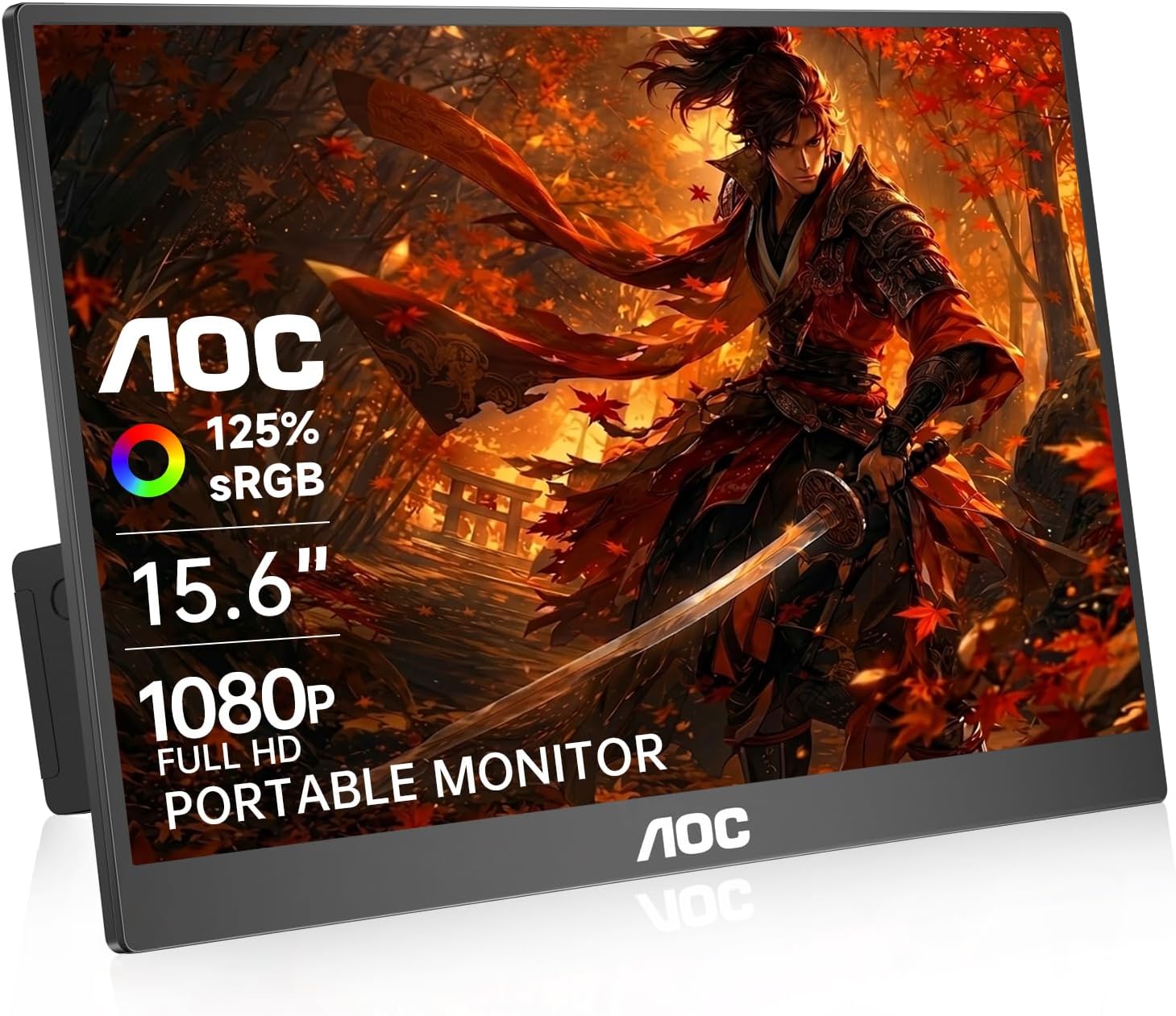
- 125% sRGB Color Accuracy for Creators Unlike standard 1080p screens,
- Ultra-Slim Travel Monitor for Work on the Go Weighing only 1.5 lbs with
- 45W Reverse Charging Single Cable Setup Say goodbye to battery anxiety
- Plug Play Compatibility for Mac, PC Consoles No drivers needed. Connect
- Eye-Care Tech Built-in Dual Speakers Designed for long work hours or
Cons
- Requires verifying desktop clearance for 0.43"D x 13.93"W x 8.66"H dimensions

Pros
- Full HD 1080P IPS Screen Immerse yourself in a vivid and accurate image
- Portable Monitor with Stand The portable monitor crafted with
- Multiple Display Modes Choose from duplicate mode, extend mode, or
- Ultra Slim Design Designed for easy travel, portable monitor is
- Wide Compatibility Enjoy hassle-free plug-and-play functionality with
Cons
- Requires verifying desktop clearance for 1.5"D x 15"W x 9.5"H dimensions

Pros
- 15 6-inch Full HD (1920x1080) portable anti-glare IPS display with an
- Hybrid-signal solution supports power and video transmission and
- Auto-rotation Display allows your screen to automatically senses its
- Foldable lite smart case can be turned into a stand to prop the monitor
- ASUS Eye Care Technology features T V Rheinland-certified Flicker-free
Cons
- Requires verifying desktop clearance for 8.91"D x 14.16"W x 0.31"H dimensions

Pros
- MSI s 15.6-inch Full HD IPS portable monitor (1920 1080, 60Hz) delivers
- T V Rheinland certified Low Blue Light and Flicker Free reducing
- Built-in 1 4-inch tripod mount lets you attach the monitor to any
- Designed to adapt to any environment the MSI portable monitor supports
- At just 0.78kg and 1.38cm slim, MSI s portable monitor is one of the
Cons
- Requires verifying desktop clearance for 0.55"D x 14.04"W x 8.28"H dimensions

Pros
- 1200 Nits True Brightness This 4K portable monitor is designed
- 4K-145%sRGB True Color Immersion The 4K UHD (3840x2400) ultra-high
- Recyclable Aluminum Material Our monitors use high-quality aluminum not
- 2000 1 High Contrast Ratio White is 2000 times brighter than the
- Smart Cover VESA Installable The Smart Cover is made of durable PU
Cons
- Requires verifying desktop clearance for 0.4"D x 13.99"W x 9"H dimensions

Pros
- Weighs just 0.83kg with a 10.5mm thin profile, light enough to slip into a laptop bag alongside a notebook
- USB-C hybrid-signal connection carries both power and video over a single cable for a quick one-cord setup
- Fold-out kickstand supports both portrait and landscape orientation on any flat surface
- TUV Rheinland-certified flicker-free and low blue light technology reduce eye strain during long viewing sessions
Cons
- USB-C hybrid signal handles most modern laptops, but older USB-A-only devices need a separate driver installation to work
- Anti-glare coating helps outdoors but the panel is still a standard-brightness display, not built for direct sunlight use
- 15.6" size is fixed, so anyone needing a larger secondary screen would need a different model entirely
What to Look for in the Best Portable Monitors
Every portable monitor listing reads about the same until you actually try to fit it in a backpack or plug it into an aging laptop. Before you compare prices, check that the panel matches how and where you’ll use it.
Screen Size and Weight
Most travel monitors sit between 13 and 16 inches, which balances usable screen space against pack weight. Anything larger, like an 18.5-inch panel, gives you more room for side-by-side windows but adds noticeable heft to a daily commute. If you fly often, weigh the monitor with its cover attached, since the case adds up fast over a full workday.
Resolution and Panel Type
A 1080P IPS panel is the sweet spot for text clarity and wide viewing angles without draining your laptop’s battery too quickly. IPS panels keep colors accurate even when you’re not looking at the screen head-on, which matters when someone glances over during a call. If color-critical work is your main use case, our guide to the best IPS monitors goes deeper into panel accuracy across sizes.
Ports: USB-C vs HDMI
USB-C with DisplayPort Alt Mode lets a single cable carry video and power together, which is why most modern travel monitors lead with it. Older laptops or desktop towers still need HDMI, so a model with both keeps you covered no matter what you’re plugging into. Check that USB-C power delivery actually reaches the wattage your laptop needs, or you may need a second cable just for charging.
Refresh Rate and Brightness
Standard portable monitors run at 60Hz, which is fine for browsing, documents, and streaming video. If you want a screen you can also game on between meetings, look for 100Hz or higher along with FreeSync support to cut down on tearing. Brightness matters more outdoors or near windows — 300 nits or higher keeps the screen readable without hunting for shade.
Stand, Case, and Speakers
A folding cover that props the screen up at an angle saves you from packing a separate stand, and it protects the panel from scratches in a bag. Built-in speakers are rarely great, but they’re useful in a pinch for a quick video call without hunting for earbuds. VESA mount compatibility is worth checking if you eventually want to bolt the monitor to a permanent desk arm.
Best Portable Monitors for Different Needs
Rather than ranking every spec sheet the same way, here’s how these 10 picks split by the situation you’re actually shopping for.
Best Overall: A Well-Rounded Everyday Pick
The cocopar 15.6” Portable Monitor earns the top spot because it doesn’t force a trade-off. You get a 1080P FHD panel with 85% sRGB coverage, built-in speakers, HDMI and USB-C inputs, and a cover stand, all with a 4.8 rating across 6,295 reviews. That combination suits people who want one monitor that handles work, streaming, and the occasional game night without swapping accessories.
Best for Gaming on the Go
If you want smoother motion for handheld consoles or a laptop between meetings, the Acer PM191Q stands out with a 100Hz refresh rate and FreeSync-compatible adaptive sync on an 18.5-inch IPS panel. The larger screen and higher refresh make fast-paced titles feel noticeably smoother than a standard 60Hz travel display. For a wider range of screens built specifically around motion and response time, see our roundup of the best monitors for gaming.
Best for Color-Accurate Creative Work
Photo editing and design work benefit from wider color coverage than a basic panel offers. The AOC 15.6” Portable Monitor covers 125% sRGB, noticeably wider than most travel displays in this size, while still packing HDR support and dual speakers into an ultra-slim body. It’s a strong pick if you review photos or export video on the road and want colors that hold up once you’re back at your main setup.
Best Budget-Friendly Pick
You don’t need to spend over $100 to get a genuinely usable second screen. The ARZOPA A1 comes in with a 1080P IPS panel, a built-in kickstand, and both USB-C and HDMI connectivity. It trims a few extras compared to pricier options, but the core viewing experience holds up well for everyday multitasking.
Best 4K Pick for Detail-Heavy Work
For spreadsheet-heavy work or fine visual detail, a sharper panel makes a real difference. The UPERFECT 4K Portable Monitor packs a 3840×2400 resolution with 1200 nits peak brightness and 145% sRGB coverage into a 16-inch frame — enough contrast and detail for demanding creative work away from your main display. If 4K clarity is a priority across the board, browse our full list of the best 4K monitors for more options at various sizes.
Best for Business Travel and Eye Comfort
Long days of back-to-back calls and documents call for a monitor built around comfort as much as sharpness. The ASUS ZenScreen MB16ACE includes eye care features that reduce blue light and flicker, paired with an anti-glare surface that holds up in bright conference rooms. Its slim case and three-year warranty also make it a dependable choice for frequent flyers who need something that survives repeated packing.
Common Mistakes to Avoid When Buying a Portable Monitor
A few buying habits quietly undercut the monitor you just paid for. Watch for these before you check out.
- Assuming any USB-C cable delivers video. Only cables rated for DisplayPort Alt Mode carry a picture — a charge-only cable will leave the screen blank.
- Ignoring your laptop’s power delivery limits. If your laptop can’t supply enough wattage over USB-C, the monitor may need its own separate power adapter to run reliably.
- Skipping the stand or case weight. A monitor that looks light on the spec sheet can feel heavy once you add its stand, cable, and protective cover to a bag.
- Overlooking brightness for outdoor use. A dim panel that looks fine indoors can be nearly unreadable on a sunlit patio or near a window seat.
- Forgetting to check the return window. Dead pixels or backlight bleed sometimes only show up after a few days of real use, so confirm the return policy before it closes.
Setting Up Your Portable Monitor for Daily Use
Getting the most out of a travel monitor is mostly about cable management and placement. Position the screen at eye level using its built-in stand, or a VESA mount if your model supports one, so you’re not tilting your neck down for hours. A single USB-C cable handling both video and power keeps your desk cleaner and reduces what you need to pack for each trip.
If your work involves frequent video calls away from your desk, pairing the monitor with a comfortable travel headset makes the whole setup more practical. Our guide to the best portable headsets covers options that pack down just as small as these displays. Keep a short microfiber cloth in your bag too — screens pick up fingerprints fast when you’re folding and unfolding them daily.
Portable Monitor FAQs
Can a portable monitor run off my laptop’s USB-C port alone?
Often, yes, if your laptop supports USB-C power delivery and DisplayPort Alt Mode over the same cable. Older or lower-power laptops sometimes can’t supply enough wattage, in which case the monitor needs its own wall adapter to stay stable.
Are portable monitors good enough for gaming?
Standard 60Hz models handle casual and story-driven games fine, but competitive or fast-paced titles benefit from a 100Hz or higher panel with adaptive sync. Check the refresh rate and FreeSync or G-Sync compatibility before buying if gaming is a priority.
What’s the difference between 1080P and 4K portable monitors?
1080P panels are lighter on your laptop’s graphics processing and cost less, which suits general productivity and streaming. 4K panels show far more detail for photo editing or spreadsheet-heavy work, but they demand more from your laptop and typically cost more.
Do I need a stand, or does the case work fine?
A folding cover-stand works well for most desk and lap use and saves you from packing a separate accessory. If you want a steadier, adjustable angle for long sessions, look for a model with VESA mount compatibility so you can add a proper arm later.
How do I protect the screen while traveling?
Most portable monitors ship with a folding cover that also serves as a stand, which is usually enough protection in a padded bag. For extra peace of mind on rougher trips, a slim sleeve case adds a second layer of cushioning against scratches and drops.


