 Daniel Okafor
An ultrawide monitor changes how much desk real estate you actually need. A 34-inch or 49-inch panel spreads across your setup and demands room to breathe. That is why the best pc gaming desks for ultrawide builds prioritize width, depth, and cable management over flashy extras. You want a stable top that holds a heavy curved screen without wobble. You also want space for a keyboard, a full mouse sweep, and speakers. This guide ranks proven desks by real dimensions and honest trade-offs. Every pick draws on verified ratings and review counts, so you can match your monitor and room to the right surface fast.
Quick answer: For most ultrawide setups in 2026, our top pick among the best pc gaming desks for ultrawide is the EUREKA Captain Series 60″ — our #1 rated choice. See the full ranked comparison, alternatives and buying advice below.

Pros
- 60 LARGE GAMING DESKTOP Captain GIP-P60 gaming desk is a extraordinary
- STURDY AND STABLE STRUCTURE Captain GIP-P60 gaming desk s support
- EXCLUSIVELY AND FULLY COVERED MOUSE PAD FOR FREE Captain GIP-P60 gaming
- EUREKA GAMING OFFERS YOU FREE ACCESSORY OPTIONS All come together with
- CUSTOMER SERVICE We hold our products to a high standard and hope you
Cons
- Requires checking room layout clearance for 27.56"D x 60"W x 30.12"H dimensions
- Requires periodic vacuuming and fabric care for Carbon Fiber

Pros
- 94.5in double T-shaped surface seats 2 people working side by side at once
- Built-in power strip with 2 AC outlets and 2 USB ports powers up to 4 devices without extra cords
- RGB LED strip syncs to music with a built-in mic and offers 29 flashing modes via app
- Rated to 325 lbs across the desk, with a 2-layer middle storage shelf for shared items
- Cable management grommets and waterproof adjustable feet keep wiring tidy and the frame level
Cons
- 94.5in width needs a large room to fit comfortably, ruling out smaller bedrooms or shared offices
- RGB lighting and music sync depend on the companion app, adding a setup step beyond the desk itself
- Keyboard tray is sized for 108-key or 87-key boards, so oversized or split ergonomic keyboards may not fit
At 94.5"W x 19.7"D x 30"H, this double T-shaped desk is built for two people to work side by side without crowding each other, separated by a 2-layer storage shelf in the middle. The frame carries a combined weight capacity of 325 lbs across the desktop, keyboard tray, and monitor stand.
- Desktop: 94.5"W x 19.7"D x 30"H
- Weight capacity: 325 lbs
- 2-layer middle storage shelf
A keyboard tray sized for 108-key or 87-key boards plus mouse room, along with a monitor stand to raise 2 displays, are built into the layout rather than sold as separate add-ons.

Pros
- Reversible frame converts between a 67-inch corner desk and a 94.5-inch straight desk, so the same unit adapts to different room layouts
- Built-in charging station adds 4 AC outlets and 2 USB ports for up to 6 devices without an extra power strip
- Top hutch, pegboard, and 2-tier storage shelves keep monitors, files, and accessories off the main desktop
- Keyboard tray sits below desk height, freeing the desktop surface for a mouse, notebook, or second monitor
- Frame is rated to hold 2 desktop computers and 1 notebook computer plus up to 3 monitors
Cons
- Engineered wood construction is lighter-duty than a solid wood or steel-frame desk, so very heavy CPU towers need to sit on the included stand rather than directly on the surface
- LED lighting strip and charging station both depend on the desk being plugged into a wall outlet, so it offers no backup power if power is cut
The desk measures 19.7"D x 67"W x 57"H in its L-shaped corner configuration, and the frame reverses to a 94.5-inch straight desk when the top hutch is moved to the opposite side. The extended length is built to hold up to 3 monitors across the surface alongside a CPU stand and two-tier storage shelves.
- 67-inch corner layout tucks into a room corner for a compact home office footprint
- 94.5-inch straight layout suits two people working side by side without interference
- Frame supports 2 desktop computers and 1 notebook computer at once
Because the same hardware converts between both layouts, the desk can move with a room redesign or a switch from single-person to shared use without buying a second piece of furniture.

Pros
- 300 lb weight capacity metal frame handles dual towers and monitors
- 55" x 21.6" desktop, large enough for two full computer setups side by side
- Two open storage shelves plus a top hutch keep consoles and speakers off the desktop
- RGB LED strip syncs to music with an adjustable-sensitivity mic, over 60,000 colours via app
- Built-in CPU holder and monitor stand free up desk surface for keyboard and mouse
Cons
- 78.8" width needs a dedicated wall run, not suited to small bedrooms
- LED strip depends on a companion app and Bluetooth pairing, no physical remote mentioned
- Metal frame with hutch and shelves means a longer bolt-together assembly than a basic table
This desk measures 78.8"W x 21.6"D x 60"H, giving it enough footprint for a triple-monitor arrangement or two workstations sharing the surface. The metal frame is rated to hold 300 pounds, which covers a full tower PC, two monitors on stands, and typical desktop accessories without flexing.
- Desktop area: 55"L x 21.6"W for keyboard, mouse and paperwork
- Two lower storage shelves for CPU towers, consoles or speakers
- Top hutch shelf for books, figures or plants
- Built-in monitor stand raises screens above desk clutter
The dimensions suit a dedicated office or gaming room rather than a shared or compact bedroom corner.
This desk fits gamers and remote workers who want a single station that also stores hardware. The 300 lb capacity and dual shelving make it practical for anyone running two PCs, streaming equipment, or console peripherals that would otherwise clutter the floor.
- Suited to dedicated gaming rooms or home offices with wall space for a 78.8" run
- Good for users who want LED ambiance synced to games or music
- Storage shelves help households consolidating a PC and console setup on one desk
It is less practical for small apartments or shared bedrooms where a 78.8" wide footprint will not fit comfortably against available wall space.

Pros
- 150 lb weight capacity across the desktop surface supports multiple monitors and equipment at once
- Built-in LED lighting offers 10 colors and 10 modes, with a memory function that restores the last setting on power-up
- 3 standard outlets plus 2 USB ports are built into the desk for charging and power without extra cords crossing the floor
- Reversible design lets the L-shape be configured for either a left or right corner setup
Cons
- MDF board construction is less impact-resistant than solid wood, especially at drilled connection points
- Assembly is required, with a metal frame and multiple storage sections to fit together
- 66.14-inch width needs a genuine corner space; it will not fit a straight-wall single-desk layout without waste
This L-shaped desk measures roughly 66.14 inches wide, 18.9 inches deep and 34.92 inches tall overall, with a 150 lb weight capacity across the surface and a main desktop section running 36 inches long, longer than the roughly 26-inch main sections found on many comparable L-desks. The larger main surface leaves room for a wide multi-monitor setup without crowding a keyboard and mouse into a narrow strip.
- 150 lb capacity accommodates monitors, a tower, and peripherals together
- 36-inch main desktop section outsizes the roughly 26-inch sections on similar desks
- Full monitor stand raises screens for improved sightlines without a separate monitor arm
Because the desk spans over 66 inches in an L configuration, it needs a genuine corner in the room rather than fitting flush against a single flat wall.
Pros
- Dimensions of 39.37"D x 53.15"W x 29.9"H engineered for optimal spatial fitting
Cons
- Requires verifying placement clearance for 39.37"D x 53.15"W x 29.9"H prior to installation

Pros
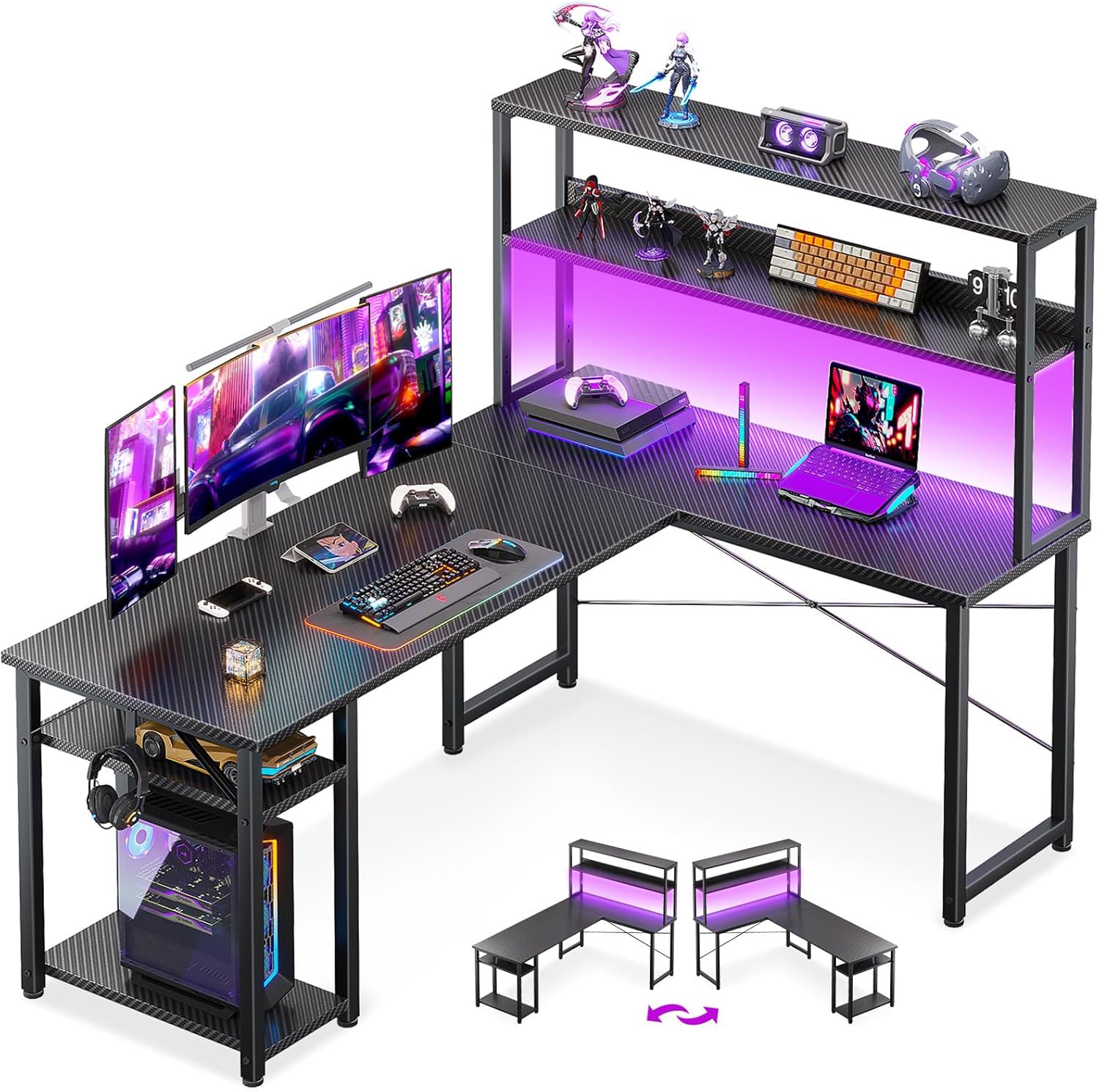
- Workstation surface measures 53 inches wide by 18.9 inches deep at 29.8 inches tall, rated to hold up to 300 pounds
- Built-in power strip adds 3 AC outlets and 2 USB ports directly on the desk for centralized charging
- RGB LED strip offers 10 color presets, 8 brightness levels and 10 dynamic modes with a memory function
- X-shaped steel frame construction adds stability for dual-monitor or multi-display setups
- Reversible left/right side modules let the L-shape orientation match either side of a room
Cons
- Assembly takes an estimated 50 to 70 minutes even with included tools and labeled parts, and is easier with two people when flipping the desk upright
- Corner L-shape footprint needs more floor space than a straight desk, so it will not fit tight rooms as easily
The main workstation area measures 53 inches wide by 18.9 inches deep at a 29.8-inch working height, rated to support up to 300 pounds across the desktop. Built-in power comes from 3 AC outlets and 2 USB ports mounted on the desk itself, along with cable management channels to keep cords off the floor during long sessions.
- Dual open shelves, a CPU stand, an accessory hook and a tool bag are included for onboard storage
- RGB LED strip supports 10 color presets, 8 brightness grades and 10 dynamic lighting modes with a memory function
- X-shaped steel frame is designed to add stability under the weight of dual monitors and a desktop tower
The overall L-shape footprint spans 53.15 x 39.37 inches at the base, so it needs a corner or wall space to match.

Pros
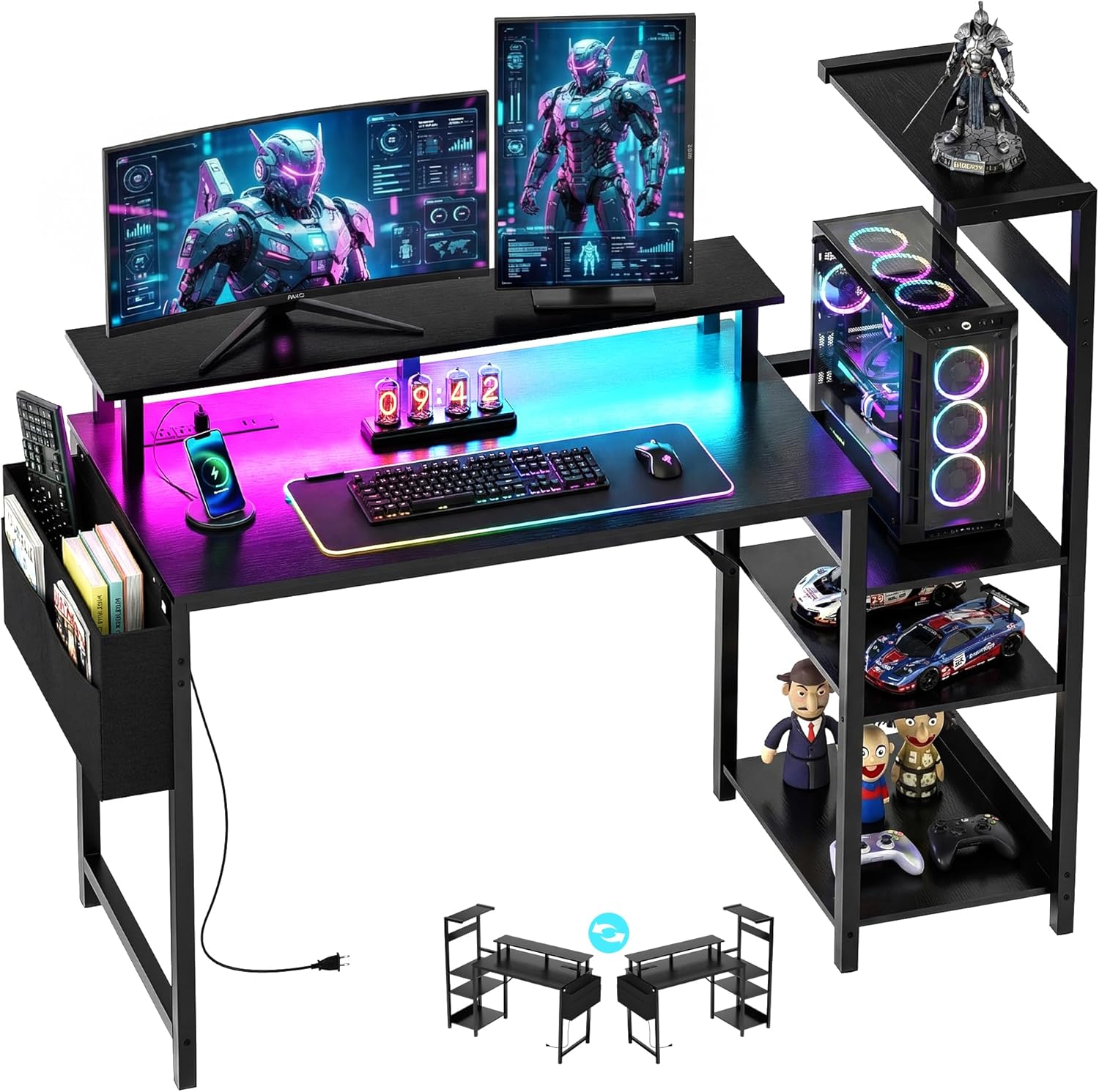
- 70.8-inch width with a 55 x 21.6-inch desktop area holds two full computer setups side by side
- 3-tier storage shelves separate a CPU tower, speakers, and console gear instead of piling them on the desktop
- Built-in RGB LED strip offers over 60,000 colors and 29 modes, including music-reactive sync via a built-in microphone
- Integrated 2-outlet, 2-USB charging station powers up to 4 devices without a separate power strip
- Cup holder and headphone hook keep drinks and headsets off the desk surface during long sessions
Cons
- Weight capacity of 55 lbs on the desktop limits how much monitor and accessory weight can sit on top at once
- RGB lighting requires an app connection to access the full 29 modes, adding a setup step beyond plug-and-play
- 70.8-inch width needs a dedicated wall run, too large for narrow bedrooms or shared desk corners
The desktop spans 70.8 inches wide by 21.6 inches deep, with a listed weight capacity of 55 lbs across the main surface. Three tiered storage shelves sit to the side, sized to hold a CPU tower, speakers, or console hardware separately from the desktop workspace, and the layout is wide enough to fit two complete computer setups.
A built-in monitor shelf raises screens above the main desktop, following ergonomic eye-level positioning without requiring a separate monitor riser purchased on top of the desk itself.

Pros
- Physical footprint measures 47.2"D x 18.9"W x 35.5"H for spatial placement
Cons
- Spacious wall or desk clearance needed for Furologee 47 Gaming De
- Careful cable routing recommended for Furologee 47 Gaming De wall mounting

Pros
- Dimensions of 17"D x 50.4"W x 27.5"H engineered for optimal spatial fitting
Cons
- Requires verifying placement clearance for 17"D x 50.4"W x 27.5"H prior to installation
- Load weight limits should not exceed 220 Pounds during active operations
Why ultrawide monitors need a different desk
Ultrawide panels sit 34 to 49 inches wide, sometimes wider. A standard 47-inch desk leaves almost no room beside the stand. Your keyboard ends up crammed against the base, and speakers have nowhere to sit.
Curved ultrawides also carry more weight than a single flat monitor. A flimsy top bounces every time you type or lean forward. Depth matters too, since curved screens need distance for a comfortable viewing arc.
If you are still comparing form factors, our guide to the best ultrawide gaming desks breaks down width thresholds in more detail. The short version: buy wider and deeper than you think you need.
How to choose the best pc gaming desks for ultrawide
Three specs separate a great ultrawide desk from a frustrating one. Weigh them against your room and your monitor before you look at price.
Width and depth
Aim for at least 55 inches of width for a single 34-inch ultrawide. Push toward 70 inches or more for a 49-inch panel or dual setups. A depth of 24 inches keeps a curved screen at a healthy distance.
Stability and weight capacity
Look for a wide leg stance and steel framing. Polygon or A-frame legs resist the side-to-side sway that plagues cheap desks. A heavy monitor arm demands a top that will not flex under clamp pressure.
Cable management and extras
Built-in power strips, USB ports, and grommets cut clutter fast. Monitor shelves raise your panel closer to eye level. Just confirm any riser is wide enough for your ultrawide base first.
Our top ultrawide desk picks by use case
Each recommendation below targets a specific room, budget, or monitor size. Match your situation to save time.
Best overall: EUREKA Captain Series 60″
The EUREKA Captain Series pairs a 60-inch top with a stable polygon-leg base. Its 4.7 rating across 2465 reviews reflects consistent build quality. It costs more, but the rigidity suits heavy curved ultrawides.
It is not the pick if you need drawers or a hutch. This is a clean, wide gaming surface built for stability first.
Best for super-ultrawide or two people: SEDETA 94.5″
A 49-inch panel or a dual battlestation needs sprawl. The SEDETA 94.5″ delivers it with LED lighting, a power strip, and a monitor stand. The value is hard to beat for that footprint.
Skip it if your room is tight. That length dominates most bedrooms and small offices.
Best L-shaped for corners: ODK 66″ L-Shaped
Corner setups let an ultrawide face you while the return holds a laptop or console. The ODK 66″ L-Shaped adds a power outlet, LED strips, and storage shelves. Its reversible design fits either wall.
For more corner-focused options, compare our roundup of the best L-shaped gaming desks before committing to a layout.
Best value L-shaped: SEDETA Reversible L-Shaped
The SEDETA L-Shaped offers a reversible corner top with a power outlet and pegboard. It undercuts most L-desks while adding LED lighting and a keyboard tray. It suits a single ultrawide angled into a corner.
The shorter arms limit dual-monitor sprawl. Solo ultrawide users get the best fit here.
Best budget: Homall 51″
The Homall 51″ costs and carries a massive 9950 reviews. It handles a single 34-inch ultrawide with a monitor riser included. The 4.6 rating sits slightly below the others but stays strong for the price.
It runs tighter on width, so speaker space is limited. Budget buyers wanting extra room should read the best gaming desks under $200 for a step up.
Best for small rooms: Furologee 47″
Short on space but committed to an ultrawide? The Furologee 47″ reverses to fit corners and adds a USB-C port. Storage shelves and two fabric drawers keep a small setup tidy.
With only 14 reviews it is less proven so far. Still, the feature set punches above its price.
Best for storage and display: SEDETA 78.8″
Gamers with gear to show off want shelving. The SEDETA 78.8″ stacks a hutch above a wide 78.8-inch top. It balances display space with real desk width for an ultrawide.
The hutch does raise the profile. Ceiling-height or shelf-averse buyers may prefer a flat top instead.
Buying guide: sizes, specs and compatibility
Measure your monitor stand footprint first. A 34-inch ultrawide base often spans close to 24 inches. Add keyboard and mouse room, and 55 inches becomes the practical floor.
Confirm the desk depth clears your curve. Deep 24-inch tops let you sit back and see the full panel without neck strain. Shallow tops force you too close to a big screen.
Check weight ratings if you plan a monitor arm. Clamp mounts stress the rear edge, so a thicker top helps a lot. Also verify the riser or hutch width against your monitor legs.
Finally, plan power early. Desks with built-in outlets and USB ports, like several SEDETA and ODK models, cut cable sprawl across a big setup.
Common mistakes to avoid
The biggest error is buying by price alone. A 47-inch desk under a 49-inch monitor leaves zero working room. Always match width to your panel plus peripherals.
Another mistake is ignoring depth. People chase length and forget a curved ultrawide needs viewing distance. Twenty-four inches of depth prevents that cramped feeling.
Do not overlook stability on tall hutches. A wobbly top ruins immersion during fast-paced games. Wide legs and steel frames earn their keep here.
Lastly, skipping cable planning creates a mess behind a wide desk. Choose grommets or a built-in strip from the start.
Frequently asked questions
How wide should a desk be for a 34-inch ultrawide?
Aim for at least 55 inches of width. That leaves room for the stand plus a full keyboard and mouse sweep. A 60-inch top like the EUREKA Captain Series adds comfortable margin.
Do I need an L-shaped desk for an ultrawide?
Not necessarily, but L-shapes help in corners. They angle the ultrawide toward you while freeing the return for other gear. Corner fans can explore the best corner desks for gaming for layout ideas.
Will a curved ultrawide fit on a monitor shelf?
Often yes, but measure the stand base first. Many risers are narrow and made for standard monitors. Confirm the shelf width exceeds your ultrawide feet before buying.
Are budget ultrawide desks stable enough?
Some are, within limits. The Homall 51″ holds a single ultrawide well. For heavier curved panels or a monitor arm, a sturdier polygon-leg desk resists flex better.
How much depth do I need for a curved screen?
Target 24 inches of depth. That distance lets your eyes track the full curve comfortably. Shallow desks push a large panel too close and cause strain over long sessions.
The bottom line
Ultrawide gaming rewards width, depth, and a rock-solid top. The EUREKA Captain Series leads for stability, while the SEDETA 94.5″ wins on sheer space. Budget hunters still get real value from the Homall 51″. Measure your monitor, match the width, and your ultrawide finally gets the room it deserves.