
 Marcus Bell
 If you’re setting up a streaming rig, the best PC cases for streaming aren’t just about looks — they need to move enough air to keep your CPU and GPU cool during marathon broadcasts, while still leaving room for capture cards, extra fans, and a webcam-friendly front panel. This guide breaks down what actually matters for streamers, then points you toward cases that fit different budgets, desk sizes, and camera setups so you can build a rig that looks as good on stream as it performs.
Quick answer: For most streamers in 2026, the best PC cases for streaming is the NZXT H6 Flow RGB — our #1 rated choice. See the full ranked comparison, alternatives and buying advice below.

Pros
- Ships with 3 pre-installed 120mm RGB fans, no separate fan purchase needed for basic airflow
- Dual-chamber layout separates the PSU and cables from the main build area for a cleaner look
- Perforated top and side panels are designed to filter dust while maintaining airflow
- Wraparound glass panels give an almost seamless view of internal components
- Wide cable channels and included straps simplify routing behind the motherboard tray
Cons
- Case measures 17.13"H x 16.34"D, sized for a mid-tower build, not compact enough for small-form-factor systems
- Panoramic glass panels increase the case's overall weight versus a mesh-only front panel
- RGB fans require compatible software or a hub to control lighting beyond the default pattern
The H6 Flow is a mid-tower ATX case built around a dual-chamber layout, with dimensions of 16.34"D x 11.3"W x 17.13"H.
- Case dimensions: 16.34"D x 11.3"W x 17.13"H
- Includes 3 pre-installed 120mm RGB fans
- Wraparound panoramic glass side and front panels
- Metal chassis construction
The dual-chamber design routes the power supply and most cabling into a separate compartment from the motherboard and GPU area, which keeps the visible build area cleaner and can improve thermal separation between hot and cool zones inside the case.
Built for standard ATX motherboards, the case's airflow-first design and perforated panels are intended to support higher-power GPU and CPU combinations.
- Supports standard ATX motherboard layouts
- Airflow-optimized perforation pattern on top and side panels
- Wide cable channels and straps for routing behind the tray
- 3 pre-installed 120mm fans positioned for front or top intake
Because the case prioritizes GPU cooling and open airflow, larger graphics cards and additional fans have more clearance than in a compact or small-form-factor case, though builders should still check specific GPU and CPU cooler length against the case's internal clearance before finalizing parts.
The included fans and dual-chamber layout give a usable starting configuration, with room to add further cooling as a build's power draw grows.
- 3 RGB fans included as a baseline cooling setup
- Additional fan mounts available for further airflow or liquid cooling radiators
- CAM-ready lighting for software-based RGB control once connected to a compatible hub
- Cable management system supports adding components without a full rewire
For builders planning to add an all-in-one liquid cooler or extra case fans later, the dual-chamber layout and perforated panels leave room to expand cooling capacity without replacing the case itself, though full RGB software control depends on pairing the fans with NZXT's CAM software and a compatible controller.

Pros
- Mid-tower with support for EATX motherboards featuring a metal chassis
- Keep your cool with three 120mm aura Sync rgb-illuminated fans, one
- Custom Liquid Cooling ready with support for top or front mounted 360mm
- Vertical GPU expansion slot Plus 7 Traditional expansion Slots
- Ergonomic, woven-cotton carry handles enable easy and safe transport up
Cons
- Requires verifying computer chassis clearance for 21.73"D x 9.88"W x 21.46"H
- Requires proper cable routing to maintain optimal interior airflow
- Requires periodic dust cleaning from internal cooling vents
The ASUS TUF Gaming GT501 Mid-Tower Gaming Case EATX Support provides essential hardware performance for custom PC builds and workstation upgrades. Engineered to manage demanding electrical or thermal workloads, this model incorporates Mid-tower with support for EATX motherboards featuring a metal chassis together with Keep your cool with three 120mm aura Sync rgb-illuminated fans, one. PC builders and system integrators will benefit from the efficient internal layout, which simplifies system assembly while supporting high operational stability. The design helps maintain consistent hardware responsiveness across intensive computing tasks, gaming sessions, and daily multitasking workloads. Physical dimensions measuring 21.73"D x 9.88"W x 21.46"H allow for straightforward spatial planning prior to final placement.
Built using resilient structural components, this unit features a sturdy outer housing engineered to resist operational wear. Precision manufacturing ensures that all joints and surface connections remain firmly aligned during regular daily activity. Custom Liquid Cooling ready with support for top or front mounted 360mm reinforces overall physical stability over extended service periods. Premium ABS Plastic, SGCC Steel, Tempered Glass, Zic Alloy Steel construction maintains structural integrity and cosmetic appearance under routine handling. Structural integrity remains firm throughout regular usage, giving owners peace of mind. Maintaining adequate interior case airflow and clean ventilation ports preserves peak hardware efficiency during heavy processing workloads.
Initial setup requires placing the unit on a flat, stable surface with adequate clearance around all sides for proper operation. Ensure all power or connection cables are routed neatly without sharp bends to prevent wire strain. Regular care involves wiping exterior housing surfaces with a soft cloth to remove dust buildup. Inspecting mechanical connections periodically preserves operational efficiency and maintains cosmetic appearance over time. Maintaining adequate interior case airflow and clean ventilation ports preserves peak hardware efficiency during heavy processing workloads. Integrating this reliable component into your computer system ensures stable power delivery and long-term electrical protection.

Pros
- Y70 Gaming PC case creates a unified modern aesthetic which is
- Massive 4 slot vertical graphics with an included luxury PCIE 4.0 x 16
- Ginormous cooling capacity with support for up to a 360mm radiator on
- Exquisite detailing such as helpful labels, reusable Velcro straps,
- Premium build experience made possible by using the finest materials,
Cons
- Requires verifying computer chassis clearance for 18.5"D x 12.5"W x 18.5"H
- Requires proper cable routing to maintain optimal interior airflow
- Requires periodic dust cleaning from internal cooling vents
The Hyte Y70 Modern Aesthetic Gaming PC Case - Panoramic provides essential hardware performance for custom PC builds and workstation upgrades. Engineered to manage demanding electrical or thermal workloads, this model incorporates HYTE Y70 Gaming PC case creates a unified modern aesthetic which is together with Massive 4 slot vertical graphics with an included luxury PCIE 4.0 x 16. PC builders and system integrators will benefit from the efficient internal layout, which simplifies system assembly while supporting high operational stability. The design helps maintain consistent hardware responsiveness across intensive computing tasks, gaming sessions, and daily multitasking workloads. Physical dimensions measuring 18.5"D x 12.5"W x 18.5"H allow for straightforward spatial planning prior to final placement.
Built using resilient structural components, this unit features a sturdy outer housing engineered to resist operational wear. Precision manufacturing ensures that all joints and surface connections remain firmly aligned during regular daily activity. Ginormous cooling capacity with support for up to a 360mm radiator on reinforces overall physical stability over extended service periods. Premium Metal, Tempered Glass construction maintains structural integrity and cosmetic appearance under routine handling. Structural integrity remains firm throughout regular usage, giving owners peace of mind. Maintaining adequate interior case airflow and clean ventilation ports preserves peak hardware efficiency during heavy processing workloads.
Initial setup requires placing the unit on a flat, stable surface with adequate clearance around all sides for proper operation. Ensure all power or connection cables are routed neatly without sharp bends to prevent wire strain. Regular care involves wiping exterior housing surfaces with a soft cloth to remove dust buildup. Inspecting mechanical connections periodically preserves operational efficiency and maintains cosmetic appearance over time. Maintaining adequate interior case airflow and clean ventilation ports preserves peak hardware efficiency during heavy processing workloads. Integrating this reliable component into your computer system ensures stable power delivery and long-term electrical protection.

Pros
- Ships with 4 pre-installed 120mm ARGB PWM fans plus a 26-LED strip, so lighting and airflow are ready without buying extras
- Clears GPUs up to 420mm, CPU coolers up to 178mm tall, and top radiators up to 360mm for high-end builds
- Tool-less side panels speed up access to internal components during builds or upgrades
- Supports back-connect ATX and Micro-ATX motherboards for cleaner cable routing behind the panel
- Side-mounted USB-C port puts a modern connection within reach without reaching around to the front
Cons
- Tempered glass panels add weight and a fragility risk during moving or panel removal that steel-only cases avoid
- Included fans run up to 1800 RPM with noise reaching 30.8 dBA at full speed, audible under sustained heavy load
- Fits ATX, Micro-ATX, and Mini-ITX boards only, so E-ATX motherboards are not supported
The Vector V100 comes with 4 pre-installed 120mm ARGB PWM fans using hydraulic bearings, each capable of up to 1800 RPM, 61.47-60.4 CFM airflow, and 2.54-2.17 mm-H2O air pressure, with noise ranging 26.5-30.8 dBA depending on speed. A 26-LED ARGB strip adds further lighting, and both fans and strip daisy-chain together for a simpler cable run than wiring each component separately.
- 4x 120mm ARGB PWM fans included, hydraulic bearing design
- 26-LED ARGB strip with full spectrum color control
- Daisy-chain connectivity reduces individual cable runs
Fan and strip lighting sync with motherboard ARGB software, so color and effects can match other components already running compatible lighting ecosystems.
The case supports ATX, Micro-ATX, Mini-ITX, and back-connect ATX or Micro-ATX motherboards, giving builders the option of a standard layout or a back-connect board for hidden cable routing behind the tray. Tool-less mounting on each side panel speeds up the build process, since panels come off without reaching for a screwdriver for routine access.
- Back-connect motherboard support for cleaner cable management
- Tool-less side panel mounting mechanism
- Included GPU support bracket for heavier graphics cards
E-ATX and other oversized motherboard formats are not on the supported list, so builders working with larger boards will need to confirm fit before assembling the rest of the build.
Internal clearance is built for high-end hardware: graphics cards up to 420mm, CPU air coolers up to 178mm tall, and a top-mounted radiator up to 360mm. That headroom leaves room to move from air cooling to a 360mm liquid loop, or to swap in a longer flagship GPU later, without the case itself becoming the limiting factor.
- 420mm max GPU length clearance
- 178mm max CPU cooler height
- 360mm top radiator support
A GPU support bracket is included to help offset the weight of longer graphics cards over time, reducing sag as heavier cards are installed.

Pros
- NOTE The following product only includes 3x Pre-Installed Fans and iCUE
- A Great Build with a Great View The 3500X has all the cooling benefits
- iCUE LINK Fans and System Hub Three pre-installed LX120-R reverse rotor
- High Cooling Capacity Side, roof, and PSU fan mounting points,
- Removable Tempered Glass Panels Easily removable front and side glass
Cons
- Requires verifying computer chassis clearance for 19.92"D x 18.11"W x 9.45"H
- Requires proper cable routing to maintain optimal interior airflow
- Requires periodic dust cleaning from internal cooling vents
The CORSAIR 3500X LX RGB Link Panoramic Mid-Tower PC Case 3X provides essential hardware performance for custom PC builds and workstation upgrades. Engineered to manage demanding electrical or thermal workloads, this model incorporates NOTE The following product only includes 3x Pre-Installed Fans and iCUE together with A Great Build with a Great View The 3500X has all the cooling benefits. PC builders and system integrators will benefit from the efficient internal layout, which simplifies system assembly while supporting high operational stability. The design helps maintain consistent hardware responsiveness across intensive computing tasks, gaming sessions, and daily multitasking workloads. Physical dimensions measuring 19.92"D x 18.11"W x 9.45"H allow for straightforward spatial planning prior to final placement.
Built using resilient structural components, this unit features a sturdy outer housing engineered to resist operational wear. Precision manufacturing ensures that all joints and surface connections remain firmly aligned during regular daily activity. iCUE LINK Fans and System Hub Three pre-installed LX120-R reverse rotor reinforces overall physical stability over extended service periods. Premium Tempered Glass construction maintains structural integrity and cosmetic appearance under routine handling. Structural integrity remains firm throughout regular usage, giving owners peace of mind. Maintaining adequate interior case airflow and clean ventilation ports preserves peak hardware efficiency during heavy processing workloads.
Initial setup requires placing the unit on a flat, stable surface with adequate clearance around all sides for proper operation. Ensure all power or connection cables are routed neatly without sharp bends to prevent wire strain. Regular care involves wiping exterior housing surfaces with a soft cloth to remove dust buildup. Inspecting mechanical connections periodically preserves operational efficiency and maintains cosmetic appearance over time. Maintaining adequate interior case airflow and clean ventilation ports preserves peak hardware efficiency during heavy processing workloads. Integrating this reliable component into your computer system ensures stable power delivery and long-term electrical protection.

Pros
- Supports GPUs up to 355mm long, or 300mm when a 360mm front radiator is installed
- Ships with two 140mm PWM fans pre-installed, rather than needing separate fan purchases
- Compatible with ATX, mATX, and ITX motherboards in one case
- 7 bridgeless expansion slots leave room for multi-card or unconventional build layouts
- Includes 2 combined 3.5-inch/2.5-inch drive mounts plus 2 dedicated 2.5-inch mounts for mixed storage setups
Cons
- Wood front panel material requires more careful handling during installation than an all-metal front
- Installing a 360mm front radiator reduces maximum GPU length from 355mm down to 300mm
- Tempered glass side panel adds weight and needs careful handling when removing it for internal access
This ATX mid tower measures roughly 17.6 inches deep, 8.46 inches wide and 18.46 inches tall, and combines a metal frame with a genuine walnut or oak wood front panel and a tempered glass side panel for viewing internal components. Two 140mm PWM fans come pre-installed, giving a working airflow setup before adding any aftermarket cooling.
- Metal frame paired with genuine wood front panel accents, cut from sustainably sourced walnut or oak
- Tempered glass side panel resists scratching while showing off internal components
- 2 pre-installed 140mm PWM fans provide baseline airflow without extra purchases
Front panel access uses an open-mesh design behind the wood slats for intake airflow, rather than a fully solid wood front that would restrict air movement.
The case supports ATX, mATX, and ITX motherboards in one shared layout, and GPUs up to 355mm in length fit with a standard configuration. Installing a 360mm radiator in the front reduces available GPU clearance to 300mm, so radiator size and GPU length need to be balanced against each other during planning.
- 355mm maximum GPU length in standard configuration without a front radiator
- 300mm GPU clearance remains available even with a 360mm front radiator installed
- 7 bridgeless expansion slots support multi-card or angled component layouts
Because GPU clearance changes depending on front radiator size, builders planning a large air-cooled GPU alongside front liquid cooling should measure both components against the case's clearance figures before buying.
Storage starts with 2 combined 3.5-inch/2.5-inch drive mounts plus 2 dedicated 2.5-inch mounts, covering a mix of traditional hard drives and SSDs without needing extra brackets. A front Type-C USB port supports newer peripherals and fast external transfers directly from the case front panel, and the interior layout leaves room for additional fans or radiators as a build's cooling needs grow.
- 4 total drive mounts, 2 combined plus 2 dedicated 2.5-inch, support a mixed HDD/SSD setup
- Front-panel USB Type-C port supports modern peripheral connections
- Removable side panels and a clip-off top panel simplify future internal upgrades
Because the drive mount count is fixed rather than expandable, builds needing more than 4 total drives will need external storage or a different case.

Pros
- Three 120 mm addressable RGB PWM fans arrive pre-installed in the front, each with eight LEDs and daisy-chained on one header
- Sliding steel fan rails accept units up to 200 mm in the front and 140 mm in the roof
- Cut-outs support rear-connector motherboards including ASUS BTF, MSI Project Zero and Gigabyte Stealth
- The inner side panel lifts out so fans can be mounted alongside the board tray instead of a cable cover
- The steel front panel is perforated in a three-dimensional Y pattern rather than left as a solid slab
Cons
- Modular parts such as the aluminium motherboard tray and alternative front I/O panels are sold separately
- All three supplied fans sit at the front, leaving the rear and roof positions empty
- Offered in black only in this configuration
Three 120 mm addressable PWM fans ship pre-installed behind a perforated steel front panel. The perforation uses a three-dimensional Y pattern designed to give air a low-obstruction path rather than forcing it through a flat mesh grille.
- Front rails take fans up to 200 mm
- Roof rails take fans up to 140 mm
- Side mounting available once the inner panel is removed
- Fans support a Zero RPM mode for near-silent behaviour at low load
The rail system is the useful part. Rather than fixed screw holes, the rails let you slide a fan to sit exactly over a graphics card or a radiator inlet. If you are running a high-power card, adding a rear exhaust fan is the first upgrade worth making, since all three included fans are intake.
This is a mid-tower ATX chassis built from alloy steel with aluminium elements, sized for a mainstream tower build rather than an extended workstation board.
- Supports ATX, micro ATX and mini ITX boards
- Supports rear-connector boards: ASUS BTF, MSI Project Zero, Gigabyte Stealth
- Roof radiator mounting up to 140 mm fan sizes
- The internal side panel doubles as a cable cover or a fan mount
Back-connect board support is the detail worth flagging. Those boards move every connector to the rear of the tray, which needs matching pass-through cut-outs in the case to work at all. If you are planning that style of build, this chassis is already prepared for it. For a conventional board, the same cut-outs simply serve as generous cable routing.
The distinguishing idea here is a chassis assembled from replaceable sections rather than a single riveted shell. Panels, the board tray and the front input panel are designed to come off and be swapped for alternatives.
- The motherboard tray can be exchanged for a billet aluminium version
- The front input panel can be swapped for one with a different port arrangement
- Side panels and rails come apart for access during a build
Two things follow from that. Building is easier, because you can strip the case back to a skeleton and reassemble around the components. And the case can change later without being replaced. The trade is that every alternative module is bought separately, so the version in the box is what you get until you choose to add to it.

Pros
- Mid-tower with support for EATX motherboards featuring a metal chassis,
- Premium cable management includes translucent rear panel, adjustable
- Keep your cool with built in fan hub, four 140mm fans and up to seven
- Custom Liquid Cooling ready features a water pump reservoir mounting
- Graphic card mounting options include Up to 2x vertically mounted
Cons
- Requires verifying computer chassis clearance for 22.24"D x 9.84"W x 23.27"H
- Requires proper cable routing to maintain optimal interior airflow
- Requires periodic dust cleaning from internal cooling vents
The ASUS ROG Strix Helios GX601 RGB Mid-Tower Gaming Case provides essential hardware performance for custom PC builds and workstation upgrades. Engineered to manage demanding electrical or thermal workloads, this model incorporates Mid-tower with support for EATX motherboards featuring a metal chassis, together with Premium cable management includes translucent rear panel, adjustable. PC builders and system integrators will benefit from the efficient internal layout, which simplifies system assembly while supporting high operational stability. The design helps maintain consistent hardware responsiveness across intensive computing tasks, gaming sessions, and daily multitasking workloads. Physical dimensions measuring 22.24"D x 9.84"W x 23.27"H allow for straightforward spatial planning prior to final placement.
Built using resilient structural components, this unit features a sturdy outer housing engineered to resist operational wear. Precision manufacturing ensures that all joints and surface connections remain firmly aligned during regular daily activity. Keep your cool with built in fan hub, four 140mm fans and up to seven reinforces overall physical stability over extended service periods. Premium Alloy Steel, Aluminum construction maintains structural integrity and cosmetic appearance under routine handling. Structural integrity remains firm throughout regular usage, giving owners peace of mind. Maintaining adequate interior case airflow and clean ventilation ports preserves peak hardware efficiency during heavy processing workloads.
Initial setup requires placing the unit on a flat, stable surface with adequate clearance around all sides for proper operation. Ensure all power or connection cables are routed neatly without sharp bends to prevent wire strain. Regular care involves wiping exterior housing surfaces with a soft cloth to remove dust buildup. Inspecting mechanical connections periodically preserves operational efficiency and maintains cosmetic appearance over time. Maintaining adequate interior case airflow and clean ventilation ports preserves peak hardware efficiency during heavy processing workloads. Integrating this reliable component into your computer system ensures stable power delivery and long-term electrical protection.

Pros
- EXCEPTIONAL GPU COOLING-The PSU shroud is perforated on the side and
- LARGE RADIATOR SUPPORT-Supports up to a 360mm radiator in front and a
- HIGH-PERFORMANCE AIRFLOW-Ultra-fine mesh on the top, front, and side
- PRE-INSTALLED FANS-Equipped with two 120mm Quiet Airflow fans one in
- SEAMLESS CABLE MANAGEMENT-Effortlessly route and conceal cables using
Cons
- Requires verifying computer chassis clearance for 8.86"D x 16.93"W x 18.31"H
- Requires proper cable routing to maintain optimal interior airflow
- Requires periodic dust cleaning from internal cooling vents
The NZXT H5 Flow - Compact ATX Mid-Tower PC Case - Black provides essential hardware performance for custom PC builds and workstation upgrades. Engineered to manage demanding electrical or thermal workloads, this model incorporates EXCEPTIONAL GPU COOLING-The PSU shroud is perforated on the side and together with LARGE RADIATOR SUPPORT-Supports up to a 360mm radiator in front and a. PC builders and system integrators will benefit from the efficient internal layout, which simplifies system assembly while supporting high operational stability. The design helps maintain consistent hardware responsiveness across intensive computing tasks, gaming sessions, and daily multitasking workloads. Physical dimensions measuring 8.86"D x 16.93"W x 18.31"H allow for straightforward spatial planning prior to final placement.
Built using resilient structural components, this unit features a sturdy outer housing engineered to resist operational wear. Precision manufacturing ensures that all joints and surface connections remain firmly aligned during regular daily activity. HIGH-PERFORMANCE AIRFLOW-Ultra-fine mesh on the top, front, and side reinforces overall physical stability over extended service periods. Premium Metal construction maintains structural integrity and cosmetic appearance under routine handling. Structural integrity remains firm throughout regular usage, giving owners peace of mind. Maintaining adequate interior case airflow and clean ventilation ports preserves peak hardware efficiency during heavy processing workloads.
Initial setup requires placing the unit on a flat, stable surface with adequate clearance around all sides for proper operation. Ensure all power or connection cables are routed neatly without sharp bends to prevent wire strain. Regular care involves wiping exterior housing surfaces with a soft cloth to remove dust buildup. Inspecting mechanical connections periodically preserves operational efficiency and maintains cosmetic appearance over time. Maintaining adequate interior case airflow and clean ventilation ports preserves peak hardware efficiency during heavy processing workloads. Integrating this reliable component into your computer system ensures stable power delivery and long-term electrical protection.
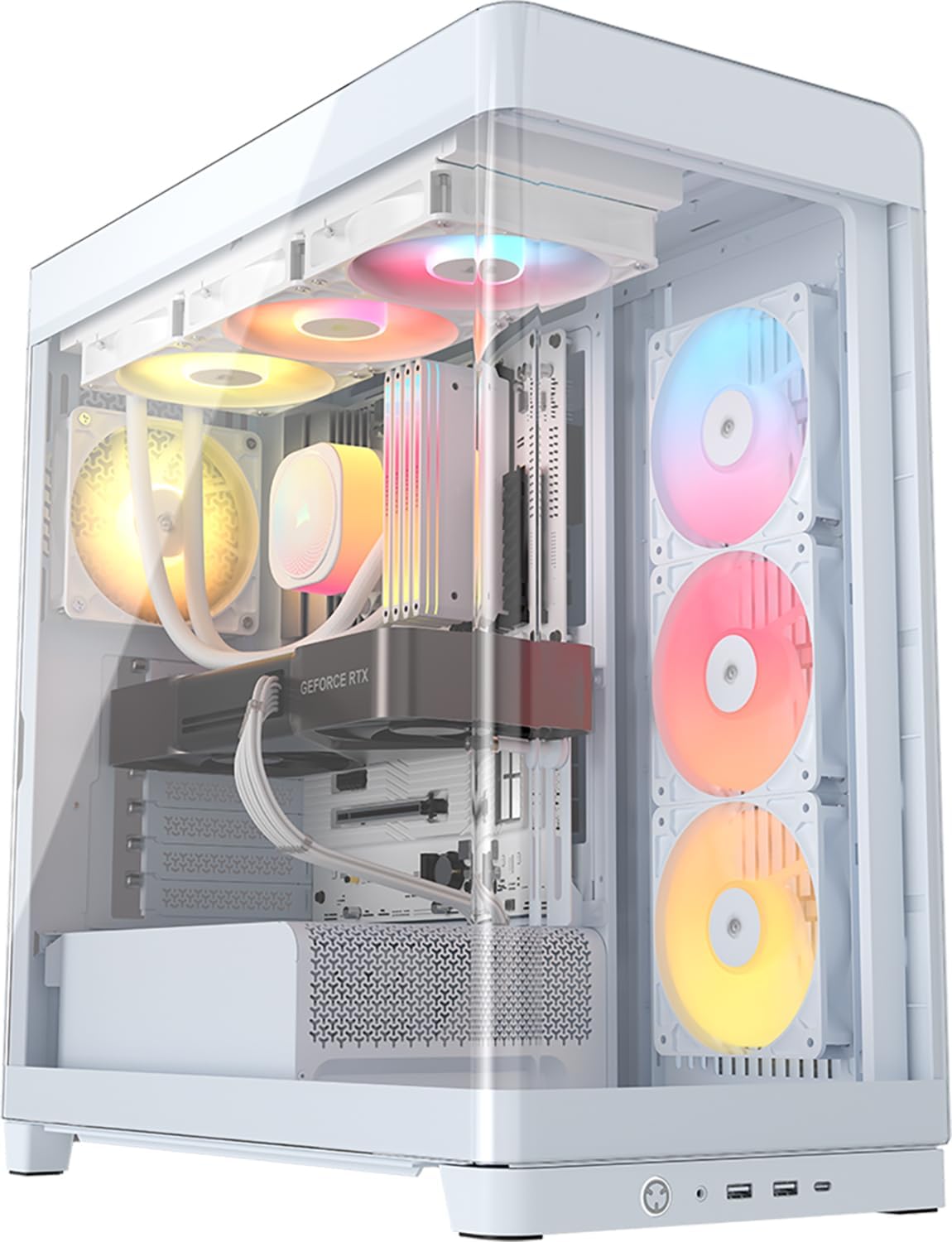
Pros
- NOTE The following product only includes 3x Pre-Installed Fans. The
- Single-Piece Curved Glass Panel - The front and side panel are made
- Reverse-Rotor RGB Fans The included side-mounted 120mm fans use a
- Cascading Industrial Design Clean lines cascade like a waterfall over
- FRAME Modular Case System - The revolutionary FRAME system gives new
Cons
- Requires verifying computer chassis clearance for 19.65"D x 10.08"W x 18.54"H
- Requires proper cable routing to maintain optimal interior airflow
- Requires periodic dust cleaning from internal cooling vents
The CORSAIR Frame 4500X RS ARGB Panoramic Mid-Tower PC Case provides essential hardware performance for custom PC builds and workstation upgrades. Engineered to manage demanding electrical or thermal workloads, this model incorporates NOTE The following product only includes 3x Pre-Installed Fans. The together with Single-Piece Curved Glass Panel - The front and side panel are made. PC builders and system integrators will benefit from the efficient internal layout, which simplifies system assembly while supporting high operational stability. The design helps maintain consistent hardware responsiveness across intensive computing tasks, gaming sessions, and daily multitasking workloads. Physical dimensions measuring 19.65"D x 10.08"W x 18.54"H allow for straightforward spatial planning prior to final placement.
Built using resilient structural components, this unit features a sturdy outer housing engineered to resist operational wear. Precision manufacturing ensures that all joints and surface connections remain firmly aligned during regular daily activity. Reverse-Rotor RGB Fans The included side-mounted 120mm fans use a reinforces overall physical stability over extended service periods. Premium Plastic, Tempered Glass construction maintains structural integrity and cosmetic appearance under routine handling. Structural integrity remains firm throughout regular usage, giving owners peace of mind. Maintaining adequate interior case airflow and clean ventilation ports preserves peak hardware efficiency during heavy processing workloads.
Initial setup requires placing the unit on a flat, stable surface with adequate clearance around all sides for proper operation. Ensure all power or connection cables are routed neatly without sharp bends to prevent wire strain. Regular care involves wiping exterior housing surfaces with a soft cloth to remove dust buildup. Inspecting mechanical connections periodically preserves operational efficiency and maintains cosmetic appearance over time. Maintaining adequate interior case airflow and clean ventilation ports preserves peak hardware efficiency during heavy processing workloads. Integrating this reliable component into your computer system ensures stable power delivery and long-term electrical protection.
What Makes a Great Streaming PC Case
Streaming puts extra load on your system compared to regular gaming. Your CPU is encoding video while your GPU renders the game, so both parts run hotter for longer stretches. A case that traps heat will throttle your frame rate right when viewers notice the drop. Encoding software like OBS also competes for CPU cycles, so any thermal headroom you can buy through better airflow pays off during your busiest stream nights.
Airflow and Cooling for Marathon Sessions
Mesh front panels and multiple intake fans matter more here than in a typical build. Look for a chassis with at least two or three pre-installed fans and clear filtration, since dust buildup during long sessions can quietly choke airflow. A case with strong front-to-back airflow keeps thermals stable even during four-hour streams.
If you plan to run a full-size ATX motherboard with a large GPU and extra capture hardware, make sure the case actually supports that footprint. Our guide to full-size ATX PC cases covers clearance and radiator support in more detail if you’re building a bigger rig.
Front I/O, Webcam Placement and Cable Routing
Streamers plug and unplug gear constantly — microphones, capture cards, webcams, and stream decks. Front-panel USB-C and USB-A ports save you from crawling behind the desk mid-broadcast. Clean cable routing channels also matter, since tangled cables behind the case can pinch airflow and make troubleshooting a nightmare.
Build Quality and Long-Term Warranty
A streaming rig often runs longer hours than a casual gaming PC, so frame rigidity and steel thickness matter more than they might seem to at first glance. Cases built from heavier-gauge steel resist panel flex and rattle less when fans spin up under load. Brands like ASUS back their higher-end frames with multi-year warranties, which is worth checking if you’re investing in a case you plan to keep through several PC builds.
RGB Lighting and Glass Panels for On-Camera Appeal
If your case sits in the camera frame, lighting is part of your brand. Addressable RGB fans synced to software like NZXT CAM or iCUE let you match your overlay colors without extra desk lighting. Browse our roundup of RGB PC cases if lighting customization is a bigger priority than raw airflow for your setup.
Best PC Cases for Streaming for Every Setup
Not every streamer needs the same case. Your ideal pick depends on your budget, how many cameras and capture devices you’re running, and how much desk space you actually have. Think about where your setup will sit in six months, not just today, since upgrading a GPU or adding a second capture card later is far easier in a case that already has room to spare.
Best Overall for a Polished Camera Backdrop
The NZXT H6 Flow RGB pairs a dual-chamber layout with panoramic glass and three RGB fans, so your build looks sharp from almost any camera angle. Reviewers consistently praise its airflow, and the dual-chamber design keeps cables hidden while your GPU stays visible on stream. It’s a strong pick if you want a build that looks intentional rather than thrown together.
Best Budget-Friendly Airflow Pick
The CORSAIR 4000D RS ARGB delivers three pre-installed fans and a high-airflow front panel for less than many rivals charge for a bare frame. It’s a sensible choice if you’re building your first streaming PC and want thermal headroom without spending your whole budget on the case. The trade-off is a simpler exterior — it won’t turn heads the way a panoramic-glass case does.
Best for Multi-Cam and Capture Card Rigs
Streamers running a capture card, extra fans, and a beefy cooler need room to work. The ASUS TUF Gaming GT501 supports EATX motherboards and ships with four fans already installed, giving you space to add a second card or extra storage drives. It’s bulkier than most cases on this list, so measure your desk before you commit to it.
If your channel leans toward variety streams with multiple PCs feeding one capture setup, it’s also worth checking our gaming PC cases guide, which covers builds tuned more for raw performance than on-camera looks.
Best Premium Pick for a Signature Look
If your budget stretches further and you want your setup to stand out on camera, the Hyte Y70 brings a striking dual-chamber silhouette with panoramic glass on two sides. It supports up to ten fans for streamers who run heavy cooling loops alongside encoding workloads. The higher price tag makes sense mainly if your channel leans on aesthetics as part of the brand.
Best Budget Case Under $100
Tight on funds but still want ARGB fans and modern styling? The Lian Li Vector V100 ships with four ARGB fans and side USB-C at a price that undercuts most rivals on this list. It supports GPUs up to 420mm, so you won’t outgrow it even if you upgrade your graphics card later. Just note the lighting software is less polished than NZXT or Corsair’s ecosystems.
Best Compact Case for Small Desks
Not everyone streams from a dedicated studio. The NZXT H5 Flow shrinks the footprint while keeping two 120mm fans and support for a 360mm front radiator, so you don’t sacrifice cooling to save desk space. If your setup is genuinely tight on room, our compact PC cases roundup has more options sized for smaller desks.
Best for Quiet, Distraction-Free Broadcasts
Fan noise picked up by your microphone is a real problem during voice-heavy streams. The Fractal Design North uses a wood front panel and PWM-controlled fans that can idle low when your CPU isn’t under heavy encoding load. It trades a bit of raw airflow for a calmer soundscape, which matters more than most people expect once the mic is live.
Mistakes to Avoid When Choosing a Case for Streaming
The biggest mistake is buying on looks alone. A glass-heavy case with poor mesh coverage can look great in photos but run noticeably hotter once you’re encoding video and gaming at the same time.
Another common misstep is ignoring GPU length and radiator clearance. Many current graphics cards are longer than older models, and a case that “should fit” on paper can end up a tight squeeze once cables are routed. Always check the listed maximum GPU length against your card, not just the general case category.
Finally, don’t overlook front-panel connectivity. If you’re constantly swapping a webcam, headset, and capture card, a case with only two rear USB ports will slow you down before every stream. A few extra dollars for front USB-C access pays for itself the first week you use it.
Streamers also tend to overlook PSU shrouds and noise dampening. A shroud hides your power supply and cables from camera view, which keeps the interior looking tidy during close-up shots. If your studio is otherwise quiet, foam-lined panels or lower default fan curves can shave several decibels off your baseline noise floor.
Frequently Asked Questions
Do streaming PCs need a special case?
Not a special case exactly, but airflow and front I/O matter more than for casual gaming builds. Extra encoding load means more heat, so prioritize mesh panels and multiple fans over pure looks.
Does a glass panel hurt cooling?
It can, if the rest of the case doesn’t compensate with strong front and top airflow. Look for cases that pair glass side panels with mesh front intakes rather than glass on every side.
How many fans does a streaming case need?
Three to four fans is a solid baseline for a streaming build, with at least two as intake at the front. Add a rear exhaust fan to keep hot air moving out rather than recirculating.
Is RGB lighting worth it for streamers?
If your PC is visible on camera, yes — it adds visual interest without extra desk lighting. If your case sits under a desk or out of frame, it’s purely a personal preference rather than a streaming necessity. Many streamers sync lighting to their overlay palette for a more polished, cohesive look on screen.
What size case works best for a small streaming setup?
A compact ATX or micro-ATX case is usually enough for most streamers, since you rarely need the extra bays a full tower offers. Check clearance for your GPU and cooler before downsizing, since compact frames sacrifice some interior room.
Whichever case you land on, treat it as part of your production setup, not just a box for parts. The right chassis keeps your components cool during long broadcasts, gives you fast access to the ports you swap daily, and looks the part when the camera is rolling. Take a few minutes to compare specs and availability before you buy, since the right fit now saves you a rebuild down the road.






