
 Marcus Bell
 Cramming a full-size tower cooler into a slim HTPC case or a low-clearance ITX build almost never works, and that is exactly why the search for the best low profile CPU coolers gets frustrating fast. Case side panels, RAM heights, and PCIe risers all fight for the same few centimeters of headroom, so a cooler that looks great on paper can still refuse to let your case close. This guide breaks down what actually matters when height is limited — socket support, thermal headroom, and noise — then points you toward specific coolers for compact gaming rigs, silent HTPCs, and AMD AM5 builds.
Quick answer: If you only read one paragraph, make it this one. For most small form factor builds in 2026, the best low profile CPU coolers pick is the Thermalright AXP120-X67 — it fits both AMD and Intel sockets, moves real airflow through its 120mm PWM fan, and costs less than many stock coolers. See the full ranked lineup and buying advice below.
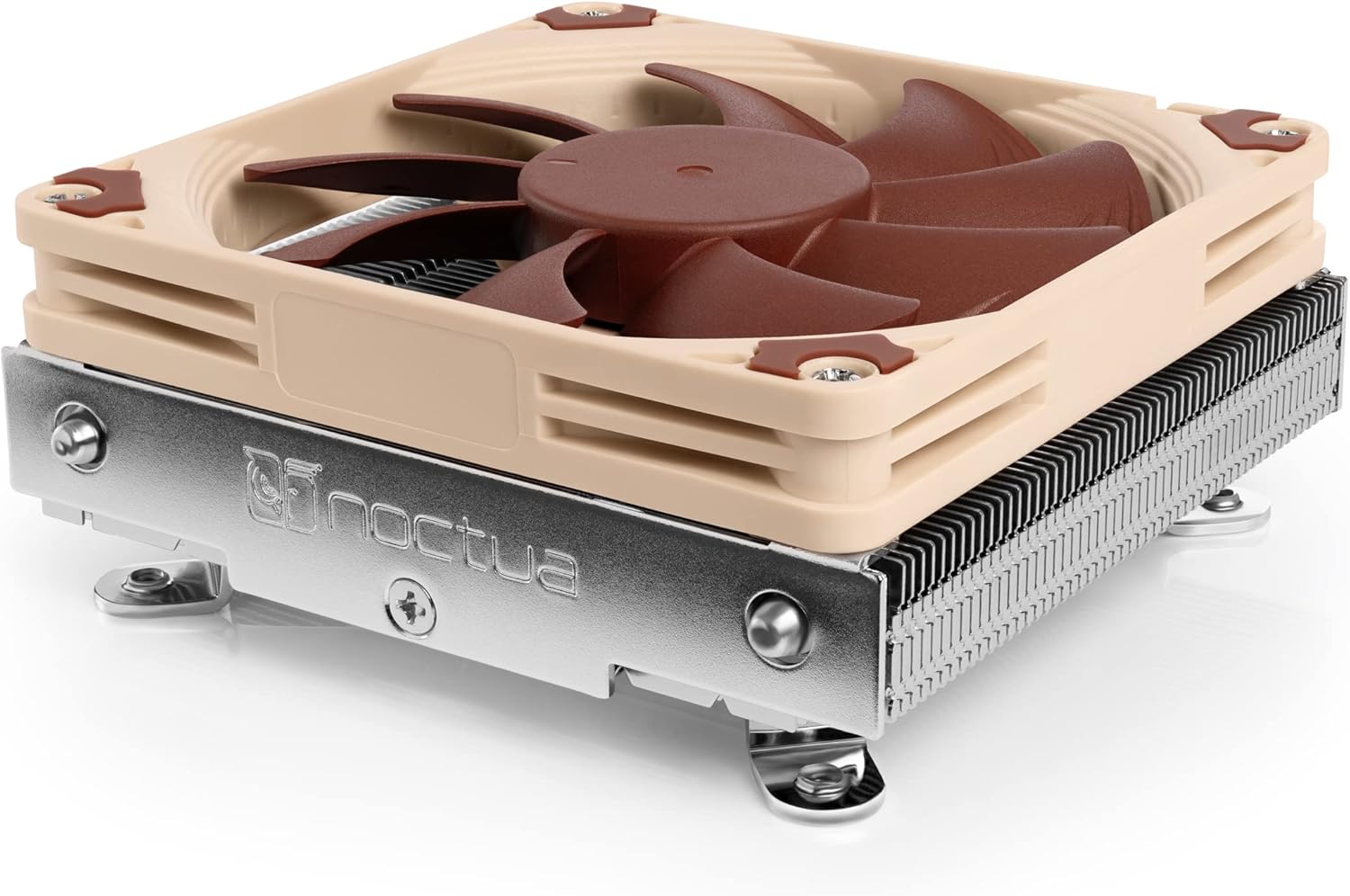
Pros
- Just 37 mm of total height, clearing the cooler limits in slim HTPC and mini-ITX chassis
- A 95 by 95 mm footprint matches the Intel socket keep-out zone, so tall memory and the first PCIe slot stay clear
- A copper base and heat pipes soldered into nickel-plated aluminium fins rather than press fitted
- A slim 92 by 14 mm PWM fan with a Low-Noise Adaptor for quieter idle behaviour
- A six-year manufacturer warranty, with thermal compound and the mounting kit supplied
Cons
- Intel LGA115x and LGA1200 only; there is no AM4, AM5 or LGA1700 hardware in this box
- Sized for moderate heat loads around 65W, so an unlocked high-power chip will run into thermal limits under sustained load
- A brown and beige colour scheme only, with the all-black version sold as a separate item
The defining number is 37 mm of total height, made up of a 23 mm fin stack and a 14 mm thick fan. That is short enough for chassis that quote very tight cooler clearance, where a conventional tower has no chance.
- Footprint: 95 by 95 mm, matching the socket keep-out zone
- Base and heat pipes: copper, nickel plated
- Fins: aluminium, soldered rather than press fitted
- Fan: 92 by 92 by 14 mm with PWM control
Soldered joints matter on a heatsink this small. With so little fin area to work with, any thermal resistance between the pipes and the fins costs measurable degrees, so the manufacturing method is doing real work here rather than serving as a specification sheet flourish.
Compatibility is deliberately narrow. The mounting kit covers Intel LGA1150, LGA1151, LGA1155, LGA1156 and LGA1200 and nothing else, so check your socket before ordering.
- No AMD AM4 or AM5 hardware included
- No LGA1700 or LGA1851 hardware included
- Fan positions accept either a 14 mm or a 25 mm thick 92 mm fan
Heat load is the second limit. A 37 mm heatsink has finite surface area, so it is matched to chips with a moderate thermal design figure, in the region of 65W. Locked six and eight core parts and older quad cores are comfortable. Pair it with an unlocked K-series chip running an all-core workload and it will reach its ceiling and throttle, which is a physics limit rather than a defect.
Installation uses a backplate and screws rather than push pins, which gives even pressure and a repeatable mount when you service the machine later.
- Fit the backplate through the motherboard socket holes
- Apply a small dot of the supplied compound to the centre of the heat spreader
- Lower the heatsink flat and tighten the two screws alternately, a few turns each
- Reconnect the fan to the CPU_FAN header so PWM control works
Do this with the board out of the case if the chassis has no backplate cutout, since the screws are accessed from the underside. The Low-Noise Adaptor is an inline resistor cable that caps maximum fan speed; fit it if the machine sits in a living room and the workload is light, and leave it off for anything sustained.

Pros
- Compact low-profile cooler with only 65mm total height ideal for HTPCs,
- Does not overhang the RAM or PCIe slots on most current motherboards
- Highly optimised NF-A9x14 slim 92mm fan with PWM support and Low-Noise
- Includes high-end NT-H1 thermal paste and SecuFirm2 mounting system for
- Recommended for CPUs with low to moderate heat dissipation (see CPU
Cons
- Requires verifying computer chassis clearance for 3.74"L x 3.74"W x 2.56"H
- Requires proper cable routing to maintain optimal interior airflow
- Requires periodic dust cleaning from internal cooling vents
The Noctua NH-L9x65 Premium Low-Profile CPU Cooler provides essential hardware performance for custom PC builds and workstation upgrades. Engineered to manage demanding electrical or thermal workloads, this model incorporates Compact low-profile cooler with only 65mm total height ideal for HTPCs, together with Does not overhang the RAM or PCIe slots on most current motherboards. PC builders and system integrators will benefit from the efficient internal layout, which simplifies system assembly while supporting high operational stability. The design helps maintain consistent hardware responsiveness across intensive computing tasks, gaming sessions, and daily multitasking workloads. Physical dimensions measuring 3.74"L x 3.74"W x 2.56"H allow for straightforward spatial planning prior to final placement.
Built using resilient structural components, this unit features a sturdy outer housing engineered to resist operational wear. Precision manufacturing ensures that all joints and surface connections remain firmly aligned during regular daily activity. Highly optimised NF-A9x14 slim 92mm fan with PWM support and Low-Noise reinforces overall physical stability over extended service periods. Premium Copper (base and heat-pipes), aluminium (cooling fins), soldered joints & nickel plating construction maintains structural integrity and cosmetic appearance under routine handling. Structural integrity remains firm throughout regular usage, giving owners peace of mind. Maintaining adequate interior case airflow and clean ventilation ports preserves peak hardware efficiency during heavy processing workloads.
Initial setup requires placing the unit on a flat, stable surface with adequate clearance around all sides for proper operation. Ensure all power or connection cables are routed neatly without sharp bends to prevent wire strain. Regular care involves wiping exterior housing surfaces with a soft cloth to remove dust buildup. Inspecting mechanical connections periodically preserves operational efficiency and maintains cosmetic appearance over time. Maintaining adequate interior case airflow and clean ventilation ports preserves peak hardware efficiency during heavy processing workloads. Integrating this reliable component into your computer system ensures stable power delivery and long-term electrical protection.

Pros
- Only 37mm total height, ideal for slim HTPC cases and Small Form Factor
- Compact footprint for 100% RAM and PCIe compatibility on ITX
- Quiet, premium-grade NF-A9x14 fan with Low-Noise Adaptor and automatic
- Includes award-winning NT-H1 thermal compound and easy-to-install
- Renowned quality backed up by 6-year manufacturer s warranty,
Cons
- Requires verifying computer chassis clearance for 1.46"L x 3.62"W x 4.49"H
- Requires proper cable routing to maintain optimal interior airflow
- Requires periodic dust cleaning from internal cooling vents
The Noctua NH-L9a-AM4 Premium Low-Profile CPU Cooler for AMD provides essential hardware performance for custom PC builds and workstation upgrades. Engineered to manage demanding electrical or thermal workloads, this model incorporates Only 37mm total height, ideal for slim HTPC cases and Small Form Factor together with Compact footprint for 100% RAM and PCIe compatibility on ITX. PC builders and system integrators will benefit from the efficient internal layout, which simplifies system assembly while supporting high operational stability. The design helps maintain consistent hardware responsiveness across intensive computing tasks, gaming sessions, and daily multitasking workloads. Physical dimensions measuring 1.46"L x 3.62"W x 4.49"H allow for straightforward spatial planning prior to final placement.
Built using resilient structural components, this unit features a sturdy outer housing engineered to resist operational wear. Precision manufacturing ensures that all joints and surface connections remain firmly aligned during regular daily activity. Quiet, premium-grade NF-A9x14 fan with Low-Noise Adaptor and automatic reinforces overall physical stability over extended service periods. Premium Copper (base and heat-pipes), aluminium (cooling fins), soldered joints & nickel plating construction maintains structural integrity and cosmetic appearance under routine handling. Structural integrity remains firm throughout regular usage, giving owners peace of mind. Maintaining adequate interior case airflow and clean ventilation ports preserves peak hardware efficiency during heavy processing workloads.
Initial setup requires placing the unit on a flat, stable surface with adequate clearance around all sides for proper operation. Ensure all power or connection cables are routed neatly without sharp bends to prevent wire strain. Regular care involves wiping exterior housing surfaces with a soft cloth to remove dust buildup. Inspecting mechanical connections periodically preserves operational efficiency and maintains cosmetic appearance over time. Maintaining adequate interior case airflow and clean ventilation ports preserves peak hardware efficiency during heavy processing workloads. Integrating this reliable component into your computer system ensures stable power delivery and long-term electrical protection.
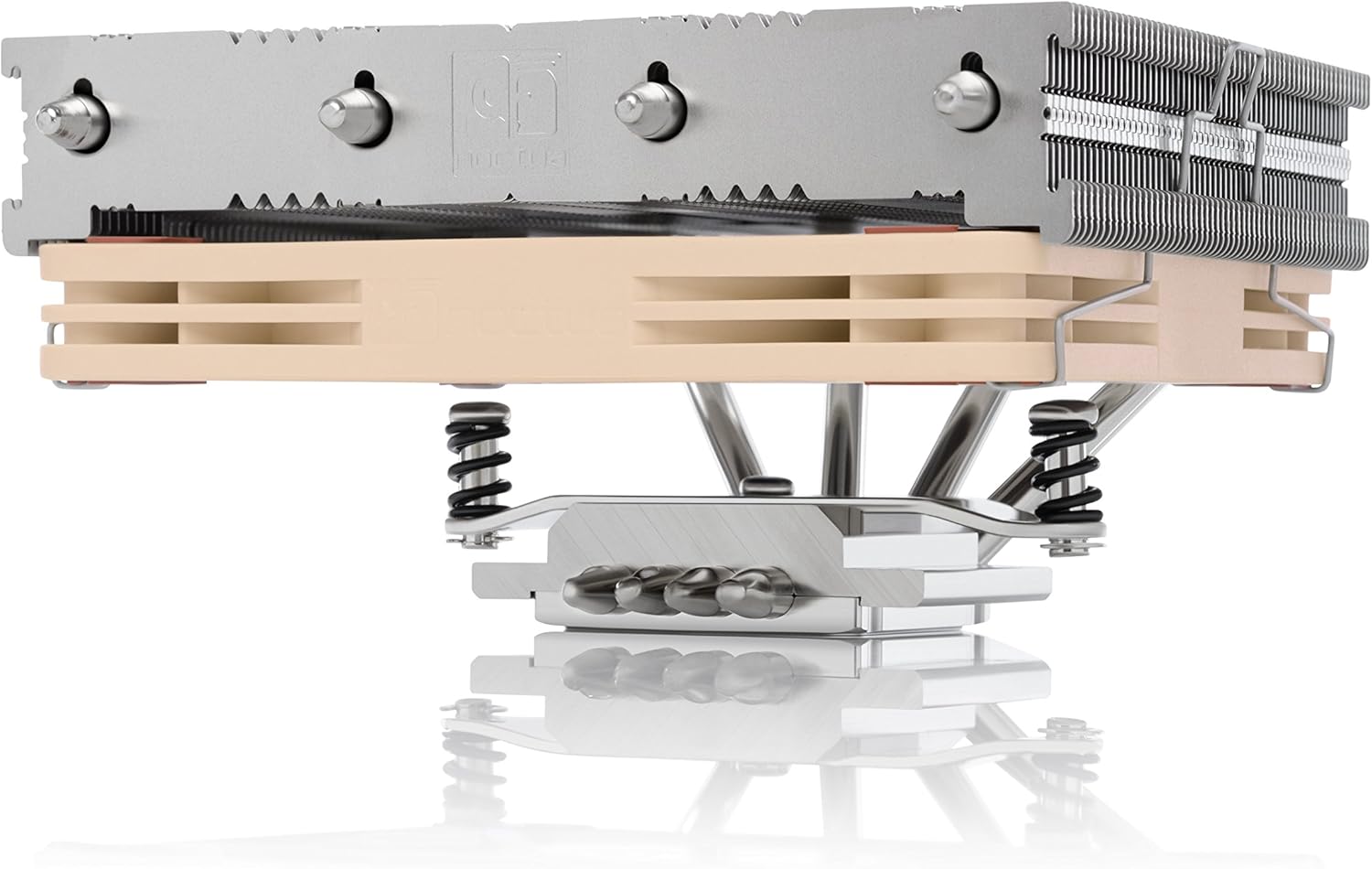
Pros
- Compact, premium-quality low-profile CPU cooler (70mm total height)
- Further improved successor to the award-winning NH-L12, ideal for ITX
- Highly optimised NF-A12x15 120mm fan with PWM support and Low-Noise
- Includes high-end NT-H1 thermal paste and SecuFirm2 mounting system for
- Renowned quality backed up by 6-year manufacturer s warranty,
Cons
- Requires verifying computer chassis clearance for 5.03"L x 5.74"W x 2.75"H
- Requires proper cable routing to maintain optimal interior airflow
- Requires periodic dust cleaning from internal cooling vents
The Noctua NH-L12S Premium Low Profile CPU Cooler with Quiet provides essential hardware performance for custom PC builds and workstation upgrades. Engineered to manage demanding electrical or thermal workloads, this model incorporates Compact, premium-quality low-profile CPU cooler (70mm total height) together with Further improved successor to the award-winning NH-L12, ideal for ITX. PC builders and system integrators will benefit from the efficient internal layout, which simplifies system assembly while supporting high operational stability. The design helps maintain consistent hardware responsiveness across intensive computing tasks, gaming sessions, and daily multitasking workloads. Physical dimensions measuring 5.03"L x 5.74"W x 2.75"H allow for straightforward spatial planning prior to final placement.
Built using resilient structural components, this unit features a sturdy outer housing engineered to resist operational wear. Precision manufacturing ensures that all joints and surface connections remain firmly aligned during regular daily activity. Highly optimised NF-A12x15 120mm fan with PWM support and Low-Noise reinforces overall physical stability over extended service periods. Structural integrity remains firm throughout regular usage, giving owners peace of mind. Maintaining adequate interior case airflow and clean ventilation ports preserves peak hardware efficiency during heavy processing workloads. Integrating this reliable component into your computer system ensures stable power delivery and long-term electrical protection.
Initial setup requires placing the unit on a flat, stable surface with adequate clearance around all sides for proper operation. Ensure all power or connection cables are routed neatly without sharp bends to prevent wire strain. Regular care involves wiping exterior housing surfaces with a soft cloth to remove dust buildup. Inspecting mechanical connections periodically preserves operational efficiency and maintains cosmetic appearance over time. Maintaining adequate interior case airflow and clean ventilation ports preserves peak hardware efficiency during heavy processing workloads. Integrating this reliable component into your computer system ensures stable power delivery and long-term electrical protection.

Pros
- Intel LGA 1851 and AMD AM5 support.
- 67mm High, 4.7 x 4.8 x 2.6 , the fan size
- Compactive low profile cooler with Mini-ITX PC on the market
- 6 heat pipes, cooling faster than Shuriken 3
- coment the silence and good value more than Shuriken 3
Cons
- Requires verifying computer chassis clearance for 4.8"L x 2.63"W x 4.72"H
- Requires proper cable routing to maintain optimal interior airflow
- Requires periodic dust cleaning from internal cooling vents
The SCYTHE Big Shuriken 4 Low Profile CPU Cooler 4.7 x 4.8 x provides essential hardware performance for custom PC builds and workstation upgrades. Engineered to manage demanding electrical or thermal workloads, this model incorporates Intel LGA 1851 and AMD AM5 support. together with 67mm High, 4.7 x 4.8 x 2.6 , the fan size. PC builders and system integrators will benefit from the efficient internal layout, which simplifies system assembly while supporting high operational stability. The design helps maintain consistent hardware responsiveness across intensive computing tasks, gaming sessions, and daily multitasking workloads. Physical dimensions measuring 4.8"L x 2.63"W x 4.72"H allow for straightforward spatial planning prior to final placement.
Built using resilient structural components, this unit features a sturdy outer housing engineered to resist operational wear. Precision manufacturing ensures that all joints and surface connections remain firmly aligned during regular daily activity. Compactive low profile cooler with Mini-ITX PC on the market reinforces overall physical stability over extended service periods. Premium Aluminum construction maintains structural integrity and cosmetic appearance under routine handling. Structural integrity remains firm throughout regular usage, giving owners peace of mind. Maintaining adequate interior case airflow and clean ventilation ports preserves peak hardware efficiency during heavy processing workloads.
Initial setup requires placing the unit on a flat, stable surface with adequate clearance around all sides for proper operation. Ensure all power or connection cables are routed neatly without sharp bends to prevent wire strain. Regular care involves wiping exterior housing surfaces with a soft cloth to remove dust buildup. Inspecting mechanical connections periodically preserves operational efficiency and maintains cosmetic appearance over time. Maintaining adequate interior case airflow and clean ventilation ports preserves peak hardware efficiency during heavy processing workloads. Integrating this reliable component into your computer system ensures stable power delivery and long-term electrical protection.

Pros
- Stands just 65mm tall, fitting HTPC, ITX, and other small-form-factor builds where taller coolers will not clear the case
- 95x95mm footprint keeps the cooler clear of RAM slots and near-socket connectors on current motherboards
- 4 heat pipes, twice the count of the smaller low-profile siblings in the lineup, add cooling capacity in the same footprint
- NF-A9x14 PWM fan includes a Low-Noise Adaptor for quieter automatic speed control
- SecuFirm2 mounting covers Intel LGA1851, LGA1700, LGA1200, LGA115x and AMD AM5, AM4 sockets in one kit
Cons
- Not recommended for overclocked CPUs or chips with high heat dissipation, per the manufacturer's own guidance
- 65mm height limits cooling capacity compared with larger tower coolers, a deliberate trade for small-form-factor fit
- Single 92mm fan design, no option to add a second fan for push-pull airflow
The NH-L9x65 stands 65mm tall with a 95x95mm footprint, built with a copper base and 4 heat pipes feeding aluminum cooling fins, double the heat pipe count of the smaller low-profile models in the same lineup. Joints are soldered and nickel-plated for corrosion resistance, finished in an all-black colorway.
- 65mm total height, 95x95mm footprint
- 4 heat pipes, copper base and heat pipes, aluminum fins
- Slim 92mm PWM fan with Low-Noise Adaptor
That 95x95mm footprint is specifically sized to clear RAM slots and near-socket connectors on current motherboards, keeping the cooler from overhanging components the way some low-profile coolers do.
The included SecuFirm2 mounting system covers Intel LGA1851, LGA1700, LGA1200, and LGA115x sockets as well as AMD AM5 and AM4, with an offset mounting option available for improved efficiency on supported boards. High-grade thermal paste is included, so no separate compound purchase is needed for the first installation.
- SecuFirm2 mounting for Intel LGA1851/1700/1200/115x
- AMD AM5 and AM4 socket support included
- High-grade thermal paste included in the box
The 95x95mm footprint's RAM and PCIe clearance means installation does not require removing memory sticks first, a step often needed with larger low-profile or tower coolers on cramped boards.
The manufacturer recommends this cooler for CPUs with low to moderate heat dissipation, citing examples like current Intel Core K-series and AMD Ryzen X3D chips at stock settings. It is explicitly not intended for overclocking or CPUs generating high sustained heat loads, a direct trade-off for the 65mm height.
- Suited to low-to-moderate heat dissipation CPUs
- Not designed for overclocked systems
- Best paired with small-form-factor or HTPC builds prioritizing size over peak cooling
Builders planning heavy overclocking or a high-TDP flagship CPU under sustained load should look at a larger tower cooler instead, since the L9x65's compact size caps its cooling headroom.

Pros
- Brand Overview is a Taiwan brand with more than 20 years
- AGHP technique 4 6mm heat pipes apply AGHP technique, Solve the Inverse
- 36mm Height The AXP90 X36 low profile cooler, combined with a 92mm PWM
- Broad Compatibility The heatsink supports CPU slots Intel LGA1700 1150
- AMD AM4 AM5, for different platforms, the heatsink is equipped with the
Cons
- Requires verifying computer chassis clearance for 3.72"L x 3.74"W x 1.42"H
- Requires proper cable routing to maintain optimal interior airflow
- Requires periodic dust cleaning from internal cooling vents
The Thermalright AXP90 X36 Low Profile ITX CPU Cooler 36mm provides essential hardware performance for custom PC builds and workstation upgrades. Engineered to manage demanding electrical or thermal workloads, this model incorporates Brand Overview Thermalright is a Taiwan brand with more than 20 years together with AGHP technique 4 6mm heat pipes apply AGHP technique, Solve the Inverse. PC builders and system integrators will benefit from the efficient internal layout, which simplifies system assembly while supporting high operational stability. The design helps maintain consistent hardware responsiveness across intensive computing tasks, gaming sessions, and daily multitasking workloads. Physical dimensions measuring 3.72"L x 3.74"W x 1.42"H allow for straightforward spatial planning prior to final placement.
Built using resilient structural components, this unit features a sturdy outer housing engineered to resist operational wear. Precision manufacturing ensures that all joints and surface connections remain firmly aligned during regular daily activity. 36mm Height The AXP90 X36 low profile cooler, combined with a 92mm PWM reinforces overall physical stability over extended service periods. Premium Aluminum construction maintains structural integrity and cosmetic appearance under routine handling. Structural integrity remains firm throughout regular usage, giving owners peace of mind. Maintaining adequate interior case airflow and clean ventilation ports preserves peak hardware efficiency during heavy processing workloads.
Initial setup requires placing the unit on a flat, stable surface with adequate clearance around all sides for proper operation. Ensure all power or connection cables are routed neatly without sharp bends to prevent wire strain. Regular care involves wiping exterior housing surfaces with a soft cloth to remove dust buildup. Inspecting mechanical connections periodically preserves operational efficiency and maintains cosmetic appearance over time. Maintaining adequate interior case airflow and clean ventilation ports preserves peak hardware efficiency during heavy processing workloads. Integrating this reliable component into your computer system ensures stable power delivery and long-term electrical protection.

Pros
- Better Heat Dissipation The low-profile CPU cooler comes with 4 heat
- Low-profile Design Ultra-compact low-profile cooler with only 47mm
- PWM Fan The 92mm PWM fan delivers Low-Noise for automatic speed control
- Max. Air Flow 46CFM
- RAM Compatibility The small-size CPU cooler design provides excellent
Cons
- Requires verifying computer chassis clearance for 3.62"L x 0.59"W x 3.62"H
- Requires proper cable routing to maintain optimal interior airflow
- Requires periodic dust cleaning from internal cooling vents
The ID-COOLING IS-40-XT Black 47mm Low Profile CPU Cooler 4 provides essential hardware performance for custom PC builds and workstation upgrades. Engineered to manage demanding electrical or thermal workloads, this model incorporates Better Heat Dissipation The low-profile CPU cooler comes with 4 heat together with Low-profile Design Ultra-compact low-profile cooler with only 47mm. PC builders and system integrators will benefit from the efficient internal layout, which simplifies system assembly while supporting high operational stability. The design helps maintain consistent hardware responsiveness across intensive computing tasks, gaming sessions, and daily multitasking workloads. Physical dimensions measuring 3.62"L x 0.59"W x 3.62"H allow for straightforward spatial planning prior to final placement.
Built using resilient structural components, this unit features a sturdy outer housing engineered to resist operational wear. Precision manufacturing ensures that all joints and surface connections remain firmly aligned during regular daily activity. PWM Fan The 92mm PWM fan delivers Low-Noise for automatic speed control reinforces overall physical stability over extended service periods. Premium Aluminum, Copper, Plastic, or Nylon construction maintains structural integrity and cosmetic appearance under routine handling. Structural integrity remains firm throughout regular usage, giving owners peace of mind. Maintaining adequate interior case airflow and clean ventilation ports preserves peak hardware efficiency during heavy processing workloads.
Initial setup requires placing the unit on a flat, stable surface with adequate clearance around all sides for proper operation. Ensure all power or connection cables are routed neatly without sharp bends to prevent wire strain. Regular care involves wiping exterior housing surfaces with a soft cloth to remove dust buildup. Inspecting mechanical connections periodically preserves operational efficiency and maintains cosmetic appearance over time. Maintaining adequate interior case airflow and clean ventilation ports preserves peak hardware efficiency during heavy processing workloads. Integrating this reliable component into your computer system ensures stable power delivery and long-term electrical protection.

Pros
- Brand Overview is a Taiwan brand with more than 20 years
- Product specification SI-100 Black CPU cooler
- CPU Air Cooler dimensions 120(L)x108(W)x100(H)mm (4.72x4.25x3.94 inch)
- Product weight 0.64kg(1.4lb)
- heat sink material aluminum, CPU cooler is equipped with metal
Cons
- Requires verifying computer chassis clearance for 4.72"L x 0.98"W x 4.3"H
- Requires proper cable routing to maintain optimal interior airflow
- Requires periodic dust cleaning from internal cooling vents
The Thermalright SI-100 Black CPU Air Cooler 6 6mm Heat provides essential hardware performance for custom PC builds and workstation upgrades. Engineered to manage demanding electrical or thermal workloads, this model incorporates Brand Overview Thermalright is a Taiwan brand with more than 20 years together with Product specification Thermalright SI-100 Black CPU cooler. PC builders and system integrators will benefit from the efficient internal layout, which simplifies system assembly while supporting high operational stability. The design helps maintain consistent hardware responsiveness across intensive computing tasks, gaming sessions, and daily multitasking workloads. Physical dimensions measuring 4.72"L x 0.98"W x 4.3"H allow for straightforward spatial planning prior to final placement.
Built using resilient structural components, this unit features a sturdy outer housing engineered to resist operational wear. Precision manufacturing ensures that all joints and surface connections remain firmly aligned during regular daily activity. CPU Air Cooler dimensions 120(L)x108(W)x100(H)mm (4.72x4.25x3.94 inch) reinforces overall physical stability over extended service periods. Premium Aluminum,Silicone construction maintains structural integrity and cosmetic appearance under routine handling. Structural integrity remains firm throughout regular usage, giving owners peace of mind. Maintaining adequate interior case airflow and clean ventilation ports preserves peak hardware efficiency during heavy processing workloads. Integrating this reliable component into your computer system ensures stable power delivery and long-term electrical protection.
Initial setup requires placing the unit on a flat, stable surface with adequate clearance around all sides for proper operation. Ensure all power or connection cables are routed neatly without sharp bends to prevent wire strain. Regular care involves wiping exterior housing surfaces with a soft cloth to remove dust buildup. Inspecting mechanical connections periodically preserves operational efficiency and maintains cosmetic appearance over time. Maintaining adequate interior case airflow and clean ventilation ports preserves peak hardware efficiency during heavy processing workloads. Integrating this reliable component into your computer system ensures stable power delivery and long-term electrical protection.

Pros
- Good Heat Dissipation The 53mm height downward pressure CPU heat sink
- AGHP Technique The 4x6mm heat pipe adopts the 4th generation technology
- 53mm Height The AXP90 X53 Full low profile cooler, combined with a 92mm
- CPU Cooler Specifications cpu cooling Size 94.5 95 53mm, matched fan
- Broad Compatibility The heatsink supports CPU slots Intel LGA1700 1851
Cons
- Requires verifying computer chassis clearance for 3.74"L x 2.09"W x 3.72"H
- Requires proper cable routing to maintain optimal interior airflow
- Requires periodic dust cleaning from internal cooling vents
The Thermalright AXP90-X53 Full Low Profile ITX CPU Air provides essential hardware performance for custom PC builds and workstation upgrades. Engineered to manage demanding electrical or thermal workloads, this model incorporates Good Heat Dissipation The 53mm height downward pressure CPU heat sink together with AGHP Technique The 4x6mm heat pipe adopts the 4th generation technology. PC builders and system integrators will benefit from the efficient internal layout, which simplifies system assembly while supporting high operational stability. The design helps maintain consistent hardware responsiveness across intensive computing tasks, gaming sessions, and daily multitasking workloads. Physical dimensions measuring 3.74"L x 2.09"W x 3.72"H allow for straightforward spatial planning prior to final placement.
Built using resilient structural components, this unit features a sturdy outer housing engineered to resist operational wear. Precision manufacturing ensures that all joints and surface connections remain firmly aligned during regular daily activity. 53mm Height The AXP90 X53 Full low profile cooler, combined with a 92mm reinforces overall physical stability over extended service periods. Premium Copper construction maintains structural integrity and cosmetic appearance under routine handling. Structural integrity remains firm throughout regular usage, giving owners peace of mind. Maintaining adequate interior case airflow and clean ventilation ports preserves peak hardware efficiency during heavy processing workloads.
Initial setup requires placing the unit on a flat, stable surface with adequate clearance around all sides for proper operation. Ensure all power or connection cables are routed neatly without sharp bends to prevent wire strain. Regular care involves wiping exterior housing surfaces with a soft cloth to remove dust buildup. Inspecting mechanical connections periodically preserves operational efficiency and maintains cosmetic appearance over time. Maintaining adequate interior case airflow and clean ventilation ports preserves peak hardware efficiency during heavy processing workloads. Integrating this reliable component into your computer system ensures stable power delivery and long-term electrical protection.
What Actually Counts as a Low Profile CPU Cooler?
Most tower coolers stand 150mm or taller, which is fine in a mid-tower but useless in a slim desktop case or a console-style HTPC chassis. Low profile coolers are built differently: the heatsink sits flat over the socket instead of standing upright, usually keeping total height under 70mm.
That shorter stack trades some raw cooling capacity for compatibility. You will not match a 240mm liquid loop, but you also will not have to give up a slim case, a low-clearance rack mount, or a media-center build sitting under your TV.
Within this category there is still a wide spread. Ultra-slim options sit around 37mm and are built for extreme clearance limits, while taller 65-70mm designs push closer to tower-cooler performance while still clearing most mini-ITX side panels. Knowing which bracket your case falls into narrows the list fast.
How to Choose the Best Low Profile CPU Coolers for Your Case
Picking the right cooler is less about brand names and more about matching four practical specs to your build. Get these right and almost any option on this list will serve you well.
Height Clearance Comes First
Measure the actual clearance in your case, not the marketing spec sheet. Side panel windows, cable channels, and PSU shrouds can all shave a few millimeters off the number your case maker advertises. A cooler like the Noctua NH-L9i at just 37mm tall leaves margin for error; a 70mm cooler leaves almost none.
Match the Socket: Intel vs AMD
Low profile coolers are not always cross-compatible, and mounting hardware differs even within the same brand’s family. AM4 brackets do not always fit AM5, and older LGA115x mounts will not clamp onto newer Intel sockets without an adapter. Always confirm the exact socket before you add a cooler to your cart.
TDP and Thermal Headroom
A cooler rated for a 65W chip will throttle a 105W processor under sustained load. Check your CPU’s actual power draw, including any boost behavior, and pick a cooler with headroom above that number rather than exactly at it.
Fan Noise and Airflow in Tight Cases
Small cases restrict airflow more than open-air towers do, so a cooler’s rated dB figure often understates real-world noise. Larger fans moving air slowly, like the 120mm unit on the Noctua NH-L12S, tend to stay quieter than small high-RPM fans forced to spin fast to compensate.
Best Low Profile Coolers by Use Case
Rather than reviewing every model in isolation, it helps to match a cooler to the way you actually plan to use your PC. Here is how the lineup breaks down.
Best for Silent HTPC and Media Center Builds
If your PC lives in the living room, noise matters more than peak thermal performance. The Noctua NH-L9i and the taller Noctua NH-L9x65 are built for exactly this scenario, running near-silent at idle and staying calm even under moderate load. For a broader shortlist built around acoustics rather than raw wattage, our guide to the best CPU coolers for low noise covers non-low-profile options too.
Best for Compact Gaming PCs
Gaming rigs squeezed into an ITX case still need to shed real heat during long sessions. The SCYTHE Big Shuriken 4 punches above its size thanks to a dense fin stack and a fan tuned for static pressure, making it a solid fit for mid-range gaming CPUs. If you are building a taller case instead, browse our roundup of the best CPU coolers for gaming for options with more thermal headroom.
Best for AMD AM5 Small Form Factor Rigs
Newer AMD boards need mounting hardware built for AM5, and not every older cooler ships with it. The Thermalright AXP90-X53 supports current AM4 and AM5 boards along with recent Intel sockets, and its pure copper base handles the higher stock voltages of Ryzen chips reasonably well for a 53mm cooler.
Best Budget Pick Under $30
You do not need to spend big to keep a low-power build cool. The ID-COOLING IS-40-XT uses four direct-contact heat pipes in a 47mm profile, which is enough for office PCs, light gaming, and NAS-style builds that never push a CPU near its thermal ceiling.
Best When You Have a Little More Clearance
If your case allows for roughly 70mm of height, you gain meaningful cooling capacity without stepping up to liquid cooling. The Noctua NH-L12S pairs a wide heatsink with a quiet 120mm fan and comfortably handles higher-TDP chips that would overwhelm a 40mm cooler.
Installation Tips That Save You a Second Trip to the Store
Low profile coolers mount differently from tower units, and a few habits make the job smoother. Test-fit the cooler against your case wall before applying thermal paste, since a dry run is much easier to correct than a mounted one.
Check fan orientation too. Some low profile coolers exhaust air toward the rear of the case, while others blow down onto the motherboard, and picking the wrong orientation for your case’s airflow layout can leave hot air trapped near the socket.
Finally, route memory-slot cables and RGB headers before you mount the cooler. Reaching around a 40mm heatsink to plug in a stray cable afterward is far more fiddly than doing it first.
Common Mistakes to Avoid When Buying a Low Profile Cooler
A few recurring errors account for most of the returns and refunds in this category. Watch for these before you check out.
- Trusting a case’s advertised clearance without accounting for cable channels or a windowed panel that sits closer than expected.
- Assuming a cooler’s older AM4 mounting kit will bolt onto a newer AM5 motherboard without checking for an included adapter.
- Ignoring RAM height. Tall heatsink-covered memory modules can collide with a low profile cooler’s overhanging fan shroud.
- Buying based on TDP rating alone and ignoring real-world boost clocks, which push power draw well above the base spec on many modern chips.
- Skipping the fan orientation check, which can leave warm air recirculating instead of exiting the case.
Low Profile Air Cooling vs Other Options
Low profile air coolers are not the only path to a quiet, compact build, and it is worth knowing when a different category makes more sense. Standard tower coolers, covered in our guide to the best air CPU coolers, generally cool better per dollar if your case has the vertical room to spare.
Liquid cooling is another option worth weighing, especially for high-TDP CPUs paired with heavy overclocks. Our breakdown of the best liquid CPU coolers is a useful next stop if your case can fit a slim 120mm or 140mm radiator instead of a low profile heatsink.
That said, low profile coolers remain the only realistic choice for many console-style cases and 1U or 2U rack builds where a radiator or tower simply will not fit, no matter how good the thermal numbers look on a competing option.
Frequently Asked Questions
Are low profile coolers as good as tower coolers?
Not quite, but they get close for mid-range CPUs. A quality low profile cooler like the NH-L12S handles moderate loads well; it just has less thermal mass for sustained heavy workloads than a 150mm tower.
Can I use a low profile cooler for overclocking?
Light overclocks are usually fine on higher-end models, but aggressive overclocking generates heat these coolers were not designed to dissipate. If you plan to push voltages hard, a taller cooler or liquid loop is the safer route.
Do low profile coolers work with tall RAM modules?
It depends on the cooler’s fan placement. Some designs overhang the first RAM slot, so check the clearance spec against your memory kit’s height before buying, especially with RGB heatsink modules.
How much case clearance do I actually need?
Measure from the motherboard tray to the nearest obstruction, then subtract a few millimeters for tolerance. Most low profile coolers list their exact height, so match that number against your real measurement rather than the case spec sheet alone.
Is a low profile cooler quieter than a small AIO?
Often yes, since it has no pump to add whine or vibration. A well-chosen low profile fan running at moderate RPM can be quieter at idle than a compact all-in-one liquid cooler’s pump and radiator fan combined.
Whichever pick you land on, match it to your case’s real clearance and your CPU’s actual power draw rather than chasing the biggest heatsink you can find. A correctly sized low profile cooler will run quieter, fit better, and last longer than one bought on specs alone.






