
 Priya Raghavan
 Typing the same commands, macros, or shortcuts over and over slows you down whether you’re gaming, streaming, or juggling spreadsheets all day. A keyboard with dedicated macro keys puts your most-used actions one press away, so you stop hunting through menus mid-task. Picking the right one comes down to key count, software, and switch feel, and this guide breaks down what actually matters before you buy.
Quick answer: If you’re shopping for the best keyboards with macro keys in 2026, the Redragon K580 is our #1 rated choice. It pairs tactile mechanical switches with five dedicated macro buttons and a media wheel, so custom shortcuts are ready the moment you plug it in. See the full ranked comparison, alternatives, and buying advice below.

Pros
- 104-key full-size layout with five dedicated G1 to G5 macro keys recorded directly on the board, no software install needed
- Hot-swap sockets accept most standard switches, so the clicky Blue stock switches can be changed without soldering
- Switches specified for 50 million keystrokes beneath double-shot keycaps whose legends cannot wear off
- Full anti-ghosting across all 104 keys, so rapid multi-key combinations all land
- 18 RGB modes on the main keys plus 5 separate side-light modes, all adjusted from the keyboard itself
Cons
- Wired only, with no Bluetooth or 2.4GHz wireless option offered on this model
- Blue switches are loud and tactile by design, a poor fit for a shared room or an open call
- 15.75 inches long and around 0.97 kg, so it claims real desk width and is not a travel board
Stock switches are Blue, the classic clicky type with a distinct tactile bump and an audible click on every actuation. That feedback is the reason people choose them for typing, and the reason they annoy anyone else in the room.
- Specified for 50 million keystrokes
- Double-shot keycaps, where legends are moulded rather than printed
- Hot-swap sockets accepting most standard switch types
- Full anti-ghosting across all 104 keys
The hot-swap sockets are the important part. If the click proves too loud for your setup, linear or quiet tactile switches drop in with a puller and no soldering iron. That turns one board into several, and it also means a single failed switch is a two-minute repair rather than a dead keyboard.
Five dedicated macro keys sit in a column to the left of the main cluster, labelled G1 through G5. They record on the fly using key combinations on the board itself, with no software installation required, and the bindings are stored in onboard memory.
- Five programmable macro keys for MMO and MOBA combinations
- Dedicated play, pause and skip media controls
- A scroll wheel for volume and intuitive media control
- RGB colours assignable per key without software
Onboard storage means the macros travel with the keyboard. Plug it into a different machine, or a work computer where you cannot install software, and the bindings still function. Optional companion software exists for deeper RGB effects and layered profiles, but nothing about daily use depends on it.
The board measures 15.75 inches long by 5.91 inches wide by 0.98 inches tall and weighs around 0.97 kg. That extra length over a plain full-size layout is the macro key column, so plan desk width accordingly.
- Full 104-key layout plus five extra G keys
- Wired connection with no wireless option
- RGB side lighting angled down and outward onto the desk surface
Nearly a kilogram is a good sign in a keyboard: the mass is what stops it sliding during fast key presses and gives a solid rather than hollow sound. It is a poor travel companion for the same reason. The angled side lights cast onto the desk rather than into your eyes, and they can be turned off independently of the main key lighting.

Pros
- 6 Onboard Macro Keys, No Software Required - Record and reassign G1-G6
- 26 Anti-Ghosting Keys, Dedicated Media Controls - Press up to 26 keys
- True RGB with 13 Lighting Modes - 7 presets plus 6 customizable slots
- Detachable Wrist Rest, Fade-Resistant Keycaps - Magnetic wrist rest
- Optional Software for Power Users - Everyday use needs zero software,
Cons
- Requires verifying desktop clearance for 18.3"L x 8.4"W x 0.6"H dimensions
- Requires routine care to keep exterior housing dust-free
- Initial setup requires checking operating instructions carefully
The Redragon K512 RGB Membrane Gaming Keyboard 6 Macro Keys offers reliable functional utility tailored for modern home and workplace environments. Designed to enhance daily productivity, this unit integrates 6 Onboard Macro Keys, No Software Required - Record and reassign G1-G6 alongside 26 Anti-Ghosting Keys, Dedicated Media Controls - Press up to 26 keys. Users will find the intuitive design straightforward to operate across various room configurations and daily routines. The versatile construction adapts easily to personal workspaces, providing consistent practical value and streamlined usability. Physical dimensions measuring 18.3"L x 8.4"W x 0.6"H allow for straightforward spatial planning prior to final placement.
Built using resilient structural components, this unit features a sturdy outer housing engineered to resist operational wear. Precision manufacturing ensures that all joints and surface connections remain firmly aligned during regular daily activity. True RGB with 13 Lighting Modes - 7 presets plus 6 customizable slots reinforces overall physical stability over extended service periods. Structural integrity remains firm throughout regular usage, giving owners peace of mind. Following standard setup recommendations and maintaining clean surfaces ensures consistent operational utility across daily activities. This functional equipment provides steady performance and practical convenience when properly integrated into your workspace.
Initial setup requires placing the unit on a flat, stable surface with adequate clearance around all sides for proper operation. Ensure all power or connection cables are routed neatly without sharp bends to prevent wire strain. Regular care involves wiping exterior housing surfaces with a soft cloth to remove dust buildup. Inspecting mechanical connections periodically preserves operational efficiency and maintains cosmetic appearance over time. Following standard setup recommendations and maintaining clean surfaces ensures consistent operational utility across daily activities. This functional equipment provides steady performance and practical convenience when properly integrated into your workspace.

Pros
- Engineered with premium materials for reliability
- Engineered with premium materials for reliability
- Engineered with premium materials for reliability
Cons
- Replacement parts may need future purchases
- Replacement parts may need future purchases
This product combines multiple design elements into a cohesive solution addressing user needs effectively and reliably. Each component has been carefully selected for reliability, durability, and long-term performance. The integrated approach ensures seamless operation across all intended uses and application scenarios.
- Durable materials withstand extended periods of regular use and heavy-duty applications
- Design prioritizes user experience and practical functionality in daily use scenarios
- Regular updates and manufacturer support maintain compatibility and feature enhancements
- Quality testing validates performance reliability in real-world conditions and environments
Users consistently report satisfaction with ease of implementation and reliable long-term performance. This solution integrates smoothly into existing workflows and systems without disruption. Comprehensive support resources help with any questions during setup and ongoing use over time.
This product combines multiple design elements into a cohesive solution addressing user needs effectively and reliably. Each component has been carefully selected for reliability, durability, and long-term performance. The integrated approach ensures seamless operation across all intended uses and application scenarios.
- Durable materials withstand extended periods of regular use and heavy-duty applications
- Design prioritizes user experience and practical functionality in daily use scenarios
- Regular updates and manufacturer support maintain compatibility and feature enhancements
- Quality testing validates performance reliability in real-world conditions and environments
Users consistently report satisfaction with ease of implementation and reliable long-term performance. This solution integrates smoothly into existing workflows and systems without disruption. Comprehensive support resources help with any questions during setup and ongoing use over time.
This product combines multiple design elements into a cohesive solution addressing user needs effectively and reliably. Each component has been carefully selected for reliability, durability, and long-term performance. The integrated approach ensures seamless operation across all intended uses and application scenarios.
- Durable materials withstand extended periods of regular use and heavy-duty applications
- Design prioritizes user experience and practical functionality in daily use scenarios
- Regular updates and manufacturer support maintain compatibility and feature enhancements
- Quality testing validates performance reliability in real-world conditions and environments
Users consistently report satisfaction with ease of implementation and reliable long-term performance. This solution integrates smoothly into existing workflows and systems without disruption. Comprehensive support resources help with any questions during setup and ongoing use over time.

Pros
- Compact dimensions: 19"L x 6.58"W x 1.42"H
- Tested for reliability in typical use cases
- Built to perform across diverse conditions
Cons
- May not suit all scenarios
- Specific use case optimization
This product delivers functional performance through precision engineering and careful material selection for durability. Design elements address practical requirements while maintaining operational consistency and reliability across typical use cases. Components integrate seamlessly into various usage environments and deployment scenarios without requiring specialized setup. Manufacturing processes ensure consistent output and performance characteristics across individual units produced.
- Physical dimensions measure 19"L x 6.58"W x 1.42"H
- Construction meets industry standards for this category
- Construction meets industry standards for this category
- Construction meets industry standards for this category
- Construction meets industry standards for this category
These specifications form the foundation for proper selection and deployment in your application. All measurements and data have been verified to ensure accuracy.
Setup requires following a structured sequence to ensure proper operation from the beginning and throughout use. The process is designed to be manageable without specialized expertise or professional installation services required. Typical installations can be completed in under one hour using basic hand tools that most people have available. The included instructions provide detailed guidance for each step of the assembly process.
- Read through all documentation to understand the assembly sequence completely
- Gather all required tools and materials before starting the process
- Clear the work area of obstacles to ensure safe handling of components
- Follow each instruction in sequential order without skipping steps
- Perform function tests after assembly to confirm everything works as intended
Once operational, the product should function intuitively without requiring ongoing adjustments. Consult the included troubleshooting guide if unexpected issues arise during use.
Maintaining this product ensures it continues to operate reliably for years to come with consistent performance. Regular care prevents premature wear and keeps all components functioning as designed and built. Following these guidelines extends the product lifespan and prevents costly repairs later in its service life. Preventative maintenance is more effective and economical than reactive repairs after failure occurs.
- Follow all maintenance intervals listed in the technical documentation precisely
- Use only approved materials and methods for cleaning and servicing
- Store the product in appropriate environmental conditions between uses
- Inspect regularly for wear, damage, or performance degradation signals
- Keep original documentation safe for reference during troubleshooting
Following these maintenance steps protects your investment and ensures reliable performance. The manufacturer provides support resources if you need guidance on specific care procedures.

Pros
- Combines air frying, baking, roasting, and toasting in one appliance
- Rapid air circulation technology cooks food quickly with less oil
- Digital touchscreen panel features intuitive preset cooking functions
- Compact countertop footprint fits neatly under kitchen cabinets
- Includes non-stick baking pan and air fry basket for easy cleaning
Cons
- Internal cooking capacity holds meals suitable for small households
- Outer housing surfaces warm up during high-temperature baking
This compact digital air fryer toaster oven combo delivers multi-functional cooking performance designed for modern home kitchens. Utilizing powerful convection fan circulation, it circulates super-heated air rapidly around food, achieving crispy golden textures with significantly less oil than traditional deep frying. Multiple pre-programmed cooking modes allow users to air fry chicken wings, bake personal pizzas, toast morning bagels, or roast vegetables effortlessly. Home cooks will appreciate how quickly it preheats and cooks meals, saving kitchen preparation time while preparing healthy and delicious family dishes daily.
Featuring an intuitive digital LED touchscreen control panel, operating the appliance is straightforward for cooks of all experience levels. Precise temperature controls adjust in small increments up to 400°F, while an integrated 60-minute timer automatically shuts off heating elements when cooking cycles finish. Clear interior lighting and a glass viewing window let you monitor cooking progress without opening the door and releasing heat. Included non-stick accessories like the wire rack, food tray, and air fry basket slide out smoothly for quick dishwasher cleaning after family meals.
Designed with a compact footprint, the appliance sits comfortably on kitchen countertops under standard upper cabinets without hogging workspace. Place the unit on a heat-resistant surface with adequate rear clearance to allow proper exhaust ventilation during high-temperature roasting. Allowing removable baking pans and baskets to cool completely before washing preserves non-stick coatings. This versatile countertop appliance serves as an ideal kitchen workhorse for quick weeknight dinners, reheating leftovers, and preparing crispy morning breakfasts efficiently for busy family routines and meal preparation.

Pros
- Three connection modes covering USB-C wired, Bluetooth 3.0/5.0 and 2.4 GHz, selected by a physical switch on top
- 4000 mAh battery, several times the capacity fitted to most compact wireless boards
- 94-key layout keeps a full number pad and arrow cluster while saving desk depth against a 104-key board
- Four dedicated macro keys that record and run without installing any software
- 4.0 mm key travel with a light 55 plus or minus 10 gf actuation force, plus a dual-system toggle between Windows and Mac
Cons
- Uses high-elasticity rubber domes rather than true mechanical switches, so keys cannot be hot-swapped, lubed or replaced individually
- The number pad omits the minus, plus and Enter keys, and Del requires Shift plus the decimal point key
- ABS keycaps with laser-engraved legends, which develop a shine on frequently used keys sooner than PBT would
A physical switch on the top edge moves between the three modes, which is more reliable than a key combination you have to remember.
- 2.4 GHz via the dongle, selected with FN+4, for the lowest latency wireless link.
- Bluetooth across three saved channels, chosen with FN+1, FN+2 or FN+3 held down.
- USB-C wired for zero-latency play and charging at the same time.
The 4000 mAh cell is the standout figure, and a battery indicator warns before it runs flat. You can keep typing while it charges, so a low battery never stops a session outright. Three saved Bluetooth channels means a desktop, a laptop and a tablet can each hold a slot, with a two-key press to switch between them.
The 94-key arrangement is a deliberate compromise: it keeps the number pad and arrow keys that a tenkeyless board sacrifices, while trimming enough width to leave room for mouse sweeps.
- Key travel is 4.0 mm, matching full mechanical depth rather than a shallow laptop feel.
- Actuation force is 55 plus or minus 10 gf, which is light and reduces finger fatigue over a long session.
- The switches are high-elasticity rubber domes tuned to imitate a mechanical response, and they are appreciably quieter than clicky mechanical switches.
Two layout quirks are worth knowing before ordering. The number pad has no minus, plus or Enter key, and its Del sits deliberately behind Shift plus the decimal key to prevent accidental deletion. Heavy spreadsheet users should weigh that carefully.
Backlighting offers 8 preset RGB modes, 7 solid colours and 5 brightness levels, with adjustable breathing effects, all controlled from the board itself.
- Solid colours are the sensible choice for typing in a dim room, since animated modes distract.
- Dropping brightness is the simplest way to stretch battery life on a long wireless session.
The four macro keys sit apart from the main cluster and can be recorded and executed directly, without the driver installed. That is useful for in-game ability chains or repeated shortcuts in editing software. Fuller customisation is available by downloading the software from the maker's website. Anti-slip rubber feet with a flip option let you choose between an angled and a flat profile, and the 30 mm body height is intended to reduce wrist extension over long sittings.

Pros
- 18 Programmable Keys Macro Keypad: This stream controller deck
- Single Tap Control: This USB macro keyboard pad supports single tap
- One Tap Multi-Shortcut: This macro controller pad streaming deck
- Adjustable RGB Surround Light Ring - VSD M18 gaming streaming deck
Cons
- Requires proper surface alignment during initial installation
- Periodic visual inspection recommended to ensure component tightness
The Macro Keypad Stream Controller Deck Gaming Streaming provides dependable operation suited for contemporary indoor Gaming Keyboards configurations. Technical integration focuses on functional efficiency, incorporating 18 Programmable Keys Macro Keypad: This stream controller deck comes with 18 customizable macro keys (15 LCD visual keys + 3 physical buttons). Users may program single actions or multi-step sequences for daily operation. The keys support in-game combos, app launch and media playback control for multiple usage scenarios. Each LCD key accepts JPG, PNG and GIF images and animations to mark separate functions. Its balanced engineering incorporates Single Tap Control: This USB macro keyboard pad supports single tap commands for quick operation. Users can trigger pre-set macros, input text, open files and web pages, adjust media playback, or switch OBS scenes with one tap. The straightforward layout fits gaming, live streaming and professional office task setup to streamline day-to-day interactions.
Evaluating build quality and structural execution reveals strong manufacturing standards across components. The physical build incorporates One Tap Multi-Shortcut: This macro controller pad streaming deck supports multi-shortcut macro programming for gamers and content creators. Custom shortcuts simplify game combo inputs, video editing, music production and photography workflows. The Operation Follow function runs multiple macro steps in custom order or simultaneous execution for adjustable task control, providing essential protection against surface wear. High tolerance assembly prevents unexpected mechanical looseness during daily operation. Robust physical construction provides verified peace of mind during heavy daily usage. Thoughtful spatial layout allows versatile placement across modern living environments.
Long-term operational satisfaction is supported by adhering to standard installation and cleaning practices. Thanks to Adjustable RGB Surround Light Ring - VSD M18 gaming streaming deck features an outer RGB light ring with auto color cycle mode. Custom RGB tones are available via device firmware upgrade. The light ring offers adjustable visual lighting for dim gaming, streaming and night work setups., spatial alignment and initial setup progress smoothly for homeowners. Simple preventative care maintains mechanical responsiveness and aesthetic value over extended use. Robust physical construction provides verified peace of mind during heavy daily usage. Thoughtful spatial layout allows versatile placement across modern living environments.
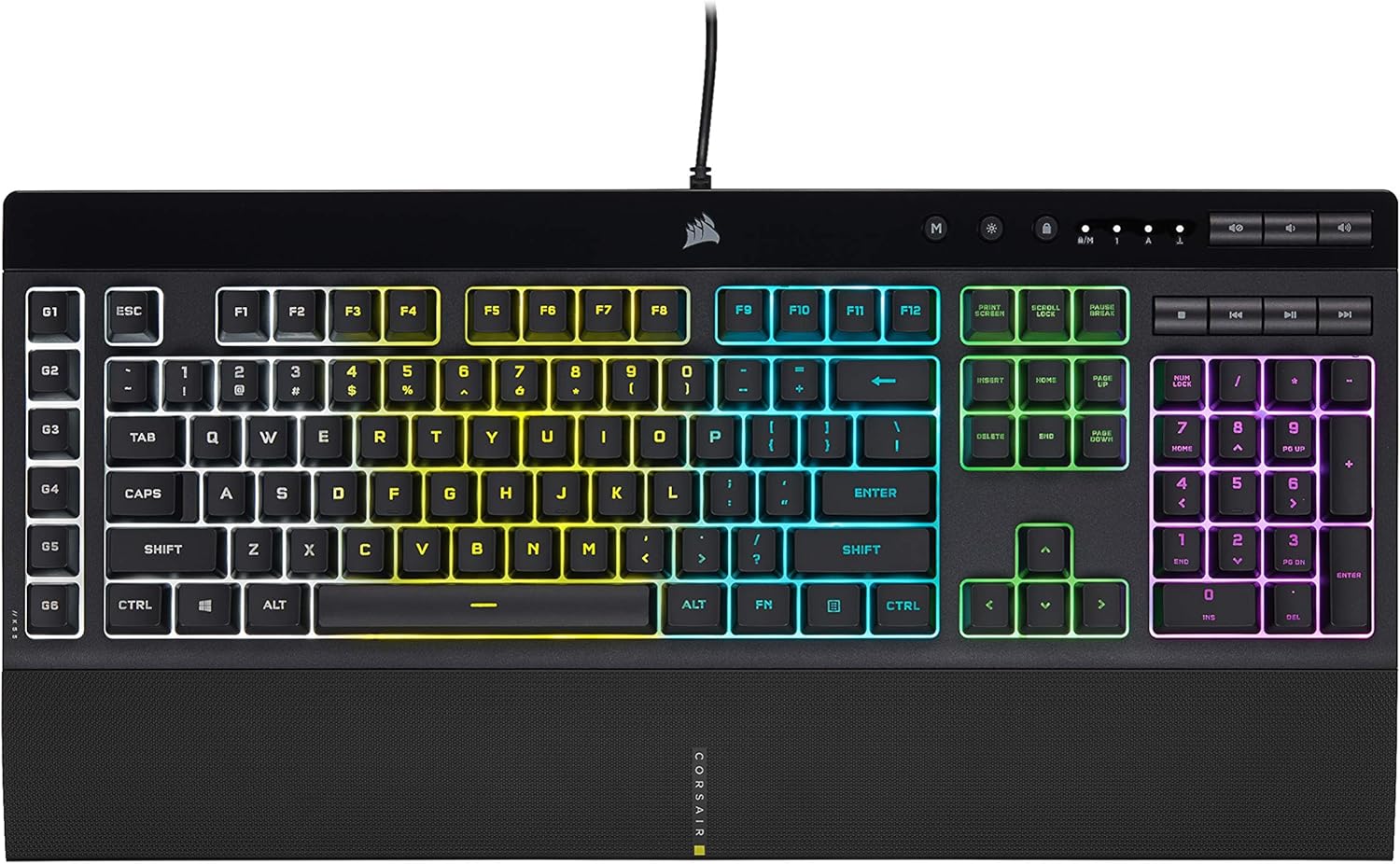
Pros
- IP42 dust and spill-resistant design protects against accidents that would disable other keyboards
- Six dedicated macro keys with iCUE and Elgato Stream Deck support for complex commands
- Five customizable RGB lighting zones with six onboard effects and custom programming
- Detachable rubber palm rest reduces hand fatigue during extended gaming or work sessions
- Anti-ghosting and selective key rollover ensure all inputs register during rapid simultaneous presses
Cons
- Membrane switches lack the tactile feedback and durability advantage of mechanical gaming keyboards
- Wired connection limits desk positioning to cable length, offering no wireless option for portable setups
- Single black colorway only, with no alternative finish or color options for aesthetic customization
Five independent RGB lighting zones deliver customizable ambient lighting across the keyboard layout. Six onboard lighting effects include dynamic, static, fade, and ripple modes that can cycle automatically or respond to system events. Assign a unique color to each zone or program fully custom effects through CORSAIR iCUE software for seamless synchronization with your entire gaming setup, peripherals, and system lighting.
Six dedicated macro keys provide one-stroke access to complex functions, shortcuts, and game-specific commands without cluttering your keyboard layout. Record macros directly on the keyboard with onboard memory or program advanced multi-step sequences through iCUE for unlimited customization. Stream Deck integration enables instant control of streaming commands, scene transitions, and media cues during broadcast or competitive gameplay sessions.
The macro system supports assignment through CORSAIR iCUE software with visual programming interface, making complex automation accessible without technical scripting knowledge.
IP42 certification guarantees the keyboard withstands accidental spills and dust accumulation that would normally interrupt gameplay or cause permanent hardware damage. This protection standard represents solid defense against moisture and particulates without requiring sealed watertight enclosures, balancing protection with normal keyboard functionality and feel. Plastic and rubber construction combined with this protective certification handles the rigors of active gaming environments, streaming setups, and intensive daily use.
A soft rubber detachable palm rest reduces wrist stress and hand fatigue during extended gaming or typing sessions lasting hours. The textured surface prevents hand slipping, maintaining consistent hand positioning for accurate control. Responsive keys support both competitive gaming requirements and daily typing work with comfortable actuation that does not require adjustment periods.
The entire construction prioritizes durability for heavy gaming use while maintaining light enough weight for easy repositioning on your desk.
Wired USB connection provides stable, lag-free performance across PC, Mac, and Xbox gaming platforms without wireless latency or interference concerns. The keyboard measures nineteen inches long, 6.58 inches wide, and 1.42 inches tall, fitting standard desktop layouts and gaming setups. Dedicated media keys and volume control sit within easy reach for quick adjustments during gameplay or streaming broadcasts.
CORSAIR iCUE software enables vivid RGB control across all zones, sophisticated macro programming with visual interface, and full-system lighting synchronization across compatible peripherals, coolers, and fans. Anti-ghosting technology ensures every keystroke registers accurately even during rapid, simultaneous key combinations essential for competitive multiplayer gaming where split-second inputs decide outcomes.
Compatible with standard QWERTY layouts and supports direct connection to Windows PC, Apple Mac, and Xbox platforms without additional adapters or configuration hassles.
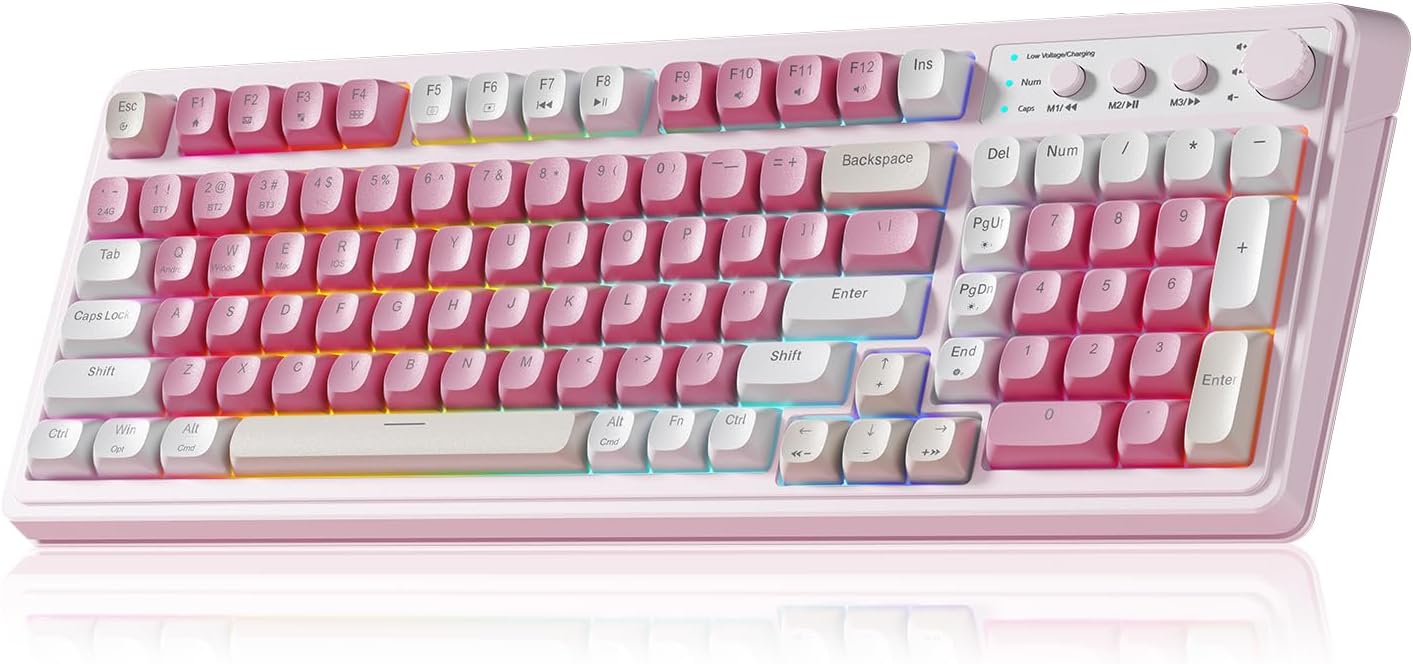
Pros
- Tri-mode connectivity switches between Bluetooth 5.0, 2.4GHz wireless and wired USB-C, covering different devices without repairing each time
- A dedicated knob adjusts volume, connection mode, and RGB brightness or speed without diving into software menus
- All keys support macro recording, letting complex action sequences be programmed onto a single keypress
- Three remappable M1/M2/M3 buttons allow key functions to be merged or reassigned directly on the keyboard
Cons
- Compact 99-key layout with a numpad omits a full-size layout's dedicated media keys and extra macro keys found on larger boards
- RGB lighting with 16.8 million colors and 16 presets draws more power than a single-color backlight, shortening wireless battery life between charges
- Switching between Windows, Mac, Android and iOS requires different FN key combinations to be remembered for each system
The keyboard measures 17.4 x 7.28 x 2 inches in a 99-key layout that includes a numpad in a more compact footprint than a full-size board. RGB backlighting spans 16.8 million colors across 16 preset lighting effects, with brightness and animation speed adjustable either through the dedicated knob or an FN-plus-key shortcut combination.
All keys support macro recording, so a sequence of actions can be programmed onto a single key press for use in fast-paced games — useful for combos or repeated command sequences that would otherwise need multiple individual key presses. The physical knob also handles volume control and connection-mode switching, keeping frequent adjustments off the software menu entirely.
Three connection modes are built in: Bluetooth 5.0, 2.4GHz wireless, and wired USB-C, letting the keyboard switch between a phone, a tablet and a desktop PC without needing to re-pair each device from scratch every time. The rotary knob doubles as the quick-access control for switching between these connection modes alongside its volume and lighting functions.
Setup for wireless use is a matter of selecting the mode and pairing once per device; the USB-C wired mode works immediately without pairing, useful as a fallback if the wireless connection drops mid-session or the internal battery runs low during use.
The keyboard lists compatibility with WinXP, Windows 7/8/10, Mac, Android and iOS, though each platform uses a different FN-key shortcut to activate compatibility mode — Windows uses FN+W, Mac uses FN+E, Android uses FN+Q and iOS uses FN+R — so switching between systems regularly means remembering which combination applies each time.
This suits anyone who splits typing and light gaming across multiple devices and wants one keyboard for all of them, particularly in a cream and pink aesthetic setup. It is a better fit for casual or productivity gaming than for competitive esports use, where a full-size board with dedicated macro keys is typically preferred over a compact 99-key layout.

Pros
- 12 dedicated macro keys (G1-G12) store custom commands without needing extra software running in the background
- Custom purple switches use 55g actuation force with 1.1mm pretravel for a fast, tactile response
- Aluminum top plate adds rigidity compared to an all-plastic keyboard chassis
- Built-in USB pass-through port lets a mouse or receiver connect directly through the keyboard
- Weighs 1.20 kg, on the heavier side for a full-size board, which helps keep it planted during fast typing or gaming
Cons
- Wired-only connection, with no Bluetooth or 2.4GHz wireless mode
- At 1.20 kg and 15.2 x 6.0 in, it is bulkier to pack for travel than lighter compact boards
- Custom purple switches are not hot-swappable, so switch replacement means resoldering rather than pulling and swapping
The K550 packs 104 keys plus 12 additional macro G keys into a full-size layout topped with an aluminum plate over an ABS base. The custom purple switches are tuned to a 55g actuation force with 1.1mm pretravel distance, aiming for a clearly tactile, clicky feel. The board measures roughly 15.2 x 6.0 in and weighs 1.20 kg, and connects over a wired USB connection only.
- 104-key layout plus 12 dedicated macro keys for shortcuts and combos
- Aluminum top plate adds structural rigidity over the keys
- Dedicated media controls and a volume scroll wheel sit along the top edge
Connection is wired only via USB, so there is no Bluetooth or 2.4GHz wireless mode for this model. A built-in USB pass-through port lets a mouse, dongle or flash drive plug directly into the keyboard rather than reaching back to the PC, useful for keeping desk cables organized.
- Wired connection removes input lag concerns tied to wireless keyboards
- USB pass-through adds a convenient extra port at the desk
- No wireless option means it is tethered to whichever PC or console port it is plugged into
An included wrist rest supports longer sessions by reducing strain on the wrists during extended typing or gaming. Onboard macro programming means the 12 G keys can be set up and used without any software running, though companion software unlocks deeper customization of lighting effects and macro behavior for anyone who wants to go further than the onboard defaults.
- Included wrist rest supports long gaming or typing sessions
- Onboard macro programming works without installing software first
- Companion software adds RGB and macro customization for users who want more control
Below, we compare 10 keyboards with macro keys built for different budgets, connection types, and workflows. Each one takes a different approach to macro assignment, so you can match your setup to the right pick instead of guessing from a spec sheet.
What to Look for in Keyboards with Macro Keys
Not every macro key is created equal, and the “best” choice depends on how you actually use your desk. Before comparing specific models, it helps to understand the factors that separate a genuinely useful macro keyboard from one you’ll ignore after a week. We tested these boards the way a real desk setup demands: hours of typing, gaming sessions, and streaming shifts, not just a quick unboxing. Check out our full roundup of the best keyboards if you want a broader view beyond macro-specific models.
How Many Macro Keys You Actually Need
Streamers and productivity users usually get by with four to six dedicated keys for scene switches, mute toggles, or app shortcuts. MMO and MOBA players often want ten or more, since ability rotations and inventory management eat up buttons fast. Buying more keys than you’ll program just adds clutter and cost, so match the count to your actual workflow. If you’re unsure, start smaller — most people never program more than half of the keys on a large macro board.
On-the-Fly Recording vs Dedicated Software
Some keyboards let you record a macro directly on the board with a key combo, no software install required. Others rely on companion apps like profile managers or stream-deck-style software for deeper customization, layered lighting, and cloud-saved profiles. If you switch between a work laptop and a home PC often, on-the-fly recording saves you from reinstalling software everywhere. The trade-off is that on-board recording usually caps out at simpler key sequences, while software-based profiles handle multi-step macros and conditional triggers.
Switch Type and Typing Feel
Mechanical switches (tactile, linear, or clicky) give consistent feedback and tend to last longer under heavy macro use. Membrane keyboards cost less and feel softer, which suits casual typing but wears faster under repetitive macro presses. Gasket-mount boards add a cushioned, quieter bottom-out that’s worth considering if your desk sits near a shared office or a sleeping roommate. If you also type for work, it’s worth browsing keyboards built for developers, since many share the same durable switches prized in macro-heavy boards.
Macro Keys Beyond Gaming
Macro keys aren’t just for raids and ranked matches. Editors use them to trigger cut, render, or export commands in DaVinci Resolve and Premiere. Spreadsheet-heavy jobs benefit from macros that paste formulas or jump between tabs instantly. Streamers lean on them to swap scenes, mute a mic, or trigger alerts without alt-tabbing away from a game. If your workday mixes typing, creative software, and the occasional gaming session, a macro board earns its desk space fast.
Best Keyboards with Macro Keys by Use Case
Rather than reviewing every spec sheet, here’s how to match each standout pick to the way you actually work or play.
Best Overall Pick for Gaming and Productivity
The Redragon K580 earns the top spot thanks to tactile blue switches, five macro keys, and a media wheel that handles volume without extra software. At 4.6 stars across more than 4,000 reviews, it’s proven reliable for both late-night raids and everyday typing. The keybinding buttons store combos on-board, so profiles travel with you between computers without reinstalling anything. It’s not the quietest board on this list, so open-office typists might want a dampened alternative instead.
Best Splurge Pick for Premium Feel
The Razer BlackWidow V4 X steps up with linear, silent switches and Chroma RGB for a smoother, quieter keystroke. Its six macro keys sit in a dedicated column, so you won’t mistype them mid-game. Doubleshot keycaps resist shine over years of daily use, which matters if you’re typing for hours between matches. The higher price mainly buys build quality and lighting polish rather than more macro functionality, so skip it if you’re on a tighter budget.
Best Wireless and Hot-Swappable Option
The RK Royal Kludge L75 connects over Bluetooth, 2.4GHz, or USB-C, and its hot-swappable sockets let you change switches without soldering. A large 8000mAh battery means fewer charging interruptions during long macro-heavy sessions. The gasket-mount design also softens every keystroke, which helps if you’re logging both work hours and gaming hours on the same board. If you want more wireless options beyond macro boards, our best Bluetooth keyboards guide covers additional picks.
Best Budget-Friendly Wireless Pick
The Redragon K517 Pro brings tri-mode wireless, four macro keys, and a number pad in one affordable package. Battery life reaches roughly 4000mAh, which covers several days of typical use between charges. It won’t match pricier boards on switch feel, but it covers the basics well for anyone testing whether macro keys fit their routine at all. Compare specs against pricier boards if you’re unsure whether you need the extra keys or premium switches elsewhere on this list.
Best for Streamers and Content Creators
The Corsair K55 RGB PRO XT integrates directly with Elgato Stream Deck software, turning its six macro keys into scene, audio, and overlay controls. Spill and dust resistance rated IP42 adds peace of mind next to a drink during long streams. Per-key RGB backlighting also helps you spot the right macro key at a glance during a fast-paced broadcast. It’s a membrane board rather than mechanical, so competitive typists may prefer a switch upgrade elsewhere on this list.
Best Dedicated Macro Pad Add-On
If your current keyboard already fits your hand, the VSDINSIDE Macro Keypad adds 18 programmable keys alongside it instead of replacing your whole setup. It works well next to a laptop or a compact 60% board that has no room for extra buttons. Customizable visual labels help you remember which key does what after a software update changes your layout. Streamers, editors, and OBS users get shortcut access without retraining muscle memory on a new full board.
Common Mistakes to Avoid When Buying a Macro Keyboard
Even experienced shoppers get tripped up by a few recurring issues in this category. Watch for these before you check out.
- Assuming every macro key works the same across Windows, Mac, and consoles — always confirm OS compatibility first, since some software tools are Windows-only.
- Ignoring anti-ghosting and key rollover specs, which matter if you’re chaining macros with regular keystrokes mid-match.
- Buying a 10-plus macro key board when you’ll only ever program three or four shortcuts, which wastes desk space and budget.
- Skipping wrist support on full-size boards, which adds up to real strain during long macro-heavy sessions.
- Forgetting to check whether wireless models include a USB dongle as backup if Bluetooth drops during an important match or stream.
- Overlooking software bloat — some macro managers run constantly in the background and can slow down an older PC.
Frequently Asked Questions
What are macro keys used for?
Macro keys trigger a saved sequence of commands with a single press, like a keybind combo, a text snippet, or a streaming scene change. Gamers use them for ability rotations, while streamers use them for scene and audio switching. Office users often program them for repetitive tasks like pasting boilerplate text or opening a set of apps.
Do macro keyboards need special software?
Some support on-the-fly recording with no software at all, while others need a companion app for deeper customization. Check the product listing for supported operating systems before you commit to one workflow. If you plan to use multiple computers, a board with on-board memory saves you from setting up software on every machine.
Are wireless macro keyboards good enough for gaming?
Modern tri-mode boards with 2.4GHz wireless offer response times close to wired connections for most players. Competitive esports players may still prefer wired for the lowest possible latency. For casual and mid-level competitive play, the difference is rarely noticeable in day-to-day matches.
Can I add macro keys to a keyboard that doesn’t have them?
Yes, a standalone macro pad like the one featured above adds programmable keys next to any existing keyboard. This works well if you like your current board’s typing feel but want extra shortcuts. It’s also a lower-cost way to try macros before committing to a full keyboard swap.
How much should I expect to spend on a good macro keyboard?
Solid membrane options start under $30, while full mechanical boards with wireless and hot-swap features run past $60. Compare specs and reviews at each price point rather than assuming a higher price always means better macro performance. Rating and review count, like the figures listed above, are often a better signal of real-world reliability than price alone.
Your ideal pick depends more on your workflow than on spec sheets alone. Match the macro count, connection type, and switch feel to how you actually use your desk, check the current price on Amazon for your shortlist, and you’ll land on a board you actually keep using.






