Priya Raghavan
 A cramped desk changes what you should shop for. When you’re hunting for the best keyboards for small desks, the goal isn’t just “smaller” — it’s the right layout, the right connection type, and enough room left over for a mouse mat and your coffee. Below, you’ll find how to judge compact layouts, which connection style fits your setup, and picks matched to real use cases like gaming, typing all day, or juggling multiple devices.
Quick answer: If you only read one paragraph, here it is: for most people, the best keyboards for small desks is the Logitech MX Keys Mini — our #1 rated choice thanks to its compact metal frame, quiet keys, and multi-device Bluetooth switching. See the full ranked comparison, layout breakdown, and buying advice below.

Pros
- Pairs with up to 3 devices over Bluetooth Low Energy and switches between them with a single keypress
- USB-C charging delivers up to 10 days of use per charge, or 5 months with backlighting switched off
- Compact 11.65 x 5.19 x 0.83 inch footprint leaves more desk room for a mouse than a full-size board
- Backlit keys sense hand approach and adjust automatically to ambient light
- Graphite finish uses 30% post-consumer recycled plastic in its housing
Cons
- Not compatible with the Logitech Unifying USB receiver, so Bluetooth is the only pairing method
- No numeric keypad, which touch typists doing heavy data entry will miss
- Weighs 506 g and has no carrying case included, so slipping it into a bag needs a separate sleeve
MX Keys Mini connects over Bluetooth Low Energy and can hold pairings with up to three separate devices at once, switching between them with a dedicated key rather than re-pairing each time. It works across Windows, macOS, iOS, iPadOS, Android, Chrome OS and Linux, though full software features like Dictation and custom key remapping need the Logitech Options app, which is only available for Windows and macOS.
- Bluetooth Low Energy, no USB dongle required
- Up to 3 paired devices with one-key switching
- Broad OS support: Windows, macOS, iOS, iPadOS, Android, Chrome OS, Linux
Limitation: this keyboard does not support Logitech's Unifying USB receiver, so anyone relying on that dongle for other Logitech peripherals will need a second pairing method for this board specifically.
A built-in rechargeable battery charges over USB-C and runs up to 10 days per charge with the backlight active, stretching to roughly 5 months when the backlighting is switched off. Keys light up automatically as hands approach and dim again after a few seconds of inactivity, so the backlight does not need to be manually toggled through a normal workday.
- USB-C charging port
- Up to 10 days per charge with backlighting on
- Up to 5 months per charge with backlighting off
Note: actual runtime depends on how often the backlight triggers and how heavily the keyboard is typed on, so dim rooms that keep the backlight active constantly will see shorter figures than the maximum.
At 11.65 x 5.19 x 0.83 inches and 17.86 oz (506.4 g), MX Keys Mini is built for desks where a full-size board would crowd a mouse mat. The compact layout drops the number pad and navigation cluster found on larger keyboards, which shifts the mouse closer to the keyboard for a more neutral shoulder position during long sessions.
- 11.65"L x 5.19"W x 0.83"H footprint
- 17.86 oz (506.4 g) weight
- Metal top plate over the key well for added rigidity
Trade-off: the smaller frame means no dedicated numeric keypad, so anyone doing frequent spreadsheet entry may prefer a full-size layout or a separate numeric pad.

Pros
- A plug-and-play USB connection with Low-profile keys give you a quiet,
- Simple Wired USB Connection,You will enjoy a comfortable and quiet
- The keyboard for business and office working is the -friendly keyboard
- Low profile keys for a more comfortable and quiet keystroke,
- Physical dimensions measure 13.98"L x 4.42"W x 0.65"H for spatial planning
Cons
- Requires verifying desktop clearance for 13.98"L x 4.42"W x 0.65"H dimensions
- Periodic cleaning recommended to maintain the Plastic finish
- Initial setup requires checking operating instructions carefully
The Rii RK907 Ultra-Slim Compact USB Wired Keyboard for Mac offers reliable functional utility tailored for modern home and workplace environments. Designed to enhance daily productivity, this unit integrates A plug-and-play USB connection with Low-profile keys give you a quiet, alongside Simple Wired USB Connection,You will enjoy a comfortable and quiet. Users will find the intuitive design straightforward to operate across various room configurations and daily routines. The versatile construction adapts easily to personal workspaces, providing consistent practical value and streamlined usability. Physical dimensions measuring 13.98"L x 4.42"W x 0.65"H allow for straightforward spatial planning prior to final placement.
Built using resilient structural components, this unit features a sturdy outer housing engineered to resist operational wear. Precision manufacturing ensures that all joints and surface connections remain firmly aligned during regular daily activity. The keyboard for business and office working is the -friendly keyboard reinforces overall physical stability over extended service periods. Premium Plastic construction maintains structural integrity and cosmetic appearance under routine handling. Structural integrity remains firm throughout regular usage, giving owners peace of mind. Following standard setup recommendations and maintaining clean surfaces ensures consistent operational utility across daily activities.
Initial setup requires placing the unit on a flat, stable surface with adequate clearance around all sides for proper operation. Ensure all power or connection cables are routed neatly without sharp bends to prevent wire strain. Regular care involves wiping exterior housing surfaces with a soft cloth to remove dust buildup. Inspecting mechanical connections periodically preserves operational efficiency and maintains cosmetic appearance over time. Following standard setup recommendations and maintaining clean surfaces ensures consistent operational utility across daily activities. This functional equipment provides steady performance and practical convenience when properly integrated into your workspace.
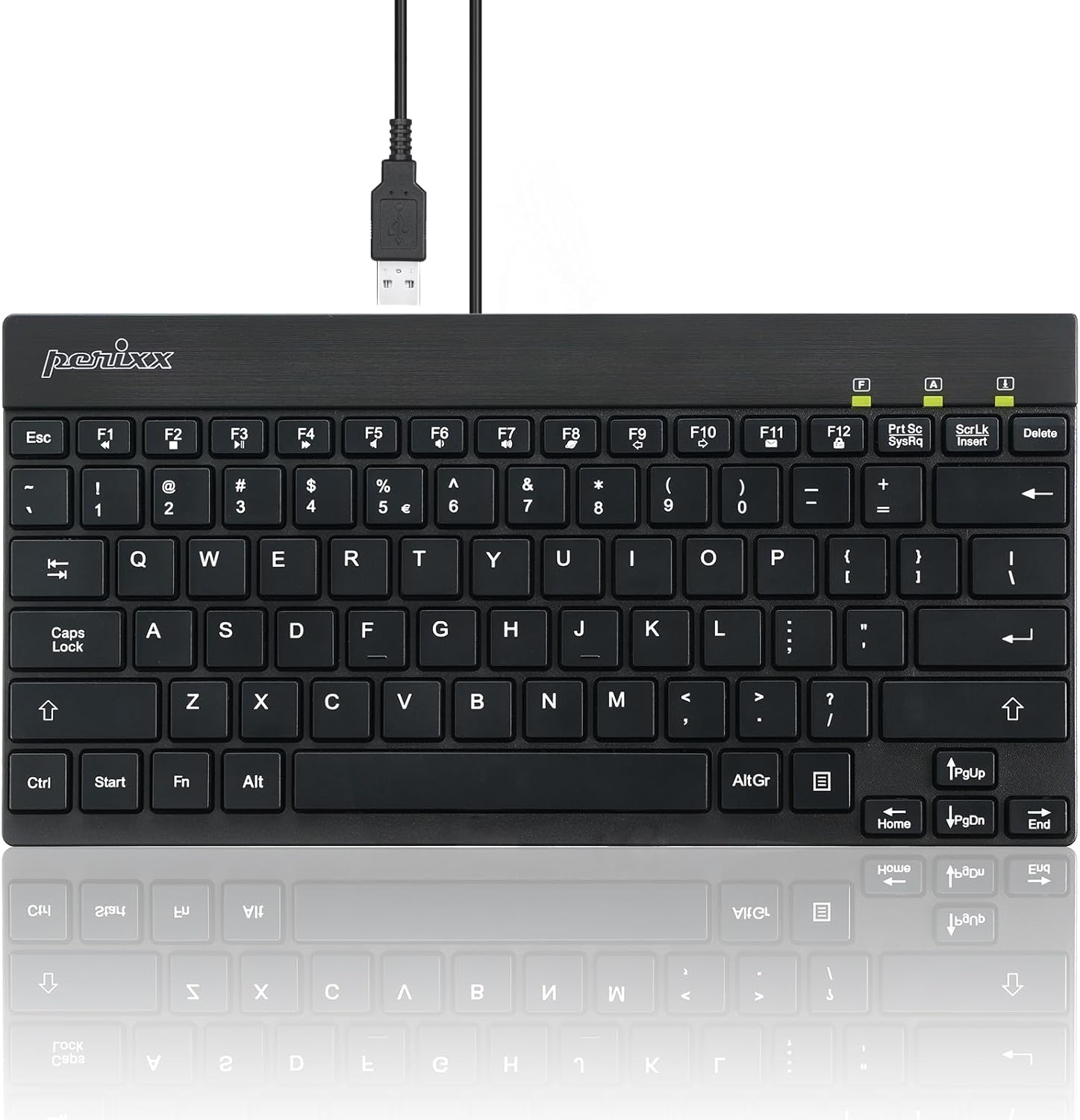
Pros
- COMPACT SIZE Slim and lightweight keyboard that saves desk space
- (Dimension 10.87 x 5.43 x 0.55 inches
- Weight 0.84 lb
- Cable is about 4 9 feet (1.5 m))
- LOW PROFILE DESIGN The keys are low profile with short travel distance
Cons
- Requires verifying desktop clearance for 10.87"L x 5.43"W x 0.55"H dimensions
- Periodic cleaning recommended to maintain the Acrylonitrile Butadiene Styrene finish
- Initial setup requires checking operating instructions carefully
The Perixx PERIBOARD-426 Wired Mini Low Profile Keyboard US offers reliable functional utility tailored for modern home and workplace environments. Designed to enhance daily productivity, this unit integrates COMPACT SIZE Slim and lightweight keyboard that saves desk space alongside (Dimension 10.87 x 5.43 x 0.55 inches. Users will find the intuitive design straightforward to operate across various room configurations and daily routines. The versatile construction adapts easily to personal workspaces, providing consistent practical value and streamlined usability. Physical dimensions measuring 10.87"L x 5.43"W x 0.55"H allow for straightforward spatial planning prior to final placement.
Built using resilient structural components, this unit features a sturdy outer housing engineered to resist operational wear. Precision manufacturing ensures that all joints and surface connections remain firmly aligned during regular daily activity. Weight 0.84 lb reinforces overall physical stability over extended service periods. Premium Acrylonitrile Butadiene Styrene construction maintains structural integrity and cosmetic appearance under routine handling. Structural integrity remains firm throughout regular usage, giving owners peace of mind. Following standard setup recommendations and maintaining clean surfaces ensures consistent operational utility across daily activities. This functional equipment provides steady performance and practical convenience when properly integrated into your workspace.
Initial setup requires placing the unit on a flat, stable surface with adequate clearance around all sides for proper operation. Ensure all power or connection cables are routed neatly without sharp bends to prevent wire strain. Regular care involves wiping exterior housing surfaces with a soft cloth to remove dust buildup. Inspecting mechanical connections periodically preserves operational efficiency and maintains cosmetic appearance over time. Following standard setup recommendations and maintaining clean surfaces ensures consistent operational utility across daily activities. This functional equipment provides steady performance and practical convenience when properly integrated into your workspace.

Pros
- Ultra-Slim Travel-Friendly Designed for professionals, students, and
- Smooth, Quiet Comfortable Typing The responsive scissor-switch keys are
- Stable 2.4GHz Wireless Connection Enjoy reliable plug-and-play
- Energy-Saving Long-Lasting Performance The wireless keyboard and mouse
- 12 Convenient Multimedia Hotkeys Access volume control, music playback,
Cons
- Requires checking placement surface dimensions before setup
- Requires routine care to keep exterior housing dust-free
- Initial setup requires checking operating instructions carefully
The TECKNET Wireless Keyboard and Mouse Combo 2.4G Mini offers reliable functional utility tailored for modern home and workplace environments. Designed to enhance daily productivity, this unit integrates Ultra-Slim Travel-Friendly Designed for professionals, students, and alongside Smooth, Quiet Comfortable Typing The responsive scissor-switch keys are. Users will find the intuitive design straightforward to operate across various room configurations and daily routines. The versatile construction adapts easily to personal workspaces, providing consistent practical value and streamlined usability. Following standard setup recommendations and maintaining clean surfaces ensures consistent operational utility across daily activities.
Built using resilient structural components, this unit features a sturdy outer housing engineered to resist operational wear. Precision manufacturing ensures that all joints and surface connections remain firmly aligned during regular daily activity. Stable 2.4GHz Wireless Connection Enjoy reliable plug-and-play reinforces overall physical stability over extended service periods. Structural integrity remains firm throughout regular usage, giving owners peace of mind. Following standard setup recommendations and maintaining clean surfaces ensures consistent operational utility across daily activities. This functional equipment provides steady performance and practical convenience when properly integrated into your workspace.
Initial setup requires placing the unit on a flat, stable surface with adequate clearance around all sides for proper operation. Ensure all power or connection cables are routed neatly without sharp bends to prevent wire strain. Regular care involves wiping exterior housing surfaces with a soft cloth to remove dust buildup. Inspecting mechanical connections periodically preserves operational efficiency and maintains cosmetic appearance over time. Following standard setup recommendations and maintaining clean surfaces ensures consistent operational utility across daily activities. This functional equipment provides steady performance and practical convenience when properly integrated into your workspace.

Pros
- Easy Setup Simply insert the nano USB receiver into your computer and
- Ergonomic design Stainless steel material gives heavy duty feeling,
- 6-Month Battery Life Rechargeable lithium battery with an industry-high
- Ultra Thin and Light Compact size (11.1 X 5.3 X 0.16in) and light
- Package contents Stainless 2.4G Wireless Keyboard, nano USB
Cons
- Requires verifying desktop clearance for 11.02"L x 5.31"W x 0.17"H dimensions
- Periodic cleaning recommended to maintain the Stainless Steel finish
- Initial setup requires checking operating instructions carefully
The Arteck 2.4G Wireless Keyboard Stainless Steel Ultra Slim offers reliable functional utility tailored for modern home and workplace environments. Designed to enhance daily productivity, this unit integrates Easy Setup Simply insert the nano USB receiver into your computer and alongside Ergonomic design Stainless steel material gives heavy duty feeling,. Users will find the intuitive design straightforward to operate across various room configurations and daily routines. The versatile construction adapts easily to personal workspaces, providing consistent practical value and streamlined usability. Physical dimensions measuring 11.02"L x 5.31"W x 0.17"H allow for straightforward spatial planning prior to final placement.
Built using resilient structural components, this unit features a sturdy outer housing engineered to resist operational wear. Precision manufacturing ensures that all joints and surface connections remain firmly aligned during regular daily activity. 6-Month Battery Life Rechargeable lithium battery with an industry-high reinforces overall physical stability over extended service periods. Premium Stainless Steel construction maintains structural integrity and cosmetic appearance under routine handling. Structural integrity remains firm throughout regular usage, giving owners peace of mind. Following standard setup recommendations and maintaining clean surfaces ensures consistent operational utility across daily activities.
Initial setup requires placing the unit on a flat, stable surface with adequate clearance around all sides for proper operation. Ensure all power or connection cables are routed neatly without sharp bends to prevent wire strain. Regular care involves wiping exterior housing surfaces with a soft cloth to remove dust buildup. Inspecting mechanical connections periodically preserves operational efficiency and maintains cosmetic appearance over time. Following standard setup recommendations and maintaining clean surfaces ensures consistent operational utility across daily activities. This functional equipment provides steady performance and practical convenience when properly integrated into your workspace.

Pros
- Classic 60% Compact Design This 60% gaming keyboard has a small size
- Ergonomic Design and Mechanical Feel The mini gaming keyboard key
- Cool RGB Backlit Effect The 60% rgb keyboard include 6 backlight
- Simple Elegant Personality For some small keyboard, if you are tired of
- After-sales service We maintain continuous improvement of product
Cons
- Requires verifying desktop clearance for 11.5"L x 4"W x 1.6"H dimensions
- Requires routine care to keep exterior housing dust-free
- Initial setup requires checking operating instructions carefully
The Snpurdiri 60 Wired Gaming Keyboard 61 Keys RGB Backlit offers reliable functional utility tailored for modern home and workplace environments. Designed to enhance daily productivity, this unit integrates Classic 60% Compact Design This 60% gaming keyboard has a small size alongside Ergonomic Design and Mechanical Feel The mini gaming keyboard key. Users will find the intuitive design straightforward to operate across various room configurations and daily routines. The versatile construction adapts easily to personal workspaces, providing consistent practical value and streamlined usability. Physical dimensions measuring 11.5"L x 4"W x 1.6"H allow for straightforward spatial planning prior to final placement.
Built using resilient structural components, this unit features a sturdy outer housing engineered to resist operational wear. Precision manufacturing ensures that all joints and surface connections remain firmly aligned during regular daily activity. Cool RGB Backlit Effect The 60% rgb keyboard include 6 backlight reinforces overall physical stability over extended service periods. Structural integrity remains firm throughout regular usage, giving owners peace of mind. Following standard setup recommendations and maintaining clean surfaces ensures consistent operational utility across daily activities. This functional equipment provides steady performance and practical convenience when properly integrated into your workspace.
Initial setup requires placing the unit on a flat, stable surface with adequate clearance around all sides for proper operation. Ensure all power or connection cables are routed neatly without sharp bends to prevent wire strain. Regular care involves wiping exterior housing surfaces with a soft cloth to remove dust buildup. Inspecting mechanical connections periodically preserves operational efficiency and maintains cosmetic appearance over time. Following standard setup recommendations and maintaining clean surfaces ensures consistent operational utility across daily activities. This functional equipment provides steady performance and practical convenience when properly integrated into your workspace.

Pros
- Easy Setup Simply insert the nano USB receiver into your computer and
- Ergonomic design Stainless steel material gives heavy duty feeling,
- 6-Month Battery Life Rechargeable lithium battery with an industry-high
- Ultra Thin and Light Compact size (14.5 X 4.9 X 0.16in) and light
- Package contents Stainless 2.4G Wireless Keyboard, nano USB
Cons
- Requires verifying desktop clearance for 14.5"L x 4.9"W x 0.16"H dimensions
- Requires routine care to keep exterior housing dust-free
- Initial setup requires checking operating instructions carefully
The Arteck USB Wireless Keyboard Stainless Steel Ultra Slim offers reliable functional utility tailored for modern home and workplace environments. Designed to enhance daily productivity, this unit integrates Easy Setup Simply insert the nano USB receiver into your computer and alongside Ergonomic design Stainless steel material gives heavy duty feeling,. Users will find the intuitive design straightforward to operate across various room configurations and daily routines. The versatile construction adapts easily to personal workspaces, providing consistent practical value and streamlined usability. Physical dimensions measuring 14.5"L x 4.9"W x 0.16"H allow for straightforward spatial planning prior to final placement.
Built using resilient structural components, this unit features a sturdy outer housing engineered to resist operational wear. Precision manufacturing ensures that all joints and surface connections remain firmly aligned during regular daily activity. 6-Month Battery Life Rechargeable lithium battery with an industry-high reinforces overall physical stability over extended service periods. Structural integrity remains firm throughout regular usage, giving owners peace of mind. Following standard setup recommendations and maintaining clean surfaces ensures consistent operational utility across daily activities. This functional equipment provides steady performance and practical convenience when properly integrated into your workspace.
Initial setup requires placing the unit on a flat, stable surface with adequate clearance around all sides for proper operation. Ensure all power or connection cables are routed neatly without sharp bends to prevent wire strain. Regular care involves wiping exterior housing surfaces with a soft cloth to remove dust buildup. Inspecting mechanical connections periodically preserves operational efficiency and maintains cosmetic appearance over time. Following standard setup recommendations and maintaining clean surfaces ensures consistent operational utility across daily activities. This functional equipment provides steady performance and practical convenience when properly integrated into your workspace.

Pros
- Compact 11.22 x 4.72 inch footprint and 10.4 oz weight make it easy to pack for travel or a coffee shop workspace
- Scissor-switch chocolate keycaps cut typing noise, useful for shared offices or late-night typing near others
- Rated for up to 12 months of battery life based on 2 hours of daily use
- Plug-and-play USB receiver works across Windows, Mac, Chrome OS, Linux and smart TVs without separate driver installs
- Backed by a 36-month warranty when registered
Cons
- 2 AAA batteries are required but not included in the box
- 2.4GHz USB receiver connection only, with no Bluetooth pairing option for devices without a USB port
- Wireless range tops out around 32.8 ft, shorter than some Bluetooth keyboards rated for longer distances
This keyboard measures about 11.22"L x 4.72"W x 0.83"H and weighs 10.4 ounces, built around a low-profile chocolate keycap design that reduces key travel for quieter, smoother typing. The scissor-switch mechanism is aimed at cutting noise by a large margin versus standard keyboards.
- Dimensions: 11.22" x 4.72" x 0.83"
- Weight: 10.4 oz
- Key design: chocolate keycaps, scissor-switch mechanism
- Reduced key travel for a quieter, more comfortable feel
The compact size and light weight make it easy to slide into a bag alongside a laptop for travel or moving between rooms at home.
The keyboard connects through a 2.4GHz USB receiver stored on the underside of the keyboard, offering plug-and-play setup with Windows, Mac, Chrome OS and Linux computers as well as compatible smart TVs. Wireless range extends up to 32.8 feet.
- Connection: 2.4GHz USB receiver, plug-and-play
- Compatible with Windows, Mac, Chrome OS, Linux, smart TVs
- Wireless range: up to 32.8 ft
- Receiver stores neatly on the back of the keyboard when not in use
Because the connection relies on the included USB receiver rather than Bluetooth, a free USB port is needed on whichever device the keyboard pairs with.
Powered by 2 AAA batteries (not included), this keyboard is rated for up to 12 months of use based on roughly 2 hours of daily typing, thanks to an intelligent power-saving sleep mode that activates during idle periods.
- Battery type: 2 AAA batteries, not included
- Estimated battery life: up to 12 months at 2 hours/day
- Smart sleep mode conserves power when idle
- Physical on/off switch for full power control
Pressing any key wakes the keyboard from sleep mode almost instantly, so the power-saving feature does not add a noticeable delay when returning to typing.

Pros
- 65% Compact Design Wired gaming keyboard compact mini design,
- Wired Connection Gaming Keybaord connects via a detachable Type-C cable
- Strong Working Life Wired gaming keyboard has more than 10,000,000
- LED Backlit Keyboard Wired Gaming Keyboard using the new
- Ergonomics Mechanical Feel Keyboard The ergonomically designed keycap
Cons
- Requires checking placement surface dimensions before setup
- Periodic cleaning recommended to maintain the Plastic finish
- Initial setup requires checking operating instructions carefully
The GEODMAER 65 Gaming Keyboard Wired Backlit Mini Keyboard offers reliable functional utility tailored for modern home and workplace environments. Designed to enhance daily productivity, this unit integrates 65% Compact Design GEODMAER Wired gaming keyboard compact mini design, alongside Wired Connection Gaming Keybaord connects via a detachable Type-C cable. Users will find the intuitive design straightforward to operate across various room configurations and daily routines. The versatile construction adapts easily to personal workspaces, providing consistent practical value and streamlined usability. Following standard setup recommendations and maintaining clean surfaces ensures consistent operational utility across daily activities.
Built using resilient structural components, this unit features a sturdy outer housing engineered to resist operational wear. Precision manufacturing ensures that all joints and surface connections remain firmly aligned during regular daily activity. Strong Working Life Wired gaming keyboard has more than 10,000,000 reinforces overall physical stability over extended service periods. Premium Plastic construction maintains structural integrity and cosmetic appearance under routine handling. Structural integrity remains firm throughout regular usage, giving owners peace of mind. Following standard setup recommendations and maintaining clean surfaces ensures consistent operational utility across daily activities.
Initial setup requires placing the unit on a flat, stable surface with adequate clearance around all sides for proper operation. Ensure all power or connection cables are routed neatly without sharp bends to prevent wire strain. Regular care involves wiping exterior housing surfaces with a soft cloth to remove dust buildup. Inspecting mechanical connections periodically preserves operational efficiency and maintains cosmetic appearance over time. Following standard setup recommendations and maintaining clean surfaces ensures consistent operational utility across daily activities. This functional equipment provides steady performance and practical convenience when properly integrated into your workspace.

Pros
- Scissor-switch keys are tuned for quiet operation, useful in shared offices or late-night typing
- Full number pad fits within a compact 14.45\" x 4.76\" footprint, saving desk space over a full-size board
- 13 hotkeys (via Fn+F1-F12) handle media, email, browser, and favourites shortcuts without extra software
- 1500mm (about 4'9\") USB cable gives reach to a tower placed off to the side of a desk
- Fn key function can be locked with Fn+ESC, so hotkeys stay accessible without holding Fn each time
Cons
- Wired-only USB connection, no Bluetooth or wireless option for a cleaner desk
- Weighs just 0.75 lb, light enough that it can shift slightly during fast typing without a grippy mat underneath
- Listed compatibility covers Windows 7 through 10/11 specifically, with no Mac-specific driver support mentioned
At 14.45" x 4.76" x 0.71", this keyboard keeps a full number pad within a slim, chiclet-style layout, with wider spacing between keys built in to cut down on mistyping. Quiet scissor-switch keys give a stable press without the loud click of mechanical switches, useful in offices or bedrooms where noise matters.
- Low-profile 0.71" height keeps wrists at a more natural angle than tall mechanical boards
- Weighs about 0.75 lb, light enough to move around a desk easily
- Compact number pad keeps full numeric input without the width of a full-size keyboard
Well suited to anyone typing near others who wants a quieter alternative to a mechanical keyboard.
Thirteen hotkeys are built into the F1-F12 row, activated by holding Fn to control media playback, volume, email, browser, and favourites shortcuts without installing separate software. Pressing Fn+ESC locks the Fn function on, so hotkeys stay active without holding the key down each time.
- Hotkey functions cover common daily tasks like adjusting volume or opening a browser
- No companion software or app is required to use the hotkey row
- Fn lock toggle offers a shortcut for anyone using media keys frequently throughout the day
Straightforward for anyone wanting quick media and browser access without learning custom key combinations.
This keyboard connects via a wired USB connection with a 1500mm (about 4'9") cable, plenty of reach for most desk setups without an extension. There's no Bluetooth or wireless receiver option, so it's built for direct plug-and-play use rather than a clutter-free wireless desk.
- Listed system compatibility covers Windows 7, 8, 10, and 11
- Plug-and-play setup needs no driver installation on supported Windows versions
- Wired-only connection avoids battery or pairing concerns that come with wireless keyboards
A dependable choice for a stationary desktop setup where a permanent USB connection isn't an issue.
What to Look for in a Compact Keyboard
Small-desk keyboards trade the numpad and extra spacing for a tighter footprint, but not every “compact” board is built the same. A few criteria decide whether it actually earns its spot on your desk.
- Footprint: Measure the free space you have left after your monitor stand and mouse mat. Even two inches matters when your desk is 30 inches wide.
- Connection type: Wireless (Bluetooth or 2.4GHz dongle) frees up desk space by removing a bulky cable, while wired keyboards skip charging entirely.
- Key travel and noise: Shared offices or apartments benefit from quieter switches, since scissor-switch and low-profile keys are usually less clacky than mechanical ones.
- Build quality: Metal-top plates resist flex better than all-plastic housings, which matters if the board gets shuffled around a small surface often.
- Multi-device support: If you switch between a laptop, tablet, and desktop, look for Bluetooth pairing across multiple channels instead of a single USB receiver.
Layout Types: Full-Size, Tenkeyless, 60%, and Mini
Layout is the single biggest factor in how much desk real estate a keyboard needs. Understanding the differences helps you avoid buying something that still feels cramped.
Tenkeyless (TKL) and 80% Boards
TKL keyboards drop the numeric keypad but keep arrow keys and function rows intact. They’re a solid middle ground if you want a smaller footprint without relearning key positions.
60% and 65% Gaming Keyboards
These strip away the function row, navigation cluster, or both, relying on key combinations for less-used commands. Gamers like the Snpurdiri 60% Gaming Keyboard for this reason — more room for mouse swipes on a small desk mat.
Ultra-Slim and Mini Wireless Keyboards
Mini wireless boards, like compact scissor-switch models, prioritize a low profile and light weight over dedicated media keys. They’re the easiest to slide into a desk drawer at the end of the day.
Wired vs. Wireless: Which Fits a Small Desk Better
Once you’ve settled on a layout, connection type is the next decision, and it affects your desk more than most people expect. A wired keyboard means one less thing to charge, but that cable has to go somewhere — usually snaking across the exact spot where you’d rest a mouse mat.
Wireless boards using Bluetooth or a small 2.4GHz dongle clear that clutter instantly, which matters more on a small surface where every inch counts. The tradeoff is battery management: a keyboard that dies mid-task is more annoying than a cable ever was. Look for rechargeable batteries over disposable ones, and check the rated battery life before buying — models that last weeks or months per charge remove most of the hassle.
If you’re prone to forgetting to charge devices, a wired option like the Perixx PERIBOARD-426 low-profile board sidesteps the issue completely. There’s no wrong answer here, just a tradeoff between cable clutter and charging discipline.
Best Keyboards for Small Desks by Use Case
Instead of ranking these purely by spec sheet, match a keyboard to how you actually use your desk. Here’s where each option earns its keep.
Best Overall for a Minimalist Office Setup
The Logitech MX Keys Mini pairs a compact 4.5-star, 4,190-review track record with a metal build and backlit keys. It’s built for people who want one keyboard that pairs cleanly across a laptop, tablet, and desktop without extra cables eating up desk space.
Best Budget Pick Under $15
If cost matters more than wireless convenience, the Rii RK907 covers the basics for under $10 with a slim wired design. It won’t wow anyone, but it does the job for a secondary desk or a guest workstation without stretching your budget.
Best for Multi-Monitor and Multi-Device Desks
The TECKNET Wireless Combo bundles a keyboard and mouse in one 2.4GHz receiver, which is handy if your small desk already has limited USB ports free. Adjustable DPI on the mouse is a nice bonus for anyone toggling between multiple monitors.
Best for Gaming on a Small Desk
Compact gaming boards like the GEODMAER 65% Gaming Keyboard give you backlighting and anti-ghosting without the bulk of a full mechanical layout. It suits players who need every inch of desk space for mouse movement during fast-paced games.
Best for a Clean Wireless Look
The Arteck Stainless Steel Keyboard uses a slim aluminum shell and a built-in rechargeable battery, so there’s no cable and no battery compartment bulge. It’s a good match if you want a tidy desk photo-ready setup.
Best With a Numeric Keypad Included
Not everyone can give up the numpad. The Perixx PERIBOARD-213U keeps a compact number pad in a wired, scissor-switch design that’s noticeably quieter than most budget boards — a smart call if you crunch spreadsheets next to a sleeping roommate.
How Keyboard Choice Affects Your Whole Desk Setup
A keyboard is only one piece of a small workspace. If your current desk itself feels tight no matter what keyboard you choose, it might be worth looking at furniture built specifically for compact rooms. Our guide to the best office desks covers models designed with cable management and shallow depths in mind, which pairs naturally with a mini keyboard setup.
Gamers dealing with the same space crunch have similar options. If a 60% or 65% board is your pick, check out our roundup of the best gaming desks for frames that leave more room for mouse swipes and monitor arms. And if your whole room is on the smaller side, our list of the best small PC gaming desks digs into footprint-first picks that complement a compact keyboard nicely.
Common Mistakes When Buying a Compact Keyboard
A few recurring mistakes trip people up when downsizing to a smaller keyboard. Avoid these before you check out.
- Ignoring key spacing: Some ultra-compact boards shrink the arrow keys or shift punctuation, which slows down touch typists. Read the layout photos closely, not just the size.
- Skipping battery life specs: Wireless convenience disappears fast if you’re recharging every three days. Look for boards rated for weeks or months per charge.
- Assuming smaller always means cheaper: Premium compact boards with metal frames and multi-device pairing often cost more than a full-size board, not less.
- Forgetting OS compatibility: If you split time between Mac and Windows, confirm the board supports both layouts instead of relying on printed Windows-only keycaps.
- Overlooking noise level: Mechanical switches sound great in reviews but can be genuinely disruptive in a shared apartment or open office.
Who Should Skip a Compact Keyboard
Compact boards aren’t right for everyone. If you rely heavily on a numpad for data entry or accounting work, a tenkeyless or mini layout will slow you down daily — stick with a full-size or numpad-included option like the Perixx PERIBOARD-213U instead. Similarly, if you have larger hands or prefer generous spacing between keys, some of the smallest 60% boards can feel cramped during long typing sessions. Try one in person when possible, or check the return policy before committing.
Ergonomics Tips for a Tight Desk Setup
Downsizing your keyboard shouldn’t mean downsizing comfort. Wrist strain often creeps in on small desks because there’s no room left for a proper wrist rest once the keyboard, mouse, and monitor stand are all squeezed together.
A low-profile board like a scissor-switch or chiclet-style keyboard sits closer to desk height, which reduces the upward wrist angle that causes fatigue during long sessions. Pair it with negative-tilt legs (angled slightly away from you) rather than the positive tilt most keyboards ship with by default — it keeps your wrists straighter and is easier on tendons over an eight-hour workday.
If you notice tingling or soreness after typing, don’t just push through it. Try lowering your chair slightly so your elbows sit at roughly 90 degrees, or add a slim gel wrist rest sized to match your compact board’s width.
Frequently Asked Questions
What size keyboard is best for a small desk?
A tenkeyless (TKL) or 60% layout usually works best, since both drop the numeric keypad and free up several inches of desk depth. Choose TKL if you still want arrow keys and function keys readily available.
Are wireless keyboards better for small desks?
Generally yes, since removing the cable reduces clutter and makes it easier to slide the keyboard back when you need extra space. Just confirm the battery life meets your daily use before switching.
Do compact keyboards work for gaming?
Yes — 60% and 65% gaming keyboards are popular specifically because they free up room for wide mouse swipes, which matters for shooters and fast-paced titles. You’ll lose some dedicated media keys, but most gamers don’t miss them.
Will I lose functionality with a smaller keyboard?
You’ll lose the numpad and sometimes the function row, but most missing keys are accessible through a function-key combination. It takes a short adjustment period, not a permanent workflow change.
How much desk space does a mini keyboard actually save?
Switching from a full-size to a 60% layout typically saves four to six inches of width, which is often enough room to fit a full mouse mat or a small desk organizer alongside it.