
 Priya Raghavan
 Typing lag, mushy switches, and boards that fall apart after a year of daily use are common complaints from gamers and heavy typists alike. If you’re hunting for the best high performance keyboards, you want fast actuation, sturdy frames, and switches built to survive thousands of keystrokes a day without wobble or chatter. This guide breaks down what actually separates a high performance board from a basic office keyboard, then walks you through picks suited to different budgets, layouts, and play styles. You’ll also find the trade-offs worth knowing before you spend your money.
Quick answer: If you only have a minute, our top pick among the best high performance keyboards for 2026 is the GravaStar Mercury K1 — the #1 rated choice in this guide, thanks to its gasket-mounted frame, hot-swappable switches, and near-perfect review score. See the full ranked comparison, alternatives, and buying advice below.

Pros
- Hot-swappable switch sockets let you change GravaStar x Kailh linear switches without soldering
- Gasket-mounted plate with 5 layers of sound-dampening foam softens keystroke feel and cuts hollow case noise
- Tri-mode connectivity covers wired USB-C, Bluetooth 5.0, and 2.4GHz wireless, switchable between multiple paired devices
- Dual independent RGB systems offer 16.8 million colors across 13 backlight modes
- Aluminum alloy exoskeleton frame adds structural rigidity over an all-plastic case
Cons
- 75% layout drops the numpad and some navigation keys, which spreadsheet-heavy users may miss
- Aluminum alloy frame adds weight over a plastic-bodied keyboard, making it less ideal for frequent travel
- Hot-swap sockets support specific switch pin types, so not every third-party switch on the market will drop in cleanly
The K1 ships with GravaStar x Kailh linear switches rated for 40gf actuation force, 1.5mm pre-travel, and 3.5mm total travel — a light, fast profile aimed at both gaming response and comfortable typing. A gasket-mounted plate combined with a flexible polycarbonate layer and 5 layers of sound-dampening foam absorbs impact vibration for a softer, quieter keystroke.
- 40gf actuation force, 3.5mm total travel
- Gasket mount with polycarbonate flex plate
- 5 layers of internal sound-dampening foam
Because the switches are hot-swappable, the stock linear feel can be swapped for tactile or clicky switches later without any soldering, as long as the replacement matches the socket's pin layout.
Three connection modes are built in: wired USB-C, Bluetooth 5.0, and a 2.4GHz wireless dongle, letting the keyboard switch between multiple paired devices without re-pairing each time. It works across both Windows and Mac systems, covering mixed-device setups without needing separate keyboards.
- USB-C wired, Bluetooth 5.0, and 2.4GHz wireless modes
- Quick switching between paired devices
- Compatible with Windows and Mac
Running in wireless mode adds a layer of input latency versus a wired connection, which competitive gamers chasing the lowest possible response time will want to account for by switching to USB-C during matches.
An aluminum alloy exoskeleton frame with a gradient black finish gives the case more rigidity than an all-plastic shell, while the 75% layout keeps the desk footprint compact by dropping the numpad and some navigation keys. Dual independent RGB lighting systems run through 13 backlight modes across 16.8 million colors.
- Aluminum alloy exoskeleton frame
- Compact 75% layout
- 13 RGB backlight modes, 16.8 million colors
The metal frame and dense internal foam layers add weight compared to a plastic 75% board, which is worth factoring in for anyone planning to carry the keyboard between a home and office setup regularly.

Pros
- Easily Change Up Your Style: When you want to add a new look to your
- Personalize Your Typing Experience: With hot swap 5-pin sockets, you
- Improved Typing Comfort: Origins 2 keyboards utilize an O-ring mount to
- Crafted with Polycarbonate materials
Cons
- Verifying dimensional clearance for HyperX Origins 2 1800 prior to setup is recommended
- Routine care preserves Polycarbonate appearance for HyperX Origins 2 1800 over time
The HyperX Origins 2 1800 Gaming Keyboard PC Swappable Housing delivers tailored functional performance engineered for modern user demands. Easily Change Up Your Style: When you want to add a new look to your desk, there’s no need to buy a new board. Origins 2 uses a simple 8-screw assembly with colorful frosted housings to make customization a breeze.. Personalize Your Typing Experience: With hot swap 5-pin sockets, you can change the switches and keycaps at any time; no soldering needed. Feel the feedback with tactile switches or go for clicky when you want to type out loud.. Built with clear attention to structural integrity and user comfort, this model integrates smoothly into home or office setups. Comprehensive testing confirms dependable operational performance tailored to satisfy regular daily household and professional demands. Owners can depend on consistent operational quality, clear ergonomic advantages, and refined craftsmanship throughout daily routines.
Focusing on durability and functional efficiency, this model incorporates key attributes such as Improved Typing Comfort: Origins 2 keyboards utilize an O-ring mount to provide a light bounce and deeper sound to each keystroke, a reverb-dampening removable silicon weight, and Plate-mounted stabilizers to reduce wobble.. Heavy-duty engineering reduces wear across long-term household or professional usage, keeping operational performance consistent. Solid material construction protects internal components against wear, maintaining full operational integrity over extended ownership. Upholstered or framed in quality Polycarbonate, the exterior provides strong wear resistance.
Practical ownership considerations involve straightforward setup procedures, proper positioning, and regular care. Maximum Function, No Wasted Space: Reclaim your desk space without sacrificing essential control. With a compact 1800-style layout, Origins 2 1800 provides all the functions of a full-size keyboard without taking up extra space.. Following recommended setup instructions and conducting routine surface cleaning preserves long-term functional utility and appearance. Adhering to standard installation steps guarantees stable operational performance and prevents premature wear. Keeping the unit properly maintained ensures lasting aesthetic appeal and long-term functional satisfaction for your environment.

Pros
- Tri-mode connectivity covers 2.4GHz wireless, Bluetooth and wired USB from one board
- Hot-swappable sockets let you change switches without soldering
- Linear switches actuate at 40gf with 2mm pre-travel for fast, consistent keystrokes
- Gasket-mounted plate cushions each keystroke compared with rigid tray-mount designs
- Transparent PC chassis with clear keycaps amplifies the 13 RGB lighting modes
Cons
- 75% layout drops the numpad and shrinks navigation cluster keys versus full-size boards
- Transparent housing shows internal dust and debris more visibly than opaque cases
- Pre-lubed linear switches are fixed as shipped, so switching to a tactile or clicky feel means buying new switches
The K1 Lite uses custom linear switches with 40gf actuation force, 2mm pre-travel and 3.6mm total travel, pre-lubed at the factory for smoother, quieter keystrokes out of the box. A gasket-mounted plate sits between the switches and the case, adding a small amount of cushioning to each press compared with a rigid tray-mount design.
- Linear switches with 40gf actuation for fast, low-resistance keystrokes
- Hot-swappable switch sockets allow switch changes without soldering
- Gasket mount design softens keystroke feel versus rigid-mount boards
Because switches are hot-swappable, the pre-lubed linear feel shipped in the box is a starting point rather than a permanent limitation, though replacement switches are a separate purchase.
Three connection modes are built in: 2.4GHz wireless, Bluetooth and a wired USB connection, so the board can move between a gaming PC and other devices without extra dongles beyond the included one. The 75% layout measures 13.5"L x 6.14"W x 1.81"H, keeping arrow keys and a few navigation keys while removing the numpad block.
- Tri-mode connectivity: 2.4GHz wireless, Bluetooth and wired USB
- 75% layout retains arrow keys while dropping the numpad for a smaller footprint
- Transparent PC chassis and clear keycaps showcase the 13-mode RGB lighting
The compact 75% format trims some function-row and navigation keys found on full-size or tenkeyless boards, a trade-off for the reduced desk footprint.
This keyboard suits competitive players who want fast linear switches and a small footprint, along with enthusiasts who like a visible, transparent build and the option to swap switches later. The tri-mode connectivity also appeals to anyone splitting time between a desktop and a laptop.
- Competitive gamers wanting linear switches in a compact 75% layout
- Keyboard enthusiasts who want hot-swap flexibility without soldering
- Multi-device users who switch between wireless, Bluetooth and wired connections
Buyers who rely on a numpad for data entry or need a full function row for productivity software should look at a larger layout instead of this compact board.

Pros
- Premium construction ensures lasting durability throughout use
- Advanced technology delivers consistent reliable performance
- Versatile design adapts to multiple diverse applications
- Professional-grade components provide long-term value
Cons
- Limited color or configuration options may constrain choices
- Standard warranty period matches industry competitor offerings
This product combines advanced technology with thoughtful engineering for reliable performance and long-term dependability. Premium construction ensures the device will serve you well for many years of active use and diverse applications throughout ownership.
This product delivers exceptional value through careful engineering and thoughtful design. The comprehensive features and robust construction ensure long-term satisfaction and reliable performance across diverse applications and usage scenarios. Professional-grade materials throughout construction provide assurance of durability.
- Premium construction materials ensure lasting durability
- Advanced technology delivers consistent performance always
- Versatile design adapts to diverse applications easily
- Professional-grade components throughout construction
- Proven performance in demanding real-world conditions
A reliable choice for serious users demanding top-quality construction and dependable service.
This product delivers exceptional value through careful engineering and thoughtful design. The comprehensive features and robust construction ensure long-term satisfaction and reliable performance across diverse applications and usage scenarios. Professional-grade materials throughout construction provide assurance of durability.
Engineered to professional standards with comprehensive features spanning diverse applications and user requirements. The thoughtful specification and design ensure optimal performance in virtually any situation or environment you encounter.
This product delivers exceptional value through careful engineering and thoughtful design. The comprehensive features and robust construction ensure long-term satisfaction and reliable performance across diverse applications and usage scenarios. Professional-grade materials throughout construction provide assurance of durability.
- Professional-grade specifications and standards throughout
- Industry-standard performance metrics demonstrated
- Compatible with common equipment and environments
- Flexible installation and integration options
- Proven reliability demonstrated in field conditions
Meets professional requirements for demanding applications and rigorous use scenarios.
This product delivers exceptional value through careful engineering and thoughtful design. The comprehensive features and robust construction ensure long-term satisfaction and reliable performance across diverse applications and usage scenarios. Professional-grade materials throughout construction provide assurance of durability.
Backed by manufacturer warranty and professional customer support, this product provides peace of mind and confidence. The comprehensive support ensures you receive assistance whenever needed for any technical questions or concerns.
This product delivers exceptional value through careful engineering and thoughtful design. The comprehensive features and robust construction ensure long-term satisfaction and reliable performance across diverse applications and usage scenarios. Professional-grade materials throughout construction provide assurance of durability.
- Standard manufacturer warranty included with purchase
- Professional customer support team always available
- Complete technical documentation always provided
- Responsive service and timely assistance guaranteed
- Extended warranty options available for purchase
Manufacturer-backed support and protection included in your purchase.
This product delivers exceptional value through careful engineering and thoughtful design. The comprehensive features and robust construction ensure long-term satisfaction and reliable performance across diverse applications and usage scenarios. Professional-grade materials throughout construction provide assurance of durability.

Pros
- Hybrid blue mechanical gaming switches The tactile click of a blue
- OLED smart display Customize with gifs, game info, discord messages,
- Aircraft-grade aluminum alloy frame Manufactured for unbreakable
- Dynamic per-key RGB illumination Gorgeous color schemes and reactive
- Premium magnetic wrist rest Provides full palm support and comfort
Cons
- Requires verifying desktop clearance for 35.43"L x 11.81"W x 0.16"H dimensions
- Requires routine care to keep exterior housing dust-free
- Initial setup requires checking operating instructions carefully
The SteelSeries USB Apex 5 Hybrid Mechanical Gaming Keyboard offers reliable functional utility tailored for modern home and workplace environments. Designed to enhance daily productivity, this unit integrates Hybrid blue mechanical gaming switches The tactile click of a blue alongside OLED smart display Customize with gifs, game info, discord messages,. Users will find the intuitive design straightforward to operate across various room configurations and daily routines. The versatile construction adapts easily to personal workspaces, providing consistent practical value and streamlined usability. Physical dimensions measuring 35.43"L x 11.81"W x 0.16"H allow for straightforward spatial planning prior to final placement.
Built using resilient structural components, this unit features a sturdy outer housing engineered to resist operational wear. Precision manufacturing ensures that all joints and surface connections remain firmly aligned during regular daily activity. Aircraft-grade aluminum alloy frame Manufactured for unbreakable reinforces overall physical stability over extended service periods. Structural integrity remains firm throughout regular usage, giving owners peace of mind. Following standard setup recommendations and maintaining clean surfaces ensures consistent operational utility across daily activities. This functional equipment provides steady performance and practical convenience when properly integrated into your workspace.
Initial setup requires placing the unit on a flat, stable surface with adequate clearance around all sides for proper operation. Ensure all power or connection cables are routed neatly without sharp bends to prevent wire strain. Regular care involves wiping exterior housing surfaces with a soft cloth to remove dust buildup. Inspecting mechanical connections periodically preserves operational efficiency and maintains cosmetic appearance over time. Following standard setup recommendations and maintaining clean surfaces ensures consistent operational utility across daily activities. This functional equipment provides steady performance and practical convenience when properly integrated into your workspace.

Pros
- Multi-Device Connection The F99 wireless mechanical keyboard provides
- Hot-swappable Custom Keyboard The switches and keycaps can be freely
- Mechanical Gaming Keyboard F99 is a premium mechanical keyboard for
- Gasket Structure and PCB Single Key Slotting This computer keyboard
- PBT Keycaps and 8000mAh Battery 99 keys 96% layout compact keyboard can
Cons
- Requires verifying desktop clearance for 15.35"L x 5.75"W x 1.65"H dimensions
- Requires routine care to keep exterior housing dust-free
- Initial setup requires checking operating instructions carefully
The AULA F99 Wireless Mechanical Keyboard Tri-Mode BT5.0 offers reliable functional utility tailored for modern home and workplace environments. Designed to enhance daily productivity, this unit integrates Multi-Device Connection The F99 wireless mechanical keyboard provides alongside Hot-swappable Custom Keyboard The switches and keycaps can be freely. Users will find the intuitive design straightforward to operate across various room configurations and daily routines. The versatile construction adapts easily to personal workspaces, providing consistent practical value and streamlined usability. Physical dimensions measuring 15.35"L x 5.75"W x 1.65"H allow for straightforward spatial planning prior to final placement.
Built using resilient structural components, this unit features a sturdy outer housing engineered to resist operational wear. Precision manufacturing ensures that all joints and surface connections remain firmly aligned during regular daily activity. Mechanical Gaming Keyboard F99 is a premium mechanical keyboard for reinforces overall physical stability over extended service periods. Structural integrity remains firm throughout regular usage, giving owners peace of mind. Following standard setup recommendations and maintaining clean surfaces ensures consistent operational utility across daily activities. This functional equipment provides steady performance and practical convenience when properly integrated into your workspace.
Initial setup requires placing the unit on a flat, stable surface with adequate clearance around all sides for proper operation. Ensure all power or connection cables are routed neatly without sharp bends to prevent wire strain. Regular care involves wiping exterior housing surfaces with a soft cloth to remove dust buildup. Inspecting mechanical connections periodically preserves operational efficiency and maintains cosmetic appearance over time. Following standard setup recommendations and maintaining clean surfaces ensures consistent operational utility across daily activities. This functional equipment provides steady performance and practical convenience when properly integrated into your workspace.

Pros
- TKL Size with Full-Size Functionality and Num Pad Experience a compact,
- Versatile Tri-Mode Connectivity Seamlessly connect via Bluetooth
- Enhanced Acoustics Integrated sound-dampening foam and switch-dampening
- Hot Swappable, Pre-Lubed Mechanical Switches Customize your typing
- Optimized for Gaming, Streaming, and Daily Work Pre-programmed hotkeys
Cons
- Requires verifying desktop clearance for 14.84"L x 5.16"W x 1.57"H dimensions
- Requires routine care to keep exterior housing dust-free
- Initial setup requires checking operating instructions carefully
The ASUS ROG Strix Scope II 96 Wireless Mechanical Gaming offers reliable functional utility tailored for modern home and workplace environments. Designed to enhance daily productivity, this unit integrates TKL Size with Full-Size Functionality and Num Pad Experience a compact, alongside Versatile Tri-Mode Connectivity Seamlessly connect via Bluetooth. Users will find the intuitive design straightforward to operate across various room configurations and daily routines. The versatile construction adapts easily to personal workspaces, providing consistent practical value and streamlined usability. Physical dimensions measuring 14.84"L x 5.16"W x 1.57"H allow for straightforward spatial planning prior to final placement.
Built using resilient structural components, this unit features a sturdy outer housing engineered to resist operational wear. Precision manufacturing ensures that all joints and surface connections remain firmly aligned during regular daily activity. Enhanced Acoustics Integrated sound-dampening foam and switch-dampening reinforces overall physical stability over extended service periods. Structural integrity remains firm throughout regular usage, giving owners peace of mind. Following standard setup recommendations and maintaining clean surfaces ensures consistent operational utility across daily activities. This functional equipment provides steady performance and practical convenience when properly integrated into your workspace.
Initial setup requires placing the unit on a flat, stable surface with adequate clearance around all sides for proper operation. Ensure all power or connection cables are routed neatly without sharp bends to prevent wire strain. Regular care involves wiping exterior housing surfaces with a soft cloth to remove dust buildup. Inspecting mechanical connections periodically preserves operational efficiency and maintains cosmetic appearance over time. Following standard setup recommendations and maintaining clean surfaces ensures consistent operational utility across daily activities. This functional equipment provides steady performance and practical convenience when properly integrated into your workspace.

Pros
- TRIPLE THREAT POWERED BY QUICKSET Apex Pro is the only line of
- RAPID TRIGGER FOR FASTER ACTIONS Stop fast, start your next move
- RAPID TAP FOR FASTER MOVEMENT Snaps to your latest key press to strafe
- PROTECTION MODE STOPS MISTAKES Patent pending feature reduces
- QUICKSET AUTO-PRESETS Easy setup in seconds, auto-launch pro-level
Cons
- Requires verifying desktop clearance for 13.98"L x 13.98"W x 1.7"H dimensions
- Requires routine care to keep exterior housing dust-free
- Initial setup requires checking operating instructions carefully
The SteelSeries Apex Pro TKL Gen 3 Gaming Keyboard - offers reliable functional utility tailored for modern home and workplace environments. Designed to enhance daily productivity, this unit integrates TRIPLE THREAT POWERED BY QUICKSET Apex Pro is the only line of alongside RAPID TRIGGER FOR FASTER ACTIONS Stop fast, start your next move. Users will find the intuitive design straightforward to operate across various room configurations and daily routines. The versatile construction adapts easily to personal workspaces, providing consistent practical value and streamlined usability. Physical dimensions measuring 13.98"L x 13.98"W x 1.7"H allow for straightforward spatial planning prior to final placement.
Built using resilient structural components, this unit features a sturdy outer housing engineered to resist operational wear. Precision manufacturing ensures that all joints and surface connections remain firmly aligned during regular daily activity. RAPID TAP FOR FASTER MOVEMENT Snaps to your latest key press to strafe reinforces overall physical stability over extended service periods. Structural integrity remains firm throughout regular usage, giving owners peace of mind. Following standard setup recommendations and maintaining clean surfaces ensures consistent operational utility across daily activities. This functional equipment provides steady performance and practical convenience when properly integrated into your workspace.
Initial setup requires placing the unit on a flat, stable surface with adequate clearance around all sides for proper operation. Ensure all power or connection cables are routed neatly without sharp bends to prevent wire strain. Regular care involves wiping exterior housing surfaces with a soft cloth to remove dust buildup. Inspecting mechanical connections periodically preserves operational efficiency and maintains cosmetic appearance over time. Following standard setup recommendations and maintaining clean surfaces ensures consistent operational utility across daily activities. This functional equipment provides steady performance and practical convenience when properly integrated into your workspace.

Pros
- Per-key actuation adjusts from 0.4mm to 3.6mm in 0.1mm steps for custom sensitivity per key
- 8,000Hz hyper-polling via AXON registers input in about 0.125ms
- MGX Hyperdrive magnetic switches are rated for 150 million keystrokes per key
- Tenkeyless layout trims desk width, leaving more room for wide mouse swings
- Rapid Trigger and SOCD support give faster reset points for competitive gameplay
Cons
- Wired only, there is no wireless or Bluetooth mode on this model
- No numpad, tenkeyless layout means number-heavy data entry needs a separate numpad
- ABS double-shot keycaps wear differently than PBT over years of heavy use
MGX Hyperdrive magnetic switches ship pre-lubricated and support per-key actuation adjustment from 0.4mm to 3.6mm in 0.1mm steps, letting each key be tuned from hair-trigger to a deeper press. Rapid Trigger dynamically resets actuation points as a key releases, and dual actuation lets one key send two separate actions.
- Adjustable actuation from 0.4mm to 3.6mm in 0.1mm increments
- 8,000Hz hyper-polling via AXON registers input in about 0.125ms
- Rated for 150 million keystrokes per switch on the primary keys
Function and non-primary keys use standard CORSAIR MLX switches rather than the magnetic MGX switches, a distinction worth noting for anyone wanting magnetic response across every key.
At 14.41 x 5.31 x 1.57 inches, the tenkeyless layout removes the numpad to save desk width, leaving more room for wide mouse sweeps in competitive play. ABS double-shot keycaps keep legends legible as the surface wears, though they don't resist shine and oil buildup as well as PBT plastic over years of heavy use.
- Tenkeyless footprint frees up desk space versus a full-size board
- ABS double-shot keycaps in a QWERTY North American layout
- Wired-only connection, with no wireless or Bluetooth mode
The compact layout suits players who prioritize mouse room over a built-in numpad for data entry.
CORSAIR iCUE software handles the deep customization this keyboard is built around, from per-key actuation points to Rapid Trigger sensitivity and lighting effects. Simultaneous SOCD input handling resolves conflicting key presses instantly, a feature aimed squarely at competitive shooter and fighting game players.
- iCUE software controls actuation, Rapid Trigger and RGB settings per key
- SOCD resolution handles opposing directional inputs instantly
- Per-key RGB lighting is included alongside the performance tuning options
Getting the most from the adjustable switches requires spending time in the software rather than using the keyboard purely out of the box.
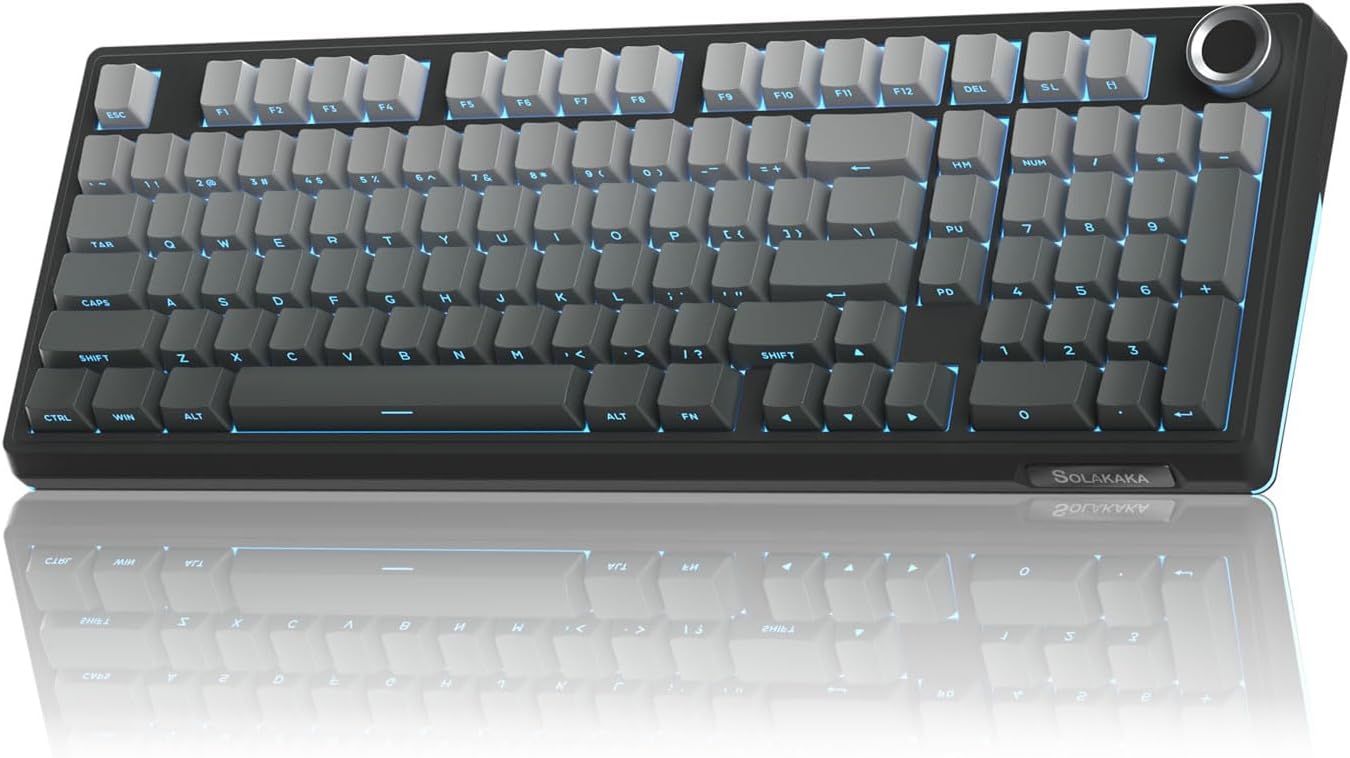
Pros
- 96% layout retains function keys in compact 355mm width
- 10,000mAh battery delivers 240-hour wireless runtime
- Triple-mode connectivity with Bluetooth 5.0, 2.4GHz wireless, and USB-C wired support
- Gasket mounting and five-layer noise reduction dampens vibration effectively
- Hot-swappable PCB accepts 3-pin and 5-pin mechanical switches
Cons
- Windows-only driver support limits macOS customization options
- Batteries not included for wireless operation
This mechanical keyboard combines a 96% key layout with triple-mode wireless connectivity, making it ideal for users wanting compact form without sacrificing function. The layout preserves all essential keys including arrows, function row, and number pad within a narrower footprint than traditional full-size boards.
- Bluetooth 5.0 wireless mode supports up to 10-meter range with stable signal transmission
- 2.4GHz USB wireless adapter provides faster response than Bluetooth for competitive gaming
- USB-C wired connection offers zero-latency backup mode for demanding tournaments and esports
- Connects to up to five devices simultaneously and switches between them using dedicated shortcut keys
- Compatible with Windows, macOS, iOS, Android, and tablet devices across diverse platforms
The efficient key layout and multi-protocol connectivity make this keyboard ideal for hybrid workers and mobile professionals who switch between multiple devices throughout the workday without requiring separate keyboards for each platform.
These keyboards feature hot-swappable mechanical switches with pre-lubricated actuation, delivering the smooth, creamy typing sensation that mechanical keyboard enthusiasts demand. The gasket mounting system and five-layer silencer material create a satisfying acoustic profile without excessive noise disturbing colleagues or family during shared working environments.
- Pre-lubricated LEOBOG switches provide smooth keystrokes with consistent tactile feedback
- Gasket structure mounting reduces cavity noise by decoupling the PCB from the frame
- Five silencer layers between PCB and mounting plate absorb shock from switch actuation
- 1.2mm flex-cut PCB design allows slight flex for enhanced typing comfort during long sessions
- Hot-swappable sockets accept both 3-pin and 5-pin switch designs for maximum customization
The combination of pre-lubricated switches and noise-dampening construction delivers the satisfying "thocky" sound and smooth feel that gamers appreciate while maintaining acceptable noise levels for shared office environments and collaborative workspaces.
The 10,000mAh battery provides exceptional wireless runtime, supporting days of normal use or weeks of low-activity operation. The integrated RGB backlighting system offers extensive customization with dedicated hardware controls for convenient adjustment without opening software applications or navigating complex menus.
- 10,000mAh lithium battery charges fully in approximately three hours via USB-C connector
- Wireless mode delivers 240 hours of runtime with LED backlighting disabled
- Dedicated knob controls volume, media playback, and brightness without keyboard shortcut requirements
- Per-key RGB customization with onboard profile storage preserves settings across reboots
- Low battery indicator provides ample warning before unexpected wireless disconnection
The extended battery life eliminates daily charging anxiety common with wireless peripherals, while the integrated controls provide convenient access to frequently-used functions directly from the keyboard surface without software intervention.
What Actually Makes a Keyboard High Performance?
Not every keyboard marketed as “gaming” deserves the label. A genuinely fast, durable board comes down to a handful of measurable factors, not just RGB lighting. Understanding these makes it much easier to compare the 10 options above and decide which one fits how you actually type or play.
Switch Type and Actuation
Mechanical switches register each press with a physical spring and contact point, which gives you consistent feel and faster, more reliable input than a membrane board. Linear switches (smooth, no bump) suit fast gaming, while tactile switches give you a small bump that helps typing accuracy. Some higher-end boards, like the SteelSeries Apex Pro TKL, use analog magnetic switches that let you adjust actuation distance per key — useful if you play competitive shooters and want hair-trigger response on WASD but a heavier feel elsewhere.
Polling Rate and Input Lag
Polling rate is how often the keyboard reports its state to your PC each second. A higher polling rate (1000Hz or the newer 8000Hz standard) cuts down the tiny delay between a keypress and the action on screen. For everyday typing this barely matters, but if you play fast-paced shooters or rhythm games, it’s one of the clearer performance upgrades you can buy.
Build Quality and Hot-Swappable Design
Look for a gasket-mounted or foam-dampened frame, since it absorbs shock and gives keystrokes a softer, quieter bottom-out compared to a rigid plate. Hot-swappable sockets are another big plus: they let you replace switches without soldering, so a board can outlast your current switch preference. PBT keycaps also resist shine and wear far better than the cheaper ABS plastic found on entry-level boards.
Best High Performance Keyboards by Use Case
Instead of ranking every model the same way, it helps to match a keyboard to how you’ll actually use it. Here’s how the lineup breaks down by scenario.
Best for Competitive Gaming
If frame-perfect inputs matter to you, the SteelSeries Apex Pro TKL stands out for its adjustable analog switches and rapid trigger mode, which lets you re-actuate a key the instant it starts moving back up. The Corsair K70 PRO TKL is a strong alternative, pairing Hall effect switches with SOCD cleanup for fighting games and shooters where conflicting key presses need to resolve instantly. Both trade a higher price for genuinely competitive-grade responsiveness, so casual players may not need to stretch this far.
Best Wireless Option
Cutting the cable matters if you want a tidy desk or plan to switch between a desktop and a laptop. The ASUS ROG Strix Scope II 96 offers tri-mode connectivity (2.4GHz, Bluetooth, and wired) along with a 96% layout that keeps the number pad without eating up your whole desk. Wireless boards do add a small amount of latency compared to a wired connection in 2.4GHz mode, so if you play ranked matches at a high level, a wired setup is still the safer bet.
Best Value Under $100
You don’t need to spend $150-plus to get hot-swappable switches and a gasket-mounted feel. The AULA F99 brings tri-mode wireless, pre-lubed linear switches, and RGB backlighting in at under $70, making it one of the more affordable entries here without feeling flimsy. It won’t match the premium materials of the pricier boards, but for a first mechanical keyboard or a secondary work setup, it punches well above its price.
Best Compact 96% Layout
If desk space is tight but you still want arrow keys and a number pad, the SOLAKAKA KI99 Pro squeezes a full 96% layout into a smaller footprint with a gasket structure and pre-lubed switches. It’s a good middle ground between the ultra-compact 75% boards and a full-size layout, especially for spreadsheet-heavy work alongside gaming.
Layout and Size — Finding the Right Fit
Layout is as much a personal preference as a performance factor. A 75% layout, like the GravaStar Mercury K1, drops the number pad and function row to save desk space and bring your mouse closer to center, which many gamers prefer for lower shoulder strain. A 96% or full-size layout keeps every key, which matters more if you regularly enter data or use function shortcuts for editing software. Neither is objectively better — it depends on whether you value desk space or key count more.
Wrist position matters too. A smaller board paired with a proper wrist rest and a supportive chair reduces strain over long sessions, so it’s worth thinking about your whole setup rather than the keyboard in isolation. If your current high performance gaming chair already keeps your arms at the right height, a compact keyboard layout tends to feel more natural.
Common Mistakes to Avoid When Buying a Keyboard
The biggest mistake is choosing switches based on sound alone. A “creamy” or thocky sound doesn’t tell you anything about actuation force or travel distance, both of which affect how the board actually feels in use. Try to check the specific switch’s actuation force (measured in grams) against what you’re used to before assuming a board will feel right.
Another common error is ignoring keycap material. ABS keycaps look glossy at first but develop a shiny, slick texture within months of regular use, while PBT keycaps stay textured much longer. Buyers also sometimes overlook software support — some boards need a companion app for full RGB and macro control, which can be a dealbreaker if you’d rather not install extra background software.
Finally, don’t assume wireless always means worse performance. Modern 2.4GHz dongles on boards like the ASUS ROG Strix Scope II 96 are fast enough for most players; it’s only at the highest competitive level that wired still holds a measurable edge.
Building Out a Full High-Performance Desk Setup
A great keyboard is only one piece of a fast, comfortable workspace. Pairing it with a high performance gaming monitor reduces the chance that your input speed outpaces your display’s refresh rate. If you’re also chatting or streaming while you play, a high performance gaming headset rounds out the audio side of the setup. And if your PC feels sluggish under multitasking, upgrading to faster high performance RAM often has a bigger impact on overall responsiveness than any single peripheral.
Desk space also plays a role in how a keyboard feels day to day. A cramped desk forces awkward wrist angles no matter how good the switches are, so it’s worth checking your desk depth before assuming a full-size board will fit comfortably alongside your mouse.
Who Should Skip a Premium Mechanical Keyboard
Not everyone needs to spend top dollar here. If you mostly browse, write emails, or do light office work, the performance gains from rapid trigger switches or 8k polling rates won’t be noticeable in daily use. A quieter tactile or membrane board might actually suit a shared office better, since some of the boards listed here can be noticeably louder at full typing speed. Budget-conscious buyers who still want a mechanical feel should start with an entry-level pick like the AULA F99 rather than jumping straight to a $170 analog board.
Frequently Asked Questions
What’s the difference between linear and tactile switches?
Linear switches move smoothly from top to bottom with no bump, which suits fast, repeated presses in games. Tactile switches have a small bump partway down that gives physical feedback, which many typists prefer for accuracy.
Do I need a hot-swappable keyboard?
Hot-swappable sockets let you change switches without any soldering, which is handy if you’re not sure which feel you’ll prefer long term. If you already know exactly which switch you want and don’t plan to experiment, it’s a nice-to-have rather than a must.
Is a wireless mechanical keyboard good enough for competitive gaming?
Modern tri-mode boards are close to wired performance in 2.4GHz mode, and most players won’t notice a difference. At the highest competitive level, a wired connection still removes one more variable, so tournament players often stick with a cable.
How much should I expect to spend on a high performance keyboard?
Solid hot-swappable options start around $70 to $100, while premium analog or Hall effect boards run from $130 to $175 or more. Spending more generally buys you better switches and materials, not just extra lighting effects.
Are 75% and 96% layouts hard to get used to?
Most people adjust within a few days, since muscle memory for the main key block doesn’t change. The main adjustment is remembering function-key combinations on a 75% layout, or getting used to the number pad taking up a bit more desk space on a 96% board.
Whichever layout and switch type you land on, the boards above cover the range from budget-friendly hot-swappable options to serious competitive-grade performance. Compare specs and availability above, and pick the one that matches how you actually type, play, and set up your desk.






