 Daniel Okafor
A tangle of power bricks, USB cords and monitor cables can wreck an otherwise clean battlestation. The best gaming desks for cable management fix that with routing holes, under-desk trays, hooks and integrated power outlets. This guide ranks 10 options, from full gaming desks with built-in wire channels to standalone trays that tidy any surface. You will see honest trade-offs, real ratings, and prices pulled straight from current listings. Whether you run a single 27-inch monitor or a triple-screen rig, there is a match here. Read on to find the desk or add-on that keeps your floor clear and your setup photo-ready.
Quick answer: For most gamers in 2026, our top pick among the best gaming desks for cable management is the EUREKA ERGONOMIC Captain Series — our #1 rated choice. See the full ranked comparison, alternatives and buying advice below.

Pros
- Keeps cords and power supplies organized and hidden from view
- Doubles as modesty panel to help block view underneath desk
- Durable steel construction with a powder coat finish
- Overall dimensions are 39 W x 9.25 H
- sized for Stand Up Desk Store 48 desks and similar products
Cons
- Requires verifying desktop clearance for 39"L x 9.25"W dimensions
- Periodic cleaning recommended to maintain the Powder Coated Steel finish

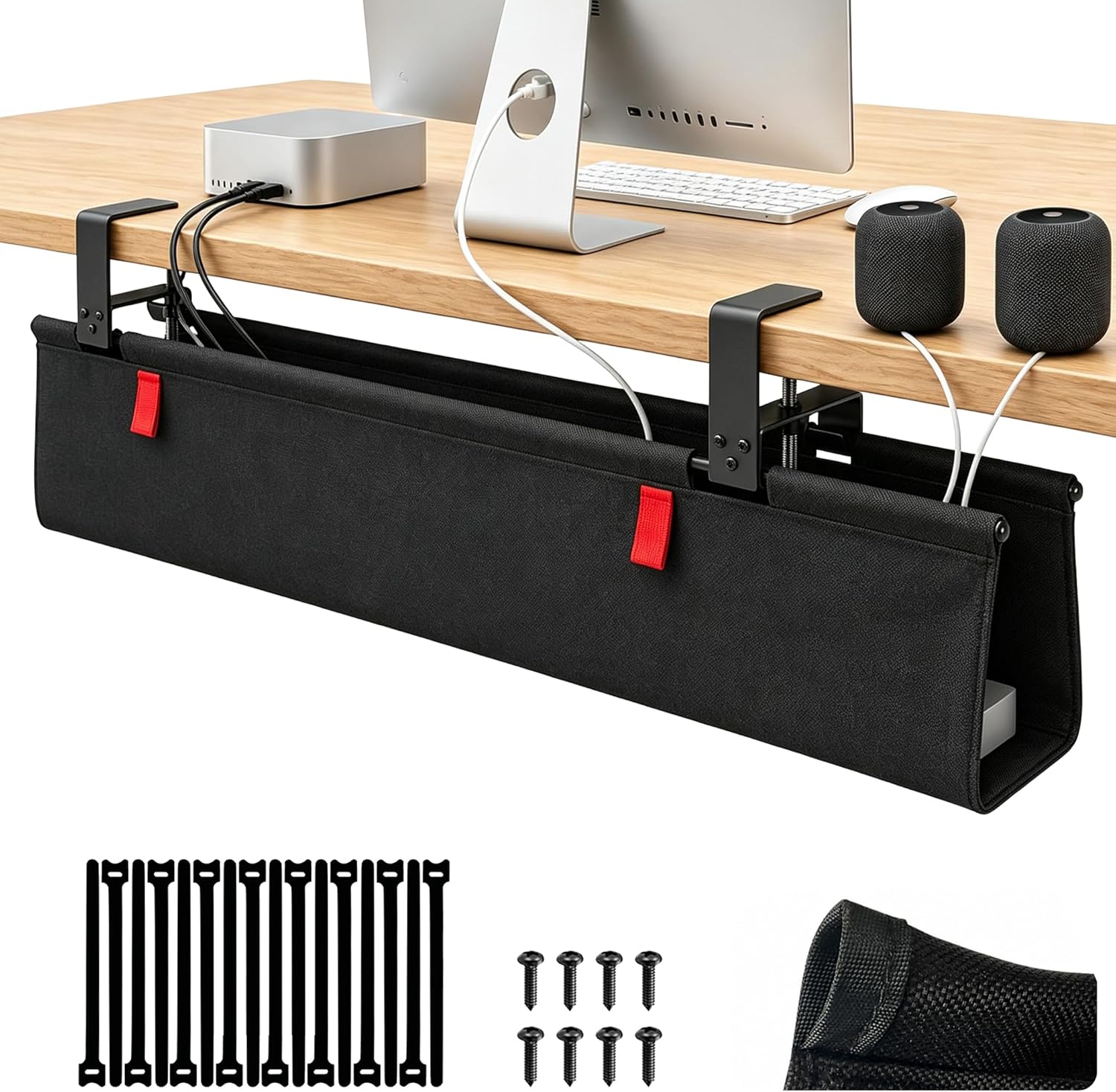
Pros
- Important Size Notice Overall full dimension 28 L x 6 W x 5.8 H(28in
- 16.9in 43cm on schematic image is ONLY spacing between two mounting
- Updated with No-scratch Clamp The silicon-padded grip for under-desk
- Excellent PE Honeycomb Base - This cable management tray has a PE
- Only - The cable management includes 16 reusable cable ties and 7
Cons
- Requires verifying desktop clearance for 28"L x 6"W dimensions
- Periodic cleaning recommended to maintain the thick 900D oxford fabric finish

Pros
- 1mm powder-coated steel construction holds multiple power strips and heavy laptop power adapters without sagging
- Angled Easy Access design keeps cables reachable at all times, even bulky laptop adapters routed alongside HDMI or VGA cables
- Set of two trays, each about 17.3 inches long, gives enough combined length to route cables across a standard desk width
- Flat head screws are included, so mounting doesn't require a separate hardware purchase
- Reusable cable ties are bundled in to bundle loose cable runs inside the tray
Cons
- Mounts with screws into the underside of the desk, so it isn't compatible with glass or very thin desktop surfaces
- Fixed screw-mount design means repositioning the tray later means drilling new holes rather than sliding it to a new spot
Each tray in the set measures roughly 17.3 inches long by 4.7 inches wide, built from 1mm powder-coated steel strong enough to hold multiple power strips, chargers, and heavy laptop power adapters without bending.
- Set of 2 trays, ~17.3"L x 4.7"W each
- 1mm coated steel construction
- Powder coated in white, black, or silver
- Rounded edges for a finished look
Two trays working together give enough combined length to span the width of most desks, letting cables route from one side to the other without doubling back or bunching in a single spot.

Pros
- 60 LARGE GAMING DESKTOP Captain GIP-P60 gaming desk is a extraordinary
- STURDY AND STABLE STRUCTURE Captain GIP-P60 gaming desk s support
- EXCLUSIVELY AND FULLY COVERED MOUSE PAD FOR FREE Captain GIP-P60 gaming
- EUREKA GAMING OFFERS YOU FREE ACCESSORY OPTIONS All come together with
- CUSTOMER SERVICE We hold our products to a high standard and hope you
Cons
- Requires checking room layout clearance for 27.56"D x 60"W x 30.12"H dimensions
- Requires periodic vacuuming and fabric care for Carbon Fiber

Pros
- 300 lb weight capacity metal frame handles dual towers and monitors
- 55" x 21.6" desktop, large enough for two full computer setups side by side
- Two open storage shelves plus a top hutch keep consoles and speakers off the desktop
- RGB LED strip syncs to music with an adjustable-sensitivity mic, over 60,000 colours via app
- Built-in CPU holder and monitor stand free up desk surface for keyboard and mouse
Cons
- 78.8" width needs a dedicated wall run, not suited to small bedrooms
- LED strip depends on a companion app and Bluetooth pairing, no physical remote mentioned
- Metal frame with hutch and shelves means a longer bolt-together assembly than a basic table
This desk measures 78.8"W x 21.6"D x 60"H, giving it enough footprint for a triple-monitor arrangement or two workstations sharing the surface. The metal frame is rated to hold 300 pounds, which covers a full tower PC, two monitors on stands, and typical desktop accessories without flexing.
- Desktop area: 55"L x 21.6"W for keyboard, mouse and paperwork
- Two lower storage shelves for CPU towers, consoles or speakers
- Top hutch shelf for books, figures or plants
- Built-in monitor stand raises screens above desk clutter
The dimensions suit a dedicated office or gaming room rather than a shared or compact bedroom corner.
This desk fits gamers and remote workers who want a single station that also stores hardware. The 300 lb capacity and dual shelving make it practical for anyone running two PCs, streaming equipment, or console peripherals that would otherwise clutter the floor.
- Suited to dedicated gaming rooms or home offices with wall space for a 78.8" run
- Good for users who want LED ambiance synced to games or music
- Storage shelves help households consolidating a PC and console setup on one desk
It is less practical for small apartments or shared bedrooms where a 78.8" wide footprint will not fit comfortably against available wall space.

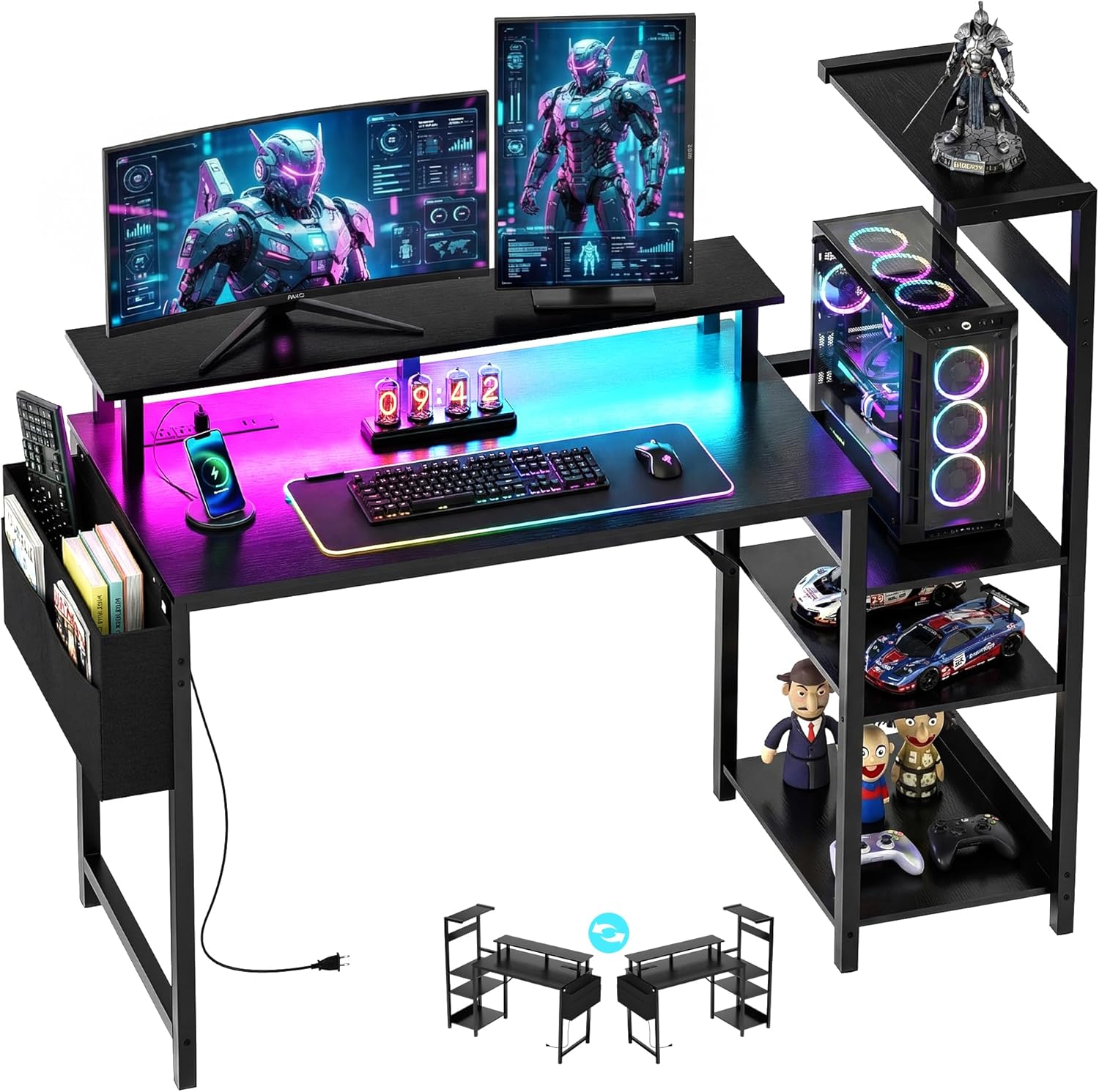
Pros
- Workstation surface measures 53 inches wide by 18.9 inches deep at 29.8 inches tall, rated to hold up to 300 pounds
- Built-in power strip adds 3 AC outlets and 2 USB ports directly on the desk for centralized charging
- RGB LED strip offers 10 color presets, 8 brightness levels and 10 dynamic modes with a memory function
- X-shaped steel frame construction adds stability for dual-monitor or multi-display setups
- Reversible left/right side modules let the L-shape orientation match either side of a room
Cons
- Assembly takes an estimated 50 to 70 minutes even with included tools and labeled parts, and is easier with two people when flipping the desk upright
- Corner L-shape footprint needs more floor space than a straight desk, so it will not fit tight rooms as easily
The main workstation area measures 53 inches wide by 18.9 inches deep at a 29.8-inch working height, rated to support up to 300 pounds across the desktop. Built-in power comes from 3 AC outlets and 2 USB ports mounted on the desk itself, along with cable management channels to keep cords off the floor during long sessions.
- Dual open shelves, a CPU stand, an accessory hook and a tool bag are included for onboard storage
- RGB LED strip supports 10 color presets, 8 brightness grades and 10 dynamic lighting modes with a memory function
- X-shaped steel frame is designed to add stability under the weight of dual monitors and a desktop tower
The overall L-shape footprint spans 53.15 x 39.37 inches at the base, so it needs a corner or wall space to match.

Pros
- Alloy steel R-frame carries a stated 150 lb across the 47-inch top, enough for a mid-tower plus two 24-inch panels
- Four leg pads screw down individually, so the frame stops rocking on carpet or uneven floorboards
- Two grommet holes and a clip-on cable box drop power leads straight to the floor
- Cup holder and headphone hook hang off the frame edge, keeping the shallow 23.45-inch depth clear
- Carbon fibre textured laminate hides fingerprints far better than a gloss black surface
Cons
- Fixed 29.55-inch height with no sit-stand adjustment beyond the levelling pads
- 23.45-inch depth is shallow, so a deep monitor stand pushes the screen close to your face
- MDF core beneath the laminate swells permanently if a spill is left standing
The surface measures 47 inches wide by 23.45 inches deep and sits at a fixed 29.55 inches high, which lines up with standard task chairs rather than drafting stools. The steel frame is quoted at a 150 lb load, so a mid-tower, two 24-inch panels and a laptop dock stay comfortably inside the limit.
- The curved front edge pulls the keyboard zone closer to the body than a straight-edged slab
- 23.45 inches of depth suits a single monitor arm better than a wide twin-screen stand
- The levelling pads take up a few millimetres of floor variation each
Measure the alcove first. The frame is rigid, so nothing can be trimmed down to fit a tight recess.

Pros
- 53.15 in wide by 18.9 in deep top standing 29.8 in tall, sized to fill a room corner without blocking a doorway
- Three mains outlets and two USB charging ports built into the frame, fed by one wall plug
- Hutch mounts on the left or the right, so the same desk fits either corner of a room
- LED strip carries 10 static colours, 8 brightness grades and 10 dynamic modes with memory
- Alloy steel frame on adjustable foot pads levels out on uneven floorboards
Cons
- 18.9 in depth is shallow for a 27-inch monitor plus keyboard once the hutch takes the back edge
- Fixed 29.8 in height with no sit-stand adjustment
- Storage is open shelves, a hook and a fabric bag, with no drawers or lockable space
The desk measures 53.15 in wide by 18.9 in deep, standing 29.8 in to the main work surface with the two-tier hutch above that. The L shape is reversible, so the upper storage rack fixes to the left or the right and the same unit works in either corner of a room.
- 18.9 in of depth suits a single monitor or a laptop plus notes, while deeper screens will overhang
- Adjustable foot pads take up the slack on uneven floorboards so the top does not rock
- An alloy steel frame carries the load rather than the board top alone
Measure the diagonal path through doorways before assembly day. Corner desks are awkward to move once built, and this one is far easier to carry in as a flat-pack carton.
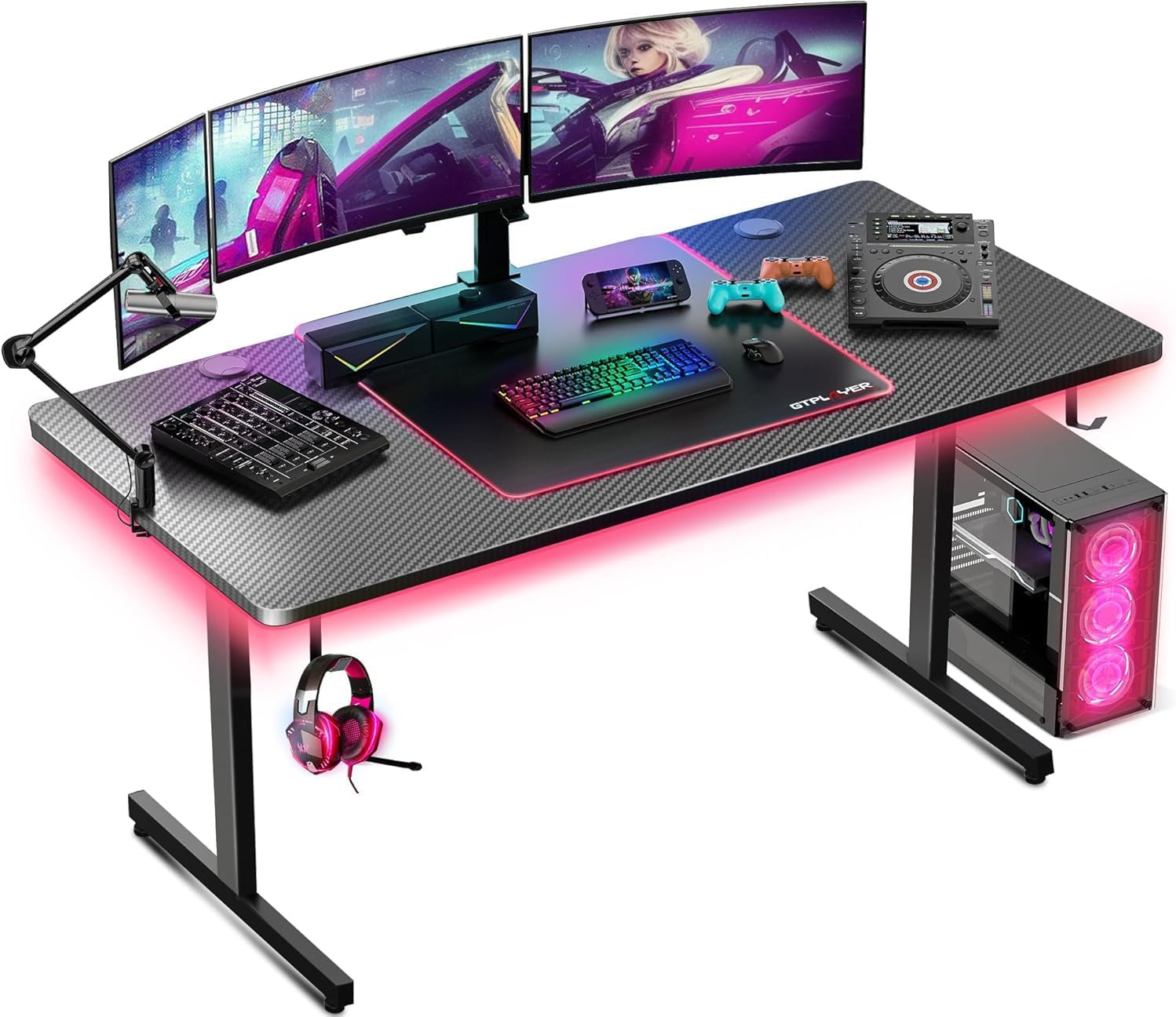
Pros
- 55.11 x 23.62 inch top at 29.52 inches high, wide enough for a 34-inch ultrawide plus a full keyboard
- Rated to 300 lb spread across the T-shaped steel frame
- Carbon fibre textured surface doubles as the mouse surface, so no separate pad is needed
- Headphone hook on the frame edge keeps a headset off the work surface and clear of cables
- One-year warranty covering the frame and surface
Cons
- The LED strip runs from a USB port, so a live powered port or adapter must stay within cable reach
- Fixed 29.52 inch height with no sit-stand mechanism or adjustable legs
- No drawers, cable tray or monitor shelf, so all storage has to be added separately
The top measures 55.11 inches wide by 23.62 inches deep, standing 29.52 inches high, which is standard seated desk height.
- That width takes a 34-inch ultrawide plus a full-size keyboard and mouse with room to spare, or two 24-inch panels side by side
- 23.62 inches of depth leaves room for a monitor arm clamp at the rear edge without pushing the screen uncomfortably close
- Load limit is 300 lb spread across the T-shaped steel frame
- The carbon fibre textured surface doubles as the mouse surface across the full width
A headphone hook fits on the frame edge, keeping a headset off the work surface. In practice the usable depth once a monitor stand is in place is closer to 17 or 18 inches, which is fine for a keyboard but tight for paperwork alongside it.
What makes a gaming desk good at cable management
Cable management is not one feature. It is a bundle of small design choices that keep cords off your legs and floor. Good desks combine several of them so wires travel from device to outlet unseen.
The features that actually matter
Look for grommet holes or cable pass-throughs near the back edge. These let cords drop straight down instead of draping over the surface. A steel frame with open channels or a rear crossbar gives you anchor points for zip ties.
Under-desk trays or baskets hold power strips and adapters off the ground. Some desks add built-in power outlets, so your surge protector lives on the desk itself. Headphone hooks and cup holders are minor perks, but they reduce clutter too.
Desk with built-in management versus add-on trays
You have two paths to a clean setup. Buy a gaming desk with routing built in, or add a tray to a desk you already own. Both work, and many people combine them.
Full gaming desks give you a matched look and sturdier mounting points. Standalone trays like the KEEGH 48″ tray cost less and fit almost any table. Choose based on whether you are replacing the desk or just upgrading it.
Best gaming desks for cable management by use case
Different rigs need different desks. Below, each pick targets a specific gamer so you can self-match quickly. Prices and ratings come from the current product data.
Best overall: EUREKA ERGONOMIC Captain Series
The EUREKA Captain Series earns the top spot with a 4.7 rating across 2465 reviews. Its polygon steel legs hide a cable-routing spine, and the 60-inch top fits dual monitors easily. You get a headphone hook and cup holder to clear surface clutter.
It is not the cheapest option, so budget buyers should look lower. But the build quality and wire routing justify the price for a main battlestation.
Best budget desk: BestOffice 47″ Carbon Fiber
The BestOffice 47″ desk is the value champion. It holds a 4.6 rating from a massive 4403 reviews, the most in this roundup. The carbon-fiber-textured top includes dedicated cable management holes plus a headphone hook.
The steel frame stays sturdy despite the low price. It suits smaller rooms and single-monitor setups. Heavy triple-screen users will want a wider surface instead.
Best large desk with storage: SEDETA 78.8″
Need room to breathe? The SEDETA 78.8″ desk spans nearly 79 inches, rated 4.7 over 1043 reviews. Its hutch, monitor stand and storage shelves keep peripherals and cords organized vertically. Built-in LED lights add ambiance without extra plugs cluttering the top.
This desk is ideal for streamers and multi-monitor rigs. It is large, so measure your wall space before buying.
Best L-shaped desk: ODK 53″ with power outlets
Corner gamers should consider the ODK 53″ L-shaped desk. With a 4.6 rating, it packs power outlets, storage shelves, an iron hook and a bag for cable gear. The reversible design fits left or right corners.
On-desk outlets mean your surge protector stays within reach. If you want more finished styling, the AODK L-shaped desk offers similar power and storage with LED lighting.
Best T-shaped surface: GTPLAYER 55″
The GTPLAYER 55″ desk costs and holds a 4.6 rating over 1895 reviews. Its T-shaped carbon-fibre surface, LED strip and headphone hook create a focused single-player zone. The frame includes routing points to guide cords toward the rear.
It is a strong mid-budget pick for one or two monitors. Larger loadouts may find the surface tight.
Add-on trays that upgrade any desk
Already love your desk? A tray fixes cable chaos without a full replacement. These attach under the top and hide power strips and slack.
Best premium tray: Stand Up Desk Store 39″
The Stand Up Desk Store tray leads the category with a 4.8 rating over 728 reviews. It bundles a horizontal cord raceway and a modesty panel for a finished front. This suits standing desks and open-back layouts where cables would otherwise show.
Best no-drill tray: Under Desk No Drill 28″
Renters and desk-savers should grab the No Drill tray, rated 4.8. Upgraded silicone pads clamp on without scratching, and 16 cable slots sort each cord. It fits desks 0 to 2.1 inches thick.
For the lowest price, the PAMO tray set gives you two trays plus 10 cable ties. That set boasts 2737 reviews, showing broad real-world approval.
Practical buying guide: sizes, specs and compatibility
Matching a desk to your gear prevents returns. Focus on width, thickness and outlet needs before you check out.
Sizing your surface
A single monitor and keyboard fit comfortably on a 47-inch to 55-inch top. Dual monitors want 60 inches or more, like the EUREKA. Triple-screen or stream setups favor the 78.8-inch SEDETA or an L-shape.
Measure your room first. Leave at least 24 inches of depth so cables can drop behind the desk cleanly.
Tray thickness and mounting
Clamp trays fit standard tops up to about 2.1 inches thick. Screw-mount trays like the KEEGH support up to 70 lbs of power bricks and adapters. Confirm your desktop thickness before ordering a clamp model.
If you rank surface size and layout above all, our roundup of the top-rated gaming desks for every setup covers wider options in depth.
Power and outlet planning
Desks with built-in outlets, like the ODK and AODK, cut cord runs to the wall. Without them, plan for a slim power strip mounted in a tray. Count your devices: PC, monitors, speakers, lamp, charger, and router if nearby.
Corner-focused shoppers can compare more layouts in our guide to the best L-shaped gaming desks for dual-screen rigs.
Common cable management mistakes to avoid
Even a great desk fails with sloppy habits. Skip these errors for a lasting clean look.
Buying only for looks
A stylish carbon-fiber top means little if it lacks routing holes. Confirm the desk has grommets, a tray, or a rear channel. The BestOffice desk proves that budget models can still include real management holes.
Ignoring cord length and slack
Cables that are too short force awkward routing. Too much slack creates the loops you are trying to hide. Use velcro straps to bundle extra length inside a tray, not zip ties you must cut later.
Overloading a single strip
Cramming every plug into one strip risks heat and clutter. Split high-draw devices across two strips when possible. A large tray gives you the room to do this safely.
Compact-room gamers weighing footprint against tidiness can browse the best small gaming desks for tight spaces before deciding.
Frequently asked questions
Do I need a gaming desk with built-in cable management or just a tray?
It depends on your current setup. If you are replacing the desk anyway, a model with routing holes and outlets saves effort. If your desk is fine, a no-drill tray adds most of the benefit for far less money.
Which desk here has the most reliable reviews?
The BestOffice 47″ desk leads on volume with 4403 reviews at 4.6 stars. For trays, the Stand Up Desk Store model holds the highest rating at 4.8 over 728 reviews. Both signal consistent real-world performance.
Will these trays fit my existing desk?
Most clamp-on trays fit tops up to 2.1 inches thick without drilling. Screw-mount trays fit thicker or unusual surfaces and hold up to 70 lbs. Always measure your desktop thickness before ordering.
Are L-shaped desks better for cable management?
They can be, since the corner hides cords and on-desk outlets shorten runs. The ODK and AODK models add shelves and hooks for extra organization. The trade-off is a larger footprint that needs corner space.
How many outlets should my setup plan for?
Count every powered device: PC, each monitor, speakers, lighting and chargers. Most single rigs need six to eight outlets. Choose a desk with built-in power or budget for a slim strip mounted in a tray.
The bottom line
Clean cable management is achievable at any budget with the right pick. The EUREKA Captain Series delivers the best all-around blend of build, size and routing. Budget-minded gamers get near-flagship tidiness from the BestOffice 47″ desk, while trays like the No Drill 28″ upgrade what you already own. Match your monitor count, room size and outlet needs to the options above, then buy the one that fits your battlestation best.