
 Priya Raghavan
 Best Gaming Computer Accessories: A Complete Buying Guide
Building a setup that feels fast, comfortable, and immersive is about far more than raw graphics power. The right peripherals decide how precise your aim feels, how clearly your teammates hear you, and how long you can play before fatigue creeps in. If you are searching for the best gaming computer accessories, this guide walks you through every core category, explains what actually matters, and points you toward proven options that fit different budgets and play styles.
Instead of ranking individual products one by one, we focus on how to choose. By the end you will know which features are worth paying for, which are marketing fluff, and how to assemble a coherent kit that works together. Below is a quick shortlist of popular accessories to explore as you read.

Pros
- HERO 25K sensor tracks to 25,600 DPI with no smoothing, filtering or acceleration across the span
- 11 programmable buttons with onboard memory, so profiles travel with the mouse to another machine
- Up to five 3.6 g weights drop into a tray to tune total mass and front-to-back balance
- Dual-mode wheel switches between ratcheted clicks and free-spin for long documents and inventory lists
- Metal spring tensioning and metal pivot hinges sit under the two main click buttons
Cons
- Wired only, with a fixed braided cable rather than a detachable one, so a bungee helps keep drag off the pad
- Lighting effects and button remapping need the desktop software installed at least once before settings can be written
- Right-handed contour with both thumb buttons on one side, so left-handed players are ruled out
The HERO sensor covers a sensitivity span reaching 25,600 DPI, and the maker specifies no smoothing, filtering or acceleration anywhere across it. Movement is detected at sub-micron scale, which is what keeps slow crosshair drags linear rather than stepped.
- Most first-person shooter players sit between 400 and 1600 DPI and use the sniper button to drop lower for scoped shots.
- Five DPI stages can be stored and stepped through with the two buttons behind the wheel.
- Indicator LEDs on the left flank show which stage is active without opening any software.
The high end of the span exists for 4K and multi-monitor desktops where the pointer has a long way to travel; for gameplay the low and middle stages do the real work.
A magnetic door under the palm opens onto a tray that accepts up to five 3.6 g weights, or 18 g in total. Placement matters as much as the count.
- A forward bias suits players who steer mostly with the wrist and keep the mouse planted.
- A rear bias suits arm-aim styles that lift and reset the mouse often.
- Leaving the tray empty gives the lightest configuration the chassis allows.
The body itself is a right-handed palm and claw shape with a broad thumb rest and rubber grips down both flanks. It is tall through the hump, so fingertip-grip players with small hands should try the shape before committing. The braided cable is fixed at the nose rather than detachable.
Button assignments, sensitivity stages and lighting are configured in the desktop app, but once written they are stored in onboard memory on the mouse itself.
- The saved profile follows the mouse to a laptop, a second desk or a machine where nothing can be installed.
- Several profiles can be held on the device and cycled with a dedicated button.
- Macros and per-game assignments run without the app sitting open in the background.
Lighting can be synchronised with other gear in the same ecosystem, which is the one function that keeps needing the software running. Plugged into a machine that has never seen the app, the mouse still works immediately, but it stays on default button assignments and default lighting until a configured profile is written to it.

Pros
- HERO optical sensor tracks from 200 to 12,000 DPI at up to 400 IPS
- The Lightspeed link reports at 1 ms, matching a wired connection in feel
- 99 g total weight including the AA cell
- Up to 250 hours of continuous play, or roughly 9 months in endurance mode
- The nano receiver stores in a bay inside the shell, so nothing rattles loose in a laptop bag
Cons
- Runs on a disposable AA cell rather than an internal rechargeable battery
- No wired fallback mode, so a flat cell stops play until a fresh AA goes in
- At 99 g it is heavy against the sub-60 g shells built for competitive play
The HERO optical sensor is the core of this mouse: 200 to 12,000 DPI in fine steps, tracking to 400 IPS, with no smoothing or acceleration applied in firmware. That matters most to low-sensitivity players who make large arm sweeps, where a lesser sensor starts to drift or cap out mid-flick.
- Sensitivity steps are stored in onboard memory, so they survive on a machine without the software installed.
- The report rate is 1 ms over the Lightspeed link.
- Six programmable buttons, including the sensitivity shift below the wheel.
HERO was also designed around power efficiency, which is why a mouse that reports every millisecond still runs for weeks on a single cell. The sensor and the battery story are the same engineering decision viewed from two directions.
A single AA drives up to 250 hours of continuous play in performance mode. Switching to endurance mode in the G HUB software lowers the report rate but pushes usable life toward 9 months, which suits a mouse that mostly does desktop work with gaming in between.
- The nano receiver clips into a bay inside the shell, under the battery door, for travel.
- Removing the cell is also the quickest way to cut weight if you prefer a lighter feel to long runtime.
- An indicator warns when the cell is running low.
The compromise is that there is no cable to fall back on. This model has no wired mode at all, so an empty cell means finding a fresh AA rather than plugging in and carrying on, and that is worth planning for before a long session.
At 99 g with the cell fitted, this sits in the middle of the modern weight range: far lighter than the wireless mice of a decade ago, noticeably heavier than the shells built for competitive play. The body is a compact ambidextrous shape with both thumb buttons on the left flank.
- The compact length favours claw and fingertip grips; large hands using a full palm grip will find it small.
- The receiver stows internally, so nothing loose ends up in a bag.
- Plain plastic flanks mean no rubber grips to peel or go tacky over years of use.
Because the mass comes largely from the AA cell sitting centrally, balance stays neutral rather than tail-heavy, which is why it feels lighter in motion than the figure on paper suggests.

Pros
- XXL size measures 940 x 410 x 4mm (37.01 x 16.14 x 0.16 in), enough room for keyboard and mouse on one surface
- 4mm high-density rubber foam stays flat even over an uneven desk surface
- Micro-weave cloth surface is tuned for consistent glide across optical and laser sensors alike
- Anti-slip rubber base keeps the pad in place during fast, high-leverage swipes
Cons
- XXL size covers most of a standard desk, leaving little open desk space for anything else
- Cloth surface will show wear over time faster than a hard plastic control-style pad
- Sold in classic black only, with no alternate colorway in this listing
The XXL size measures 940 x 410 x 4mm (37.01 x 16.14 x 0.16 inches), large enough to fit a full-size keyboard and mouse on one continuous surface rather than switching between a desk and a separate pad. This is the second-largest option in the lineup, sitting below the 3XL and above the Medium and Large sizes.
The micro-weave cloth surface is optimized across all mouse sensor types for pixel-precise tracking, aimed at reducing the need to lift and reposition the mouse during fast, high-leverage plays. Covering this much desk area does mean less open space remains for other items like a notepad or phone stand.
Underneath the cloth surface sits 4mm-thick high-density rubber foam, thicker than the 3mm foam used on the Medium and Large sizes, chosen to keep the pad uniformly flat even across an imperfect or slightly uneven desk surface. An anti-slip base grips the desk to prevent the pad from sliding during quick, aggressive mouse movements.
This stability matters most during fast-paced, competitive play, where a shifting mat can throw off aim mid-swipe. The tradeoff of a soft, thick cloth pad versus a hard plastic control pad is a smoother glide feel at the cost of the surface eventually showing wear from repeated aggressive input over time.
The XXL size suits gamers using large, low-sensitivity mouse settings that require sweeping arm movements rather than small wrist flicks, since the extended surface gives room for those bigger swipes without running off the edge. It also works for anyone who wants their keyboard and mouse to share one consistent surface texture.
Desk space is the main tradeoff, at nearly 37 inches wide, it takes up most of a standard desk, so it suits a dedicated gaming setup better than a shared or multi-purpose desk where surface space is already tight. Available up to 3XL for those needing even more coverage.
Pros
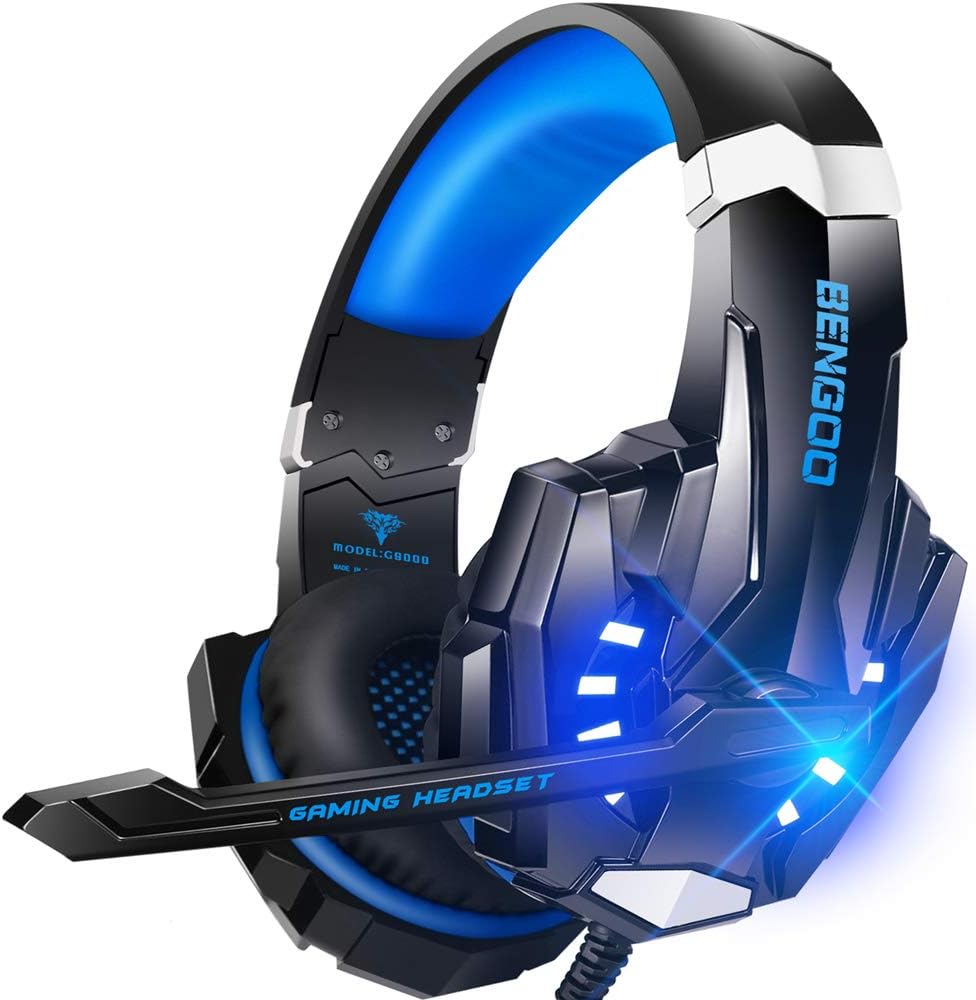
- 40mm magnetic neodymium drivers in sealed closed-back cups for clear footstep direction in shooters
- Single 3.5mm plug covers PS5, PS4, Xbox Series X and S, Switch, PC, tablets and phones
- Omnidirectional boom mic on a bendable arm you can angle toward the mouth
- Protein leather earmuffs over a multi-point headbeam that spreads clamp force across the crown
- Inline volume dial and mic mute sit at collar height on the cable
Cons
- Older Xbox One controllers without a headphone jack need a Microsoft stereo adapter that is not supplied
- The 7.1 label describes positional processing done by the console or PC, not seven discrete drivers
- Leatherette cups trap heat and break their seal slightly around glasses arms
Each cup houses a 40mm neodymium driver, a cone area large enough to register explosions and engine noise without a separate bass unit. The 7.1 label refers to positional processing handled by the console or PC, so what reaches your ears is stereo widened by the host system rather than seven separate speakers. Directional cues still read clearly, which is what most players actually need from a headset.
- 40mm magnetic neodymium drivers in a closed-back shell
- Omnidirectional boom mic on a bendable arm you can point at your mouth
- Isolation comes from the sealed over-ear cups rather than active circuitry
- Inline controls put volume and mic mute at collar height
The headset terminates in a 3.5mm connector that plugs straight into a PS5 or PS4 controller, an Xbox Series X or S pad, a Switch, a laptop or a tablet. Older Xbox One controllers without a built-in headphone jack need a Microsoft stereo adapter, which is not supplied. On desktop towers with separate microphone and headphone sockets you use the bundled splitter to break the single plug into two.
- One 3.5mm plug covers consoles, handhelds, laptops and phones
- The USB lead powers the LED lighting only and carries no audio
- No wireless mode, so the cable runs to the controller or PC at all times
The earcups use protein leather over foam, which seals against the head better than fabric and blocks more room noise, though it also traps heat during summer marathons. A multi-point headbeam spreads clamp force across the crown instead of one narrow strip, and the glowing side panels are decorative rather than functional. Anyone wearing glasses should expect the seal to break slightly at the temple arms, a trait shared by every leatherette closed-back design.
- Protein leather earmuffs with soft foam fill for extended wear
- Sliding headband and rotating cups adjust to head width
- LED lighting draws from the USB lead and can be left unplugged
Pros
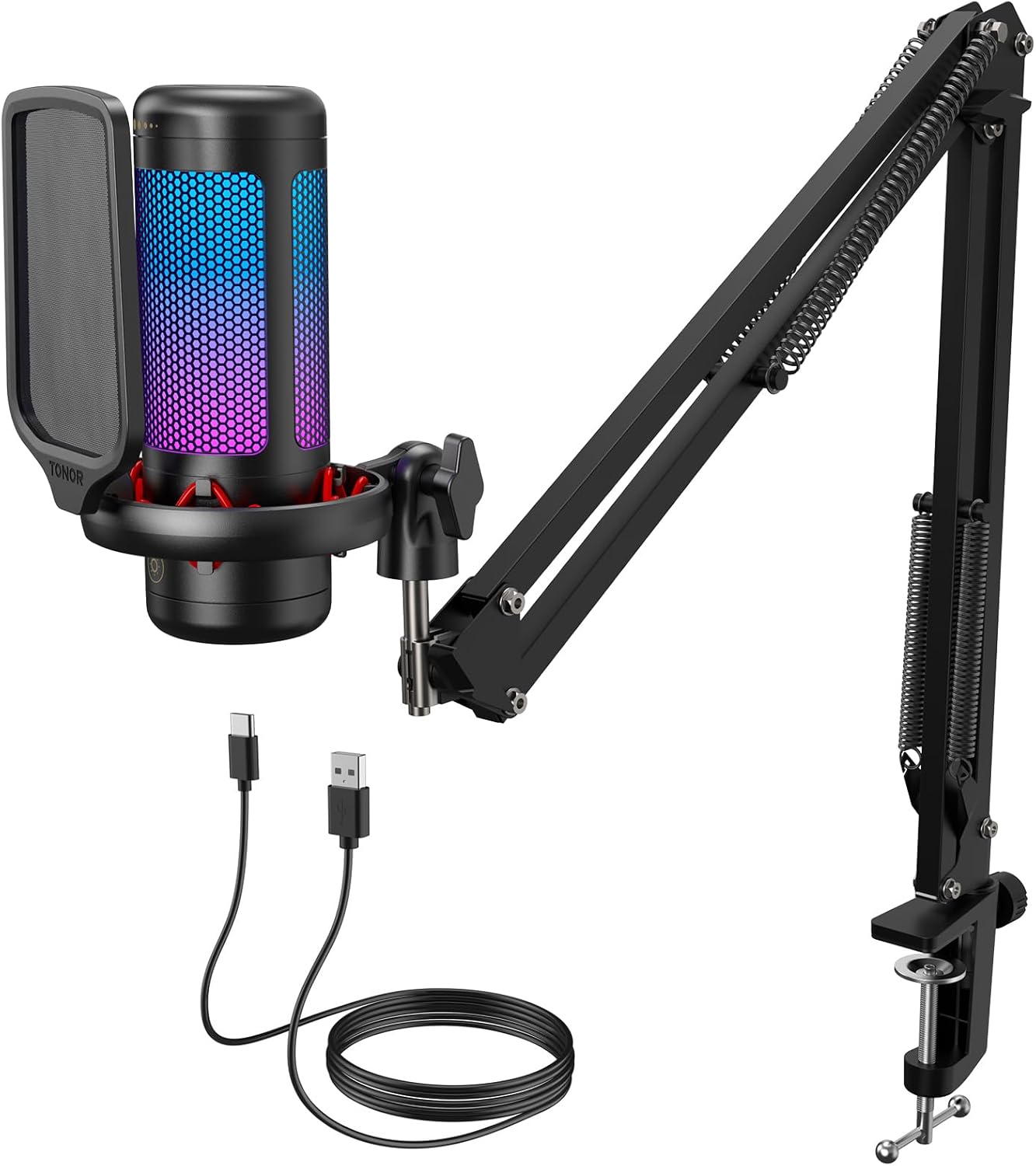
- Boom arm and clamp fit desks up to 2.36 in thick, with multiple joints for angle adjustment
- Tap-to-mute control on top of the mic responds without opening any app
- 4 RGB lighting modes, including breathing and mixed-color gradient, run off the same tap controls
- Included pop filter and shock mount cut plosive and vibration noise at the source
- Gain adjusts by rotating the top ring of the mic for on-the-fly volume control
Cons
- USB connection only, so it will not work with XLR audio interfaces or mixers
- Peak performance depends on a USB 2.0 or 3.0 port, so older or non-standard ports may cause connection issues
- RGB lighting has no companion software for custom color mapping beyond the 4 built-in modes
Premium chips and tuned internal components aim for a clean, high-fidelity signal suited to team voice chat, streaming, and general recording. Gain adjusts by rotating the top of the microphone itself, letting you dial in an appropriate volume without opening any software, and a short tap mutes the mic instantly during unexpected interruptions.
- Rotating top ring for manual gain adjustment
- Tap-to-mute control at the top of the mic
- Recommended on a USB 2.0 or 3.0 port with a fully seated Type-C connector
Because there is no XLR output, this microphone is built specifically for direct USB connection to a PC rather than routing through an external audio interface or mixer.
The included metal boom arm and clamp fit desks up to 2.36 in thick, with multiple adjustable joints for finding the right angle relative to a monitor and seating position. A pop filter and an upgraded shock mount with rubber bands come as part of the kit, cutting down on air-flow plosives and mechanical vibration noise picked up through the desk.
- Metal boom arm with multiple adjustable joints
- Clamp fits desks up to 2.36 in thick
- Pop filter and shock mount included in the kit
Because everything ships as one complete kit, setup does not require sourcing a separate arm, filter, or mount before the microphone is ready to use.
Four RGB lighting modes, six static colors, single-color gradient, breathing, and mixed-color gradient, cycle through with a short tap on the lighting control button, while a longer tap adjusts brightness across three steps. The same tap-based layout controls muting, so switching between light shows and muting the mic during a call both happen at the same physical spot on the microphone.
- 4 RGB lighting modes including breathing and gradient effects
- 3-step brightness control via long tap
- Instant mute with a short tap on the mic top
Since there is no companion app, all lighting and mute functions are controlled directly on the hardware rather than through a settings menu on the PC.

Pros
- 8.2ft (2.5m) USB-C to USB-A/C cable reaches from a PC tower on the floor to a desktop boom arm without an extension
- Reversible USB-C connector on the mic end plugs in correctly on the first try, even in a dim setup
- Touch mute button on top silences the mic instantly without pressing a tiny physical switch
- Gain knob on the base allows on-the-fly volume adjustment without opening software settings
- Cardioid pickup pattern focuses on sound directly in front of the mic, reducing pickup of side and rear room noise
Cons
- Not compatible with Xbox consoles, only PC, Mac, PS4, and PS5 per the manufacturer
- RGB lighting cycles automatically through colors and cannot be manually set to a single fixed color or controlled by software
- Cardioid-only pickup pattern means it isn't suited for recording multiple people from different sides of the mic at once
The mic uses a cardioid pickup pattern, focusing on sound from directly in front while reducing pickup from the sides and rear - useful for solo streaming or gaming voice chat where room noise or a nearby fan shouldn't bleed into the mix. A touch-sensitive mute button sits on top for instant silencing, and a gain knob on the base handles volume adjustment without digging into software settings.
- Cardioid pickup pattern
- Touch-tap mute button on top
- Physical gain knob for on-the-fly volume control
Because the pattern is cardioid rather than omnidirectional, positioning the mic correctly in front of your mouth matters more here than it would with a pattern designed to pick up a whole room.
This is a USB plug-and-play microphone with a reversible USB-C connector on the mic side, connected through an 8.2ft (2.5m) USB-C to USB-A/C cable - long enough to run from a tower under the desk up to a boom arm on the desktop. It's compatible with Windows, Mac OS, PS4, and PS5, requiring no drivers or additional software to start recording.
- USB plug-and-play, no drivers needed
- 8.2ft (2.5m) USB-C to USB-A/C cable
- Works with Windows, Mac, PS4, and PS5
It is not compatible with Xbox consoles, so console streamers on Xbox will need a different microphone or an audio interface workaround.
The kit includes a metal tripod-style boom arm stand along with a pop filter, ready to clamp to a desk without buying a separate arm. A two-tone automatic gradient RGB lighting effect runs across the mic body, cycling through colors on its own rather than through a manual color picker or companion app.
- Included metal boom arm and pop filter
- Two-tone automatic gradient RGB lighting
- Mute button doubles as the only way to turn off the RGB glow
Because the RGB cycles automatically with no software control, streamers wanting a fixed brand color or a dark, no-light setup will find the only workaround is muting the mic, which turns the lighting off along with the audio.

Pros
- Pentakill, 5 DPI Levels - Geared with 5 redefinable DPI levels
- Any Button is Reassignable - 11 programmable buttons are all
- Comfort Grip with Details - The skin-friendly frosted coating is
- 5 Decent Backlit Modes - Turn the backlit on and make some kills in
Cons
- Periodic visual inspection recommended to ensure component tightness
- Best placed in well ventilated indoor spaces away from excess moisture
Built for everyday utility, the Redragon M612 Predator RGB Gaming Mouse 8000 DPI Wired provides reliable functionality in active Gaming Mice settings. Daily usage reveals robust utility supported by Pentakill, 5 DPI Levels - Geared with 5 redefinable DPI levels (default as: 500/1000/2000/3000/4000), easy to switch between different game needs. Dedicated demand of DPI options between 500-8000 is also available to be processed by software.. Complementing its primary framework, the design also incorporates Any Button is Reassignable - 11 programmable buttons are all editable with customizable tactical keybinds in whatever game or work you are engaging. 1 rapid fire + 2 side macro buttons offer you a better gaming and working experience. to optimize routine handling.
Focusing on material selection, this hardware is constructed to resist ongoing physical fatigue. Reinforced internal elements like Comfort Grip with Details - The skin-friendly frosted coating is the main comfort grip of the mouse surface, which offers you the most enjoyable fingerprint-free tactility. The left side equipped with rubber texture strengthened the friction and made the mouse easier to control. maintain steady operational balance under continuous use. Solid structural engineering allows the unit to maintain physical stability under load. Attention to manufacturing details ensures reliable utility for your Gaming Mice. Using proper installation techniques maintains physical stability across daily activities.
Maintaining optimal hardware conditions involves simple periodic inspection and spatial planning. Featuring 5 Decent Backlit Modes - Turn the backlit on and make some kills in your gaming battlefield. The hyped dynamic RGB backlit vibe will never let you down when decorating your gaming space, it would be better with other Redragon accessories with lights on., ongoing operation remains intuitive across varied household routines. Wiping surfaces periodically with a soft cloth prevents dust accumulation in functional crevices. Attention to manufacturing details ensures reliable utility for your Gaming Mice. Using proper installation techniques maintains physical stability across daily activities.

Pros
- Slim and Tactical - The K585 keyboard gets rid of those extra keys
- Upgraded Hot-Swap - The upgraded socket is now available on
- Play to Win - With 7 programmable macro keys, binding multiple
- Light it Up in Your Way - 5 RGB backlit modes are selectable with
- Dimensions of 10.3"L x 8.5"W x 2"H engineered for optimal spatial fitting
Cons
- Requires verifying placement clearance for 10.3"L x 8.5"W x 2"H prior to installation
- Periodic visual inspection recommended to ensure component tightness
The Redragon K585 DITI Wired One-Handed RGB Mechanical Gaming offers a refined combination of structural durability and user convenience for Gaming Keyboards setups. Daily usage reveals robust utility supported by Slim and Tactical - The K585 keyboard gets rid of those extra keys and keeps the most useful ones in a slim & portable package. All of your keyboard action keys are in one convenient place. No need to worry about misclicked keys.. Complementing its primary framework, the design also incorporates Upgraded Hot-Swap - The upgraded socket is now available on Redragon one-handed keyboard, with more ways to mod, and more fun. The iconic Redragon Blue Switches deliver audible clicky with clear tactile feedback, original mechanical feel. to optimize routine handling. Measurements of 10.3"L x 8.5"W x 2"H provide clear dimensional boundaries for precise space planning.
Focusing on material selection, this hardware is constructed to resist ongoing physical fatigue. Reinforced internal elements like Play to Win - With 7 programmable macro keys, binding multiple commands and activating them instantly is simple and quick. Assign single or multiple keystrokes to any macro key to save precious time in the middle of battle. maintain steady operational balance under continuous use. Solid structural engineering allows the unit to maintain physical stability under load. Precision engineering delivers a stable foundation tailored for active household demands. Carefully selected components ensure minimal maintenance overhead over long service life.
Maintaining optimal hardware conditions involves simple periodic inspection and spatial planning. Featuring Light it Up in Your Way - 5 RGB backlit modes are selectable with 16.8 Million Colors. Glorious & amazing lighting effects let the light of victory wreak havoc in the dark., ongoing operation remains intuitive across varied household routines. Wiping surfaces periodically with a soft cloth prevents dust accumulation in functional crevices. Precision engineering delivers a stable foundation tailored for active household demands. Carefully selected components ensure minimal maintenance overhead over long service life. Attention to manufacturing details ensures reliable utility for your Gaming Keyboards.

Pros
- 18 Programmable Keys Macro Keypad: This stream controller deck
- Single Tap Control: This USB macro keyboard pad supports single tap
- One Tap Multi-Shortcut: This macro controller pad streaming deck
- Adjustable RGB Surround Light Ring - VSD M18 gaming streaming deck
Cons
- Requires proper surface alignment during initial installation
- Periodic visual inspection recommended to ensure component tightness
The Macro Keypad Stream Controller Deck Gaming Streaming provides dependable operation suited for contemporary indoor Gaming Keyboards configurations. Technical integration focuses on functional efficiency, incorporating 18 Programmable Keys Macro Keypad: This stream controller deck comes with 18 customizable macro keys (15 LCD visual keys + 3 physical buttons). Users may program single actions or multi-step sequences for daily operation. The keys support in-game combos, app launch and media playback control for multiple usage scenarios. Each LCD key accepts JPG, PNG and GIF images and animations to mark separate functions. Its balanced engineering incorporates Single Tap Control: This USB macro keyboard pad supports single tap commands for quick operation. Users can trigger pre-set macros, input text, open files and web pages, adjust media playback, or switch OBS scenes with one tap. The straightforward layout fits gaming, live streaming and professional office task setup to streamline day-to-day interactions.
Evaluating build quality and structural execution reveals strong manufacturing standards across components. The physical build incorporates One Tap Multi-Shortcut: This macro controller pad streaming deck supports multi-shortcut macro programming for gamers and content creators. Custom shortcuts simplify game combo inputs, video editing, music production and photography workflows. The Operation Follow function runs multiple macro steps in custom order or simultaneous execution for adjustable task control, providing essential protection against surface wear. High tolerance assembly prevents unexpected mechanical looseness during daily operation. Robust physical construction provides verified peace of mind during heavy daily usage. Thoughtful spatial layout allows versatile placement across modern living environments.
Long-term operational satisfaction is supported by adhering to standard installation and cleaning practices. Thanks to Adjustable RGB Surround Light Ring - VSD M18 gaming streaming deck features an outer RGB light ring with auto color cycle mode. Custom RGB tones are available via device firmware upgrade. The light ring offers adjustable visual lighting for dim gaming, streaming and night work setups., spatial alignment and initial setup progress smoothly for homeowners. Simple preventative care maintains mechanical responsiveness and aesthetic value over extended use. Robust physical construction provides verified peace of mind during heavy daily usage. Thoughtful spatial layout allows versatile placement across modern living environments.

Pros
- Full-size 104-key layout with a number pad plus 5 dedicated macro keys down the left edge for recorded command sequences
- Soft-touch membrane switches stay quiet enough for a shared room or a late-night session
- 6 keyboard backlight modes and 10 mouse lighting effects, adjustable for brightness and speed from the keyboard itself
- Onboard memory keeps lighting and DPI settings after a reboot or a move to another machine
- Wired USB plug-and-play on Windows 10 and 11, with an integrated wrist rest supporting the heel of the hand
Cons
- Membrane switches, not mechanical, so the bottom-out feels cushioned and service life is shorter than a mechanical board
- Backlighting is zone-based across preset modes, so individual keys cannot be given their own colour
- The configuration software is a separate download from the manufacturer site and targets Windows, leaving macOS and Linux users on default lighting and DPI
The board uses soft-touch membrane switches rather than mechanical ones. Actuation is quiet and cushioned, which is the point: it can be used in a shared room or late at night without the clack of a clicky mechanical board. The trade is a mushier bottom-out and a shorter service life.
- Full-size layout with a number pad, plus 5 dedicated macro keys along the left edge
- Macros are recorded on the fly or through the downloadable utility, so a multi-step command fires from one key
- Anti-ghosting covers the common gaming key clusters, so WASD plus modifiers all register together
- An integrated wrist rest supports the heel of the hand through long sessions
Key legends are backlit so the lettering stays readable in a dark room.
Backlighting is zone-based rather than per-key. The keyboard cycles 6 backlight modes and the mouse adds 10 lighting effects, with brightness and animation speed adjustable directly from the keyboard.
Deeper customisation, including macro assignment and mouse DPI stages, comes from software downloaded from the manufacturer site rather than bundled on a disc. It is a Windows utility, so macOS and Linux users get the default lighting and default DPI stages only.
- Settings are stored on the devices, so lighting and DPI survive a reboot or a move to a different computer
- Individual keys cannot be assigned their own colour, unlike per-key RGB boards
- Lighting dims or switches off entirely for daytime office use
This is a wired, plug-and-play set aimed at a first gaming build or a shared family computer. Both devices connect over USB-A and work on Windows 10 and 11 with no install step before they function.
- Good fit: students, first-time gamers, and anyone replacing the keyboard and mouse that shipped with a prebuilt desktop
- Good fit: shared rooms and open offices, where membrane keys keep the noise down
- Poor fit: competitive players who want mechanical actuation, hot-swap switches or a wireless desk
- Poor fit: Mac and Linux setups, since the configuration utility targets Windows
Desk depth matters too. A full-size board with an attached wrist rest eats a fair amount of surface before the mouse hand has room to move.
Why Your Accessories Matter More Than You Think
A high-end graphics card gives you frames, but your accessories translate those frames into wins and enjoyment. A responsive mouse turns a split-second reaction into a clean headshot. A clear microphone keeps your squad coordinated. A comfortable headset lets you notice footsteps you would otherwise miss. When people upgrade peripherals for the first time, the improvement often feels bigger than a new CPU, because it changes the way the game feels in your hands and ears.
The trick is balance. Spending your entire budget on one flashy item while ignoring the rest leaves gaps. A smart accessory kit spreads investment across input, audio, comfort, and control so every part of your experience improves together.
Gaming Mice: The Foundation of Precision
Your mouse is the single most important input device for most PC games, especially shooters, MOBAs, and anything that rewards fast, accurate movement. When choosing one, focus on sensor quality, weight, button layout, and whether you prefer wired or wireless.
Sensor and DPI
DPI numbers get a lot of attention, but very few players actually game at 25,000 DPI. What matters more is a consistent, accurate sensor that tracks reliably at the settings you use. A high-performance wired option like the Logitech G502 Hero offers a proven sensor, adjustable weights, and a generous set of programmable buttons, making it a versatile choice for players who want control over every click.
Wired vs Wireless
Modern wireless mice have eliminated the lag that once made them a compromise. If you value a clean desk and freedom of movement, a lightweight wireless model such as the Logitech G305 Lightspeed delivers low-latency performance and long battery life without a cable dragging across your pad. For budget-focused players who want plenty of buttons and RGB flair, the Redragon M612 Predator proves you do not have to spend a fortune for programmable control.
Weight and Grip
Lighter mice suit flick-heavy shooters, while slightly heavier bodies feel stable for players who use lower sensitivity. Grip style matters too: palm, claw, and fingertip grips each pair better with different shapes. If possible, match the mouse shape to how your hand naturally rests rather than chasing spec sheets.
Mouse Pads: The Overlooked Upgrade
A good mouse pad is one of the cheapest ways to instantly improve tracking and comfort. Small pads restrict low-sensitivity swipes, so many competitive players choose extended or extra-large surfaces that give the arm room to move. A thick, high-density cloth pad like the Razer Gigantus V2 provides a smooth, consistent glide and a non-slip base that keeps everything anchored during intense moments. If your mouse ever feels inconsistent, the surface underneath it is often the hidden culprit.
Gaming Headsets: Hearing Is Winning
Audio is a competitive advantage that beginners routinely underestimate. In many games, hearing an enemy reload or reposition matters as much as seeing them. A headset with clear positional sound helps you locate threats, while a built-in microphone keeps you in constant contact with your team.
When shopping for a headset, prioritize comfort for long sessions, a microphone that your friends can actually understand, and sound that separates footsteps from background noise. An affordable all-in-one option such as the BENGOO G9000 Stereo Headset covers the essentials with over-ear cushioning and a flexible mic, making it a practical entry point for players who want a single device for both audio and voice chat across PC and consoles.
What to Look For
- Comfort: Memory foam earcups and an adjustable headband prevent pressure headaches during marathon sessions.
- Microphone clarity: A noise-cancelling mic keeps your voice clean and your keyboard clatter out of the call.
- Sound stage: Wider positional audio helps you pinpoint direction and distance.
- Compatibility: Confirm the headset works with your PC and any consoles you own.
Microphones: Sound Like a Pro
If you stream, create content, or simply want to be heard clearly, a dedicated microphone beats a headset mic every time. Standalone mics capture richer, cleaner voice audio and give your channel or team calls a professional edge.
USB Condenser Sets
USB microphones are the easiest path for most gamers because they plug in and work without an audio interface. A complete kit like the TONOR TC310 Mic Set bundles a boom arm and controls so you can position the mic exactly where you want it and adjust gain on the fly. For streamers who love RGB and want a plug-and-play package, the FIFINE AmpliGame A6T pairs a condenser mic with a boom arm, pop filter, and mute button, covering everything a new creator needs in one box.
Positioning and Environment
Even the best microphone struggles in a noisy, echo-prone room. A boom arm lets you place the mic close to your mouth for a fuller sound, while a pop filter tames harsh plosives. Soft furnishings around your space reduce echo and make your voice sound more polished with no extra gear.
Keyboards and Keypads: Control at Your Fingertips
Your keyboard handles movement, abilities, and dozens of commands, so responsiveness and layout have a real impact on performance. Mechanical switches offer tactile feedback and durability that many players prefer once they try them.
Full Keyboards vs One-Handed Keypads
Some players prefer a compact, dedicated gaming input focused only on the keys they actually use in-game. A one-handed mechanical keypad like the Redragon K585 DITI frees up desk space and puts macro keys within easy reach, which suits titles that lean heavily on quick ability rotations. If you want a complete, budget-friendly starting point, a matched set such as the Redragon S101 Combo pairs an RGB keyboard and mouse so you can outfit an entire station in a single purchase.
Macros and Programmability
Programmable keys let you bind complex actions to a single press, saving precious time in fast games. Look for onboard memory if you want your macros to travel with the device between computers, and software support if you plan to fine-tune your keybinds regularly.
Stream Controllers and Macro Pads
Content creators and power users increasingly rely on dedicated control surfaces to manage scenes, audio, and shortcuts without breaking gameplay. A programmable stream deck such as the VSDINSIDE Stream Controller gives you a row of customizable keys for switching scenes in OBS, triggering sounds, or launching apps, keeping your broadcast smooth while your hands stay on the mouse and keyboard. Even non-streamers can use these pads to automate repetitive desktop tasks and speed up their whole workflow.
How to Build a Balanced Accessory Kit
With so many categories, it helps to prioritize based on how you play. Here is a simple approach to spending your budget wisely.
- Competitive shooter fans: Invest first in a precise mouse, a large mouse pad, and a headset with strong positional audio.
- Streamers and creators: Prioritize a quality microphone, a boom arm, and a stream controller for smooth broadcasts.
- All-around players: A reliable keyboard-and-mouse combo plus a comfortable headset covers most needs affordably.
- Budget builders: Combo sets and entry-level peripherals let you fill every category now and upgrade individual pieces later.
Aim for consistency across your kit. Matching RGB lighting and unified software are nice bonuses, but the real goal is making sure no single category holds you back. A world-class mouse cannot save you if your microphone garbles every callout.
Comfort and Ergonomics for Long Sessions
Marathon gaming punishes a poorly arranged setup. Position your monitor at eye level, keep your wrists neutral, and choose peripherals that reduce strain. Detachable wrist rests, memory-foam earcups, and lightweight mice all help you stay comfortable and focused. Comfort is not a luxury; it directly affects how consistently you can perform over hours of play.
Final Thoughts
The best gaming computer accessories are the ones that fit your games, your space, and your budget while working together as a system. Start with the input device that matters most for your favorite titles, then round out your kit with audio, control, and comfort upgrades. Whether you choose a premium wired mouse, a plug-and-play streaming mic, or an affordable combo set, thoughtful choices in each category add up to a setup that feels faster, sounds clearer, and stays comfortable longer. Explore the options linked above, match them to your play style, and build a rig that gives you every possible edge.







