
 Daniel Okafor
Building a battlestation starts with the surface everything sits on, and the best desktop gaming desks give your rig, monitors, and peripherals room to breathe. A cramped or wobbly desk kills immersion fast, whether you run a single 27-inch panel or a triple-monitor wall. The good news: you no longer pay a premium for a stable steel frame, tidy cable routing, and gamer-friendly extras like headset hooks and cup holders. Below you will find hands-on rankings, honest trade-offs, and a plain buying guide. We compared frames, surface materials, sizes, and real review data so you can match a desk to your room, your budget, and your setup.
Quick answer: For most players in 2026, our top pick among the best desktop gaming desks is the Mr IRONSTONE L-Shaped Gaming Desk — our #1 rated choice. It pairs a 51-inch carbon-fiber surface, LED lighting, and a monitor stand with a huge stack of positive reviews. See the full ranked comparison, alternatives and buying advice below.

Pros
- 50.8 by 50.8 inch corner span with two 18.2-inch deep tops at 29.5 inches high
- Carbon-fibre-textured P2 MDF surface resists mouse-sweep scuffing and wipes clean
- App-controlled RGB strip runs hundreds of lighting effects from a phone
- Steel X-shaped legs bolt to both tops for a rigid corner join
- Cup holder and headphone hook mount into pre-drilled holes on either side
Cons
- Listed load capacity is 220 pounds, below the 350 pound figure used in the marketing copy, so plan around the lower number
- The corner layout needs a genuine free corner of about 51 by 51 inches and cannot be pushed flat against one wall
- 18.2-inch wing depth is shallow, so a keyboard plus an A4 pad fills it quickly
The L-shape spans 50.8 by 50.8 inches across the corner, each wing 18.2 inches deep, with the surface sitting 29.5 inches off the floor. That is standard desk height with clear knee space under both wings, so a tall user is not forced to splay their legs around a crossbar.
- Two tops meet at the corner to form a continuous work area
- Carbon-fibre-textured surface over P2 MDF on a steel X-leg frame
- Listed load capacity is 220 pounds
An 18.2-inch depth is shallow by desk standards, so a 27-inch monitor on a tall stand sits closer to your face than it would on a 24-inch deep top. The included riser helps by lifting the screen rather than pushing it further back.

Pros
- Built-in strip carries 4 AC outlets at 120V and 12A plus 2 USB-A ports at 5V 2.2A
- Rated for a 1500W total load, enough for a tower, a monitor and peripherals from one wall plug
- Shelf tower mounts on the left or the right, so the desk works in either corner of a room
- Second shelf sets to 3 heights or lifts out entirely to clear a full-tower case or an upright PS5
- Steel frame with an X-crossbar carrying a 100 pound capacity
Cons
- 44 inches wide by 19 inches deep, too tight for two 27-inch monitors side by side
- USB ports are 5V 2.2A Type-A only, with no USB-C and no fast-charge standard
- LED strip runs on its own buttons with 7 colours and 22 modes, but has no app and no sync to other RGB gear
The writing surface measures 44 inches wide by 19 inches deep, with the shelf tower taking overall height to 44 inches. Depth is the number to check before anything else.
- 19 inches deep puts a 27-inch panel closer to the eyes than the usual 24 to 30 inch guideline, so a monitor arm or riser helps a lot
- 100 pound capacity spread across the steel frame and X-crossbar
- Second shelf sets to three heights or comes out completely for tall tower cases
- Headset hook and side bag move gear and cables off the main surface
For a single ultrawide or a pair of 24-inch panels this span works. Two 27-inch monitors will overhang the ends, which is fine visually but leaves no room for a mouse mat at the edges.

Pros
- 60 LARGE GAMING DESKTOP Captain GIP-P60 gaming desk is a extraordinary
- STURDY AND STABLE STRUCTURE Captain GIP-P60 gaming desk s support
- EXCLUSIVELY AND FULLY COVERED MOUSE PAD FOR FREE Captain GIP-P60 gaming
- EUREKA GAMING OFFERS YOU FREE ACCESSORY OPTIONS All come together with
- CUSTOMER SERVICE We hold our products to a high standard and hope you
Cons
- Requires checking room layout clearance for 27.56"D x 60"W x 30.12"H dimensions
- Requires periodic vacuuming and fabric care for Carbon Fiber

Pros
- Reversible frame converts between a 67-inch corner desk and a 94.5-inch straight desk, so the same unit adapts to different room layouts
- Built-in charging station adds 4 AC outlets and 2 USB ports for up to 6 devices without an extra power strip
- Top hutch, pegboard, and 2-tier storage shelves keep monitors, files, and accessories off the main desktop
- Keyboard tray sits below desk height, freeing the desktop surface for a mouse, notebook, or second monitor
- Frame is rated to hold 2 desktop computers and 1 notebook computer plus up to 3 monitors
Cons
- Engineered wood construction is lighter-duty than a solid wood or steel-frame desk, so very heavy CPU towers need to sit on the included stand rather than directly on the surface
- LED lighting strip and charging station both depend on the desk being plugged into a wall outlet, so it offers no backup power if power is cut
The desk measures 19.7"D x 67"W x 57"H in its L-shaped corner configuration, and the frame reverses to a 94.5-inch straight desk when the top hutch is moved to the opposite side. The extended length is built to hold up to 3 monitors across the surface alongside a CPU stand and two-tier storage shelves.
- 67-inch corner layout tucks into a room corner for a compact home office footprint
- 94.5-inch straight layout suits two people working side by side without interference
- Frame supports 2 desktop computers and 1 notebook computer at once
Because the same hardware converts between both layouts, the desk can move with a room redesign or a switch from single-person to shared use without buying a second piece of furniture.

Pros
- 300 lb weight capacity metal frame handles dual towers and monitors
- 55" x 21.6" desktop, large enough for two full computer setups side by side
- Two open storage shelves plus a top hutch keep consoles and speakers off the desktop
- RGB LED strip syncs to music with an adjustable-sensitivity mic, over 60,000 colours via app
- Built-in CPU holder and monitor stand free up desk surface for keyboard and mouse
Cons
- 78.8" width needs a dedicated wall run, not suited to small bedrooms
- LED strip depends on a companion app and Bluetooth pairing, no physical remote mentioned
- Metal frame with hutch and shelves means a longer bolt-together assembly than a basic table
This desk measures 78.8"W x 21.6"D x 60"H, giving it enough footprint for a triple-monitor arrangement or two workstations sharing the surface. The metal frame is rated to hold 300 pounds, which covers a full tower PC, two monitors on stands, and typical desktop accessories without flexing.
- Desktop area: 55"L x 21.6"W for keyboard, mouse and paperwork
- Two lower storage shelves for CPU towers, consoles or speakers
- Top hutch shelf for books, figures or plants
- Built-in monitor stand raises screens above desk clutter
The dimensions suit a dedicated office or gaming room rather than a shared or compact bedroom corner.
This desk fits gamers and remote workers who want a single station that also stores hardware. The 300 lb capacity and dual shelving make it practical for anyone running two PCs, streaming equipment, or console peripherals that would otherwise clutter the floor.
- Suited to dedicated gaming rooms or home offices with wall space for a 78.8" run
- Good for users who want LED ambiance synced to games or music
- Storage shelves help households consolidating a PC and console setup on one desk
It is less practical for small apartments or shared bedrooms where a 78.8" wide footprint will not fit comfortably against available wall space.
Pros
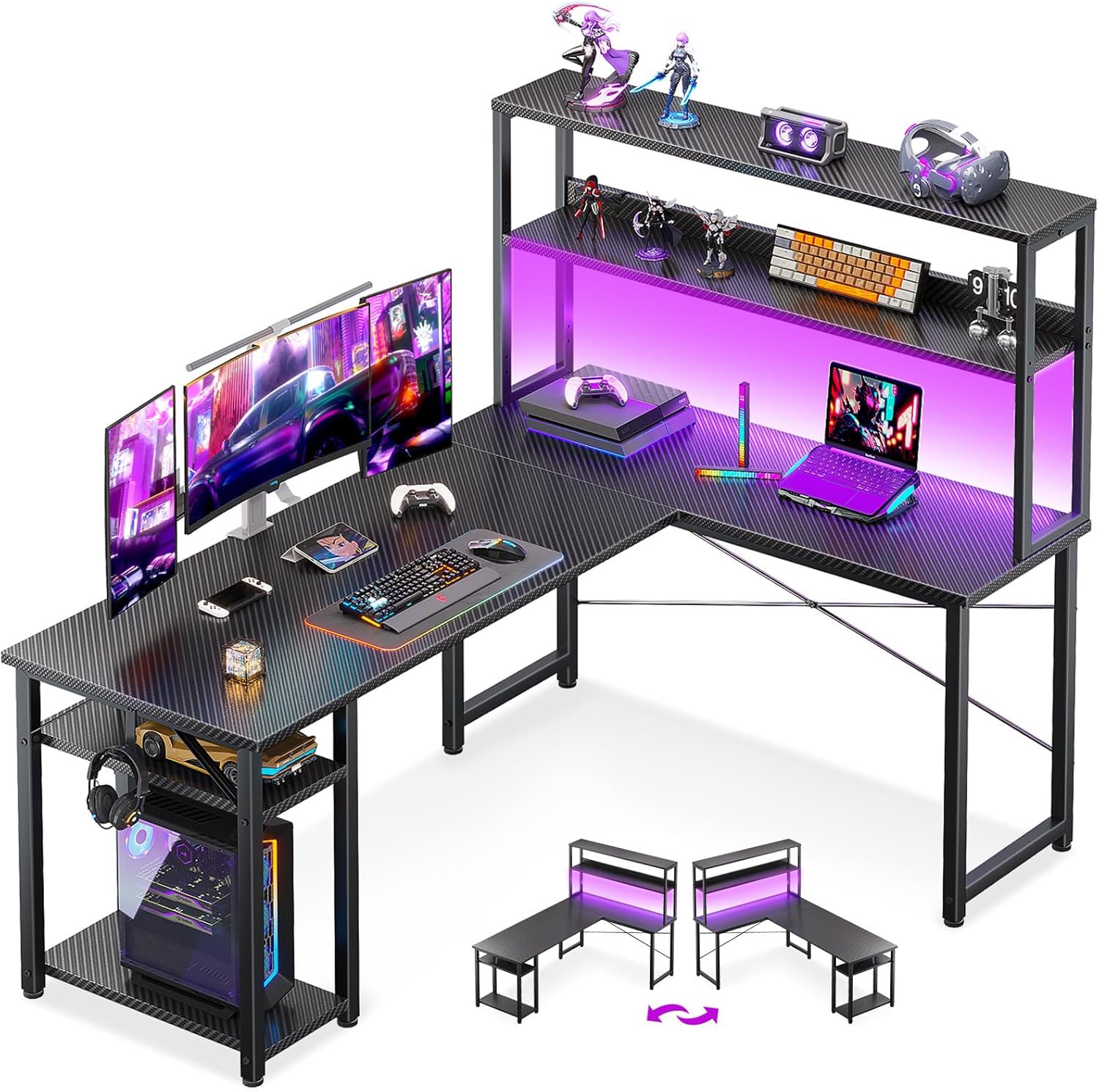
- Dimensions of 39.37"D x 53.15"W x 29.9"H engineered for optimal spatial fitting
Cons
- Requires verifying placement clearance for 39.37"D x 53.15"W x 29.9"H prior to installation

Pros
- Workstation surface measures 53 inches wide by 18.9 inches deep at 29.8 inches tall, rated to hold up to 300 pounds
- Built-in power strip adds 3 AC outlets and 2 USB ports directly on the desk for centralized charging
- RGB LED strip offers 10 color presets, 8 brightness levels and 10 dynamic modes with a memory function
- X-shaped steel frame construction adds stability for dual-monitor or multi-display setups
- Reversible left/right side modules let the L-shape orientation match either side of a room
Cons
- Assembly takes an estimated 50 to 70 minutes even with included tools and labeled parts, and is easier with two people when flipping the desk upright
- Corner L-shape footprint needs more floor space than a straight desk, so it will not fit tight rooms as easily
The main workstation area measures 53 inches wide by 18.9 inches deep at a 29.8-inch working height, rated to support up to 300 pounds across the desktop. Built-in power comes from 3 AC outlets and 2 USB ports mounted on the desk itself, along with cable management channels to keep cords off the floor during long sessions.
- Dual open shelves, a CPU stand, an accessory hook and a tool bag are included for onboard storage
- RGB LED strip supports 10 color presets, 8 brightness grades and 10 dynamic lighting modes with a memory function
- X-shaped steel frame is designed to add stability under the weight of dual monitors and a desktop tower
The overall L-shape footprint spans 53.15 x 39.37 inches at the base, so it needs a corner or wall space to match.

Pros
- Spacious and Ergonomic Desk 71.5 inch Large gaming table with monitor
- Gamer Desk with Power Outlet l shaped desk is equipped with 4
- AC power outlet 120V 12A
- USB port 5V 2.2A
- Computer Desk with LED Light This big black desk has an RGB light strip
Cons
- Requires checking room layout clearance for 19.7"D x 71.5"W x 35.8"H dimensions
- Requires periodic vacuuming and fabric care for Stainless Steel

Pros
- Physical footprint measures 47.2"D x 18.9"W x 35.5"H for spatial placement
Cons
- Spacious wall or desk clearance needed for Furologee 47 Gaming De
- Careful cable routing recommended for Furologee 47 Gaming De wall mounting

Pros
- Alloy steel R-frame carries a stated 150 lb across the 47-inch top, enough for a mid-tower plus two 24-inch panels
- Four leg pads screw down individually, so the frame stops rocking on carpet or uneven floorboards
- Two grommet holes and a clip-on cable box drop power leads straight to the floor
- Cup holder and headphone hook hang off the frame edge, keeping the shallow 23.45-inch depth clear
- Carbon fibre textured laminate hides fingerprints far better than a gloss black surface
Cons
- Fixed 29.55-inch height with no sit-stand adjustment beyond the levelling pads
- 23.45-inch depth is shallow, so a deep monitor stand pushes the screen close to your face
- MDF core beneath the laminate swells permanently if a spill is left standing
The surface measures 47 inches wide by 23.45 inches deep and sits at a fixed 29.55 inches high, which lines up with standard task chairs rather than drafting stools. The steel frame is quoted at a 150 lb load, so a mid-tower, two 24-inch panels and a laptop dock stay comfortably inside the limit.
- The curved front edge pulls the keyboard zone closer to the body than a straight-edged slab
- 23.45 inches of depth suits a single monitor arm better than a wide twin-screen stand
- The levelling pads take up a few millimetres of floor variation each
Measure the alcove first. The frame is rigid, so nothing can be trimmed down to fit a tight recess.
What makes a great desktop gaming desk
A gaming desk is a workstation tuned for long sessions and heavy gear. It holds monitors at eye level, keeps your mouse arm supported, and hides the cable mess most rigs create. The category ranges from compact 44-inch rectangles to sprawling 78-inch L-shaped corners.
Three things separate a keeper from a wobbler: frame rigidity, usable surface depth, and smart storage. A steel frame with adjustable leg pads stops the sway that ruins aim during a firefight. Depth matters too, since a shallow top forces your monitor too close to your eyes.
Surface material and finish
Most desks in this list use a carbon-fiber-textured laminate over particleboard. It resists scratches, wipes clean, and gives mouse feet a smooth glide even without a pad. Matte black hides fingerprints better than gloss, though the BestOffice red top adds personality if you want color.
Frame and stability
Look for a full steel frame, cross-bracing, and leveling feet. The EUREKA ERGONOMIC 60-inch uses polygon-shaped legs that widen the footprint for extra stability under heavy monitors. Skip anything with thin tubular legs if you plan to mount a monitor arm.
How to choose the best desktop gaming desks for your space
Start with your room, not the desk. Measure the wall or corner where the desk will live, then subtract clearance for your chair to recline. A desk that looks perfect online can swallow a small bedroom in person.
Match the shape to your room
Rectangular desks suit tight walls and renters who move often. L-shaped models exploit a corner and give you a second wing for a stream deck, laptop, or notebook. If a corner setup appeals to you, our guide to the best corner desks for gaming breaks down clearance and monitor placement in detail.
Plan for monitors and peripherals
Single-monitor players do fine on a 44-to-47-inch top. Dual or ultrawide setups want 60 inches or more, and a raised hutch keeps speakers and figures off the main deck. The SEDETA 78.8-inch adds a full storage hutch, so it doubles as a display shelf for a growing collection.
Set a realistic budget
You can land a solid desk between $55 and $160. Spending more mostly buys size, thicker steel, and built-in power. If you want to compare feature-rich picks without overspending, our roundup of the best gaming desks under $200 stays inside that sweet spot.
Top recommendations by use-case
Every player wants something different, so we sorted the standouts by the job they do best. Each pick below scored 4.6 or higher, and we note who should skip it.
Best overall value
The Mr IRONSTONE L-Shaped Desk earns the top spot on sheer track record. With 40910 reviews at a 4.7 rating and a price, it delivers an L-shaped corner, LED strip, cup holder, and headphone hook for the cost of a single AAA release. The monitor stand lifts your panel to a healthier eye line.
The trade-off is depth on the short wing, which suits a laptop more than a second large monitor. Pair it with a monitor arm and it handles most single-screen and dual-screen builds with ease.
Best for built-in power
The Bestier 44-inch Gaming Desk puts outlets right on the desk, so your phone, lamp, and controller charge without a floor snake of cords. With 4-tier reversible shelves and a side storage bag, it packs a lot into a compact rectangle. It is a strong fit for a bedroom or dorm where wall sockets sit out of reach.
Because the footprint is small, competitive players who run triple monitors will feel boxed in. For them, size up.
Best for large and dual-monitor setups
The SEDETA 78.8-inch Desk is the space monster here. Its hutch, monitor stand, and storage shelves swallow two monitors plus speakers and still leave keyboard room. It costs more, but the real estate justifies it for streamers and multitaskers.
You do need a wide wall to fit it, so measure twice. If space is your constraint, drop to a 53-inch corner model instead.
Best premium flat desk
The EUREKA ERGONOMIC 60-inch is a purist’s pick. There is no hutch or LED gimmickry, just a rock-solid 60-inch top on those wide polygon legs. It is built for a monitor arm, a mechanical keyboard, and clean lines.
Bargain hunters will balk at the price. But if you value a stable, uncluttered slab that lasts, it delivers.
Best for RGB lighting
The Bestier 71.5-inch LED Desk leans into ambiance with 20 static and 22 dynamic RGB modes across a 71.5-inch L-shaped carbon-fiber top. Power outlets, a storage rack, and foldable cup and headset hooks round it out. It is the show-off centerpiece of a themed room.
Best ultra-budget desk
The BestOffice 47-inch Desk proves you can start cheap. You get a sturdy steel frame, cup holder, headphone hook, cable holes, and that eye-catching red carbon-fiber texture. Its 4.6 rating across 4403 reviews shows it holds up.
Storage is minimal and there is no LED. First-time builders and kids’ rooms, though, will not find better value.
Your practical buying guide: sizes, specs, and compatibility
Numbers matter more than marketing here. Use these benchmarks to avoid a return.
Sizing and clearance
- Width: 44 inches fits one monitor; 60-plus inches suits dual or ultrawide.
- Depth: aim for 24 inches or more so your screen sits an arm’s length away.
- Height: most fixed desks land near 29 inches, which fits chairs with adjustable seat height.
- Corner wing: confirm the L-shape is reversible if your room layout may change.
Monitor-mount compatibility
If you plan a clamp-style monitor arm, check the rear lip thickness and overhang. Desks with a solid, flat back edge like the EUREKA accept clamps easily. Models with an attached hutch may block the clamp, so plan a desktop stand instead.
Cable management and power
Grommet holes and under-desk trays keep cords invisible and airflow clean. Built-in outlets, found on both Bestier models and the reversible ODK, cut clutter dramatically. A USB-C port, like the one on the Furologee 47-inch, charges a handset or Switch without a wall brick.
Common mistakes to avoid
Even good desks disappoint when you skip the basics. Dodge these traps.
Buying too small
The most common regret is undersizing. A 44-inch top feels roomy until you add speakers, a stream light, and a second panel. When in doubt, size up one tier.
Ignoring the corner fit
L-shaped desks only save space when the corner is truly square and clear of baseboards or radiators. Measure the return wing against your wall before ordering. If corners tempt you, compare layouts in our guide to the best l shaped gaming desks so you pick the right orientation.
Overlooking stability
A flimsy frame is the enemy of accuracy. Prioritize steel legs, cross-bars, and leveling pads over flashy extras. For a deeper look at frame quality across brands, our rundown of the best pc gaming desks weighs weight capacity and sway.
Forgetting assembly effort
Larger L-shaped and hutch models take 45 to 90 minutes to build. Clear a work area, keep the hardware sorted, and use a power screwdriver only on the final snug turn to avoid stripping the board.
Frequently asked questions
How much should I spend on a gaming desk?
Most players are well served between $70 and $160. That range covers L-shaped corners, LED lighting, and built-in power. Spend past $200, like on the EUREKA 60-inch, only when you want a larger, heavier-duty slab for a monitor arm.
Are L-shaped desks better than rectangular ones?
L-shaped desks give you more surface and a natural corner for a second monitor or laptop. They shine in rooms with a free corner. If you sit against a flat wall or move often, a rectangular desk is simpler and easier to place.
Do I need built-in outlets and LED lights?
Outlets are genuinely useful when wall sockets sit far from the desk, cutting cable clutter fast. LED strips are cosmetic, so treat them as a bonus, not a deciding factor. The Bestier models offer both, while the BestOffice keeps costs down by skipping them.
Will these desks fit a triple-monitor setup?
You want 60 inches of width or more for three panels, plus 24 inches of depth for viewing distance. The SEDETA 78.8-inch and EUREKA 60-inch handle it best. Compact 44-to-47-inch desks are better for single or dual screens.
How do I keep cables tidy?
Route cords through grommet holes into an under-desk tray or a stick-on cable channel. Bundle them with reusable ties and leave slack for monitor movement. Desks with a rear shelf, like the ODK L-shaped, hide power bricks out of sight.
The bottom line
The right desk disappears into your setup and lets the game take over. For most players, the ODK 53-inch L-Shaped Desk and the Mr IRONSTONE deliver corner space and extras at a friendly price, while the EUREKA rewards anyone chasing a premium flat slab. Match the size to your room, favor a steel frame, and plan your cables early. Do that, and any pick above will anchor a battlestation you actually enjoy sitting at.


