 Daniel Okafor
Small rooms and dorm corners force tough choices, but the best desks for gaming small setups prove you never have to sacrifice a clean battlestation for square footage. A compact gaming desk squeezes a monitor stand, cable management, and headset hooks into 32 to 44 inches of width. That means your keyboard, mouse, and even a mid-tower PC all fit without crowding your chair. In this guide, you get 10 tested picks ranked by rating, review count, and real-world fit. You also get a plain buying guide covering desk depth, weight limits, and LED wiring. By the end, you will know exactly which small gaming desk matches your space and budget.
Quick answer: For most tight bedrooms and apartments in 2026, our top pick among the best desks for gaming small is the Bestier 44″ Gaming Desk — our #1 rated choice. See the full ranked comparison, alternatives and buying advice below.

Pros
- Dimensions of 43.31"D x 77.95"W x 29.92"H engineered for optimal spatial fitting
Cons
- Requires verifying placement clearance for 43.31"D x 77.95"W x 29.92"H prior to installation
Pros
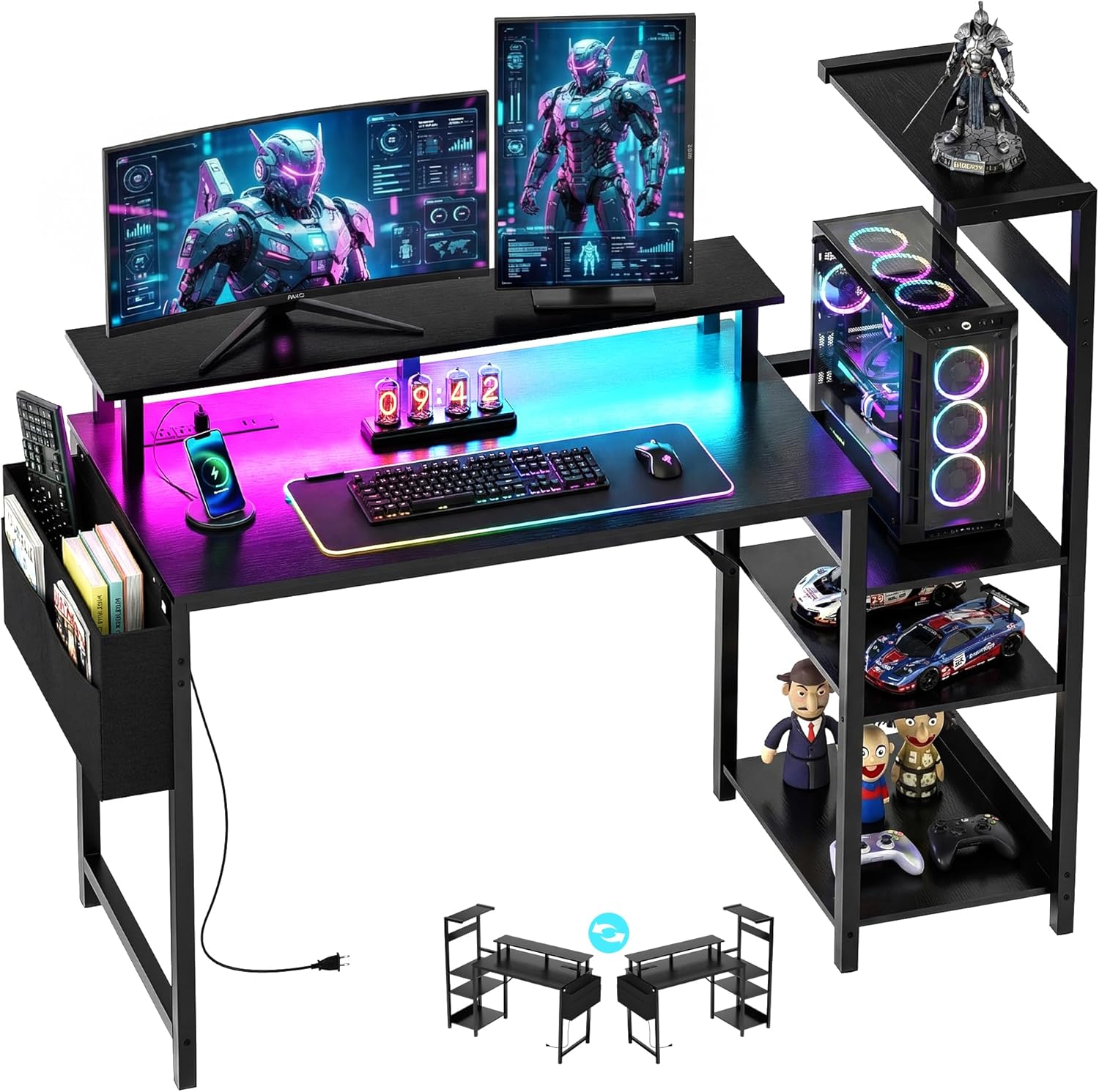
- Space-Saving Multi-Functional Design - Maximize your workspace with
- Reversible Storage Shelves for Flexible Layout - Designed with a
- Ergonomic Monitor Stand for Better Posture - The raised monitor shelf
- Built for Gaming Work Setups - With a sleek black finish and spacious
- Sturdy Structure Easy Assembly - Made with durable engineered wood and
Cons
- Requires checking room layout clearance for 18.9"D x 43.3"W x 45.47"H dimensions

Pros
- Dimensions of 19"D x 40"W x 47"H engineered for optimal spatial fitting
Cons
- Requires verifying placement clearance for 19"D x 40"W x 47"H prior to installation
- Load weight limits should not exceed 165 pounds during active operations

Pros
- Designed with Generous Storage Space Designed with 2 spacious compartments for showcasing for reliable daily operation
- Designed with Modern Gaming Style The small computer desk features a power for reliable daily operation
- Designed with Ergonomic Design for Comfort With a monitor stand the black for reliable daily operation
- Dimensions measure 19.7"D x 39.4"W x 57.1"H for spatial allocation
- Rated load capacity supports up to 55 pounds
Cons
- Requires measuring doorways and room clearance for HOOBRO 39 Small Ga prior to placement

Pros
- 44.3 W x 19.7 D x44.7 H home office desk
- The 4 tier shelf computer table is feature-packed with an LED light
- Left and Right-handed Suitable escritorios de oficina has reversible
- The built-in headphone hanger keeps accessories within reach
- The additional magazine bag is helpful in keeping your laptop desk
Cons
- Requires checking room layout clearance for 19.7"D x 44.3"W x 44.7"H dimensions

Pros
- Workstation surface measures 53 inches wide by 18.9 inches deep at 29.8 inches tall, rated to hold up to 300 pounds
- Built-in power strip adds 3 AC outlets and 2 USB ports directly on the desk for centralized charging
- RGB LED strip offers 10 color presets, 8 brightness levels and 10 dynamic modes with a memory function
- X-shaped steel frame construction adds stability for dual-monitor or multi-display setups
- Reversible left/right side modules let the L-shape orientation match either side of a room
Cons
- Assembly takes an estimated 50 to 70 minutes even with included tools and labeled parts, and is easier with two people when flipping the desk upright
- Corner L-shape footprint needs more floor space than a straight desk, so it will not fit tight rooms as easily
The main workstation area measures 53 inches wide by 18.9 inches deep at a 29.8-inch working height, rated to support up to 300 pounds across the desktop. Built-in power comes from 3 AC outlets and 2 USB ports mounted on the desk itself, along with cable management channels to keep cords off the floor during long sessions.
- Dual open shelves, a CPU stand, an accessory hook and a tool bag are included for onboard storage
- RGB LED strip supports 10 color presets, 8 brightness grades and 10 dynamic lighting modes with a memory function
- X-shaped steel frame is designed to add stability under the weight of dual monitors and a desktop tower
The overall L-shape footprint spans 53.15 x 39.37 inches at the base, so it needs a corner or wall space to match.

Pros
- Physical footprint measures 47.2"D x 18.9"W x 35.5"H for spatial placement
Cons
- Spacious wall or desk clearance needed for Furologee 47 Gaming De
- Careful cable routing recommended for Furologee 47 Gaming De wall mounting

Pros
- Designed with RGB LED strips offer multiple colors modes and brightness levels for reliable daily operation
- Designed with USB ports and power outlets keep your phone headset and for reliable daily operation
- Designed with Features 3 fabric drawers and a top display shelf for for reliable daily operation
- Dimensions measure 18.9"D x 39.4"W x 47.2"H for spatial allocation
Cons
- Requires measuring doorways and room clearance for YOUDENOVA 40 Inch prior to placement

Pros
- 32 in wide by 16 in deep top holds a laptop and a single monitor in a dorm room or bedroom alcove
- Powder-coated alloy steel frame with anti-slip pads under each leg stops it walking on tile or laminate
- 28 in fixed height matches the seat range most task chairs are designed around
- Water-resistant, scratch-resistant surface wipes clean after a knocked-over mug
- Backed by a 5-year limited warranty
Cons
- Fixed 28 in height with no adjustment, so taller users cannot raise it and standing work is out
- 16 in of depth leaves little room in front of a monitor stand for a full-size keyboard
- Manufacturer lists a load capacity around 110 lbs, which rules out a heavy monitor arm plus a tower on the surface
The top measures 32 in wide by 16 in deep and sits at a fixed 28 in height.
- That width takes a laptop and a single monitor, or a 24 in display with a keyboard in front of it
- 16 in of depth is shallow, so a screen on its stand sits close to the eyes unless it goes on an arm
- 28 in matches the standard writing height most task chairs are built around
- The manufacturer lists a load capacity of about 110 lbs, which is ample for a monitor, a laptop and a lamp
It suits a dorm room, a bedroom corner or a landing where a full-size desk simply will not fit. A tower is better placed on the floor beside it than on the surface, both to save space and to stay well inside that load figure.
The proportions decide this one more than anything else does.
- Students and anyone furnishing a small bedroom, where 32 in of wall is all that is spare
- Laptop-first workers who need a surface rather than a workstation
- Secondary duty as a printer table, a hallway console or a craft surface
It is a poor match for a dual-monitor setup, since 32 in of width and 16 in of depth cannot hold two displays and still leave keyboard room, and heavy monitor arms clamp to a shallow edge with limited leverage. Anyone who wants to alternate sitting and standing is also looking at the wrong desk, because the height is fixed with no adjustment at all. For one screen in a tight room, that small footprint is the entire point.

Pros
- Large surface This gaming desk workstation offers huge space for PCS,
- Durable construction The game table is designed for all gamers. The
- Easy maintenance and assembly Thanks to the smooth surface, you can
- Available for multiple occasions We are committed to providing you with
Cons
- Requires checking room layout clearance for 21"D x 39"W x 28"H dimensions
What makes a small gaming desk worth buying
A small gaming desk is any compact workstation built for gaming in under 48 inches of width. The best ones stay narrow but add vertical storage, so you gain shelf space without eating floor space. Look for a raised monitor shelf that lifts your screen to eye level.
Good models also route power and RGB lighting cleanly. Many now ship with built-in outlets, USB ports, and adhesive LED strips. That keeps your cables off the floor and your setup tidy. A carbon-fiber laminate top resists sweat and mouse wear better than plain melamine.
Not every gamer needs storage shelves, though. If you run a single monitor and a laptop, a flat 32-inch top may serve you better than a busy multi-tier frame. Match the desk to your gear, not to the flashiest photo.
Who these desks are for
These picks suit students, renters, and anyone building a corner setup in a shared room. They also work for hybrid workers who game after hours. If you want a sprawling triple-monitor rig, jump to a full-size or L-shaped model instead.
How to choose the best desks for gaming small spaces
Start with a tape measure. Measure your wall width, then leave 6 inches of breathing room on each side for cables and chair movement. A 40-inch desk needs about 52 inches of clear wall to feel comfortable.
Desk width and depth
Width sets how many peripherals fit side by side. A 32-inch top like the SHW Mission holds one monitor and a keyboard, and little else. A 43 to 47-inch top gives room for speakers or a second screen.
Depth matters just as much for eye comfort. Aim for at least 20 inches of depth so your monitor sits far enough back. Shallow 16-inch desks force your eyes too close to the panel.
Weight capacity and stability
Check the rated load before mounting a heavy monitor or CPU. Z-shaped and Y-legged frames like the BestOffice Z-Shaped add lateral bracing that fights wobble. That steel geometry keeps a 27-inch monitor steady during frantic mouse swings.
Particleboard tops flex under sustained weight, so avoid loading a compact desk beyond its spec. If you plan to clamp a monitor arm, confirm the edge is thick enough to grip. Many budget tops measure only 15mm.
Lighting, power, and ports
Built-in LEDs add ambiance without a separate strip purchase. Integrated outlets and a USB-C port, like the one on the Furologee 47″, let you charge a controller at arm’s reach. These extras cost a little more but cut clutter fast.
Best small gaming desks by use case
Each pick below solves a specific problem, so you can self-match quickly. Prices and ratings come straight from current listings.
Best overall for small rooms
The Bestier 44″ Gaming Desk earns the top spot on trust and value. It holds a 4.7 out of 5 stars rating across 2955 reviews, the deepest track record among the true compact models here. It pairs a 3D carbon-fiber top with reversible storage shelves and a side storage bag.
You can flip the shelf tower to either end, which helps in corner layouts. The LED strip and monitor riser round out a complete starter battlestation. It is not for triple-monitor users, but for one screen and a console it nails the brief. Shoppers weighing several compact options should read our roundup of the best small gaming desks for tight bedrooms before deciding.
Best budget pick
The BestOffice 39″ Z-Shaped costs and still carries a 4.6 out of 5 rating from 4403 reviews. Its ergonomic Z-frame and headphone hook cover the essentials. The bold red finish suits gamers who want color without extra spend.
Depth runs shallow, so it fits best against a wall with a single monitor. If you crave storage shelves, look higher up this list. For a first rig on a tight budget, it is hard to beat.
Best for maximum storage in minimal space
The YOUDENOVA 40″ packs 2 drawers, reversible shelves, and a side storage bag into 40 inches. It hides clutter that open frames leave exposed. The wood-grain finish reads calmer than glossy carbon fiber.
Drawers add weight and assembly steps, so skip it if you want the simplest build. But for a bedroom that doubles as an office, the extra compartments earn their keep. It also ships with LED lights and power outlets.
Best compact desk under 40 inches
The HOOBRO 39″ squeezes a monitor stand and a separate CPU stand into a 39-inch footprint. With a 4.8 out of 5 rating, it lifts your tower off the floor and away from dust. That CPU shelf is a genuine space saver in dorms.
It suits small-form-factor and mid-tower builds alike. The all-black finish blends into any room. Just confirm your PC fits the stand’s dimensions before ordering.
Compact L-shaped and corner options
An L-shape turns dead corner space into a wraparound work zone. It gives you more usable surface without pushing the desk further into the room. These models cost more and demand a real corner.
Best corner L-shaped value
The ODK 53″ L-Shaped delivers a full corner setup. It holds a 4.7 out of 5 rating across 879 reviews and adds power outlets, storage shelves, a bag, and an iron hook. The reversible design fits left or right corners.
At 53 inches per side, measure carefully before buying. It rewards gamers who have an empty corner going to waste. If you are comparing wraparound frames, our guide to the best L-shaped gaming desks for corner setups breaks down depth and clearance in detail.
Best large L-shape for growing setups
The BYSAUD 102″ U-Shaped is the big-room outlier. It offers 3 drawers, an LED strip, a power outlet, a monitor stand, a shelf, and a storage bag. The reversible U-shape can wrap around you on three sides.
This is not a truly small desk, so only buy it if your “small room” has one long open wall. For dual or triple monitors, its surface area shines. Beginners with tiny bedrooms should choose a narrower pick.
A practical buying guide for compact battlestations
Assembly time varies widely across these desks. Simple frames like the SHW Mission go together in under 20 minutes. Multi-tier models with drawers can take an hour, so budget your evening accordingly.
Match the finish to your room
Carbon-fiber laminate hides fingerprints and mouse wear on the YOUDENOVA 40″ Carbon Fiber with drawers and shelves. Wood grain suits calmer, work-friendly rooms. Glossy black looks sharp but shows dust fast.
Consider your lighting too. RGB strips pop against dark tops and wash out on pale ones. If aesthetics drive your build, weigh finish before features.
Plan your cable and power routing
Desks with onboard outlets cut the reach to a wall socket. Confirm the plug type and cord length match your room’s layout. A grommet or wire channel keeps your HDMI and power leads from tangling.
USB-A and USB-C ports add convenience for charging peripherals. If your desk lacks them, a clamp-on hub fills the gap cheaply. Either way, tuck a power strip under the top for a clean look.
Stick to your budget bracket
Most compact gaming desks here land between $42 and $96, so you rarely need to overspend. Only the U-shaped BYSAUD crosses into higher territory. For a wider range of price tiers, browse the best gaming desks under $200 to see what extra money buys.
Common mistakes to avoid
The biggest error is buying by width alone and ignoring depth. A wide but shallow desk still crams your eyes against the screen. Always check both dimensions against your monitor’s ideal viewing distance.
Another trap is overloading a lightweight frame. Compact particleboard tops are not rated for heavy monitor arms or three panels. Read the weight spec, and add a monitor arm only if the edge supports a clamp.
Finally, do not forget chair clearance. Storage shelves that hang low can block your knees or armrests. Measure the leg gap, especially on L-shaped and drawer-heavy models, before you commit.
Frequently asked questions
What size desk is best for a small gaming setup?
A 40 to 44-inch width with at least 20 inches of depth fits most single-monitor rigs comfortably. That range holds a keyboard, mouse, and speakers without crowding. For very tight corners, a 32 to 39-inch model like the HOOBRO or SHW Mission works well.
Can a small desk hold a full gaming PC?
Yes, many compact desks include a dedicated CPU stand or lower shelf for a mid-tower. The HOOBRO 39″ lifts your tower off the floor to reduce dust intake. Just confirm the stand’s dimensions match your case before ordering.
Are LED gaming desks worth it?
Built-in LEDs save you from buying and routing a separate strip, and they add ambiance for streaming. Most use a simple remote or inline switch. If you already own RGB lighting, a plainer desk may save you a few dollars.
Is an L-shaped desk good for small rooms?
An L-shape works when you have an empty corner, since it uses otherwise dead space. The ODK 53″ fits reversibly into left or right corners. If you only have one flat wall, a rectangular compact desk suits you better.
How much should I spend on a small gaming desk?
Solid compact desks start near $43 and top out around $96 for feature-rich models. Budget picks like the BestOffice cover the basics, while storage-heavy YOUDENOVA desks cost more. Spend based on how much shelving and how many ports you truly need.
The bottom line
The best desks for gaming small spaces balance a narrow footprint against smart vertical storage and clean power routing. The Bestier 44″ wins on proven reviews and value, while the BestOffice Z-Shaped stretches a tight budget furthest. Measure your wall, weigh your storage needs, and pick the finish that fits your room. With the right compact desk, even a dorm corner becomes a battlestation you are proud to sit at.