 Daniel Okafor
A gaming laptop throws off real heat, so the surface it sits on shapes your comfort, airflow, and posture every session. If you want the best desks for gaming laptops, you need a stable top, smart cable routing, and enough depth for a cooling pad plus a mouse. This guide ranks 10 strong options for 2026, from tight bedroom setups to full L-shaped battlestations. Every desk here holds a 4.7 rating from hundreds or thousands of buyers. Below you will find picks by budget, room size, and workflow, plus a plain buying guide. Read on, then match a desk to your exact space and rig.
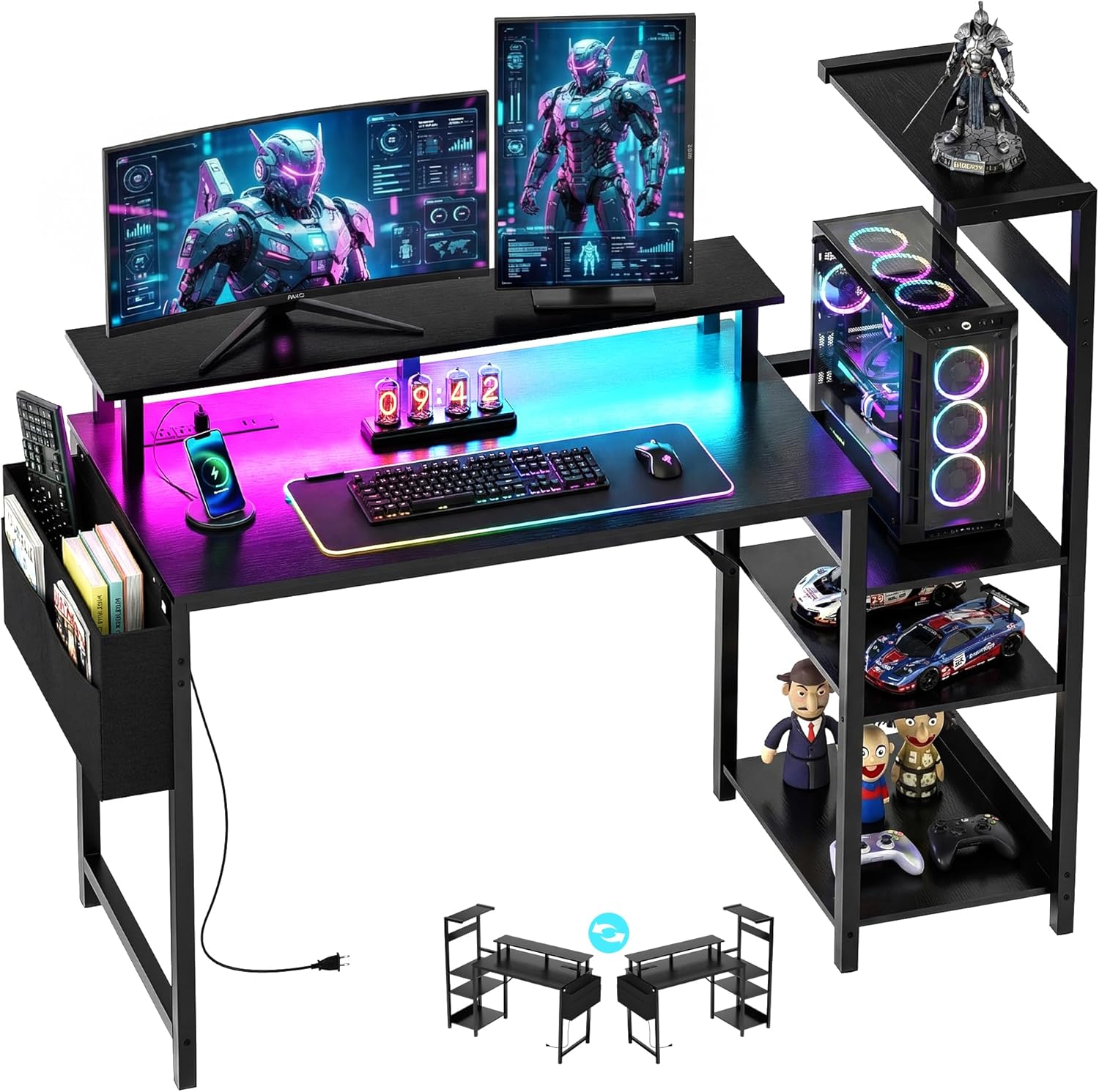
Quick answer: For most players in 2026, our top pick among the best desks for gaming laptops is the Bestier Gaming Desk — our #1 rated choice. See the full ranked comparison, alternatives and buying advice below.

Pros
- Built-in strip carries 4 AC outlets at 120V and 12A plus 2 USB-A ports at 5V 2.2A
- Rated for a 1500W total load, enough for a tower, a monitor and peripherals from one wall plug
- Shelf tower mounts on the left or the right, so the desk works in either corner of a room
- Second shelf sets to 3 heights or lifts out entirely to clear a full-tower case or an upright PS5
- Steel frame with an X-crossbar carrying a 100 pound capacity
Cons
- 44 inches wide by 19 inches deep, too tight for two 27-inch monitors side by side
- USB ports are 5V 2.2A Type-A only, with no USB-C and no fast-charge standard
- LED strip runs on its own buttons with 7 colours and 22 modes, but has no app and no sync to other RGB gear
The writing surface measures 44 inches wide by 19 inches deep, with the shelf tower taking overall height to 44 inches. Depth is the number to check before anything else.
- 19 inches deep puts a 27-inch panel closer to the eyes than the usual 24 to 30 inch guideline, so a monitor arm or riser helps a lot
- 100 pound capacity spread across the steel frame and X-crossbar
- Second shelf sets to three heights or comes out completely for tall tower cases
- Headset hook and side bag move gear and cables off the main surface
For a single ultrawide or a pair of 24-inch panels this span works. Two 27-inch monitors will overhang the ends, which is fine visually but leaves no room for a mouse mat at the edges.

Pros
- 60 LARGE GAMING DESKTOP Captain GIP-P60 gaming desk is a extraordinary
- STURDY AND STABLE STRUCTURE Captain GIP-P60 gaming desk s support
- EXCLUSIVELY AND FULLY COVERED MOUSE PAD FOR FREE Captain GIP-P60 gaming
- EUREKA GAMING OFFERS YOU FREE ACCESSORY OPTIONS All come together with
- CUSTOMER SERVICE We hold our products to a high standard and hope you
Cons
- Requires checking room layout clearance for 27.56"D x 60"W x 30.12"H dimensions
- Requires periodic vacuuming and fabric care for Carbon Fiber

Pros
- Reversible frame converts between a 67-inch corner desk and a 94.5-inch straight desk, so the same unit adapts to different room layouts
- Built-in charging station adds 4 AC outlets and 2 USB ports for up to 6 devices without an extra power strip
- Top hutch, pegboard, and 2-tier storage shelves keep monitors, files, and accessories off the main desktop
- Keyboard tray sits below desk height, freeing the desktop surface for a mouse, notebook, or second monitor
- Frame is rated to hold 2 desktop computers and 1 notebook computer plus up to 3 monitors
Cons
- Engineered wood construction is lighter-duty than a solid wood or steel-frame desk, so very heavy CPU towers need to sit on the included stand rather than directly on the surface
- LED lighting strip and charging station both depend on the desk being plugged into a wall outlet, so it offers no backup power if power is cut
The desk measures 19.7"D x 67"W x 57"H in its L-shaped corner configuration, and the frame reverses to a 94.5-inch straight desk when the top hutch is moved to the opposite side. The extended length is built to hold up to 3 monitors across the surface alongside a CPU stand and two-tier storage shelves.
- 67-inch corner layout tucks into a room corner for a compact home office footprint
- 94.5-inch straight layout suits two people working side by side without interference
- Frame supports 2 desktop computers and 1 notebook computer at once
Because the same hardware converts between both layouts, the desk can move with a room redesign or a switch from single-person to shared use without buying a second piece of furniture.

Pros
- 300 lb weight capacity metal frame handles dual towers and monitors
- 55" x 21.6" desktop, large enough for two full computer setups side by side
- Two open storage shelves plus a top hutch keep consoles and speakers off the desktop
- RGB LED strip syncs to music with an adjustable-sensitivity mic, over 60,000 colours via app
- Built-in CPU holder and monitor stand free up desk surface for keyboard and mouse
Cons
- 78.8" width needs a dedicated wall run, not suited to small bedrooms
- LED strip depends on a companion app and Bluetooth pairing, no physical remote mentioned
- Metal frame with hutch and shelves means a longer bolt-together assembly than a basic table
This desk measures 78.8"W x 21.6"D x 60"H, giving it enough footprint for a triple-monitor arrangement or two workstations sharing the surface. The metal frame is rated to hold 300 pounds, which covers a full tower PC, two monitors on stands, and typical desktop accessories without flexing.
- Desktop area: 55"L x 21.6"W for keyboard, mouse and paperwork
- Two lower storage shelves for CPU towers, consoles or speakers
- Top hutch shelf for books, figures or plants
- Built-in monitor stand raises screens above desk clutter
The dimensions suit a dedicated office or gaming room rather than a shared or compact bedroom corner.
This desk fits gamers and remote workers who want a single station that also stores hardware. The 300 lb capacity and dual shelving make it practical for anyone running two PCs, streaming equipment, or console peripherals that would otherwise clutter the floor.
- Suited to dedicated gaming rooms or home offices with wall space for a 78.8" run
- Good for users who want LED ambiance synced to games or music
- Storage shelves help households consolidating a PC and console setup on one desk
It is less practical for small apartments or shared bedrooms where a 78.8" wide footprint will not fit comfortably against available wall space.

Pros
- Rated to hold 300 lbs across the desktop, enough for two desktop towers plus monitors
- 58-inch desktop width fits dual-monitor and multi-PC setups without crowding
- 7-tier open shelving plus a glass storage cabinet on the attached hutch adds vertical storage beyond desk surface
- Reversible frame lets the L-shape be installed left or right-facing depending on room layout
- RGB LED strip offers over 60,000 colors and 29 modes, including music-sync via a built-in microphone
Cons
- 61-inch overall height plus the hutch shelving takes up more wall space than a standard desk, so low-ceiling or slanted-wall rooms may not fit it
- Particle board desktop surface is less scratch- and moisture-resistant over years of use than solid wood or laminate-coated MDF
- LED strip requires its own app pairing and remote, adding another accessory to manage alongside desk assembly
The desktop measures 58 inches long by 21.6 inches wide with an overall footprint of 21.6 inches deep by 58 inches wide by 61 inches tall once the shelving hutch is included, and the desk surface is rated to hold 300 lbs, enough for two desktop towers, dual monitors and typical desk accessories at once. The attached hutch adds 7 tiers of open shelving plus a glass storage cabinet, giving vertical storage for books, a printer or collectibles without taking up desktop space. Being an L-shaped design, it needs a corner placement rather than a flat wall run to use the footprint efficiently.

Pros
- 150 lb weight capacity across the desktop surface supports multiple monitors and equipment at once
- Built-in LED lighting offers 10 colors and 10 modes, with a memory function that restores the last setting on power-up
- 3 standard outlets plus 2 USB ports are built into the desk for charging and power without extra cords crossing the floor
- Reversible design lets the L-shape be configured for either a left or right corner setup
Cons
- MDF board construction is less impact-resistant than solid wood, especially at drilled connection points
- Assembly is required, with a metal frame and multiple storage sections to fit together
- 66.14-inch width needs a genuine corner space; it will not fit a straight-wall single-desk layout without waste
This L-shaped desk measures roughly 66.14 inches wide, 18.9 inches deep and 34.92 inches tall overall, with a 150 lb weight capacity across the surface and a main desktop section running 36 inches long, longer than the roughly 26-inch main sections found on many comparable L-desks. The larger main surface leaves room for a wide multi-monitor setup without crowding a keyboard and mouse into a narrow strip.
- 150 lb capacity accommodates monitors, a tower, and peripherals together
- 36-inch main desktop section outsizes the roughly 26-inch sections on similar desks
- Full monitor stand raises screens for improved sightlines without a separate monitor arm
Because the desk spans over 66 inches in an L configuration, it needs a genuine corner in the room rather than fitting flush against a single flat wall.
Pros
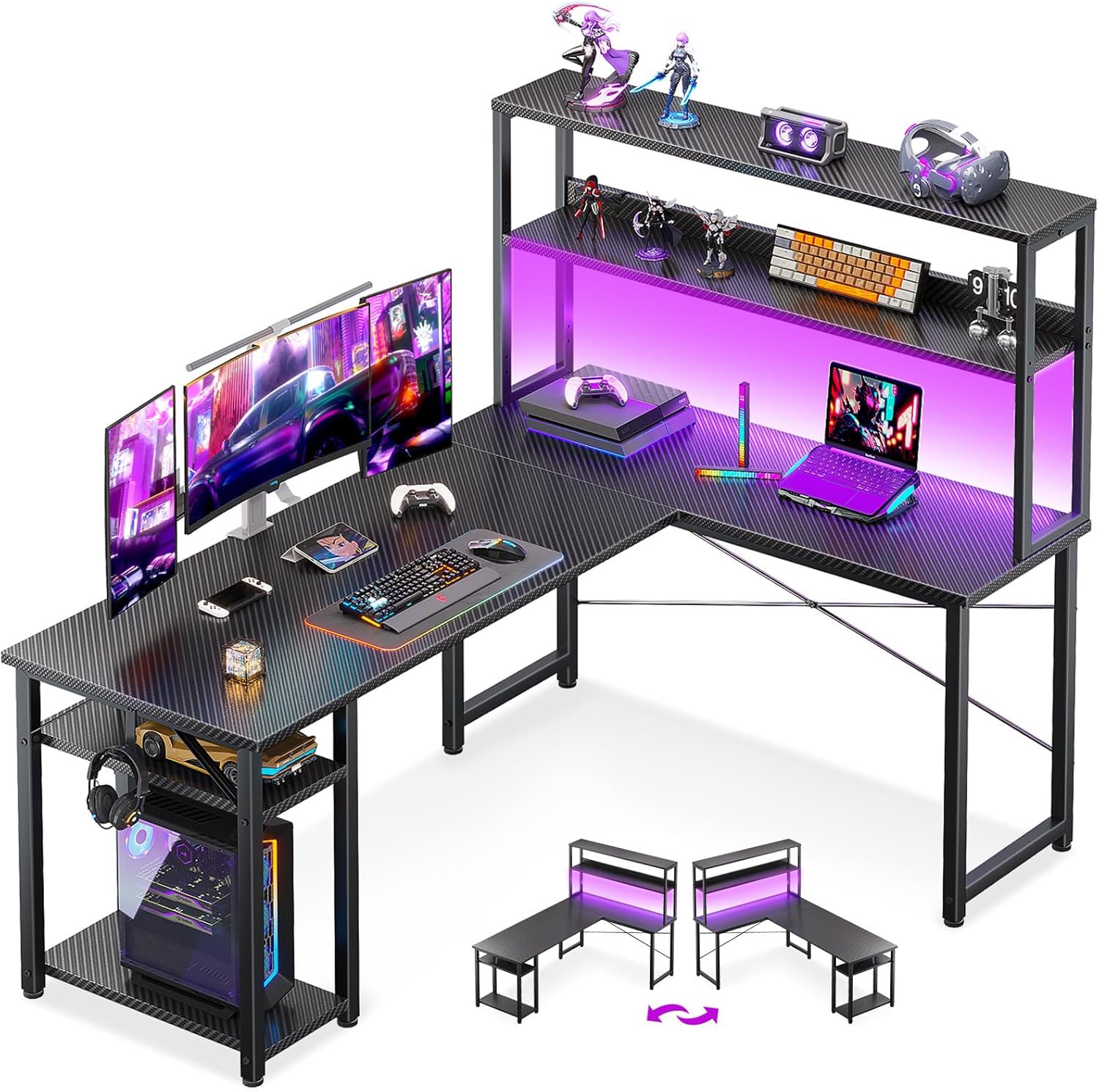
- Dimensions of 39.37"D x 53.15"W x 29.9"H engineered for optimal spatial fitting
Cons
- Requires verifying placement clearance for 39.37"D x 53.15"W x 29.9"H prior to installation

Pros
- Workstation surface measures 53 inches wide by 18.9 inches deep at 29.8 inches tall, rated to hold up to 300 pounds
- Built-in power strip adds 3 AC outlets and 2 USB ports directly on the desk for centralized charging
- RGB LED strip offers 10 color presets, 8 brightness levels and 10 dynamic modes with a memory function
- X-shaped steel frame construction adds stability for dual-monitor or multi-display setups
- Reversible left/right side modules let the L-shape orientation match either side of a room
Cons
- Assembly takes an estimated 50 to 70 minutes even with included tools and labeled parts, and is easier with two people when flipping the desk upright
- Corner L-shape footprint needs more floor space than a straight desk, so it will not fit tight rooms as easily
The main workstation area measures 53 inches wide by 18.9 inches deep at a 29.8-inch working height, rated to support up to 300 pounds across the desktop. Built-in power comes from 3 AC outlets and 2 USB ports mounted on the desk itself, along with cable management channels to keep cords off the floor during long sessions.
- Dual open shelves, a CPU stand, an accessory hook and a tool bag are included for onboard storage
- RGB LED strip supports 10 color presets, 8 brightness grades and 10 dynamic lighting modes with a memory function
- X-shaped steel frame is designed to add stability under the weight of dual monitors and a desktop tower
The overall L-shape footprint spans 53.15 x 39.37 inches at the base, so it needs a corner or wall space to match.

Pros
- Reversible design converts between a 62.2-inch L-shaped corner desk or an 86.6-inch straight two-person desk
- Built-in charging station with 4 outlets and 2 USB ports powers up to 6 devices at once from the desk itself
- Top hutch, 2 fabric drawers, and a storage cabinet door give multiple dedicated storage zones without separate furniture
- Desktop is made from FSC certified wood, supporting responsibly sourced material sourcing
Cons
- Metal frame construction with a large 62.2 to 86.6 inch footprint needs a sizable room to accommodate either configuration
- Charging station relies on the desk's own power switch, so devices lose power entirely when it is switched off
- Fabric drawers are less durable under heavy repeated use than solid wood or metal drawer boxes
This desk measures 18.9 inches deep by 62.2 inches wide by 65 inches tall in its L-shaped corner configuration, and can be reconfigured into an 86.6-inch straight desk for two people working side by side. The top hutch can be positioned on either the left or right side depending on room layout.
- 2 fabric storage drawers plus 1 storage cabinet door for organization
- Desktop surface made from FSC certified wood
- Metal frame provides the structural support for both configurations
Because the desk reverses between two distinct layouts, measuring your available wall or corner space for both options helps decide which configuration fits best long-term.

Pros
- 70.8-inch width with a 55 x 21.6-inch desktop area holds two full computer setups side by side
- 3-tier storage shelves separate a CPU tower, speakers, and console gear instead of piling them on the desktop
- Built-in RGB LED strip offers over 60,000 colors and 29 modes, including music-reactive sync via a built-in microphone
- Integrated 2-outlet, 2-USB charging station powers up to 4 devices without a separate power strip
- Cup holder and headphone hook keep drinks and headsets off the desk surface during long sessions
Cons
- Weight capacity of 55 lbs on the desktop limits how much monitor and accessory weight can sit on top at once
- RGB lighting requires an app connection to access the full 29 modes, adding a setup step beyond plug-and-play
- 70.8-inch width needs a dedicated wall run, too large for narrow bedrooms or shared desk corners
The desktop spans 70.8 inches wide by 21.6 inches deep, with a listed weight capacity of 55 lbs across the main surface. Three tiered storage shelves sit to the side, sized to hold a CPU tower, speakers, or console hardware separately from the desktop workspace, and the layout is wide enough to fit two complete computer setups.
A built-in monitor shelf raises screens above the main desktop, following ergonomic eye-level positioning without requiring a separate monitor riser purchased on top of the desk itself.
What makes a good desk for a gaming laptop
A gaming laptop is portable, but it still needs a proper base. The chassis vents heat from the sides and rear, so clearance matters. A cramped desk traps warm air and throttles performance.
Depth is the first spec to check. A shallow top forces the screen too close to your eyes. Aim for at least 24 inches so you can add a cooling pad and still reach the keyboard.
Surface texture also counts. A carbon-fiber laminate resists sweat marks and mouse drag. Metal legs with adjustable feet keep the top level on uneven floors and stop the wobble that ruins aim.
Heat, airflow, and elevation
Laptops pull cool air from below. A flat, solid top blocks those intakes. A monitor stand or riser lifts the machine and opens a gap for airflow underneath.
Many gaming desks now include a shelf or hutch. That extra tier lets you raise an external monitor while the laptop breathes below. It is a simple fix that lowers fan noise fast.
How to choose the best desks for gaming laptops
Start with your room. Measure the wall or corner before you fall for a spec sheet. A 78-inch desk looks great online and terrible in a small bedroom.
Next, decide on shape. A straight desk suits a single wall and a minimal kit. An L-shaped desk gives you a second wing for a docking station, drink, or notebook.
Key buying criteria
- Top size: 44 to 60 inches works for one laptop and one monitor.
- Stability: steel frames and cross-bars beat thin tube legs.
- Power: built-in outlets and USB ports cut cord clutter.
- Storage: shelves, hooks, and bags keep the top clear for the mouse.
- Cable management: grommets or trays hide the charger brick.
Weigh price against longevity. A $89 desk that lasts three years is smart value. A flimsy top that sags under a monitor arm is not, no matter the discount.
Top picks by use-case
Best overall and best budget straight desk
The Bestier Gaming Desk earns the top spot with a 4.7 rating from 2955 buyers. You get built-in power outlets, four reversible shelves, and a headset hook. The 44-inch top fits a bedroom while the carbon-fiber finish shrugs off scuffs.
It is not for players who want a huge corner layout. But for a single laptop plus a monitor riser, the value is hard to beat. The side storage bag also swallows chargers and cables.
Best premium build
Spend more and the EUREKA ERGONOMIC Gaming Desk feels like a workstation, not a toy. With a 4.7 rating from 2465 reviews, the 60-inch top and polygon legs stay rock-solid under a heavy monitor arm. Serious streamers who move gear daily will notice the difference.
The trade-off is price and footprint. If you rarely add peripherals, you are paying for headroom you may not use. Casual players should save the cash.
Best for small spaces and corners
Corners are dead space in most rooms. The ODK 53″ L Shaped Desk turns that gap into a full battlestation. It ships with a hutch, headphone hook, and storage shelves, all at a 4.7 rating.
Corner setups keep the screen at a natural viewing angle and free your walls. If you are weighing this style, our guide to the best corner desks for gaming breaks down clearance and reach in detail.
Best L-shaped desk with power built in
The ODK 66″ L Shaped Desk pairs a carbon-fiber texture with an integrated power outlet and LED lights. The reversible design fits either side of a room, and 960 reviewers back the 4.7 score. It suits a laptop plus a second display and a console.
L-shaped layouts shine when you multitask across work and play. For a wider field of choices, compare models in our roundup of the best l shaped gaming desks before you commit.
Best large desk for a full setup
If you run a laptop, a big monitor, and speakers, go wide. The SEDETA 78.8″ Gaming Desk gives you a hutch, storage shelves, and a monitor stand. At a 4.7 rating, it anchors a dedicated game room without cramping your peripherals.
This desk is overkill for a dorm or narrow office. Measure twice, since 78.8 inches dominates most walls. But for a living-room command center, the space pays off.
Best storage-focused desk
Cable chaos kills the look of any rig. The SEDETA L Shaped Desk in grey adds fabric drawers, a hutch, and a power outlet. The soft-tone finish blends into a bedroom better than gloss black.
Drawers hide the charger brick, spare batteries, and a cooling pad when you are done. That tidiness matters when a laptop desk doubles as a work-from-home surface.
Best budget L-shaped option
The SEDETA L Shaped Gaming Desk proves a corner rig need not cost much. You get a power outlet, a pegboard, a keyboard tray, and LED lights. It carries a 4.7 rating across 1262 reviews.
The pegboard is the standout, holding headsets, cables, and controllers off the top. If you love vertical storage, this desk keeps your surface clear for aim-heavy games.
Practical buying guide: sizes, specs, and compatibility
Match the top length to your gear count. A single laptop needs 40 inches minimum. Add an external monitor and you want 55 to 60 inches for elbow room.
Check the weight rating before you mount an arm or a heavy 27-inch panel. Most desks here hold a laptop, a monitor, and speakers with ease. Still, confirm the number if you stack two displays.
Height, posture, and legroom
Standard desk height sits near 29 to 30 inches. That works for most adults in a gaming chair. If you type for hours, a pull-out keyboard tray keeps your wrists neutral and comfortable.
Leave knee clearance under the top. Bulky storage cabinets can steal legroom on smaller desks. Test the fit against your chair height before buying.
Cooling accessories and the laptop itself
A cooling pad adds roughly an inch of height and needs USB power. Plan for that when you pick a desk with built-in outlets. A monitor stand also creates the gap your fans crave.
Keep the charger brick off the floor with a cable tray. Heat and dust shorten a brick’s life. A shelf or hook near the outlet solves both problems.
Common mistakes to avoid
The biggest error is buying purely on top length. A long desk on weak legs still wobbles under mouse pressure. Prioritize a steel frame over a few extra inches.
Another slip is ignoring airflow. Players set the laptop flat against a hutch and wonder why fans scream. Always leave a breathing gap behind and below the machine.
Do not overlook cable routing either. A desk with no grommets forces cords across the top. That mess drags your mouse and looks cluttered on camera.
Finally, avoid overspending for features you skip. If you never add a docking station, a $240 workstation is wasted budget. Shoppers on a tight limit can browse the best gaming desks under $100 to find a sturdy, no-frills top. Those who want deeper spec comparisons should also see the best pc gaming desks for cross-shopping.
Frequently asked questions
Do I need a special desk for a gaming laptop?
You do not need a laptop-only desk, but airflow and depth matter more than with a tower. Look for at least 24 inches of depth and room for a cooling pad. A monitor stand that lifts the laptop also helps fans pull cool air. Any stable gaming desk with those traits will serve you well.
What size desk is best for a gaming laptop?
A 44 to 60-inch top suits most single-laptop setups. Go to 60 inches or an L-shape if you add an external monitor. For a full room with speakers and a console, a 70 to 78-inch desk gives breathing room. Always measure your wall or corner first.
Should I get a straight or L-shaped desk?
Choose a straight desk for a single wall and a minimal kit. Pick an L-shape when you multitask across work and play or want a corner. L-shaped models add a second wing for a dock, drink, or notes. The right shape depends on your room, not on trends.
Are desks with built-in power outlets worth it?
Yes, for a laptop setup they cut clutter noticeably. You plug the charger, a cooling pad, and a monitor into one hub. Several picks here, like the Bestier and ODK models, include outlets at no premium. It is a small feature that tidies the whole rig.
How much should I spend on a gaming laptop desk?
A solid, stable desk starts near $89 and covers most needs. Around $120 to $160 buys an L-shape with storage and LED lighting. Only step up to $240 if you need a heavy-duty workstation for daily gear changes. Match the spend to how much you load onto the top.
Final word
The right desk keeps your laptop cool, your posture honest, and your cables hidden. For most players in 2026, the Bestier Gaming Desk blends price, stability, and storage into the smartest all-round pick. If you have a corner to fill or a full room to outfit, the L-shaped and 78.8-inch options scale with you. Measure your space, count your gear, then choose the top that fits both. A good surface pays off every single session.