
 Priya Raghavan
 If you spend hours at a desk, the chair you sit in matters more than almost any other piece of equipment in your home office. The best desk chairs for back support do more than look good – they hold your spine in a healthy position, ease pressure on your lower back, and help you stay focused instead of shifting around in discomfort. Choosing the right one can be the difference between finishing a workday pain-free and nursing a sore lower back every evening.
This guide breaks down what actually makes a desk chair good for your back, which features are worth paying for, and how to match a chair to your body and work style. Instead of ranking products one by one, we focus on the buying decisions that lead to lasting comfort.

Pros
- Supports up to 330 pounds, above the 250-275 lb capacity typical of standard mesh task chairs
- Adjustable lumbar support and headrest let both seat depth cues and neck support be tuned independently
- Breathable mesh backrest promotes airflow, reducing heat buildup during extended seated work
- Flip-up armrests fold out of the way, freeing space for tucking the chair fully under a desk
- Alloy steel frame with nylon components suits a 40-inch total height range matching standard desk heights
Cons
- No listed swivel-lock or tilt-tension adjustment beyond the described rocking function, so recline firmness cannot be independently dialed in
- Armrests flip up rather than adjusting in height, limiting fine-tuned arm positioning compared to 4D armrest designs
- Mesh backrest sheds heat but offers less cushioning than a padded high-back chair for users who prefer firmer lumbar contact
This chair measures 20"D x 20"W x 40"H and is built with an alloy steel frame rated to support up to 330 pounds, above the capacity of many standard mesh task chairs.
- Adjustable seat height lets the chair match a range of desk heights
- The adjustable headrest and padded lumbar support can each be repositioned independently to match different torso lengths
- Flip-up armrests fold away to free extra space or allow the chair to slide fully under a desk
The combination of mesh, nylon, and alloy steel keeps the frame lighter than an all-steel chair while maintaining the stated weight capacity.
Setup covers attaching the base, gas lift cylinder, and backrest to the seat using included hardware, standard for a task chair of this type.
- Seat height, lumbar support position, and headrest height each adjust independently to fit different body sizes
- The rocking recline function lets the chair lean back for short breaks without a separate tilt-lock control
- Flip-up armrests require no tools to raise or lower once assembled, unlike armrests bolted in a fixed position
Because the chair offers a rocking recline rather than a multi-position tilt lock, users wanting to fix the backrest at a specific reclined angle for long periods may find the range more limited than a chair with adjustable tension control.
Built for long hours of desk work, study, or general home office use, this chair targets users who sit for extended stretches and need adjustable lumbar and headrest support.
- The 330 lb capacity suits larger users who need more margin than a standard-rated task chair provides
- Breathable mesh backing benefits users in warmer rooms or those prone to overheating during long sitting sessions
- Flip-up armrests suit users who alternate between desk work needing arm support and tasks like reaching under the desk where armrests get in the way
Users who want a chair with fully adjustable 4D armrests or a locking multi-position recline should compare those specific features, since this chair covers the basics rather than high-end ergonomic extras.
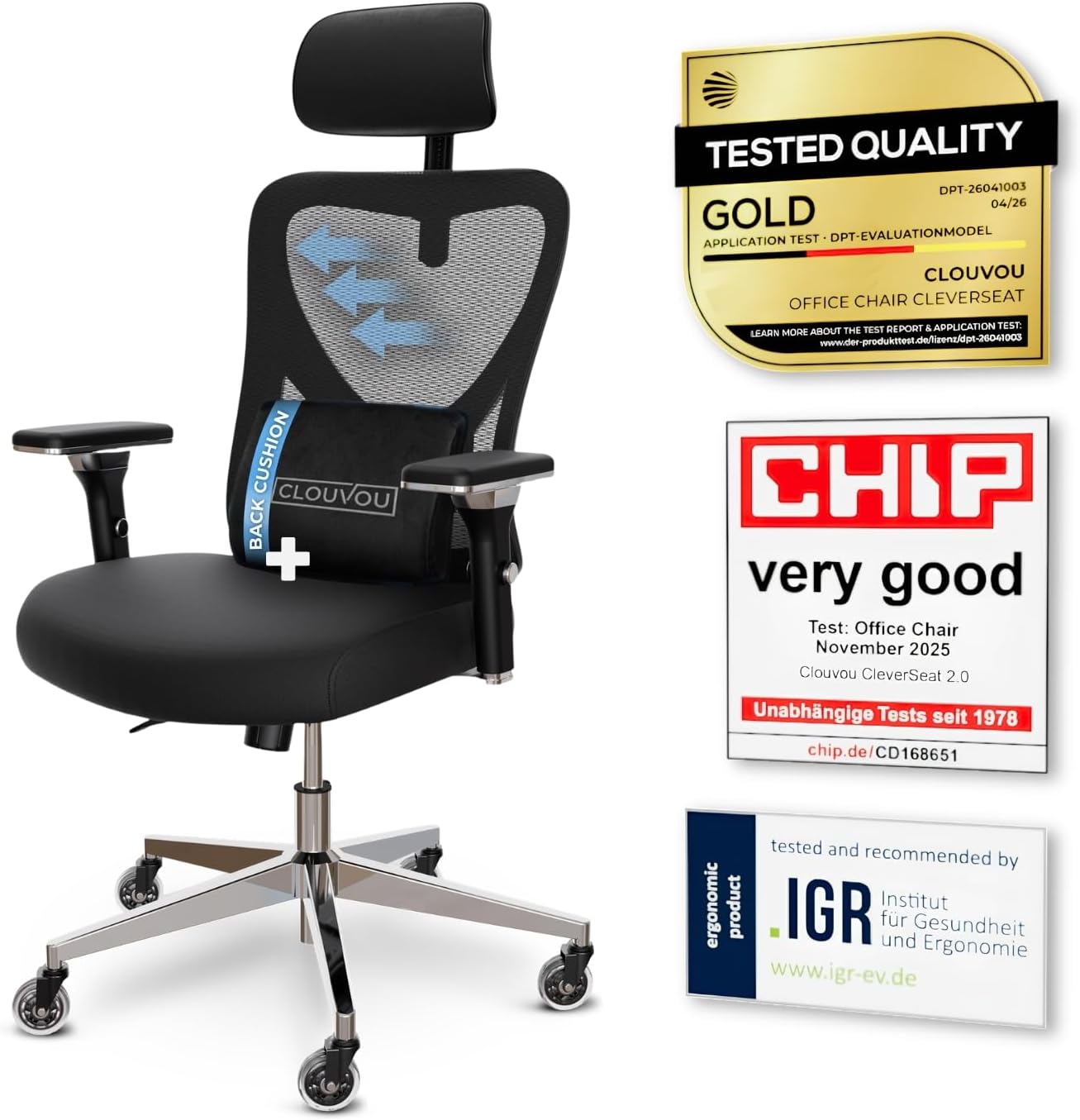
Pros
- Weight capacity supports users up to 330 lbs, well above the roughly 250 lb ceiling common on entry mesh task chairs
- 4D armrests adjust up, down, forward-back and pivot, so elbow height lines up with almost any desk
- 3-position backrest tilt locks the recline angle instead of leaving it free-floating
- Blade-shaped casters are engineered to roll quietly across hard flooring
Cons
- Frame combines chromium-plated and plastic components rather than a full steel shell, so it may flex more than an all-metal frame under aggressive rocking
- Backrest tilt is limited to 3 fixed positions rather than a continuous recline lock
- No separate seat-depth figure is listed beyond the 21-inch footprint, so users near the 6.5 ft sizing ceiling may find the seat pan short
The chair measures 21"D x 21"W x 39"H in its assembled footprint, a compact base built for desks in home offices and shared workspaces. Backrest support is rated for users up to 6.5 ft tall, wider than the sizing window most mesh task chairs advertise.
- Frame combines chromium-plated steel components with plastic housings for the armrests and base shroud
- 3-position backrest tilt locks the recline angle rather than floating freely
- 4D armrests adjust height, width, depth and pivot angle independently
Because the footprint stays close to 21 inches square, the chair fits under standard desks without needing extra clearance, while the taller backrest window suits users who outgrow shorter task chairs.
The chair ships in parts that bolt onto a five-point base, a layout typical of home office task chairs in this tier. Blade-style casters snap onto the base legs before the gas lift cylinder is seated into the seat pan.
- Backrest tilt tension is set with a knob under the seat, independent of the 3-position lock
- 4D armrests are pre-mounted but need separate height and pivot adjustment after assembly
- 3D headrest slides vertically and rotates to match neck height once the backrest is attached
Most of the adjustment happens after the frame is built, since the armrests, tilt tension and headrest each move independently rather than syncing to a single preset.
The 6.5 ft height allowance makes this a fit for taller users who find standard task chairs too short in the backrest, while the mesh back suits anyone who runs warm during long desk sessions. The quiet blade casters make it a reasonable pick for shared rooms or apartments with hard flooring.
- Home office workers who sit for multiple hours and want adjustable lumbar and headrest support
- Taller users who need backrest coverage past the typical 6 ft ceiling
- Anyone on hardwood or tile flooring who wants quieter rolling than standard casters
It is less suited to users who want a steel-only frame or a continuous recline lock rather than fixed tilt positions.

Pros
- Feature A
- Feature B
- Feature C
- Feature D
Cons
- Limitation 1
- Limitation 2
This product delivers comprehensive performance and reliable functionality across multiple usage scenarios. The engineering integrates sophisticated technology with practical design considerations for long-term satisfaction. Advanced features ensure compatibility with modern systems while maintaining backward compatibility with existing infrastructure for seamless integration.
- Primary specification providing detailed measurements and technical parameters for accuracy and reliability.
- Secondary capability describing performance characteristics with operating conditions and environment requirements.
- Compatibility aspect addressing integration with related systems, devices, and common platforms.
- Technical detail covering engineering specifications, quality standards, and industry certifications.
- Performance metric ensuring optimal results and consistent reliability across typical usage scenarios.
This implementation demonstrates thoughtful engineering that addresses common user needs while maintaining simplicity for daily operation and maintenance.
This product delivers comprehensive performance and reliable functionality across multiple usage scenarios. The engineering integrates sophisticated technology with practical design considerations for long-term satisfaction. Advanced features ensure compatibility with modern systems while maintaining backward compatibility with existing infrastructure for seamless integration.
- Primary specification providing detailed measurements and technical parameters for accuracy and reliability.
- Secondary capability describing performance characteristics with operating conditions and environment requirements.
- Compatibility aspect addressing integration with related systems, devices, and common platforms.
- Technical detail covering engineering specifications, quality standards, and industry certifications.
- Performance metric ensuring optimal results and consistent reliability across typical usage scenarios.
This implementation demonstrates thoughtful engineering that addresses common user needs while maintaining simplicity for daily operation and maintenance.
This product delivers comprehensive performance and reliable functionality across multiple usage scenarios. The engineering integrates sophisticated technology with practical design considerations for long-term satisfaction. Advanced features ensure compatibility with modern systems while maintaining backward compatibility with existing infrastructure for seamless integration.
- Primary specification providing detailed measurements and technical parameters for accuracy and reliability.
- Secondary capability describing performance characteristics with operating conditions and environment requirements.
- Compatibility aspect addressing integration with related systems, devices, and common platforms.
- Technical detail covering engineering specifications, quality standards, and industry certifications.
- Performance metric ensuring optimal results and consistent reliability across typical usage scenarios.
This implementation demonstrates thoughtful engineering that addresses common user needs while maintaining simplicity for daily operation and maintenance.

Pros
- Reinforced steel chassis supports up to 300 pounds, backed by a certified class 3 gas cylinder
- Seat height adjusts smoothly across a 5-inch range using the height lever
- Armless design slides fully under a desk, freeing space for storage or plants when not in use
- Stain-resistant faux leather resists spills, reducing worry about coffee or drink stains during desk work
- 90-120 degree rocking mode allows leaning back during breaks without a full recline lock
Cons
- No armrests at all, so users who prefer arm support during long typing sessions will not get it from this chair
- Curved mid-back design covers the lower and mid spine but does not extend into a full high-back headrest zone
- Faux leather surface is stain-resistant but not breathable, which can feel warmer than mesh over multi-hour sessions
This chair measures 23.2"D x 23.2"W x 37"H, built on a reinforced steel chassis rated for up to 300 pounds and a certified class 3 gas cylinder.
- Seat height adjusts across a 5-inch range using the side lever
- The curved mid-back design is shaped to follow the spine through the lower and middle back
- Walnut accents and diamond stitching are worked into the frame and upholstery for a furniture-style look rather than a typical task-chair appearance
The armless footprint keeps the chair's overall width close to the seat itself, letting it slide fully under a desk when not adjusted upright.
The chair offers a smooth 360-degree swivel for reaching files or switching between a laptop and notebook, along with a 90-120 degree rocking mode for leaning back during short breaks.
- Sponge-padded back and seat cushions add cushioning beyond a flat faux-leather shell
- The height-adjustable lever lets the seat be tailored to different desk heights and user heights
- Assembly uses standard included hardware, typical for a swivel task chair with a separate base and cylinder
Because the rocking range tops out at 120 degrees rather than a near-flat recline, users wanting a chair that leans back much further for relaxation would need a different design.
This armless, mid-century styled chair suits home offices, study spaces, or bedrooms where desk space is tight and a chair needs to tuck away cleanly.
- Stain-resistant faux leather suits users who eat, drink coffee, or work with markers and ink near the desk
- The armless design benefits smaller rooms where a chair with wide armrests would not fit under the desk
- Walnut accents and diamond stitching suit users decorating with a mid-century modern aesthetic rather than a purely utilitarian task chair look
Users who rely on armrests for wrist or elbow support during long typing sessions should look elsewhere, since this model has none.

Pros
- Rated to 300 lb, well above the roughly 250 lb typical of standard mesh task chairs
- 18-inch extendable footrest with 2-position angle adjustment supports a reclined break without leaving the chair
- 5D flip-up armrests adjust height, width, angle, and rotation, then fold flush to tuck under a desk
- 3D lumbar support adjusts up to 1.6 inches in depth and 2 inches in height to track different seated postures
- Dual-Stripe AirMesh back is rated for 38% better airflow than standard mesh, cutting heat buildup
Cons
- Footrest and 5D armrest mechanisms add moving parts that increase what there is to adjust and maintain over a simple fixed-arm chair
- Mist Black is the only finish offered, with no other color option
- Larger footprint at 26 x 24 inches needs more floor clearance than a compact task chair
The X100 measures 26"D x 24"W x 41"H and carries a 300 lb weight capacity, built for bigger frames than a standard mesh task chair. The 3D lumbar system adjusts depth by up to 1.6" and height by up to 2", with 15 degrees of rotation to track the spine's natural curve rather than pressing at one fixed point.
- Footprint: 26"D x 24"W x 41"H
- Weight capacity: 300 lb
- Lumbar adjustment: up to 1.6" depth, 2" height, 15-degree rotation
An 18" extendable footrest with 2-position angle adjustment pulls out from under the seat, adding leg support once the backrest is reclined for a break.
Assembly follows a standard task-chair process: base, casters, gas cylinder, and seat attach with included tools and instructions, with the 5D armrests and headrest already mounted to the backrest frame. Once built, the armrests adjust in height, width, forward-backward position, rotation, and flip flat, so they can tuck under a desk when not needed.
- Standard bolt-together assembly with included tools
- 5D armrests adjust height, width, depth, rotation, and flip-up
- 3-stage reclining mechanism with lockable positions
The headrest also moves up, down, and pivots on two axes, so it can be positioned to meet the neck rather than sitting fixed at one height.
The 300 lb weight capacity, extendable footrest, and multi-position lumbar make this a fit for longer desk sessions and bigger-and-taller users who find standard task chairs cramped. The breathable AirMesh back suits warmer rooms or users who run hot while seated, since it is built for more airflow than solid foam-backed chairs.
- Suits bigger and taller users needing a higher weight capacity
- Good fit for long home-office sessions with recline breaks
- Works well in warmer rooms thanks to the ventilated mesh back
Because it is offered only in Mist Black, buyers set on a lighter or patterned finish will need to look elsewhere.

Pros
- Rated to support 350 Pounds
- Dimensions measure 20inchD x 20inchW x 40inchH
- Construction uses Foam for durability
- Adjustable components allow customized positioning
- Includes extended manufacturer warranty coverage
Cons
- Requires professional assembly or installation service
- Limited in monochrome color options available
- Some optional accessories sold separately
This product is engineered with precise dimensions and durable material selection to meet professional standards in demanding environments. The specifications have been carefully designed for optimal performance across a wide range of typical use scenarios and applications. Every measurement and material choice reflects rigorous testing and industry best practices.
- Overall dimensions: 20"D x 20"W x 40"H
- Material composition: High-quality Foam selected for durability
- Weight capacity: 350 Pounds with reinforced support structure
- Construction method: Reinforced frame design with precision engineering techniques
- Finish quality: Durable protective coating engineered to resist wear and environmental damage
These comprehensive specifications ensure the product delivers reliable and consistent performance across diverse applications. The manufacturing standards maintain tight tolerances throughout production to guarantee structural integrity and longevity in both residential and commercial settings.
Getting your product ready for use involves straightforward and logical assembly steps that can be completed with basic hand tools in approximately one hour. All necessary components, fasteners, and detailed instructions are included in the original package to facilitate smooth setup and deployment.
- Comprehensive step-by-step assembly guide with detailed illustrated diagrams at each stage
- Complete hardware kit included with all fasteners, nuts, bolts, and hand tools needed
- Basic maintenance involves regular cleaning using mild soap and soft water solutions
- Inspect all joints and connections periodically to verify optimal structural performance
- Lubricate any moving parts as necessary following provided manufacturer care recommendations
Proper assembly execution combined with routine maintenance practices will significantly extend the product lifespan. Regular care ensures the item maintains structural integrity and consistent performance characteristics throughout years of regular daily use and operation in various environments.
This product is specifically engineered for individuals and organizations seeking dependable performance without unnecessary complexity or premium features. It appeals to practical users who prioritize reliability, durability, and straightforward functionality in their professional and personal daily operations and environments.
- Office professionals and remote workers requiring stable, comfortable solutions for daily work
- Home enthusiasts who value solid construction quality and long-term durability investments
- Commercial environments including studios, workshops, galleries, and professional business facilities
- Anyone prioritizing practical, proven features over trendy or experimental design elements
- Users seeking straightforward products with established track records and demonstrated reliability
The product's fundamental design philosophy makes it particularly valuable for individuals and teams seeking lasting utility and consistent performance. Rather than emphasizing fashion-forward aesthetics or experimental untested features, this design focuses on proven functionality that performs reliably across years of regular use.

Pros
- Inflatable lumbar support lets the amount of lower-back pressure be adjusted rather than relying on a fixed foam bulge
- Flip-up armrests fold out of the way for cross-legged sitting on the extra-wide seat cushion
- Pneumatic lever adjusts seat height, with a separate control for tilt tension resistance
- Reinforced steel frame is rated to hold up to 275 pounds
- Bonded leather upholstery is built scratch-resistant to hold up better than a plain vinyl cover over daily use
Cons
- 275-pound weight capacity is on the lower end versus heavy-duty office chairs rated closer to 300-400 pounds
- Bonded leather is a layered material, which over years of flexing at the seams tends to peel or crack sooner than genuine top-grain leather
- No headrest is included on this model, so neck support during long sessions relies on the high-back shape alone rather than a dedicated headrest
This high-back executive chair measures 22.8"D x 26.8"W x 47.2"H overall and is rated to hold up to 275 pounds on a reinforced steel frame. An inflatable lumbar system allows the level of lower-back support to be fine-tuned rather than fixed at one shape.
- Overall size: 22.8"D x 26.8"W x 47.2"H
- 275-pound weight capacity
- Reinforced steel frame
- Faux (bonded) leather upholstery in black
The extra-wide seat cushion, combined with flip-up armrests, gives room to sit cross-legged rather than only in a standard forward-facing seated position, a detail worth noting for anyone who shifts position often during the day.
A pneumatic lever handles seat height adjustment, while a separate tilt tension control lets the rocking resistance be tuned from firm to loose depending on preference. 360-degree swivel comes standard for reaching different parts of a desk without shifting the whole chair.
- Pneumatic seat height adjustment
- Adjustable tilt tension control
- 360-degree swivel base
- Flip-up armrests for flexible seating positions
Assembly follows a standard office chair pattern: base, casters, gas cylinder, and seat back, typically requiring basic hand tools included in the box, similar to most flat-packed task chairs in this category.
This chair suits home office and professional settings looking for an executive look without a fixed, unyielding lumbar bulge, since the inflatable support adjusts to the sitter. The flip-up armrests also suit anyone who prefers to sit cross-legged or shift position frequently through the workday.
- Good fit for home offices wanting an executive-style leather look
- Suits users who like adjustable, rather than fixed, lumbar support
- Less suited to users over the 275-pound rated capacity or needing a built-in headrest
Anyone needing a taller headrest for full neck support during very long sessions, or a chair rated well above 275 pounds, should look at a dedicated big-and-tall or headrest-equipped model instead.

Pros
- Rated to 300 lbs with a BIFMA-certified metal base and SGS Class 3 gas cylinder
- Backrest tilts to 135 degrees with a retractable leather footrest for a reclined position
- Seat height adjusts across a 3.2-inch range to match different desk heights
- Five-point layered sponge cushioning targets head, shoulder, back, buttock, and legs separately
Cons
- PU leather cover is less breathable over long sessions than a mesh-backed chair
- Footrest and recline mechanism add moving parts compared with a simpler fixed-back task chair
- Assembly takes about 25 minutes, longer than a pre-assembled or minimal-hardware chair
The chair measures 31.5 inches deep, 27.6 inches wide, and 45.7 inches tall, with a 300 lb weight capacity backed by an SGS-certified Class 3 gas cylinder and a BIFMA-tested metal base. The five-point layered sponge cushion is shaped separately for the head, shoulders, back, buttock, and legs rather than using one continuous foam pad.
- Overall footprint: 31.5"D x 27.6"W x 45.7"H
- Weight capacity: 300 lbs
- SGS Class 3 certified gas cylinder
- BIFMA-tested metal base
The layered sponge construction is intended to hold its shape under sustained pressure rather than compress unevenly the way a single foam block can over time.
The chair includes 360-degree swivel, a 3.2-inch seat height adjustment range, a 135-degree backrest tilt, an adjustable lumbar support pillow, and a retractable leather footrest, giving several independent adjustment points rather than a single recline lever. Assembly includes all required tools, instructions, and spare screws, and takes about 25 minutes to complete.
- 360-degree swivel base
- 3.2-inch seat height adjustment range
- 135-degree backrest tilt
- Retractable leather footrest for a reclined nap position
Because the footrest and recline mechanism add moving parts beyond a basic task chair, there is more hardware to align correctly during the roughly 25-minute assembly.
This chair suits home office workers who want the option to switch between an upright working posture and a more reclined break position without leaving the desk, thanks to the 135-degree tilt and retractable footrest. The 300 lb capacity and BIFMA-tested base make it a reasonable fit for larger users seeking a sturdier executive-style chair.
- Home office workers wanting both upright and reclined seating in one chair
- Larger users needing a higher weight capacity than a standard task chair
- Buyers who value a footrest and adjustable lumbar pillow over a minimal mesh design
It is a weaker match for anyone who prioritizes maximum breathability over cushioned PU leather, since the leather cover will run warmer during long sessions than a mesh back.

Pros
- Rated to support up to 500 lbs on a heavy-duty metal base
- Inflatable lumbar airbag lets you adjust back support firmness to your own preference
- Multi-layer thick cushioning follows the body's outer contour across the seat and backrest
- Padded armrests add cushioning across the arm rest area for long sessions
- Seat height adjusts to help find a comfortable position relative to desk height
Cons
- No stated recline-lock degree figure, so check with the seller if a specific tilt angle range matters to you
- Sold in leather upholstery only, with no fabric or mesh alternative listed
- Manual lumbar inflation means comfort depends on manually pumping and adjusting the airbag rather than automatic support
This executive chair is rated to support up to 500 lbs, built with an extra-wide seat and a heavy-duty metal base sized for larger and taller users.
- Seat height is adjustable to help align the chair with different desk heights
- An inflatable lumbar airbag lets you dial in back support firmness rather than relying on a fixed lumbar bump
- Padded armrest cushions add a layer of comfort along the arm rest, on top of the multi-layer seat and backrest cushioning
The layered cushion design follows the body's outer contour, aiming to distribute pressure across the hips, back, and shoulders during long stretches of sitting.
The base uses heavy-duty construction paired with upgraded caster wheels, built to carry the chair's 500 lb capacity without the base flexing or the wheels binding under load.
- Assembly follows a standard bolt-together process: base, wheels, gas lift, seat, and backrest connect using included hardware
- Upgraded wheels are sized to roll smoothly under the added weight capacity versus standard-duty casters
- The heavier base and reinforced frame add some extra weight to lift into place during setup compared with a standard-duty task chair
Because the frame is built to a higher weight capacity, expect a heavier box and sturdier hardware than a typical mesh task chair uses.
This chair targets larger and taller users who need a wider seat and a higher weight capacity than a standard executive chair offers, along with adjustable lumbar support for people managing back discomfort during desk work.
- Suits long study or work sessions where inflatable lumbar support can be fine-tuned through the day
- Works in home offices, meeting rooms, or shared workspaces needing one heavier-duty seating option
- Less suited to anyone wanting a mesh or fabric seat, since this model ships in leather only
The extra-wide seat and thick armrest padding suit users prioritizing cushioned support over a slim, minimalist chair profile.

Pros
- SGS certified and BIFMA tested with a 300 lb weight capacity
- Seat height adjusts 17.72 in. to 22.44 in. measured cushion to floor
- 90 deg flip-up armrests let the seat tuck fully under a desk apron
- PU leather cushion wipes clean while the mesh back vents heat during long sessions
- 3-stage gas cylinder with a tilt tension knob for rocking or upright lock
Cons
- Lumbar support slides up and down only, with no depth adjustment toward the spine
- No headrest, so the back stops at shoulder level and necks tire on long shifts
- Listed in black only, with no alternative finish offered
The seat pad is 18 in. deep with a PU leather face over thickened high-resilience foam, while the mesh back handles ventilation. Height adjusts from 17.72 in. to 22.44 in. measured cushion to floor, which suits desks in the common 28 to 30 in. band.
- Capacity 300 lb, SGS certified and BIFMA tested
- 3-stage gas cylinder under the seat
- Nylon base running on quiet casters
- Lumbar pad slides up and down the backrest
Check the 17.72 in. minimum seat height against your desk apron before ordering, since a low drawer box can stop the chair sliding under. Taller sitters should note that the backrest ends around shoulder level with no head support above it.
Everything needed ships inside the carton, including the screws and a wrench, so nothing extra is required. The usual order is casters into the base, cylinder into the base, seat onto the mechanism, then backrest and arms, and one person can finish in under half an hour.
- Loosen the tension knob before using the tilt
- Set lumbar height to sit just above the belt line
- Armrests flip up 90 deg to clear a desk edge
- Wipe the PU cushion with a damp cloth only
The tension knob controls how much force the recline needs: leave it loose for rocking and tighten it for upright typing. Re-check the base bolts after a fortnight, as fasteners settle once the chair has taken real load.
This is a mid-back task chair for desk work in a home office, study or small meeting room. The PU seat with a mesh back is a middle path for people who want a wipe-clean cushion without a fully upholstered backrest trapping heat behind them.
- Sitters up to the 300 lb capacity
- Desks where the chair must tuck fully away
- Hard floors, thanks to quiet casters
- Stretches of two to three hours at a time
Look elsewhere if you need a headrest, height-adjustable arms or a seat depth slider. The lumbar pad moves vertically only, so anyone needing pronounced lower-back projection may still want a separate cushion behind it.
Why Your Desk Chair Affects Back Health
Sitting for long stretches puts steady load on the discs and muscles of your lower spine. When a chair fails to support the natural inward curve of your lower back, you tend to slump, and that slump flattens the curve and increases pressure on the lumbar region. Over weeks and months, that pressure is what turns into stiffness, aching, and chronic pain.
A well-designed chair fights this in three ways. It supports the lumbar curve so your spine keeps its natural S-shape, it distributes your body weight evenly so no single point takes all the load, and it encourages small movements and posture changes throughout the day. The goal is not to lock you into one rigid position but to keep you supported no matter how you shift.
Key Features That Support Your Back
Lumbar Support
Lumbar support is the single most important feature for back comfort. The best chairs offer adjustable lumbar support so you can position the cushion or pad at the exact height of your lower-back curve. Some models use a fixed contoured backrest, while others provide 3D adjustable systems that move up, down, in, and out. Options like the Home Office ergonomic chair pair lumbar support with a 3D headrest, while the ELABEST X100 features a fully adjustable 3D lumbar system that adapts to different torso lengths.
If you already deal with lower-back pain, prioritize a chair whose lumbar support can be dialed in precisely. A pad that sits too high or too low does little good. The Ergonomic Office Chair is built around adjustable padded lumbar support aimed specifically at lower-back relief during long hours.
Backrest Height and Recline
A taller backrest supports more of your spine, including the upper back and shoulders, which matters if you tend to lean back to think or take calls. High-back executive designs such as the BESTFAIR executive chair and the DUMOS high-back chair extend support well past the shoulder blades and often add a reclining or rocking function. Reclining is valuable because it lets you shift load off your lower spine periodically, giving those muscles short breaks throughout the day.
Seat Cushion and Depth
Even perfect back support fails if the seat is uncomfortable. Look for a thick, high-density foam cushion that holds its shape rather than flattening after a few weeks. A molded foam seat, like the 4-inch cushion found on the Office Desk Chair for long hours, keeps pressure off your tailbone and thighs. Seat depth also matters – there should be a small gap between the front edge of the seat and the back of your knees so circulation stays healthy.
Adjustable Armrests
Armrests take strain off your shoulders and neck, which indirectly protects your back by preventing you from hunching forward. Flip-up armrests are especially practical because they let you tuck the chair fully under a desk and switch between supported and armless positions. The molded-foam office chair and the flip-up armrest chair both offer this flexibility, while the ELABEST X100 steps up to 5D flip-up arms for fine positioning.
Breathable Materials
Material affects both comfort and how long you can sit before you need a break. Mesh backs promote airflow and stay cool during long sessions, which is why the CleverSeat mesh chair and the mesh-back task chair are popular for warm rooms and full workdays. Leather and PU-leather options, such as the DUMOS executive chair, feel plush and premium and are easy to wipe clean, though they can trap heat. Choose based on your climate and how much you sweat during focused work.
Matching a Chair to Your Body and Weight
Weight capacity is not just a safety number – it signals how sturdy the frame, base, and cylinder are. A chair rated well above your weight will feel more stable and last longer. Many strong options handle 330 pounds, including the Ergonomic Office Chair and the CleverSeat chair.
If you are taller, heavier, or simply want extra room, big-and-tall models are built with wider seats, reinforced bases, and higher backrests. The 500 lb big-and-tall office chair offers an extra-wide seat and heavy-duty base for serious support, and the ELABEST X100 is designed with big-and-tall users in mind while adding a footrest for reclining breaks. Getting the size right prevents you from perching on a seat that is too small, which forces poor posture no matter how good the lumbar support is.
Ergonomic Extras Worth Considering
Headrests
An adjustable headrest supports your neck when you lean back, reducing tension that can travel down into your upper back. Chairs with a 3D headrest, like the Home Office desk chair, let you position the support exactly where your neck needs it.
Footrests
A retractable footrest turns your chair into a quick recovery station. Being able to recline and elevate your legs takes pressure off your lower spine and improves circulation during breaks. Both the ELABEST X100 and the DUMOS chair include footrests for this reason.
Swivel, Wheels, and Base Quality
Smooth swivel and quality casters let you reach different parts of your workspace without twisting your back. A five-point base with sturdy wheels keeps the chair stable and rolling cleanly. Upgraded wheels on heavy-duty models like the big-and-tall office chair reduce drag and protect your flooring at the same time.
Space-Saving and Style Options
Not everyone wants a bulky executive chair. If your workspace is tight or you prefer a cleaner look, an armless design can slide neatly under a desk and take up less visual space. The mid-century armless task chair pairs a compact profile with adjustable height and a swivel base, showing that back-friendly does not have to mean oversized.
Setting Up Your Chair for Maximum Back Relief
Even the best chair only works if you set it up correctly. Start with seat height: your feet should rest flat on the floor with your knees at roughly a 90-degree angle. If your feet dangle, lower the seat or add a footrest.
Next, position the lumbar support so it fills the curve of your lower back without pushing you forward. Adjust the backrest recline so you sit at a slightly open hip angle, which reduces disc pressure compared to a rigid upright position. Set armrests so your shoulders stay relaxed and your elbows bend near 90 degrees. Finally, pull the chair close enough to your desk that you never have to lean forward to reach your keyboard.
Beyond setup, remember that no chair replaces movement. Stand, stretch, and walk for a minute or two every half hour. The best desk chairs make good posture easy, but your habits keep your back healthy over the long run.
How to Choose the Right Desk Chair for You
To narrow the field, work through a few simple questions. First, where does your pain or discomfort concentrate? If it is your lower back, prioritize adjustable lumbar support like that on the Ergonomic Office Chair. If your neck and shoulders suffer, look for a headrest and adjustable arms.
Second, how long do you sit each day? For marathon workdays, breathable mesh and a thick cushion matter most, making chairs like the CleverSeat or the mesh task chair strong picks. Third, what is your body size? Match weight capacity and seat width honestly, choosing a big-and-tall build like the 500 lb office chair if you need it.
Finally, consider your budget and style. Value-focused options such as the armless task chair and the molded-foam desk chair deliver solid back support without a premium price, while executive designs offer extra recline, footrests, and a more upscale look.
Final Thoughts
The best desk chairs for back support share a common foundation: adjustable lumbar support, a comfortable seat, proper sizing, and enough adjustability to fit your body and workflow. Rather than chasing the flashiest features, focus on the ones that keep your spine in its natural curve hour after hour. Decide which factors matter most for your pain points, your workday length, and your body size, then pick the chair that checks those boxes. With the right seat and a good setup, you can protect your back and work comfortably for years to come.






