 Sofia Marchetti
 If your lower back aches by mid-afternoon, your chair is one of the first things worth checking. This page is for people with a sore or sensitive back who sit at a desk most of the day and want a chair that supports them instead of fighting them.
No chair treats back pain. What a good chair can do is make it easier to sit in a neutral posture: hips slightly above or level with your knees, feet flat and the natural inward curve of your lower back supported. For that, two features matter most. One is lumbar support you can move to the right spot. The other is a seat that fits, so you can sit all the way back against that support.
How we chose
- Adjustable lumbar support: at least up and down. Depth adjustment, rotation or an inflatable pad counted in a chair’s favor. Chairs with only a fixed curve were dropped.
- Seat depth and height: listed numbers that let you sit back fully with feet on the floor.
- Recline control: lockable angles or tension, so you can change position without losing support.
- Weight rating with headroom above the user’s weight.
- Warranty length, since lumbar mechanisms and gas lifts are wear parts.
Picks are based on manufacturer specs and owner reviews, not hands-on testing. Read how we research products for more.
Quick picks
- Best overall for lower back support: HOLLUDLE V Chair — 3D lumbar that moves up, down, forward, back and rotates, plus a lockable tilt.
- Best value with a headrest: Casasio 2307H — two-direction lumbar, 3D headrest and a 350 lb rating.
- Best for shifting positions: SIHOO B100 — dynamic lumbar plus three lockable recline angles.
- Best lumbar range: ELABEST X100 — lumbar adjusts in height, depth and rotation, with a footrest for breaks.
- Best for shorter thighs: TRALT YX001 — depth-adjustable lumbar and a 17.3-inch seat depth.
- Best simple mesh option: Zeonsit 8188B — adjustable lumbar pad and flip-up arms, 330 lb rating.
- Best for heavier users: Cloomey Big and Tall — inflatable lumbar and a 500 lb rating.

Pros
- Lumbar pad travels up, down, forward and back and rotates, so it meets the curve of your spine rather than approximating it
- Meets BIFMA and EN1335 standards with a steel base tested to 1136 kg and a 35 mm steel tilt mechanism
- 3D armrests change height, slide forward and back and pivot inward for keyboard or controller posture
- Three-level tilt lock plus a 2D headrest that raises and rotates for reclined reading
- SGS-certified gas cylinder and steel-stem castors instead of plastic-stemmed wheels
Cons
- Stands 48.82 in tall at full headrest extension, so it will not tuck under a desk with a low overhead shelf
- Assembly takes 20 to 30 minutes and the back, seat, base and mechanism all arrive as separate pieces
- Mesh seat pan has no fabric or foam alternative, and this listing covers the white and silver finish only
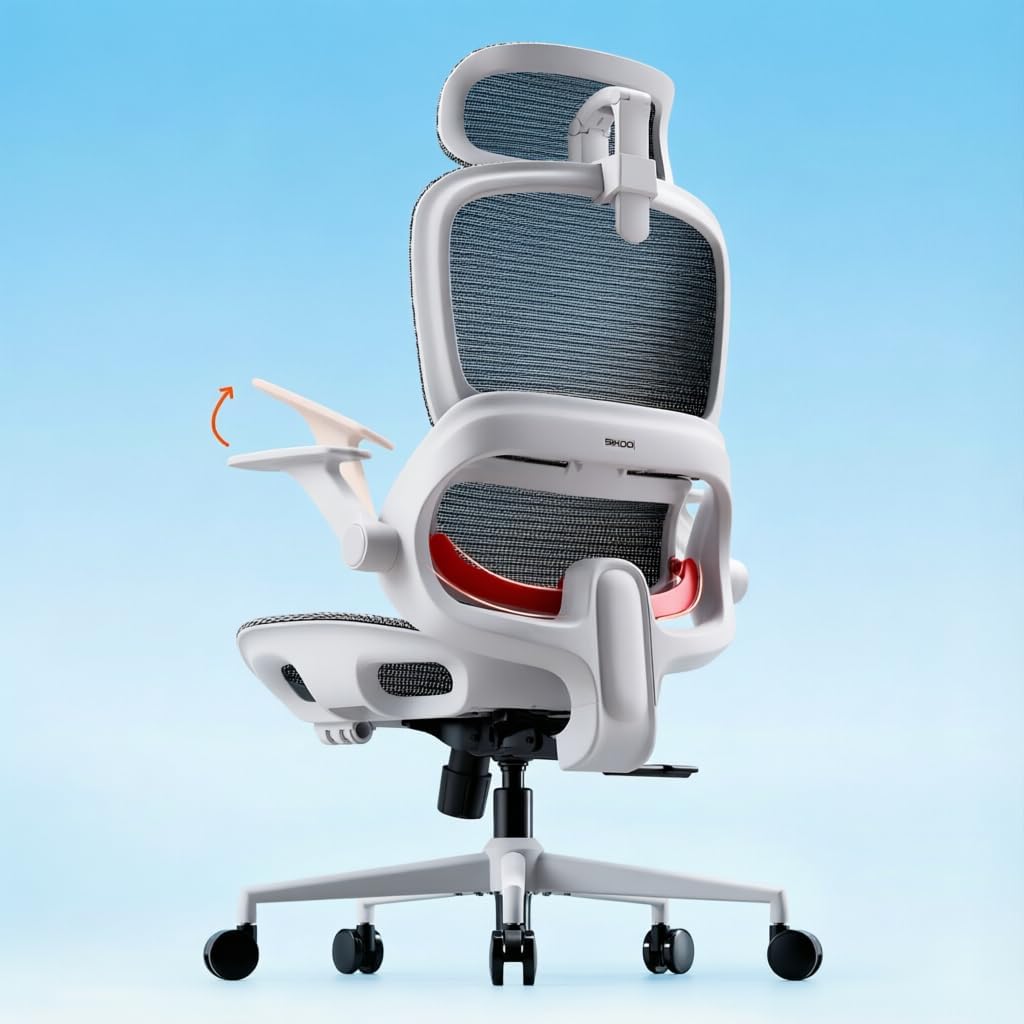
The chair measures 25.98 in deep by 25.98 in wide, standing 48.82 in tall with the headrest at full extension. Construction meets BIFMA and EN1335, the two standards office furniture buyers actually check.
- Steel base tested to a 1136 kg load in the maker's structural test
- 35 mm steel tilt mechanism rather than a plastic housing
- SGS-certified gas cylinder
- Steel-stem castors, which resist splaying under load better than plastic stems
- High-density mesh across seat and back for airflow
That 48.82 in overall height is worth measuring against your room. A desk with a hutch, an overhead shelf or a low window sill behind it may not let the chair tuck fully away. The V-shaped back in white with silver accents is the finish shown here.

Pros
- Adaptive lumbar support follows the spine's curve as you shift between leaning forward and sitting upright
- Seat height adjusts from 18.3" to 21.9", covering a wide range of body heights and desk setups
- Three lockable recline angles at 110°, 125° and 135° let you switch from focused work to a reclined break
- Full-mesh backrest keeps air moving to reduce heat buildup during long afternoons
Cons
- Ships without a footrest, so buyers wanting leg support during recline need to add one separately
- Flip-up armrests adjust vertically but are not detailed as depth or width adjustable
- Grey is the color shown, limiting choice for buyers wanting to match a specific office palette
This chair is built for long desk sessions with adjustment ranges aimed at fitting a variety of body types.
- Seat height adjusts from 18.3" to 21.9", accommodating different desk heights
- Overall footprint of 28.3" D x 27.6" W x 51.6" H
- Weight capacity rated to 300 pounds
- A widened seat cushion spreads weight more evenly across the hips and thighs during long sits
Because the seat height range is fairly wide, most desk heights should be accommodated, though very tall or very short users should double-check the range against their specific desk before ordering.
Getting the chair set up involves standard task chair assembly plus a few adjustment points once built.
- Flip-up armrests move out of the way when not needed, useful for sliding fully under a desk
- Backrest recline locks at 110°, 125° or 135° depending on whether you want upright focus or a relaxed break
- An adjustable headrest supports the neck during typing, calls, or leaning back to think
- The chair ships without a footrest, so that accessory is not included in the box
Because assembly instructions typically ship in the box with labeled hardware, most buyers should expect a single-person build using basic tools.

Pros
- 18-inch extendable footrest with 2-position angle adjustment supports a reclined break without leaving the chair
- 5D flip-up armrests adjust height, width, angle, and rotation, then fold flush to tuck under a desk
- 3D lumbar support adjusts up to 1.6 inches in depth and 2 inches in height to track different seated postures
Cons
- Footrest and 5D armrest mechanisms add moving parts that increase what there is to adjust and maintain over a simple fixed-arm chair
- Mist Black is the only finish offered, with no other color option
- Larger footprint at 26 x 24 inches needs more floor clearance than a compact task chair
The X100 measures 26"D x 24"W x 41"H and carries a 300 lb weight capacity, built for bigger frames than a standard mesh task chair. The 3D lumbar system adjusts depth by up to 1.6" and height by up to 2", with 15 degrees of rotation to track the spine's natural curve rather than pressing at one fixed point.
- Footprint: 26"D x 24"W x 41"H
- Weight capacity: 300 lb
- Lumbar adjustment: up to 1.6" depth, 2" height, 15-degree rotation
An 18" extendable footrest with 2-position angle adjustment pulls out from under the seat, adding leg support once the backrest is reclined for a break.

Pros
- 330 pound capacity carried on a metal-core base rather than plain moulded plastic around the cylinder hub
- Class 3 gas cylinder certified to BIFMA, the specification that addresses slow height sink during use
- Lumbar block adjusts in depth rather than sitting fixed, so the curve can be set to your own spine
- High-resilience moulded foam seat instead of the low-density slab foam that flattens within months
- 21.7 inch deep by 25.7 inch wide footprint at 40 inches tall, which slides under a standard 30 inch desk
Cons
- 40 inch overall height means there is no headrest, so long video calls leave the neck unsupported
- Listed in black only, with no alternative mesh or frame finish in this configuration
- Ships flat, so seat, back, base and cylinder are all assembled at home, typically in about 15 minutes
The load path through a task chair runs seat, cylinder, base, castors, and every one of those is a known failure point on lightweight chairs.
- 330 pound capacity supported by a base with a metal core, which addresses the cracking that appears around the cylinder hub on all-plastic bases
- Class 3 BIFMA-certified gas cylinder, where the class number describes the cylinder specification and Class 3 is the one specified to hold height rather than settle through a working day
- 21.7 inches deep by 25.7 inches wide, 40 inches tall, a footprint that fits a compact home office and rolls under a standard desk
Measure the space behind your desk before ordering. A 25.7 inch width plus room to swivel means about 30 inches of clear floor is needed for the chair to be usable rather than merely to fit.

Pros
- SGS-certified gas lift cylinder drives the height adjustment mechanism
- Flip-up armrests free up desk width when raised out of the way
- Adjustable lumbar pad shifts to follow the spine's curve rather than sitting in one fixed position
Cons
- Recline is a rocking/tilt function only - there is no multi-position lock for a fixed recline angle
- No headrest is included, which matters for anyone leaning back for extended periods
- Frame footprint is 19.6x19.6 inches, a narrower base than some heavy-duty task chairs
This chair is built with a 330 pound weight capacity, above the roughly 250 pound ceiling common on entry-level mesh task chairs. The frame measures 19.6 x 19.6 x 40 inches, with a breathable mesh backrest and a foam-cushioned seat.
- 330 lb rated weight capacity
- Frame materials: alloy steel, foam, mesh and nylon
- SGS-certified gas lift cylinder for height adjustment
The seat height and lumbar pad are both adjustable, letting the chair be tuned to different body sizes within that stated capacity.

Pros
- Rated to support up to 500 lbs on a heavy-duty metal base
- Inflatable lumbar airbag lets you adjust back support firmness to your own preference
- Multi-layer thick cushioning follows the body's outer contour across the seat and backrest
- Padded armrests add cushioning across the arm rest area for long sessions
- Seat height adjusts to help find a comfortable position relative to desk height
Cons
- No stated recline-lock degree figure, so check with the seller if a specific tilt angle range matters to you
- Sold in leather upholstery only, with no fabric or mesh alternative listed
- Manual lumbar inflation means comfort depends on manually pumping and adjusting the airbag rather than automatic support
Comparison
| Chair | Lumbar type | Seat depth | Seat height | Recline | Max weight |
|---|---|---|---|---|---|
| HOLLUDLE V Chair | 3D (up/down, forward/back, rotate) | 17.32″ | Not listed as a range | 3-level lock | Not listed |
| Casasio 2307H | Two-direction cushion | 20″ (listed) | Not listed | Tilt with tension | 350 lb |
| SIHOO B100 | Dynamic, follows your movement | 17.1″ | 18.3″–21.9″ | 110°/125°/135° lock | 300 lb |
| ELABEST X100 | 3D (height, depth, rotation) | 18″ | 18.3″–23″ | 3 positions | 300 lb |
| TRALT YX001 | Depth-adjustable | 17.3″ | 17.7″–21.7″ | Tilt | 330 lb |
| Zeonsit 8188B | Adjustable pad | 20″ (listed) | Not listed | Rocking tilt | 330 lb |
| Cloomey Big and Tall | Inflatable airbag | Not listed | Not listed | Not listed | 500 lb |
The picks in detail
HOLLUDLE V Chair
The HOLLUDLE lumbar pad moves up, down, forward and back, and it rotates. That helps if your sore spot is lower or higher than average. It also has a 2D headrest, 3D armrests and a 3-level tilt lock. Listed seat depth is 17.32 inches, which suits average and shorter legs. The brand says it meets BIFMA and EN1335 standards and offers a 5-year warranty.
Good fit if you have struggled to get a lumbar pad in the right place. Skip it if you need a stated user weight limit; the listing gives a base strength figure, not a seat rating.
Casasio 2307H
A practical choice for a bad back on a mid budget. The lumbar cushion adjusts in two directions, the headrest in height, depth and angle, and tilt tension is adjustable. It is rated for 350 lb and has flip-up arms. The listed seat depth of 20 inches matches the whole chair’s depth, so treat it as approximate.
Good fit if you want both lower back and neck support for under $200. Skip it if you are short and need a shallow seat, or want adjustable armrest height.
SIHOO B100
The B100 uses a dynamic lumbar that the listing says follows your back as you lean forward or sit upright. Some people prefer that to a fixed pad they must reset. The back locks at 110, 125 or 135 degrees, and the headrest adjusts. Seat height runs 18.3 to 21.9 inches, seat depth is 17.1 inches and capacity is 300 lb. SIHOO lists 3 years of free parts replacement. It carries a 4.3 rating over more than 16,000 reviews.
Good fit if you move around a lot while working. Skip it if you want to set lumbar depth by hand.
ELABEST X100
The X100 offers the largest listed lumbar range here: about 2 inches of height, 1.6 inches of depth and 15 degrees of rotation. An 18-inch footrest pulls out for breaks, and the back reclines to three positions. Seat height is 18.3 to 23 inches, seat depth 18 inches, capacity 300 lb. Treat the listing’s strain-reduction percentages as marketing claims.
Good fit if you want precise lumbar control and like to recline. Skip it if you have limited floor space or a tight budget.
TRALT YX001
TRALT focuses on fit basics instead of a headrest. The lumbar adjusts in depth, the seat is 19.7 inches wide and 17.3 inches deep, and seat height runs 17.7 to 21.7 inches. The brand suggests it fits users from about 5’4″ to 6’2″. It lists a BIFMA Class 3 gas lift, a 330 lb rating and a 2-year warranty.
Good fit if deep seats leave you perched on the front edge. Skip it if you need armrests; the spec sheet lists the chair as armless.
Zeonsit 8188B
A plain mesh chair with an adjustable lumbar pad, a foam seat, flip-up arms and a rocking tilt. It is rated for 330 lb, and the listing mentions a 5-year warranty and an SGS-certified gas lift. There is no headrest on this version, so it suits people who sit upright more than they recline. The mesh back keeps the build light at a listed 28 lb.
Good fit if you want an adjustable lumbar pad at a lower cost. Skip it if you want more feedback before buying; it has very few reviews so far.
Cloomey Big and Tall
The Cloomey uses an inflatable lumbar airbag, so you control firmness rather than position. It is rated for 500 lb on a metal base, with thick layered cushioning and leather upholstery. Seat height adjusts, the armrests are padded, and the casters have a polyurethane outer layer for hard floors. The warranty is 1 year.
Good fit if you are a larger user and want firmer lower back support. Skip it if you run warm or want a listed recline range. See our big and tall guide for more high-capacity options.
How to choose a chair for a bad back
Find your lumbar spot
Sit upright and feel for the inward curve of your lower back, usually just above your belt. The lumbar pad should meet that curve when you sit all the way back. If a chair only lists “back support” with no adjustment, it is a fixed curve. That works for some bodies and not others. For a deeper comparison of pad types, see our lumbar support guide.
Match seat depth to your legs
If the seat is too deep, you slide forward and lose contact with the lumbar pad. Aim for two to four fingers between the seat edge and the back of your knees. Shorter users should look for listed seat depths around 17 to 18 inches.
Check seat height against your desk
Your feet should rest flat with thighs about level. If the lowest listed seat height is still too tall, add a footrest.
Lower back pain versus general back support
Lower back discomfort usually points to lumbar fit and seat depth. Upper back and neck tension often relates to armrest height, monitor position and whether you have a headrest for reclining. If pain runs down your leg, read our page on chairs for sciatica and talk to a clinician.
What a chair can’t fix
A chair is only one part of your workstation. Set your desk so your elbows sit near keyboard height, and put the top of your monitor at or slightly below eye level. Stand up and move every 30 to 60 minutes. Even a well-fitted chair cannot make up for hours without a break. The OSHA computer workstations guide walks through desk and monitor setup. If back pain persists or gets worse, see a clinician.
FAQ
Is a firm or soft chair better for back pain?
Neither is right for everyone. A seat that keeps its shape over a full day and a lumbar pad you can position tend to matter more than softness.
Are mesh chairs good for back support?
They can be. Mesh backs flex to your shape and breathe well. Check that the chair also has an adjustable lumbar pad, since mesh alone is not lumbar support.
Should I get a chair with a headrest?
A headrest helps when you recline. If your pain is mainly in the lower back and you sit upright, lumbar fit is the bigger priority.
How long until a new chair feels right?
Give yourself time to adjust the settings over several days. Small changes in lumbar height or seat height can make a noticeable difference.