
 Marcus Bell
Finding the best CPUs under $100 usually means one of two things: you are patching an aging desktop back to life, or you are stretching every dollar on a fresh budget build. Either way, the processor market at this price point is a mixed bag of new entry-level chips, older flagship parts, and renewed silicon that still has plenty of life left. Some of these CPUs game well, some crush multitasking, and a few only make sense if your motherboard socket happens to match. This guide sorts through the noise so you can match a chip to your actual use case instead of guessing.
Quick answer: If you want one recommendation and nothing else, our top pick among the best CPUs under $100 pick for most people is the AMD Ryzen 5 3600X — six cores, twelve threads, and a bundled cooler make it our #1 rated choice for 2026. Keep reading for the full breakdown by use case, socket compatibility notes, and the mistakes worth avoiding.

Pros
- Intel Core i7-5930K Processor 3.5GHz 0GT/s 15MB LGA 2011-v3 CPU w/o

Pros
- Requires a thermal solution sold separately
- Max Turbo Frequency 4.00 GHz ; 3.6 GHz Clock Speed
- 8 Cores/16 Threads

Pros
- 6 cores and 12 processing threads handle multitasking and heavily threaded applications alike
- Base clock of 3.8GHz boosts up to 4.4GHz unlocked, leaving headroom for manual overclocking
- Bundled Wraith Spire cooler means no separate CPU cooler purchase is needed for stock operation
- 35MB of combined cache (3MB L2 + 32MB L3) helps keep frequently used data close to the cores
- Built on AM4 socket with PCIe 4.0 support on X570 motherboards for newer GPU and SSD bandwidth
Cons
- 95W TDP means adequate case airflow is needed even with the included Wraith Spire cooler
- AM4 platform is being phased out in favor of AM5, so future CPU upgrades on this socket are limited
- PCIe 4.0 support depends on pairing with an X570 motherboard; older B450/X470 boards cap out at PCIe 3.0
The 3600X packs 6 cores and 12 processing threads, running at a 3.8GHz base clock with a boost up to 4.4GHz when thermal headroom allows. A combined 35MB of cache — 3MB of L2 and 32MB of L3 — helps reduce the number of trips to system memory during gaming and multitasking workloads.
- 6 cores, 12 threads
- 3.8GHz base, up to 4.4GHz boost
- 35MB combined L2 and L3 cache
The unlocked multiplier means the chip can be pushed past its stock boost clock with a compatible motherboard and cooling setup, though the bundled cooler is built for stock operation rather than sustained overclocking.

Pros
- 6 cores and 12 threads with a 4.2 GHz maximum boost, enough for 100+ FPS in mainstream titles alongside a discrete card
- 19 MB of combined cache keeps working sets close to the cores in games and compile workloads
- Fully unlocked multiplier, so overclocking is available on B450, B550 and X570 boards
- A stock air cooler is supplied in the box, so no separate heatsink is needed to run at default clocks
- Drops into the mature Socket AM4 platform with DDR4-3200 memory support
Cons
- No integrated graphics at all, so a discrete graphics card is mandatory just to reach the desktop
- Limited to PCIe 3.0, so a Gen4 NVMe drive or a Gen4 graphics card runs at half its available link bandwidth
- AM4 is the end of its own road; there is no upgrade path to newer CPU generations without changing motherboard and memory together

Pros
- Integrated Vega 8 graphics run 1080p esports titles with no discrete card fitted
- 4 cores at a 3.6 GHz base clock boosting to 4.0 GHz, with 6 MB of combined cache
- Unlocked multiplier allows overclocking on boards that expose the setting
- Wraith Stealth cooler is supplied in the box, so no separate heatsink is required
- Socket AM4 fits A320, B450, X470 and X570 boards, leaving a wide choice of motherboard
Cons
- 4 cores with only 4 threads and no simultaneous multithreading, so heavy rendering falls behind six-core chips
- The graphics slot runs 8 PCIe 3.0 lanes rather than 16, giving up a little with a powerful card
- Integrated graphics share system memory, so a single-channel memory stick visibly drops frame rates

Pros
- Country Of Origin China
- Package Dimensions 7.3Cm L X10.7Cm W X11.8Cm H
- Package Weight 9.9Ounces
- Product Type Computer Processor

Pros
- Built-in Radeon Vega RX 11 graphics
- 4 Cores 8 Threads UNLOCKED
- Frequency 3.9 GHz Max Boost. Supported technologies AMD sensemi
- Socket Type AM4. Default TDP TDP 65W
- Thermal solution Wraith Stealth cooler

Pros
- 8 physical cores with a 4.0GHz base clock and 4.2GHz turbo handle multi-threaded workloads
- Unlocked multiplier allows manual overclocking on compatible AM3+ motherboards
- 8MB combined L2 cache plus 8MB L3 cache keeps frequently used data close to the cores
- Ships with a heat sink, fan, and pre-applied thermal paste, so no separate cooler purchase is required at install
- Backed by a 3-year manufacturer warranty on the processor
Cons
- Socket AM3+ is an older platform with no path to modern AM4 or AM5 motherboards
- 125W power draw runs hotter than newer processors offering similar core counts
- Bundled stock cooler is adequate for base clocks but limits headroom for sustained overclocking
This processor packs 8 cores running at a 4.0GHz base clock with a 4.2GHz overdrive turbo, paired with 8MB of L2 cache and 8MB of L3 cache. The unlocked multiplier gives room to push clocks further using AMD Overdrive or Catalyst Control Center software.
- 8 cores at 4.0GHz base / 4.2GHz turbo
- 8MB L2 cache plus 8MB L3 cache
- Unlocked multiplier for manual overclocking
Aggressive cooling solutions can push clocks toward 5.0GHz, though the included stock cooler is built for standard operation rather than sustained overclocked loads, so serious overclockers typically pair this chip with an aftermarket air or liquid cooler.
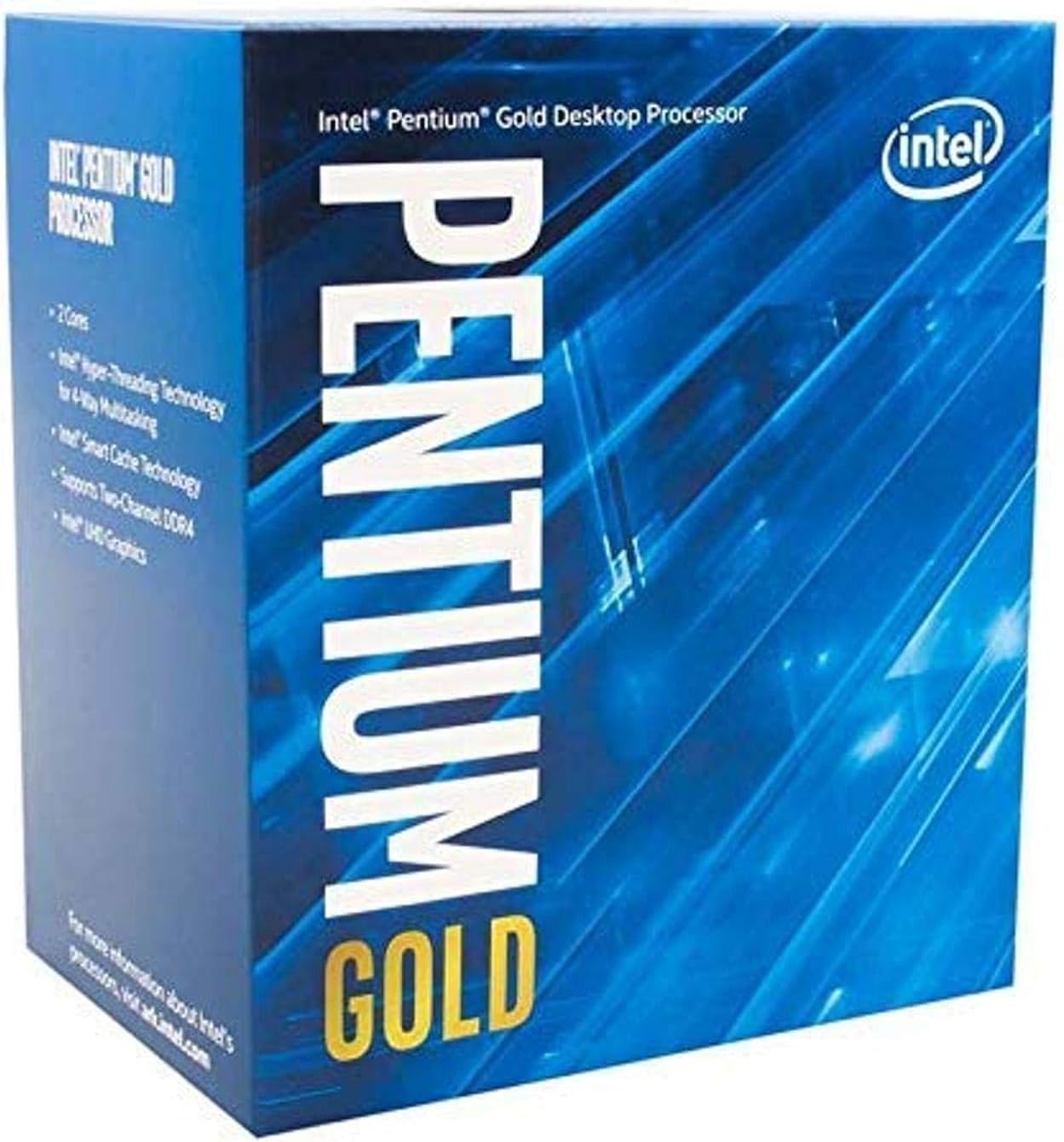
Pros
- Clocked at a fixed 4.0GHz across 2 cores and 4 threads, giving consistent performance without relying on boost variability
- LGA1200 socket compatibility spans the 400 series chipset lineup, a widely available motherboard family
- Supports Intel Optane Memory for systems configured to use it as a storage cache
Cons
- No thermal solution (cooler) included in the box, so a compatible cooler needs to be bought separately
- 2 cores and 4 threads is a limited core count next to quad-core and higher chips in the same generation, which matters for multitasking or multi-threaded workloads
- Only compatible with 400 series chipset motherboards, not the newer 500 or 600 series LGA1200/1700 boards, narrowing which builds it drops into
The Pentium Gold G6400 is a dual-core, entry-level desktop processor with clearly fixed specifications rather than a range of boost states.
- Cores/threads: 2 cores, 4 threads
- Clock speed: 4.0GHz
- Socket: LGA1200
- TDP: 58W
- Chipset support: Intel 400 series
- Additional feature: Intel Optane Memory support for compatible storage configurations
The fixed 4.0GHz clock (rather than a base/boost spread) means performance is predictable and consistent under load, without the variability of a turbo-boosting chip. That predictability suits basic desktop tasks — web browsing, office applications, and general computing — more than workloads that benefit from higher core counts, like heavy multitasking or video encoding.
Pros
- Base clock of 3.4 GHz turbos up to 3.9 GHz across 4 physical cores
- 8MB of Intel Smart Cache reduces trips to system memory for frequently accessed data
- Supports up to 25.6 GB/s max memory bandwidth on compatible LGA 1155 boards
- Integrated graphics with a 650 MHz base frequency handle display output without a discrete GPU
- Renewed condition offers this older-generation socket at a lower entry point for LGA 1155 upgrades or repairs
Cons
- Renewed unit, not new; expect normal cosmetic wear and no original retail packaging
- LGA 1155 socket is several generations behind current platforms, so it only fits older motherboards
- 4 cores without hyperthreading-class core counts limits multitasking headroom against newer 6- and 8-core chips
This chip runs a 3.4 GHz base clock with a 3.9 GHz max turbo frequency across 4 physical cores, backed by 8MB of Intel Smart Cache to keep frequently used data close to the cores instead of pulling from system memory every cycle. The DMI runs at 5 GT/s, linking the CPU to the chipset.
Integrated graphics carry a 650 MHz base frequency, enough for basic display output and everyday desktop use without a discrete graphics card installed. Max memory bandwidth reaches 25.6 GB/s on a properly configured board.
- 3.4 GHz base / 3.9 GHz max turbo
- 4 cores, 8MB Smart Cache
- 25.6 GB/s max memory bandwidth
What to Check Before You Buy a Budget CPU
A cheap processor is only a good deal if it actually fits your system and your workload. Before you compare specs, walk through these four checks so you don’t end up with a chip that never leaves the box.
Match the Socket to Your Motherboard First
Every CPU only works with a specific socket type, and this list spans several: AM4, LGA1200, LGA1155, LGA2011-v3, and even the older AM3+. A chip being cheap and fast does not matter if your board cannot physically accept it.
Check your motherboard’s manual or model number before ordering. If you are unsure, a quick search for your board’s chipset will confirm which socket and CPU generation it supports.
Cores, Threads, and Clock Speed
Cores handle separate tasks at once, while threads let each core juggle two workloads through simultaneous multithreading. Clock speed, measured in GHz, tells you how fast each core works through instructions.
For gaming, a handful of fast cores usually beats many slow ones. For multitasking or background rendering, higher core counts pull ahead even at lower clock speeds.
Does It Need Integrated Graphics?
Some budget chips include integrated graphics (iGPU), which means you can run a display without a separate graphics card. Others, like “F” suffix Intel chips, strip the iGPU out entirely to save cost.
If you already own a graphics card, this barely matters. If you don’t, or if your dedicated card ever fails, an iGPU is a genuine safety net worth paying attention to.
Best CPUs Under $100 for Gaming
Gaming performance leans heavily on single-thread speed and cache size rather than raw core count. These three options balance both well without pushing past the $100 mark.
Best Overall: AMD Ryzen 5 3600X
The AMD Ryzen 5 3600X pairs six cores and twelve threads with a bundled Wraith Spire cooler, so you skip an extra purchase most budget builders forget to budget for. It handles current games comfortably and still has enough headroom for streaming or light editing on the side.
With a 4.8-star rating across more than 12,000 reviews, it is the most proven chip on this entire list. If your motherboard supports AM4, this is the one to check first.
Best Newer Generation: AMD Ryzen 5 5500
The AMD Ryzen 5 5500 is a step up in architecture while staying on the same AM4 socket. It also ships with a Wraith Stealth cooler, so total setup cost stays low.
Reviewers rate it 4.7 stars, and its six cores and twelve threads make it a smart pick if you’re building fresh and want the newest chip your budget allows.
Best Intel Pick: Intel Core i3-10100F
If your board runs LGA1200, the Intel Core i3-10100F delivers four cores and eight threads at a 3.6GHz base clock. The “F” means no integrated graphics, so plan on using a discrete graphics card.
At 4.7 stars across roughly 3,000 reviews, it’s a dependable entry point for gamers who already own a GPU and want Intel’s platform instead of AMD’s.
Best Budget CPUs for Multitasking and Heavier Workloads
If your day looks like a dozen browser tabs, a spreadsheet, and a background export running at the same time, core count starts to matter more than clock speed.
Best Core Count for the Price: AMD Ryzen 7 1800X
The AMD Ryzen 7 1800X brings eight cores and sixteen threads to the AM4 socket as a renewed unit. That thread count is unusual this far under $100 and suits video exports, compiling, or running several apps at once.
It’s an older architecture, so single-core gaming speed trails newer six-core chips. Choose it when raw parallel throughput matters more than the highest possible frame rate.
Legacy Multitasker: AMD FX-8350
The AMD FX-8350 is an eight-core AM3+ chip that still shows up with a 4.6-star rating across more than 6,600 reviews. It’s a sensible upgrade only if you already own an AM3+ motherboard and want more cores without replacing the whole platform.
Don’t buy this one for a fresh build. Its per-core performance is well behind modern chips, so it only makes sense as a drop-in upgrade for an existing AM3+ system.
CPUs Under $100 With Built-in Graphics
Skipping a graphics card saves money and simplifies troubleshooting, which makes these two chips worth a look for office builds, home theater PCs, or a first-time build on a tight budget.
Best Balanced iGPU Pick: AMD Ryzen 3 3200G
The AMD Ryzen 3 3200G pairs four cores with Radeon Vega graphics strong enough for casual gaming and everyday desktop use. It rates 4.7 stars across more than 10,000 reviews, making it one of the most trusted no-GPU-needed picks around.
Pick this one if you want a display working out of the box and don’t plan on gaming at high settings.
More Threads, Same Idea: AMD Ryzen 5 2400G
The AMD Ryzen 5 2400G steps up to four cores and eight threads with Radeon RX Vega 11 graphics built in. Reviewers give it 4.7 stars, and the extra threads help when you’re multitasking on top of light gaming.
It costs a little more attention to find in stock than the 3200G, but the added thread count is worth it if you regularly run background tasks.
Upgrading an Older Desktop? Match the Socket First
Not everyone shopping under $100 is building new. If you’re reviving an aging office PC or hand-me-down tower, the socket on your current motherboard decides your options.
For LGA1155 Boards: Intel Core i7-3770
The Intel Core i7-3770 is a renewed quad-core chip, one of the most affordable options on this list. If your old office PC uses an LGA1155 socket, this is a straightforward way to squeeze a few more years out of it without a full rebuild.
Don’t expect modern gaming performance here. It’s best suited to office work, browsing, and general productivity on hardware you already own.
For HEDT Boards: Intel Core i7-5930K
The Intel Core i7-5930K targets LGA2011-v3 workstation-style boards as a renewed part. It’s a niche pick, useful mainly if you already own a compatible high-end desktop board and want more cores than a mainstream chip of its era offered.
Entry-Level Office Chip: Intel Pentium Gold G6400
The Intel Pentium Gold G6400 covers basic office use on LGA1200 boards. With only two cores, it’s not built for multitasking or gaming — it’s for spreadsheets, email, and light browsing where a fast chip simply isn’t necessary.
Common Mistakes to Avoid When Buying a Cheap CPU
- Buying a chip before confirming your motherboard’s socket and chipset support it, which is the single most common return reason for budget CPUs.
- Ignoring cooling needs on higher-core chips like the Ryzen 7 1800X or FX-8350, which can throttle under a weak stock cooler.
- Choosing an “F” suffix Intel chip without owning a graphics card, leaving you with no way to output a display.
- Assuming renewed or refurbished units carry no warranty — most reputable renewed listings include a return window, so check before you rule them out.
- Overpaying for extra cores your software will never use, when a cheaper four-core chip would have handled the job just as well.
Pair Your New CPU With the Right Supporting Gear
A budget CPU still needs memory that keeps up, so it’s worth checking our Best RAM under $100 picks before you finalize a build.
Higher core-count chips like the Ryzen 7 1800X pull more power under load, so confirm your power supply has enough clean headroom — our Best PSUs under $100 guide covers solid options.
Pairing any of these processors with a fast boot drive makes the whole system feel snappier day to day. See our Best SSDs under $100 roundup for drives that won’t bottleneck your new chip.
Frequently Asked Questions
What’s the best CPU under $100 for gaming right now?
The AMD Ryzen 5 3600X and Ryzen 5 5500 are the strongest gaming picks here, thanks to their six-core designs and modern AM4 platform support. Both handle current games well at 1080p.
Do I need a graphics card with a budget CPU?
Only if the chip lacks integrated graphics. Chips like the Ryzen 3 3200G and Ryzen 5 2400G include an iGPU, while “F” suffix Intel chips do not and require a separate graphics card.
Can I use a $100 CPU with an old motherboard?
Sometimes. Older sockets like LGA1155 or AM3+ only accept CPUs built for that generation, so check your board’s supported chip list before ordering anything on this list.
Are renewed or refurbished CPUs safe to buy?
Generally yes, from reputable sellers. Renewed listings are typically tested and often include a return window, which makes them a reasonable way to save money on older platforms.
How much RAM should I pair with a budget CPU?
16GB is a comfortable baseline for gaming and multitasking in 2026, while 8GB works for basic office builds using chips like the Pentium Gold G6400.
The right pick here comes down to your socket, your workload, and whether you already own a graphics card. Confirm compatibility first, then compare current pricing before you commit to an upgrade.


