
 Marcus Bell
 Choosing from the best computer desks for gaming is about far more than picking a surface to hold your monitor. The right desk shapes your posture, your cable management, your reaction times, and even how immersed you feel during a long session. With so many shapes, sizes, and feature sets on the market, it is easy to overspend on gimmicks or, worse, buy something too small for your setup. This buying guide walks through everything that matters, so you can match a desk to your space, your gear, and your budget with confidence.
Whether you are building a first battlestation or upgrading from a cramped starter table, the goal is the same: a stable, spacious, and comfortable workstation that keeps your peripherals organized and your focus sharp. Below you will find a curated selection of popular options, followed by a practical framework for deciding which features are worth paying for.

Pros
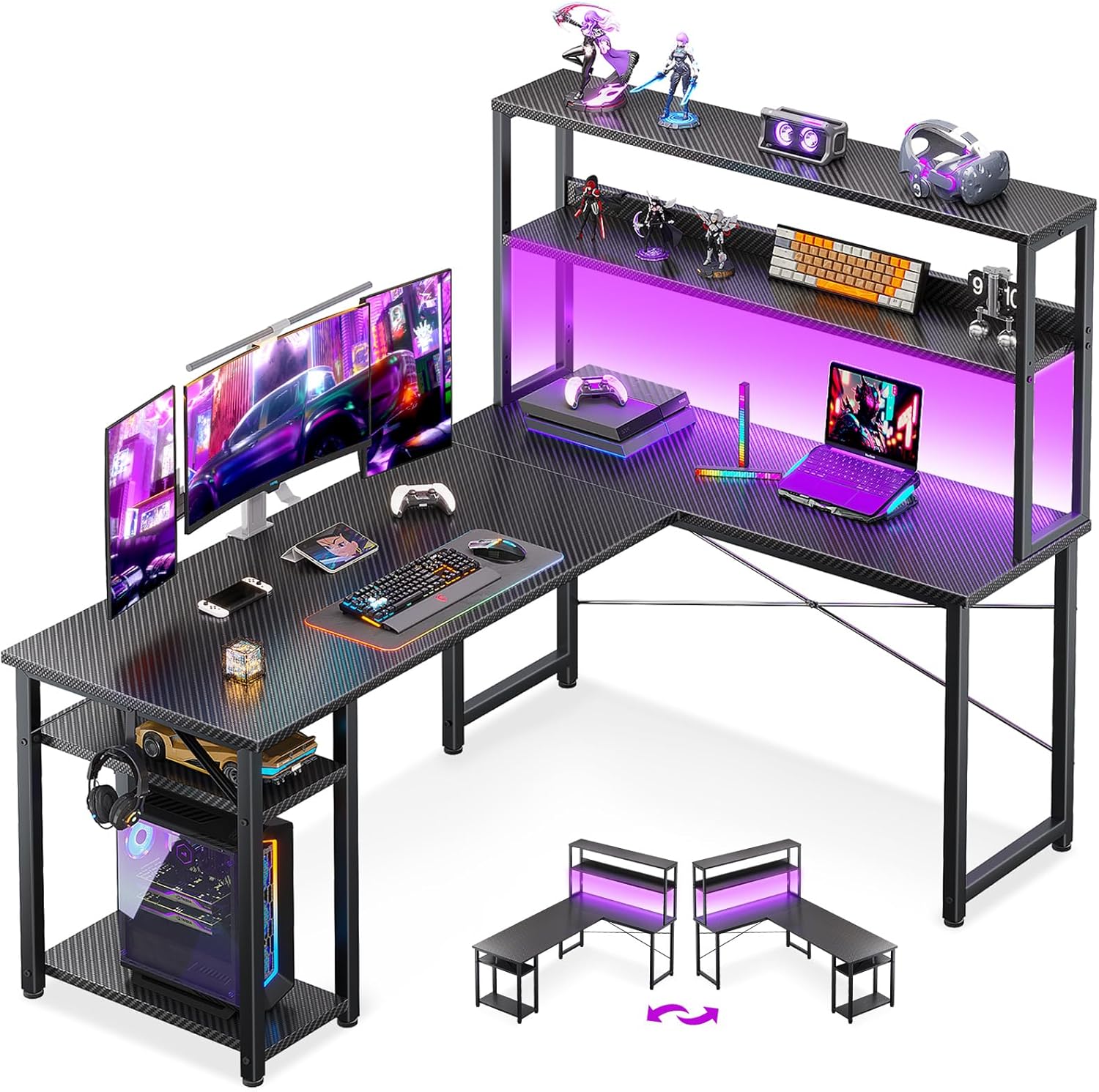
- Reversible frame converts between a 67-inch corner desk and a 94.5-inch straight desk, so the same unit adapts to different room layouts
- Built-in charging station adds 4 AC outlets and 2 USB ports for up to 6 devices without an extra power strip
- Top hutch, pegboard, and 2-tier storage shelves keep monitors, files, and accessories off the main desktop
- Keyboard tray sits below desk height, freeing the desktop surface for a mouse, notebook, or second monitor
- Frame is rated to hold 2 desktop computers and 1 notebook computer plus up to 3 monitors
Cons
- Engineered wood construction is lighter-duty than a solid wood or steel-frame desk, so very heavy CPU towers need to sit on the included stand rather than directly on the surface
- LED lighting strip and charging station both depend on the desk being plugged into a wall outlet, so it offers no backup power if power is cut
The desk measures 19.7"D x 67"W x 57"H in its L-shaped corner configuration, and the frame reverses to a 94.5-inch straight desk when the top hutch is moved to the opposite side. The extended length is built to hold up to 3 monitors across the surface alongside a CPU stand and two-tier storage shelves.
- 67-inch corner layout tucks into a room corner for a compact home office footprint
- 94.5-inch straight layout suits two people working side by side without interference
- Frame supports 2 desktop computers and 1 notebook computer at once
Because the same hardware converts between both layouts, the desk can move with a room redesign or a switch from single-person to shared use without buying a second piece of furniture.

Pros
- 300 lb weight capacity metal frame handles dual towers and monitors
- 55" x 21.6" desktop, large enough for two full computer setups side by side
- Two open storage shelves plus a top hutch keep consoles and speakers off the desktop
- RGB LED strip syncs to music with an adjustable-sensitivity mic, over 60,000 colours via app
- Built-in CPU holder and monitor stand free up desk surface for keyboard and mouse
Cons
- 78.8" width needs a dedicated wall run, not suited to small bedrooms
- LED strip depends on a companion app and Bluetooth pairing, no physical remote mentioned
- Metal frame with hutch and shelves means a longer bolt-together assembly than a basic table
This desk measures 78.8"W x 21.6"D x 60"H, giving it enough footprint for a triple-monitor arrangement or two workstations sharing the surface. The metal frame is rated to hold 300 pounds, which covers a full tower PC, two monitors on stands, and typical desktop accessories without flexing.
- Desktop area: 55"L x 21.6"W for keyboard, mouse and paperwork
- Two lower storage shelves for CPU towers, consoles or speakers
- Top hutch shelf for books, figures or plants
- Built-in monitor stand raises screens above desk clutter
The dimensions suit a dedicated office or gaming room rather than a shared or compact bedroom corner.
This desk fits gamers and remote workers who want a single station that also stores hardware. The 300 lb capacity and dual shelving make it practical for anyone running two PCs, streaming equipment, or console peripherals that would otherwise clutter the floor.
- Suited to dedicated gaming rooms or home offices with wall space for a 78.8" run
- Good for users who want LED ambiance synced to games or music
- Storage shelves help households consolidating a PC and console setup on one desk
It is less practical for small apartments or shared bedrooms where a 78.8" wide footprint will not fit comfortably against available wall space.
Pros
- Dimensions of 39.37"D x 53.15"W x 29.9"H engineered for optimal spatial fitting
Cons
- Requires verifying placement clearance for 39.37"D x 53.15"W x 29.9"H prior to installation

Pros
- Workstation surface measures 53 inches wide by 18.9 inches deep at 29.8 inches tall, rated to hold up to 300 pounds
- Built-in power strip adds 3 AC outlets and 2 USB ports directly on the desk for centralized charging
- RGB LED strip offers 10 color presets, 8 brightness levels and 10 dynamic modes with a memory function
- X-shaped steel frame construction adds stability for dual-monitor or multi-display setups
- Reversible left/right side modules let the L-shape orientation match either side of a room
Cons
- Assembly takes an estimated 50 to 70 minutes even with included tools and labeled parts, and is easier with two people when flipping the desk upright
- Corner L-shape footprint needs more floor space than a straight desk, so it will not fit tight rooms as easily
The main workstation area measures 53 inches wide by 18.9 inches deep at a 29.8-inch working height, rated to support up to 300 pounds across the desktop. Built-in power comes from 3 AC outlets and 2 USB ports mounted on the desk itself, along with cable management channels to keep cords off the floor during long sessions.
- Dual open shelves, a CPU stand, an accessory hook and a tool bag are included for onboard storage
- RGB LED strip supports 10 color presets, 8 brightness grades and 10 dynamic lighting modes with a memory function
- X-shaped steel frame is designed to add stability under the weight of dual monitors and a desktop tower
The overall L-shape footprint spans 53.15 x 39.37 inches at the base, so it needs a corner or wall space to match.

Pros
- Reversible design converts between a 62.2-inch L-shaped corner desk or an 86.6-inch straight two-person desk
- Built-in charging station with 4 outlets and 2 USB ports powers up to 6 devices at once from the desk itself
- Top hutch, 2 fabric drawers, and a storage cabinet door give multiple dedicated storage zones without separate furniture
- Desktop is made from FSC certified wood, supporting responsibly sourced material sourcing
Cons
- Metal frame construction with a large 62.2 to 86.6 inch footprint needs a sizable room to accommodate either configuration
- Charging station relies on the desk's own power switch, so devices lose power entirely when it is switched off
- Fabric drawers are less durable under heavy repeated use than solid wood or metal drawer boxes
This desk measures 18.9 inches deep by 62.2 inches wide by 65 inches tall in its L-shaped corner configuration, and can be reconfigured into an 86.6-inch straight desk for two people working side by side. The top hutch can be positioned on either the left or right side depending on room layout.
- 2 fabric storage drawers plus 1 storage cabinet door for organization
- Desktop surface made from FSC certified wood
- Metal frame provides the structural support for both configurations
Because the desk reverses between two distinct layouts, measuring your available wall or corner space for both options helps decide which configuration fits best long-term.

Pros
- 70.8-inch width with a 55 x 21.6-inch desktop area holds two full computer setups side by side
- 3-tier storage shelves separate a CPU tower, speakers, and console gear instead of piling them on the desktop
- Built-in RGB LED strip offers over 60,000 colors and 29 modes, including music-reactive sync via a built-in microphone
- Integrated 2-outlet, 2-USB charging station powers up to 4 devices without a separate power strip
- Cup holder and headphone hook keep drinks and headsets off the desk surface during long sessions
Cons
- Weight capacity of 55 lbs on the desktop limits how much monitor and accessory weight can sit on top at once
- RGB lighting requires an app connection to access the full 29 modes, adding a setup step beyond plug-and-play
- 70.8-inch width needs a dedicated wall run, too large for narrow bedrooms or shared desk corners
The desktop spans 70.8 inches wide by 21.6 inches deep, with a listed weight capacity of 55 lbs across the main surface. Three tiered storage shelves sit to the side, sized to hold a CPU tower, speakers, or console hardware separately from the desktop workspace, and the layout is wide enough to fit two complete computer setups.
A built-in monitor shelf raises screens above the main desktop, following ergonomic eye-level positioning without requiring a separate monitor riser purchased on top of the desk itself.

Pros
- Spacious 55-inch width accommodates dual monitors plus keyboard and accessories
- Supports up to 149 kg, well above typical desk equipment loads
- Sturdy Z-shaped metal legs provide stable base without wobbling
- Simple assembly requires just 15 minutes with included tools
- Smooth particleboard top resists scratches from daily use
Cons
- Fixed height at 29.5 inches may feel low for users over 6 feet tall
- Desktop is not height-adjustable for sitting or standing work positions
The extra-large 55-inch desktop provides ample workspace for modern multi-monitor setups, office supplies, and decorative elements without requiring constant reorganization. The smooth particleboard surface resists scratches from keyboard and mouse movement while maintaining a professional appearance suitable for both home offices and professional environments.
- Width of 55 inches accommodates dual 27-inch monitors side by side with keyboard between them
- Depth of 23.6 inches allows monitor stands and pull-forward peripherals without excessive reach required
- Height of 29.5 inches aligns with standard office desk heights for most users between five feet four inches and six feet
- Smooth finish top prevents snagging cables or damaging monitor bases during repositioning
- Neutral gray color coordinates with most office furniture and lighting fixtures without clashing
The spacious layout eliminates cramped feeling common with compact desks, enabling comfortable positioning of multiple monitors and peripherals for enhanced productivity and reduced neck strain from excessive head turning.

Pros
- 23.6-inch deep desktop across an L-shaped 59"D x 61"H footprint leaves room for dual monitors
- 5-tier open shelving plus a glass display cabinet add vertical storage beyond the desktop surface
- 2 fabric drawers and a multifunctional storage bag keep small items off the work surface
- Built-in power strip with 3 outlets and 2 USB ports charges gear without a floor extension cord
- RGB LED strip with app remote control offers over 60,000 colors and 29 flashing modes
Cons
- 61-inch-tall bookshelf section needs wall clearance, so it will not fit under a sloped ceiling nook
- Fabric drawers, rather than solid wood, mean heavier items are better kept on the open shelves
- Multi-piece assembly across the metal frame, shelving, and cabinet takes longer than a single-slab desk

Pros
- Dimensions of 17"D x 50.4"W x 27.5"H engineered for optimal spatial fitting
Cons
- Requires verifying placement clearance for 17"D x 50.4"W x 27.5"H prior to installation
- Load weight limits should not exceed 220 Pounds during active operations

Pros
- Alloy steel R-frame carries a stated 150 lb across the 47-inch top, enough for a mid-tower plus two 24-inch panels
- Four leg pads screw down individually, so the frame stops rocking on carpet or uneven floorboards
- Two grommet holes and a clip-on cable box drop power leads straight to the floor
- Cup holder and headphone hook hang off the frame edge, keeping the shallow 23.45-inch depth clear
- Carbon fibre textured laminate hides fingerprints far better than a gloss black surface
Cons
- Fixed 29.55-inch height with no sit-stand adjustment beyond the levelling pads
- 23.45-inch depth is shallow, so a deep monitor stand pushes the screen close to your face
- MDF core beneath the laminate swells permanently if a spill is left standing
The surface measures 47 inches wide by 23.45 inches deep and sits at a fixed 29.55 inches high, which lines up with standard task chairs rather than drafting stools. The steel frame is quoted at a 150 lb load, so a mid-tower, two 24-inch panels and a laptop dock stay comfortably inside the limit.
- The curved front edge pulls the keyboard zone closer to the body than a straight-edged slab
- 23.45 inches of depth suits a single monitor arm better than a wide twin-screen stand
- The levelling pads take up a few millimetres of floor variation each
Measure the alcove first. The frame is rigid, so nothing can be trimmed down to fit a tight recess.
Why a Dedicated Gaming Desk Matters
A general-purpose table can technically hold a PC and a screen, but a purpose-built gaming desk is engineered for the demands of modern play. It accounts for the weight of multiple monitors, the clutter of cables from a full rig, and the need for enough depth to sit at a healthy distance from your display. When your desk is stable and well-sized, your aim is steadier, your wrists are supported, and marathon sessions feel far less fatiguing.
Gaming desks also tend to bundle features that hobbyist gamers actually use: headphone hooks, cup holders, cable routing holes, monitor risers, and increasingly, integrated LED lighting and power outlets. These extras keep your desk tidy and your accessories within reach, which is exactly what you want when the match is heating up.
L-Shaped vs. Rectangular Desks
One of the first decisions is the overall shape. Both layouts have loyal followings, and the best choice depends heavily on your room and how much gear you run.
L-Shaped Desks for Multitaskers
L-shaped desks fit neatly into a corner and give you two working zones – one for your primary display and one for a second monitor, laptop, or workspace. If you stream, run dual monitors, or split your time between gaming and productivity, the extra surface is invaluable. Reversible corner designs are especially flexible because you can orient the long side left or right to suit your room. Options like the SEDETA L-Shaped Desk and the SEDETA L-Shaped with Bookshelf lean into this multitasking philosophy with pegboards, storage shelves, and drawers built in.
For smaller rooms, a compact corner unit like the ODK 53″ L-Shaped Desk packs a hutch and storage shelves into a footprint that tucks away neatly, while the ODK Reversible L-Shaped Desk adds power outlets and LED lighting for a more finished battlestation feel.
Rectangular Desks for Focused Setups
A straight, rectangular desk is simpler to place along a wall and often gives you a wider single surface for your keyboard, mouse pad, and monitor stand. If you run a single ultrawide display or prefer a clean, minimal layout, this shape is easier to live with. Large workstations such as the SEDETA 78.8″ Desk and the SEDETA 70.8″ Desk provide generous width plus monitor stands and storage, making them strong picks for gamers who want one big, uninterrupted deck.
Size and Surface Space
Nothing frustrates a gamer faster than a desk that cannot hold their gear. Before you buy, measure your room and list what will live on the desk: monitor or monitors, keyboard, mouse with room to swing, speakers, and any peripherals like a stream deck or drawing tablet.
- Width: A single-monitor setup is comfortable around 47 to 55 inches, while dual monitors or an ultrawide benefit from 60 inches or more.
- Depth: Aim for at least 24 inches of depth so your monitor sits far enough away to reduce eye strain.
- Legroom: Check the clearance under the desk, especially on L-shaped models where storage cabinets can eat into knee space.
Compact 47 to 48 inch models like the Casaottima 48″ Desk and the BestOffice 47″ Desk are ideal for tighter bedrooms or dorms, giving you a true gaming look without dominating the room.
Build Quality and Stability
Stability is where cheap desks reveal themselves. During intense play, a wobbly surface transfers every keystroke and mouse jerk straight to your monitor. Look for a sturdy steel frame, adjustable leg pads that let you level the desk on uneven floors, and cross-bracing that resists side-to-side sway.
The tabletop material matters too. Most gaming desks use engineered wood with a carbon-fiber-textured or laminate coating that resists scratches and wipes clean easily. A well-known example of a dependable steel-frame build is the Homall L-Shaped Desk, which has earned a large following for its rigid workstation feel at an entry-level price. When you weigh options, prioritize a frame that feels solid over flashy extras, because a rock-steady base is the foundation of a good gaming experience.
Features Worth Paying For
Modern gaming desks come loaded with conveniences. Not every feature is essential, so it helps to know which ones genuinely improve daily use.
Cable Management
A rig with a PC, monitors, and several peripherals generates a surprising tangle of wires. Desks with grommet holes, cable trays, or routing channels keep everything hidden and prevent the dreaded cord spaghetti. Good cable management is not just cosmetic – it makes cleaning easier and reduces the chance of yanking a plug mid-game.
Power Outlets and USB Ports
Integrated power strips and USB ports are a genuine quality-of-life upgrade. Instead of reaching behind your tower, you can charge a controller or headset right at the desk edge. Models such as the SEDETA Grey L-Shaped Desk build in power outlets alongside fabric drawers and storage, so your accessories stay powered and organized in one place.
LED Lighting
RGB LED strips have become a signature of the gaming aesthetic. Beyond looks, soft ambient lighting reduces the harsh contrast between a bright screen and a dark room, which can ease eye fatigue during night sessions. Many desks now include controllable LED lights that sync with the rest of your setup, letting you dial in the mood without buying separate strips.
Storage and Organization
Hutches, monitor stands, shelves, drawers, and pegboards keep your essentials off the main surface. A monitor riser also lifts your screen to eye level for better posture, while a headphone hook and cup holder keep your favorite accessories from cluttering the deck or getting knocked over.
Ergonomics and Comfort
Long gaming sessions put real strain on your body, so ergonomics deserve attention. The ideal desk height lets your forearms rest roughly parallel to the floor with your elbows at about a 90-degree angle. Standard fixed-height desks around 29 to 30 inches suit most people paired with an adjustable chair, but taller or shorter players should confirm the measurement.
Pair your desk with a supportive chair, position your monitor so the top of the screen sits at or just below eye level, and keep your mouse and keyboard close enough that you are not reaching. A desk with a monitor stand or built-in riser makes achieving that eye-level position much simpler.
Matching a Desk to Your Budget
Gaming desks span a wide price range, and more expensive does not always mean better for your needs. Here is a simple way to think about value.
- Budget picks: Entry-level desks deliver the essential gaming look, a sturdy frame, and basic extras like cup holders and headphone hooks. They are perfect for first-time buyers or secondary setups.
- Mid-range: Stepping up adds LED lighting, power outlets, larger surfaces, and better storage. This is the sweet spot for most gamers who want features without overspending.
- Feature-rich: Premium L-shaped units with multiple drawers, glass cabinets, bookshelves, and integrated lighting suit streamers and enthusiasts who want a complete command center.
Notice that even higher-end options in this space stay reasonably priced, so you can often get a fully featured L-shaped desk for less than a single AAA peripheral bundle. Decide which two or three features you will actually use every day, then buy the desk that nails those rather than the one with the longest spec list.
Setting Up Your Battlestation
Once your desk arrives, a thoughtful setup pays dividends. Start by leveling the legs so the surface is perfectly stable, then route your cables through the management holes before placing your gear. Position your PC where airflow is not blocked, mount or stand your monitor at eye level, and reserve the most accessible zones for the peripherals you touch most.
Finally, personalize the space. Add your LED lighting scene, hang your headset on the hook, and arrange your storage so game cases, controllers, and snacks each have a home. A clean, organized battlestation is not just satisfying to look at – it genuinely helps you stay focused and comfortable when it counts.
Final Thoughts
The best gaming desk is the one that fits your room, holds your gear securely, and includes the handful of features you will use every day. Start with the shape that suits your space, confirm the width and depth handle your monitors and peripherals, insist on a stable steel frame, and then layer on conveniences like cable management, power outlets, and lighting as your budget allows. Whether you gravitate toward a sprawling L-shaped command center or a tidy rectangular deck, matching those priorities to your setup will give you a workstation that elevates every session for years to come.








